1
Setting Up and Connecting the MPA
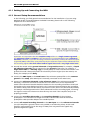
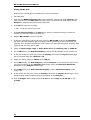
18. If you are not using a Faraday cage, it might be necessary to shield the complete setup with
aluminum foil or similar to prevent electrical interference from the outside. Connect the
aluminum foil to the ground of the setup (for example, the metal table).
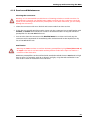
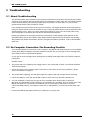
Troubleshooting: If you observe problems with noise, check that the ground of the setup is
connected to exactly the same ground as the data acquisition computer. For example,
connect the metal table to the ground/earth wire of a free power outlet (of the same
electrical system), as the computer is generally connected to ground/earth via the power
plug, too. Also, connect the data acquisition computer’s metal case with a thick
ground wire to the ground of the setup (for example, the metal table), preferably with a
4 mm plug.
4.1.3 Testing the Noise Level of the Setup
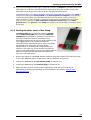
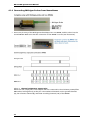
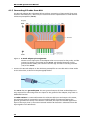
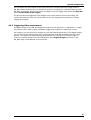
A terminal plug that connects all inputs to ground,
and a model test probe that mimics the electrode
impedance are provided for testing the noise level of
the setup. Please note that all instruments were
thoroughly tested at the factory site before delivery. The
tests suggested below are mainly intended for
optimizing and troubleshooting your setup, to exclude
any damage that might have occurred during
transportation, or to fulfill your own guidelines, for
instance. It will take only a few minutes time and can
save you time and trouble in the long run. Multi Channel
Systems recommends running these tests before you
start your real experiments.
1. Shorten the inputs of one MPA8I with the terminal plug, and connect the model test probe
to the other MPA8I as shown in the picture (do not mismatch the polarity).
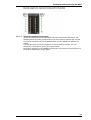
2. Connect the MPA8I with the test model probe to channels 1–8.
3. Connect the MPA8I with the terminal plug to channels 9–16.
4. Make sure that all other connections are appropriate, and that your setup has an
appropriate grounding and shielding as recommended in the chapter General Setup
Recommendations.
13