1
Chapter 7. Firmware Upgrade
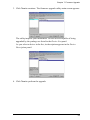
3. Click Next to continue. The firmware upgrade utility main screen appears:
The utility inspects your installation. All the devices capable of being
upgraded by the package are listed in the Device List panel.
As you select a device in the list, its description appears in the Device
Description panel.
4. Click Next to perform the upgrade.
59