1
INTRODUCTION
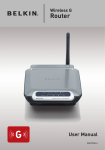
Thank you for purchasing the Belkin Cable/DSL Gateway Router (the Router). In
minutes you will be able to share your Internet connection and network your
computers. The following is a list of features that make your new Router an ideal
solution for your home or small office network.
Key Features
Easy Install Wizard
The Easy Install Wizard takes the guesswork out of setting up your Router. This
automatic software determines your network settings for you and sets up the
Router for connection to your Internet Service Provider (ISP). In a matter of
minutes, your Router will be up and running on the Internet.
NOTE: Easy Install Wizard software is compatible with Windows 98, Me, 2000, and
XP. If you are using another operating system, the Router can be set up using the
Alternative Method described in this manual.
Integrated 802.11g Wireless Access Point
802.11g is an exciting new wireless technology that achieves data rates up to
54Mbps, nearly five times faster than 802.11b.
Integrated Parental Control Web Content Filter
Belkin has teamed with Cerberian, a leading content-filtering company, to bring
you this unique feature. Your Router is the first home networking solution with
an integrated web content filter that allows you to block unwanted or offensive
web content before it makes it to your network. Unlike other Parental Control
solutions, Parental Control is built into the Belkin Router, so there is no software
to install on any computer and you will never be charged a per-computer fee for
the service, ever. Your Router comes with a six-month free trial of this feature so
you can take advantage of the capabilities right away. No credit card is needed
to use the trial. You have control: Belkin Parental Control can be modified to
meet your needs. You can set up your own policies and block any website you
want. There is also an optional reporting feature (fee-based) that allows you to
get a report showing you every website that was visited from your network.
1