1
System BIOS Settings
The BIOS screens in this section are for reference only. The actual
screens may differ by models and territories.
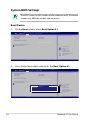
Boot Device
1. On the Boot screen, select Boot Option #1.
Aptio Setup Utility - Copyright (C) 2010 American Megatrends, Inc.
��������������������
Main
Advanced Boot Security Save & Exit
Set the system boot order.
Boot Configuration
UEFI Boot
PXE ROM
[Disabled]
[Disabled]
Boot Option Priorities
Boot Option #1
[P0: ST9640423AS
...]
Hard Drive BBS Priorities
Delete Boot Option
: Select Screen
: Select Item
Enter: Select
+/—: Change Opt.
F1: General Help
F9: Optimized Defaults
F10: Save & Exit
ESC: Exit
Version 2.01.1204. Copyright (C) 2010 American Megatrends, Inc.
2. Press [Enter] and select a device as the Boot Option #1.
Aptio Setup Utility - Copyright (C) 2010 American Megatrends, Inc.
��������������������
Main
Advanced Boot Security Save & Exit
Set the system boot order.
Boot Configuration
UEFI Boot
PXE ROM
[Disabled]
[Disabled]
Boot Option Priorities
Boot Option #1
[P0: ST9640423AS
...]
Hard Drive BBS Priorities
Delete Boot Option
Boot Option #1
P0: ST9640423AS
Disabled
: Select Screen
: Select Item
Enter: Select
+/—: Change Opt.
F1: General Help
F9: Optimized Defaults
F10: Save & Exit
ESC: Exit
Version 2.01.1204. Copyright (C) 2010 American Megatrends, Inc.
A-4
Notebook PC User Manual