1
Connection
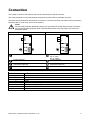
The module connects to the Profibus network via a standard 9-pin Sub-D connector.
The Profibus Module can be powered either through the network cable or externally (24 VDC).
Input links are required across terminals 56, 57 and 58, 57 if the Aurora LPRA soft starter is being operated in
Remote mode. In Local mode, links are not required.
NOTE
Aurora LPRA parameter 6B selects whether the soft starter will accept Start and Stop commands
from the Serial Network Master while in Remote Mode. Refer to the soft starter user manual for
parameter details.
Aurora LPRB
Aurora LPRA
1
56
1
57
58
2
4
Aurora LPRB
3
4
1187 5.A
3
03198.B
2
Profibus Module
Aurora LPRA (Remote mode)
56, 57: Stop
58, 57: Reset
Profibus Module
External 24 VDC supply required if not
powered through bus
9-pin Sub-D connector to Profibus network
External 24 VDC supply required if not
powered through bus
9-pin Sub-D connector to Profibus network
9-pin Sub-D connector
Pin No.
Assignment
1
Shield
2
24 VDC negative (optional)
3
RxD/TxD-P
4
Not used
5
DGND
6
VP (end of bus slave only)
7
24 VDC positive (optional)
8
RxD/TxD/-N
9
DGND
CMG Aurora | Profibus Module 1106 (edition 1.0.0)
3