1
Quick stop bit
When Fwd run bit changes from 1 to 0:
0 = stop action will be a soft stop (as selected on the soft starter).
1 = stop action will be a quick stop (ie coast to stop).
NOTE
The Quick stop bit must be set to 0 before the soft starter can perform a start.
Motor set bits (Aurora LPRA only)
Selects which parameter set to use when starting:
0 = selected from soft starter remote input (programmable input must be set to 'Motor Set Select')
1 = soft starter primary motor set (ensure soft starter programmable input is not set to 'Motor Set Select')
2 = soft starter secondary motor set (ensure soft starter programmable input is not set to 'Motor Set Select')
3 = reserved
NOTE
Ensure that the programmable input is not set to Motor Set Select before using this function.
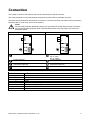
Slave > Master status word is structured as follows:
Byte 0
Bit 7
Bit 6
Bit 5
Bit 4
Ramping
Local
Byte 1
Bit 7
Bit 6
Bit 5
Bit 4
Reserved
Reserved
Reserved
Reserved
Bit 3
Bit 2
1
Motor current (% FLC)
Bit 1
Bit 0
Bit 3
Warning
Bit 1
On
Bit 0
Ready
Bit 2
Fault
1
Motor current (% FLC) represents current as a percentage of the set motor FLC. A maximum value of 63
represents 200% FLC. To convert this value to a readable percentage, divide by 0.315.
Ready is set when the soft starter is ready to start the motor.
On is set when the soft starter is starting, running or soft stopping the motor.
Warning is set when the soft starter detects a warning condition.
Fault is set when the soft starter has tripped.
Ramping is set when the soft starter is starting or soft stopping the motor.
Local is set when the soft starter is set to Local mode.
CMG Aurora | Profibus Module 1106 (edition 1.0.0)
5