1
GENERAL FEATURES & OVERVIEW
General Features and Overview
ITEMS PROVIDED
1. QuickSTAR Strip Reader
3. Power Supply Adapter
5. Data Manager Software Suite CD
2. USB Data Connection Cable
4. QuickSTAR Cartridge Adapter
CHARGING THE UNIT
The unit is supplied with a USB data connection cable and a power supply charger that connects
to the cable. The cable from the power supply adapter plugs into the USB connection cable,
which then connects to the bottom of the unit. Please ensure that the unit is allowed to fully
charge for 2 hours prior to first use. The QuickSTAR Strip Reader will perform several hundred
tests per session before needing a charge.
If the battery is fully drained, all data and settings will be preserved, however, upon startup the
user will be prompted to reset the date and time.
USB Cable
Power Supply Adapter
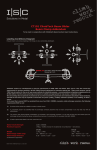
PRIMARY BUTTONS AND CONTROLS
Stylus
Pen
Speaker
Screen Brightness
Power ON/OFF
SD Card &
Battery
Compartment
Directional Arrows
(Up/Down, Left/Right Scroll)
Enter
Communications &
Charging Connector
4
®