1
12. WORKING WITH THE SEDACOM SOFTWARE
The purchase of the Sedacom software is needed for transferring the data to a
computer (please contact your local sales delegate for more information). The
Sedacom’s software reference is composed by a USB Flash key containing the
software Installer, a License for use and Sedacom’s User’s Manual. Follow the next
instructions:
• Please refer to the Sedacom’s User’s Manual for instructions on how to install
and use the software with the present device. For the LE2708 device, the
GENERIC mode has to be used. Once the experiment ends the DATA is sent
to the computer. The identification number is increased sequentially with each
experiment. The counter can be reset by keeping pressed the RESET button on
the front panel of the LE 2708 for 3 seconds.
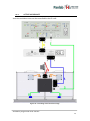
• A serial port (RS232) communication cable (provided with the present device)
is needed for the connection of the present device to the computer in which
the Sedacom software is installed. Please refer to the present User’s Manual
chapter 10 for instructions on how to connect this cable to the device.
• If the computer does not have any serial port, the RS232/USB adapter is
needed (ref. CONRS232USB, contact your local sales delegate for more
information)
WARNING: the RS232 communication cable provided with the device is used for
connecting the device to any associated software (Sedacom, etc.). Even when the
device is used without software at first instance, this cable is to be preserved and kept
in a secure place in case the need of using the system with a software arises in the
future. In this last case, if the user lost the cable, a new one should be purchased to his
local sales delegate, ref. CONRS232). The warranty time of this cable is the same than
the warranty time of the device.
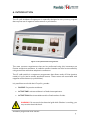
Avoidance programmer with shocker
26