1
Hardware Manual
Step 2: Install the New Ethernet Cable
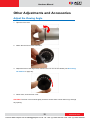
1. Insert the new Ethernet cable through the sealing nut, claw, seal, and cable
gland of the back cover.
2. Attach the RJ-45 connector to the Ethernet cable. See How to Make an
Ethernet Cable on page 34 for more information.
3. Assemble the seal and claw, and then connect the RJ-45 connector to the
Ethernet port inside the camera.
2
2
1
2
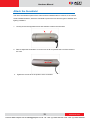
4. Attach the back cover by tightening the three (3) screws.
NOTE: Make sure the rubber ring on the cover is secured and the screws are
completely tightened to avoid possible water leak.
21
www.acti.com
VoIPon www.voipon.co.uk [email protected] Tel: +44 (0)1245 808195 Fax: +44 (0)1245 808299