1
Test lead installation
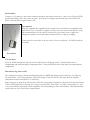
Strip approximately 1/8” (2 mm) from one end of the test leads and tin using
rosin core solder. Install the grommets into the enclosure end panel as shown
in the picture. Then push the test leads through the grommets. The outside of
the panel is the finished side. Yes, the leads fit tightly in the grommets, they
are supposed to.
Then solder the test leads to the pc
board and secure them with the tie
wrap. Leave enough slack for the
leads to clear around the pc board
holes for the enclosure bosses.
Strip approximately ¼” (4 mm)
from the other end of the test
leads, do not tin them. Push
alligator clip insulators onto the
leads first and then push the lead
end into the center hole of the
alligator clips as shown in the
picture.
Then solder the lead to the clip,
trimming it so that the insulator
can be slid over the clip. Use
rosin core solder to make the
soldering easier.
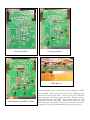
Finished pcb assembly
Battery connector
When all the components are on the board, solder the battery snap connector to the
battery pads on the PC board - red to “+” and black to “-”.
Final Assembly
The pc board sits snugly in the bottom enclosure. Fasten the board into place using
the five self-tapping screws.
Remove the battery compartment door from the bottom of the enclosure and feed
the battery leads through the opening and as shown in the picture.