1
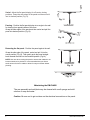
Swivel- Adjust the flat panel display for off-center viewing
positions. Grasp the side edges of the panel and then swivel it
into its desired position (Fig.11).
Fig. 11
Panning - Position the flat panel display at an angle to the wall
for viewing from opposite sides of the room.
Grasp the side edges of the panel and then swivel and pull the
panel into desired position (Fig.12).
Fig. 12
Retracting the flat panel - Position the panel against the wall.
Grasp the side edge of the panel, swivel and pull it into the
center position (Fig.13). Then gently push the panel straight
back towards the wall into the retracted position (Fig.14).
NOTE: Use care when moving the panel to ensure that cables do not
become stretched or pinched. It is recommended that you allow a
small amount of slack in cables to allow for easy movement without
pinching.
Fig. 13
Fig. 14
Maintaining the EM-PLAB2
The arm assembly and wall plate may be cleaned with a soft sponge and mild
solution of soap and water.
Caution: Be sure not to get moisture on the electrical connections or the panel.
5
EM-PLAB2.HB.092012.IM