1
RMW 6170
17” 1920x1080 Full HD LCD monitor
6U Rackmount Display Panel
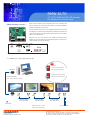
< 2.3.2 > Picture By Picture ( PBP )
Mode
Display the Sub screen next to the Main screen.
OSD Menu ? MISC ? PIP Mode ? PBP
Main screen
Sub screen
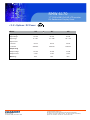
Size
LCD Monitor
Main / Sub screen
1920 x 1200
955 x 716
1920 x 1080
1440 x 900
955 x 716
715 x 536
1366 x 768
1280 x 1024
678 x 508
635 x 476
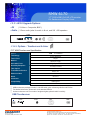
< 2.3.3 > PIP / PBP Source
To select an input signal for PIP / PBP Sub screen.
OSD Menu ? MISC ? PIP Source ? VGA / S-Video / Composite / DVI / HDMI / SDI / YPbPr / TV
The PIP / PBP is operable in the following table :
Sub
VGA
S-Video
Composite
DVI-D
HDMI
SDI
YPbPr
TV
VGA
x
o
o
o
o
o
o
o
S-Video
o
x
x
o
o
o
o
x
Composite
o
x
x
o
o
o
o
x
DVI
o
o
o
x
x
o
o
o
HDM I
o
o
o
x
x
o
o
o
SDI
o
o
o
o
o
x
x
o
YPbPr
o
o
o
o
o
x
x
o
TV
o
x
x
o
o
o
o
x
Main
14628 Central Ave,
Chino, CA 91710
tel:909.597.7588, fax:909.597.1939
© Copyright 2013 Acnodes, Inc.
All rights reserved. Product description and product specifications
are subject to change without notice. For latest product information,
please visit Acnodes’ web site at www.acnodes.com.