1
Lab Reports
Multi-Player Management
Lab Reports provide a detailed analysis on your swing sessions and how
Add/Remove a Player
you're performing against your goals. In your Lab Report, you will be
To add or remove a player from your account, select “Players” from the
provided with your Average Swing Score, number of swings, number
main menu. To add a player, select the “ + “ sign located in the top right
of clubs used, and an overview of general stats - Tempo, Backswing
corner. To delete a player, select the player profile in which you would like
Position, Club Pane Comparison, Hand Plane Comparison, and Club-head
to remove. Located at the bottom of their profile, select Delete Player.
Speed for a selected day in which you captured swing data. Switch Between Players Capturing Swings
Zepp Insights
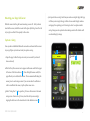
Capturing swing data for different players is done by selecting the player in
Zepp Insights is a feature built into a users lab reports. This report will take
section that contains the name of the current player. To switch between
users who have captured at least 30 swings for a certain week and provide
players, simply select the name to open the "Change Golfer” tab which
them with their top metric as well as a metric that can use improvement.
contains all players. Select accordingly and swing! All swings will then be
Both of these measurements are calculated based on your swing
saved under that specific player’s account.
the “Change Golfer” tab located in the 3D view. Above the 3D avatar there is
performance for the week in comparison to your swing goals. The metric
that averages nearest to its goal will be outlined as your top stat whereas the
metric thats average is the furthest off is considered the recommended
focus. ZEPP GOLF USER GUIDE
Page 13