1
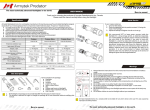
Set description
2
x2
6
7
9
4
1
5
3
8
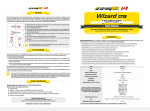
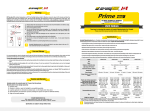
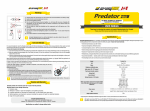
Wizard
Operation
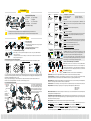
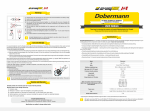
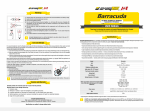
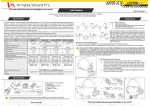
Items included in the package:
1 - Flashlight
6 - 2 spare O-rings
2 - Clip
7 - Magnet
3 - Lanyard
8 - Silicone holder
4 - Hand band
9 - User manual
5 - Headband (2 straps)
Click x2
Press & Hold
OFF вMain
Any mode вMain
Main вFirefly
Main1 вMain2
е
з
Main3
Click x2
Press & Hold
Firefly
гд
Main
OFF вFirefly
In OFF state:
Initial Service
1.
3.
2.
To set/replace batteries:
1. Unscrew the tailcap.
2. Place the batteries with the positive contact (+) facing the
head of the flashlight.
3. Adjust the tailcap and tighten it as far as it can go.
The flashlight is ready for operation.
The removable magnet in the tailcap.
Specifying the battery type for correct voltage indication.
Do not specify the type of power source manually unless you use unprotected Li-Ion batteries. 1x18650 Li-Ion battery is by default.
Press & Hold
Press & Hold
OFF вMax
Any mode вMax
Main1 вMain2
е
з
Main3
Click x4
Press & Hold
OFF вSpecial
Any mode вSpecial
StrobeвBeacon
е
з
Voltage Indication
State Indication
Battery level
Firefly1
Max
Main3
x1
Main2
Firefly2
Firefly3
Main1
1
5sec
The same in OFF & ON states:
2 clicks: To turn on the last used Main mode [Section 2]. Further double clicks
will switch modes between the last used modes in [Section 1] and [Section 2].
Special
3 clicks: To turn on the Maximum mode [Section 3].
4 clicks: To turn on the last used Special mode [Section 4].
Wizard Pro has 2 types of operation:
Critical
Press & Hold
High Temperature Indication
Warning
x1
1x18650 Li-Ion
x2
2xCR123A
x3
2x18350 Li-Ion
2xRCR123 Li-Ion
1. General. The flashlight is switched on/off permanently.
2. Tactical. The light turns on for the time the button is being pressed. It will
switch on in the last memorized mode (except for the Special modes). This
type of operation is useful for short-time lighting and setting signals.
+
2
1/4
Low Battery Indication
Press and hold: To start cycling through the modes of the current Section. In
Maximum mode it starts cycling through the Main modes in [Section 2].
Critical
To access the Tactical operation type, unscrew the tailcap to 1/4, press the
button and tighten the tailcap again keeping the button pressed. To return to
the General type, unscrew the tailcap to 1/4 and tighten it again.
You have a convenient momentary access to all Modes:
Main. Double click from OFF or ON state turns on the last used Main Mode.
1sec
< 25%
< 10%
To access the Menu press and hold the switch button (when the flashlight is switched off). It will switch on, go through the all available
modes and then switch off again. After switching off, release the button quickly and click it rapidly again. The flashlight will enter the
Menu and the LED will flash about 3 times a second.
Now you can specify the battery type: 1 click for 1x18650 Li-Ion, 2 clicks for 2xCR123A, 3 clicks for 2x18350 or RCR123 Li-Ion.
After the choice is made the light will flash 1, 2 or 3 times to show the battery type chosen.
To use the head mount with the flashlight:
Pass the ends of the big strap through
2.
1. Connect the
the loop of the small strap and slots in
small strap
the silicone holder (fig.b), conjoin
with the
them in a ring (fig.c). Pass the loose
silicone holder.
end of the big strap through the loop of
the small one in the opposite direction
Fix the
and fix it in the buckle (fig.d).
flashlight and
adjust the
elastic bands
to the size
of your
a.
head.
c.
d.
b.
c.
e.
3.
Click: To turn off the flashlight.
Maximum
Switching State Indication ON/OFF
< 100%
< 50%
Warning
In ON state:
Click x1, x2 or x3
Release & Click
OFF
Press and hold: To turn on Firefly1 mode in [Section 1].
Firefly1 вFirefly2
е
з
Firefly3
Click x3
With its help you can easily attach the flashlight to an electric service panel, a bike handlebar,
above a car wheel, etc.
The magnet can be taken out of the tailcap. To do this unscrew the small cover at the end of the
tailcap and put the magnet out.
Click: To turn on the last used mode (Firefly, Main or Maximum). If the
flashlight was turned on in one of the Special modes it will turn on in the last
used Main mode.
Firefly
ь Depending on the model, your flashlight can inconsiderably differ from the pictures in the manual.
ь The producer reserves the right to change the package at his own discretion without modifying this manual.
The flashlight has 4 Sections of modes:
[Section1] – Firefly modes
[Section2] – Main modes
[Section3] – Maximum
[Section4] – Special modes
Main
e.
b.
2sec
0.5sec
< 5%
вFirefly1
вOFF
WARM
HOT
1sec
HOT
Firefly. Press and hold the button in OFF-state to turn on the Firefly1. Press
and hold after Firefly activation to start cycling through the Firefly modes:
release the button to select one. Firefly modes can be also accessed from the
Main mode by a double click.
в65% of output
вFirefly2
Maximum. 3 clicks from OFF or ON state turn on the Maximum mode.
Special modes (Strobe / Beacon / Voltage Indication). 4 clicks from OFF or ON state turn on the last used Special mode.
Cycling through modes. In ON-state press and hold the button in any mode: the modes of the current Section will start switching
cyclically. Release the button to select the desired mode. In Maximum mode it starts cycling through the Main modes.
Automemorizing. After switching off the last used Mode is memorized for quick 1-click access at next switching on. If the flashlight was
turned on in one of the Special modes it will turn on in the last used Main mode.
Lock-out function. Unscrew the tailcap to 1/4 for the protection from accidental switching on. State Indication will be turned off.
Voltage Indication. Shows the battery voltage in percents. The percentage is indicated by flashes: < 100% - 4 flashes
< 50% - 3 flashes
< 25% - 2 flashes
< 10 - 1 flash
Multicolor State Indication. Shows the battery level by short flashes every 5 seconds. State Indication in OFF state and Firefly modes
can be helpful to find the flashlight in the dark.
Switching Multicolor State Indication ON/OFF. It is switched off by default in OFF-state and Firefly modes. To turn on and off: unscrew
the tailcap to 1/4, press the button and holding the button pressed - tighten the tailcap and then unscrew it again. The settings will be
memorized even when battery is changed.
Warning Indication. In ON-state shows the battery level and the temperature inside the flashlight.
Low battery level. When it is <25%, the color LED shows the warning level once a second and the main LED flashes 2 times once a
minute. Critical level <5% is color indicated twice a second and light output decreases to Firefly1 and then switched off.
High temperature. When it increases to the warning level, the color LED flashes 3 times once in 2 seconds. At critical level the color LED
flashes 3 times once a second, the main LED flashes 4 times once and the light output decreases by 35%. In case the temperature
doesn’t fall the light output decreases to Firefly2. At normal temperature the brightness increases to usual level.