1
Gemini Express Fiber Multiplexer User’s Guide
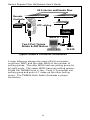
ACTIVE PAIR SETUP
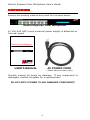
All Gemini Express Fiber Multiplexers can be factory
configured per customer request.
The factory default
MODEL GXM8-45
PINS
4/5 3/6 1/2
S/N
xxxxxxxxxx
setting is Pins 4 & 5.
Different configurations will be
indicated on the label on the bottom of the unit.
IDENTIFICATION LABEL
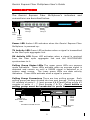
The active pair may be re-configured by performing the
following procedure:
•
•
•
•
Disconnect all power to the unit.
Remove the two top cover screws located on the rear
panel.
Gently slide the top cover back one inch.
Hold the top cover and tilt it up.
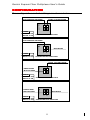
Reconfigure the jumpers located behind the RJ45 connectors
as required.
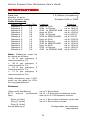
Settings for polarity and active pair
assignment are shown below:
ACTIVE PAIR JUMPER SETTINGS
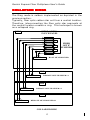
It should be noted that connections to the DB25 and the
RJ45s are mutually exclusive. If any of the three pairs of
the RJ45 are selected, the DB25 is disconnected. If the
DB25 is selected, the RJ45s are disconnected. All jumper
settings must be identical. To reinstall the top cover, tilt
the top cover down, and slide the top cover forward until it
mates completely with the bottom cover. Install the 2 top
cover screws.
7