1
tesco english manual 32-250 pagePage 1 22. 7. 2009 12:09:59
DIGITAL TELETEXT & ANALOGUE TELETEXT
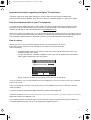
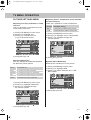
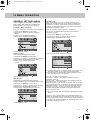
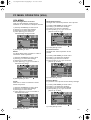
Digital TV Teletext
With Digital TV (Freeview) there is also
digital teletext available on some channels.
Simply follow the on screen commands. Here is
an example of the BBC digital teletext service.
1) To start digital teletext press the RED button
(BBC channels) or the TEXT buttons (Other
channels)
B B C
i
Teletext is a service offered by some
broadcasters.
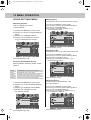
Teletext Operation
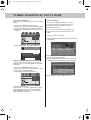
1) Press [TEXT], after a few seconds
teletext page 100 should appear.
Here is an example of BBC1
100
Tuesday 18 Dec
Press SELECT for
Live Crecket
Eng v SL
Radio Concert
News Multiscreen
Sport
Weather
BBCi INDEX
1001
300
400
199
Did Bee Movie Leave you
buzzing? BBC Movies - 540
To exit, press TEXT
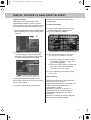
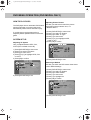
2) To select the information you require you
can scroll using [\/] or [/\] and press [OK]
alternatively you can key the page number
for example [3][0][0] followed by [OK]
B B C SPORT
11:15 18 Dec
300
Sport
Sport in Video
Main Headlines
Football
Cricket
Rugby Union
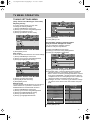
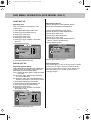
2) You can now navigate to the page
you require in a number of ways:
a) Press the page you require using
the number buttons i.e. page 302,
by pressing [3][0][2]
b) Press the colour buttons, these will
take you to the page indicated
on screen for each colour
Rugby League
BBC ONE
Tennis
To exit, press TEXT
For full screen TV, press 0
Golf
3) To exit Teletext press [TEXT] twice
at any time
more...
B B C
i HOME
SHORTCUTS
BACK
INDEX
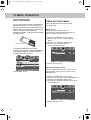
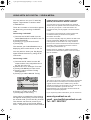
Other buttons
You can then navigate using the colours
buttons (Red, Green, Yellow, Blue), the [/\] [\/]
buttons and numbers.
If you wish to exit at anytime press [EXIT]
[SIZE] this increases or decreases the
size of the text on screen
[INDEX] some pages are more than one
page long this button displays
the number of pages
[REVEAL] if there is an answer or
something hidden this will display it
[SUBPAGE] displays the sub page
if it exists
[HOLD] This stops the pages changing
when there are multiple pages
21