1
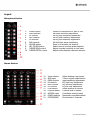
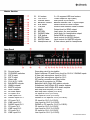
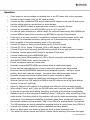
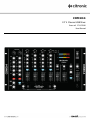
Operation Check mains for correct voltage as indicated near to the IEC mains inlet on the rear panel Connect to mains supply using the IEC cable provided Connect the Main unbalanced RCA and/or balanced XLR outputs to the main PA and ensure that the volume levels are turned down to avoid damage Connect the BOOTH outputs to powered booth monitors or separate PA zone Connect any turntables to the RCA PHONO inputs on CH.2 and CH.3 For external audio processing or effects, assign the required channel using AUX ASSIGN and connect SEND to inputs of the processor and RETURN to outputs of the processor If the unit is to be rack-mounted, it is possible to unscrew the input connector section and rotate 180° for underside connection, taking care not to disconnect any internal wiring Earth turntables to the case grounding point on the rear panel Connect CD players or other line level audio sources to the CD inputs Connect CD, CD+G, laptop, TV decoder, DVD or MP3 players to LINE inputs Connect DJ mics to the top panel jack/XLR combo sockets and rear jack sockets if needed If required, connect personal MP3 player to top panel 3.5mm input Connect headphones to the HEADPHONE jack Connect rear panel USB connections to a PC or Mac for computer audio playback/recording With MASTER LEVEL down, switch the power on Ensure microphone levels are turned down Gradually increase MASTER LEVEL and channel levels to check input signals Ensure that the input selectors are moved to select the relevant input being played Be aware that the CROSSFADER operates across assigned channels – setting to centre position allows both channels through – moving to either side favours that channel Gradually increase microphone channel levels to check microphone signals. Monitor each stereo channel via headphones selecting using the CUE switches Whilst a channel is on CUE, adjust the GAIN so that LED meters show a full signal without showing “in the red” (overload) Adjust Hi, Mid and Lo EQ settings to the desired tonal effect for mics and audio sources When using DJ mics 1 and 2, push the ON AIR switch and if required, push MIC OVERRIDE to drop the music level whilst talking. Sensitivity and Depth of this function are adjustable. Playback from PC or Mac computer is available through 2 USB ports, which act as Plug & Play audio devices. Connecting these to the computer will work the same as connecting 2 external sound cards. Once automatic installation is complete, select these as playback hardware in the relevant software menu and select “USB” on the CDM10:4 channel selector for playback. The USB interfaces can also be selected as recording devices to record mixes from CDM10:4 (consult your software manual for further installation and setup details) When not being used, turn down the Vocal mic levels to avoid unwanted noise Turn down PA volume controls and CDM10:4 faders before switching off to avoid loud pops 171.135UK User Manual