1
Dealing with multiple heads
The most significant change in the v5 ActiveX control is the fact that multiple marking heads may be
‘connected’ to the application. Among these ‘heads’ could be
• one (and only one) Fiber Link Controller Card installed in the PC - even if there is not a
DH/FHIN/FHTR/Fenix/FenixII marker connected and powered up, the FLCC is detected as a ‘head’
• one or more Flyer/Fenix Flyer heads powered up and connected through the USB port(s) on the PC
• one or more Flyer/Fenix Flyer heads powered up and connected through the Ethernet port(s) on the PC –
the heads will be detected only if they’ve been used before and their Ethernet addresses have been stored
in the WinMark registry. Use the ConnectToEthernet method to register new heads through the Ethernet.
• a ‘Simulation Head’ – if the control doesn’t detect any heads when the application starts up, it will
default to simulation mode (enabling you to create mark files without a head connected) and report this
head type as an unknown head (type = -1).
A very important distinction must be made between connected and available:
• connected means that a data connection has been established between the head and the application
• available means that the head is connected and not being controlled by another process
Each head may be controlled by one process at a time. We don’t want a marking head running two jobs at once.
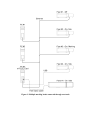
As an example, consider the system in Figure 1 that has:
• a Flyer head (Flyer1) connected to an Ethernet network, but not powered up
• a Flyer head (Flyer2) connected to the Ethernet network, powered up but not running a job
• a Flyer head (Flyer3) connected to the Ethernet network, powered up and running a job
• a PC (PC1) connected to the network, running WinMark v5, controlling Flyer3
• a PC (PC2) connected to the network, running a v5 ActiveX application but not controlling a head
• a PC (PC3) on the network running the ActiveX application, also connected to a Flyer head (Flyer4)
through it’s USB port, also with an FLCC connected to a Fenix marker (Fenix1)
An application running on PC1 would see:
• Flyer1 is not connected
• Flyer2 is connected and available
• Flyer3 is connected and available
• This PC would not see Flyer4 or Fenix1, since they are not directly connected to the network
An application running on PC2 would see:
• Flyer1 is not connected
• Flyer2 is connected and available
• Flyer3 is connected but not available
• This PC would not see Flyer4 or Fenix1, since they are not directly connected to the network
An application running on PC3 would see:
• Flyer1 is not connected
• Flyer2 is connected and available
• Flyer3 is connected but not available
• Flyer4 is connected and available
• Fenix1 is connected and available
To summarize all of this: a head that is being controlled by a process is available only to that process.