1
ETC Source Four LED Quick Guide
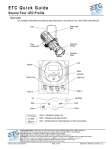
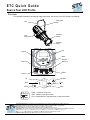
Connect
Connect
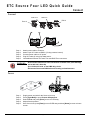
Power Thru
DMX Thru
DMX In
Power In
Step 1:
Step 2:
Step 3:
Step 4:
Step 5:
Attach power cable to Power In.
Attach 5-pin XLR cable to DMX In (if using external control).
Connect power cable to AC power.
Plug XLR cable (if using) into data source.
Link additional fixtures via Power Thru and DMX Thru connectors.
W A R N I N G : No more than nine Source Four LED fixtures on Power Thru (non-dimming,
100 to 240 VAC, 50/60 Hz)
Up to 32 device loads on the DMX daisy-chain.
Disconnect Power and DMX before all cleaning and maintenance.
Focus
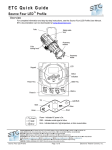
Step 1:
Step 2:
Step 3:
Step 4:
Step 5:
Sou rc e Fo ur LED Pr of i le
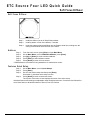
Supply power and wait for the fixture to boot up.
Press [Light Bulb] to open Presets & Sequences.
Select Focus and press [Enter] to turn on LED array.
Adjust fixture's position.
Once focus is set, press [Enter] to turn off LED array and then [Home] to return to home
screen.
Page 3 of 7
El ect r on ic T he at r e Con tr o ls , I nc.