1
Courier 2
User Manual
Subject:
Courier 2.0 – User Manual
Owner:
Derek van Wyk
Storage:
P:\Product user manuals
Version:
02/061004
Description:
User Manual
Date:
06/10/2004
Attached Files:
None
TABLE OF CONTENTS
INTRODUCTION .......................................................................................................................................... 3
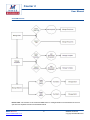
SYSTEM LAYOUT ....................................................................................................................................... 4
1. GLOBAL PRODUCT FUNCTIONALITY ..................................................................................................... 5
1.1 Manage Account: ............................................................................................................................... 5
1.2 Manage lists: ..................................................................................................................................... 5
1.3 Manage Templates:............................................................................................................................ 6
1.4 Manage Batches: ............................................................................................................................... 6
1.5 Account Reports: ............................................................................................................................... 6
1.6 Account Settings: ............................................................................................................................... 6
1.7 Tools: ................................................................................................................................................ 6
2. MANAGE LISTS FUNCTION..................................................................................................................... 7
2.1 Creating a New List and Adding Recipients Individually ........................................................................ 8
2.2
Creating and Importing a Mailing / SMS List................................................................................... 9
2.3 Adding recipients to existing lists....................................................................................................... 12
2.4 Editing List Properties ....................................................................................................................... 14
2.5 Editing recipient properties................................................................................................................ 14
2.6 Deleting a list ................................................................................................................................... 15
2.7 Deleting a recipient........................................................................................................................... 15
2.8 Deactivating a recipient .................................................................................................................... 15
2.9 Activating a Recipient ....................................................................................................................... 16
2.10 Removing Duplicates (list level)....................................................................................................... 16
2.11 Exporting a list (All recipients or deactivated recipients) .................................................................... 17
2.12 Making a copy of an existing list ...................................................................................................... 17
3. MANAGE TEMPLATES FUNCTION ....................................................................................................... 18
3.1 Creating a new template................................................................................................................... 19
3.2 Creating HTML content for a template ............................................................................................... 19
3.3 Creating text content for a template................................................................................................... 34
MWEB Business
www.mwebbusiness.co.za
1
Version: 02/061004
Copyright © MWEB Business
















![CURSA [1ex] Catalogue and Table Manipulation](http://vs1.manualzilla.com/store/data/005911996_1-56034bbec42ed74359b0b23f04aae37f-150x150.png)