1
EN
1.
2.
3.
Press SELECT several times until the calendar area
flashes.
Press and hold SELECT for 2 seconds to enter the
calendar setting mode.
Select the year, month, date, and language. Press
UP or DOWN to change the setting.
Press
SELECT to confirm.
BAROMETER
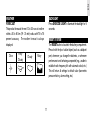
This product tracks barometric pressure changes over the
past 24 hours to provide the weather forecast ( 11) and
a trend line showing the direction of barometric change.
NOTE The language options are (E) English, (F)
French, (D) German, (I) Italian, and (S) Spanish.
9