1
HPLC system (or pump) is equipped with an external stop, refer to the systems User’s Manual to determine if
these terminals need a contact closure or a contact opening to activate. If a contact closure is needed plug the
supplied cable into the Bubble Busters 3-pin I/O plug then connect the red and black wires to the remote stop
terminals on the HPLC. If a contact opening is needed, use the red and white wires. If the HPLC system isn’t
equipped with remote stop, plug the HPLC system (or pumps) into the 120 volt outlet on back of the Bubble
Buster and set the "When triggered, turn outlet:" switch to the "OFF" position.
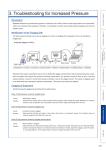
To verify correct operation of the Bubble Buster, fill all solvent lines then press the reset button on the Bubble
Buster’s front panel. The HPLC system should work normally. Now introduce a bubble into any of the
solvent lines. When the bubble reaches the detection head, the red trouble indicator on the Bubble Buster’s
front panel lights and the HPLC system turns off.
Solvent Line Monitor
Switch Position
Switch Switch
1
2
ON
OFF
Unscrew the detector head and position the solvent line in the ‘V’ of the detection head. Position the detection
head in an area where it won't be frequently hit so as to minimize false triggering. To test the action of the
Bubble Buster, fill the tube with liquid then press the reset switch on the front panel of the Bubble Buster.
Now introduce a bubble into the tubing. When the bubble reaches the detection head the red trouble indicator
on the Bubble Buster lights.
Trigger Mode
Sec.
Min.
N.O.
N.C.
COM
Sensor
Head
7
15
30
1
2
8
16
32
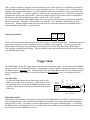
One-Shot Mode.
To place the Bubble Buster in one-shot trigger mode set all 8
timed reset switches to the off position. In this trigger mode, if
air is detected in the solvent line the Bubble Buster resets only
when the "Reset" button is manually pressed on the front panel
of the unit.
HPLC Head
Level Head
The Bubble Buster works in 2 trigger modes, one-shot and time delayed modes. In one-shot mode the Bubble
Buster turns OFF (or ON) the attached piece of equipment as soon as a bubble is detected and keeps it off until
the Bubble Buster is manually reset. In time delayed mode the Bubble Buster turns OFF (or ON) the attached
piece of equipment when a bubble is detected, but then reset automatically after a User selectable time has
passed.
OFF
ON
Timed reset switches
Time Delayed Mode
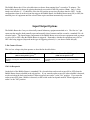
In this mode, when a bubble is detected in the solvent line the Bubble Buster turns OFF (or ON) the attached
piece of equipment for a User specified time and then automatically resets causing the attached equipment to
turn back ON (or OFF). This mode is useful in applications such as gravity chromatography. For example,
the Bubble Buster could monitor for air in a solvent transfer line and when air is detected turn on a pump for a
specific period of time refilling the reservoir.