1
en
GB
F
I
E
P
NL
DK
S
N
Operation
5
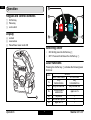
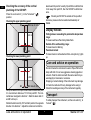
Keypad and control elements
1
1 On/Set key
2 Pulse key
3 Lock switch
2
2x
1x
Display
4x
5x
3x
4
4 Locked
5 Laser active
6 Pulse/Power save mode ON
6
Switching on/off
FIN
•
•
J
CN
ROK
ON: Briefly press the On/Set key 1.
OFF: Press and hold down the On/Set key 1.
Laser functions
PL
Pressing the On/Set key 1 activates the following laser
functions:
HR
H
Action
RUS
CZ
1x
GR
2x
LT
3x
LV
4x
5x
6x
3
EST
SLO
SK103P
not in Lock mode
only
horizontal line
only vertical line
horizontal and
vertical line
all points
all lines and points
again as 1x
in Lock mode
only
horizontal line
only vertical line
again as 1x
–
–
–
SK
M
TR
Operation
2
Makita SK103P