1
PEGASUS® MiniECO Digital Dimmer
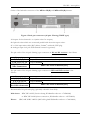
The DMX start address can be select with two blue buttons on the front panel. The left
side button [5] is decrease, the right one [7] is increase the DMX start address of the dimmer. If
you hold down one of the buttons, the address is increment/decrement automatically. After the
last button press, the dimmer saves the selected address within 5 seconds. The saving is indicated
with a three times flash of the display (no dimming while saving!). On the next power on, the
saved DMX address will restore.
4.2 Testing the outputs (TEST Mode)
To go to TEST function, press the Test/Chaser button [6] on the front panel. If you push
ones the level of the selected dimmer channel is increasing automatically for 0% to 100%. Use
the Up/Down keys [5,7] to select other channel. If the display indicates “00”, all channels are go
0% to 100%. By pressing the Test/Chaser button again, and the dimmer goes to Chaser mode.
4.3 Chaser running (CHASER Mode)
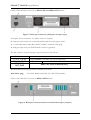
In this mode (second pressing of the Test/Chaser button [6]) the dimmer can work in
stand-alone mode. There are three fix level scenes (30%, 60% and 100% for all channels) and six
running scenes with adjustable speed. When the dimmer is in this mode, you can see on the
display two digits like this:
Speed
Chaser No.
The left one shows the speed of the chaser effect (1 means the fastest, 9 the slowest).
You can adjust this with the Down button [5] below the display. The digit on the right side
shows the number of the selected Chaser effect (1 to 3 are the fix scenes, 4 to 9 are running
scenes). You can select the Chasers with the Up button [7] below the display.
To go back the normal operation (dimming mode) press again the Test/Chaser button [6].
10