1
2. Hardware Installation
2.1 Main Unit Installation
STEP1
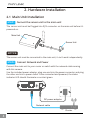
Connect the sensor unit to the main unit
The sensor unit must be Plugged into RJ12 connector on the main unit before it’s
powered on.
Main Unit
Sensor Unit
NOTICE
The sensor unit must be connected to the main unit, it can't work independently.
STEP2
Connect Network and Power
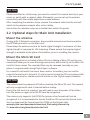
Connect the main unit to your router or switch with the network cable coming
with this camera.
Use the included power adaptor, plug one end into the power connector and plug
the other end into a power outlet. Once connected and powered, the status
indicator LED should illuminate a constant green.
I/O
LAN
Reset
DC12V
DC power adaptor
Network cable
Router
4