1
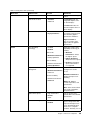
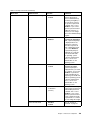
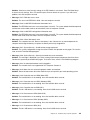
Table 5. Security menu items (continued)
Menu item
Submenu item
Selection
Comments
Integrated Camera
• Disabled
If you select Enabled, you
can use the integrated
camera.
• Enabled
Microphone
• Disabled
If you select Enabled, you
can use the microphones
(internal, external, or
line-in).
• Enabled
Fingerprint Reader
• Disabled
If you select Enabled, you
can use the fingerprint
reader.
• Enabled
NFC Device
• Disabled
If you select Enabled, you
can use the NFC device.
• Enabled
ExpressCard Slot
• Disabled
If you select Enabled, you
can use the ExpressCard
slot.
• Enabled
Thunderbolt
• Disabled
If you select Enabled, you
can use the Thunderbolt
connector.
• Enabled
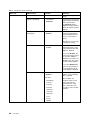
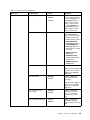
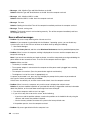
Internal Device Access
Anti-Theft
Bottom Cover Tamper
Detection
• Disabled
Intel AT Module Activation
• Disabled
Enable or disable the
tamper detection. If tamper
is detected, Supervisor
Password is required to
boot the system. Bottom
Cover Tamper Detection
will not take effect unless
Supervisor Password is
enabled.
• Enabled
• Enabled
• Permanently Disabled
Enable or disable the UEFI
BIOS interface to activate
the Intel AT module, which
is an optional anti-theft
service from Intel.
Note: If you set the Intel
AT module activation to
Permanently Disabled,
you will be unable to enable
this setting again.
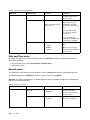
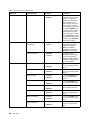
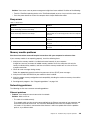
Intel AT Suspend
• Enter
This option is displayed
only when the anti-theft
function is activated.
The Intel anti-theft suspend
screen will be displayed
at next boot to enter the
suspend mode.
Computrace
• Disabled
• Enabled
• Permanently Disabled
Enable or disable the UEFI
BIOS interface to activate
the computrace module.
Computrace is an optional
monitoring service from
Absolute Software.
Chapter 8. Advanced configuration
127