1
Menus
6.6.2
149
Options|Format
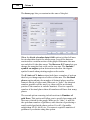
This dialog lets you change the various options for how data are
displayed in the data editor and results window.
First is the setting of the number of Decimal Places for
numeric data, followed by an option as to whether to Include
seconds in time data. These are followed by three buttons
that take you directly to the Windows format setting dialog
boxes, for setting the format of Numbers, Times and Dates.
Changing these three options will affect how these data are
displayed in all Windows programs, not just Oriana.
6.6.3
Options|Preferences
This option lets you change a variety of settings that affect the
whole of the program. These settings are automatically saved
for future use. When you choose it, the following dialog box is
displayed.