1
Digital Storage Oscilloscope ---- DSO5000P Series
FFT
Autoset
Troubleshooting
If the oscilloscope is no display of waveforms on the screen when the
oscilloscope is turned on, follow these steps:
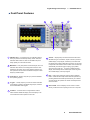
Dual-window Mode (Full Screen)
Math: CH1+CH2
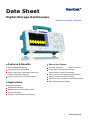
Performance You Need at a Price You Can Afford
The DSO5000B Series Digital Storage Oscilloscope provides you
I. Check the probe to assure its proper connection to the input BNC;
with affordable performance in a compact design. Packed with stan-
II. Check the channel switch (such as CH1, CH2 menu buttons) to
dard features-including USB connectivity, 32 automated measurem-
make sure it has been turned on;
III. Check the input signal to verify it has been connected to the probe
correctly;
IV. Affirm that all measured circuits have signals to output;
V. Turn up the magnitude for DC signals with large magnitude;
VI. In addition, you may press the Auto Measure button to perform an
automatic detection of signals at first.
ents, limit testing, data loading, and context-sensitive make the
instruments help you get more done in less time. Digital Precision for
Accurate Measurements With up to 200MHz bandwidth and 1GS/s
maximum sample rate, no other digital storage oscilloscope offers as
much bandwidth and sample rate for the price. Hantek provides realtime sampling with a minimum of 10X oversampling on all channels,
all the time to accurately capture your signals.
Designed to Make Your Work Easy
The DSO Series oscilloscopes are designed with the ease of use and
familiar operation you have come to expect from Hantek
Help When You Need It, Where You Need It
The built-in Help menu provides you with important information on
Easy PC Connectivity
Easily capture, save, and analyze measurements results by connecting to your PC with the rear-panel USB device port. Simply pull
screen images and waveform data into the stand-alone desktop
application.
your oscilloscope’s features and functions. Help is provided in the
same languages as the user interface.
2
www.hantek.com