1
That's done !
On Mac OSX (3.9 or later)
Uncompress the Lax 2.1.zip fle.
Copy the folder « Lax softwares » in your Applications directory
That's done !
The principle
Lax is looping using an overdub process without accumulation.
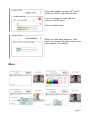
You can loop audio or video or audio and video by switching on or off the
buttons show below.
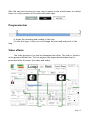
The frst layer of loop make the maximum length of your loop. You can
resize the loop (only at this state) with the inlet and outlet of the progression bar.
The over layers of loop will be of this length or less, and this will be the last
period of loop length that will be looped. It means that if your frst layer of loop is
12 sec long and you loop an hour for the second, that will be the last 12 sec. of
this hour that will be looped (non cumulative).
It also use Ram for storing audio and video data in real time. The amount of
Ram needed is related to the video defnition of the loop, its length, its frame rate
(of audio and also video).
Keep in mind that a 10 sec loop at 720 x 576 with 25 fps and an audio
sampling rate at 44.1 kHz needs 410 Mo. Lax needs 250 Mo itself.
Depending on your hardware and the settings of the loop preset the startup
of Lax takes one's time. On a macbook pro 2.4 Ghz with a loop preset of 20 sec
at 640 x 480 with 30 fps, Lax needs 17 sec to start
Page 4