1
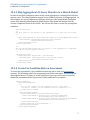
SCORM Users Guide for
Programmers
Version 10
September 15, 2011
Table of Contents
Getting Started with SCORM ..................................................................................................................................................7
Course Structure & Organization ..................................................................................................................................... 10
2. Introduction ........................................................................................................................................................................................... 10
3. Content Packages ................................................................................................................................................................................. 17
LMS Management & Communication .............................................................................................................................. 24
4. Understanding the SCORM API ....................................................................................................................................................... 24
5. CMI Data Model .................................................................................................................................................................................... 26
6. Status and Scoring ............................................................................................................................................................................... 31
Sequencing & Navigation ..................................................................................................................................................... 35
7. Control Modes ........................................................................................................................................................................................ 35
8. Navigation .............................................................................................................................................................................................. 39
9. Sequencing .............................................................................................................................................................................................. 43
10. Tracking across SCOs using Global Objectives ....................................................................................................................... 50
11. Rollups.................................................................................................................................................................................................... 55
12. Exiting SCOs and Courses ............................................................................................................................................................... 59
Resources, Tools, & Development Support ................................................................................................................... 65
13. ADL SCORM Resources Overview ................................................................................................................................................. 65
Cookbook ................................................................................................................................................................................... 70
14. Bookmarking ....................................................................................................................................................................................... 70
15. Prerequisites ........................................................................................................................................................................................ 73
16. Assessments .......................................................................................................................................................................................... 77
17. The Menu SCO ..................................................................................................................................................................................... 81
18. Sequencing Collections .................................................................................................................................................................... 85
Glossary of SCORM Terminology ...................................................................................................................................... 87
SCORM 2004 API Wrapper .................................................................................................................................................. 91
Index......................................................................................................................................................................................... 102
Detailed Table of Contents
Getting Started with SCORM ..................................................................................................................................................7
1.1 Programmer Process ................................................................................................................................................................... 7
1.2 Your First SCORM Course .......................................................................................................................................................... 8
1.3 SCORM Terms ................................................................................................................................................................................. 9
Course Structure & Organization ..................................................................................................................................... 10
2. Introduction ........................................................................................................................................................................................... 10
2.1 Anatomy of a SCORM Course .................................................................................................................................................10
2.2 Asset ..................................................................................................................................................................................................11
2.3 Sharable Content Object ..........................................................................................................................................................12
2.4 Aggregation ...................................................................................................................................................................................13
2.5 Organization ..................................................................................................................................................................................14
2.6 Curriculum or Course ................................................................................................................................................................15
3. Content Packages ................................................................................................................................................................................. 17
3.1 Introduction ..................................................................................................................................................................................17
3.2 When to Implement ...................................................................................................................................................................17
3.3 How to Implement ......................................................................................................................................................................17
LMS Management & Communication .............................................................................................................................. 24
4. Understanding the SCORM API ....................................................................................................................................................... 24
4.1 Introduction ..................................................................................................................................................................................24
4.2 API Wrapper JavaScript file ....................................................................................................................................................24
4.3 Initialization and Termination ..............................................................................................................................................24
5. CMI Data Model .................................................................................................................................................................................... 26
5.1 When to Implement ...................................................................................................................................................................26
5.2 Examples .........................................................................................................................................................................................27
5.3 How to Implement ......................................................................................................................................................................29
6. Status and Scoring ............................................................................................................................................................................... 31
6.1 Introduction ..................................................................................................................................................................................31
6.2 How to Implement ......................................................................................................................................................................31
Sequencing & Navigation ..................................................................................................................................................... 35
7. Control Modes ........................................................................................................................................................................................ 35
7.1 Introduction ..................................................................................................................................................................................35
7.2 When to Implement ...................................................................................................................................................................35
7.3 Example ...........................................................................................................................................................................................35
7.4 How to Implement ......................................................................................................................................................................36
7.5 Related Information ...................................................................................................................................................................38
8. Navigation .............................................................................................................................................................................................. 39
8.1 Introduction ..................................................................................................................................................................................39
8.2 Examples .........................................................................................................................................................................................39
8.3 When to Implement ...................................................................................................................................................................39
8.4 How to Implement ......................................................................................................................................................................40
9. Sequencing .............................................................................................................................................................................................. 43
9.1 Introduction ..................................................................................................................................................................................43
9.2 Examples .........................................................................................................................................................................................43
9.3 When to Implement ...................................................................................................................................................................43
9.4 How to Implement ......................................................................................................................................................................44
9.5 Pre-Condition Rules ...................................................................................................................................................................46
9.6 Post-Condition Rules .................................................................................................................................................................47
9.7 Additional Sequencing Elements .........................................................................................................................................48
10. Tracking across SCOs using Global Objectives ....................................................................................................................... 50
10.1 Sequencing Objectives ...........................................................................................................................................................50
10.2 Examples ......................................................................................................................................................................................50
10.3 When to Implement ................................................................................................................................................................50
10.4 How to Implement ...................................................................................................................................................................51
10.5 Local vs. Shared Global Objectives....................................................................................................................................51
10.6 Defining Objectives in the Manifest .................................................................................................................................51
10.7 Understanding Mappings......................................................................................................................................................52
10.8 SCORM 2004 4th Edition Extended Global Objective Information......................................................................53
10.9 Accessing Objectives in the Content ................................................................................................................................54
11. Rollups.................................................................................................................................................................................................... 55
11.1 Introduction ................................................................................................................................................................................55
11.2 Examples ......................................................................................................................................................................................55
11.3 When to Implement ................................................................................................................................................................55
11.4 How to Implement ...................................................................................................................................................................56
11.5 Rollups vs. Global Objectives ..............................................................................................................................................58
12. Exiting SCOs and Courses ............................................................................................................................................................... 59
12.1 Introduction ................................................................................................................................................................................59
12.2 Examples ......................................................................................................................................................................................59
12.3 Exiting the SCO ..........................................................................................................................................................................59
12.4 Exiting the Course ....................................................................................................................................................................60
12.5 When to Implement ................................................................................................................................................................62
12.6 How to Implement ...................................................................................................................................................................62
Resources, Tools, & Development Support ................................................................................................................... 65
13. ADL SCORM Resources Overview ................................................................................................................................................. 65
13.1 Background .................................................................................................................................................................................65
13.2 SCORM 2004 4th Edition Document Suite ....................................................................................................................65
13.3 SCORM 2004 4th Edition Sample Run-Time Environment (SRTE) ...................................................................66
13.4 SCORM 2004 4th Edition Test Suite (TS) ......................................................................................................................67
13.5 ADL SCORM 2004 4th Edition Content Examples .....................................................................................................68
Cookbook ................................................................................................................................................................................... 70
14. Bookmarking ....................................................................................................................................................................................... 70
14.1 Background .................................................................................................................................................................................70
14.2 How to Implement ...................................................................................................................................................................70
14.3 Learner Option ..........................................................................................................................................................................71
15. Prerequisites ........................................................................................................................................................................................ 73
15.1 Background .................................................................................................................................................................................73
15.2 How to Implement ...................................................................................................................................................................73
16. Assessments.......................................................................................................................................................................................... 77
16.1 Introduction ................................................................................................................................................................................77
16.2 When to Implement ................................................................................................................................................................77
16.3 Examples ......................................................................................................................................................................................77
16.4 How to Implement ...................................................................................................................................................................77
17. The Menu SCO ..................................................................................................................................................................................... 81
17.1 Background .................................................................................................................................................................................81
17.2 How to Implement ...................................................................................................................................................................81
17.3 Create a SCO that Contains a Nice "Menu" ....................................................................................................................82
17.4 Impact on Reuse .......................................................................................................................................................................84
18. Sequencing Collections .................................................................................................................................................................... 85
18.1 Background .................................................................................................................................................................................85
18.2 How to Implement ...................................................................................................................................................................85
Glossary of SCORM Terminology ...................................................................................................................................... 87
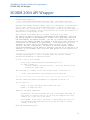
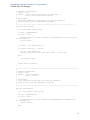
SCORM 2004 API Wrapper .................................................................................................................................................. 91
Index......................................................................................................................................................................................... 102
SCORM Best Practices Guide for Programmers
Getting Started with SCORM - Introduction
Getting Started with SCORM
This purpose of this guide is to help the e-learning programmer become familiar with
SCORM 2004. It is meant for programmers who have no experience with SCORM, or who
are familiar with earlier versions of SCORM. It is not meant to be the definitive user’s
guide; there are other documents where all the technical information can be found (a link
to the SCORM Books can be found under SCORM Documentation of this page).
If you are new to the Sharable Content Object Reference Model (SCORM) standards, or have
only used a version prior to SCORM 2004, this section will help you acclimate to currently
accepted SCORM development procedures. In the first part, we present a typical
programmer approach to creating SCORM-conformant e-learning, and in the second part
we walk you through setting up your first SCORM course.
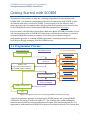
1.1 Programmer Process
Programmer Process
New SCORM Concepts
Understand Task
Section in Guide (linked)
Sequencing &
Navigation
Understand SCORM file
structures
Look for code
previously created templates
in SCORM resources (Books)
Course Structure &
Organization
LMS Management &
Communication
Glossary of SCORM
Terminology
Look up SCORM terms
Resources, Tools, &
Development Support
Figure out what files
need to be changed
Modify or create code
Test
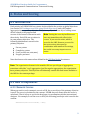
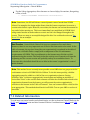
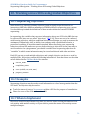
Figure 1.1 Programmer process for developing SCORM-conformant e-learning.
A typical programmer approach to navigating the SCORM waters and creating SCORMconformant e-learning is outlined in Figure 1.1. For example, after understanding the
instructional task that the instructional systems designer (ISD) has shared with you, it is
important to understand how SCORM file structures can support the task. The sections that
7
SCORM Best Practices Guide for Programmers
Getting Started with SCORM - Introduction
will help you understand SCORM file structures (see Figure 1.1) are Sequencing &
Navigation1, Course Structure & Organization, and LMS Management & Communication.
You will also need to look up and understand new SCORM terms and get familiar with the
resources available to you. This information can be found in the Glossary and the
Resources, Tools, & Development Support sections, respectively.
1.2 Your First SCORM Course
The easiest and recommended way to create a SCORM content package is by using a
template. A template is a conformant SCORM 2004 content package (zip file) consisting of a
simple course structure with HTML files that can be modified and extended to create your
course. It typically also includes a helper JavaScript file, sometimes called the API Wrapper,
which makes using the SCORM API (see Understanding the SCORM API) easier for the
programmer to use.
Templates are typically provided by the community and may implement instructional
design patterns. For the purposes of this document we will use a simple starter template
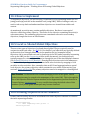
provided by ADL located (download from SCORM API/Code Example). The structure of the
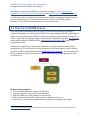
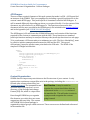
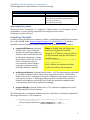
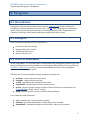
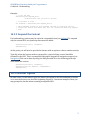
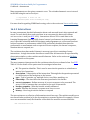
starter template is simple. It contains a single SCO followed by an aggregation of 2 SCOs
(see Figure 1.2).
Figure 1.2 Structure of the starter XML template
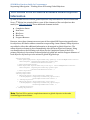
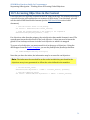
Steps to using a template
1. Locate and download the template file (zip file).
2. Copy the .zip file to your project area and unzip.
3. Edit the HTML files of the template to add content.
4. Edit the imsmanifest.xml file: replacing titles, adding resources, etc.
5. If necessary, edit sequencing and extend the template according to the design.
1
Blue dotted-underlined text are section names and contain hot links to those sections in this document.
8
SCORM Best Practices Guide for Programmers
Getting Started with SCORM - Introduction
Steps 1-4 of this process should be straightforward to a programmer familiar with web
application development. Step 5 will be more challenging to those starting out in SCORM.
Refer to the remainder of this document for information on how to implement sequencing
and other advanced features of SCORM 2004.
1.3 SCORM Terms
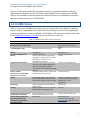
Table 1.1 lists some SCORM terms as they relate to common ISD terms. These are useful to
know in order to communicate well with instructional designers who will be designing the
courses you implement. Some commonly used SCORM or ISD terms have official terms used
in the SCORM Documentation Books that you should also be aware of.
Table 1.1 SCORM terms as they relate to ISD terms
COMMON ISD TERM
COMMON SCORM TERM
OFFICIAL SCORM TERM
Video, text file, image, or
Asset
Asset;
other media; also called asset
Also, a Resource is a group of
assets
Learning object (LO)
Sharable Content Object (SCO)
SCO
Course
(set of learning objects)
(None)
Organizational Structure
Course content
(all assets, LOs, branching,
structure for a course)
(None)
Branching
Scoring
Branching instructions to the
programmer, flowcharts
Learner interactivity data
(any interactions with
content, usually used for
assessment data)
Organization;
Or Content Package
Activity: a SCO or logical grouping or
aggregation of SCOs, with associated
sequencing; could refer to an
Organizational Structure
An Activity Tree represents the data
structure that an LMS implements to
reflect the hierarchical, internal
representation of the defined learning
activities.
Content Package (a PIF or zip file that
contains the course content)
Organization or
Content Organization
Activity
Content Aggregation represents the
collection of content and its structure
represented within a Content Package
Content Aggregation is a nested
structure. A content package
might have 1 or 100
aggregations.
Sequencing
Sequencing (not internal branching
within a SCO)
Objective (NOTE: this is not related to
the ISD term Learning Objective)
Rollup and Sequencing rules (not
internal branching within a SCO)
Interactions
Activity Tree/ Organization
Content Package
Objective
Rollup and Sequencing rules
Interaction Data/
cmi.interactions (see the
Assessments Cookbook section)
9
SCORM Best Practices Guide for Programmers
Course Structure & Organization - Introduction
Course Structure & Organization
2. Introduction
This section addresses the most basic elements of a SCORM course. In its simplest
definition, a SCORM 2004 course consists of web-deliverable assets bundled into a SCORM
2004 4th Edition Content Package (see CAM 3.1)2. This Content Package is a zip file which
provides a standardized, interoperable way for you to exchange digital resources among
different learning management systems (LMSs), content repositories, and operating
systems.
2.1 Anatomy of a SCORM Course
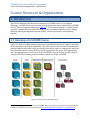
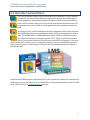
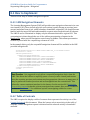
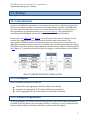
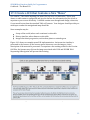
Figure 2.1 depicts SCORM content components from smallest (assets) to largest (curricula);
each component is described individually. The colors you see here for each component are
used throughout this Guide to help you quickly identify the types of components. Assets are
blue, sharable content objects (SCOs) are gold, aggregations are green, and organizations
and root aggregations are red. Curricula are shown here in gray and red, but they may be
comprised of other learning activities and are outside the scope of SCORM.
Figure 2.1 Components of SCORM Content
The Content Aggregation Model is one of the SCORM “Books”. The whole suite of books (CAM, SN, & RTE) is
available for download under Documentation at http://www.adlnet.gov/capabilities/scorm#tab-learn.
2
10
SCORM Best Practices Guide for Programmers
Course Structure & Organization - Introduction
2.2 Asset
Assets are electronic representations of media, text, images, sounds, HTML pages,
assessment objects, and other pieces of data. They do not communicate with the
LMS. Assets will likely be your most reusable items; they can be redeployed,
rearranged, repurposed, or reused in many different contexts and applications.
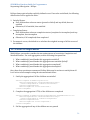
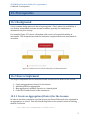
The figure to the left depicts each asset as a small blue box with examples of
several asset types (such as .gif, .mpg, .html, .txt, .jpg).
For example, in Figure 2.2, an image of the Hazard Class 7 Radioactive placard
could be used in training materials for different audiences in both commercial and
DoD transportation as well as by different individuals such as truck drivers, first
responders, and shipping inspectors who may be affected by the transportation of
hazardous materials. The radioactive symbol could be reused as a “slice” (separate
graphic file) which is seamlessly integrated into the top and bottom of each
composite graphic.
Figure 2.2 Shared Asset Example
11
SCORM Best Practices Guide for Programmers
Course Structure & Organization - Introduction
2.3 Sharable Content Object
SCOs are the smallest logical unit of information you can deliver to your learners
via an LMS. The term SCO has different implications for instructional designers
and programmers. Instructional Systems Designers (ISDs) and content authors
view a SCO as content; they focus on the actual instructional material in the SCO.
Programmers may view a SCO as a web application that communicates with an
LMS.
In technical terms, a SCO is defined as the only component of the course that uses
the SCORM Application Programming Interface (API) for communication with an
LMS. The SCORM API is a standardized method for a SCO to communicate with
the LMS when learners are interacting with a SCO. There is specific information
the SCO can retrieve from the LMS and store in the LMS. For example, it can store
values in the LMS, such as a score or completion status, or retrieve information from the
LMS, such as a learner’s name. Figure 2.3 depicts the API communication link between a
SCO and an LMS.
Figure 2.3 API Communication Link
Experienced SCORM designers talk about SCOs as the content that learners see and interact
with, but this is not the complete story. Technically, a SCO must communicate with the LMS
to be called a SCO (see Content Packages section).
12
SCORM Best Practices Guide for Programmers
Course Structure & Organization - Introduction
2.4 Aggregation
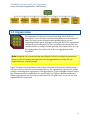
An aggregation is a collection of related activities. An aggregation may contain
SCOs or other aggregations. In this Guide, an aggregation is defined as a parent
and its children.
Note: The SCORM documents refer to an aggregation as a cluster. The terms
aggregation and cluster may be used interchangeably. In this document, we will
use the term aggregation.
The figure to the left depicts aggregations as green boxes and SCOs as gold boxes
containing blue assets. Aggregations are used to group related content so that it
can be delivered to learners in the manner your ISD prescribes.
An aggregation is not a physical file; it is a structure within a SCORM manifest where
sequencing rules are applied to a collection of related SCOs or aggregations.
Figure 2.4 depicts a SCORM aggregation called Hazard Classes that contains multiple
aggregations: Hazard Class 1 Explosives; Hazard Class 2 Gases, and others. This structure
would continue to reveal individual aggregations for all nine hazardous materials classes.
These aggregations, the green boxes, do not contain content themselves, but are a way of
structuring content to apply sequencing rules.
Figure 2.4 Example of Potential SCORM Content Aggregations
Figure 2.5 depicts the expansion of the Hazard Class 1 Explosives aggregation, the green
box, with six SCOs, gold boxes: Hazard Class 1 Explosives Overview, Division 1.1 Mass
Explosion Hazard, Division 1.2 Fragmentation Hazard, Division 1.3 Fire Hazard, Division
1.4 Minor Explosion Hazard, Division 1.5 Very Insensitive Explosion Hazard, and Division
1.6 Extremely Insensitive Explosion Hazard. (Refer to Sequencing to learn more about
structuring content for sequencing).
13
SCORM Best Practices Guide for Programmers
Course Structure & Organization - Introduction
Figure 2.5 Example Expansion of a Potential SCORM Content Aggregation
2.5 Organization
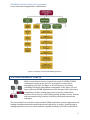
The organization is the part of a content package where SCOs are
ordered into a tree structure and sequencing behaviors are assigned to
them. The figure to the left depicts an organization as a red box
containing multiple green aggregations and gold SCOS. The organization
outlines the entire structure you have created for the content that you
intend to deliver as a single content package. Each organization is a toplevel aggregation, also referred to as the root aggregation in this
document.
Note: Originally, the content package was defined to allow for multiple organizations.
However, this is currently not supported, so it is suggested that you only use one
organization per content package.
Figure 2.6 depicts the organization called Types of Hazardous Materials (HazMat) using a
red box at the top of the tree with rounded corners. The organization represents a content
package containing three aggregations. The aggregations: Types of HazMat, Hazard Classes,
and Transportation Documentation, are green boxes. The Types of HazMat and Hazard
Classes aggregations also show their associated SCOs, the gold boxes, so you can see how
organizations are structured.
14
SCORM Best Practices Guide for Programmers
Course Structure & Organization - Introduction
Figure 2.6 Example of Potential SCORM Organization
2.6 Curriculum or Course
While a curriculum or course is outside the scope of SCORM, SCORMconformant content can be part of a curriculum or course that is
managed by your LMS. The figure to the left depicts a curriculum
consisting of multiple independent components. In this figure, the red
boxes represent SCORM organizations while the gray boxes represent a
combination of other learning experiences (such as, collaboration
sessions, labs, lectures). A curriculum typically includes courses, lessons,
and assessments using a variety of delivery media and instructional
strategies.
The curriculum for a truck driver may include SCORM-conformant content organizations in
loading, hazardous materials transportation, and road safety, as well as, actual driving or
loading experiences on a test course and also on public roadways. The LMS would deliver
15
SCORM Best Practices Guide for Programmers
Course Structure & Organization - Introduction
and store learners’ performance data for the SCORM-conformant content organizations,
and it might also store and manage the scheduling and completed work accomplished on
the test course and public roadways.
16
SCORM Best Practices Guide for Programmers
Course Structure & Organization - Content Packages
3. Content Packages
3.1 Introduction
All SCORM content is ultimately placed in a “content package.” The content package is a .zip
file, sometimes called a Package Interchange File (PIF), that contains everything needed to
deliver content to learners via a SCORM 2004 conformant (see Glossary of SCORM
Terminology for a definition) LMS. As the programmer on your team, you are typically
responsible for creating the SCORM content package.
There are tools available to create content packages or you may choose to create them from
scratch. Some authoring tools will create the entire content package after you load your
SCOs and assets into the tool. The ADL version of the RELOAD is an example of such a tool.
RELOAD provides a graphical interface for creating a content package and managing
sequencing and other values contained in the manifest file that is described below. Ensure
that the tools you select match the knowledge, skill, and ability levels of the team members
who will use them. This guide will not go into much detail on tools as there are many
variations in functionality.
3.2 When to Implement
SCORM does not dictate how learning content is organized. A content package may consist
of a single SCO or may be an organization of hundreds of SCOs. It really depends on the
design and how the course will be used and shared across organizations. It's also important
to understand how your target LMS organizes content. Most LMSs allow registrations at the
content package level and many allow the creation of a curriculum by combining content
packages.
3.3 How to Implement
3.3.1 Components of a Content Package
A SCORM content package contains two principal parts:
1. The XML manifest file that describes
o All of the SCOs or assets you want to include in the package
o A representation of the content structure diagram created (called the
organization)
o The sequencing rules
o Metadata for the SCOs, aggregations, and the package itself
2. All of the actual SCO and asset files for the content package.
17
SCORM Best Practices Guide for Programmers
Course Structure & Organization - Content Packages
Manifest File
An Extensible Markup Language (XML) file called a manifest organizes the content package.
The manifest is a detailed set of instructions, structured in a manner specified by SCORM,
that organizes your content package and tells the LMS when, how, and what content to
deliver to your learners.
An authoring tool typically creates the manifest, though some programmers prefer to
create them from scratch using an XML editor. In this guide, we will not assume the use of
authoring tools, so you can begin to understand all the components and how they fit
together.
The manifest file is always named imsmanifest.xml and it always appears at the top
level of a content package (zip file), regardless of the structure of the rest of the package.
The basic structure of a manifest file is as follows:
Metadata
The metadata section is where additional informative data about the course is placed. See
CAM 4 or the section about the Content Aggregation Model (CAM) Book in this document,
18
SCORM Best Practices Guide for Programmers
Course Structure & Organization - Content Packages
for details of how this section is structured. At its simplest and most common form, it only
contains the schema and schemaVersion elements:
<metadata>
<schema>ADL SCORM</schema>
<schemaversion>2004 4th Edition</schemaversion>
</metadata>
Note: The schemaVersion designates the SCORM version and many LMSs read this
value to determine which SCORM engine to apply during the runtime of a course.
Additional metadata regarding the organization, activities, and assets in the course may be
referenced in the manifest file. This metadata is typically provided to you by the ISD (see
Glossary of SCORM Terminology). For further reading on how to reference metadata in the
manifest file, see CAM 4.5 or the section that describes the Content Aggregation Model
(CAM) Book in this document.
Organizations
The organization consists of multiple activities (SCO or aggregation) represented by item
elements. This structured representation of the content is typically called the "Activity
Tree." Inside the organization and item is where all the sequencing (see Sequencing &
Navigation) is defined.
The XML structure of an organization is below.
<organizations default="ORG-SAMPLE">
<organization identifier="ORG-SAMPLE"
adlseq:objectivesGlobalToSystem="false">
<item identifier="AGGREGATION1">
<title>Sample Aggregation</title>
<item identifier="SCO1" identifierref="RES1">
<title>Sample SCO</title>
</item>
<item identifier="SCO2" identifierref="RES2">
<title>Another Sample SCO</title>
</item>
</item>
</organization>
</organizations>
Resources
SCORM content typically consists of web-delivered assets. These assets may be HTML,
images, Flash objects, audio, video, etc. All of these assets are listed in the resources section
of the manifest file. A resource is a grouping of related assets. There are two types of
resources: SCO resources and asset resources. This is designated by the adlcp:scormType
attribute in a resource. A SCO resource contains the starting or "launch" point for a SCO
along with a list of files and dependencies used by the SCO, while an asset resource
19
SCORM Best Practices Guide for Programmers
Course Structure & Organization - Content Packages
provides supporting
Best Practice: An important attribute of the
materials which could also
organization element is the
support other SCOs. The
href attribute in the
adlseq:objectivesGlobalToSystem. This tells the
resource element is used to
LMS how to scope the global objectives in the course.
determine which file is
Global objectives are programmer-specified variables
initially delivered to the
stored on the LMS which can be read and written by a
learner. If a set of assets is
SCORM 2004 course (see section on Tracking across
shared by multiple SCOs,
SCOs using Global Objectives). Typically, it is a best
then an asset resource
practice to contain them in the content package and
listing may be created to
remove repetition of assets
therefore a value of "false" should be used. The
in the manifest file. The
default is "true," so it's important to explicitly define
asset resource is
this.
referenced using the
dependency element. The following code shows a simple example of a manifest file having a
resource for a SCO (SCO-RESOURCE) that has a dependency on another resource (LESSONCOMMON).
<organizations>
<organization>
<title>Example Course</title>
<item identifier="EXAMPLE-SCO" identifierref="SCO-RESOURCE">
<title>Example SCO</title>
</item>
</organization>
</organizations>
<resources>
<resource identifier="SCO-RESOURCE" adlcp:scormType="sco" type="webcontent"
href="load.html" >
<file href="load.html" />
<file href="example.jpg" />
<file href="example.swf" />
<file href="example.mp3" />
<dependency identifierref="LESSON_COMMON" />
</resource>
<resource identifier="LESSON-COMMON" adlcp:scormType="asset"
type="webcontent" >
<file href="common/apiwrapper.js" />
<file href="common/common.js" />
<file href="common/logo.jpg" />
</resource>
</resources>
Best Practice: Using dependencies is useful to reduce redundancy in the manifest file
and keep it better organized.
3.3.2 Content
SCORM does not dictate the format of the content of a SCO. It is typically standard web
content that can be delivered in a web browser.
20
SCORM Best Practices Guide for Programmers
Course Structure & Organization - Content Packages
API Wrapper
There are some required elements of this web content that make it a SCO. A SCO must find
an instance of the SCORM. This is accomplished by including a special JavaScript file in the
content's main HTML page. This JavaScript file is sometimes called the API Wrapper. It
will be named differently depending on where you acquired this file. For the context of this
document, we will reference it as APIWrapper.js. The functions referenced in this
document will the ones provided in the APIWrapper.js file included in the starter template
and in the Appendix (see SCORM 2004 API Wrapper).
The APIWrapper.js file will locate the SCORM API instance and contains all the functions
required for the content to communicate with the LMS. These functions are standard
JavaScript functions and may be used just like any other JavaScript functions in a web page.
To be conformant, a SCO must make, at a minimum, two calls. The first, doInitialize(), must
be called to initiate communication between the LMS and the SCO. The second,
doTerminate(), must be called at some point before the SCO exits. The HTML of the
simplest SCO might look like this:
<html>
<head>
<script type="text/javascript" src="APIWrapper.js">
<script type="text/javascript">
function doOnload() {
doInitialize();
doTerminate();
}
</script>
</head>
<body onload=doOnload()>
Hello World, I am a SCO
</body>
</html>
Content Organization
SCORM does not impose any restrictions on the file structure of your content. It only
requires that certain non-content files exist in the package, including the imsmanifest.xml
file and other schema related files (see
Content Packages). The imsmanifest.xml
Best Practice: It may be useful to
file must exist in the top-level, or root
organize the content into folders that are
directory, of the Package Interchange
represented in the resources section of
Format (PIF) file, which is a zip archive.
the manifest file. This will make it easier to
repurpose and reorganize the content
Even though SCORM lets you organize
going forward.
files however you wish, there are some
suggestions that may help. The content
of a SCORM 2004 content package is
organized in related groups called resources. These resources are defined and referenced
in the manifest file.
21
SCORM Best Practices Guide for Programmers
Course Structure & Organization - Content Packages
Here is the example we used in the Content Packages section:
<organizations>
<organization>
<title>Example Course</title>
<item identifier="EXAMPLE-SCO" identifierref="SCO-RESOURCE">
<title>Example SCO</title>
</item>
</organization>
</organizations>
<resources>
<resource identifier="SCO-RESOURCE" adlcp:scormType="sco" type="webcontent"
href="load.html" xml:base="content/">
<file href="load.html"
/>
<file href="example.jpg" />
<file href="example.swf" />
<file href="example.mp3" />
<dependency identifierref="LESSON_COMMON" />
</resource>
<resource identifier="LESSON-COMMON" adlcp:scormType="asset"
type="webcontent" xml:base="content/">
<file href="common/apiwrapper.js" />
<file href="common/common.js" />
<file href="common/logo.jpg" />
</resource>
</resources>
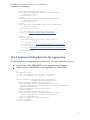
In this example, we have one SCO and two Resources. A good plan would be to organize the
content into folders, with each folder corresponding to a Resource.
Another tip is to put all the content you create into a separate folder, named content or
something similar. So, in this example, we would have:
22
SCORM Best Practices Guide for Programmers
Course Structure & Organization - Content Packages
This structure makes it easy to keep everything organized and to be prepared for any
repurposing or reuse that may be in your future plans.
Note: Many tools will handle all this organization for you. However, be aware that not
everyone will use the same tools as you do, so do what you can to keep the file structure
and organization neat and clean.
Best Practice: When possible, remove the redundancy of duplicated files in the
content package. Use the dependency element (see Content Packages section and CAM
3.6.2) in the resource XML to encapsulate common resources and reuse within the
content package.
23
SCORM Best Practices Guide for Programmers
LMS Management & Communication - Understanding the SCORM API
LMS Management & Communication
4. Understanding the SCORM API
4.1 Introduction
The SCORM Application Programming Interface (API) is a standardized method for a
sharable content object (SCO) to communicate with the learning management system
(LMS) when a learner is interacting with a SCO. There is a specific set of information the
SCO can set or retrieve. For example, it can retrieve information such as a student name, or
set values such as a score.
To use the API, the content implements ECMAScript code, typically JavaScript, which makes
API-specific calls to communicate with the LMS.
4.2 API Wrapper JavaScript file
To access the API in content, typically an API wrapper JavaScript file is included in the main
HTML page of the SCO. This JavaScript file will find the LMS-provided API object and
provide JavaScript functions to program the required functionality for your content. An
API wrapper file is provided in the starter template and may be included in your project as
a standard JavaScript include. The API wrapper code is also provided in the Appendix (see
SCORM 2004 API Wrapper).
Note: The API wrapper files are typically used to make the life of the programmer a little
easier. They are not required, and the programmer may directly communicate with the
API. However, for the purposes of this document, we will assume the use of an API
wrapper and reference functions found within it.
4.3 Initialization and Termination
To be a valid SCO, the content must do at least two things: Initialize and Terminate. The
first API call that the content must make to the LMS is Initialize(). After all communication
with the LMS is completed, the SCO must end the API session by calling Terminate().
Depending on the JavaScript library or API Wrapper you are using, the following calls might
be made:
24
SCORM Best Practices Guide for Programmers
LMS Management & Communication - Understanding the SCORM API
// called on page load
function onLoadPage()
{
doInitialize();
}
// called on page unload
function onUnloadPage()
{
doTerminate();
}
Note: If content does not need to communicate scoring or status information to the
LMS, then Initialize() and Terminate() are the only required API calls for the SCO to be
considered conformant. They may be called at any time after the content loads and
before it closes.
25
SCORM Best Practices Guide for Programmers
LMS Management & Communication - CMI Data Model
5. CMI Data Model
This section explains storing and retrieving data about learner performance from and to
the Learning Management System (LMS). Understanding the types of data that can be
communicated via the SCORM data model enables you to discuss with your instructional
system designer (ISD) what information you can retrieve from or store in the LMS.
In SCORM 2004, every LMS must implement certain functionality to ensure interoperability
and achieve SCORM-conformance. One element of this functionality governs how data is
retrieved and stored. The SCORM data
Note: Every SCO has a full set of data model
model elements govern how data on
learners’ performance and interactions
elements, but it is not possible to access the
is retrieved and stored.
data model elements of another SCO. For
example, you cannot access the completion
A SCO must initiate all communication
status of different SCOs in the course. There
with the LMS. After the SCO has
are ways to share certain information across
initiated communication with the
SCOs: through the use of global objectives (see
SCORM API, requests to store or
Section 11 Tracking across SCOs using Global
retrieve data from the LMS can be
initiated by the SCO. The SCORM data
Objectives) and a special data model element,
model elements, described in detail in
named adl.data (see Section 5.3.1 Inter-SCO
the SCORM RTE book (also see the
Data Storage). These elements allow the
section on the Run-Time Environment
sharing of some status data and also a data
(RTE) Book), facilitate the collection of
bucket for sharing generic strings across SCOs.
learner information as learners
progress through a SCO. An LMS is
required to support all of the data model elements, but you are not required to use any of
them. As a programmer, you need to know what data can be communicated via the SCORM
data model so you can assist your ISD in knowing what options are available.
5.1 When to Implement
The SCORM data model is used whenever you need to store or retrieve data related to the
learner’s session in the LMS. For example, you might want to retrieve the following
information from the LMS:
The learner's name for use inside the content (i.e., "Well done, Jane.")
The last location in the content the learner viewed (i.e., "Do you want to start where
you left off?") (see the Bookmarking Cookbook section)
The learner's language, presentation, or other preferences
26
SCORM Best Practices Guide for Programmers
LMS Management & Communication - CMI Data Model
You may also want to store information in the LMS such as the learner's:
Score
Total time spent in a SCO
Time spent in a single session of a
SCO
Completion status
Responses to assessment items
Interactions within a SCO
Pass/fail status
Note: If your course design requires
minimal tracking or learner interaction,
no data model elements need to be stored.
Again, it is important to work with the
designer to understand what is required.
5.2 Examples
Table 5.1 provides a description and application of the most common SCORM data model
elements, using the simple name and the cmi name. See CAM 4.1 or the section that
describes Content Aggregation Model (CAM) Book in this document, for the complete
description of the data model and list of elements with their allowed value formats.
Table 5.1 Common SCORM Data Model Elements
Data Model Element
with cmi Name
Technical Data
Entry
cmi.entry
Launch Data
cmi.launch_data
Location
cmi.location
Description
Application
Indicates whether the learner has
previously accessed the SCO so the runtime environment will know if data for the
SCO exists or not. This value is initialized
by the LMS and is read-only.
When learners enter a SCO for the first
time, the element is set to ab-initio. If the
learner is re-entering a suspended
session, the element is set to resume.
Provides data specific to a SCO that the
SCO can use for initialization. This value
is initialized by the LMS using the data
from the manifest file element
<adlcp:dataFromLMS>.
Allows SCOs to be configured with data
from the LMS at the time of launch. This
data is defined in the manifest file element
dataFromLMS (see CAM 3.4.1.14). For
example, configuration data for scenarios
can be passed via this element.
Represents a location in the SCO.
Used for book-marking the learner’s
position in a SCO in a given instance,
allowing the learner to resume the SCO at
the same point at which learning was
suspended. This value is not interpreted
by the LMS, but is made available to the
programmer to implement features such
as book-marking.
27
SCORM Best Practices Guide for Programmers
LMS Management & Communication - CMI Data Model
Data Model Element
with cmi Name
Suspend Data
cmi.suspend_data
Description
Application
Provides additional space to store and
retrieve data between learner sessions.
If the learner starts the SCO, but does not
complete it, the current state data (up to
64K characters) may be stored in this
element. This value is not interpreted by
the LMS, but is made available to the
programmer to implement features such
as book-marking.
Allows the SCO to present the name of
the learner inside the content, in the form
lastname, firstname.
Typically used to customize learning
content, for example:
Indicates if the learner has completed the
SCO.
The completion status [see Status and
Scoring], determined by the ISD, can be
based on a test score, navigation through
content, completion activities, etc.
Describes a collection of learner
responses, such as responses to
questions or tasks for the purpose of
measurement or assessment.
Frequently used in tests or quizzes to
collect learner response information. [see
Assessments, for more information on
cmi.interactions.]
Specifies learning or performance
objectives associated with a SCO. Usually
mapped to Globals which may be shared
across SCOs.
May be used to represent learning
objective status and to impact sequencing
decisions in the course.
Identifies the scaled passing score
required to master the SCO. This field is
set from the LMS using the value in
<adlcp:minNormalizedMeasure>.
This value is read-only.
Will be initialized to your minimum passing
score and may be retrieved for reference.
Identifies the learner’s score for the SCO.
A SCO can only report one score. [see
RTE 4.2.20]
This is typically the result of some
interaction the learner has with the
content where a numeric score is relevant.
The score object is broken down into 4
sub-elements, with scaled being the most
commonly used to represent a mastery
percentage.
Indicates if the learner has mastered the
SCO, as indicated by a passed or failed
value.
The criteria, defined by the ISD, can be
based on a percentage of interactions
being passed or objectives being met, a
score for a test or quiz, etc. See Status
and Scoring for additional details on how
this field is used.
Indicates how the learner left the SCO.
(see Exiting SCOs and Courses)
Can be used to impact sequencing
decisions and determines if a SCO is
suspended or exited normally.
Content Initialization
Learner Name
cmi.learner_name
“Welcome back Sgt Thomas.” or “Nice
work, Capt. Brown.”
Score Reporting
Completion Status
cmi.completion_status
Interactions
cmi.interactions
Objectives
cmi.objectives
Scaled Passing Score
cmi.scaled_passing_score
Score
cmi.score.raw
cmi.score.min
cmi.score.max
cmi.score.scaled
Success Status
cmi.success_status
Exit Data
Exit
cmi.exit
28
SCORM Best Practices Guide for Programmers
LMS Management & Communication - CMI Data Model
Data Model Element
with cmi Name
Session Time
cmi.session_time
Total Time
cmi.total_time
Description
Application
Identifies the amount of time the learner
has spent in the current instance of the
SCO.
The ISD defines the value and meaning of
session time. The LMS uses this time to
compute total time.
Stores the learner’s cumulative time for all
sessions of a specific SCO for a given
learner attempt.
Stores the total time spent in every
session of a given SCO, for a given
learner.
5.3 How to Implement
The cmi data model is accessed through JavaScript calls in the content. In the API wrapper
files we are using in this document (see Section 3.3.2 API Wrapper), there are two calls that
are used when working with these elements: doSetValue and doGetValue. Both of these
are defined in the APIWrapper.js file in the content package. A full set of API calls that are
available can be found in RTE 3.1.
Values of the cmi data model are simple strings and numbers. Here are some examples in
JavaScript.
// get the learner's name
var name = doGetValue("cmi.learner_name");
// set the score for the SCO
var score = ".85";
doSetValue("cmi.score.scaled", score);
// mark the SCO as passed
doSetValue("cmi.success_status", "passed");
// look up the bookmark of a SCO
var bookmark = doGetValue("cmi.location");
// store the current state data of the SCO to be used after resuming.
// „save this data‟ refers to a string stored in the LMS that upon
// resumption of the course will be fetched and used to initialize the
// content
doSetValue("cmi.suspend_data", “save this data”);
5.3.1 Inter-SCO Data Storage
Prior to SCORM 2004 4th Edition, SCOs had no visibility or access into information tracked
by other SCOs or even different attempts on a given SCO. With 4th Edition, ADL has
provided the adl.data data model element to allow for the sharing of sets of data across
SCOs through a collection of data stores.
Data stores are associated with a SCO using the <adlcp:data> (see CAM 3.4.1.18 and RTE
4.3) extension element in the Manifest File. This element is the last element in the <item>
29
SCORM Best Practices Guide for Programmers
LMS Management & Communication - CMI Data Model
element and a SCO may be associated with many data stores. The following XML will share
two data stores with a SCO.
<item identifier="SCO1" identifierref="RES1">
<title>SCO with shared data</title>
<adlcp:data>
<adlcp:map targetID = "shared_data_1" />
<adlcp:map targetID = "shared_data_2" />
</adlcp:data>
</item>
From within the content, the adl.data is accessed similar to global objectives (see Section
11 Tracking across SCOs using Global Objectives). The data store is located by searching
for it within an array of data store elements. In the Starter Template, a function called
findDataStore() is provided. To access the data in the store, the following JavaScript is
used:
var index = findDataStore("shared_data_1");
// grab the data
var sharedData = doGetValue("adl.data." + index + ".store");
// store the data
doSetValue("adl.data." + index + ".store",
"some data you would like to share");
The data stored in adl.store may be shared across content packages as well. An attribute
adlseq:sharedDataGlobalToSystem in the <organization> element of the manifest controls if
this data is accessible outside the scope of the content package. The default value is true, so
be sure to set the value to false if you wish to restrict access.
<organization identifier="ORG-SAMPLE" adlseq:sharedDataGlobalToSystem="false">
30
SCORM Best Practices Guide for Programmers
LMS Management & Communication - Status and Scoring
6. Status and Scoring
6.1 Introduction
Each activity in SCORM 2004 has a status. As described in the section on global objectives
(see Section 11 Tracking across SCOs using Global Objectives), both a SCO and an
aggregation have a primary objective. This primary objective is an object holding status
values related to the progress and
Note: Setting the score by itself does not
success of the learner's interaction with
the activity. Each SCO can set values in
have any immediate side effect in the
its own primary objective. The
course. It just sets the value, which is
following information is stored in the
stored in the LMS. However, as noted in
primary objective:
the next section, when used in
combination with manifest file settings,
Success_status
the scaled score may impact success
Completion_status
status.
Score (scaled, raw, min, max)
Progress_measure
Note that these are the same values defined in the CMI Data Model for statuses.
Note: The organization element in the manifest file is a special type of aggregation,
sometimes called the "root" aggregation. Just like regular aggregations, the organization
has a primary objective. This objective will ultimately contain the final status available to
the LMS for the content package.
6.2 How to Implement
6.2.1 Numeric Scores
When you need to track a numeric score in a SCO, the score object of the primary objective
is used. The score is calculated by the content. SCORM does not dictate how this score is
calculated. That is left up to you as the developer, in coordination with the instructional
designer. For example, to set the score to 85%, the following JavaScript code is used in the
content:
doSetValue("cmi.score.scaled", ".85");
31
SCORM Best Practices Guide for Programmers
LMS Management & Communication - Status and Scoring
The element cmi.score.scaled must be a number between -1 and 1. It is typically the
score of the content normalized to a percentage. The other elements of cmi.score are used
to provide additional context only. These include cmi.score.min, cmi.score.max,
cmi.score.raw. The min and max values may be used to define a range and the raw element
should be a number within the range of min and max. See RTE 4.2.20 for examples.
6.2.2 Calculate the Success Status
A score in and of itself does not have any impact on the course. It should be combined with
the Success Status and Sequencing. The Success Status represents if an activity is passed or
failed. This can be set directly, using the data model API:
doSetValue("cmi.success_status", "passed");
Another method is to use some special XML in the manifest file to calculate whether the
saved score represents a passed or failed attempt by the learner. This element is called
imsss:minNormalizedMeasure
and is detailed in CAM
Best Practice: Using the manifest to drive the success
5.1.7.1.1. When used in
status of the activity is a really good method to use if you
conjunction with the
need more dynamic control over the passing threshold of
satisfiedByMeasure attribute in
a SCO. For example, a pre-assessment of a course may
the primary objective, the
require 90% mastery, while the same content when used
pass/fail status of the activity
can easily be controlled by the
as a post-test may only require 80%. This XML method
manifest. In the following
makes it easy to make alterations without the need to
example, any score of 60% or
change content.
higher will result in a passing
status.
<imsss:primaryObjective objectiveID = "PRIMARYOBJ" satisfiedByMeasure = "true">
<imsss:minNormalizedMeasure> 0.6 </imsss:minNormalizedMeasure>
</imsss:primaryObjective>
6.2.3 Completion and Progress
A SCO is either completed or not, depending on the progress of the learner. There are two
data model elements (see CMI Data Model) available to the SCO to update progress.
cmi.progress_measure
This is used to indicate partial completion and also automatically update
cmi.completion_status. Referencing the table in RTE 4.2.18, cmi.progress_measure has the
following impact on cmi.completion_status:
32
SCORM Best Practices Guide for Programmers
LMS Management & Communication - Status and Scoring
cmi.progress_measure
0
1
0 < value < 1
cmi.completion_status
"not attempted"
"completed"
"incomplete" (typically, unless a
cmi.completion_threshold is defined and the
cmi.progress_measure >=
cmi.completion_threshold)
cmi.completion_status
This may be set to "incomplete" or "completed." Default value is "not attempted." As the
programmer, you are typically responsible for setting this value unless
cmi.progress_measure is used.
Completion Threshold
It's also possible, though not as common, to define a completion threshold in the manifest
file. In the SCORM books, Sequencing & Navigation 3.14 and CAM 3.4.1.15, ADL has
provided a special element to control completion. This element has three attributes:
completedByMeasure (optional,
default value = false): Indicates
whether the minProgressMeasure
attribute's data value shall be used
to determine completion. Setting
this attribute to true will force the
SCO to calculate the value of
cmi.completion_status based on
cmi.progress_measure and the
minProgressMeasure attribute.
Note: In SCORM 2004 4th Edition, the
syntax for Completion Threshold
changed. In 3rd Edition, it was possible to
set the threshold using the child value of
the XML element:
<adlcp:completionThreshold>0.75</adlcp:
completionThreshold>.
For 4th Edition, the attribute should be
used as described in this document.
minProgressMeasure (optional, default
. value = 1.0): The value used as a threshold
to calculate completion status. Valid values range from 0.0000 to 1.0000. When
defined, this value is compared to the value contained in cmi.progress_measure. If
cmi.progress_measure >= minProgressMeasure (which is found in the read-only
element cmi.completion_threshold), the SCO will be considered completed and
cmi.completion_status will be updated accordingly.
progressWeight (optional, default value = 1.0): Indicates weighting factor used
during completion rollup of parent.
The following code is an example manifest entry for a SCO that is considered completed if
the progress measure is 75% completed.
<item identifier="ITEM3" identifierref="RESOURCE3" isvisible="true">
<title>Content 1</title>
<adlcp:completionThreshold completedByMeasure = “true”
minProgressMeasure = “0.75” />
</item>
33
SCORM Best Practices Guide for Programmers
LMS Management & Communication - Status and Scoring
6.2.4 Reporting Scores for Multi-SCO Course
We've discussed how to set the score and completion for a SCO. However, most SCORM
2004 courses contain multiple SCOs. The course as a whole will need to ultimately report a
status. This can be accomplished by using Rollups and/or Globals to calculate the scores of
aggregations and propagate up the activity tree to the root aggregation.
34
SCORM Best Practices Guide for Programmers
Sequencing & Navigation - Control Modes
Sequencing & Navigation
7. Control Modes
7.1 Introduction
In SCORM 1.2, the learner could choose any SCO at any time by clicking on a desired entry
in the LMS-provided table of contents. In SCORM 2004, Sequencing gives you, the
programmer, the option to control the order in which the SCOs in a given Aggregation is
presented. If you do not need to implement sequencing, the default settings will allow
learners to choose any SCO at any time.
However, if you need to control the order in which your learners experience the SCOs
within a given aggregation, SCORM Sequencing provides several options called Control
Modes that you set to true or false. Table 7.1 describes the most common control modes.
Table 7.1 Common Control Mode Descriptions
Control
Mode
Choice
Default
Value
Description
SCORM
Book
true
SN 3.2.1
Flow
false
Choice Exit
true
Allows learners to select the order in which they view the
content.
Requires learners to view the content in an order defined by
the instructional designer. A combination of Navigation
requests and sequencing initiates the delivery.
Controls if learner may select an activity outside the active
aggregation via choice. Typically, all other portions of the
activity tree are hidden and the active aggregation appears as
the top-level in the Table of Contents.
SN 3.2.3
SN 3.2.2
Details and information on additional modes can be obtained in SN section 3.2. We will discuss
the most commonly used modes in this guide.
7.2 When to Implement
Every course uses Control Modes. Even if you do not explicitly add the XML in the Manifest
File to define the control modes of an aggregation, a control mode exists. The default control
modes are displayed in Table 7.1 above.
7.3 Example
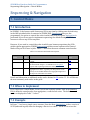
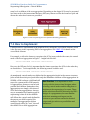
In Figure 7.1 we have a simple course structure. From the Root Aggregation, we have a series of
SCOs (indicated in gold) related to changing a flat tire in a vehicle. All the SCOs exist at the
35
SCORM Best Practices Guide for Programmers
Sequencing & Navigation - Control Modes
same level as children of the root aggregation. Depending on the design SCOs may be presented
in a linear order or the instructional designer (ISD) may choose to allow the learners to pick and
choose the order these lessons are presented.
Figure 7.1 Basic Sequencing Structure (SCOS indicated by gold boxes)
7.4 How to Implement
Control modes are implemented in the manifest file by editing the controlMode element, which
is the first entry in the sequencing XML of an aggregation. See CAM 5.1.2 for details on the
controlMode element.
For example, to allow the learner to experience the SCOs in any order he/she wants, the control
mode of the Root Aggregation in Figure 7.1 might look like this:
<imsss:controlMode flow="false" choice="true"/>
However, the ISD may feel it's important that the learner experience the SCOs in the order they
are listed above. To accomplish this, the following control would be used:
<imsss:controlMode flow="true" choice="false"/>
As mentioned, control modes are defined at the aggregation levels in the course structure
(also called the activity tree) and affect only the immediate children of that aggregation. In
SCORM, a SCO is always a child and will
Best Practice: It is important to work
never be a parent with a SCO beneath
closely with the instructional designer when
it. Aggregations, however, can be both
parents and children. Remember that
selecting control modes and deciding how to
aggregations are simply collections of
implement the sequencing of a course. These
SCOs and other aggregations. An easy
mode selections should be driven by the ISD’s
way to remember how modes apply in
design. As a programmer, become familiar
sequencing is that all of the children
with their meanings and impact on the
will follow the control mode defined in
content so you can best realize the desired
the parent; no child is special. For
example, if an aggregation defines
output and give advice on possibilities and
control mode choice as "true", then all
limitations.
the child SCOs or child aggregations
36
SCORM Best Practices Guide for Programmers
Sequencing & Navigation - Control Modes
will be available for selection in the table of contents.
Best Practice: Though it's possible to set
both flow and choice to true, be careful as
this can create problems. These two modes
are usually in conflict with each other.
Choice is learner-driven, while Flow is
design driven. Enabling Choice in an
aggregation will allow the learner to bypass
some important design features the ISD may
have prescribed.
There is no inheritance of control modes,
so the modes set at the parent level apply
only to that parent’s immediate children
(and not even to itself). A child that is an
aggregation will have its own defined
control modes that its children will
follow.
For example, Figure 7.2 depicts a series of
SCOs under a root aggregation. Each of
the SCOs in this root aggregation will
follow the set of rules defined for the root
aggregation. If you wanted to allow learners to choose Recognizing a Flat or Safety
Precautions before going on to the other SCOs,
you would have to create a new parent for them.
Best Practice: Any time you need
Figure 7.2 depicts the same content with a new
to define a special mode for a SCO or
parent aggregation called Safety that includes
aggregation, you need to create a
the Recognizing a Flat and Safety Precautions
SCOs as children. Rules can now be assigned to
new parent for it.
the Root Aggregation that will apply only to the
Safety Aggregation and the Locating the Spare, Removing the Flat and subsequent SCOs. A
unique set of rules can now be added to the Safety aggregation.
Figure 7.2 Basic Sequencing Structure with an additional Aggregation
For Figure 7.2, you might write the following rules for control mode:
For the Root Aggregation, learners must view all of the items in order. They can go
back at any time.
o
<imsss:controlMode flow="true" choice="false"/>
37
SCORM Best Practices Guide for Programmers
Sequencing & Navigation - Control Modes
For the Safety Aggregation, allow learners to choose Safety Precautions, Recognizing
a Flat, or both.
o
<imsss:controlMode flow="false" choice="true"/>
Note: Sometimes, the ISD will dictate a more dynamic control mode than SCORM
allows. For example, the design might dictate that the learner experience lessons in a
certain order before a quiz. However, once taken, the learner can review the material in
any order before moving on. This is not immediately accomplished in SCORM 2004
using control modes as mode values are static and can't be changed throughout the
course. There are ways to accomplish designs like this. See cookbook section on The
Menu SCO for an example.
Best Practice: Control Mode Choice Exit is not as common as flow and choice.
However, there is one very important use of Choice Exit that needs to be noted. In the
table of contents, the top-level item (the root organization) is rendered in the table of
contents as a clickable link to comply with a component of the UI conformance
requirements of SCORM. This is problematic as the learner may click the top link
anytime during the session. The result is that the activity tree is started over from the
beginning and the current session will probably end up in an undefined state. To
overcome this, choiceExit should be set to false in the course's organization's control
mode element.
Note: This method is not currently interoperable across LMSs due to a gray area in the
conformance criteria of SCORM 2004 4th Edition. To do this interoperably, a hidden
aggregation must be added as a child of the root organization element. Setting
isvisible="false" in this new aggregation's item element and adding an attribute of
choiceExit="false" to the control mode element will hide the clickable link related to the
organization element from the learner, yet still present the entire organization's
activities to the learner in the Table of Contents. Your real content will be a child to this
new aggregation. This method should work in all LMSs. Test on your LMS to see how it
functions.
7.5 Related Information
To read more on control modes and related topics, see the sections on Control Modes in the
SN 3.2 and CAM 5.1.2 books and also Constrain Choice Considerations in SN 3.3 and CAM
5.1.10.
38
SCORM Best Practices Guide for Programmers
Sequencing & Navigation - Navigation
8. Navigation
8.1 Introduction
Navigation is the process in which content (see the Sequencing section) is initiated. A
navigation request, as detailed in section 4.4.3 of the SN book, is the process of initiating
events, which results in the identification of learning activities (SCOs, Organizations or
Clusters) for delivery. Both learner and system may initiate these events.
8.2 Examples
Some conceptual examples of these requests are:
Continue to the next activity
Suspend this entire session
Exit (finish) this course
Jump to the post test
8.3 When to Implement
As the programmer, it's very important to understand when navigation requests occur. The
timing of navigation events must adhere to the design the ISD provides. For every SCO (see
Sharable Content Object section), you must understand and control when navigation
requests are allowed to take place.
The main set of actions available through navigation requests are:
previous - request the previous activity
continue - request the next activity
exitAll - exit/finalize the attempt on the course
suspendAll - suspend and close the current session
choice - target a specific activity to launch. Allowed based on control mode (see
Control Modes section) "choice" setting.
jump - target a specific activity to launch. Always allowed.
Less commonly used actions are:
exit - terminate the current activity normally
abandon - terminate abnormally. Activity may not be resumed.
abandonAll - terminate attempts on all activities. May not be resumed.
39
SCORM Best Practices Guide for Programmers
Sequencing & Navigation - Navigation
8.4 How to Implement
There are four ways to initiate navigation requests.
8.4.1 LMS Navigation Elements
The Learning Management System (LMS) will provide some navigation elements in its own
user interface (UI). These include previous and continue (usually shown as previous/next
arrows) and some form of exit, exitAll, abandon, abandonAll, suspendAll. You should become
familiar with the target LMS and understand the requests associated with each UI element.
The LMS UI can be customized to display only the elements desired for a given SCO. This
customization is done through the use of the <adlnav:presentation> elements in the
Manifest File, where specific navigation controls may be hidden. This adlnav:presentation
element is placed after the <sequencing> element of a SCO.
In the example below, only the suspendAll navigation element will be available in the LMS
provided navigation UI.
<item identifier="SCO-1" identifierref="RES-SCO_1" isvisible="true">
<title>SCO 1</title>
<adlnav:presentation>
<adlnav:navigationInterface>
<adlnav:hideLMSUI>continue</adlnav:hideLMSUI>
<adlnav:hideLMSUI>previous</adlnav:hideLMSUI>
<adlnav:hideLMSUI>abandon</adlnav:hideLMSUI>
<adlnav:hideLMSUI>exit</adlnav:hideLMSUI>
<adlnav:hideLMSUI>abandonAll</adlnav:hideLMSUI>
<adlnav:hideLMSUI>exitAll</adlnav:hideLMSUI>
</adlnav:navigationInterface>
</adlnav:presentation>
</item>
Best Practice: It is suggested to only allow a suspendAll navigation device from the
LMS. This allows the learner to explicitly pause a course (to take a break) and resume
later. On occasion, previous and continue may be appropriate. However, in many cases, it
may be preferred to embed previous and next navigation into the content itself. This
allows for a more consistent interface for the learner. See the section 8.4.3 Navigating
from within Content for details on how to navigate from content. Also see the Cookbook
section on The Menu SCO for additional options on navigating within the course.
8.4.2 Table of Contents
The LMS is required to display a table of contents that represents the activity tree of the
Content Packages in this document. When the learner selects an activity via the table of
contents, a choice navigation request is initiated and the selected activity is launched if
available.
40
SCORM Best Practices Guide for Programmers
Sequencing & Navigation - Navigation
8.4.3 Navigating from within Content
Navigation requests may be initiated from within the content itself. This is done through a
special data model element, adl.nav.request. Programming calls are made in JavaScript to
initiate these requests. The syntax of the request is as follows:
doSetValue("adl.nav.request", requestToken); // navigation request set
doTerminate(); // navigation request processed after Terminate
The tokens available for use in SetValue are the same actions listed above in Section 8.3.
The tokens of choice and jump have special syntax to designate the targeted activity.
doSetValue("adl.nav.request", "{target=<ACTIVITY_ID>}choice");
doSetValue("adl.nav.request", "{target=<ACTIVITY_ID>}jump");
ACTIVITY_ID is the identifier attribute found in the manifest file for the <item> element
associated with the targeted activity.
Note: jump is a new request in 4th Edition. It was introduced to allow content to have
more navigation control. A choice request is only allowed if the parent cluster of a SCO
has choice enabled in its control mode (see Section 7. Control Modes). To enable content
to target an activity for launch, regardless of control mode, the jump request was
introduced. Other than this, they exhibit identical behaviors.
Best Practice: The most common use of adl.nav.request is to initiate a continue
request. This is a very clean and interoperable way to initiate navigation from within
the content of the SCO. It does not impact reuse and does not violate any best practice of
keeping the SCO as a standalone entity. It simply means "This activity is done, move the
learner to the next available activity." If there are no more activities to present to the
learner, the course is exited and the equivalent of an exitAll navigation request is sent.
The following code should be placed within the SCO at a section that is executed when the
learner is finished with a given attempt on the SCO.
doSetValue("adl.nav.request", "continue");
doTerminate();
8.4.4 Post-condition Rule Actions
Actions in sequencing rules (see Sequencing & Navigation section in this document) will
have a similar effect on the content as initiating a navigation request. These requests may
be initiated through the use of post-condition rules. These include continue, previous, and
exitAll.
41
SCORM Best Practices Guide for Programmers
Sequencing & Navigation - Navigation
To issue a continue sequencing request if a SCO is satisfied, the following post-condition
rule may be implemented:
<imsss:sequencingRules>
<imsss:postConditionRule>
<imsss:ruleConditions conditionCombination="all">
<imsss:ruleCondition condition="satisfied" />
</imsss:ruleConditions>
<imsss:ruleAction action="continue" />
</imsss:postConditionRule>
</imsss:sequencingRules>
42
SCORM Best Practices Guide for Programmers
Sequencing & Navigation - Sequencing
9. Sequencing
9.1 Introduction
Sequencing is the process in which content objects are selected by the LMS for delivery to
the learner. Sequencing is typically initiated by a navigation request, as described in section
4.4.3 of the SN book (also see Navigation section in this document). During the sequencing
process, rules are evaluated and an activity (SCO or aggregation) is identified for delivery.
Sequencing is the most complex part of SCORM. In this guide, we will break down the most
commonly used pieces of sequencing and give you the information needed to be successful.
Under the blanket of sequencing, there is a lot of functionality. Some of this functionality is
complex enough to warrant its own section in this document (Tracking across SCOs using
Global Objectives, Control Modes, and Rollups), and we will address them separately. .
In this section, we will cover Sequencing as it relates to moving from one activity to another
and also address some miscellaneous sequencing items (Limit Conditions, Randomization,
and Delivery Controls). For a full list of sequencing components, see SN 3.1 and CAM 5.1.1.
9.2 Examples
Some conceptual examples of sequencing are:
Move from one SCO to the next
Retry a cluster if failed
Exit a cluster in the middle
Skip an activity that has already been attempted
9.3 When to Implement
If you do not need to control the order in which activities are presented, the default Control
Modes in SCORM 2004 will act very similarly to SCORM 1.2. That is, the SCOs will be
available for selection by the learner in any order they wish. If you need to control the
order in which activities are presented to the learner, then sequencing must be
implemented. Work closely with the designer to understand how a learner would flow
through the course in all scenarios. To sequence in SCORM, the Control Mode flow should
be set to "true" and typically Control Mode choice should be set to "false."
43
SCORM Best Practices Guide for Programmers
Sequencing & Navigation - Sequencing
9.4 How to Implement
In sequencing, you basically need to understand how to use three types of condition rules
provided by SCORM: pre-conditions, post-conditions, and exit-conditions. These rules, in
combination with navigation requests (see the Navigation section in this document) are all
that is needed to implement the majority of sequencing. Sequencing rules are defined in
detail in the SN book (see SN 3.4).
All sequencing rules have the same syntax. In the sequencing element of an activity, found
in the manifest file, there is a sequencingRules element, which may contain any number of
pre, post, and exit condition rules. Here is an example of the syntax:
<imsss:sequencingRules>
<imsss:preConditionRule>
<imsss:ruleConditions conditionCombination="all|any">
<imsss:ruleCondition condition="someCondition" />
<imsss:ruleCondition condition="someOtherCondition" />
</imsss:ruleConditions>
<imsss:ruleAction action=
"skip|disabled|hiddenFromChoice|stopForwardTraversal" />
</imsss:preConditionRule>
<imsss:postConditionRule>
<imsss:ruleConditions conditionCombination="all|any">
<imsss:ruleCondition condition="someCondition" />
</imsss:ruleConditions>
<imsss:ruleAction action=
"exitParent|exitAll|retry|retryAll|continue|previous" />
</imsss:postConditionRule>
<imsss:exitConditionRule>
<imsss:ruleConditions conditionCombination="all|any">
<imsss:ruleCondition condition="someCondition" />
</imsss:ruleConditions>
<imsss:ruleAction action="exit" />
</imsss:exitConditionRule>
</imsss:sequencingRules>
Let's break it down into the components of a sequencing rule.
First, rule conditions are either combined using AND or OR logic. This is done using the
conditionCombination attribute in the imsss:ruleConditions element. The values of "all" and
"any" correspond to AND and OR.
Conditions are listed as children of the imsss:ruleConditions element, using the
imsss:ruleCondition elements. There are three important attributes used in this element:
condition - the condition being tested
operator - may have a value of "not" to add logical NOT to condition
44
SCORM Best Practices Guide for Programmers
Sequencing & Navigation - Sequencing
referencedObjective - if comparing the condition to the value in a local objective (see
Tracking across SCOs using Global Objectives), the identifier of the local objective is
used here.
measureThreshold - When using objectiveMeasureGreaterThan or
ObjectiveMeasureLessThan, this attribute holds the comparison value.
Best Practice: It's important to understand how to implement a logical NOT in
sequencing conditions. In SCORM, the condition of "not satisfied" means "failed." It does
not mean "a value other than passed," which may be counter-intuitive compared to
other languages. For example, say you want to skip an activity if the learner has failed
an optional pre-assessment. It may seem like this code should work, but beware! It will
not.
<imsss:preConditionRule>
<imsss:ruleConditions conditionCombination="any">
<imsss:ruleCondition operator="not"
condition="satisfied"
referencedObjective="obj-pre" />
</imsss:ruleConditions>
<imsss:ruleAction action="skip" />
</imsss:preConditionRule>
This example only checks if the pre-assessment was failed. If the optional preassessment was skipped, the referenced objective [see Tracking across SCOs using
Global Objectives on how to use them] "obj-pre" will have a value of "unknown."
Therefore, you need to add a second condition:
<imsss:preConditionRule>
<imsss:ruleConditions conditionCombination="any">
<imsss:ruleCondition operator="not"
condition="objectiveStatusKnown"
referencedObjective="obj-pre" />
<imsss:ruleCondition operator="not"
condition="satisfied"
referencedObjective="obj-pre" />
</imsss:ruleConditions>
<imsss:ruleAction action="skip " />
</imsss:preConditionRule>
This properly checks the condition "If the activity has never been attempted or if it is
failed."
Figure 3.4a from the SN book, shown below, explains how these values fit together:
45
SCORM Best Practices Guide for Programmers
Sequencing & Navigation - Sequencing
The conditions are documented well in Table 3.4.2a of the SN book. Here is a simplified
table explaining the conditions:
Condition
always
satisfied
completed
attempted
objectiveStatusKnown
objectiveMeasureKnown
objectiveMeasureGreaterThan
objectiveMeasureLessThan
activityProgressKnown
attemptLimitExceeded
Description
Always True
True if activity or referenced objective is passed
True if activity or referenced objective is completed
True if activity has been attempted
True if the activity or referenced objective has a
satisfied status is not unknown.
True if the activity or referenced objective has a
normalized measure (score.scaled) is not unknown
True if the activity or referenced objective has a
normalized measure greater than the
measureThreshold
True if the activity or referenced objective has a
normalized measure less than the measureThreshold
True if the activity or referenced objective is in
progress
True if the number of attempts on the activity is
greater than or equal to any defined attempt limit on
the activity
Note: You can program multiple sequencing rules for an activity. They will be
evaluated in top-down order.
9.5 Pre-Condition Rules
The main actions taken via a pre-condition rule are to keep the learner from having access
to a given activity. The three most commonly used actions are:
skip - skip over this activity and select the next available
46
SCORM Best Practices Guide for Programmers
Sequencing & Navigation - Sequencing
disabled - disallows an activity for delivery of any kind. Typically seen as grayed out
in Table of Contents. (see Prerequisites Cookbook section)
hiddenFromChoice - disallows activity as target of choice request. Will be grayed
out or completely hidden in table of contents.
For example, to skip an activity if it's already been attempted, the following rule should be
used:
<imsss:preConditionRule>
<imsss:ruleConditions conditionCombination="any">
<imsss:ruleCondition condition="satisfied" />
</imsss:ruleConditions>
<imsss:ruleAction action="skip" />
</imsss:preConditionRule>
Note: Pre-Condition rules are continuously evaluated. This is in contrast to Post and
Exit-Condition rules which are evaluated only after an activity Terminates. The reason
behind this is that the execution of some of the actions such as disabled and
hiddenFromChoice cannot be tied to a specific point in time.
9.6 Post-Condition Rules
Post-Condition rules are executed when an activity terminates. They are executed each
time a SCO terminates. The following are the typical actions that can be taken:
exitParent - Exit the current aggregation and execute post-condition rules of the
parent
exitAll - Terminate this attempt on the course
retry - Retry the current activity. Note: All prior attempt data for this activity will
be erased and a new attempt generated.
retryAll - Retry the entire activity tree
continue - Sequence to the next available activity in the tree
previous - Sequence to the prior activity as available
Note: Post-Condition rules on an aggregation are not automatically evaluated. They
are evaluated if a child activity executes an exitParent action in its own post-condition
rule or if the aggregation's own Exit Condition rule executes an exit action.
47
SCORM Best Practices Guide for Programmers
Sequencing & Navigation - Sequencing
9.7 Additional Sequencing Elements
9.7.1 Limit Condition
Sometimes you may wish to limit the number of attempts a learner may have on an activity.
Using limit conditions may help you achieve this design. The following XML element may
be inserted immediately after any sequencing rules to limit the activity to one attempt:
<imsss:limitConditions attemptLimit="1"/>
Best Practice: An activity may not be delivered more than its defined attempt limit.
Sequencing does not provide an alternate activity or action if the attempt limit
threshold is met. Typically the LMS will only show a message saying that the activity
was not available for delivery. It's up to you as the programmer to use sequencing rules,
specifically with condition attemptLimitExceeded, as defined above, to send the learner
to an appropriate alternative activity.
9.7.2 Randomization Controls
In some cases, you may wish to randomize the order in which content is presented to the
learner. For example, you may have two versions of an assessment and you want the
learner to only be presented with one of them. This can be accomplished through the use of
randomization controls (see SN 3.12). Randomization XML is placed before Delivery
Controls on an aggregation. It does not make sense in the context of a SCO. The most
common example is to reorder all the children prior to delivery:
<imsss:randomizationControls randomizationTiming="onEachNewAttempt"
reorderChildren="true"/>
Best Practice: If you want to only deliver one of the activities in an aggregation when
using randomization controls, you will need to use post-condition rules to exit the
aggregation after the learner takes the randomized activity presented to them. This will
prevent the remaining sibling activities from being delivered. The following XML could
be placed in the sequencing XML of each child in the aggregation.
<imsss:postConditionRule>
<imsss:ruleConditions conditionCombination="any">
<imsss:ruleCondition condition="always" />
</imsss:ruleConditions>
<imsss:ruleAction action="exitParent" />
</imsss:postConditionRule>
48
SCORM Best Practices Guide for Programmers
Sequencing & Navigation - Sequencing
9.7.3 Delivery Controls
There are three attributes that can be set in Delivery Controls.
tracked (SN 3.13.1) - Whether or not the LMS manages tracking status information.
Default = true.
completionSetByContent – (SN 3.13.2) - If true, the content is required to set
completion status (CMI Data Model). If false, the activity is marked as completed
automatically on termination. Default = false.
objectiveSetByContent – (SN 3.13.3) - If true, the content is required to set
satisfied status (CMI Data Model). If false, the activity is marked as passed
automatically on termination. Default = false.
Note: The attributes completionSetByContent and objectiveSetByContent allow noncommunicative content (PDFs, Images, PPTs, etc.) to be easily used in SCORM without
the need for programming additional JavaScript in the HTML. Also note that even if
these attributes have their default values of false, that any statuses set by the content
will always be honored.
9.7.4 Sequencing Collections
The XML for sequencing can become quite verbose, especially if sequencing designs are
repeated throughout the course. To remove duplication, sequencing collections may be
used. This is described more fully in the Sequencing Collections in the Cookbook section.
49
SCORM Best Practices Guide for Programmers
Sequencing & Navigation - Tracking across SCOs using Global Objectives
10. Tracking across SCOs using Global Objectives
10.1 Sequencing Objectives
Some terms (e.g., objective, primary objective) used to signify a specific function of
instruction could have different meanings in SCORM related to sequencing your content.
You should keep in mind the definitions of these words within the context of SCORM
sequencing.
In sequencing, the variables that can store information about one SCO in the LMS that can
be retrieved for later use are called "objectives," (SN 3.10). These are not to be confused
with learning objectives, which in traditional instructional design, are used to measure the
attainment of knowledge, skill, or ability in accordance with a predefined behavior, a
prescribed condition, or an achievement standard. When discussing your sequencing
behaviors with an ISD, make sure you are both referring to objectives in the same way to
avoid confusion. As a programmer, you should consider these sequencing objectives as
"variables" in which some information may be stored and shared with other activities.
Each SCO can set or read multiple objectives, and a single objective can be set or read by
multiple SCOs. Objectives contain the following information. Note that these are the same
values defined in the CMI Data Model for statuses.
success_status
completion_status
score (scaled, raw, min, max)
progress_measure
10.2 Examples
Sequencing objectives may be used to track information at a level more granular than the
SCO itself. An objective may be used to:
Track the status of parts of Assessments within a SCO for the purpose of remediation
Share the score of one SCO with another SCO
10.3 When to Implement
Objectives should be implemented any time you need to share tracking information from
one activity with another activity or if you need to persist the status of an activity across
multiple attempts.
50
SCORM Best Practices Guide for Programmers
Sequencing & Navigation - Tracking across SCOs using Global Objectives
10.4 How to Implement
To implement objectives, you will be using a combination of programming inside the SCO
(using JavaScript) and also at the manifest level (using XML). Before looking at code, we
need to take a step back and understand how objectives are viewed from within each
context.
As mentioned, an activity may contain multiple objectives. But there is one special
objective called the primary objective. This refers to the objective containing the activity's
own status values. The remaining objectives are sometimes referred to as secondary
objectives, though that is not an official name.
10.5 Local vs. Shared Global Objectives
There are two types of objectives: local and shared global. They are typically used in
conjunction with each other. See SN 3.10.1 for details. Local objectives are typically defined
at the activity level through definitions in the manifest file (see examples below).
Objectives can be stored and retrieved by JavaScript in the SCO and accessed by sequencing
rules on the LMS (see the Sequencing section in this document). Local objectives are
typically mapped to a shared global objective through the use of the imsss:MapInfo element
(see Defining Objectives in the Manifest). Shared global objectives exist in the namespace
inside the content package, and may be shared with other activities by mapping to local
variables in other activities. Also, remember that each SCO and aggregation has a special
local objective, the primary objective, which contains the core status of that activity (see
section 6 Status and Scoring. The primary objective can also be mapped to a shared global.
Best Practice: As discussed in the content packaging section of this guide, shared
global objectives may be scoped to the namespace of the entire LMS. This is through the
use of the Objective Global to System attribute in the Organization [see Best Practice in
Content Package Organizations]. Be very careful when using the default value of this
attribute (True) as the global namespace may become cluttered.
10.6 Defining Objectives in the Manifest
Primary and secondary objectives are defined in the imsss:objectives element as a child of
the imsss:sequencing element.
<imsss:sequencing>
<!-- other sequencing rules go here -->
<imsss:objectives>
51
SCORM Best Practices Guide for Programmers
Sequencing & Navigation - Tracking across SCOs using Global Objectives
<imsss:primaryObjective objectiveID="obj-primary" satisfiedByMeasure="false">
<imsss:mapInfo targetObjectiveID="obj-global-1" />
</imsss:primaryObjective>
<imsss:objective objectiveID="obj-local-1 " satisfiedByMeasure="false">
<imsss:mapInfo targetObjectiveID="obj-global-1" />
</imsss:objective>
</imsss:objectives>
. . .
</imsss:sequencing>
In this example, we have defined a primary objective and mapped it to a shared global
named obj-global-1. We have also defined another local objective, obj-local-1, and mapped
it to the shared global objective obj-global-1.
Note: Even though we give the primary objective an ID, this identifier is really never
used in practice. Only the identifiers of the secondary objectives are important.
Best Practice: There is no real restriction on the naming of the objective identifiers.
However, as a best practice, choose a naming convention that makes sense for your
organization. It is a good idea to make the global identifiers something that will be
unique universally. This can be done with a globally unique identifier (GUID) or using
any local conventions. Also, since objectives can represent learning objectives and
variables, many have opted to use prefixes like "obj-" and "var-" when naming
objectives.
10.7 Understanding Mappings
When a local objective is mapped to a shared global objective, permissions must be defined
for reading from and writing to the global objective. The imsss:mapInfo element lets the
programmer control access to the Success Status and Normalized Measure (score) of an
objective through the use of four attributes, each having a value of true or false:
readSatisfiedStatus (default value = true)
writeSatisfiedStatus (default value = false)
readNormalizedMeasure (default value = true) f
writeNormalizedMeasure (default value = false)
52
SCORM Best Practices Guide for Programmers
Sequencing & Navigation - Tracking across SCOs using Global Objectives
10.8 SCORM 2004 4th Edition Extended Global Objective
Information
Up until SCORM 2004 4th Edition, global objectives only held values for Success Status and
Score. 4th Edition has extended this to cover all the elements of the cmi.objectives data
model (see CMI Data Model). These additional elements include:
Completion Status
Raw Score
Min Score
Max Score
Progress Measure
However, since these elements were not part of the original IMS Sequencing specification
for objectives, ADL had to add an extension to sequencing. A new element, adlseq:objectives
was added to allow this additional information to be mapped to global objectives. The
adlseq:objectives element is placed immediately after the imsss:objectives element. Using
our example above, the following code allows for the Completion Status of the SCO’s
primary objective to be written to shared global obj-global-abc and the Progress Measure of
local objective obj-local-xyz to be written to global obj-global-xyz.
<imsss:objectives>
<imsss:primaryObjective objectiveID="obj-primary" satisfiedByMeasure="false">
<imsss:mapInfo targetObjectiveID="obj-global-abc"
writeSatisfiedStatus="true" />
</imsss:primaryObjective>
<imsss:objective objectiveID="obj-local-xyz " satisfiedByMeasure="false">
<imsss:mapInfo targetObjectiveID="obj-global-xyz"
writeSatisfiedStatus="true" />
</imsss:objective>
</imsss:objectives>
<adlseq:objectives>
< adlseq:objective objectiveID="obj-primary">
< adlseq:mapInfo targetObjectiveID="obj-global-abc"
writeCompletionStatus="true" />
</ adlseq:objective>
< adlseq:objective objectiveID="obj-local-xyz">
< adlseq:mapInfo targetObjectiveID="obj-global-xyz"
writeProgressMeasure="true" />
</ adlseq:objective>
</ adlseq:objectives>
Note: The last SCO to write a completion status to a global objective is the value
that finally gets stored there.
53
SCORM Best Practices Guide for Programmers
Sequencing & Navigation - Tracking across SCOs using Global Objectives
10.9 Accessing Objectives in the Content
Local objectives are typically accessed in the SCO using JavaScript. The primary objective is
a special objective and contains the core statuses of the activity. To access these, you will
use the related CMI Data Model elements (see the CMI Data Model section in this
document).
// read the success status of the primary
var success = doGetValue("cmi.success_status");
// write the progress measure of the primary to 50% completion
doSetValue("cmi.progress_measure", ".50");
For objectives other than the primary, the cmi.objectives data model element is used. The
content must know the objectiveID of the local objective. It does not need to know the
global's ID as it always accesses it via the local objective to which it is mapped.
To access a local objective, you must search for it in the array of objectives. Using the
APIWrapper from the Starter Template, you use the findObjective JavaScript function.
var index=findObjective("obj-local-xyz");
Now that you have the index, the information may be accessed in cmi.objectives.
Note: The index must be searched for as the order in which they are found in the
objectives array is not guaranteed to follow the order defined in the manifest.
// set the success_status
doSetValue("cmi.objectives." + index + ".success_status", "passed");
// read the completion_status
var status = doGetValue("cmi.objectives." + index + ".success_status");
54
SCORM Best Practices Guide for Programmers
Sequencing & Navigation - Rollups
11. Rollups
11.1 Introduction
Activities in SCORM are organized in a hierarchical tree structure, called the Activity Tree.
There are an infinite number of structures and designs that are possible in SCORM 2004,
but at the end of the day, there needs to be a status reported for the root of this tree (i.e.,
the organization, described elsewhere (see Content Packages). The mechanism for
calculating and bubbling up statuses through the activity tree is called Rollups.
Rollup rules (see CAM 5.1.6 and SN 3.7) are used to report the status of children to their
parents. Each aggregation conceptually asks its children what their status is. The
aggregation can then determine its status and report its status up the tree until the root
aggregation knows the status of each of its children. Like standard sequencing rules, rollup
rules follow an if/then pattern using conditions defined from the limited vocabulary shown
in SN Figure 3.7a, reproduced below. Rollup rules apply to a defined subset of the children.
11.2 Examples
Some conceptual examples of rollups are:
Satisfy (Pass) the aggregation if all the children are satisfied
Complete the aggregation if 75% of the children are completed
Fail an aggregation if any of the children are failed (Not Satisfied)
11.3 When to Implement
As the programmer, you need to define the Rollup Rules to meet the design requirements
provided by the ISD that are not covered by defaults. It will be up to you to understand the
impacts and possibilities of Rollups and discuss options with the designer.
55
SCORM Best Practices Guide for Programmers
Sequencing & Navigation - Rollups
Rollups always exist whether explicitly defined or not. If no rules are defined, the following
default rules will be applied in order.
1. Satisfied Status:
If all children have a known status (passed or failed) and any failed, then not
satisfied
Otherwise, If all satisfied, then satisfied
2.
Completion Status:
If all children have a known completion status (completed or incomplete) and any
incomplete, then incomplete
Otherwise, if all completed, then completed
3. For numeric scores, the default is to calculate the weighted average of all the scores of
the children.
11.4 How to Implement
With Rollups, you need to consider the two main statuses of an activity: Completion and
Satisfied Statuses. For each aggregation, ask the following four questions:
1.
2.
3.
4.
What condition(s) would make this aggregation satisfied?
What condition(s) would make this aggregation not satisfied (failed)?
What condition(s) would make this aggregation completed?
What condition(s) would make this aggregation incomplete?
Once these four questions are answered, Rollup Rules may be written to satisfy them all.
Let’s look at a few examples using the ones mentioned above:
1. Satisfy the aggregation if all the children are satisfied
<imsss:rollupRule childActivitySet="all">
<imsss:rollupConditions conditionCombination="any">
<imsss:rollupCondition condition="satisfied"/>
</imsss:rollupConditions>
<imsss:rollupAction action="satisfied"/>
</imsss:rollupRule>
2. Complete the aggregation if 75% of the children are completed
<imsss:rollupRule childActivitySet="atLeastPercent" minimumPercent="0.75">
<imsss:rollupConditions conditionCombination="any">
<imsss:rollupCondition condition="completed"/>
</imsss:rollupConditions>
<imsss:rollupAction action="completed"/>
</imsss:rollupRule>
3. Fail the aggregation if any of the children are not passed
56
SCORM Best Practices Guide for Programmers
Sequencing & Navigation - Rollups
<imsss:rollupRule childActivitySet="any" >
<imsss:rollupConditions conditionCombination="any">
<imsss:rollupCondition operator="not" condition="satisfied"/>
</imsss:rollupConditions>
<imsss:rollupAction action="notSatisfied"/>
</imsss:rollupRule>
These rules are wrapped by the imsss:rollupRules element in the manifest.
<imsss:sequencing>
<imsss:controlModes> … </imsss:controlModes>
<imsss:sequencingRules> … </imsss:sequencingRules>
<imsss:rollupRules rollupObjectiveSatisfied="true"
rollupProgressCompletion="true" objectiveMeasureWeight="0">
…
Rollup Rules go here
</imsss:rollupRules>
<imsss:objectives> … </imsss:objectives>
<imsss:sequencing>
As mentioned before, rollup rules only apply to aggregations. However, all activities may
participate in rollup in some way or another, even SCOs. Every activity has the opportunity
to contribute to the rollup of the parent aggregation or not. This is defined in the three
attributes of imsss:rollupRules.
rollupObjectiveSatisfied - Set to "true" if activity contributes to satisfied status of
parent.
rollupProgressCompletion - Set to "true" if activity contributes to completion
status of parent.
objectiveMeasureWeight - This value is used to assist in calculating an average
score for the children.
Not all activities should contribute to rollup. Consider a series of lessons followed by an
assessment. You may program the course so that only the assessment contributes to the
Satisfied Status, while both the lessons and the assessment must be completed for the
course to be marked completed. In this case, each lesson will have
rollupObjectiveSatisfied set to "false".
Best Practice: Be careful when using scores in rollups. By default, scores of the
children are averaged and the resulting average score is assigned to the parent. In
practice, this may not be desired. When using scores, it may be more appropriate to set
objectiveMeasureWeight to 0.0 (doing this keeps rollups from setting a score of
any kind) and use global objectives (see Tracking across SCOs using Global Objectives)
when calculating and assigning a score to the parent.
57
SCORM Best Practices Guide for Programmers
Sequencing & Navigation - Rollups
11.5 Rollups vs. Global Objectives
Rollups are likely the most common way you will propagate status and scores in the
activity tree. However, global objective mappings may also be used to affect the primary
objective of a SCO or aggregation. This is a good idea if you need to control the status in
ways that Rollups do not support. For example, instead of averaging the scores of sibling
SCOs, you may wish to keep the highest or latest score. To accomplish this, a Global may be
used to keep track and write the desired score to the aggregation's primary objective.
Note: Globals always take precedence over Rollups. If there is ever a conflict in the
values of the statuses or scores, the Global wins.
58
SCORM Best Practices Guide for Programmers
Sequencing & Navigation - Exiting SCOs and Courses
12. Exiting SCOs and Courses
12.1 Introduction
The concept of exiting learning content is an important one. Everything that gets launched
must eventually exit. There are many variations of exiting a course, that will appear to be
similar from the learner's perspective, but the results are quite unique.
12.2 Examples
There are multiple applications of the word "exit," so to make it clear, consider the
following use cases:
1. The learner has finished a SCO and is ready for the next activity.
2. The learner needs to "pause" in the course and return later.
3. The learner has completed all the activities in the course.
Each of these represents a way to "exit" an activity in the course. The resulting state of the
course is different for each scenario.
12.3 Exiting the SCO
First, we will look at what it means to exit a SCO. When a SCO terminates, it is either with a
normal or suspend exit state. If a SCO is exited normally, it means that this attempt on the
SCO is completed and any re-entry into the
Best Practice: Make sure the learner
SCO will initiate a new separate attempt.
A suspended SCO retains state data from
knows what to do at all times. If you choose
the prior session, and upon resumption of
to just exit the SCO and remove the
the content, the learner may be placed
content, always provide prompts to the
where he/she left off (see Bookmarking
learner regarding how to continue. This
section).
may be a simple screen that displays
"Select an Activity from the Table of
To exit normally, which typically indicates
some finality (not needing to resume), the
Contents" or another appropriate message.
following JavaScript code in the SCO may
If the course uses Control Modes, it may be
be executed:
appropriate to create a continue navigation
request while setting the exit status of a
doSetValue("cmi.exit","normal");
doTerminate();
SCO. See the section on Navigation for how
this is done.
To exit in a suspend state (the ability to
resume later):
59
SCORM Best Practices Guide for Programmers
Sequencing & Navigation - Exiting SCOs and Courses
doSetValue("cmi.exit","suspend");
doTerminate();
From the learner's perspective, nothing happens when these JavaScript calls are made. The
content remains on the screen and the learner may continue to interact with it. It is up to
you as the developer, to remove the
Best Practice: If a SCO is exited in the
content from the screen and provide
input to the learner regarding what
suspend exit state, it probably is a good idea to
actions to take next.
implement bookmarking. Check with your
ISD to see what bookmarking is required in
In many cases, the learner may exit the
the course. If cmi.exit is set to suspend,
SCO at unexpected times. This can
additional data model elements are available
occur if the learner clicks the LMS
to store information that may be retrieved
navigation menu or table of contents
or simply closes the browser using the
upon reentry into the course. See
window's close button. As the
Bookmarking for examples.
programmer, you need to be prepared
for such cases using the browser's
event handling functions. For example, if the learner closes the browser, the following code
will show a confirmation dialog and suspend the SCO if closed.
function doOnUnload() {
// check if we already terminated cleanly before the unload occurred.
if (alreadyTerminated == false) {
// make sure they meant to close the window
event.returnValue = "Are you sure you want to exit the content?";
event.cancelBubble = true;
// add some cleanup or bookmarking code here as appropriate
doSetValue("cmi.exit", "suspend");
alreadyTerminated = true;
doTerminate();
}
}
12.4 Exiting the Course
If the SCO is exited, as described above, the course session is still active. The learner will
have to select a new activity or sequencing will present a new activity to him/her. The
course session is not necessarily exited if the SCO exits. A course is usually exited when the
learner needs to take an extended break from the course or when the course is completed.
Note: If the element adl.nav.request (see section 8.4.3, Navigating from within
Content) was set prior to terminating the SCO, the content will initiate the defined
navigation request. This is the only time content will be removed upon termination.
60
SCORM Best Practices Guide for Programmers
Sequencing & Navigation - Exiting SCOs and Courses
A course is exited through the
Best Practice: It is not suggested to use exitAll
use of exitAll or suspendAll
from within the SCO. The SCO typically does not
navigation requests. There is a
have the context to know when the course should
similar relationship at the
course level with exitAll and
exit completely. The sequencing request, exitAll,
suspendAll that exists in the SCO
may be initiated from the imsmanifest.xml via a
with "normal" and "suspend"
postConditionRule. The manifest is the best place to
cmi.exit values. If a course
control such actions.
receives either of these
navigation requests, this will
cause the course to close and the LMS will regain control.
From within a SCO, when explicitly wanting to pause the course, the following code should
be used:
doSetValue("cmi.exit","suspend");
doSetValue("adl.nav.request", "suspendAll");
doTerminate();
This will exit the SCO, leaving it in a suspended state and exit the course, leaving the entire
course in a suspended state. At this
point, the entire learning session will
Best Practice: Two other requests, abandon
be removed from the screen and
and abandonAll, will completely remove the
control will be handed back to the LMS.
attempt as if it never took place. It is
The course may be launched again and
will resume at the suspended SCO. If
suggested to use these with caution.
the adl.nav.request element is not set,
then the content will remain on the screen. It is up to you as the programmer to provide
instructions to the learner on how to launch another activity.
The following code can be used in the sequencing section of the SCO where a course exit is
desired:
<imsss:sequencing>
<imsss:sequencingRules>
<imsss:postConditionRule>
<imsss:ruleConditions>
<imsss:ruleCondition condition = "satisfied"/>
</imsss:ruleConditions>
<imsss:ruleAction action = "exitAll"/>
</imsss:postConditionRule>
</imsss:sequencingRules>
</imsss:sequencing>
61
SCORM Best Practices Guide for Programmers
Sequencing & Navigation - Exiting SCOs and Courses
Best Practice: In many cases, it may be best to exit the course in all cases where the
learner closes the content window without using the provided navigation elements.
This is necessary in courses that use the Control Modes and hide the LMS navigation
controls as the Table of Contents is not accessible and the learner has no option to
choose a new activity.
12.5 When to Implement
As a programmer, it’s important to understand the concepts of exiting and it’s up to you to
ensure that each exit scenario is available and accounted for per the course design. You
should also assist in the development of test plans to ensure coverage of the scenarios
during the testing phases of development.
12.6 How to Implement
There are four places that affect when and how content is exited:
1.
2.
3.
4.
The LMS Navigation UI
The LMS table of contents
Programming JavaScript calls inside the SCO
Sequencing post-condition rules
12.6.1 LMS-provided Navigation UI
The learner may select an action from the navigation menu provided natively by the LMS.
This may be a Next or Previous button or may be one of the Exit buttons for the course. If
these options are available to
the learner, you have very
Best Practice: If the design requires some level of
little control over when these
control over when the learner exits a SCO and moves to
actions are initiated. The
the next SCO, the LMS navigation UI should be
content needs to be
customized as discussed in the Navigation section.
programmed to capture exit
events from the learner and
handle them appropriately.
12.6.2 LMS Table of Contents
This is very similar to the navigation
interface provided by the LMS. If the
learner clicks on an activity in the
table of contents, the current activity
is exited and a new activity is
Best Practice: If the design requires more
control over when the learner selects activities
to experience, then enabling the table of
contents may not be appropriate. See section
on Control Modes for additional options.
62
SCORM Best Practices Guide for Programmers
Sequencing & Navigation - Exiting SCOs and Courses
selected for the learner. Content will need to be handled in a similar manner as above.
12.6.3 Exiting from within Content
When a SCO is exited with no additional navigation action, control remains with the
learner. The learner will need to select the next activity from the table of contents (if
available). If a navigation request is initiated after exiting the SCO or if a course is exited,
control is returned to the LMS. The LMS will either select a new activity (based on
sequencing rules) to launch or the current session will be terminated.
12.6.4 Exiting via Sequencing Rules
As mentioned above, it’s probably not a good idea to exit the course (using an exitAll
navigation request) from within a SCO. If a learner finishes the course and has experienced
all the content available to him/her per the course’s design, then it’s possible for the
attempt on the course to be finalized through the use of sequencing. This is done in two
ways:
Continue Past the Last Available SCO
If a continue request (e.g., see the Navigation section in this document) is made that causes
the course to sequence past the last available SCO, the course is considered to have "walked
off the tree." The result of this action is to effectively finalize the current attempt of the
course and turn control over to the LMS.
Initiate an exitAll Sequencing request from a Post-condition Rule
A post-condition action can be associated with an activity that will cause the course to exit
and finish based on a certain condition. In the following example, the course will exit if the
activity is satisfied. This sequencing code may be placed in the sequencing section of any
SCO or aggregation.
<imsss:sequencingRules>
<imsss:postConditionRule>
<imsss:ruleConditions conditionCombination="all">
<imsss:ruleCondition condition="satisfied" />
</imsss:ruleConditions>
<imsss:ruleAction action="exitAll" />
</imsss:postConditionRule>
</imsss:sequencingRules>
63
SCORM Best Practices Guide for Programmers
Sequencing & Navigation - Exiting SCOs and Courses
Note: Where does an exit condition fit into all this? An exit condition rule may be applied
at the cluster level to force an exit action on the cluster. Note that this is different than
actually exiting or leaving a SCO or cluster. This is a special action in sequencing that will
trigger the execution of post-condition rules in the cluster. In a cluster, these rules are
executed only if a child explicitly executes an exitParent action in its own post condition
rules or if the cluster's Exit Condition Rule executes an exit action. The following code will
cause a cluster's post-condition rules to be evaluated if the cluster is satisfied.
<imsss:sequencingRules>
<imsss:exitConditionRule>
<imsss:ruleConditions>
<imsss:ruleCondition condition="satisfied"/>
</imsss:ruleConditions>
<imsss:ruleAction action="exit"/>
</imsss:exitConditionRule>
</imsss:sequencingRules>
64
SCORM Best Practices Guide for Programmers
Resources, Tools, & Development Support - ADL SCORM Resources Overview
Resources, Tools, & Development Support
13. ADL SCORM Resources Overview
13.1 Background
ADL does not provide or recommend tools to build content. However, there are a few ADL
applications and documents that can assist in the development process. Located at
http://www.adlnet.gov/capabilities/scorm#tab-learn, they are:
SCORM 2004 4th Edition Document Suite (CAM, SN, & RTE SCORM Books)
SCORM 2004 4th Edition Sample Run-Time Environment (SRTE)
SCORM 2004 4th Edition Test Suite (TS)
ADL SCORM 2004 4th Edition Content Examples
13.2 SCORM 2004 4th Edition Document Suite
13.2.1 Background
The official documentation of SCORM can be found in three books. They are commonly
called The SCORM Books. These books contain detailed information about the specifications
included in SCORM. Here we will break them down so you know where to go for what
information.
13.2.2 Content Aggregation Model (CAM) Book
The introduction of the CAM book (see CAM 1.1) says:
"The SCORM Content Aggregation Model (CAM) book describes the components used in
a learning experience, how to package those components for exchange from system to
system, how to describe those components to enable search and discovery and how to
define sequencing information for the components. The SCORM CAM promotes the
consistent storage, labeling, packaging, exchange and discovery of learning content."
In plain English, this book contains information that describes:
High level information on content packaging and organization
Specific details on the syntax of the Manifest File
An overview of Metadata, including Learning Object Metadata (LOM) details
Best Practices and Practical Guidelines
65
SCORM Best Practices Guide for Programmers
Resources, Tools, & Development Support - ADL SCORM Resources Overview
13.2.3 Sequencing and Navigation (SN) Book
The introduction to the SN book states:
"The SCORM SN book describes how SCORM-conformant content may be delivered to
learners through a set of learner- or system-initiated navigation events. The branching
and flow of that content may be described by a predefined set of activities."
This book contains conceptual information related to:
Sequencing Definitions and Behaviors
Navigation Controls and Data model
13.2.4 Run-Time Environment (RTE) Book
The introduction to the RTE book states:
"The SCORM RTE book describes the learning management system (LMS) requirements
in managing the run-time environment (i.e., content launch process, standardized
communication between content and LMSs and standardized data model elements used
for passing information relevant to the learner’s experience with the content). The RTE
book also covers the requirements of Sharable Content Objects (SCOs) and their use of a
common application programming interface (API) and the SCORM Run-Time
Environment Data Model."
This book covers:
SCORM API
CMI Data Model Overview
13.3 SCORM 2004 4th Edition Sample Run-Time
Environment (SRTE)
13.3.1 Background
The SCORM 2004 4th Edition Sample Run-Time Environment (SRTE) Version 1.1.1
provides a working example of the Run-Time Environment described in SCORM 2004 4th
Edition. In simple terms, the SRTE functions as a sample player for your content. The intent
is to provide a stable environment to test content to make sure it runs as expected. The
SRTE can be found at http://www.adlnet.gov/capabilities/scorm#tab-learn.
66
SCORM Best Practices Guide for Programmers
Resources, Tools, & Development Support - ADL SCORM Resources Overview
13.3.2 When to Use the SRTE
Use the SRTE for your testing process during content development. The SRTE will allow
you to test:
Content Import
The SRTE will do a validation on your content package before importing it to ensure
conformance. For more detailed testing, use the SCORM 2004 4th Edition Test Suite (TS),
described below.
Content Delivery
The SRTE will allow you to launch your content and see how it will appear when running in
an LMS.
Note: All LMSes will provide a similar UI, but the look and feel will vary. The SRTE will
give you an idea and will also allow you to test your content in a browser environment.
SCORM API and Data Model Usage
All the SCORM 2004 API features and the CMI Data Model are available in the SRTE. You
can fully test this functionality prior to LMS deployment.
Sequencing and Navigation
Sequencing is one of the more complex components of an LMS implementation. If you are
unfamiliar with your
LMS's sequencing
Best Practice: In some cases, even an LMS claiming to be
implementation or are
conformant will have incorrect behaviors regarding
trying to debug a
sequencing. Using the SRTE as a comparison base is a good
sequencing related issue,
idea, so you can assist the vendor in correcting
it's always good to go back
conformance issues.
to the SRTE and ensure
that it functions there first.
13.4 SCORM 2004 4th Edition Test Suite (TS)
13.4.1 Background
The only way to ensure your content is SCORM 2004 4th Edition conformant is to use the
ADL SCORM 2004 4th Edition Test Suite, here referred to as the TS.
13.4.2 When to Use the TS
The TS provides five tests, four of which can be used by you as a content developer.
67
SCORM Best Practices Guide for Programmers
Resources, Tools, & Development Support - ADL SCORM Resources Overview
Learning Management System (LMS) Conformance Test
This test is used by LMS vendors to test their SCORM implementations. You can ignore this
test.
Content Package Conformance Test
This test will check your content package for conformance. It will check the manifest file
(similar to Manifest Utility), linked metadata files, and will launch the SCO RTE test as well.
Sharable Content Object (SCO) Run-Time Environment (RTE) Conformance Utility
Test
This test will allow you to launch all the SCOs in the manifest file and monitor the API traffic
between your content and the SCORM API. It will ensure that at a minimum the SCO initializes
and terminates correctly and that there are no conformance errors in the RTE programming.
Manifest Utility Test
This test will simply check the manifest file for conformance and check that the files in the
package match those listed in the resources.
Checksum Utility Test
This is a handy utility to verify that a prior test log generated by the TS is valid for your
current content package. It will make sure that no files in the content package have
changed since that log was generated.
13.5 ADL SCORM 2004 4th Edition Content Examples
13.5.1 Background
ADL provides six content packages containing functional examples of SCORM 2004
implementation strategies in addition to offering sound instruction on SCORM 2004 4th
Edition content development. (See: http://www.adlnet.gov/capabilities/scorm#tab-learn)
13.5.2 Content Examples
Manifest Basics Content Example (MBCE)
The MBCE serves to show the basic concepts and components of a content package
manifest in SCORM.
Bookmarking Example (BKME)
The BKME shows the concept of bookmarking, the rules and components needed to
successfully use it, as well as implementation strategies to allow creation of content that
can be resumed in its most recent state.
Plug-In Technologies Content Example (PITE)
68
SCORM Best Practices Guide for Programmers
Resources, Tools, & Development Support - ADL SCORM Resources Overview
The PITE shows how to implement SCORM 2004 web-based solutions beyond that of
JavaScript by looking at strategies of using SCORM 2004 with both Adobe® Flash® and
Adobe® Director®.
The Sequencing Essentials Content Example (SECE)
The SECE provides sequencing information and examples in preparation for or reference
use in development of SCORM 2004 content.
The Data Model Content Example (DMCE)
The DMCE provides data model element information and examples in preparation for or
reference use in development of SCORM 2004 content.
The Multiple Sequencing Content Example (MSCE)
The MSCE provides a common set of content with different sequencing implementations to
fit multiple pedagogical approaches.
69
SCORM Best Practices Guide for Programmers
Cookbook - Bookmarking
Cookbook
In this section of the guide, we will address common questions about SCORM that have
surfaced over the years. We have included examples, tips, tricks, and best practices based
on expert input and experience.
14. Bookmarking
14.1 Background
Bookmarking is the common term used for allowing the learner to take a break and then
return to where they left off in the content. SCORM 2004 does not use the term
Bookmarking, but provides multiple ways to accomplish this.
14.2 How to Implement
14.2.1 Save the State
SCORM 2004 4th Edition provides two ways to save content state that can be accessed
when the learner resumes. These elements are simply storage areas for text that may be
used for bookmarking. No bookmarking occurs automatically. As the programmer, it is
your responsibility to use this data to initialize the content in the SCO at the bookmarked
location.
cmi.location
The CMI Data Model has a location element (see RTE 4.2.14) that can be used to store a
string. It can hold 1000 characters.
Example:
// to set the data
doSetValue("cmi.location", "some data that you want to store");
// to retrieve it later …
var bookmark = doGetValue("cmi.location");
// The programmer should use this bookmark variable to initialize the SCO
// and put the learner back where they left off. Nothing automatically happens
// here.
cmi.suspend_data
If 1000 characters are not enough, the CMI Data Model has an element to store the
suspended state of a SCO (see RTE 4.2.23). This element can also be used to store a string.
It can hold 64000 characters.
70
SCORM Best Practices Guide for Programmers
Cookbook - Bookmarking
Example:
// to set the data
doSetValue("cmi.suspend_data",
"some more data that you want to store");
// to retrieve it later …
var bookmark = doGetValue("cmi.suspend_data");
// The programmer should use this bookmark variable to initialize the SCO
// and put the learner back where they left off. Nothing automatically happens
// here.
14.2.2 Suspend the Content
For bookmarking, content must be exited in a suspended state (see Rollups). To suspend
only the current SCO, two JavaScript lines must be added:
doSetValue("cmi.exit", "suspend");
doTerminate();
At this point, you will need to provide the learner with an option to choose another activity.
Typically, when the learner needs to suspend for a period of time, control should be
returned to the LMS. This is accomplished through a Suspend All navigation request (see
Navigation). This can be done by using the LMS-provided UI or the following JavaScript
code within the content:
doSetValue("cmi.exit", "suspend");
doSetValue("adl.nav.request", "suspendAll");
doTerminate();
14.3 Learner Option
In some cases, you will want to give the learner the option to use the bookmark to resume
or to start the activity over from the beginning. Figure 14.1 shows an example of how you
may prompt the learner when resuming a suspended SCO.
71
SCORM Best Practices Guide for Programmers
Cookbook - Bookmarking
Figure 14.1 Example Use of cmi.location Data Model Element in a SCO
72
SCORM Best Practices Guide for Programmers
Cookbook - Prerequisites
15. Prerequisites
15.1 Background
A very common design pattern is that of a prerequisite. This is where the availability of
one activity is dependent on some external condition, typically the completion or
satisfaction of a prior activity.
For example, Figure 15.1 shows a flowchart with a series of lessons followed by an
assessment. The design dictates that the lessons be completed before the assessment is
accessible.
Figure 15.1 Flowchart of two lessons followed by a locked assessment.
15.2 How to Implement
The steps to implement this are listed below and are described in detail in this section:
1.
2.
3.
4.
Create an aggregation (cluster) for the lessons
Add Rollup Rules to aggregation
Map aggregation's primary objective to a shared global
Create Pre-Condition rule on the assessment
15.2.1 Create an Aggregation (Cluster) for the Lessons
In order to track the completion of all the lessons, the lesson SCOs need to be organized in
an aggregation, or cluster. This will allow Rollup Rules to be created to assist in tracking
them as a collective.
<item identifier="CLUSTER-ONE" isvisible="true" >
73
SCORM Best Practices Guide for Programmers
Cookbook - Prerequisites
<title>Lesson Aggregation</title>
<item identifier="LESSON1" identifierref="RES-SCO1"
isvisible="true">
<title>Child 1</title>
</item>
<item identifier="LESSON2" identifierref="RES-SCO2"
isvisible="true">
<title>Child 2</title>
</item>
<item identifier="ASSESSMENT" identifierref="RES-SCO3"
isvisible="true">
<title>Child 3</title>
<!-- Pre-condition sequencing rules go here,
see 15.2.4 Create Pre-Condition Rule on Assessment -->
</item>
<imsss:sequencing>
<imsss:controlMode flow="true" choice="true"/>
<!-- Rollups go here,
see section 15.2.2 Implement Rollup Rules for the Aggregation -->
<!-- Objectives go here,
see 15.2.3 Map Aggregation's Primary Objective to a Shared Global -->
</imsss:sequencing>
</item>
15.2.2 Implement Rollup Rules for the Aggregation
The Rollup Rules for the aggregation are shown here. The logic conditions used are:
"If any lesson is NOT COMPLETED" set the aggregation to incomplete.
"If All lessons are COMPLETED" set the aggregation to COMPLETED.
<!-Two important rules:
- If any are incomplete, the cluster is incomplete.
- If all are completed, the cluster is complete.
-->
<imsss:rollupRules rollupObjectiveSatisfied="true"
rollupProgressCompletion="true">
<imsss:rollupRule childActivitySet="any">
<imsss:rollupConditions conditionCombination="any">
<imsss:rollupCondition operator="not" condition="completed"/>
<imsss:rollupConditions>
<imsss:rollupAction action="incomplete"/>
</imsss:rollupRule>
<imsss:rollupRule childActivitySet="all">
<imsss:rollupConditions conditionCombination="any">
<imsss:rollupCondition condition="completed"/>
</imsss:rollupConditions>
<imsss:rollupAction action="complete"/>
</imsss:rollupRule>
</imsss:rollupRules>
74
SCORM Best Practices Guide for Programmers
Cookbook - Prerequisites
15.2.3 Map Aggregation's Primary Objective to a Shared Global
In order to track the completion status of the lesson aggregation, a shared global objective
must be used. This shared global is mapped to the primary objective of the aggregation. In
this example, we are writing from the primary objective to the satisfied and completion
status of the shared global named obj-global-lessons. This global will always have the
current Completion Status of the cluster. We will use this later to create the prerequisite
condition.
<imsss:objectives>
<!—
Map that global to the primary of the aggregation so it gets the core status.
-->
<imsss:primaryObjective objectiveID="obj-primary" satisfiedByMeasure="false">
<imsss:mapInfo targetObjectiveID="obj-global-lessons"
writeSatisfiedStatus="true"/>
</imsss:primaryObjective>
</imsss:objectives>
<!-Use the 4th Ed adlseq:objectives to capture if this aggregation is completed
in a global named obj-global-lessons.
-->
<adlseq:objectives>
<adlseq:objective objectiveID = "obj-primary">
<adlseq:mapInfo targetObjectiveID = "obj-global-lessons"
writeCompletionStatus="true" />
</adlseq:objective>
</adlseq:objectives>
15.2.4 Create Pre-Condition Rule on Assessment
To create the prerequisite, a pre-condition sequencing rule is used (see Sequencing
section). The following code is the sequencing used in the assessment. You will map the
shared global from 1.2.3 above to a local objective obj-prereqs, and create an action to
disable the assessment while obj-prereqs is either unknown or incomplete.
<imsss:sequencing>
<imsss:sequencingRules>
<!-You can now sequence off the completed status of the global.
You have to account for the "unknown" state of completion, so 2
conditions are needed
-->
<imsss:preConditionRule>
<imsss:ruleConditions conditionCombination="any">
<imsss:ruleCondition operator="not" condition="completed"
referencedObjective="obj-prereqs" />
<imsss:ruleCondition operator="not" condition="activityProgressKnown"
referencedObjective="obj-prereqs" />
</imsss:ruleConditions>
<imsss:ruleAction action="disabled" />
</imsss:preConditionRule>
</imsss:sequencingRules>
75
SCORM Best Practices Guide for Programmers
Cookbook - Prerequisites
<imsss:rollupRules rollupObjectiveSatisfied="true"
rollupProgressCompletion="true" />
<imsss:objectives>
<imsss:primaryObjective objectiveID="obj-primary"
satisfiedByMeasure="false"/>
<imsss:objective objectiveID="obj-prereqs" satisfiedByMeasure="false">
<imsss:mapInfo targetObjectiveID="obj-global-lessons"
readSatisfiedStatus="true"/>
</imsss:objective>
</imsss:objectives>
<imsss:deliveryControls objectiveSetByContent = "true"/>
<adlseq:objectives>
<!-This lets you read the global's completion status and bring it into
scope
-->
<adlseq:objective objectiveID = "obj-prereqs">
<adlseq:mapInfo targetObjectiveID = "obj-global-lessons"
readCompletionStatus="true" />
</adlseq:objective>
</adlseq:objectives>
</imsss:sequencing>
76
SCORM Best Practices Guide for Programmers
Cookbook - Assessments
16. Assessments
16.1 Introduction
An assessment, otherwise known as a test, is a common type of content. It is implemented
as a normal SCO. However, SCORM provides some features that can assist in the tracking
and reporting of the learner's experience in the assessment. In this section, we will look at
the CMI Data Model of cmi.success_status, cmi.score, cmi.interactions and how they may be
utilized in assessments.
16.2 When to Implement
The tracking requirements for an assessment will vary based on the design. These
requirements need to be discussed with your designers (ISDs). In some cases, you may only
need to mark the assessment as passed or failed. In other cases, you may also need to
calculate a numeric score and store this in the LMS as well. In yet other instances, you may
have to capture and store in the LMS detailed information about each assessed item.
16.3 Examples
SCORM provides some functionality that is commonly used in assessments and will help
you implement almost any design your ISD provides. An assessment can be a simple set of
questions (multiple-choice, true/false, fill in the blank, etc.), or it can be a complex scenario
with detailed step-by-step processes that must be performed in a certain order. SCORM
does not impose any restrictions on assessments. An assessment in SCORM is treated just
like any other type of SCO.
16.4 How to Implement
All tracking in SCORM is done using the CMI Data Model.
16.4.1 Pass/Fail and Scoring
Most assessments are graded and given a result of passed or failed. This value is calculated
by the programming logic in the course and the resulting value is stored in the LMS as
follows:
// cmi.success_status is either passed or failed
doSetValue("cmi.success_status","passed");
77
SCORM Best Practices Guide for Programmers
Cookbook - Assessments
Many assessments are also given a numeric score. The calculated numeric score is stored
in the LMS using the cmi.score object:
// represents a score of 75%
doSetValue("cmi.score.scaled","0.75");
For more details regarding SCORM and scoring, refer to the section on Status and Scoring.
16.4.2 Interactions
In some assessments, detailed information about each assessed item is also captured and
stored. To track details about each tested item in an assessment, the data model element
cmi.interactions is used (see RTE 4.2.9). Interactions allow a SCO to send data to the
Learning Management System (LMS) about a learner’s performance in an interoperable
way. It provides a detailed model for designers and programmers to collect metrics about
learner responses or performance within a SCO, particularly detailed data related to
performance on assessments such as expected correct response, the learner’s response,
duration taken to respond, etc.
The cmi.interactions data model element is an array type object consisting of many
interactions. A single interaction describes a tested item. An interaction is represented by
dot notation similar to other cmi data model elements. Refer to the section on CMI Data
Model for details on this syntax.
The most common elements used in the cmi.interaction object are shown below. See RTE
Table 4.2.9a for details of the syntax used in creating an interaction.
id - The question identifier. This is used to associate the question to a database or
master list of questions.
description - A description of the interaction. This might be the question presented
or a description of the task given to the learner.
type - Type of question, e.g. multiple-choice, true/false, matching, etc.
timestamp – The time when this item was presented to the learner
correct_responses - Defines an array of correct responses to be presented. The
array is a list of patterns that correspond to the type of interaction.
learner_response – What the learner actually answered
result - Whether the learner’s response was correct or not
latency – How long it took the learner to respond
The interactions are a collection of information stored in arrays. The cmi data-model uses a
zero-based index position (n) in the dot-notation to separate the data. For example, if there
were ten assessment items, the identifier of the third one would be accessed like this:
cmi.interactions.2.id
78
SCORM Best Practices Guide for Programmers
Cookbook - Assessments
Here is an example of a multiple-choice question and how to represent it using
interactions:
Which of the following cities is in Texas?
A - Los Angeles
B - Santa Fe
C - Austin
D - New York City
Using interactions, the following code is required to be implemented in the SCO:
// Find an array index to use for the new interaction. This is
// done by checking how many exist and using that as the next
// available index in the array.
var numInts = doGetValue("cmi.interactions._count");
// Create the new one. The id must be a valid Uniform Resource
// Identifier (URI). In general, it is a short string (no spaces)
// that can be used to identify the interaction in an external
// list. A list of all the interaction elements and their types
// can be found in RTE table 4.2.9a
var id = "example-question-1";
doSetValue("cmi.interactions." + numInts + ".id", id);
// Set the type of interaction. The options include:
// true-false, choice, fill-in, long-fill-in, likert, matching,
// performance sequencing, numeric, other (see RTE table 4.2.9a)
doSetValue("cmi.interactions." + numInts + ".type", "choice");
// description is typically the question asked or task
// description
doSetValue("cmi.interactions." + numInts + ".description",
"Which of the following cities are in Texas?");
// The correct responses array contains a list of possible
// correct answers. Each correct answer has a pattern specific to
// the type defined above. These patterns are defined in
// RTE table 4.2.9a. The simplest example is shown below: A
// multiple choice response with a single correct answer.
doSetValue("cmi.interactions." + numInts + ".correct_responses.0.pattern",
"Austin");
// When the learner submits their answer, you (the programmer)
// must capture this response and store it in the
// learner_response field of the interaction.
doSetValue("cmi.interactions." + numInts + ".learner_response",
"SantaFe");
// An interaction also stores the result. The values may be:
// correct, incorrect, unanticipated, neutral, or a real number.
// programming logic of the SCO will determine
// the result of the learner's answer and store it here.
doSetValue("cmi.interactions." + numInts + ".result",
"incorrect");
The
This example is then repeated for each tested item in the assessment.
79
SCORM Best Practices Guide for Programmers
Cookbook - Assessments
Note: Interactions may be used to do detailed item-level analysis of your assessments.
Most LMSs provide some method of querying and reporting interaction data for a
course. However, this functionality is outside of SCORM and can vary widely from one
LMS to another. It's important to understand how your LMS reports runtime data for
courses and how to best utilize this to meet the analysis needs of your design.
80
SCORM Best Practices Guide for Programmers
Cookbook - The Menu SCO
17. The Menu SCO
17.1 Background
As mentioned in the section on Navigation, the LMS will provide some rudimentary
methods for the learner to navigate the activity tree of a course. The Table of Contents is a
requirement of SCORM and is useful in many situations. However, it's not customizable
and has a few notable shortcomings:
Control Modes are not dynamic.
You can set an aggregation to use Control Mode choice or not. This can't be changed
dynamically after importing into the LMS.
Table of Contents does not provide context to the learner.
The LMS does not know the context of your content and therefore cannot provide
the learner with prompts that might be necessary to help them make a good choice
in the table of contents.
Table of Contents UI is not customizable.
The LMS-provided Table of Contents is typically just an outline structure
representing the activity tree. For your content, you might wish to provide
something a bit more engaging or graphically stimulating. This is currently not
possible.
All these issues keep the Table of Contents from being a viable navigation element in some
cases. There is a design pattern, which we will call the Menu SCO, which may be used to
help.
17.2 How to Implement
The steps to implement this are listed here and described in detail in the sections that
follow.
Create a SCO that contains a nice "menu"
Use Shared Globals to track status of menu items.
Program menu to use global objectives
Program menu to issue Navigation Requests
Add navigation to show menu after each item
81
SCORM Best Practices Guide for Programmers
Cookbook - The Menu SCO
17.3 Create a SCO that Contains a Nice "Menu"
Get creative. This can be anything you want. The key here is to add value. This is your
chance to add context to navigation and give the learner the information he/she needs to
experience your course effectively. It should contain some thought and design; otherwise,
it's not much better than the standard Table of Contents. Your designer should provide you
with input on what the navigational map should be.
Some examples may be:
A map of the world, where each continent is selectable
History timeline, where dates are selectable
Images that show progression, such as how plants or animals grow
Figure 16.1 shows an example menu SCO implementation. An interactive timeline is
presented to the learner. As the learner moves his mouse over the images, a brief
description of the material is presented. To experience the training related to the Persian
Gulf War, the learner may click on the image associated with 1990 and SCORM 2004
Sequencing & Navigation will present this training.
Figure 16.1 Timeline as menu – 1990 is selected in this example.
82
SCORM Best Practices Guide for Programmers
Cookbook - The Menu SCO
17.3.1 Use Shared Globals to Track Menu Items
In order for the Menu SCO to track the progress of the course's activities, shared global
objectives must be used. Using the examples in the section on global objectives (see
Tracking across SCOs using Global Objectives), define global objectives for each menu item
in the Menu SCO. These global objectives will also need to be defined in the associated
activities' objectives section. In the example above, each year in the timeline will have an
associated global objective.
17.3.2 Program Menu and Content to Use Global Objectives
Defining the global objectives in the manifest file for the Menu SCO is not enough. You must
actually program the content to utilize this information. For example, reading the
information from global objectives will allow you to do things like:
Display which activities have been completed
Display the passed/failed status for each module
Display a status bar showing completion progress for each module
Again, this is a time to work with your ISD to determine what needs to be shown. It's
important to choose features that will be engaging and add value.
You also have to make sure your content updates the global objectives. If the objectives are
mapped to the content's primary objectives, then ensure the content is updating the
necessary CMI Data Model values that will update the global. (See CMI Data Model and
Globals.)
17.3.3 Program Menu to Issue Navigation Requests
To actually launch the content, the Menu SCO will need to issue Jump navigation requests
(see Navigation section). This is a new navigation request in SCORM 2004 4th Edition and
allows a SCO to explicitly target another SCO for navigation purposes. In our timeline
example above, JavaScript code should be implemented to perform these requests. The
identifier attribute found in the manifest file for the <item> element associated with the
targeted activity is what the navigation request references. For example, the following is a
sample manifest file entry for our SCO:
<item identifier="SCO-PERSIAN-GULF-1990" identifierref="RES-PERSIAN-GULF-1990">
<title>Persian Gulf War</title>
</item>
To target this SCO from our Menu SCO, the following JavaScript code is implemented within
the Menu SCO HTML file:
doSetValue("adl.nav.request", "{target=SCO-PERSIAN-GULF-1990}jump"};
doTerminate();
83
SCORM Best Practices Guide for Programmers
Cookbook - The Menu SCO
The LMS will immediately terminate the Menu SCO and deliver the content for the Persian
Gulf War.
17.3.4 Add Navigation to Show Menu after Each Item
A key part of using the Menu SCO design is that the menu must be displayed at the
appropriate times. This will depend on design, but a common pattern is to display the
Menu after exiting each activity. This can easily be accomplished using a Jump request
similar to the one explained above to target the Menu SCO. The lessons can be configured
upon launch using CMI Launch Data (see CMI Data Model) to know the SCO identifier of the
Menu SCO.
The value of the menu SCO may be passed from the manifest file by using the
adlcp:dataFromLMS element as shown in this example:
<item identifier="SCO1" identifierref="RESOURCE1">
<title>Lesson 1</title>
<adlcp:dataFromLMS>NAV-MENU</adlcp:dataFromLMS>
</item>
And in JavaScript:
var menuId = doGetValue("cmi.launch_data");
// menuId will be "NAV-MENU" here
// check the return value. If no menu SCO is provided, then no
// navigation request is needed
if (menuId != "") {
doSetValue("adl.nav.request", "{target=" + menuId + "}jump"};
}
doTerminate();
17.4 Impact on Reuse
The Menu SCO is a great example of designing for reuse. For a SCO to be standalone and
easily reused or repurposed, it should not have to know much about the other SCOs in the
course. The Menu SCO in this example is separated from the learning content and it is the
only SCO that needs to use information from other SCOs. The sequencing that displays the
Menu SCO is in the manifest file and is relevant only to this activity tree. The content SCOs
themselves are not aware of the Menu SCO and can be freely reused in any context.
84
SCORM Best Practices Guide for Programmers
Cookbook - Sequencing Collections
18. Sequencing Collections
18.1 Background
Sequencing can be complex and XML can be very verbose. This combination can make for
rather lengthy manifest files. Many times the patterns in sequencing will be repeated
throughout a course. When these patterns emerge, Sequencing Collections can come in
handy to reduce the size and redundancy of the XML. This makes the manifest more
readable and maintainable as functionality is encapsulated in one location.
18.2 How to Implement
Implementing sequencing collections is straightforward. First identify the repeated blocks
of sequencing. Take for example this code, which, if satisfied, issues an exitParent action in
a post-condition rule.
<imsss:sequencing>
<imsss:sequencingRules>
<imsss:postConditionRule>
<imsss:ruleConditions conditionCombination="any">
<imsss:ruleCondition condition="satisfied" />
</imsss:ruleConditions>
<imsss:ruleAction action="exitParent" />
</imsss:postConditionRule>
</imsss:sequencingRules>
<imsss:rollupRules rollupObjectiveSatisfied="true"
rollupProgressCompletion="true" />
<imsss:objectives>
<imsss:primaryObjective objectiveID="obj-primary"
satisfiedByMeasure="false">
<imsss:mapInfo targetObjectiveID="g-obj-item-one-1"
writeSatisfiedStatus="true"/>
</imsss:primaryObjective>
</imsss:objectives>
<imsss:deliveryControls objectiveSetByContent = "true"
completionSetByContent="true"/>
</imsss:sequencing>
Imagine having a series of twenty SCOs with this same flow pattern. There would be over
300 lines of repeated XML for the sequencing. To solve this, we create a
sequencingCollection element that encapsulates the repeated components of the XML.
<imsss:sequencingCollection>
<imsss:sequencing ID="lesson_seq_rules">
<!-- exit parent when terminating, if satisfied -->
<imsss:sequencingRules>
<imsss:postConditionRule>
<imsss:ruleConditions conditionCombination="any">
<imsss:ruleCondition condition="satisfied" />
</imsss:ruleConditions>
85
SCORM Best Practices Guide for Programmers
Cookbook - Sequencing Collections
<imsss:ruleAction action="exitParent" />
</imsss:postConditionRule>
</imsss:sequencingRules>
<!-- Content counts towards rollup Success and Completion -->
<imsss:rollupRules rollupObjectiveSatisfied="true"
rollupProgressCompletion="true" />
<!-- Note that the objectives are not included here! -->
<imsss:deliveryControls completionSetByContent="true"
objectiveSetByContent="true"/>
</imsss:sequencing>
</imsss:sequencingCollection>
This XML for the collection is placed at the bottom of the manifest file, just before the
closing manifest tag, </manifest>.
Note: As noted in the XML comment, the objectives element is not included. The
collection only contains repeated bits of the XML. Any additional elements and rules
will be left in the original sequencing section and will be merged at runtime.
Going back to our original sequencing sections, we can replace them with this code:
<imsss:sequencing IDRef="lesson_seq_rules">
<!-- the objectives element is unique per activity, therefore it is
not abstracted out into the collection -->
<imsss:objectives>
<imsss:primaryObjective objectiveID="obj-primary"
satisfiedByMeasure="false">
<imsss:mapInfo targetObjectiveID="g-obj-item-one-1"
writeSatisfiedStatus="true"/>
</imsss:primaryObjective>
</imsss:objectives>
</imsss:sequencing>
In our example, we have taken a seventeen-line segment of XML and reduced it to seven
lines. Doesn't seem like much, but this was a simple example and it adds up the more times
it's repeated. If you have ten SCOs like this, the savings is 100 lines. But the bigger win is
that there is now only one place to edit to alter the behavior across the course. There is
much less room for mistakes.
Note: If you are using a tool to produce your XML, it may or may not support
collections. You will have to refer to the specific documentation of the tool to determine
if this is a viable option for you.
86
SCORM Best Practices Guide for Programmers
Glossary of SCORM Terminology
Glossary of SCORM Terminology
Accessible: Accessible content can be loaded and accessed when needed to meet training
and education requirements.
Adaptable: Adaptable content can be customized for individual learners and organizations
as needed.
Advanced Distributed Learning (ADL): An evolving, outcomes-focused approach to
education, training, and performance support that blends standards-based distributed
learning models emphasizing reusable content objects, content and learning management
systems, performance support systems/devices, web applications services, and
connectivity.
Advanced Distributed Learning Registry (ADL-R): The ADL Registry is the Department
of Defense (DOD) central registry for content repositories and SCORM content packages.
The ADL Registry portal at http://adlregistry.adlnet.gov/ is where DoD affiliated persons,
as instructed by DoDI 1322.26, submit and search for SCORM-conformant content.
Aggregation: Aggregations are used to group related content so that it can be delivered to
learners in the manner you prescribe. Sequencing rules allow you to prescribe the
behaviors and functionality of the content within the aggregation as well as how the
aggregation relates to other SCOs within the same root aggregation. In SCORM 2004,
aggregations are also referred to as clusters.
Application Programming Interface (API): The SCORM API is a standardized method for
a sharable content object (SCO) to communicate with the learning management system
(LMS) when a learner is interacting with a SCO. There is a specific set of information the
SCO can set or retrieve. For example, it can retrieve information, such as a student name, or
a set of values, such as a score.
API Wrapper: A script commonly used in SCORM development to simplify how a
programmer interacts with an instance of the SCORM API. The script will contain wrapper
functions that find the API instance and encapsulate commonly used functionality.
Asset: Assets are electronic representations of media, text, images, sounds, web pages and
other pieces of data that can be delivered to a Web client. They do not communicate with
the LMS directly. Assets, like the sharable content objects (SCOs) in which they appear, are
highly reusable. In order to be reused, assets are described using metadata so that they are
both searchable and discoverable in online content repositories.
Certification or Certified: "Certification" indicates that materials have been tested by an
independent third party to assess conformance with the guidelines established in SCORM.
"Certification" indicates a successful testing by the Conformance Test Suite. All "certified"
products are "conformant."
Choice: A control mode that defines if the learner may select an activity of this cluster
through a choice navigation request.
87
SCORM Best Practices Guide for Programmers
Glossary of SCORM Terminology
Cluster (synonym for Aggregation)
Completion Status: The status used to track if an activity is attempted and if it is
completed or incomplete.
Compliance or Compliant: A product is compliant when tested to ensure it performs
according to applicable guidelines, instructions, policy, or law. The SCORM test suite is
designed to rigorously test inputs, processes, and outputs.
Conformance or Conformant: A product or service is conformant when it adheres to
technical specifications, guidelines, recommendations, or best practices to identify the
correctness, completeness, and quality of developed product or service. Test assertions are
achieved by inspecting results focused on reliability, stability, portability, maintainability,
and usability. No form of testing is used other than evaluating actual results against
expected results.
Content Package: The content package contains everything needed to deliver the course,
module, lesson, etc. to the learner via the LMS. A SCORM content package contains two
principal entities: (1) a manifest file that lists all of the resources or assets you want to
include in the package, the content structure you created (called the organization), the
sequencing rules, and all of the metadata for the SCOs, the LOs, and the package itself; (2)
all of the physical SCO and asset files for the content. It ends up as a PIF file (zip).
Content Repository: An accessible digital storage system containing SCORM content
packages.
Context-neutral Content: Context-neutral content can be separated from its SCORM
package and still be considered complete. You can maintain context-neutrality by not
referring to other SCOs, avoiding direct links to other SCOs or portions of the content, etc.
Control Mode: A value defined in the manifest file to define how Navigation Requests are
applied to an aggregation.
Data Model Elements: A set of information about a learner’s performance in, and
interaction with, the instructional content initiated by the SCO and stored in an LMS. Data
model elements are made interoperable by the SCORM Run Time Environment Data Model.
The SCORM data model elements allow the LMS to collect data on the learners and their
progress through the SCO. This data can then be used by the LMS for reporting purposes
and to offer personalized content.
Durable: Durable content does not require modification to operate as versions of software
systems and platforms are changed or upgraded.
Flow: A control mode that defines if the LMS may sequence move activities of this cluster
using SCORM 2004 Sequencing.
Interactions: An element of the CMI data model used to track learner interaction with
content. Typically used to track item level interactions in assessments.
Interoperable: Interoperable content operates across a wide variety of hardware,
software, operating systems, and web browsers regardless of the tools used to create it and
88
SCORM Best Practices Guide for Programmers
Glossary of SCORM Terminology
the platform, such as a learning management system (LMS), on which it is initially
delivered. SCORM-conformant content can easily be moved from one SCORM-compliant
LMS to another.
Item: The XML element of the Manifest file representing the activities (SCO and/or
aggregation) in the organization of a content package.
Learning Management System (LMS): An LMS is a software package used to administer
one or more courses to one or more learners. An LMS is typically a web-based system that
allows learners to authenticate themselves, register for courses, complete courses and take
assessments. The LMS stores the learner’s performance records and can provide
assessment information to instructors.
Manifest: A manifest is a description of everything contained in your content package.
Generally a tool such as the Reload Editor will be used to create the manifest as an XML
document during the content packaging process. The manifest includes all of the resources
or assets included in the content package, the content structure you created, the
sequencing rules, and all the metadata for the SCOs and the package itself.
Metadata: Metadata is “data about data.” It is the information that describes what your
content is, both the individual pieces (the assets and SCOs) and the content packages.
Metadata enables instructional designers searching for content or assets to locate them
with relative ease and determine whether they will be useful before downloading or
requesting rights to your content. The ADL Registry has a custom metadata taxonomy to
which all metadata registered in it must adhere.
Navigation: The event of initiatiating the overall sequencing process. Typically initiated
through requests such as "continue" or "previous" or by selecting an activity directly
(choice).
Normalized Measure: The numeric value held in global objective. Typically used as a
score and maps to the "score.scaled" element of the CMI data model when accessed from
within the SCO.
Objective: In traditional instructional design, a learning objective is used to measure the
attainment of a knowledge, skill, or ability in accordance with a predefined behavior, a
prescribed condition, and an achievement standard. Your SCOs may each contain one
objective or several objectives – it’s up to you.
Your programmer may also use the term objectives, but it does not necessarily mean the
same thing. When the programmer sets up sequencing, which are the rules that guide the
way the content is presented to the learner, the variables that can store information about
one SCO in the LMS that can be retrieved for later use to impact another SCO are also called
"objectives." The programmer can use these objectives, at the ISD’s direction, to do
remediation automatically.
Objective Map: Used to define how a local objective is mapped to a global objective.
Organization: The organization is the part of a content package where SCOs are ordered
into a structure and sequencing behaviors are assigned to them. The organization outlines
89
SCORM Best Practices Guide for Programmers
Glossary of SCORM Terminology
the entire structure you have created for your content. The organization provides order to
the otherwise unordered collection of SCOs and their metadata.
Primary Objective: Used to define the objective that contributes to the rollup of an
activity.
Progress Measure: The number used to track progress for an activity. This number is
represented by a scaled decimal number between 0 and 1.
Remediation: Remediation is used to help learners comprehend instruction with which
they may be struggling. In the event that learners do not answer a test item correctly, or fail
an entire test, they can remediate to already-viewed content for review or completely new
content to try and understand from a different approach. In SCORM 2004, remediation
paths between SCOs can be created using sequencing rules.
Repository: A repository is a device for storing and maintaining digital information
(content). Content proponents declare the existence of the data chunks in a registry for
discovery and retrieval by others.
Resource: The XML element of the Manifest file that contains information for groups of
assets used by SCOs in a content package.
Reuse: Reused content is existing content used in new or different contexts or applications.
SCORM content can be reused in multiple ways: redeployed, repurposed, rearranged, or
rewritten.
Rollup Rules: Rules used to define how tracking data is propagated up from a child activity
to its parent.
Root Aggregation (See also organization): A root aggregation is a top-level aggregation.
Satisfied Status: This status is used to track whether or not an activity is passed or failed.
Shareable Content Object Reference Model (SCORM): SCORM is a model that references
and integrates a set of interrelated technical standards, specifications, and guidelines
designed to meet high-level requirements for e-learning content and systems.
Sequencing: Sequencing is similar to the ISD term “branching” in that it describes and
prescribes the manner in which learners receive content. SCORM 2004 sequencing defines
a method for representing the intended behavior of an authored learning experience such
that any LMS will sequence discrete learning activities consistently, based upon rules
created by the designer.
Sharable Content Object (SCO): In general terms, a SCO is a collection of assets that
becomes an independent, defined piece of instructional material. SCOs are the smallest
logical unit of instruction you can deliver and track via a learning management system
(LMS).
90
SCORM Best Practices Guide for Programmers
SCORM 2004 API Wrapper
SCORM 2004 API Wrapper
/*************************************************************************
SCORM_2004_APIwrapper.js
⌐ 2000, 2011 Advanced Distributed Learning (ADL). Some Rights Reserved.
**************************************************************************
Advanced Distributed Learning ("ADL") grants you ("Licensee") a non-exclusive,
royalty free, license to use and redistribute this software in source and
binary code form, provided that i) this copyright notice and license appear on
all copies of the software; and ii) Licensee does not utilize the software in a
manner which is disparaging to ADL.
This software is provided "AS IS," without a warranty of any kind.
ALL EXPRESS OR IMPLIED CONDITIONS, REPRESENTATIONS AND WARRANTIES, INCLUDING
ANY IMPLIED WARRANTY OF MERCHANTABILITY, FITNESS FOR A PARTICULAR PURPOSE OR
NON-INFRINGEMENT, ARE HEREBY EXCLUDED. ADL AND ITS LICENSORS SHALL NOT BE
LIABLE FOR ANY DAMAGES SUFFERED BY LICENSEE AS A RESULT OF USING, MODIFYING OR
DISTRIBUTING THE SOFTWARE OR ITS DERIVATIVES. IN NO EVENT WILL ADL OR ITS
LICENSORS BE LIABLE FOR ANY LOST REVENUE, PROFIT OR DATA, OR FOR DIRECT,
INDIRECT, SPECIAL, CONSEQUENTIAL, INCIDENTAL OR PUNITIVE DAMAGES, HOWEVER
CAUSED AND REGARDLESS OF THE THEORY OF LIABILITY, ARISING OUT OF THE USE OF OR
INABILITY TO USE SOFTWARE, EVEN IF ADL HAS BEEN ADVISED OF THE POSSIBILITY OF
SUCH DAMAGES.
**************************************************************************
*SCORM_2004_APIwrapper.js code is licensed under the Creative Commons
Attribution-ShareAlike 3.0 Unported License.
To view a copy of this license:
- Visit http://creativecommons.org/licenses/by-sa/3.0/
- Or send a letter to
Creative Commons, 444 Castro Street, Suite 900, Mountain View,
California, 94041, USA.
The following is a summary of the full license which is available at:
- http://creativecommons.org/licenses/by-sa/3.0/legalcode
**************************************************************************
Creative Commons Attribution-ShareAlike 3.0 Unported (CC BY-SA 3.0)
You are free to:
- Share : to copy, distribute and transmit the work
- Remix : to adapt the work
Under the following conditions:
- Attribution: You must attribute the work in the manner specified by
the author or licensor (but not in any way that suggests that they
endorse you or your use of the work).
- Share Alike: If you alter, transform, or build upon this work, you
may distribute the resulting work only under the same or similar
license to this one.
With the understanding that:
91
SCORM Best Practices Guide for Programmers
SCORM 2004 API Wrapper
- Waiver: Any of the above conditions can be waived if you get permission
from the copyright holder.
- Public Domain: Where the work or any of its elements is in the public
domain under applicable law, that status is in no way affected by the
license.
- Other Rights: In no way are any of the following rights affected by the
license:
* Your fair dealing or fair use rights, or other applicable
copyright exceptions and limitations;
* The author's moral rights;
* Rights other persons may have either in the work itself or in how
the work is used, such as publicity or privacy rights.
- Notice: For any reuse or distribution, you must make clear to others the
license terms of this work.
*************************************************************************/
/*************************************************************************
** Usage: Executable course content can call the API Wrapper
**
functions as follows:
**
**
javascript:
**
var result = doInitialize();
**
if (result != true)
**
{
**
// handle error
**
}
**
**
authorware:
**
result := ReadURL("javascript:doInitialize()", 100)
**
**
director:
**
result = externalEvent("javascript:doInitialize()")
**
**
*************************************************************************/
var debug = true;
// set this to false to turn debugging off
var output = window.console; // output can be set to any object that has a
log(string) function
// such as: var output = { log:
function(str){alert(str);} };
// Define exception/error codes
var _NoError = {"code":"0","string":"No Error","diagnostic":"No Error"};;
var _GeneralException = {"code":"101","string":"General
Exception","diagnostic":"General Exception"};
var _AlreadyInitialized = {"code":"103","string":"Already
Initialized","diagnostic":"Already Initialized"};
var initialized = false;
// local variable definitions
var apiHandle = null;
/*************************************************************************
**
92
SCORM Best Practices Guide for Programmers
SCORM 2004 API Wrapper
** Function: doInitialize()
** Inputs: None
** Return: true if the initialization was successful, or
**
false if the initialization failed.
**
** Description:
** Initialize communication with LMS by calling the Initialize
** function which will be implemented by the LMS.
**
*************************************************************************/
function doInitialize()
{
if (initialized) return "true";
var api = getAPIHandle();
if (api == null)
{
message("Unable to locate the LMS's API Implementation.\nInitialize was
not successful.");
return "false";
}
var result = api.Initialize("");
if (result.toString() != "true")
{
var err = ErrorHandler();
message("Initialize failed with error code: " + err.code);
}
else
{
initialized = true;
}
return result.toString();
}
/******************************************************************************
**
** Function doTerminate()
** Inputs: None
** Return: true if successful
**
false if failed.
**
** Description:
** Close communication with LMS by calling the Terminate
** function which will be implemented by the LMS
**
*******************************************************************************
/
function doTerminate()
{
if (! initialized) return "true";
var api = getAPIHandle();
if (api == null)
{
message("Unable to locate the LMS's API Implementation.\nTerminate was
not successful.");
return "false";
}
else
{
93
SCORM Best Practices Guide for Programmers
SCORM 2004 API Wrapper
// call the Terminate function that should be implemented by the API
var result = api.Terminate("");
if (result.toString() != "true")
{
var err = ErrorHandler();
message("Terminate failed with error code: " + err.code);
}
}
initialized = false;
return result.toString();
}
/******************************************************************************
**
** Function doGetValue(name)
** Inputs: name - string representing the cmi data model defined category or
**
element (e.g. cmi.learner_id)
** Return: The value presently assigned by the LMS to the cmi data model
**
element defined by the element or category identified by the name
**
input value.
**
** Description:
** Wraps the call to the GetValue method
**
*******************************************************************************
/
function doGetValue(name)
{
var api = getAPIHandle();
var result = "";
if (api == null)
{
message("Unable to locate the LMS's API Implementation.\nGetValue was not
successful.");
}
else if (!initialized && ! doInitialize())
{
var err = ErrorHandler();
message("GetValue failed - Could not initialize communication with the
LMS - error code: " + err.code);
}
else
{
result = api.GetValue(name);
var error = ErrorHandler();
if (error.code != _NoError.code)
{
// an error was encountered so display the error description
message("GetValue("+name+") failed. \n"+ error.code + ": " +
error.string);
result = "";
}
}
return result.toString();
}
/******************************************************************************
**
** Function doSetValue(name, value)
** Inputs: name -string representing the data model defined category or
94
SCORM Best Practices Guide for Programmers
SCORM 2004 API Wrapper
**
element value -the value that the named element or category will be
**
assigned
** Return: true if successful
**
false if failed.
**
** Description:
** Wraps the call to the SetValue function
**
*******************************************************************************
/
function doSetValue(name, value)
{
var api = getAPIHandle();
var result = "false";
if (api == null)
{
message("Unable to locate the LMS's API Implementation.\nSetValue was not
successful.");
}
else if (!initialized && !doInitialize())
{
var error = ErrorHandler();
message("SetValue failed - Could not initialize communication with the
LMS - error code: " + error.code);
}
else
{
result = api.SetValue(name, value);
if (result.toString() != "true")
{
var err = ErrorHandler();
message("SetValue("+name+", "+value+") failed. \n"+ err.code + ": " +
err.string);
}
}
return result.toString();
}
/******************************************************************************
**
** Function doCommit()
** Inputs: None
** Return: true if successful
**
false if failed
**
** Description:
** Commits the data to the LMS.
**
*******************************************************************************
/
function doCommit()
{
var api = getAPIHandle();
var result = "false";
if (api == null)
{
message("Unable to locate the LMS's API Implementation.\nCommit was not
successful.");
}
else if (!initialized && ! doInitialize())
{
var error = ErrorHandler();
95
SCORM Best Practices Guide for Programmers
SCORM 2004 API Wrapper
message("Commit failed - Could not initialize communication with the LMS
- error code: " + error.code);
}
else
{
result = api.Commit("");
if (result != "true")
{
var err = ErrorHandler();
message("Commit failed - error code: " + err.code);
}
}
return result.toString();
}
/******************************************************************************
**
** Function doGetLastError()
** Inputs: None
** Return: The error code that was set by the last LMS function call
**
** Description:
** Call the GetLastError function
**
*******************************************************************************
/
function doGetLastError()
{
var api = getAPIHandle();
if (api == null)
{
message("Unable to locate the LMS's API Implementation.\nGetLastError was
not successful.");
//since we can't get the error code from the LMS, return a general error
return _GeneralException.code;
}
return api.GetLastError().toString();
}
/******************************************************************************
**
** Function doGetErrorString(errorCode)
** Inputs: errorCode - Error Code
** Return: The textual description that corresponds to the input error code
**
** Description:
** Call the GetErrorString function
**
*******************************************************************************
*/
function doGetErrorString(errorCode)
{
var api = getAPIHandle();
if (api == null)
{
message("Unable to locate the LMS's API Implementation.\nGetErrorString
was not successful.");
return _GeneralException.string;
}
return api.GetErrorString(errorCode).toString();
96
SCORM Best Practices Guide for Programmers
SCORM 2004 API Wrapper
}
/******************************************************************************
**
** Function doGetDiagnostic(errorCode)
** Inputs: errorCode - Error Code(integer format), or null
** Return: The vendor specific textual description that corresponds to the
**
input error code
**
** Description:
** Call the LMSGetDiagnostic function
**
*******************************************************************************
/
function doGetDiagnostic(errorCode)
{
var api = getAPIHandle();
if (api == null)
{
message("Unable to locate the LMS's API Implementation.\nGetDiagnostic
was not successful.");
return "Unable to locate the LMS's API Implementation. GetDiagnostic was
not successful.";
}
return api.GetDiagnostic(errorCode).toString();
}
/******************************************************************************
**
** Function ErrorHandler()
** Inputs: None
** Return: The current error
**
** Description:
** Determines if an error was encountered by the previous API call
** and if so, returns the error.
**
** Usage:
** var last_error = ErrorHandler();
** if (last_error.code != _NoError.code)
** {
**
message("Encountered an error. Code: " + last_error.code +
**
"\nMessage: " + last_error.string +
**
"\nDiagnostics: " + last_error.diagnostic);
** }
*******************************************************************************
/
function ErrorHandler()
{
var error = {"code":_NoError.code, "string":_NoError.string,
"diagnostic":_NoError.diagnostic};
var api = getAPIHandle();
if (api == null)
{
message("Unable to locate the LMS's API Implementation.\nCannot determine
LMS error code.");
error.code = _GeneralException.code;
error.string = _GeneralException.string;
error.diagnostic = "Unable to locate the LMS's API Implementation. Cannot
determine LMS error code.";
return error;
}
97
SCORM Best Practices Guide for Programmers
SCORM 2004 API Wrapper
// check for errors caused by or from the LMS
error.code = api.GetLastError().toString();
if (error.code != _NoError.code)
{
// an error was encountered so display the error description
error.string = api.GetErrorString(error.code);
error.diagnostic = api.GetDiagnostic(“”);
}
return error;
}
/******************************************************************************
**
** Function getAPIHandle()
** Inputs: None
** Return: value contained by APIHandle
**
** Description:
** Returns the handle to API object if it was previously set,
** otherwise it returns null
**
*******************************************************************************
/
function getAPIHandle()
{
if (apiHandle == null)
{
apiHandle = getAPI();
}
return apiHandle;
}
/******************************************************************************
**
** Function findAPI(win)
** Inputs: win - a Window Object
** Return: If an API object is found, it's returned, otherwise null is
** returned
**
** Description:
** This function looks for an object named API_1484_11 in parent and opener
** windows
**
*******************************************************************************
/
function findAPI(win)
{
var findAPITries = 0;
while ((win.API_1484_11 == null) && (win.parent != null) && (win.parent !=
win))
{
findAPITries++;
if (findAPITries > 500)
{
message("Error finding API -- too deeply nested.");
return null;
}
98
SCORM Best Practices Guide for Programmers
SCORM 2004 API Wrapper
win = win.parent;
}
return win.API_1484_11;
}
/******************************************************************************
**
** Function getAPI()
** Inputs: none
** Return: If an API object is found, it's returned, otherwise null is
**
returned
**
** Description:
** This function looks for an object named API_1484_11, first in the current
** window's frame hierarchy and then, if necessary, in the current window's
** opener window hierarchy (if there is an opener window).
**
*******************************************************************************
/
function getAPI()
{
var theAPI = findAPI(window);
if ((theAPI == null) && (window.opener != null) && (typeof(window.opener) !=
"undefined"))
{
theAPI = findAPI(window.opener);
}
if (theAPI == null)
{
message("Unable to find an API adapter");
}
return theAPI
}
/******************************************************************************
**
** Function findObjective(objId)
** Inputs: objId - the id of the objective
** Return: the index where this objective is located
**
** Description:
** This function looks for the objective within the objective array and returns
** the index where it was found or it will create the objective for you and
** return the new index.
**
*******************************************************************************
/
function findObjective(objId)
{
var num = doGetValue("cmi.objectives._count");
var objIndex = -1;
for (var i=0; i < num; ++i) {
if (doGetValue("cmi.objectives." + i + ".id") == objId) {
objIndex = i;
break;
}
}
if (objIndex == -1) {
message("Objective " + objId + " not found.");
objIndex = num;
99
SCORM Best Practices Guide for Programmers
SCORM 2004 API Wrapper
message("Creating new objective at index " + objIndex);
doSetValue("cmi.objectives." + objIndex + ".id", objId);
}
return objIndex;
}
/******************************************************************************
** NOTE: This is a SCORM 2004 4th Edition feature.
**
** Function findDataStore(id)
** Inputs: id - the id of the data store
** Return: the index where this data store is located or -1 if the id wasn't
**
found
**
** Description:
** This function looks for the data store within the data array and returns
** the index where it was found or returns -1 to indicate the id wasn't found
** in the collection.
**
** Usage:
** var dsIndex = findDataStore("myds");
** if (dsIndex > -1)
** {
**
doSetValue("adl.data." + dsIndex + ".store", "save this info...");
** }
** else
** {
**
var appending_data = doGetValue("cmi.suspend_data");
**
doSetValue("cmi.suspend_data", appending_data + "myds:save this info");
** }
*******************************************************************************
/
function findDataStore(id)
{
var num = doGetValue("adl.data._count");
var index = -1;
// if the get value was not null and is a number
// in other words, we got an index in the adl.data array
if (num != null && ! isNaN(num))
{
for (var i=0; i < num; ++i)
{
if (doGetValue("adl.data." + i + ".id") == id)
{
index = i;
break;
}
}
if (index == -1)
{
message("Data store " + id + " not found.");
}
}
return index;
}
/******************************************************************************
**
** Function message(str)
** Inputs: String - message you want to send to the designated output
100
SCORM Best Practices Guide for Programmers
SCORM 2004 API Wrapper
** Return: none
** Depends on: boolean debug to indicate if output is wanted
**
object output to handle the messages. must implement a function
**
log(string)
**
** Description:
** This function outputs messages to a specified output. You can define your
** own output object. It will just need to implement a log(string) function.
** This interface was used so that the output could be assigned the
** window.console object.
*******************************************************************************
/
function message(str)
{
if(debug)
{
output.log(str);
}
}
101
SCORM Best Practices Guide for Programmers
Index
Index
activity tree....................................................... 19
aggregation ..................................................... 13
aggregations ..................................................... 10
API Wrapper ....................... 21, 24, 29, 54, 91
assessments.................................................... 77
assets................................................................... 10
authoring tools ................................................ 17
bookmarking ...................................... 59, 68, 70
branching......................................................... 43
CAM book .......................................................... 65
choice................................................................... 35
cluster ................................................................. 13
CMI ....................................................................... 24
conditional branching............................... 43
conformance .................................................... 68
content aggregation ............................... 10, 17
content package ....................................... 10, 17
control mode.................................................. 35
course ................................................................. 15
curricula............................................................. 10
curriculum ........................................................ 15
dependency ...................................................... 20
exit condition ................................................... 44
first SCORM course ........................................... 7
flow ...................................................................... 35
interactions ...................................................... 77
item element .................................................... 19
launch ................................................................. 19
learning management systems (LMSs) . 10
manifest ............................................................. 17
manifest file ...................................................... 17
navigation .................................................. 35, 39
objective mapping.......................................... 58
objectives ......................................................... 58
organization ..................................................... 14
organizations ................................................... 10
post-condition ................................................. 44
precondition..................................................... 44
prerequisites ................................................. 73
RELOAD ............................................................. 17
resources .................................................. 19, 65
resuming a course .......................................... 59
rollups................................................................. 58
Run-Time Environment ........................... 66
scoring ............................................................... 31
SCORM Books .................................................. 65
SCORM-conformant e-learning .................... 7
sequencing ...................................................... 43
sequencing and navigation ......................... 66
Sharable Content Object (SCO) ................. 12
status ................................................................... 31
suspend .............................................................. 59
Test Suite, ADL ................................................ 67
XML ...................................................................... 17
zip file ................................................................. 17
102