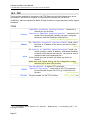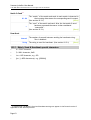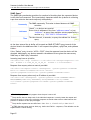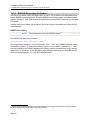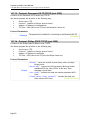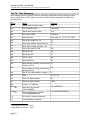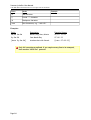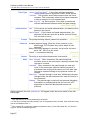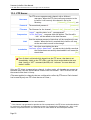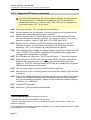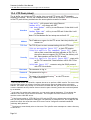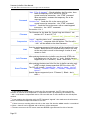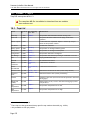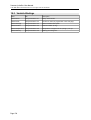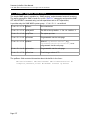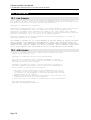
1
ip.buffer Manual 7th October 2015 Firmware Version 2.92 ip.buffer Manual Date Author Release 2007-06-21 MP For version 1.00 2008-05-02 MP For version 2.00 2008-06-16 MP For version 2.10 2008-08-29 MP For version 2.20 2008-09-03 MP For version 2.21 2008-12-12 MP For version 2.30 2009-04-15 MP For version 2.40 2009-09-22 MP For version 2.41 2010-02-02 MP For version 2.50 2010-07-28 MP For version 2.60 2011-04-14 MP For version 2.70 Added 48V schematic details 2012-02-08 MP For version 2.75 2012-07-10 MP For version 2.76 2013-03-25 MP For version 2.80 Reformatting Removed HTTP info 2013-11-08 MP For version 2.82 2013-12-17 MP Correction for 48V schematic 2014-05-14 MP For version 2.90 2014-10-23 MP For version 2.91 2015-10-07 MP For version 2.92 ... Copyright © UK 2007-2015 Scannex Electronics Limited. All rights reserved worldwide. Scannex Electronics Ltd, UK t: +44(0)1273 715460 f: +44(0)1273 715469 Scannex LLC, USA t: 1-866-4BUFFER (1-866-428-3337) http://www.scannex.co.uk [email protected] http://www.scannex.com [email protected] Table of Contents 1.Introduction...............................................1 1.1.The Range............................................1 1.2.Features..............................................1 1.3.Block Diagrams......................................3 1.3.1.System Overview..............................3 1.3.2.Source...........................................4 1.3.3.Destination.....................................5 1.4.Firmware.............................................6 2.GPRS (Cellular) Modem..................................7 2.1.GPRS Safety Precautions...........................7 2.1.1.GPRS Radiation Exposure Statements......7 2.2.Installing a SIM card................................8 2.3.Installing the antenna..............................8 3.Fitting Batteries..........................................9 3.1.1.Battery Precautions...........................9 3.1.2.Installing in an ip.1..........................10 3.1.3.Installing in an ip.4..........................11 4.Physical Mounting.......................................12 4.1.ip.1 – plastic box..................................12 4.1.1.DIN Rail Mounting............................12 4.1.2.Wall mounting................................12 4.2.ip.4 – metal case..................................12 5.Installation...............................................13 5.1.Connections........................................13 5.2.Getting Started....................................14 5.3.Forgotten passwords & factory defaults.......15 6.Front Panel...............................................16 7.Status Web page.........................................18 7.1.Channel: Source...................................18 7.2.Channel: Storage..................................18 7.3.Channel: Destination..............................19 7.4.Modem..............................................19 7.5.System..............................................19 8.SETUP.....................................................20 8.1.Web Interface......................................20 8.2.Global: Settings....................................21 8.2.1.Network.......................................21 8.2.2.Time...........................................26 8.2.3.Power..........................................27 8.2.4.Modem.........................................28 8.2.5.Modem Out...................................30 8.2.6.SMTP Email Servers..........................34 8.2.7.Alerts..........................................36 8.2.8.Alert List......................................39 8.2.9.RADIUS.........................................40 8.2.10.Certificates for SSL/TLS and SSH........44 8.2.11.Advanced Security Options...............47 8.2.12.Ciphers override strings...................47 8.2.13.Signature Hashes override strings.......48 8.2.14.FTP...........................................49 8.2.15.Web...........................................51 8.2.16.Cloud Server................................53 8.3.Date and Time Synchronize......................55 9.Channels..................................................56 10.Sources..................................................58 10.1.COM Serial........................................58 10.1.1.Settings......................................58 10.1.2.Connection to a PC serial port...........61 10.1.3.When using a Y-lead.......................62 10.2.TCP.................................................63 10.2.1.Match, Send & Heartbeat special characters............................................64 10.3.UDP.................................................65 10.3.1.Syslog Collection...........................65 10.3.2.SNMP Trap Collection......................65 10.3.3.RADIUS Accounting Collection............67 10.4.FTP Server.........................................68 10.4.1.FTP Server Notes...........................69 10.5.Cloud Server......................................70 10.6.None...............................................70 10.7.Common Modules................................71 10.7.1.Protocol......................................71 10.7.2.Protocol: ASCII Lines.......................73 10.7.3.Protocol: Alcatel TCP/IP [port 2533]....74 10.7.4.Protocol: Avaya RSP TCP/IP...............75 10.7.5.Protocol: Binary (full 8-bit)...............75 10.7.6.Protocol: Generic Records................76 10.7.7.Protocol: Inter-Tel/Mitel Axxess & 5000 TCP/IP [port 4000]..................................78 10.7.8.Protocol: iSDX binary......................79 10.7.9.Protocol: NEC (STX/ETX) Serial..........79 10.7.10.Protocol: NEC NEAX TCP/IP.............80 10.7.11.Protocol: Nortel BCM Live TCP/IP......81 10.7.12.Protocol: Nortel Meridian & Norstar...82 10.7.13.Protocol: Panasonic KX-TD TCP/IP [port 2300]..................................................83 10.7.14.Protocol: Philips FDCR TCP/IP [port 2599]..................................................83 10.7.15.Time Stamping............................84 10.7.16.Extra tokens for delivery filenames....86 10.7.17.Pass-through...............................87 10.7.18.Notification................................90 11.Destinations............................................91 11.1.Email push (SMTP client).......................91 11.2.HTTP POST to Cloud Server....................92 11.3.FTP Server.........................................93 11.3.1.Supported FTP server commands........94 11.4.FTP Push (client).................................95 11.4.1.Overwrite and Append.....................97 11.4.2.Tmp File & Rename mode16..............97 11.5.TCP Server (passive).............................98 11.6.TCP Push (active/client)........................99 11.7.COM port serial.................................100 11.8.Legacy Emulation (TCP Server)...............101 11.9.None..............................................102 11.10.Destination Common Modules...............103 11.10.1.Data Markers.............................103 11.10.2.Data Security.............................103 11.10.3.Push Triggers.............................104 12.Storage.................................................106 13.Tools....................................................107 13.1.General...........................................107 13.1.1.Live Record View..........................107 13.1.2.Pass-Through Access......................108 13.1.3.Storage Counters..........................109 13.1.4.Reboot Lua.................................109 13.1.5.Reboot ip.buffer (cold boot)............109 13.1.6.Battery off (shutdown)...................109 13.2.Modem...........................................110 13.2.1.Clear timers...............................110 13.2.2.Hangup & Reset / Hangup & Power cycle .......................................................110 13.3.Source, Pass-through, and Destination......110 13.4.Network..........................................111 13.4.1.Ping a device..............................111 13.4.2.Listening Ports.............................111 13.4.3.Network Tables............................111 13.5.Log................................................111 13.5.1.View Log....................................111 13.5.2.Send Log to Cloud Server................111 13.6.System............................................112 13.6.1.Upgrade Firmware........................112 13.6.2.Check for Updates........................113 13.6.3.System Memory...........................113 13.6.4.Diagnostics Dump.........................113 14.Advanced Setup......................................114 14.1.Configuration (Advanced).....................114 14.1.1.Edit..........................................114 14.1.2.Ad hoc change.............................115 14.1.3.Download...................................115 14.1.4.Upload......................................115 14.2.Script.............................................116 14.2.1.Edit..........................................116 14.2.2.Download...................................116 14.2.3.Upload......................................116 14.3.Server Certificate..............................117 14.3.1.Generate...................................117 14.3.2.Upload......................................119 14.3.3.Download server certificate............119 14.3.4.Download SSH publickey.................119 15.Advanced Topics......................................120 15.1.Replication of settings.........................120 15.2.Lua extensions..................................120 15.2.1.Alert System...............................120 15.2.2.Delivery Trigger System..................121 15.2.3.Comments within Lua code.............121 15.2.4.Sending data to the channel source. . .121 15.3.Example scripts.................................122 15.3.1.Simple prefix..............................122 15.3.2.Duplicating data..........................123 15.3.3.Discarding data............................123 15.3.4.Masking telephone digits................124 15.3.5.Upgrading Firmware – the Last Resort.125 16.SNMP Traps............................................126 16.1.Trap List..........................................126 16.2.Variable Bindings...............................127 17.SNMP Agent OID List..................................128 18.Cloud Server HTTP Implementation...............129 19.Licenses................................................130 19.1.Lua License......................................130 19.2.zlib License......................................130 19.3.X509 certificate generation license.........131 19.4.SNMP Trap Decoding............................132 20.Specifications.........................................133 21.Optional 48V Power Supply.........................134 21.1.Two-pin connector..............................134 21.2.Schematic........................................134 22.PSTN Modem Country Codes and Approvals......135 23.Safety Warnings.......................................137 23.1.Optional AA Battery Caution..................137 23.2.Real Time Clock Battery Caution.............137 23.3.Ethernet Ports Caution........................137 23.4.Power Supply Caution..........................138 23.4.1.Scannex Approved PSUs..................138 23.5.General Warnings...............................138 23.6.Modem Caution (if fitted).....................138 23.7.A note about Power Connection, Surge Protectors, and lightning............................138 23.8.South Africa.....................................138 24. Approvals.............................................139 24.1.EMC...............................................139 24.2.Safety.............................................139 24.3.Environmental...................................139 24.4.PSTN Modem.....................................139 24.5.GPRS Modem....................................139 24.6.Export Control..................................139 24.7.European Union (EU) Statement.............140 24.7.1.EMC, Safety, and R&TTE Directive Compliance.........................................140 24.7.2.Network Compatibility Declaration....140 24.8.Deutsch..........................................140 24.9.USA...............................................141 24.9.1.FCC Registration Information...........141 24.9.2.Repair Information........................141 24.9.3.FCC Rules Part 15 - Computing Devices .......................................................142 24.9.4.GPRS Modem...............................142 24.10.Canada..........................................143 24.10.1.Industry Canada Information..........143 24.10.2.GPRS Modem.............................143 24.10.3.Industry Canada Regulatory Compliance Information for Class B Equipment.............144 25.European Union Waste Electrical and Electronic Equipment (WEEE) Statement..........................145 25.1.UK Users.........................................145 25.2.European Users (outside the UK).............145 25.3.Manufacturer/Responsible Party.............145 Scannex ip.buffer User Manual © UK 2007-2015 Scannex Electronics Ltd. All rights reserved worldwide. 1. Introduction 1.1. The Range The ip.buffer is designed to collect and store information from such devices as telephone PBXs – for CDR/SMDR collection, for alarm and traffic management, and to allow passthrough access for moves and changes. The product range includes three main devices: ip-4 = 128Mbyte memory with 4 serial ports ip-1 = 32Mbyte memory with 1 serial port The ip-4 device includes internal temperature monitoring, built in global or GPRS modem, plus the SEbus expansion connector. They also have an option for 48VDC power (see Section 21). They are both built inside a metal box that can be rack mounted in a 1U high bay. The ip-1 device has an optional global PSTN or GPRS modem and is housed in a plastic casing with facilities for wall mounting, tie-wrapping, and DIN rail mounting. All three devices allow battery backup using 3 standard AA NiMH batteries. With fully charged cells the unit can continue to operate for approximately 2 hours. 1.2. Features All devices have proprietary Scannex features and advanced facilities: Collection o Auto pin detection on the serial ports1 o Auto baud rate and protocol detection on the serial ports o Collection from serial and TCP/IP enabled devices2 o Collection from devices that perform FTP push o Collection of UDP data including syslog information, SNMP Traps (with trap decoding and SNMP get queries on connected devices), and RADIUS Accounting o Collection from a web server running Scannex C# or PHP scripts. o Support for ASCII, Binary and iSDX data sources o Automatic partitioning of NAND flash memory with optional settings for limiting memory sizes of each channel Various delivery options including: o HTTP/HTTPS post to web Cloud Server o FTP/SFTP push 1 The detection is performed using voltage sensing, so the ip.buffer can detect whether the data source is DCE or DTE wired even with no data 2 Each ip.buffer can collect data from as many TCP/IP devices as there are serial ports. Each channel can be assigned to either the serial port or a TCP/IP or UDP/IP collection. Page 1 Scannex ip.buffer User Manual © UK 2007-2015 Scannex Electronics Ltd. All rights reserved worldwide. o FTP server o Email/SMTP push o TCP/IP push o TCP/IP server o COM port serial LAN and management features o Fully web-based setup and status information o “Reflective Routing” on the LAN to allow easy access from different subnets 3 o Email, HTTP POST, and SNMP alert mechanisms to enable a pro-active system o Extremely powerful Lua4 scripting engine o SNTP (Simple Network Time Protocol) time synchronisation with daylight saving option o Settings can be quickly replicated across multiple ip.buffers for bulk installations o All changes to the settings occur immediately – no need for reboot5 o Fully fail-safe firmware upgrades. The power can fail at any point in the upgrade process and the ip.buffer will recover with the old version (or the new version if successfully uploaded). o Simple SNMP v1/v2c agent to provide inventory information to SNMP clients o Centralised updates via standard web-server (See section 8.2.16) o Supports Proxy servers running HTTP, SOCKS 5 and SOCKS 4a protocols. Security features o Option to authenticate to one or two RADIUS servers o https (SSL) access for web pages (optional) (See section 8.2.15) o SSL/TLS link encryption for HTTP post, FTP, email, and TCP connections (optional) (See section 11) o SFTP/SSH encryption for SFTP push (See section 11.4) 3 In practise it means you do not have to have a gateway address, or the correct gateway, programmed in the ip.buffer when connecting into it for web services and the like. 4 See www.lua.org However, several extensions have been applied to the Lua base. 5 Even Lua script changes can occur while the ip.buffer is still running Page 2 Scannex ip.buffer User Manual © UK 2007-2015 Scannex Electronics Ltd. All rights reserved worldwide. 1.3. Block Diagrams 1.3.1. System Overview Conceptual view of the ip.buffer (ip.4-128m): Channel #1 Source Passthrough Protocol Lua Script Storage Destination Storage Destination Storage Destination Storage Destination Channel #2 Source Passthrough Protocol Lua Script Channel #3 Source Passthrough Protocol Lua Script Channel #4 Source Passthrough Protocol Lua Script Lua Core – configuration, scripts, notifications SNMP Trap Sender Alerts SNMP Agent Web Server System Health Monitoring Log Files SNTP Client (Time Sync) Modem Manager RADIUS Client Secret Store SMTP Client (Email) HTTP Client (Web post) The ip.buffer is “channel based” with each channel allowing separate collection and delivery methods. Page 3 Scannex ip.buffer User Manual © UK 2007-2015 Scannex Electronics Ltd. All rights reserved worldwide. 1.3.2. Source Source x 4 Serial Client TCP/IP Server RAW SNMP Trap UDP/IP Radius Accounting Syslog FTP Server The four source collection modules run independently. Each source can collect from a different source device, and the ip.buffer allows any mix of serial, TCP, UDP or FTP across the four channels. Although the ip.buffer is “channel based” with custom Lua scripting it is possible to send data across to other channels. For example, one physical data source (e.g. COM port) may contain a mixture of CDR, and Alarms information – custom Lua scripting can split this information into two channel storage areas. Page 4 Scannex ip.buffer User Manual © UK 2007-2015 Scannex Electronics Ltd. All rights reserved worldwide. 1.3.3. Destination The four destination delivery modules also run independently. Each destination can deliver using a different method. Or, they can use the same method (e.g. FTP Push) but deliver to a different central server. Each channel can be configured to use any combination of LAN/WAN/DSL or Modem interfaces. Page 5 Scannex ip.buffer User Manual © UK 2007-2015 Scannex Electronics Ltd. All rights reserved worldwide. 1.4. Firmware Firmware 2.90 and above is shipped as a single .BLF firmware file 6 in the form “IPBx.xx.xxx.blf” where x.xx.xxx is the version number. If cryptography is not permitted in your region Scannex can ship a special build of the hardware that cannot run cryptography. The firmware file is identical, but the hardware will prevent crypto code from running. The web pages of the ip.buffer indicate whether cryptography is enabled: • IPBSSLx.xx.xxx indicates that SSL/TLS/SSH cryptography is enabled. • IPBCFx.xx.xxx indicates that cryptography is disabled. Scannex have full export approval. See section 24.6 The cryptographic routines cannot be modified or updated by an end user. 6 Firmware 2.82 and earlier was shipped in two firmware files – an SSL and a CF version. However, the ability to load SSL enabled firmware in the field still meant the hardware was “crypto capable” from an import-restriction viewpoint. Page 6 Scannex ip.buffer User Manual © UK 2007-2015 Scannex Electronics Ltd. All rights reserved worldwide. 2. GPRS (Cellular) Modem Some models of the ip.buffer come fitted with a GPRS modem allowing for delivery of data and remote access over the cellular/mobile network. They are shipped without a SIM card and without an antenna and so require an appropriate data-enabled SIM card for the country of installation 1 and a suitable GPRS antenna prior to use. 2.1. GPRS Safety Precautions If the ip.buffer is fitted with a GPRS Radio Module (RF) transmitter the following operating conditions and restrictions must be observed at all times. • • Be sure the use of this product is allowed in the country and in the environment required. The use of this product may be dangerous and has to be avoided in the following areas: ◦ Where it can interfere with other electronic devices in environments such as hospitals, airports, aircrafts, etc. ◦ Where there is risk of explosion such as gasoline stations, oil refineries, etc It is responsibility of the user to enforce the country regulation and the specific environment regulation 2.1.1. GPRS Radiation Exposure Statements Failure to meet these requirements may mean the maximum permissible exposure (MPE) limit is exceeded! • This transmitter must not be collocated or operated in conjunction with any other antenna or transmitter. • The device is designed for and intended to be used in fixed and mobile applications. • ◦ "Fixed" means that the device is physically secured at one location and is not able to be easily moved to another location. The antenna for a fixed device is mounted on an outdoor permanent structure with a minimum separation distance of 2 meters (79 inches) ◦ "Mobile" means that the device is designed to be used in other than fixed locations and generally in such a way that a separation distance of at least 20 cm is maintained between the transmitter's antenna and the body of the user or nearby persons. The antenna gain must not exceed 2 dBi2 in mobile applications and 7dBi in Fixed 1 SIM 1.8/3V Mini-Subscriber Identity Module (SIM) 2 Antenna gain in dB relative to an isotropic radiator Page 7 Scannex ip.buffer User Manual © UK 2007-2015 Scannex Electronics Ltd. All rights reserved worldwide. 2.2. Installing a SIM card The GPRS module uses a SIM 1.8/3V Mini-Subscriber Identity Module (SIM). To insert the SIM card proceed as follows: • Make sure that the ip.buffer is disconnected from the supply voltage and any batteries are removed. • The ip.buffer must be opened to insert the SIM card. ◦ For an ip1 device the housing is fastened by four screws in the base ◦ For an ip2/ip4 device the housing is fastened by 2 screws in the case sides • The SIM card holder is visible on the GPRS modem motherboard. • Slide the SIM card under the flap of the SIM card holder, with the gold-coloured microchip facing down. ◦ The SIM card holder has a groove to accept the SIM card. ◦ The notched corner of the SIM matches the notch in the card holder. ◦ Slide the SIM card into the holder as far as possible. 2.3. Installing the antenna • Disconnect the ip.buffer from the power supply • Connect an appropriate fixed or portable (e.g. 'stub') aerial of suitable gain to the antenna connector SMA socket Page 8 ◦ The SMA socket is situated on the rear of the ip.buffer next to the power connector. ◦ The antenna can be a broadband type covering the 800-1900MHz range of the module, or one that is specific for the country of operation. Scannex ip.buffer User Manual © UK 2007-2015 Scannex Electronics Ltd. All rights reserved worldwide. 3. Fitting Batteries The ip.buffer can run from 3 x standard AA-size Ni-MH batteries when the mains power fails (supplied without batteries). With fully charged batteries the ip.buffer should run for at least 2 hours (although this run time can be limited using the configuration options). 1 3.1.1. Battery Precautions Use only AA sized rechargeable Ni-MH batteries with a capacity of at least 2000mAH. Batteries should all be of the same capacity, manufacturer, and type. RISK OF EXPLOSION IF BATTERIES OF INCORRECT TYPE ARE FITTED. Never use non-rechargeable batteries. 1 Do not burn or puncture the batteries. The cells may explode. Check with local requirements for possible special disposal instructions. When replacing batteries all batteries should be replaced at the same time. Remove the batteries from the product if the product will not be used for some time (several months or more). Check with local requirements for shipping restrictions before shipping with batteries fitted. Some authorities strongly recommend shipping without batteries fitted! Batteries not supplied. Page 9 Scannex ip.buffer User Manual © UK 2007-2015 Scannex Electronics Ltd. All rights reserved worldwide. 3.1.2. Installing in an ip.1 The battery compartment for the ip.1, which has a plastic case, is accessible beneath the cover in the lid. Undo the retaining screw and insert the batteries over the ribbon, observing polarity. The ribbon will help in the battery removal. Remove the power supply and all other connectors from the unit before opening the case! Page 10 Scannex ip.buffer User Manual © UK 2007-2015 Scannex Electronics Ltd. All rights reserved worldwide. 3.1.3. Installing in an ip.4 The ip.4 has a metal case. The case has to be opened by removing the screws on either side, and then sliding the top case section off. Inside, the battery compartment lid is fixed by one screw. Observe polarity when inserting the batteries. Take care not to damage or touch the rest of the circuit board. Remove the power supply and all other connectors from the unit before opening the case! Page 11 Scannex ip.buffer User Manual © UK 2007-2015 Scannex Electronics Ltd. All rights reserved worldwide. 4. Physical Mounting 4.1. ip.1 – plastic box 4.1.1. DIN Rail Mounting Fits “top-hat” DIN rail, as per DIN E0022, 35x15 or 35x7.5mm. To fit: ● Hang the ip.buffer onto the top lip of the DIN rail ● Push the bottom of the box down onto the rail until it clicks into place To remove: ● Push box up and unhook from the top of the DIN rail lip. 4.1.2. Wall mounting ● ● Mount two flat-headed screws (not supplied) that are 90mm apart in a vertical line ○ The stem should be no more than 4.5mm diameter ○ The screw head should be between 6mm and 11mm Leave the heads proud of the wall ○ ● The head should be no more than 6mm from the wall Slot the box onto the screws. 4.2. ip.4 – metal case 19” rack mounting: ● Screw the two ears onto the sides of the casing, using the 6 screws provided. ● Mount in a 1U rack position. Page 12 Scannex ip.buffer User Manual © UK 2007-2015 Scannex Electronics Ltd. All rights reserved worldwide. 5. Installation 5.1. Connections Plug the plug-top Power Supply Unit (PSU) into an AC 100-240V mains outlet situated near the unit. Connect the cord from the PSU into the DC power input of the ip.buffer. o The green Status (S) LED should flash once a second, indicating the unit is functioning correctly. o The power cable can be retained: Page 13 Slot the cable into the recessed cable-restraint on the underside of the ip.1, or, Use a cable-tie on the ip.4 Connect the ip.buffer to a network hub or switch. Make sure you connect the “LAN” port, and not the “SEbus” connector! o The yellow Link (L) LED should light and flash in time with network traffic. If required, and fitted in the ip.buffer, connect the modem port to the telephone with an appropriate adapter if needed. Scannex ip.buffer User Manual © UK 2007-2015 Scannex Electronics Ltd. All rights reserved worldwide. 5.2. Getting Started On your PC, run the SEDiscover1 application, and press the F5 key (or the magnifying glass). This will locate all ip.buffers (and NetBuffers) on the LAN. o SEDiscover will only show ip.buffers that are physically connected to the same network segment. It will not show ip.buffers that are separated by a router/gateway/firewall. o If you have problems locating the ip.buffer: Disconnect the PC from the main network. Connect a CAT5 cable directly between the PC and the ip.buffer. Make sure the PC has a fixed IP address (e.g. 192.168.0.111) Retry SEDiscover The default IP address of the ip.buffer will be 192.168.0.235 You can highlight the entry in SEDiscover and press the world icon to go straight to the web page of the ip.buffer2 You should see the ip.buffer’s main status page. The default username and password for the Setup & Tools pages are: o Username = “admin” o Password = “secret” You can change the ip.buffer's IP address, subnet & gateway details: o Through the web-page at any time (assuming you have the correct username and password!) o With SEDiscover if the ip.buffer has been powered up for less than 5 minutes3. 1 You can download this from our website at www.scannex.com. SEDiscover uses a more acceptable protocol when compared with the older NBDiscover application. 2 Even if the ip.buffer is on a different subnet, the SEDiscover tool (v2.2+) inserts a temporary static route into your PC’s routing table. The added routes are removed when you close SEDiscover. In addition, if you have multiple ip.buffers with the same IP address, the SEDiscover tool inserts a static ARP entry to allow direct access. Note that these facilities are not readily available when not using the SEDiscover tool. 3 If the ip.buffer has been powered up for more than 5 minutes, you can hold the front recessed button for 2 seconds only to enable updating through SEDiscover. Page 14 Scannex ip.buffer User Manual © UK 2007-2015 Scannex Electronics Ltd. All rights reserved worldwide. 5.3. Forgotten passwords & factory defaults If the password is forgotten, there is one sure way to gain access to the ip.buffer: Once you have performed this action there is no way to recover any of the data or settings. Everything will be completely and utterly erased! Use this as a last resort only. With the ip.buffer running its normal firmware... Press and hold the button on the front of the ip.buffer for more than 10 seconds o The red LED will blink every second until you have held it down for 10 seconds o Then the red LED will blink rapidly Now release the button The ip.buffer will erase all parameters and data and reboot. When the reboot process completes the ip.buffer will be reset to factory settings. There is a programmable option which allows for a 5-minute access after power-up – without requiring a username and password. If this option is not enabled (it is off by default) then you have to resort to the wipe-everything method above. Page 15 Scannex ip.buffer User Manual © UK 2007-2015 Scannex Electronics Ltd. All rights reserved worldwide. 6. Front Panel The LEDs on the front panel show the following information: ● ● Channel 1..4 Off Source not connected On Source Connected Flashing L: LAN Off No Ethernet Connection On Ethernet Connected Flashing Off ● M: Modem Data Arriving Ethernet Activity Modem Off-Line Slow Flash Answering or Dialling Fast Flash Negotiating PPP1 On Modem On-Line ● S: Status Blinks every second to indicate the ip.buffer is functioning normally ● E: Error Blinks when booting. Normally off Firmware 2.76 and above: The “S” green LED will blink at least every second to show the ip.buffer is running. When any data arrives, the “S” green LED will blink more rapidly2. Firmware 2.75 and below: All LEDs (except the “L” LAN) will flash on, then off every 8 seconds to show that the operating system kernel is functioning. The LAN LED is controlled directly by the Ethernet circuitry. 1 When the ip.buffer boots up, the Modem LED will flash if there is a modem present. If no modem is installed, the Modem LED will not light (except for the regular 8 second flash) 2 This 'quieter' LED display was introduced because there was some confusion over the 8-second flash and end users thought the red “E” LED was indicating something! Page 16 Scannex ip.buffer User Manual © UK 2007-2015 Scannex Electronics Ltd. All rights reserved worldwide. 7. Status Web page The status web page is accessible by anyone on the LAN. It provides a visual guide to the status of the ip.buffer, as well as more detailed information. Use the mouse to hover over one of the coloured cells to show detailed information – that information will appear on the right hand side of the page. When first loaded, the status web page will automatically refresh every 5 seconds. If you need to freeze the automatic update, click on the “stop” radio button at the bottom of the page. 7.1. Channel: Source Green Connected Amber Connected, but quiet Red White Not connected Source task not running1. When there are special services running on the source these are shown below the source type2: o “diagnostic” - the COM port is in the RX/TX diagnostic mode o “loopback” - the COM port is in loopback mode o “scripting” - the channel is executing a temporary Lua script on the source o “passthru” - the pass-through socket is connected and active. o “processed” - the channel has a Lua script processing incoming records. 7.2. Channel: Storage Shows how much data is stored for the channel Shows when the last write occurred Shows how much data has been lost (if the memory has been exceeded) Some of the full NAND Flash storage area is reserved for firmware (4Mb), configuration settings, encryption keys, certificates, bad flash blocks, etc. Usable storage space will be approximately 5Mb less than the total. The web status screen shows the true capacity available for data storage. 1 This can happen if the power supply is not providing a voltage within the specifications for running the ip.buffer. If the ip.buffer boots with low volts it will prevent collection and delivery until the supply reaches a suitable supply voltage. An email alert and SNMP trap are sent out in this condition. Additionally, the System Status (section 7.5) will be red and show “Power: Low volts!!” 2 Firmware versions 2.81 and earlier show some of these conditions with cryptic symbols (e.g. “*”. “∞”, etc). These symbols did not display correctly if the appropriate Unicode font was not installed. Firmware 2.82 is now much clearer and work on all browsers. Page 17 Scannex ip.buffer User Manual © UK 2007-2015 Scannex Electronics Ltd. All rights reserved worldwide. 7.3. Channel: Destination White Not connected Green Currently connected Red The last delivery had a problem For the “push” methods of delivery you can also request an immediate delivery by hovering over the destination cell which will show a “[ Push Now! ]” button in the detail panel. 7.4. Modem White Idle Amber Answering, Dialling, Negotiating PPP Green Online When online, shows the Local and Remote IP addresses for the PPP link. When the modem was last used, and what PPP state was reached (to help diagnose PPP configuration errors) The tasks that are requesting modem usage The hold off timer for the modem 7.5. System System Green Red System error3 o Total percentage usage of memory o The current time Alerts Green No alerts Amber Alerts Pending Red o 3 System fine Error sending the alert(s) Alerts currently active are shown when you hover over the alerts cell e.g. low volts on power input; overfull memory Page 18 Scannex ip.buffer User Manual © UK 2007-2015 Scannex Electronics Ltd. All rights reserved worldwide. 8. SETUP Firmware version 1.60 and above use new web technologies (AJAX in particular – Asynchronous Javascript And XML) to provide a more logical setup interface. Before describing the settings that are available it is worth outlining the general design of the web interface: 8.1. Web Interface The setup pages are built in a modular fashion. Some pages will automatically load some of the modules when you open a page. For other pages the modules will only load when you choose to examine the settings within the module. There are two ways to view and hide a module: 1. Click on the “top / hide” links at the right of the module block 2. Click on the blue bar (with the white text) on the left of the module. e.g. “ Network ” Some pages, like the channel settings page, will dynamically fetch the appropriate module as you change the source and destination combo-box. Once a module has been fetched, it remains in the browser and does not need fetching again. You may notice the text “Loading…” appear when you open a module for the first time. When using the LAN this message will flash up briefly. However, when connected via a modem this message is visible longer – as it takes longer to fetch the module over the relatively slow PPP connection. All text fields allow special characters to be entered with a backslash “\” character. For example “\t” is a [TAB] character, “\r” is [CR], “\n” is [LF]. Additionally, “\xnn” will enter a two digit hex character – e.g. “\xc9”. For this reason, if you want to enter a genuine backslash character, enter “\\” - e.g. “let\\me\\in” is the character sequence “let\me\in” Default settings in the manual are shown in italic green. e.g. [60] denotes a default value of 60. Page 19 Scannex ip.buffer User Manual © UK 2007-2015 Scannex Electronics Ltd. All rights reserved worldwide. 8.2. Global: Settings http://192.168.0.235/setup/settings.shtm The global settings are divided into several main modules. Device Name The device name is used for: Display in the status page Identification when using SEDiscover As the “from” address when sending emailed data and email alerts 1 By the Cloud Server for data, alerts, and updates 8.2.1. Network LAN/Ethernet Assignment Fixed IP Subnet Gateway “Fixed IP” will apply the static assignments below. “DHCP” will obtain network assignments from the LAN2. For static multi-homed addresses, click the “multihoming ” link. [Fixed IP] Dotted IP address. [192.168.0.235] Dotted Subnet. [255.255.255.0] Dotted Gateway address. [192.168.0.1] 1 The email client will strip any illegal characters when using the name. Only “A”-“Z”, “a”-“z”, “0”-“9”, “_”, “-” and “~” are allowed. These are the characters supported by the Scannex SECollector utility. 2 The DCHP Option 61 Client ID includes the Ethernet MAC address and a suffix sequence of hex characters (which uniquely identify the individual DHCP request on the ipbuffer). When assigning a permanent allocation on the DHCP server (e.g. Microsoft DHCP Server), use the full client ID string and not just the Ethernet MAC address. Page 20 Scannex ip.buffer User Manual © UK 2007-2015 Scannex Electronics Ltd. All rights reserved worldwide. Multihome IP (global) You can assign up to two other IP addresses for the ip.buffer. This allows connection with a device that is physically on the same Ethernet network, but is not on the same IP subnet. The Multihome IP setting module is also available from within the TCP Source module. Effectively, a copy of the settings can be seen and edited there. Please note that the settings are global and apply to all channels. 2nd IP 2nd Subnet 3rd IP 3rd Subnet Dotted IP address. Dotted Subnet. Dotted IP address. Dotted Subnet. [blank] [255.255.255.0] [blank] [255.255.255.0] For example, if the PBX has a fixed IP address of 192.0.2.3: 2nd IP = 192.0.2.4 2nd Subnet = 255.255.255.0 The PBX should be plugged into the same hub/switch as the ip.buffer The ip.buffer can now connect directly to the PBX (or the PBX can access the ip.buffer on its extra address of 192.0.2.4) Only the primary address is visible to SEDiscover and only the primary address can use DHCP. The 2nd and 3rd IP addresses are meant for accessing devices that cannot be brought onto the LAN (e.g. they have a fixed IP address) Page 21 Scannex ip.buffer User Manual © UK 2007-2015 Scannex Electronics Ltd. All rights reserved worldwide. Name Servers DNS 1 Dotted IP addresses for Domain Name Servers3. [192.168.0.1] The name servers can be on the LAN, or accessible via the Gateway. Typically, the gateway IP address can be used as this will proxy the DNS requests. DNS 2 Secondary DNS server. [255.255.255.255] Proxy Server The ip.buffer can talk to the outside world through a proxy server. The proxy servers can be used when delivering to HTTP POST, FTP Push, and Email Push, and TCP Push 4. Type of proxy “None (no proxy)” - communicate directly. “HTTP/1.1 using CONNECT” - communicate using the HTTP proxy protocol5. “SOCKS 5” - communicate using SOCKS version 5. “SOCKS 4a” - communicate using SOCKS version 4a. [None (no proxy)] Server The name, or IP address, of the proxy server. (When using HTTP Proxy protocol: not a URL, so no 'http:', just an plain address or name) [blank] TCP Port The TCP port that the proxy server is listening on. The normal ports are 8080 when using HTTP Proxy, and port 1080 when using SOCKS 5 or SOCKS 4a. [blank] Username The username, if needed, for the proxy server. [blank] Password The password, if needed, for the proxy server. [blank] No Proxy For A list of explicit, or wildcard6, addresses or names to skip proxy for. Typically you enter the names or addresses of local machines in this list to prevent them needlessly going via the proxy. Separate the list with commas, semicolons, or spaces. e.g. “192.168.*, *.scannex.com, *.scannex.co.uk” [blank] If in doubt about the proxy settings then the IT department usually will know! 3 DNS name-to-IP entries are cached for a maximum of 5 minutes. The DNS server can specify a shorter time in the time-to-live field of the DNS response. 4 Stale connections can be a problem with TCP push over a proxy. You should ensure the proxy server uses keep-alives so it knows if the link to the far end has been broken. 5 Do not confuse this with the delivery/destination type. The HTTP Proxy protocol can be used for delivering by FTP push and by email (because the HTTP protocol is used for talking to the proxy only). 6 “*” = anything, “?” = any character. Page 22 Scannex ip.buffer User Manual © UK 2007-2015 Scannex Electronics Ltd. All rights reserved worldwide. SNMP Traps Destination Dotted IP address for SNMP traps. [255.255.255.255] “0.0.0.0” will disable SNMP trap transmission “255.255.255.255” will broadcast traps across the LAN Can also be a list of names or IP addresses (firmware 2.82+). SNMP traps are sent in SNMP v1 format. The MIB definitions for the ip.buffer and NetBuffer are available from Scannex. Firmware 2.82 allows for up to 16 trap destinations to be entered as a list 7. Separate each address with a comma, a semicolon, or a space. e.g. “192.168.0.123,127.0.0.1,10.0.0.123” When sending a powerfail trap the ip.buffer may only be able to send to the first destination. If powerfail traps are critical then ensure the most important destination is entered first. If a broadcast address is used along with a local address then duplicate traps will be received by the PC. e.g. “255.255.255.255,192.168.0.123” - the address 192.168.0.123 will receive duplicate traps. SNMP Agent UDP Port The port for the agent. Set to zero (0) to disable SNMP Agent completely. [161] Community The SNMP community name. This value is shared between all SNMP activities and modules. [public] Name override The name to return for sysName. If left blank this will default to the string “ip.buffer-00-02-ae-xx-xx-xx” (the serial number) [blank] Contact A contact name, number, or email. This value is simply reported back to the SNMP agent when querying the sys information group. [blank] Location A location for this device. This value is simply reported back to the SNMP agent when querying the sys information group. [blank] See section 17 for details on the complete SNMP OID values. 7 If you need to receive the “Power Off” trap, make sure the most important server is listed first. Depending on the network conditions the ip.buffer may not be able to transmit to all on the list as it loses power. Page 23 Scannex ip.buffer User Manual © UK 2007-2015 Scannex Electronics Ltd. All rights reserved worldwide. Syslog Server Dotted IP address or name for syslog output messages. [blank] On bootup, a syslog message “system: ip.buffer starting” is output with facility KERNEL, severity NOTICE. All protected GETs and POSTs to the web-server will output a syslog USER facility with NOTICE severity message in the form: “web: ipaddress method /url?query username” Where: ipaddress is the browser's IP address in dotted form. e.g. “192.168.0.235” method is either “GET” or “POST” /url?query are the url and query (if present) given for the GET or POST username is the user that performed the action (if applicable) By tracking the syslog output it is possible to maitain a basic audit tracking log of changes made to the ip.buffer8. Bandwidth Limiting Max data Value in kilo-bytes per second. “0” means unlimited. [0] Normally the ip.buffer will transmit stored data as fast as it can. In some circumstances this is undesirable. Setting a value other than zero will limit the transfer rate for all data deliveries across the Ethernet interface. (Deliveries across the PPP interface will be sent as fast as possible.) 8 Version 2.30+ stores all syslog messages in the Log, even if the syslog server entry is blank. Page 24 Scannex ip.buffer User Manual © UK 2007-2015 Scannex Electronics Ltd. All rights reserved worldwide. 8.2.2. Time The ip.buffer includes SNTP client code so it can contact a remote time server and synchronise the date and time. The server is contacted whenever the ip.buffer is booted, and whenever the daily time update is performed9. When the ip.buffer is in a remote location that has no LAN access to the Internet, the SNTP client can dial through the modem to contact a public SNTP server – keeping the date and time always up to date. SNTP – Simple Network Time Protocol Server Address or IP address of an accessible SNTP server. Blank = no SNTP update performed. e.g. “time.nist.gov” [blank] Interface “LAN only” – will connect only using Ethernet “Modem only” – will always use PPP “LAN then Modem” – will try to use Ethernet. If that fails it will try PPP “Modem then LAN” – will try to use PPP and if that fails it will try Ethernet. For the Modem dial-out setup see section 8.2.5 [LAN only] Update At The daily time, in 24hr “HHMM” format, when the SNTP should be contacted. Blank = no daily update. [0200] Variance 9 The number of minutes that the “Update At” time should be varied by for each ip.buffer serial number. [0] Sync Now A write-only value that forces the ip.buffer to contact the SNTP server immediately. “No” waits until the normal update time to contact the server. “Sync on save” will contact the SNTP server when you save the form (pressing the “SAVE” button) [No] Last SNTP Shows the last date and time a reply from the SNTP server was received. When using the HTTP POST features for data delivery, alert delivery, or central updates the web server can also apply time changes back to the ip.buffer (firmware >= version 2.75) Page 25 Scannex ip.buffer User Manual © UK 2007-2015 Scannex Electronics Ltd. All rights reserved worldwide. Time Zone & Daylight Saving The daylight saving option is applied both to the reply from the SNTP server and to the internal clock. If you do not use the SNTP server, the DST options can still be used. Time Zone Daylight Saving The time-zone offset, in hours, from UTC/GMT. You can enter positive and negative, as well as fractional hour values. [0] Sets whether Daylight Saving Adjustment is performed. “No” does not apply DST. “Adjust” Will adjust for DST. [No] DST Start Which Day Month Time Chooses which week number. “1st” first week of the month. “2nd” second week. “3rd” third week. “4th” fourth week. “Last” the last specified day in the month. The day of the week that DST should change. The month that DST should change. The time, in 24hr “HHMM” format, when DST should change. DST End The same entries as for “DST Start” apply. 8.2.3. Power Battery Power Run Limit Time, in minutes, before powering off when running on batteries. A value of “0” will run the ip.buffer until the batteries are dead (recharging will take longer though). [60] Ethernet Whether Ethernet is powered when running on batteries 10. “Always on” Ethernet powered on batteries. “Off (save power)” No Ethernet on batteries11. [Always on] Modem Whether the modem is powered when running on batteries “Always on” modem powered on batteries. “On demand (no dial in)” powered when needed. “Off (save power)” No modem on batteries. [Always on] 10 If the Ethernet switch is powered off, then the ip.buffer will automatically cut power to the Ethernet circuit. It will check every 10 seconds to see whether the Ethernet link has been restored. 11 A delay of 10 seconds before killing power allows any SNMP Traps to be sent first. Page 26 Scannex ip.buffer User Manual © UK 2007-2015 Scannex Electronics Ltd. All rights reserved worldwide. 8.2.4. Modem If a modem is not physically present then all the web options for using the modem will not be shown. The PPP interface only allows access to the ip.buffer itself. The ip.buffer will not work as a modem router (this protects the internal LAN from any dial-in attacks). Modem General (global) Country12 Initialisation ip.buffer Address 12 Only for RJ-modem. Page 27 The default of “B5” should work in most countries. For specific country codes please refer to Section 22. Applies extra commands after resetting the modem. [B5] [blank] If set to a dotted IP address, then the ip.buffer will assume this address when a computer dials in. If set to blank, then the ip.buffer will become the next IP address up from the calling computer. e.g. if the computer is 10.10.0.23, then the ip.buffer will become 10.10.0.24. [blank] Scannex ip.buffer User Manual © UK 2007-2015 Scannex Electronics Ltd. All rights reserved worldwide. Dial-In Answer After13 The number of rings to answer in. If the line rings less than this, then a dial-in trigger is generated (and you can force delivery on individual channels). [2] Answer Time The maximum time (in seconds) for answering, negotiating the modem and negotiating the PPP before hanging up and aborting the incoming connection. [120] Username Username for incoming connections (case sensitive) Password Password for incoming connections (case sensitive) [user] [password] CHAP Specifies the authentication required for incoming connections. “PAP or CHAP” will allow either PAP (Password Authentication Protocol) which will send the username and password “in the clear” (i.e. can be eavesdropped), and CHAP (Challenge Handshake Authentication Protocol). “CHAP only” will only allow the more secure CHAP protocol. [CHAP only] Computer Address If the calling computer is setup to use automatic IP assignment, then this value is the address given to the computer. If the calling computer has a static IP address on its PPP interface, then this value is not used. [192.168.234.1] 13 Only for RJ-modem. GPRS modem does not require this setting. NOTE: The GRPS modem will only answer incoming DATA calls. VOICE calls will never be answered, but will perform a trigger. Page 28 Scannex ip.buffer User Manual © UK 2007-2015 Scannex Electronics Ltd. All rights reserved worldwide. 8.2.5. Modem Out If a modem is not physically present then all the web options for using the modem will not be shown. The ip.buffer will not dial-out during the first 5 minutes of boot-up. This allows for dial-in access. See section 8.2.4 Modem GPRS settings (global) These settings only appear for the GPRS & EDGE mobile modems. They do not appear for the RJ-modem. 14 SIM PIN If the SIM requires a PIN number, then enter it here. The value is always hidden.14 [blank] Band Which GSM/GPRS frequency bands are enabled on the modem. The frequencies used vary by country. “All bands” - auto-detect. “GSM-850 & PCS-1900 (Americas)” - used in Canada, the United States, and many other countries in the Americas. “E-GSM-900 & DCS-1800” - Extended GSM used in most parts of the world: Europe, Middle East, Africa, Australia, Oceania. “P-GSM-900 only” - only Primary GSM 900MHz “DCS-1800 only” - only DCS 1800MHz “PCS-1900 only” - only PCS 1900MHz [All bands] If the SIM card is protected with a PIN and an incorrect PIN number is entered, the ip.buffer will try once only. If the entered PIN number gives an error, the internal PIN number is erased (but you will still see “*******” on the web). The ip.buffer Log will record that the PIN attempt failed. This is to prevent the SIM card getting locked completely! Page 29 Scannex ip.buffer User Manual © UK 2007-2015 Scannex Electronics Ltd. All rights reserved worldwide. Modem Dial-Out (global) Dial Type15 “Tone dialling” – uses DTMF tone dialling. “Pulse dialling” – uses loop disconnect dialling [Tone dialling] Connect “On demand (firewalled)” – dial out only when required. “Nailed-up (permanent)” – dials out and stays connected. Use for situations like GPRS VPN networks for remote management. [On demand (firewalled)] Connect Time Maximum time (in seconds) to dial, connect, and negotiate PPP. If this time is exceeded, the ip.buffer will hangup and abort the call. [150] Online max time Maximum amount of time (in minutes) to spend in one dial out connection. When this time limit is exceeded, all working delivery tasks are told to finalise their delivery and finish early. Once all the tasks have completed, the modem connection is terminated. [15] Interval time Time (in seconds) to wait after hanging up the modem. This time is effective for both unsuccessful and successful connection attempts16. [60] Retry limit Maximum number of times to dial before waiting a hold-off period. [3] Hold off time Time (in minutes) to wait if tried “Retry Limit” times without managing to connect to the ISP17. Should be longer than the interval time. [60] sequence18 “#1 then #2 on fail” will always try ISP #1 first. ISP #2 will only be used if ISP #1 fails. “Alternate #1 & #2” will try ISP #1 and ISP #2 in turn. [#1 then #2 on fail] ISP 15 Only for RJ-modem. GPRS does not require this setting. 16 Use a value of at least 30 seconds otherwise the internal modem may not dial. 17 Once a hold-off or interval period is in place, the user can clear the timer from the status web page by hovering over the “Modem” status panel and pushing the “[ Clear Timers! ]” button. 18 Only for RJ-modem. GPRS does not require this setting. Page 30 Scannex ip.buffer User Manual © UK 2007-2015 Scannex Electronics Ltd. All rights reserved worldwide. Connection Recycling19 (Nailed-up only) Failure Limit Quiet Time Number of consecutive failures before resetting. PPP quiet timer, in minutes, before resetting. [3] [360] Dial-Out Exclusion Between …and The start time to begin exclusion. [1800] The end time for the exclusion period. [1900] If the modem is used as the primary means of data delivery it may be that the modem is in use all the time (when there are very large amounts of data to send). Since the modem is also used for administration of the ip.buffer it is advantageous to allow a known “window” when you can always dial-in. During the exclusion time period the ip.buffer will not perform any new dial-out attempts. If the modem is in use when the exclusion time comes into force, the modem manager task will request that all delivery tasks finish their work early so the modem can be hung up soon. Be aware that the dial-out exclusion time is based on the ip.buffer’s local clock. There may be clock-drift over periods of weeks and months. This clock drift can be eliminated by using SNTP (section 8.2.2) ISP #1 & ISP #2 (RJ-modem only) Number The full number for the ISP [blank] Username The CHAP/PAP username for the ISP [blank] Password The CHAP/PAP password for the ISP [blank] GPRS Internet (GPRS-modem only) APN The GPRS service Access Point Name. e.g. “vodafone-data” [blank] Username The CHAP/PAP username for Internet access, if required. [blank] Password 19 The CHAP/PAP password for Internet access, if required. [blank] The connection recycling values provide a means of stopping a GPRS connection from looking connected but unable to pass data. Page 31 Scannex ip.buffer User Manual © UK 2007-2015 Scannex Electronics Ltd. All rights reserved worldwide. Firewalling When using the “On demand” connection method and when connected to an ISP the ip.buffer implements a firewall to prevent any TCP/IP connections being made to the device. It is impossible to gain access to the web server, FTP server, or any other ports while dialled up to an ISP (even if the ISP is actually a RAS server). If using the “Nailed-up (permanent)” connect type then the firewall is disabled. This allows remote management of the ip.buffers within a VPN network (e.g. through a specialised SIM contract). DNS Servers Normally, for Ethernet LAN connections, the ip.buffer will use the DNS1 and DNS2 addresses programmed in the Network & System web page. However, for delivery destinations that use the modem the DNS requests are sent across the PPP modem link using the DNS server addresses supplied at connection by the remote PPP end 20. If the remote machine name is already in the DNS cache (whether obtained via the LAN or the modem) the cache entry is used. 20 While the PPP link is active, the LAN DNS server addresses are still used for Ethernet LAN transfers. Page 32 Scannex ip.buffer User Manual © UK 2007-2015 Scannex Electronics Ltd. All rights reserved worldwide. 8.2.6. SMTP Email Servers The ip.buffer allows two separate email servers to be programmed. For email data delivery, we strongly recommend sending the data “point-to-point”. That is to say, the ip.buffer should connect directly to the SMTP server that is processing the data, and it should not connect through any SMTP relays. This ensures that the data cannot be lost in transit21. For the delivery of email alerts, any server could be used – whether that is a private server or a public one. The SMTP#1 and SMTP#2 are global settings – editing within one module will affect all others. The settings for each SMTP server are: Name A screen name used for choosing an SMTP server. [SMTP1] & [SMTP2] Interface “LAN only” – will connect only using Ethernet “Modem only” – will always use PPP “LAN then Modem” – will try to use Ethernet. If that fails it will try PPP “Modem then LAN” – will try to use PPP and if that fails it will try Ethernet. For the Modem dial-out setup see section 8.2.5 [LAN only] Server TCP Port TLS/SSL The name or IP address of the server22. The port number to connect to the server on. [blank] [25] “No encryption” – a plain SMTP session “Explicit (by command)” – starts with a plain connection and then upgrades to SSL/TLS. If the server does not support SSL/TLS then the delivery will fail. “Implicit (by port)” – starts with an SSL/TLS connection. [No encryption] 21 If using the point-to-point email delivery method across a public network we suggest using a nonstandard port number. Some ISPs now filter any port 25 traffic and perform anti-spam and other checks. You can use any port (e.g. 20025), as long as the server is programmed to use the same port! For any public SMTP server, port 25 should be used for non SSL traffic. 22 In the case of a modem-only connection, you can use the special designator “$” to denote the address of the other end of the PPP connection. This is helpful where the mail server machine is also a RAS/PPP server. Page 33 Scannex ip.buffer User Manual © UK 2007-2015 Scannex Electronics Ltd. All rights reserved worldwide. Domain Domain – you need to enter a domain name (e.g. “scannex.com”) that is used for the “HELO”/“EHLO” logon sequence, and for the domain part of the “from” address. The from email address for alerts will be boxname@domain, while for data deliveries it will be boxname_channelname@domain. [blank] Username Only enter a username if the server requires authentication for sending emails. Usually required if sending to someone on a domain other than the server’s domain. [blank] Password Limit (see Username above). [blank] When the SMTP server is used to send data this value, in kilobytes, will break the emails into sizeable chunks. [1024] The recipient (email to) addresses are programmed individually for each channel and on the email alert setup. Page 34 Scannex ip.buffer User Manual © UK 2007-2015 Scannex Electronics Ltd. All rights reserved worldwide. 8.2.7. Alerts The alert system allows the pro-active monitoring of the ip.buffer and all channels. Alerts can be sent as emails (which can be human-read or machine processed). Alternatively the alerts can be HTTP POST'd into the central Cloud Server – and the server can decide how best to deal with the alerts (see section 8.2.16). Alerts are generated for memory full conditions, reboots, web configuration, authentication failures, channel quiets, and channel connects/disconnects. Each alert has a “tag” that identifies the specific alert. Along with the “tag” there is usually a text field as well. The emails contain the tags on the subject line, as well as the alert entry in the body HTML text of the email. All notification emails may include more than one tag on the subject line (separated by a comma), and will have the “status.lua” file attached. When using HTTP POST, the alerts are sent through as fields. Each field has the prefix “alert_”. The “tag” follows – e.g. “alert_Reboot”. The field value is always the date (in the form “YYYY-MM-DD HH:MM:SS”), a space, and the alert text. It is relatively trivial to process these alerts in web-server-side scripting languages like ASP.NET, Java, PHP, etc 23. Alerts Method Method “Email (SMTP)” will send alerts by email “HTTP POST to Cloud Server” will send alerts by the HTTP POST method to the Cloud Server. See 8.2.16 for details. “Don't send alerts” will not send anything [Email (SMTP)] Send Info “yes” will send the information attachment with the alert. “no” will send just the alert. [yes] Email Server (Only visible if Method is “Email (SMTP)”) 23 SMTP “SMTP #1” will send via SMTP server #1 “SMTP #2” will send via SMTP server #2 Click the “show” to view the actual SMTP#1 and SMTP#2 programming. [SMTP#2] For SMTP settings see section 8.2.6 email to The recipient(s) of the alert emails. Use a semicolon to separate multiple recipients. e.g. [email protected];[email protected] [blank] Scannex can supply a licensed Web Server Support Package. Page 35 Scannex ip.buffer User Manual © UK 2007-2015 Scannex Electronics Ltd. All rights reserved worldwide. Memory Alerts Global Memory Percentage level for the global memory full alert24. The tag is “Full”. 0 will disable this alert. [75] Channel # Specifies the trigger level (in megabytes) to send a channel based full alert. The tag is “Full#”. 0 will disable the alert for the given channel. [0] Notification Alerts Comfort Sets the interval in minutes for the transmission of an alert back to the central system to show that the ip.buffer is still running. The tag is “Comfort”. [0] Reboot If enabled will send an alert when the ip.buffer is rebooted. The tag is “Reboot”. [Notify] Configure If enabled, an alert will be sent when anyone changes the settings through the webpage25. [Notify] Authentication If enabled, all FTP server authentication failures, all pass-through authentication failures, and all TCP server authentication failures will be notified26. The tag is “Auth”. The alert text will indicate which service caused the authentication alert. [Notify] Temperature Alerts Temperature display and alerts is only available in the ip.4 product, and uses a small onboard thermometer chip located near the front panel, on the left side (looking at the LEDs). The internal temperature of the ip.buffer is approximately 5°C higher than the room temperature. High Sets the temperature high point, in integer degrees Celcius, to send out an alert and trap. 0=no alert. The tag is “TempHi” [0] Low Sets the temperature low point, in integer degrees Celcius, to send out an alert and trap. 0=no alert. The tag is “TempLo” [0] 24 The alert will be sent immediately the memory goes over the limit. However, repeat “Full” alerts will continue to be sent every 8 hours until the memory drops below the limit. 25 The first time a configuration is posted, the alert will be sent immediately. If configuration changes are performed over an extended period of time, reminder alerts will be sent every 10 minutes. If the configuration is left for more than 10 minutes the “Config” alert will clear. 26 There is no time-out on the authentication failures. All failures are sent immediately. Page 36 Scannex ip.buffer User Manual © UK 2007-2015 Scannex Electronics Ltd. All rights reserved worldwide. Other Alerts If the Log area becomes full, the alert tag “Log” with description “Log full” will be sent. If the ip.buffer boots up running on a power supply that has too low a voltage, the alert “LowVolts” will be sent. Other alerts are listed in Section 8.2.8 Schedule for Quiet Alerts The individual channels specify the timeout for the quiet alerts, but the schedule decides whether the alert is actually sent. Days Between …and Check which days to send quiet alerts. [Mon,Tue,Wed,Thu,Fri,Sat,Sun] The start time for the schedule27 [0000] The end time for the schedule [2359] Source Quiet Alerts These are duplicate entries as found in the individual channels Channel # The number of minutes of quiet before sending an alert. A value of “0” means disabled. [0] Source Connect/Disconnect alerts These are duplicate entries as found in the individual channels Channel # “Ignore” – don’t send an alert on connect/disconnect. “Notify” – send an alert when connected or disconnected. [Ignore] If the alert cannot be sent, then new events will overwrite the pending ones. 27 You must enter the minutes as well as the hours. e.g. 10am should be entered as 1000; 9am can be written as 0900 or 900 Page 37 Scannex ip.buffer User Manual © UK 2007-2015 Scannex Electronics Ltd. All rights reserved worldwide. 8.2.8. Alert List Alert Tag Definition Auth An authentication failure Battery Comfort The ip.buffer is running on battery power Config Connect1, etc The ip.buffer has been reconfigured28 ip.buffer is still alive (sent at the interval specified in the alerts setting page) A channel has connected Disconnect1, etc A channel has disconnected Global memory is full, as set in the alerts setting page (resent every 8 hours). Full Full1, etc Log Channel has reached its full limit (resent every 8 hours) LowVolts Mains The ip.buffer has started up running on a PSU that is too low Quiet1, etc Reboot Channel has had no data (resent periodically) TempHi TempLo The ip.buffer temperature is too high User User triggered alert (i.e. clicked “Trigger User Alert!” on web page) The log area has become full, or the Log has been requested. The ip.buffer is running on mains power The ip.buffer has booted and started running code The ip.buffer temperature is too low29 28 The config alert will be sent every 10 minutes while configurations are still in progress. It will clear after 10 minutes of making no configuration changes. 29 Temperature alerts are only available on the ip.4 product Page 38 Scannex ip.buffer User Manual © UK 2007-2015 Scannex Electronics Ltd. All rights reserved worldwide. 8.2.9. RADIUS These settings allow the ip.buffer to refer back to one or two RADIUS servers for authentication of all server services. The ip.buffer uses UDP port 1812 for the RADIUS requests. RADIUS Authentication Servers Server 1 A dotted IP address or name for the RADIUS server. If this field is blank then RADIUS authentication is effectively disabled and only local username/passwords are used. [blank] Secret 1 The shared secret for server 130 UDP Port 1 The UDP port for server 1 [blank] [1812] Server 2 A dotted IP address or name for the backup RADIUS server. [blank] Secret 2 The shared secret for server 2 UDP Port 2 The UDP port for server 2 [blank] [1812] Timeout The timeout (in seconds) for requests to the RADIUS server(s) [2] NAS-Identifier override The identifier string to send to the server when issuing requests. If blank, this will be the serial number of this ip.buffer but can be programmed to anything required. [blank] NAS-IP-Address A dotted IP address to send back to the RADIUS when issuing requests. If the field is blank then the NAS-IP-Address field is not included in the request. This field is for complex RADIUS setups. [blank] 30 When replicating buffer settings it is not possible to transfer these secret values. The configuration file will have “********” for each of the secrets. You must manually edit those values in the file before uploading into the target buffer. Page 39 Scannex ip.buffer User Manual © UK 2007-2015 Scannex Electronics Ltd. All rights reserved worldwide. Authentication Methods Web Authentication option for the web-server “Local only” – Uses the local username/password set in the Web option. “RADIUS only” – Only asks the RADIUS server31. “RADIUS then Local on timeout” – Tries the RADIUS server(s) and falls-back to the local username/password if the server(s) time out32. “RADIUS and Local” - tries the RADIUS server(s) first, and then tries the local username/password if the server(s) time out or reject the username/password. [Local only] Pass-through Authentication option for the pass-through of all channels. (See above options) [Local only] FTP Server Authentication option for the FTP Server delivery of all channels. (See above options)33 [Local only] TCP Server Authentication option for the TCP Server delivery of all channels. (See above options) [Local only] Each RADIUS request packet includes the following information: Username and Password (encrypted using the MD5 according to the RADIUS spec) NAS-Identifier – as set above NAS-IP-Address – optional (as above) NAS-Port-Id – this string value indicates which internal service is requesting the RADIUS authentication: o “Web” - the web server o “FTP” - the FTP server o “P1”, “P2”, “P3”, “P4” - the pass-through socket for each channel o “T1”, “T2”, “T3”, “T4” - the TCP server delivery socket for each channel. 31 When rebooting, the ip.buffer will use the local username/password if the RADIUS cannot be contacted. As soon as the RADIUS server gives a reply the local username/password is never used again (until next reboot). 32 If contacting the RADIUS server times out, then every protected web-page (and section) will be slow to load in the browser. 33 Collecting with FTP Server is unaffected by this setting. Page 40 Scannex ip.buffer User Manual © UK 2007-2015 Scannex Electronics Ltd. All rights reserved worldwide. The RADIUS server MUST reply with a packet that includes a “Filter-Id” string value. This Filter-Id string value specifies which services the user is allowed to access on the ip.buffer. If there are multiple “Filter-Id” values that need to be returned, for the benefit of other devices or because of the RADIUS Server configuration, then the ip.buffer details can be prefixed with the string “Scannex:”34. The Filter-Id should be built from the following string tags: W1 – user is allowed to read all protected web pages but cannot POST changes. W2 – user is allowed to read and write to the web pages W3 – user is allowed to only read the status pages W4 – user is allowed to read all protected web pages, but cannot POST changes. However, they may use the web-based Pass Through Access tool 35. P1, P2, P3, P4 – user can access the TCP pass-through socket for channels 1, 2, 3, or 4 respectively. Any number of these tag values can be present within the Filter-Id. T1, T2, T3, T4 – user can access the TCP Server delivery socket for channels 1, 2, 3, or 4 respectively. Any number of these tag values can be present within the Filter-Id string. F1, F2, F3, F4 – user can access FTP Server delivery36 for channel 1, 2, 3 or 4 respectively. Only one “F” value should be present within the Filter-Id string37. For example, a returned Filter-Id string of “W1F1P1P2P3P4T1T2T3T4” will allow readonly web access, access to FTP delivery channel 1, and all pass-through and TCP server delivery channels. As another example, the Filter-Id string “P1P2P3P4” will only allow access to the passthrough sockets for all channels – but not web, FTP, nor TCP server delivery. Web The web-browser client is forced to use the Basic authorization method for http. The secure MD5 Digest authorization of http is physically impossible to use with RADIUS. For that reason you SHOULD use an https secure session when using the web (the web server can be programmed to force https). See section 8.2.15. When using RADIUS for web access, the web server will deliver a simple cookie to the browser. This cookie enables the server to link the user's web session with the current username/password combination. As a consequence the ip.buffer only has to contact the RADIUS server once for that session (without a cookie it would have to contact the RADIUS server for every page and resource requested by the web-browser). After switching authentication modes for web you may need to restart your web browser to get the new username and password in effect as it will have cached the cookies. 34 Applies to firmware >= 2.80 35 Once connected to a passthrough channel they will still need to authenticate for that channel. 36 A RADIUS user can only access one channel's storage through the FTP server. 37 If there are multiple “F” values then only the first account is used. Page 41 Scannex ip.buffer User Manual © UK 2007-2015 Scannex Electronics Ltd. All rights reserved worldwide. FTP When FTP is linked to RADIUS then any channel that is set to deliver by “FTP Server” will be checked against RADIUS. When the user logs in the FTP server will contact the RADIUS server to determine which channel that user should access. The Filter-Id value is searched for the first “F” value – so there should only be one “F” value in the returned Filter-Id string. Consequently, if “F3” is received for a given user, then that user will log into channel 3. Pass-through and TCP Server Delivery When RADIUS is not used, both of these services only ask for a password. When the TCP/IP socket connects the user is shown a “Password:” prompt. However, when linked to RADIUS we need both a username and password from the client. Hence, when either of these services is set to refer to RADIUS the end user should use the form “user:password” when replying to the “Password:” prompt. If you enter just a password, then the RADIUS client will assume a username of “ipbuffer_boxname_serviceid”, e.g. “ipbuffer_Scannex_P1” for pass-through 1. e.g. “ipbuffer_Scannex_T3” for TCP Server channel 3. Other considerations Unless the RADIUS server can create a NAS-Identifier + User-Name to Filter-Id matrix then the inclusion of a user on the RADIUS server will allow access to the specified resources on all ip.buffers that refer to that RADIUS server. The inclusion of programmable NAS-Identifier and NAS-IP-Address values should provide for enough flexibility to manage either groups of ip.buffers or individual ip.buffers at the RADIUS server. However, for some RADIUS servers, it may be that providing administrative web-access is all that is practical. This is the main reason for allowing each of the four services to choose where their authentication is taken. Page 42 Scannex ip.buffer User Manual © UK 2007-2015 Scannex Electronics Ltd. All rights reserved worldwide. 8.2.10. Certificates for SSL/TLS and SSH The certificates38 section allows options to “lock” the ip.buffer to specific servers by checking the servers' certificates. Additionally, clients can be forced to provide a client certificate for checking against a list of approved fingerprints. The fingerprints are a mathematical “hash” of the full certificate. There are two common methods of hashing certificates - “MD5” and “SHA1”. The ip.buffer uses the stronger SHA1 fingerprint hash method. The full certificates can be very large (several kilo-bytes), whereas an SHA1 hash is 20bytes long. In the ip.buffer it is shown as 20 pairs of hex numbers. e.g. “0c:15:fe:6e:7f:b4:cd:2c:64:18:16:8b:d5:3a:67:6e:c7:54:b8:71” Locking an ip.buffer to a particular server certificate will prevent “man-in-the-middle” style attacks and spoofing. The ip.buffer will only connect to the genuine server. 38 SSL/TLS firmware only. Page 43 Scannex ip.buffer User Manual © UK 2007-2015 Scannex Electronics Ltd. All rights reserved worldwide. Security Certificate Fingerprints Local Fingerprint Shows the SHA1 hash fingerprint of the ip.buffer's TLS/SSK PKI certificate. You can use this to check that the PC clients are actually connecting to this ip.buffer (and not being intercepted). Download Links for download the TLS/SSL PKI X509 certificate, or the SSH publickey39. These files may be needed for inclusion in the allowed keys on your server. Approved Fingerprints A list of SHA1 hash fingerprints for certificates that are approved by this ip.buffer. You may enter just the fingerprint on each line, or “name=fingerprint” (so you can identify the fingerprints more easily). [Blank] Recent Fingerprints The Recent Fingerprint list shows the fingerprints of any certificates that were not listed in the Approved Fingerprints list40. (SSH server fingerprints will be prefixed with the IP address and SSH version number.41) “IP Address” is the IP address of the client or server. “Name” is the IP address or name that was programmed into the ip.buffer. When a client connects this field will show “(blank)”. CA certificates will show “CA” or “CA+1” “Certificate CN” is the Common Name that is entered into the certificate on the server or client. You can hover the mouse over the “Approve” link to show the SHA1 fingerprint of the certificate. Clicking “Approve” will add the fingerprint to the Approved Fingerprints list. “Chains of trust”: Usually the server will only send a single certificate. That certificate may be signed by an approved person (e.g. Verisign etc), and a PC is able to check against a database of known certificate authorities to verify the certificate. The ip.buffer does not have a internal database of approved certificate authorities and can only verify certificates that were actually sent as part of the SSL/TLS handshake protocol. If multi-level certificates are required you should be able to load the whole certificate chain into your server. 39 The SSH server publickey is taken from the TLS/SSL PKI certificate's RSA key. 40 Certificates originating from Source will not be displayed. Neither are they validated, since some devices have weakly protected private keys. 41 The SSH fingerprints are SHA1 fingerprints, rather than the shorter and more usual MD5 fingerprints that are shown in most SSH client software on PCs. Page 44 Scannex ip.buffer User Manual © UK 2007-2015 Scannex Electronics Ltd. All rights reserved worldwide. Security Certificate Global Options 42 Verify Servers “Ignore (allow any certificate)” – will allow any certificate. The fingerprint of any servers the ip.buffer connects to will appear in the “Recent Fingerprints” list. “Fingerprint must be approved” – only servers that have certificates that match the approved fingerprint list can be connected to. Any others will result in an error. [Ignore (allow any certificate)] Verify Date “Ignore” – the validity date of the certificate is not checked. “Must be in date” – the certificate date is checked. If out of date then an error is reported and the connection closed. [Ignore] Verify Name “Ignore” – does not check the certificate name. “Address and CN must match” – the address entered in the ip.buffer must match the certificate CN (Common Name) field43. [Ignore] Verify Clients “Ignore (allow any certificate)” – will allow any certificate. The fingerprint of any clients that connect to the ip.buffer will appear in the “Recent Fingerprints” list. “Fingerprint must be approved” – only clients that have certificates that match the approved fingerprint list can be connected to. Any others will be rejected. In addition, if a client does not provide a certificate then the client will be rejected. The client certificate date and name are also checked according to the above two rules. [Ignore (allow any certificate)] A link at the bottom of the Certificates page allows “Advanced security options...” 42 Source certificates (client & server) are not checked. Some devices have very weakly protected private keys and can be compromised. For this reason, only destination and pass-thru certificates are validated. 43 Only explicit common names are currently supported (e.g. “collect.scannex.com”). Wildcard common names are not supported (e.g. “*.scannex.com”) Page 45 Scannex ip.buffer User Manual © UK 2007-2015 Scannex Electronics Ltd. All rights reserved worldwide. 8.2.11. Advanced Security Options Advanced Security: Global The global cipher settings affect pass-through sockets, delivery, HTTPS, and FTPS. Ciphers Peer RSA Key Peer Signature Hash A string that can override the cipher-suites used [blank] Whether to require a certain RSA key length for the peer[Default] A string that can override the signature hash choice [blank] Advanced Security: Source only The source-only cipher settings affect only TCP collection sockets. Ciphers Peer RSA Key Peer Signature Hash A string that can override the cipher-suites used [blank] Whether to require a certain RSA key length for the peer[Default] A string that can override the signature hash choice [blank] 8.2.12. Ciphers override strings Predefined sets: • “def…” = No DHE/RSA key exchange, no 3DES. • “good” = good and fast security. No RC4, no MD5, no 3DES • “strong” = strong and slow security. DHE-RSA key exchange (very slow), 256-bit only, no RC4, no 3DES, no MD5 • “all” = all available cipher-suites • “128…” = only 128-bit cipher suites • “256…” = only 256-bit cipher suites • “rc4…” = only RC4 based cipher suites (not recommended) • “aes…” = only AES based cipher suites • “3des…” = only triple-DES based cipher suites (not recommended) • “none” = no cipher suites – extend using modifiers Modifiers should be prefixed with either “+” or “-”. A plus sign will add the modified set, while a minus sign will remove the set from the list: • “±dhe” = DHE/RSA key exchange (strong & very slow) • “±rsa” = RSA key exchange • “±aes” = AES based symmetric ciphers • “±rc4” = RC4 based symmetric ciphers (not recommended) • “±3des” = Triple-DES based symmetric ciphers Page 46 Scannex ip.buffer User Manual © UK 2007-2015 Scannex Electronics Ltd. All rights reserved worldwide. • “±256” = 256-bit ciphers • “±128” = 128-bit ciphers • “±cbc” = Cipher Block Chain mode symmetric ciphers • “±gcm” = Galois Counter Mode symmetric ciphers • “±md5” = MD-5 HMAC (very weak) • “±sha1” = SHA-1 HMAC (weak) • “±sha256” = SHA-256bit HMAC • “±sha384” = SHA-384bit HMAC Examples: • “aes+3des” = AES ciphers and 3DES. • “all-rc4-md5” = everything but RC4 and MD5 • “none+aes+3des-dhe-sha256” = AES and 3DES encryption with RSA key exchange only (not DHE/RSA), and no SHA-256 HMAC 8.2.13. Signature Hashes override strings The Signature Hashes override string allows you to specify what signature hashes should be presented during the handshake phase of the TLS connection, and also what signature hashes are allowed for a peer TLS certificate. The same semantics apply as for cipher suites, but obviously the set of applicable values is reduced: • “all” = all digests • “def” = all digests • “±md5” = MD-5 digest (very weak) • “±sha1” = SHA-1 digest (avoid for strong security) • “±sha224” = SHA-224bit digest • “±sha256” = SHA-256bit digest • “±sha384” = SHA-384bit digest Page 47 Scannex ip.buffer User Manual © UK 2007-2015 Scannex Electronics Ltd. All rights reserved worldwide. 8.2.14. FTP The FTP server, as used for FTP server data delivery and FTP server data collection, has global settings. FTP Server TCP Port The port number for the server. 0 will disable the FTP server completely. Interface “LAN only” – dial-in PPP connections are blocked “Modem only” – Ethernet connections are blocked44 “LAN or Modem” – either PPP or Ethernet can be used [LAN or Modem] Allow You can enter a name, IP address, or wildcarded45 IP address to restrict access to the FTP server for clients on the LAN. You can also enter a comma- or semicolon-separated list. Any non-matching clients will have their connection immediately closed. (Hint: leave this blank until you have the system working, and then secure it with a value) [blank] TLS/SSL “No Encryption or explicit” – uses plain FTP transfers “Require explicit (by command)” – starts with a plain connection and requires the client to negotiate SSL/TLS before transferring data46. “Only Implicit (by port)” – starts with SSL/TLS47 Note: Even if set to “No Encryption” the client can still request an explicit SSL/TLS connection. [No encryption] [21] Passive Port Range Lo The lowest port number to use (use 1024-65534) [50000] Hi The highest port number to use (use 1024-65534) [50099] When the FTP client request PASV (passive mode), the server will use one of the ports within this range, Lo-to-Hi. You can easily setup an inbound firewall rule if needed 48. 44 If you are using collection with the FTP Server, then do not use the “Modem Only” setting – this will prevent your device from connecting to the ip.buffer. 45 e.g. “192.168.0.*, device.scannex.com, 192.168.*”. Wildcards are “*” for anything, and “?” for any single character. 46 Using “Require explicit” SSL will still allow collection from non-SSL FTP devices. 47 When forcing “Implicit” SSL, all FTP connections must use SSL – including collecting FTP devices. 48 If the ip.buffer is behind a firewall, you will need to add “Services” to the firewall. The main service will be the FTP service (or specific TCP port if you use something other than 21). In addition, you should add the passive port range as services in the firewall. For all these services, tell the firewall to send the TCP traffic to the internal IP address of the ip.buffer. (Individual firewall configuration varies greatly.) Page 48 Scannex ip.buffer User Manual © UK 2007-2015 Scannex Electronics Ltd. All rights reserved worldwide. Source Users These are duplicate entries as found in the individual channel “Source” setting module when set to collect from FTP. Channel # The username for FTP collection for the channel (case sensitive). [_channel1], [_channel2], etc (password) The password for FTP collection for the channel (case sensitive). [password] The username and password for each of the channels that are collecting data by FTP server. Destination Users These are duplicate entries as found in the individual channel “Destination” setting module when set to deliver by FTP Server. Channel # The username for FTP Server for the channel (case sensitive). [Channel1], [Channel2], etc (password) The password for FTP Server for the channel (case sensitive). [password] Destination Users – the username and password for each of the channels that are delivering data by FTP server. See the documentation relating to the FTP Server delivery mode in section 11.3. Page 49 Scannex ip.buffer User Manual © UK 2007-2015 Scannex Electronics Ltd. All rights reserved worldwide. 8.2.15. Web You can set your own username and password for web-administration to prevent unauthorised modifications to the ip.buffer settings. Web Server Security 49 Allow http “No (https only)” – force the web-browser to use https. Accessing port 80 (http) will redirect to port 443 (https). “Yes (http & https)” – either http or https connections can be made. The user is encouraged to use https by the use of a red banner at the top of the browser. [Yes (http & https)] Authorization “Digest Only” – the web-browser must use MD5 digest authorization. Passwords are protected. “Basic & Digest” – either basic authorization (where the username and password are sent unencrypted) or digest MD5 authorization is possible. [Digest Only] WebLock49 “Unlocked” – Scannex WebLock is not used. “WebLocked” – In cases where the username/password is not secure enough, you can lock the web pages with the Scannex authentication/encryption. In this case, the user has to enter a numerical response to a challenge before gaining timed access to the setup pages50. [Unlocked] On reboot “Authenticate” – will always require a password. “5 minute window” – allows for 5 minutes grace after rebooting where no password is required. [Authenticate] Local Passwords “Visible” – passwords can be read and written. “Obscured” – reading passwords will only show “********” on both the web-page and configuration downloads51. [Visible] Only visible if the Scannex encryption key has been set for WebLock facilities. 50 One example is where you need to give temporary access to a user or on-site engineer. They will need the username/password anyway, but by using the WebLock you can restrict their access to a one-time operation. They call you with the serial number and challenge, and you provide them with a 5 digit response code that is derived from the private secret (which you don’t give out!) 51 Version 2.20+ now store all passwords in the write-only secret-store (the same area that the Scannex encryption secrets and PKI certificates and keys are stored). When set to “Obscured” it is not possible to simply read-out the configuration and write into another buffer to replicate the settings. Before uploading the saved configuration file you must replace all “********” values with the required passwords and secrets. Page 50 Scannex ip.buffer User Manual © UK 2007-2015 Scannex Electronics Ltd. All rights reserved worldwide. User: Status Page By default anyone can view the Status page of the buffer. These settings allow you to restrict access to the Status page. Username Password The username for the status page. If this is blank, then no authentication is performed for the status page. If you are using RADIUS authentication, and want the status page authenticated, then you must fill in a username. [blank] The password for the status page. Forgot the password? See section 5.3 [blank] Admin: Setup & Tools Pages Page 51 Username The username for setup and tools pages. [admin] Password The password for setup and tools pages. Forgot the password? See section 5.3 [secret] Scannex ip.buffer User Manual © UK 2007-2015 Scannex Electronics Ltd. All rights reserved worldwide. 8.2.16. Cloud Server The central Cloud Server feature of the ip.buffer allows central management of all configured ip.buffers with a standard web server. This is particularly useful for 'Managed Services' deployments where out-bound web browsing is allowed on customer sites. The ip.buffer issues a requests (either with http or https) to the server. The server can respond and deliver: • Lua script updates • Firmware upgrades • Configuration changes • Requests for diagnostic dumps • Requests for log files • Time synchronisation • Reboot requests. • Data to be injected in the Source channel of the ip.buffer Cloud Server (global) Interface URL “LAN only” – will connect only using Ethernet “Modem only” – will always use PPP “LAN then Modem” – will try to use Ethernet. If that fails it will try PPP “Modem then LAN” – will try to use PPP and if that fails it will try Ethernet. For the Modem dial-out setup see section 8.2.5 [LAN only] The full URL. This should be in the form “http[s]:// [user[:pass]@]server[:port]/directory/resour ce”. You can also specify a choice of https / http by using “http?://” or “http*://” as the URL e.g. “https://192.168.0.240/private/update.php” e.g. “https://main:[email protected]/ipbuffer/get.asp” e.g. “http://[email protected]:8081/ipbuffer.php” [blank] Managed by Modem ring 52 “Cloud Server URL (default)” - the server specified by the URL above will manage the ip.buffer “Scannex Support Server” - the ip.buffer will be managed by Scannex's ip.buffer support server52. [Cloud Server URL (default)] “Ignore” - does nothing when the modem line rings “Update on Ring” - triggers an update request when the This mode allows Scannex to assist in resolving site issues without having to obtain remote PC access, etc. Once switched back to the default setting, Scannex will have no access at all. Page 52 Scannex ip.buffer User Manual © UK 2007-2015 Scannex Electronics Ltd. All rights reserved worldwide. modem rings. Failure Delay [Contact on Ring] The time, in seconds, to wait after a connection to the Cloud Server failed. [300] The ip.buffer will check with the Cloud Server whenever it reboots, or when Lua reboots. An immediate check can also be performed with the “Tools / Check for Updates” link. Page 53 Scannex ip.buffer User Manual © UK 2007-2015 Scannex Electronics Ltd. All rights reserved worldwide. 8.3. Date and Time Synchronize http://192.168.0.235/setup/time.shtm The ip.buffer has a battery powered real time clock. The ip.buffer uses UTC (Universal Time, Coordinated) or GMT as its internal time53. The web page allows very simple synchronisation with the PC's UTC clock. The page shows the time zone offsets for both the PC and the ip.buffer54. To simply synchronize the PC clock and the ip.buffer just click “SAVE”. Alternatively you can manually enter a UTC/GMT time: UTC Enter a manual time in the form “yyyy-mm-dd hh:mm:ss” The Time Zone and Daylight Saving Time is applied to calculate the ip.buffer's local time. See section 8.2.2 for SNTP time-related settings, Time Zone and Daylight Saving Time settings. 53 Firmware 2.60 and before used local time internally. 54 Local time = UTC + TimeZoneOffset. Page 54 Scannex ip.buffer User Manual © UK 2007-2015 Scannex Electronics Ltd. All rights reserved worldwide. 9. Channels http://192.168.0.235/setup/channel.shtm?ch=1 The ip.buffer has the concept of “channels” at the core. A channel consists of: The data source – Serial1, TCP, UDP, FTP Server, or “off” (Section 10) A pass-through channel that allows bidirectional access to the source from a TCP/IP socket2 (Section 10.7.17) A method of delivery (the destination) – Email Push, HTTP POST to Web Server, FTP Push, FTP Server, TCP Server, TCP Push, Pass-through Only (Section 11) Storage area – the memory (Section 12) Name The name of the channel. [Channel1] Where to collect data from: Source Type Description Section COM1 Serial Serial port 10.1 TCP TCP/IP device 10.2 UDP UDP/IP FTP Server Device FTP pushes into the ip.buffer 10.4 Cloud Server Data is fetched from the Cloud server. 10.5 None (off) No source (Lua scripting can still 10.6 make use of the storage for this channel) [COM1 Serial], [COM2 Serial], etc 1 Channel 1 uses COM1, Channel 2 uses COM2, and so on 2 Each pass-through socket has a separate port number Page 55 10.2.1 Scannex ip.buffer User Manual © UK 2007-2015 Scannex Electronics Ltd. All rights reserved worldwide. How to deliver the data: Type Description Section Email push (SMTP Deliver by email client) HTTP POST to Deliver by HTTP or HTTPS Cloud Server Destination 11.1 11.2 FTP server Computer collects data from ip.buffer with FTP 11.3 FTP push (client) ip.buffer FTP pushes into a central computer 11.4 TCP server (passive) Raw TCP/IP where computer connects to the ip.buffer 11.5 TCP push (active/client) Raw TCP/IP where ip.buffer pushes into a central computer 11.6 COM port serial Send data to a free serial port 11.7 Legacy ip.buffer emulates legacy devices across TCP/IP or modem 11.8 None No delivery of data (useful for just pass-through) 11.9 [FTP server] Storage How to handle memory for the channel. See section 12 The associated “Pass-through” socket can be used for engineer or administrative access to the data source. When the pass-through socket is connected the data may not be stored – this depends on the Pass-Through setting in 10.7.17. It is also worth noting that each channel has its own method of delivering the data, so you can mix-and-match methods to suit the needs of the system as a whole. Page 56 Scannex ip.buffer User Manual © UK 2007-2015 Scannex Electronics Ltd. All rights reserved worldwide. 10. Sources 10.1. COM Serial All serial ports of the ip.buffer include full auto-pin detection, auto-baud 1 rate measurement, and auto-parity detection. You can also set the type of hardware flow control for receive and transmit. 10.1.1. Settings Serial Autobaud Whether Scannex auto-baud and auto-protocol detection is enabled. [Enabled] Baud The baud rate, from 300 to 115200. If autobaud is enabled, this is the starting baud rate. [115200] Protocol The number of data bits and parity. [8N] Rx/Tx “DTE: Rx2/Tx3” – pin 2 is receive on the DB9 connector “DCE: Rx3/Tx2” – pin 3 is receive on the DB9 connector “Auto” – uses the detect voltage on the pin2 “Diagnostics” – puts the COM port in a diag mode3. [Auto] Rx Flow Which control lines to use to stop the device sending more data. [RTS] 1 The NetBuffer and ModemBuffer required a pause in the data after measuring the baud rate and before detecting the parity. The ip.buffer uses a different technique which means that a pause is not required. 2 If the device has TTL outputs, and not standard RS232 +ve/-ve signals, you cannot use Auto. The electronics require the receive pin to go negative to detect. 3 No data can be received in the Diagnostics mode. It reports a “Detect” number that can be reported to Scannex for problem solving. Page 57 Scannex ip.buffer User Manual © UK 2007-2015 Scannex Electronics Ltd. All rights reserved worldwide. On Pass-through Check Which control line(s) are checked to consider the COM port is connected when in pass-through mode. “None” – The COM port is considered open. If CTS and/or DSR are selected, then the COM port is considered “connected” when it/either is asserted. If both are unasserted the port is considered disconnected (and the pass-through is terminated). [None] Handshake Which control line(s) to use to indicate when the passthrough socket is connected. “None” – any control lines not used for Rx Flow are asserted. The Rx Flow control lines always take priority. For example, if you choose “RTS & DTR” for Rx Flow control then the passthrough setting will have no effect. [None] Tx Break The time, in milliseconds, to send a serial break sequence when pass-through connects. 0=disabled. [0] Serial Transmit Tx Flow Which control lines to monitor when deciding whether we can send data into the device. [CTS] Tx Size Determines the maximum chunk size to transmit. The Tx Flow control lines are only checked before sending each chunk. If the connected device has a small input buffer and uses hardware flow control then lower this value4. [16] Tx Pause Allows insertion of an inter-byte gap on transmission. The value is measured in bits, so a value of 10 will halve the transmission speed. Use larger values to slow down the transmission into slow devices5. [0] 4 When using higher baud rates (e.g. 115200), very small values of Tx Size will cause excessive CPU load when sending very large amounts of data out of multiple COM ports and may cause the ip.buffer to reset. 5 The receive speed/flow is unaffected. Page 58 Scannex ip.buffer User Manual © UK 2007-2015 Scannex Electronics Ltd. All rights reserved worldwide. Serial Diagnostics Loopback “Normal = off” – no loopback “Diagnostics = on” – helps diagnose COM port issues. While in loopback mode nothing is sent to the connected device and nothing is received from the device (Rx and Tx pins are effectively disconnected from the outside world)6. Be careful when trying to use bidirectional protocols with the diagnostic mode!7 [Normal = off] In most cases, the automatic settings will work perfectly. However, there are a few exceptions which need to be outlined: 6 If Tx Flow control is enabled, this is still respected and data will not be transmitted if the connected device is signalling that it is not ok to send. 7 Also, when using this feature, make sure the pass-through socket is in “Stored” or “Not stored”, as both the “Monitor” and “Debug” modes will dump any data that you try and send to the source. Page 59 Scannex ip.buffer User Manual © UK 2007-2015 Scannex Electronics Ltd. All rights reserved worldwide. 10.1.2. Connection to a PC serial port If the ip.buffer is collecting data from a PC’s serial port it is possible the PC will “probe” the port for mice and modems on boot-up. This is usually done at 115200 baud. If the ip.buffer is set for autobauding, it may trigger the autobaud process whenever the PC is rebooted. It is more of a problem if the ip.buffer is being used to administer a PC device through the serial port. If the PC probes for devices on boot up it will start an autobauding process that may never complete (if the PC doesn’t send data). Disable autobauding for this special case. For collection of SMDR/CDR data from a PBX we strongly recommend leaving autobaud enabled. If an engineer changes any settings then the ip.buffer will quickly lock onto the correct baud rate and continue logging. Page 60 Scannex ip.buffer User Manual © UK 2007-2015 Scannex Electronics Ltd. All rights reserved worldwide. 10.1.3. When using a Y-lead Firmware 2.91 and later The ip.buffer detects that it is in a Y-lead configuration and will wait until data is transmitted before deciding on the DCE/DTE mode8. The ip.buffer will show “Rx pin: Both – analyzing” while waiting for the data to start, and “Rx pin: 2Y” or “Rx pin: 3-Y” when completed. If the transmitting device requires handshake lines to be asserted from the ip.buffer to transmit, then you may need to force the DCE/DTE orientation in the ip.buffer. Firmware 2.90 and earlier If the ip.buffer is connected in parallel to another logging device the ip.buffer will see two transmit lines (one from the device being logged, and one from the other device). In this case, depending on which logging device is connected first, the ip.buffer may not be able to decide which pin to log data from9. There are two solutions: 1. Cut all pins other than the ground and transmit on the cable that connects to the ip.buffer. The ip.buffer will always get it right. 2. Force the DCE/DTE of the ip.buffer. You can determine which way round it should be by temporarily unplugging the secondary device. Then force this in the Serial port’s Source page. (The Rx/Tx setting.) Once you have forced the pin out, the secondary device can be reconnected. If two Scannex devices are connected using a Y-lead (e.g. NetBuffer+ip.buffer or ip.buffer+ip.buffer) then please email Scannex for extra instructions and suggestions. 8 The first character sent will be lost as the ip.buffer has to enable the DCE/DTE mode. 9 If the ip.buffer is set to “Auto”, and sees two transmit lines it will default to the standard PC pin out (a DTE). Page 61 Scannex ip.buffer User Manual © UK 2007-2015 Scannex Electronics Ltd. All rights reserved worldwide. 10.2. TCP There are two methods of connection with TCP. Either the ip.buffer behaves as a server and waits for the device to connect, or the ip.buffer connects into the device. In addition, there are options for Match & Send (to allow for login sequences) and a regular heartbeat. TCP/IP Connect “ipbuffer to Device (active/client)” – the device is listening for the ip.buffer “Device to ipbuffer (passive/server)” – the device will connect into the ip.buffer (usually you have to program the device with the IP address of the buffer) [Device to ipbuffer (passive/server)] Address For “ipbuffer to Device (active/client)” mode, this is the name or IP address of the device you wish to collect data from. [blank] Allow For “Device to ipbuffer (passive/server)” mode, you choose to enter a name, IP address, wildcarded IP address to specify which devices can connect. You can also enter a comma or semi-colon separated list10. If this is blank then the ip.buffer will allow any device to connect. (Hint: start with a blank setting, get the configuration working and then lock it down with a value) [blank] TLS/SSL “No encryption” - a regular TCP connection. “Implicit (by port)” - starts with an SSL/TLS connection. For devices that require SSL/TLS (e.g. Nortel BCM Live Stream) [No encryption] TCP Port 10 The port number for the TCP/IP socket [2001], [2002], etc e.g. “192.168.0.*, device.scannex.com, 192.168.*”. Wildcards are “*” for anything, and “?” for any single character. Page 62 Scannex ip.buffer User Manual © UK 2007-2015 Scannex Electronics Ltd. All rights reserved worldwide. Match & Send11 #1..#4 The “match” of the match and send. As each match is detected in the incoming data stream its corresponding send is output. (See section 10.2.1) [blank] -> The “send” of the match and send. After the last match & send has been processed the source is then considered “connected”. (See section 10.2.1) [blank] Interval The number of seconds between sending the heartbeat string. Zero is disabled. [0] Heartbeat String The string to send for heartbeat. (See section 10.2.1) [blank] 10.2.1. Match, Send & Heartbeat special characters • # = CR/LF character • $ = NULL character, 0x00 • /nn = HEX character, e.g. /0D • {nn…} = HEX character(s). e.g. {0D0A0A} 11 In version 2.60+ the Match & Send and Heartbeat settings now appear in the Protocol section if applicable to the selected protocol. Page 63 Scannex ip.buffer User Manual © UK 2007-2015 Scannex Electronics Ltd. All rights reserved worldwide. 10.3. UDP The ip.buffer is unique in that it allows collection of UDP data. Some devices, such as the Cisco Call Manager Express, send local data using the syslog protocol. The ip.buffer can collect this syslog data and treat it as normal data. Allow UDP Port Packet “blank” = any incoming UDP source To restrict to one device (or a list), enter a name, IP address, or wildcarded IP address12. [blank] The UDP/IP port number. 1813 or 1646 = RADIUS accounting collection. 514 = syslog service. 162 = SNMP trap collection [2001], [2002], etc “ASCII + CR/LF” – takes the UDP packet and only stores readable characters. Appends a carriage return & line feed. “Length (LSB/MSB) + Binary” – stores a two byte length in little endian format, and then the binary packet data. “Binary” – stores just the pure, untouched, UDP packet data. [ASCII + CR/LF] There are special considerations for the specific ports 514 (syslog) and 162 (SNMP trap). 10.3.1. Syslog Collection Set the port to 514 (syslog). You can only select the UDP packet type of “ASCII + CR/LF”. 10.3.2. SNMP Trap Collection Set the port to 162 (SNMP trap). The “Packet” mode decides what is stored: ● “ASCII+CR/LF” - the SNMP trap is decoded into a single ASCII line and stored 13. Internally the data is presented as ASCII data with 1 CR/LF. The decoded string includes the IP address of the sending device. ● “Length (LSB/MSB) + Binary” - the trap is stored as it was received with a length prefix. ● “Binary” - the trap is stored as it was received. Additionally, a section appears for SNMP trap collection: 12 e.g. “192.168.0.*, device.scannex.com, 192.168.*”. Wildcards are “*” for anything, and “?” for any single character. 13 Prior to v1.63.48 only the binary modes were available for SNMP trap storage. Page 64 Scannex ip.buffer User Manual © UK 2007-2015 Scannex Electronics Ltd. All rights reserved worldwide. SNMP Query14 The SNMP Query mechanism provides for a method of checking that the connected device is still alive and connected. This is particularly important where the ip.buffer is collecting traps from a device that sends traps only infrequently 15. Community The SNMP community. This value is shared between all SNMP activities. [public] Addresses “blank” = no devices are queried Enter a list of addresses in the form “address=name” or just “address” to query. Keep multiple entries separated by a newline. e.g. “192.168.0.241=MainPBX” [blank] Time The time interval, in seconds, to query the address list. 0=don't query. [600] At the time interval the ip.buffer will transmit an SNMP GET-NEXT query to each of the devices listed in the Addresses field. It will request the sysDescr, sysUpTime, and sysName fields16. If the “Packet” entry is set to “ASCII + CR/LF” then the response from the device will be decoded. Additionally, any devices named in the address list are given the name as any SNMP trap or SNMP reply is decoded: Incoming trap from an ip.buffer: 192.168.0.235: Trap E:6024.1.3 192.168.0.235 enterpriseSpecific s=2 100 E:6024.1.3.1=00_02_ae_10_06_4c E:6024.1.3.2="Scannex"17 Response from a query where a name is provided: 192.168.0.241="Epson Laser": GetResponse system.sysDescr.0="EPSON Built-in 10Base-T/100Base-TX Print Server" system.sysUpTime.0=267127311 system.sysName.0="EPSON Laser" Response from a query where only an IP address is provided: 192.168.0.242: GetResponse system.sysDescr.0="HP ETHERNET MULTIENVIRONMENT,ROM none,JETDIRECT,JD128,EEPROM V.28.47,CIDATE 11/17/2004" system.sysUpTime.0=5738382 system.sysName.0="EPSON Laser" 14 The SNMP Query options only appear when the port is set to 162 15 The ip.buffer does not keep track of the individual responses. It merely issues the request and collects the reply. It is up to the collecting computer to decide what action to take based on the presence or absence of the reply messages. 16 The ip.buffer requests the next OID from 1.3.6.1.2.1.1.1, 1.3.6.1.2.1.1.3, 1.3.6.1.2.1.1.5 17 A [TAB] character starts each var-bind (e.g. before the E:6024... sequence). This delimiter can be adjusted with a custom setting. Page 65 Scannex ip.buffer User Manual © UK 2007-2015 Scannex Electronics Ltd. All rights reserved worldwide. 10.3.3. RADIUS Accounting Collection Set the port to either 1646 (the legacy port) or 1813. The ip.buffer will then behave as a simple RADIUS accounting server. Incoming RADIUS accounting packets are authenticated against the secret, and valid packets are decoded into simple ASCII lines that can be easily processed. Packets that do not match the ip.buffer's secret are silently discarded (according the RFC requirements). RADIUS Accounting Secret The private secret for the RADIUS packets18. [“secret”] The packets are decoded as follows: 192.168.0.16: Acct #1=”User” #40=1 The originating IP address is first, followed by “Acct”. Then each RADIUS attribute within the packet is output. The attribute number is given, not the name, followed by “=” and the value. Most of the RADIUS attributes are known, and are decoded into string, integer, date/time, or IP address. Octet attributes, and unknown attributes, are decoded into an ASCII hex representation, e.g. #24=0x12345678abcdef0 18 Unlike a full PC-based RADIUS server, the ip.buffer has a single secret for all clients. PC-based servers have one secret per client or group of clients. Page 66 Scannex ip.buffer User Manual © UK 2007-2015 Scannex Electronics Ltd. All rights reserved worldwide. 10.4. FTP Server The ip.buffer can collect data from devices that perform an FTP push into the buffer. e.g. Cisco Call Manager 5. The files pushed into the ip.buffer are stored into the single storage area for the channel. You can choose whether to apply a marker around the file. This is especially useful in rebuilding the files at the central site (particularly if the memory wraps and you lose the beginning marker). FTP Server Username Password The ip.buffer has a single FTP server for all activities (collection and delivery) and so you need to enter a unique username to distinguish the activity. Obviously, you will need the same username and password that is programmed into the sending device. [_channel1], [_channel2], etc The password. [password] Timeout A timeout (in minutes) for the FTP client. If the client does not send an FTP command within this time period the ip.buffer will disconnect the session – if the client “hangs”. “0” = disable the timeout. [0] File Markers “None” – just stores the files as-is. “Use {ftp…}” – applies the {ftp} begin and end markers “Use {ftp…}+CRLF” – applies the {ftp} begin and end markers on a separate line. [Use {ftp…}] The File Markers are in the form: {ftp begin,time,ip,file} Where: “time” is the date and time (local buffer time) in the form yyyymmddhhmmss. “ip” is the IP address of the FTP client “file” is the filename the client is about to push The file’s data is then processed through the ip.buffer’s record detector (which can include further modification such as adding a date time prefix etc). At the end of the file transfer a suffix is appended to the memory store: {ftp end,time,ip,file} If the FTP client aborts the transfer for any reason, then the following suffix is appended instead: {ftp failed, time,ip,file} Page 67 Scannex ip.buffer User Manual © UK 2007-2015 Scannex Electronics Ltd. All rights reserved worldwide. 10.4.1. FTP Server Notes As each channel can be configured for any form of collection, it is possible to collect data from multiple FTP clients. It is necessary to make the username for each collection and delivery channel unique so the FTP server code can determine the activity that is allowed. Each username is exclusive – in other words, when one FTP client has successfully logged in with a username any other clients that try to use the same username will receive a “Busy” error from the FTP server when they try and log in. (Devices like the Cisco Call Manager 5 will connect to the FTP server in the ip.buffer and remain connected permanently.) Only the “STOR” and “APPE” commands are supported for channels that are collecting by FTP. The “LIST” and “RETR” commands will result in an error code while logged in with that username. Page 68 Scannex ip.buffer User Manual © UK 2007-2015 Scannex Electronics Ltd. All rights reserved worldwide. 10.5. Cloud Server The ip.buffer can fetch source data from the Cloud Server running Scannex scripts. This is useful where the information is being generated by a device on the Internet and the data needs to be pulled safely into the ip.buffer for local delivery or anaylsis. Cloud Server / Script Markers “None” – just stores the files as-is. “Use {cloud…}” – applies the {cloud begin...} and {cloud end... } markers “Use {cloud…}+CRLF” – applies the {ftp} begin and end markers on a separate line. [Use {cloud…}+CRLF] The Markers are in the form: {cloud begin,time,file,size} Where: “time” is the date and time (local buffer time) in the form yyyymmddhhmmss. “file” is the filename the Cloud server is about to push “size” is the content length for the HTTP transfer The data is then processed through the ip.buffer’s record detector (which can include further modification such as adding a date time prefix etc). At the end of the file transfer a suffix is appended to the memory store: {cloud end,time,file,size} 10.6. None The source setting “None” will disable the input channel completely. However, the storage for that channel can still be used. For example another channel may split its data with a Lua script and store half of the data in this channel. Page 69 Scannex ip.buffer User Manual © UK 2007-2015 Scannex Electronics Ltd. All rights reserved worldwide. 10.7. Common Modules Whether collecting from Serial, TCP, UDP, or FTP Server, each channel includes a “Protocol Handler”, “Pass-through” options, and “Notification” options. 10.7.1. Protocol Not available with UDP sources. The protocol core in the ip.buffer provides for a flexible way of handling almost any data source or source protocol. With the exception of the Avaya RSP the included protocols just detect and pre-process data ready for storage. The Avaya RSP requires a bi-directional communication between the ip.buffer and the PBX. Practically any protocol can be added through Lua script extensions. Protocol 19 “Alcatel TCP/IP [port 2533]” – connects to the Alcatel PBX. “ASCII lines” – processes data as lines of text, separated by carriage returns and/or line feeds. “Avaya RSP TCP/IP” – the Avaya Reliable Session Protocol “Binary (full 8-bit)” – stores data “as-is”. “Generic Records” – receives records and sends acknowledgements for a wide variety of older devices. “Inter-Tel/Mitel Axxess & 5000 TCP/IP [port 4000]” – for Inter-Tel PBXs. “iSDX binary” – only stores 22-byte iSDX frames that start with 0xEE 0xFF. “NEC NEAX (STX/ETX) Serial” – NEC NEAX2400 over serial. “NEC NEAX TCP/IP” – the NEC NEAX protocol over network. “Nortel BCM Live TCP/IP” – live CDR collection from “Live Stream” enabled BCMs19. “Nortel Meridian & Norstar” – processes data as lines of text. Detects Norstar CDR, Meridian CDR and alarm records. “Panasonic KX-TD TCP/IP [port 2300]” – connect to the Panasonic KX-TD over the network. “Philips FDCR TCP/IP [port 2599]” – connect to the Philips Sopho iS3000 etc. [ASCII lines] Only available in the SSL firmware! Page 70 Scannex ip.buffer User Manual © UK 2007-2015 Scannex Electronics Ltd. All rights reserved worldwide. Time Stamp Allows the setting of a time-stamp that is applied to each record20. See section 10.7.15 [blank] Match & Send Heartbeat If the Source is set to “TCP” and the protocol is a 'generic' one (e.g. ASCII Lines, Binary, or Generic Records) then the Match & Send and Heartbeat settings appear and can be edited. [Parameters] Some protocols have parameters that can be modified. The options appear beneath the Time Stamp. Note that changing the protocol will reset the parameters to default values. The individual protocol will provide the following services: Record presentation into Lua. When using Lua scripting for checking or filtering incoming records, the Protocol will send a complete record to Lua. Some devices send multiple lines of data (e.g. Nortel Norstar) which are best kept as a logical “Record”. This allows for simple “keep/trash” decisions on records, as well as activities such as time-stamping. Tagging of records. In some protocols, such as the Nortel protocol, the record is tagged with its type. This allows for easier filtering/detection/splitting of individual data types (e.g. CDR, alarm) Storage of complete records in memory. The internal file system keeps track of record boundaries. This enables the delivery mechanisms to send sets of complete records. When you change the protocol on a channel, the source is disconnected. In addition, if Lua is rebooted, then all sources will be temporarily disconnected (because each channel is using Lua to run the protocol). 20 The time stamp option is disabled for all binary protocols (e.g. Binary and iSDX) Page 71 Scannex ip.buffer User Manual © UK 2007-2015 Scannex Electronics Ltd. All rights reserved worldwide. 10.7.2. Protocol: ASCII Lines The ASCII line protocol reads in lines from the data source. The top bit of data (D7) is always stripped. The line handling mechanism inside the protocol engine uses the following method to detect line endings: a CR followed by any number of LF characters, or an LF character followed by any number of CR characters. It should handle all data formats – Unix, DOS, Mac etc. If STX...ETX data is received by this protocol it will change the ETX to a CR21. Protocol Parameters 21 XON “None” – Send nothing to the source. “Send” – an XON character (0x11, DC1) is sent to the data source every 30 seconds. [None] Allow “ASCII only” – strips the high bit from the incoming data and removes all NULL characters (0x00) and control codes. “ASCII + codes” – strips the high bit from the incoming data but keeps NULL characters (0x00) and control codes. [ASCII only] Line ending “As received” – saves the CR/LF, LF, CR exactly as collected. “Force CR+LF” – change all line endings to CR/LF. [As received] Timeout If there is no line ending (or more precisely the first character of the next line has not been received), the timeout decides when to “finalise” the data and assume that nothing more is arriving from the source. The value is the time in milliseconds22. [1000] This is a new feature to firmware 2.70 22 The “FTP Server” source type will override this value. The timeout is handled directly by detecting when the FTP STOR operation has been completed. Page 72 Scannex ip.buffer User Manual © UK 2007-2015 Scannex Electronics Ltd. All rights reserved worldwide. 10.7.3. Protocol: Alcatel TCP/IP [port 2533] The Alcatel protocol connects to the PBX and receives CDR data on TCP/IP port 2533. You should program the ip.buffer in the following way: Source type = TCP Connect = “ipbuffer to Device (active/client)” (enforced) Address = IP address of the Alcatel PBX TCP Port = 2533 (enforced) It is vital that only one client connects to the Alcatel at a time! The PBX does not enforce this, so if more clients try to connect they will succeed – but CDR records will not be delivered to all clients (and the one that receives most of the records may not get 100%). Scannex have an AppNote that details ways to check the number of connections to the Alcatel. Page 73 Scannex ip.buffer User Manual © UK 2007-2015 Scannex Electronics Ltd. All rights reserved worldwide. 10.7.4. Protocol: Avaya RSP TCP/IP The Avaya Reliable Session Protocol enables the Avaya PBX to connect to the ip.buffer and deliver CDR data. You should program the ip.buffer in the following way: Source type = TCP Connect = “Device to ipbuffer (passive/server)” (enforced) Allow = blank (or can be the IP address of the Avaya PBX) TCP Port = 9000 (this is the default Avaya port)23 There are no Protocol Parameters for the Avaya RSP. Blocks of lines are sent from the Avaya to the ip.buffer, and when received, the ip.buffer acknowledges their receipt and feeds the individual lines through to storage. Although the Avaya RSP was designed for transferring data across a WAN from the PBX we strongly suggest that you site the ip.buffer directly next to the PBX to minimise any downtime across the network. The Avaya can send data either with the RSP or with a raw TCP socket 24. If you are able, it is more efficient to use a raw TCP connection, and set the ip.buffer protocol to “ASCII lines”25. A multi-port ip.buffer can collect from multiple Avaya PBXs (or indeed any other IP-enabled devices) 10.7.5. Protocol: Binary (full 8-bit) The binary protocol will simply grab the incoming data and store it. The size of the chunks are arbitrary and can be up to 2048 bytes long. There are no parameters, and there is no option for time-stamping binary data. All 8-bits of data are stored without any modification. 23 You can use another port, other than 9000. However, make sure that the ip.buffer port and Avaya port agree. Additionally, if collecting from multiple Avayas into an ip.4, make sure that each Avaya uses a different port number. 24 The “Reliable Protocol” can be set to either “Y” or “N” in the “change ip-services” section of the Avaya admin. 25 Scannex can provide further information on how the Avaya can be configured for raw TCP delivery. Page 74 Scannex ip.buffer User Manual © UK 2007-2015 Scannex Electronics Ltd. All rights reserved worldwide. 10.7.6. Protocol: Generic Records This protocol provides an easy way to collect ASCII data from a wide variety of devices. It is subtly different to the “ASCII Lines” protocol in the following ways: • It will always terminate the record with CR+LF sequence (adding one if needed) • It will throw away any “runt” records – records that do not terminate in the “Suffix” character string. • It will only keep data between the Prefix and Suffix strings. All other data is discarded. Protocol Parameters 26 Allow “ASCII only” – strips the high bit from the incoming data and removes all NULL characters (0x00) and control codes26. “ASCII + codes” – strips the high bit from the incoming data but keeps NULL characters (0x00) and control codes. [ASCII only] Type “Lua Pattern” – The Prefix and Suffix are both interpreted as Lua string patterns. This allows for very complex record boundaries. “String Literal” – Treats Prefix and Suffix as literal strings (i.e. not Lua patterns). [String Literal] Prefix The string or Lua pattern that denotes the beginning of a record (if applicable). [blank] Suffix The string or Lua pattern that denotes the end of a record. If left blank then the protocol will look for either CR or LF characters. [blank] ACK The string to send back to the device. Some devices require a positive acknowledgement from the ip.buffer. The Source must be a bidirectional device to allow this (i.e. COM or TCP) [blank] Timeout If there is no line ending suffix received the timeout decides when to throw away the partial data received. [1000] If the extracted record contains CR and LF characters these will be stripped from the record as control characters. If you have a multi-line record then you should choose “ASCII + codes” Page 75 Scannex ip.buffer User Manual © UK 2007-2015 Scannex Electronics Ltd. All rights reserved worldwide. This “Generic Records” protocol can handle, amongst others, the following PBXs: PBX Name Type Prefix Suffix ACK String Literal % $ [blank] String Literal \x02 \x03 [blank] Nitsuko28 String Literal [blank] [blank] [blank] Tenovis (Bosch/Telenorma) String Literal \x02 \x03 \x06 Coral Isis NEC NEAX serial 27 27 The ip.buffer includes a specific NEC NEAX protocol handler. The NEC is shown here for completeness. 28 The Nitsuko outputs an LF as a line ending. The Generic Records protocol will detect this and effectively convert to CR+LF line ending. Page 76 Scannex ip.buffer User Manual © UK 2007-2015 Scannex Electronics Ltd. All rights reserved worldwide. 10.7.7. Protocol: Inter-Tel/Mitel Axxess & 5000 TCP/IP [port 4000] This simple protocol is for connecting with TCP/IP to an Inter-Tel PBX or Mitel 5000 PBX (repackaged Inter-Tel 5000). It provides the necessary sign on process to get the CDR records out of the PBX29. The Inter-Tel protocol allows for the connecting client to advertise an “application” name. The ip.buffer declares itself as “ip.buffer-00-02-ae-xx-xx-xx” (where xx-xx-xx is the serial number). Protocol Parameters Password Handling If the PBX requires a password, enter it here. [blank] “Plain ASCII (original)” – receives the incoming records as ASCII. Lines may be prefixed with “Q” and “R” letters. “Length+ASCII (correct)” – correctly handles the Inter-Tel protocol and stores the correct text. “Length preserved30” – correctly handles the Inter-Tel protocol and stores the four binary length bytes + correct text. [Plain ASCII (original)] 29 Although you can use the Match/Send fields to do the same thing, this protocol provides a convenient way of connecting to the Inter-Tel. 30 This option was added in version 2.92 Page 77 Scannex ip.buffer User Manual © UK 2007-2015 Scannex Electronics Ltd. All rights reserved worldwide. 10.7.8. Protocol: iSDX binary The “iSDX binary” protocol will wait for the initial 0xEE and 0xFF characters of the iSDX binary format and then collect the rest of the 22-byte frame. All other data is discarded. Protocol Parameters Format “Pure Binary” - Stores the data “as-is”. No time stamping is performed. “ASCII Hex” – converts the 22-byte binary data into human readable ASCII hex with a CR/LF at the end. Time stamping is performed. [Pure Binary] 10.7.9. Protocol: NEC (STX/ETX) Serial This protocol is for the serial-connected NEC PBX where each chunk of data is enclosed in 0x02...0x03 binary characters. All other data is discarded 31. A CR+LF sequence is automatically appended to each frame that is received (because the NEC does not use CR/LF characters but the ETX character). Data is tagged as “cdr nec”. Protocol Parameters 31 Save As “Text Lines” – removes the STX & ETX characters and saves the CDR records as normal lines of text with a CR/LF. “Raw (STX..ETX)” – keeps the NEC format with STX (0x02) and ETX (0x03) characters32. [Text Lines] Characters “ASCII only” – strips the high bit from the incoming data and removes all control characters. “ASCII + codes” – strips the high bit from the incoming data but keeps control characters. [ASCII only] The NEC NEAX protocol can also be handled in the “Generic Records” protocol. 32 Be careful if using the Time Stamp feature with the Raw format – your software may not like the mix of text and NEC records! Page 78 Scannex ip.buffer User Manual © UK 2007-2015 Scannex Electronics Ltd. All rights reserved worldwide. 10.7.10. Protocol: NEC NEAX TCP/IP The NEC NEAX TCP/IP protocol will connect to a variety of NEC PBXs (including IVS, IPS, IPX, SV8300, SV8500, and SV7000) and collect CDR data. The NEC protocol includes options for Device ID and parity. The ip.buffer protocol uses techniques to automatically discover both the parity and Device ID so that installation should be simple! By default the NEC is listening on TCP port 60010. Consequently you should program the ip.buffer in the following way: Source type = TCP Connect = “ipbuffer to Device (active/client)” Address = IP address of the NEC TCP Port = 60010 (this is the default NEAX port)33 Protocol Parameters Interval The time interval, in seconds, to probe the NEC for new data34. [5] Save As “Text Lines” – removes the STX & ETX characters and saves the CDR records as normal lines of text with a CR/LF. “Raw (STX..ETX)” – keeps the NEC format with STX (0x02) and ETX (0x03) characters35. [Text Lines] 33 If the NEC has been programmed to listen on another TCP port then you should enter the same port number in the ip.buffer. 34 You should use an interval less than 120 seconds. If the NEC hears nothing from the ip.buffer for two minutes then it will terminate the connection. 35 Be careful if using the Time Stamp feature with the Raw format – your software may not like the mix of text and NEC records! Page 79 Scannex ip.buffer User Manual © UK 2007-2015 Scannex Electronics Ltd. All rights reserved worldwide. 10.7.11. Protocol: Nortel BCM Live TCP/IP The “Nortel BCM Live TCP/IP” connects to a suitable BCM36 and provides a real-time stream over an SSL-link. Because this protocol requires SSL, it does not show in the CryptoFree firmware that is shipped by default. Protocol Parameters Username The username for logging onto the BCM's CDR service. [blank] Password The password for logging onto the BCM's CDR service. [blank] The call-record and alarm data is processed and handled in the same way as the “Nortel Meridian & Norstar” protocol. 36 The BCM needs to support the “Live Stream” running on TCP/IP. The older BCM models supported only DCOM connection (which is not supported by the ip.buffer) Page 80 Scannex ip.buffer User Manual © UK 2007-2015 Scannex Electronics Ltd. All rights reserved worldwide. 10.7.12. Protocol: Nortel Meridian & Norstar The “Nortel Meridian & Norstar” protocol is based on the “ASCII lines” protocol. However, it is also aware of the record formats of Meridian and Norstar. Protocol Parameters Allow “ASCII only” – strips the high bit from the incoming data and removes all NULL characters (0x00) and control codes.37 “ASCII + NULLs + codes” – strips the high bit from the incoming data but keeps NULL characters (0x00) and control codes.38 [ASCII only] Timeout If there is no line ending (or more precisely the first character of the next line has not been received), the timeout decides when to “finalise” the data and assume that nothing more is arriving from the source. The value is the time in milliseconds39. [1000] The high bit is stripped for ASCII data. The Nortel Meridian will often send data with D7 set40. The protocol automatically strips the bit so that only pure ASCII is stored. The protocol detects in the following way: 8 dashes at the beginning of a line This denotes the start of a Norstar record. All lines up to the next 8 dashes are assembled together and stored as one “cdr norstar” tagged record. uppercase letter + space + number This is taken as a Meridian CDR record. Any following lines that begin with “Space + &” are assembled together and stored as one “cdr meridian” tagged record. 3 or 4 uppercase letters + 3 numbers + space All others 37 This is taken as a Meridian alarm record. It is stored as an “alarm meridian” tagged record. Passed as a single line, tagged as “ascii”. Except for TAB (0x09), CR (0x0d), and LF (0x0a) 38 For example, if you rely on the NULL 0x00 byte sent within the Nortel Meridian PBX, then you should set the “Nortel Merdiain & Norstar” (or “ASCII lines”) protocol parameter to “ASCII + NULLs + codes”. If your software is confused by the NULL, then use “ASCII only”. Note: Hyperterminal strips the NULLs anyway. 39 The “FTP Server” source type will override this value. The timeout is handled directly by detecting when the FTP STOR operation has been completed. 40 Urban legend says that the Meridian sends in 7-bit Mark parity. This is not the case. The Meridian sets D7 when it is talking to a computer, and clears the bit when it is talking to a human via a terminal. In all cases, the Meridian UART is set to 8-bit no parity, but the setting of D7 makes it appear like 7-bit mark. Nortel references can be provided. Page 81 Scannex ip.buffer User Manual © UK 2007-2015 Scannex Electronics Ltd. All rights reserved worldwide. 10.7.13. Protocol: Panasonic KX-TD TCP/IP [port 2300] Connects to the Panasonic KX-TD series over TCP/IP. You should program the ip.buffer in the following way: Source type = TCP Connect = “ipbuffer to Device (active/client)” Address = IP address of the Panasonic TCP Port = 2300 (this is the TCP port the Panasonic listens on) Protocol Parameters Password The password for needed for connecting to the Panasonic KX-TD. [PCCSMDR] 10.7.14. Protocol: Philips FDCR TCP/IP [port 2599] Connects to the Philips Sopho iS3000 etc over TCP/IP. You should program the ip.buffer in the following way: Source type = TCP Connect = “ipbuffer to Device (active/client)” Address = IP address of the Philips TCP Port = 2599 (this is the TCP port the Philips listens on) Protocol Parameters Format Page 82 “Binary” - saves the records in pure binary with a two byte length prefix. “ASCII Hex” – converts the 22-byte binary data into human readable ASCII hex with a CR/LF at the end. Time stamping is performed. “CSV Lines” - decodes the data into comma-separated ASCII Lines. “Fixed ASCII Lines (normal)” - decodes the data into fixed column ASCII Lines. [Fixed ASCII Lines] Scannex ip.buffer User Manual © UK 2007-2015 Scannex Electronics Ltd. All rights reserved worldwide. 10.7.15. Time Stamping ASCII based protocols include a field for specifying a date-time format string to prefix every record when in ASCII mode. Any text can be inserted, along with the following special tokens: Token Result Example %a Abbreviated weekday name. Thu %A Full weekday name. Thursday %b Abbreviated month name. Jan %B Full month name. January %c Date and time. Thu Aug 23 15:17:02 2007 %d Day of the month (01-31) 23 %H Hour using 24-hour format (00-23) 15 %I Hour using 12-hour format (1-12) 3 %j Day of the year 001-366 235 %m Month (01-12) 06 %M Minute (00-59) 17 %p ‘am’ or ‘pm’ PM %S Second (00-59) 02 %U Week number, starting from the first 33 Sunday (00-53) %W Week number, starting from the first 34 Monday (00-53) %w Day of the week number. Sunday = 0 4 %X Time 15:17:02 %y Year as 2-digit decimal. 07 %Y Year as 4-digit decimal. 2007 %% Literal “%” character date41 Date tag in the format “{d YYYYMMDD}” {d 20070621} time42 Date and time tag in format “{t YYYYMMDDhhmmss}” {t 20070621151702} \n Line Feed / Newline character \r Carriage Return character 41 Must appear on its own – “date” 42 Must appear on its own – “time” Page 83 Scannex ip.buffer User Manual © UK 2007-2015 Scannex Electronics Ltd. All rights reserved worldwide. Token Result Example \t Tab character \\ Literal “\” character \b Backspace character \xnn Hex characters, e.g. “\x01\x7e” Examples: Prefix Description Example Output %m/%d %H:%M Month, Day, Hour, Minute 06/23 15:21 %y-%m-%d Year-Month-Day 07-06-23 [Date %y-%m-%d] As above but with literals [Date 07-06-23] Only full records are prefixed. If you require every line to be stamped, then use the “ASCII line” protocol. Page 84 Scannex ip.buffer User Manual © UK 2007-2015 Scannex Electronics Ltd. All rights reserved worldwide. 10.7.16. Extra tokens for delivery filenames The following extra codes are available within filenames for push delivery operations (the standard codes in section 10.7.15 are also allowed): Token Result Example %D Date in the form, YYYYMMDD 20120618 %T Time in the 24hr form HHMMSS 152723 %Q Eight digit hexadecimal delivery sequence number 00012adf %nQ Decimal sequence number with 'n' digits, where n is between 1 and 9 e.g. '%6Q' will output a 6 digit 015632 Page 85 Scannex ip.buffer User Manual © UK 2007-2015 Scannex Electronics Ltd. All rights reserved worldwide. 10.7.17. Pass-through The pass-through connection is limited to read-only when collecting from UDP or FTP.. TCP Port The TCP/IP port that will listen for an incoming connection, or active connect, for pass-through. 0 = disable pass-through on this channel. [0] Connect “Device to ip.buffer (passive/server) [Default]” – The ip.buffer behaves as a TCP server. “ip.buffer to Device (active/client)” – The ip.buffer behaves as a TCP client and connects to the remote end. [Device to ip.buffer (passive/server)] Interface 43 “LAN only” – dial-in PPP connections are blocked “Modem only” – Ethernet connections are blocked “LAN or Modem” – either PPP or Ethernet can be used Address Enter a name or IP address to connect to (when using “ip.buffer to Device (active/client)” connect mode) [blank] Allow “blank” will allow any client to connect to the ip.buffer for passthrough on this channel. Enter a name, IP address or wildcarded IP address to restrict inbound access to only that LAN address43. You can also enter a list of addresses. [blank] TLS/SSL “No encryption” – a plain TCP/IP session “Implicit (by port)” – starts with an SSL/TLS connection. A client that connects with plain TCP/IP will time out and be disconnected. [No encryption] When dialling in with a modem the “Allow” address is ignored. Page 86 [LAN only] Scannex ip.buffer User Manual © UK 2007-2015 Scannex Electronics Ltd. All rights reserved worldwide. Client Type Authenticate44 Prompt Password Success Mode “Auto (Telnet/Raw)” – if the client software negotiates Telnet options then we send back further Telnet options. “Telnet” – The ip.buffer sends Telnet options when the client connects. This is necessary when a Linux telnet command is used to connect to a non-standard port. “Raw TCP/IP” – No Telnet options. Every byte is transferred without modification between source and pass-through. [Auto (Telnet/Raw)] “No” – If the remote end needs authentication, the details will be passed to the Source. “Wait/Send” – If the remote end needs authentication, the password will be sent from the ip.buffer (and the Source will not have to worry) [No] The prompt message when a password is required45. [Password:] A simple password string. When the client connects to the passthrough TCP/IP socket they will be asked for the password46. When a successful password is entered, the ip.buffer will send back “OK” (CR/LF) to the client. “blank” = no password checking [password] The string to send when the password is successfull. [OK\r\n] “Not Stored” – When connected, the pass-through has exclusive access to the source port. Nothing received from the source is stored. “Stored” – When connected, the pass-through can read and write to the source port (and the channel's protocol is prevented from writing to the source port). All data from the source is passed through to the protocol section for storage. “Monitor” – the pass-through is read-only. Additionally the passthrough socket can be connected even when the source is not connected. “Debug” – The pass-through is read-only and presents debugging information in a packetised format (for use with a PC application to show the data between source and protocol). [Not stored] While connected, the text “passthru” will appear under the source name in the web status page. 44 Only applicable to an active passthrough connection 45 If you want to always send the prompt, even if the password entry is blank, then prefix the string with an exclamation mark “!”. 46 Only a single CR is required to finalise the password entry. If the client sends CR + LF, then the single LF will be consumed (ignored). Page 87 Scannex ip.buffer User Manual © UK 2007-2015 Scannex Electronics Ltd. All rights reserved worldwide. Pass-through Mode Diagrams Source Protocol Passthru Pass-through not connected The pass-through socket is not connected. The protocol has full read/write access to the source. Data that is received on the source is processed and stored normally. Source Protocol Passthru “Not Stored” When connected, the pass-through socket has full access to the source. Since the protocol does not “see” any received data from the source, nothing is processed and stored while the pass-through socket is connected47. Source Protocol Passthru “Stored” When connected, the pass-through socket has full access to the source. The protocol and storage will still store all data arriving at the source, even when the pass-through socket is connected48. Source Protocol Passthru “Monitor” When connected, the pass-through socket will show all data arriving at the source. However, the pass-through socket cannot write any data to the source. The protocol, and storage, has full access to the source49. “Debug” mode is similar to “Monitor” except that encoded data, and event information, is sent to the pass-through socket. The pass-through socket still cannot write data to the source. 47 Protocols that are bidirectional packet based, like the Avaya RSP, will prohibit this mode. 48 Protocols that are bidirectional packet based, like the Avaya RSP, will prohibit this mode. 49 For non-bidirectional sources, like FTP Server and UDP, this is the only available mode. Page 88 Scannex ip.buffer User Manual © UK 2007-2015 Scannex Electronics Ltd. All rights reserved worldwide. 10.7.18. Notification Each channel can send an alert (either by email or HTTP POST). There are two options for each channel’s data source: Quiet The number of minutes of quiet50 before sending an alert. When the passthrough is connected (section 10.7.17), the ip.buffer will not “see” any data to stop the quiet alert. “0” will disable the notification. [0] Connects “Ignore” – do nothing “Notify” – send an alert when the channel connects51 and disconnects. [Ignore] 50 Once a channel has become quiet, the alert system will send regular quiet alerts at that interval. The alert system has a schedule to decide when to send these quiet alerts. See section 8.2.7 51 In the case of a TCP source that includes “Match/Send” fields, the channel is considered connected when the Match/Send process completes successfully. See section 10.2 Page 89 Scannex ip.buffer User Manual © UK 2007-2015 Scannex Electronics Ltd. All rights reserved worldwide. 11 . D e s t i n a t i o n s There are also common options for each destination type that are detailed in section 11.10 11.1. Email push (SMTP client) The email client in the ip.buffer will send channel data directly to an SMTP server. You can choose to send the data in compressed, and/or encrypted form, and decide on the filename and extension. The emails themselves are split into three parts: 1 1. Body. This includes basic information, in HTML format, about the ip.buffer. 2. Status attachment, “status.lua”. This is the complete Lua variable tree for the status. This contains detailed information about the status for every channel and the ip.buffer itself1. 3. Data attachment. The actual filename and format is decided by the setup. Server Choose which SMTP server to send the data via. Use the “show” links to edit the global SMTP server settings. See section 8.2.6 for server settings and data limits. [SMTP #1] email to The address(es) of recipients. You can separate multiple email address with a semicolon. e.g. “[email protected];[email protected]” [blank] Filename The filename for the data file. Special tags are allowed – see sections 10.7.16 and 10.7.15 Alternatively entering “<body>” will insert the data into the email body first, rather than as an attachment. Using “<body>SubjectText” will insert the data into the email body and set the subject line of the email [channel1.dat], [channel2.dat], etc Compression “none” – send the data “as-is” “zlib deflate” – compress with zlib deflate. The file suffix “.zlib” will be added to the data filename. If the file is encrypted it must be decrypted before being decompressed. [none] Send Info “yes” will send the information attachment 'info.lua'with the data. “no” will send just the dat. [yes] The internal Lua variable tree also includes other non-sensitive information. Page 90 Scannex ip.buffer User Manual © UK 2007-2015 Scannex Electronics Ltd. All rights reserved worldwide. 11.2. HTTP POST to Cloud Server The ip.buffer can push data to the Cloud Server (running Scannex's server-side script). Filename The filename for the data file. Special tags are allowed – see sections 10.7.16 and 10.7.15 [channel1.dat], [channel2.dat], etc The Cloud Server does require a filename since it can override anything set in the buffer. Decisions for server-side file destination SHOULD be taken from ip.buffer Device Name, Channel Name, or Serial Number. See section 8.2.16 for the Cloud Server settings. Page 91 Scannex ip.buffer User Manual © UK 2007-2015 Scannex Electronics Ltd. All rights reserved worldwide. 11.3. FTP Server Username The FTP server separates each channel with a different username. When the FTP client software connects to the ip.buffer it will see only this channel’s file in the directory. [Channel1], [Channel2], etc Password The associated password2. Filename The filename for the channel. [channel1.dat], [channel2.dat], etc Compression “none” – send the data “as-is”, uncompressed3. “zlib deflate” – compress with zlib deflate. The file suffix “.zlib” will be added to the data filename. [none] Limit Sets the maximum amount of data that will be transferred in one session. When the limit is reached the ip.buffer will stop at the next whole record in the storage. [0] Autodelete “No” – the client must delete the data. “Delete after download” – as soon as the ip.buffer sees that the file has been successfully downloaded it will erase the stored data. [No] [password] Even if data is collected while logged into the FTP server, that data is not immediately visible to the FTP client, and the client cannot delete that new data. Issuing a “LIST” command (aka DIR) will “refreeze” the new data and make it visible. Only one FTP client is supported per channel. In other words, all channels can connect at the same time, but two clients cannot connect into one channel – the FTP server will tell the second client that it is busy. (The same applies for channels that are configured to collect by FTP server. Each channel can be used by only one FTP client device at a time.) 2 Both username and password are case sensitive! 3 If the channel is programmed to provide the file uncompressed, the FTP client can decide whether to retrieve an uncompressed or compressed version. By requesting the filename with “.zlib” it will obtain a compressed version. See www.zlib.net for more details on the zlib deflate method. Page 92 Scannex ip.buffer User Manual © UK 2007-2015 Scannex Electronics Ltd. All rights reserved worldwide. 11.3.1. Supported FTP server commands The following commands are the native commands that are sent between the FTP client and server. The Windows command line tool FTP uses different commands for the user. e.g. the user types “DIR”, but the FTP command line tool actually sends “LIST” to the server. USER selects the username4. The usernames are case sensitive. PASS send the password for the username. Incorrect usernames and/or passwords will generate an email authentication alert (if enabled).5 LIST obtain a directory listing. This will show the file and its uncompressed file size. Each time the directory listing is retrieved, the channel is “frozen”. The correct action for a client is: connect, USER, PASS, LIST6, RETR, DELE, QUIT. RETR Retrieve the file. Normally you RETR the filename that appeared in the LIST command. However, you can choose to download a zlib compressed version by appending “.zlib” to the filename. All other extensions are ignored. STOR This command is only available for channels that are configured to collect from FTP server. The RETR, LIST, and DELE commands are not possible when logged into a username that is designated for collection. APPE See STOR above for restrictions. The FTP tag will show a “+” before the filename. DELE Delete the data. If the FTP client has not issued a RETR, then this command will delete all data that was frozen (i.e. not new data that has been stored since logging in). If the FTP client has issued a RETR, then this command will only delete what has been transferred to the client. PORT tells the server where to connect to send the data or directory. PASV asks the server to open a listening socket so the client can connect to get the data or directory. LIMIT This is a non-standard command that allows the client to set a limit for the transfer of data. This is particularly useful when downloading large files across a modem link, you can decide to download in 1Mbyte chunks. Provide the number of Kbytes to limit by, e.g. “LIMIT 1024”.7 QUIT Close the FTP connection. HELP Obtain help – the list of supported commands. 4 This is the channel name (as mentioned in section 9) 5 The username and password supplied are case sensitive. 6 The LIST command is optional. The act of completing a login will automatically “freeze” the channel’s storage file. 7 In the standard FTP command line software in Windows, you can type “QUOTE LIMIT 1024” to send the command directly to the ip.buffer. Page 93 Scannex ip.buffer User Manual © UK 2007-2015 Scannex Electronics Ltd. All rights reserved worldwide. 11.4. FTP Push (client) The ip.buffer can initiate an FTP transfer into a central FTP server. All FTP transfers require two sockets – one for the command socket, and one for the data. The FTP transfer in the FTP push delivery method uses the secure passive transfer for data 8. Interface “LAN only” – will connect only using Ethernet “Modem only” – will always use PPP “LAN then Modem” – will try to use Ethernet. If that fails it will try PPP “Modem then LAN” – will try to use PPP and if that fails it will try Ethernet. Note: For the Modem dial-out setup see section 8.2.5 [LAN only] Address The IP address or name for the FTP server that the ip.buffer will connect to.9 [blank] TCP Port The TCP/IP port to start communicating with the FTP server. [21] Security “FTP no encryption [port 21]” – a plain FTP session “FTPS/TLS explicit (by command) [port 21]” – starts with a plain connection and then upgrades to SSL/TLS. If the server does not support SSL/TLS then the delivery will fail. Data transfers will be SSL/TLS as well. “FTPS/TLS implicit (by port) [port 990]” – starts with an SSL/TLS connection. Data transfers will be SSL/TLS as well. “SFTP/SSH [port 22]” – connects using the SSHv2 protocol with SFTP file transfer. [No encryption] Username The username to log in. [username] Password The password to log in10. [password] Directory The name of an existing directory11 on the FTP server. e.g. “/data/sitestore/” [blank] 8 The FTP push client, the ip.buffer, requests the server to perform a PASV transfer. The server then tells the client where to connect to and the client actively opens the data socket to the given address. This means the ip.buffer can sit behind a firewall and still gain access to the FTP server. It is secure inasmuch as the ip.buffer does not need to open a listening socket that could be hijacked by an attacker. 9 In the case of a modem-only connection, you can use the special designator “$” to denote the address of the other end of the PPP connection. This is helpful where the central FTP server machine is also a RAS/PPP server. 10 If the Security option is “SFTP/SSH [port 22]” and the SFTP server authenticates using 'publickey' then you may leave this password field blank. The publickey is attempted first, and if that fails the password is used. Also note that some SFTP servers can be configured to authenticate BOTH 'publickey' AND 'password' 11 The directory must already exist on the server. The ip.buffer never attempts to create a directory on the server. Page 94 Scannex ip.buffer User Manual © UK 2007-2015 Scannex Electronics Ltd. All rights reserved worldwide. Command “Tmp file & Rename” – Checks whether the file exists, then sends a temporary file to the server with an create/overwrite instruction – the “STOR” command. When successful, renames the temporary file to the required name. “Overwrite” – Sends the file to the server with an create/overwrite instruction – the “STOR” command. “Append” – Send the file to the server with a create/append instruction – the “APPE” command. See section 11.4.1 [Overwrite] Filename The filename for the data file. Special tags are allowed – see sections 10.7.16 and 10.7.15 [channel1.dat], [channel2.dat], etc Compression “none” – send the data “as-is”, uncompressed12. “zlib deflate” – compress with zlib deflate. The file suffix “.zlib” will be added to the data filename13. [none] Limit Sets the maximum amount of data that will be transferred in one session. When the limit is reached the ip.buffer will stop at the next whole record in the storage. A value of zero means no limit. [0] Info Filename After pushing the data the ip.buffer can also push (STOR) the information set (i.e. the Lua “i.*” tree). Special tags are supported (as in “Filename”). Blank = don't send. [Blank] Event Filename After pushing the data (and info file) the ip.buffer can also push (APPE) a single comma separated ASCII line into a file.14 The CSV will contain: “Date&Time, Device Name, Serial Number, Channel Name, Filename, Sequence#, Bytes”. Special tags are supported (as in “Filename”). Blank = don't send.15 [Blank] 12 If the channel is programmed to provide the file uncompressed, the FTP client can decide whether to retrieve an uncompressed or compressed version. By requesting the filename with “.zlib” it will obtain a compressed version. See www.zlib.net for more details on the zlib deflate method. 13 If you combine the zlib option with the FTP Command “Append” then make sure the software at the PC can handle multiple zlib streams in one file! 14 If there is an error sending either the info or the event file then the whole transfer is considered a failure – data will not be deleted and re-delivery will be attempted. 15 The user account on the FTP server must have APPEND rights selected for this to function. Page 95 Scannex ip.buffer User Manual © UK 2007-2015 Scannex Electronics Ltd. All rights reserved worldwide. 11.4.1. Overwrite and Append Data is only deleted from the ip.buffer when the transfer completes successfully. If the push fails and the ip.buffer reattempts delivery, it will transfer the file again. When using the “Overwrite” command the ip.buffer will overwrite any existing file on the server. In this mode it is suggested to use the “%Q”, or “%6Q” option in the filename to avoid any possible duplication of data (where the server has a partial transfer plus a complete transfer of the same information from the ip.buffer's reattempt). For example, if the ip.buffer begins transferring “channel1.dat.00001234” and the transfer fails, the ip.buffer will attempt the delivery of “channel1.dat.00001234” again the next time. The 8digit-hex number is only incremented on a successful delivery. When using the “Append” command there is no easy way to determine when there has been a failed transfer. Unless the FTP server can “unwind” the data on a failure, you should use the “Overwrite” command instead. However, it is possible to make use of the Data Markers – the prefix and suffix – to create markers that indicate a transfer was started and completed successfully. But your application software has to handle this separately. See section 11.10.1 for Data Markers. 11.4.2. Tmp File & Rename mode16 The “Tmp file & Rename” option provides a good 'interlock' mechanism. This method is especially useful when your server-side data processing works by processing the file and then deleting or archiving the file. The ip.buffer will work like this: • • • • Logs into FTP server Checks whether the file already exists (using the “MDTM” command in FTP) ◦ If the file exists: ▪ If the target uses the %Q sequence the ip.buffer deletes the file17. ▪ else then the push is aborted (the rename would fail) ◦ If the MDTM command fails (perhaps because not supported) then the ip.buffer continues (but the rename itself may fail) Transfers the file to filename+.tmp When successful, the ip.buffer instructs the server to rename filename+.tmp to filename. As long as the server-side mechanisms ignore any “.tmp” files then everything will be correctly interlocked18. 16 Available in version 2.80+ 17 Version 2.91+. When the previous push transferred the data, the server renamed the file but the success response was lost due to network outage, etc. The ip.buffer considers this a failure as it cannot be sure the file was renamed. 18 You may need to clean out any old “.tmp” files. Check their creation date+time to automatically remove them on a schedule. Page 96 Scannex ip.buffer User Manual © UK 2007-2015 Scannex Electronics Ltd. All rights reserved worldwide. 11.5. TCP Server (passive) The TCP server option allows for a simple client to connect to a listening socket in the ip.buffer and pull the data out of the ip.buffer. The data is transferred “as-is” with no protocol. TCP Port The TCP/IP port to listen on. This port must be a unique number within the ip.buffer (i.e. you cannot have two channels listening on the same port number) [5001] Interface “LAN only” – allows incoming connections only from Ethernet. PPP will not connect. “Modem only” – allows incoming connections only from PPP. Ethernet will not connect. “LAN or Modem” – allows incoming connection from either PPP or Ethernet. [LAN or Modem] Allow You can enter a name, IP address, or wildcarded19 IP address to restrict access to the TCP server for devices on the LAN20. You can also enter a comma- or semicolon-separated list. Any non-matching clients will have their connection closed before any data is sent. (Hint: leave this blank until you have the system working, and then secure it with a value) [blank] TLS/SSL “No encryption” – a plain TCP/IP session “Implicit (by port)” – starts with an SSL/TLS connection. A client that connects with plain TCP/IP will time out and be disconnected. [No encryption] Prompt The prompt to show when the client connects. [Password:] Password If this is non-blank the ip.buffer will show a simple “Password:” prompt when the client connects. If the client does not enter the correct password in time, the message “Failed” is output, the connection will be closed and an email authentication alert generated (if enabled – section 8.2.7)21 [blank] Success The message to show immediately after a correct password is sent by the client. [blank] 19 e.g. “192.168.0.*, device.scannex.com, 192.168.*”. Wildcards are “*” for anything, and “?” for any single character. 20 When dialling in with a modem the “Allow” address is ignored. 21 By default, when a correct password is entered, nothing is sent to the client (except the data itself). In some cases it is preferably to have an “OK” message, or similar. Manually enter a configuration entry - c.chnl[n].dst.tcps.successmsg = "string" (where n is the channel number, and string is the text to send back). Page 97 Scannex ip.buffer User Manual © UK 2007-2015 Scannex Electronics Ltd. All rights reserved worldwide. On Complete “Disconnect (one-shot)” – when the client connects the ip.buffer will “freeze” the data, send only that data, wait 3 seconds then close the socket. The client will see the server close the connection indicating that the transfer was complete. Data is deleted only when the complete amount has been sent. “Stay connected (real-time)” – data is sent in 32k chunks to the computer. The data is deleted from the store as it progresses. [Stay connected (real-time)] In all cases, the TCP/IP sockets have a 2 minute keep alive programmed. If the link is broken for more than 2 minutes, the socket is closed. 11.6. TCP Push (active/client) TCP Push corresponds with TCP Server, except the ip.buffer will actively open the socket into the central site to deliver the data. Interface Address TCP Port 22 “LAN only” – will connect only using Ethernet “Modem only” – will always use PPP “LAN then Modem” – will try to use Ethernet. If that fails it will try PPP “Modem then LAN” – will try to use PPP and if that fails it will try Ethernet. Note: For the Modem dial-out setup see section 8.2.5 [LAN only] The name or IP address of the TCP server to connect to. The TCP/IP port the server is listening on. [blank] [3001] TLS/SSL “No encryption” – a plain TCP/IP session “Implicit (by port)” – starts with an SSL/TLS connection. If the server is not an SSL/TLS server the delivery will fail. [No encryption] On Complete “Disconnect (one-shot)” – once connected the ip.buffer will “freeze” the data, send only that data, wait 3 seconds then close the socket. The ip.buffer will then delete the data. Data is deleted only when the complete amount has been sent. “Always connected (real-time)” – data is sent in 32k chunks to the computer. The data is deleted from the store as it progresses22. [Always connected (real-time)] In this mode the ip.buffer will always try to connect to the TCP server. The “Push triggers” are not required in this mode. This eliminates the need to enter special settings in the triggers as required in version 1.55 and before, and now makes the ip.buffer behave like the NetBuffer in this respect. Page 98 Scannex ip.buffer User Manual © UK 2007-2015 Scannex Electronics Ltd. All rights reserved worldwide. 11.7. COM port serial The “COM port serial” delivery option allows pushing the data out through one of the unused COM ports of the ip.buffer. This allows for collection from TCP/IP devices and delivery to standard serial equipment or PC ports. With the ip.4 product it is possible to collect on one COM port and deliver to another. The COM port serial is output only. Anything transmitted into the delivery COM port will be discarded. Port Baud Protocol Which COM port to deliver on. [COMn] The baud rate [19200] The number of data bits and parity. [8N] Tx Pin Which pin to transmit on. “Auto” - automatically detects the DCE/DTE pinout 23. “Pin2 (DCE/PC)” – a straight cable from the ip.buffer to the PC can be used. “Pin3 (DTE/PC+Null)” – a null-modem cable from the ip.buffer to the PC should be used. [Auto] Tx Flow Which control lines to monitor when deciding whether we can send data into the device. The ip.buffer will wait for the handshake lines to be asserted for 5 seconds before considering the connection “connected” and sending data. If the handshake lines remain unasserted for 10 seconds the ip.buffer will consider the connection closed and finalise the delivery. [CTS & DSR] Tx Size Determines the maximum chunk size to transmit. The Tx Flow control lines are only checked before sending each chunk. If the connected device has a small input buffer and uses hardware flow control then lower this value24. [16] Tx Pause Allows insertion of an inter-byte gap on transmission. The value is measured in bits, so a value of 10 will halve the transmission speed. Use larger values to slow down the transmission into slow devices. [0] 23 Auto requires that both TX and RX be connected to detect the pin-out. For connections with only TX you must use one of the non-auto modes. 24 When using higher baud rates (e.g. 115200), very small values of Tx Size will cause excessive CPU load when sending very large amounts of data out of multiple COM ports and may cause the ip.buffer to reset. Page 99 Scannex ip.buffer User Manual © UK 2007-2015 Scannex Electronics Ltd. All rights reserved worldwide. 11.8. Legacy Emulation (TCP Server) The legacy emulation option provides the ip.buffer with the ability to behave like legacy command-line driven buffers. This option is not visible unless a suitable Emulation Lua script has already been loaded into the buffer, and the Lua core has been rebooted. TCP Port The TCP/IP port to listen on. This port must be a unique number within the ip.buffer (i.e. you cannot have two channels listening on the same port number). Most legacy devices will use port 23. [6001] Interface “LAN only” – allows incoming connections only from Ethernet. “Modem only (PPP)” – allows incoming connections only from PPP. Ethernet will not connect. Modem dial-ins must use PPP only. “LAN, Modem (PPP & Legacy)” – Allows Ethernet, dial-in PPP connection, and legacy-style “dumb” modem dial-in connections. [LAN, Modem (PPP & Legacy)] Allow You can enter a single name or IP address to restrict access to the TCP server on the LAN25. Any non-matching clients will have their connection closed before any data is sent. (Hint: leave this blank until you have the system working, and then secure it with a value) If you want to restrict connections to just “dumb” legacy modem dial-in, then set this to “127.0.0.1” [blank] TLS/SSL “No encryption” – a plain TCP/IP session. Most legacy devices will not use TLS/SSL for their socket connections. “Implicit (by port)” – starts with an SSL/TLS connection. A client that connects with plain TCP/IP will time out and be disconnected26. [No encryption] Client Type “Auto” – if the client software negotiates Telnet options then we send back further Telnet options. “Telnet” – The ip.buffer sends Telnet options when the client connects. This is necessary when a Linux telnet command is used to connect to a non-standard port. “Raw TCP/IP” – No Telnet options. Every byte is transferred without modification between source and pass-through. [Telnet] 25 When dialling in with a modem the “Allow” address is ignored. 26 The “dumb” legacy modem dial-in mode will only work if “No encryption” is chosen. Page 100 Scannex ip.buffer User Manual © UK 2007-2015 Scannex Electronics Ltd. All rights reserved worldwide. 11.9. None When set to “None” the source will not store data, although the records are still handled and can be detected and managed in the Lua scripting core. The source port can also be used for moves and changes and administration options. See section 10.7.17. Page 101 Scannex ip.buffer User Manual © UK 2007-2015 Scannex Electronics Ltd. All rights reserved worldwide. 11.10. Destination Common Modules 11.10.1. Data Markers The data markers provide a convenient way to prefix and suffix some text to the output data – irrespective of the data delivery itself. Prefix This text is added to the beginning of the output. You can include the special “%” characters outlined in section 10.7.15 [blank] Suffix This text is added to the end of the output. In the case of a TCP real-time link, this suffix is not applicable as the socket never closes. [blank] 11.10.2. Data Security The data security module applies to all destination types (except “None”). Data Security27 Data Encryption 27 “Unencrypted” – send the data in plain-text format. “Scannex Encrypted” – encrypts the data using the Scannex 40-bit stream cipher. If the destination specifies compression, then the compression is applied before encryption. [Unencrypted] Only shows if the Scannex encryption key has been set for the channel. Page 102 Scannex ip.buffer User Manual © UK 2007-2015 Scannex Electronics Ltd. All rights reserved worldwide. 11.10.3. Push Triggers Presets The presets provide a useful way of recalling common requirements for push triggers. Just click the URL to enter the appropriate values. You can then further customize and tweak the value. Push Triggers The push methods (Email, FTP Push, HTTP POST, and TCP Push) require a trigger to initiate the transfer of data to the central server. Page 103 Full Initiate a delivery when the channel has more than this amount of data (in kilo-bytes) “0” will disable this trigger. [0] Pause When there has been more than this value (in seconds) pause in the incoming data stream the ip.buffer will deliver the data. “0” will disable this trigger. [0] Modem ring “Ignore” – do nothing when the modem rings. “Deliver on Ring” - ringing the ip.buffer for 6 seconds or less can initiate a delivery of data on all channels with this value set. [Ignore] Scannex ip.buffer User Manual © UK 2007-2015 Scannex Electronics Ltd. All rights reserved worldwide. Push Schedule In addition to the triggers, there is a powerful scheduler that allows for timed deliveries. Condition “Always” – trigger a delivery at the schedule times. “Only when data” – only trigger a delivery at the scheduled times if there is something to deliver. [Only when data] Deliver Every Sets the interval (in minutes) to deliver data during the specified days. “0” means deliver once only (the At/Between time) [60] At/Between The start time for delivering. [0800] …and The end time for delivering (not used if “Deliver Every” is set to 0. [1800] Variance The number of minutes that the push times should be varied by for each ip.buffer serial number28. [0] On These Days At all other times Deliver Every Tick the days to deliver on. [none] This value specifies the interval (in minutes) to deliver when outside the days and/or times above. “0” means do nothing. [0] Failures Retry time 28 Specifies the time (in seconds) between retry attempts. Note: If the delivery method uses the modem, please note the modem has its own hold-off timing mechanism. See section 8.2.5 [60] e.g. Serial numbers ending in -00 will have no variance applied, ending in -80 will have 50% applied, and ending in -ff will have 100% variance added to the time. This allows for a uniform programming in a managed-service environment, but a spread load on the central server. Page 104 Scannex ip.buffer User Manual © UK 2007-2015 Scannex Electronics Ltd. All rights reserved worldwide. 12. Storage Each channel can control how the NAND flash is apportioned. Reserved1 When the NAND flash is full the memory manager will ask around the storage areas requesting a block2. A storage file can decide whether it will give up a block for the benefit of another. If the total memory in the channel is less than the reserved value the memory manager will ask another storage file. This mechanism allows for the protection of data. However, if the file uses less than the reserved amount the memory is available for other files. “0” will disable this feature for the channel. [0] Maximum When a storage file wants to save data in the NAND flash it will consult this limit. If the file has more than this amount it will not ask the manager for more space – instead it will sacrifice some of its own, or ditch the new data (depending on the “When full” setting). “0” will disable this feature for the channel – allowing the channel to use up to the total amount of memory in the ip.buffer. (“When full” does not apply.) [0] When full “Erase old data” – reuse an old block from this channel. The “Lost Old” counter will increase. “Stop storing” – throw away new data. The “Lost New” counter will increase when the channel reaches the “Maximum” value3. [Erase old data] Full Alert Specifies the trigger level (in megabytes) to send a channel based full alert. The tag is “Fulln”. 0 will disable the alert for the given channel. [0] 1 Not visible in the ip-1 product range 2 One block = 128k-bytes 3 Note, this is not when the storage area is full! Page 105 Scannex ip.buffer User Manual © UK 2007-2015 Scannex Electronics Ltd. All rights reserved worldwide. 1 3 . To o l s http://192.168.0.235/tools/tools.shtm The ip.buffer includes a menu for tool-type controls1. 13.1. General 13.1.1. Live Record View http://192.168.0.235/tools/live.shtm The live record view shows the incoming data. Choose the channel number from the quick selection on the right hand side of the page. At the top of the page is a choice of display presentation: View As: ASCII Only ASCII + Codes Shows just printable characters Show printable characters and any hex codes in red. Hex Shows a binary hex dump view of the data List Show up to 10 records. Records are alternately highlighted. Records: Single Show only a single record. Refresh: Stop Auto-refresh Don't update the Live View display. Updates the display every 2 seconds Click the “Download” URL to download the latest 10 records2. 1 In versions prior to 1.50 this was simply “Diag” in the top menu bar. The “Tools” menu option is new to v1.50 2 Note that these downloaded records may be newer than those displayed. Page 106 Scannex ip.buffer User Manual © UK 2007-2015 Scannex Electronics Ltd. All rights reserved worldwide. 13.1.2. Pass-Through Access http://192.168.0.235/tools/passthru.shtm This page allows direct pass-through access using the web-interface, rather than having to use a telnet client over the network or modem. • Select the required channel from the drop down list. • Click the “Connect” button to establish a web-based link to the passthrough port ◦ • • If a password is needed, you will see the prompt in the terminal window Choose the display mode with the check boxes ◦ CRLF will send CR+LF when checked ◦ 7-bit will strip the top bit ◦ Codes will display ASCII code names for control characters 3 ◦ Hex-dump will show hexadecimal dump with ASCII4 ◦ ANSI/VT100 will enter the 80x24 mode5. Click the “Close” button to terminate the pass-through session 6. Only channels that have the Pass-through port set will be accessible using the Pass-Through Access web page. If the pass-through has not been configured, then you will see “Passthrough not configured for this channel!” 3 Limited to 3000 characters 4 Limited to 8192 characters 5 If the device starts to send VT100 control sequences then the web page will automatically enable the ANSI/VT100 mode. You can, however, disable this to see the original characters. 6 The passthrough session will automatically close after 10 minutes of idle time. Page 107 Scannex ip.buffer User Manual © UK 2007-2015 Scannex Electronics Ltd. All rights reserved worldwide. 13.1.3. Storage Counters http://192.168.0.235/tools/storage.shtm This page shows how many blocks each storage file is using, as well as how many bytes have been lost. “Lost Old” is the number of bytes that have been recycled because the channel was full. “Lost New” is the number of bytes that had to be thrown away because there wasn’t space. Click on the “Reset Counters” to zero the Lost Old and Lost New counters. 13.1.4. Reboot Lua (post) http://192.168.0.235/lua/rebootlua Reboots the internal Lua scripting engine. A Lua reboot is required if any script changes have been made7. Rebooting Lua does not stop the delivery mechanisms from working. However, because of the Lua protocols, all source collections are restarted. If the scripts make use of internal variables then these are cleared. There is no persistence between reboots. Rebooting Lua will also temporarily disconnect all sources8. 13.1.5. Reboot ip.buffer (cold boot) (post) http://192.168.0.235/lua/reboot Reboots the unit completely. The page asks for confirmation before actually rebooting. 13.1.6. Battery off (shutdown) (post) http://192.168.0.235/lua/batteryoff Appears only when running from battery. Shuts down the batteries in 10 seconds. 7 Reboots are not required for any configuration changes – either by the web page or the Ad Hoc change. These occur immediately. 8 Also any “emulation” destinations will be disconnected. Page 108 Scannex ip.buffer User Manual © UK 2007-2015 Scannex Electronics Ltd. All rights reserved worldwide. 13.2. Modem 13.2.1. Clear timers (post) http://192.168.0.235/public/modemclear Clears the hold-off timers associated with the dial-out modem. This action is also available from within the status web page. 13.2.2. Hangup & Reset / Hangup & Power cycle (post) http://192.168.0.235/lua/modemreset If there is a current modem connection it is hung up. The modem is then reset and will be ready for the next dial-out or dial-in operation. The GPRS modem is labelled as “Hangup & Power cycle”. The modem hangs up, is powered off, and powered back on9. 13.3. Source, Pass-through, and Destination The tools page also includes options for aborting connected sockets. These options show only when the socket is connected: 9 Aborting any connected Source ports (only the connected ones are visible) Aborting any connected pass-through sockets Aborting any delivery transfers The ip.buffer will wait 30 seconds before communicating with the GPRS modem. Page 109 Scannex ip.buffer User Manual © UK 2007-2015 Scannex Electronics Ltd. All rights reserved worldwide. 13.4. Network 13.4.1. Ping a device http://192.168.0.235/tools/ping.shtm Provides a convenient way to ping a device from the ip.buffer. Enter an IP address or name and then click the “Ping” button. Four ping attempts will be made. For example, if an ip.buffer is sitting behind a firewall or router and you exchange the ip.buffer for another while keeping the same IP address there will be an Ethernet MAC address mismatch (the router will have cached the original IP address-to-MAC in its ARP table). By pinging the router you should automatically update the router’s ARP table. 13.4.2. Listening Ports http://192.168.0.235/tools/ports.shtm The listening ports page shows all the port numbers for TCP/IP and UDP/IP server sockets in the ip.buffer. It is important that all port numbers are unique – and this page helps to see the overall configuration of the ip.buffer. 13.4.3. Network Tables http://192.168.0.235/tools/netstat.shtm Shows the TCP socket, UDP socket, ARP table, and Routing table of the ip.buffer. It is helpful in diagnosing TCP connection issues. The ARP table list also includes a “[x]” link to allow you to delete any particular IP-to-MAC entry. 13.5. Log The ip.buffer keeps an ASCII, RAM-based, log of all activity. This includes SNMP traps output, syslog messages output, modem events, source and destination events, and others. The log is circular and will erase old messages when the log exceeds 32k-bytes. 13.5.1. View Log http://192.168.0.235/lua/log.txt Clicking this link shows the ASCII log. You can also right click and select “Save Link As...” to save straight to disk. 13.5.2. Send Log to Cloud Server (post) http://192.168.0.235/lua/sendlog Clicking this will send the log to the Cloud Server. See section 8.2.16 for setting up the Cloud Server details. Page 110 Scannex ip.buffer User Manual © UK 2007-2015 Scannex Electronics Ltd. All rights reserved worldwide. 13.6. System 13.6.1. Upgrade Firmware http://192.168.0.235/setup/firmware.shtm The firmware in the ip.buffer is stored in a special area of the NAND flash. This option allows the ip.buffer to be remotely upgraded. You will need a valid “.BLF” file from Scannex to upgrade the firmware. Fail safe upgrading The ip.buffer actually has two main sections of code. The first provides for boot time services and gets the hardware basically configured and ready to accept the main firmware10. This first part is not user modifiable – it is programmed at the factory. The second is the firmware as stored in the NAND flash. There is space for two full copies of the application firmware so that any failures on upgrading are recovered. On boot up the primary loader validates the “.BLF” file, as loaded through the web, and either runs the new code, or defaults to the previous version in case of an incomplete or erroneous file. This makes it safe to perform a remote upgrade over a modem link, even when there is a possibility of power or line failure. After upgrading, it may be necessary to press Ctrl-F5 in your browser to reload the cached files on the PC. 10 In actual fact, the first part is split into three. There is the CPU’s ROM loader, a micro loader, and a web-based bootloader. Page 111 Scannex ip.buffer User Manual © UK 2007-2015 Scannex Electronics Ltd. All rights reserved worldwide. 13.6.2. Check for Updates (post) http://192.168.0.235/lua/checkupdate Triggers the HTTP POST update mechanism to check for updates immediately. Note that the ip.buffer will also check whenever it boots (or when Lua boots). Progress is not shown on the main status screen. All progress, errors and events are saved to the log file. 13.6.3. System Memory http://192.168.0.235/tools/mem.shtm Shows internal system memory values. Useful for seeing how much Lua memory has been used. 13.6.4. Diagnostics Dump http://192.168.0.235/lua/diag.txt Provides a complete dump of the configuration, information, diagnostic Lua tables, as well as the TCP/IP network information and all scripts. When reporting any issues back to Scannex this page is essential. Page 112 Scannex ip.buffer User Manual © UK 2007-2015 Scannex Electronics Ltd. All rights reserved worldwide. 14. Advanced Setup 14.1. Configuration (Advanced) 14.1.1. Edit http://192.168.0.235/setup/config/edit.shtm The Configuration:Edit page shows the complete Lua configuration tree for the ip.buffer. This configuration includes everything that can be programmed through the web pages of the ip.buffer. Most of the entries conform directly and logically to the HTML pages. You can choose to edit the whole tree. Alternatively, you can clear the edit box on the web page and enter just the changes that are required. For example, if you want to just adjust the address of the SMTP server for SMTP1, clear the box and enter: c.smtp[1].address=”192.168.0.123” This will update just that setting. It is worth mentioning that the text that you post from this edit box is actually Lua code, so you can include Lua functions and condition statements. For example, if you want to adjust the SMTP 1 only if it equals a certain value you could enter: if (c.smtp[1].address == “mail.scannex.com”) c.smtp[1].address = “mail2.scannex.co.uk” end BE CAREFUL when editing the configuration. Any changes to the username and password for the web, c.web.setup.user and c.web.setup.pass, will be applied immediately – if you have forgotten the settings, or have inadvertently changed them, you will be unable to access the ip.buffer again (except by erasing everything, as outlined in section 5.3). Page 113 Scannex ip.buffer User Manual © UK 2007-2015 Scannex Electronics Ltd. All rights reserved worldwide. 14.1.2. Ad hoc change http://192.168.0.235/setup/config/adhoc.shtm The “Ad hoc change” url performs the same function as the “Edit” url, except that the edit box is already blank. This allows the quick entry of single changes, or special Lua commands. Special commands There are some special commands that can be entered in this edit box. For each of them, clear the whole box (Ctrl-A and then Del): prune() Prune will clear out any unknown configuration settings. It is possible to save extra settings and information in the Lua config tree. To get back to a set that the current firmware version recognises (and that alone), use the prune function. mem.wipestore(n) This will instruct the memory storage code to completely erase the channel’s data. e.g. “mem.wipestore(1)” will erase channel 1 data. mem.resetflags(n) Resets the “Lost Old” and “Lost New” counters for the given channel. 14.1.3. Download http://192.168.0.235/lua/config.txt This link will download the complete Lua configuration tree – either to the browser, or a file (if you use the “Save Link As” option in the browser). Use this to store a backup of all the configuration settings of the box. See also section 15.1 14.1.4. Upload http://192.168.0.235/setup/config/load.shtm This link will allow the programming of the ip.buffer configuration settings by uploading a file from the PC. See also section 15.1 Page 114 Scannex ip.buffer User Manual © UK 2007-2015 Scannex Electronics Ltd. All rights reserved worldwide. 14.2. Script The ip.buffer uses the Lua scripting engine. The Lua compiler and byte-code interpreter is about one-tenth the size of a Java virtual machine (JVM) – about 100k. Since it is very small it runs well in embedded devices with limited processing power. Scannex have extended the core of Lua to include various extensions. Most extensions are small, but they enhance the overall usability of Lua. Documentation, tutorials and other information for Lua is available from www.lua.org In addition, the printed book “Programming in Lua” by Roberto Ierusalimschy is a valuable guide. The ip.buffer is designed to use Lua for storing and processing all configuration parameters, as well as for the ability to filter and modify the incoming data streams 1. 14.2.1. Edit http://192.168.0.235/setup/script/edit.shtm This link allows complete editing of the Lua script. Typically this script is used for filtering and processing the incoming record data. Any changes to the script will require a reboot of the Lua core. Rebooting the Lua core is not the same as rebooting the ip.buffer. All channels continue to be connected, and all delivery processes continue while Lua reboots. Rebooting Lua will temporarily disconnect all sources2. 14.2.2. Download http://192.168.0.235/lua/script.shtm This link allows the download of the Lua script – either to the browser or to file. 14.2.3. Upload http://192.168.0.235/setup/script/load.shtm This link allows a pre-written Lua script to be sent to the ip.buffer. Again, changes to the script will require a reboot of the Lua core. (See section 14.2.1) 1 Most of the ip.buffer is actually coded in C++. Lua is an extension to the system. C++ tasks continue to run to perform the main collection, delivery, and housekeeping of the system. 2 Also all “emulation” destinations are disconnected. Page 115 Scannex ip.buffer User Manual © UK 2007-2015 Scannex Electronics Ltd. All rights reserved worldwide. 14.3. Server Certificate For SSL/TLS server operation the ip.buffer requires at least one certificate to allow the client to identify the ip.buffer. When shipped the ip.buffer includes the following certificates: Scannex Root CA certificate Scannex ip.buffer certificate Default ip.buffer certificate for 192.168.0.235 The client will check whether the last certificate matches the address used to access the ip.buffer. If they mismatch the client normally shows an error. So that you can customise the certificate you can either generate a certificate or upload one you create on a PC. 14.3.1. Generate http://192.168.0.235/setup/makecer.shtm This option will generate both a TLS/SSL PKI X509 certificate and a corresponding SSH key 3. RSA Key Size Hostname Choose the RSA key size for the certificate4. The name for the certificate. The client checks that this hostname matches the address used to access the ip.buffer. Can be either an IP address (e.g. 192.168.0.235) or a name (e.g. ipbuffer.scannex.co.uk). It defaults to the address you used in the browser and should not require changing. Organisation Name Optional Organisation Unit Optional City Optional State or Province Optional Country [1024-bit] A two character certificate identifier. e.g. “US” or “GB” [GB] Email Optional From The time the certificate starts (defaults to midnight today) Validity To The time the certificate expires 3 The SSH key is actually the RSA key that is contained within the X509 certificate. 4 512-bit keys are not accepted by modern browsers. 2048-bit keys can take 5 minutes to create! Page 116 Scannex ip.buffer User Manual © UK 2007-2015 Scannex Electronics Ltd. All rights reserved worldwide. The optional fields are helpful for the client if trying to find out who to contact. Pressing “SAVE” will generate the certificate. Certificate generation is extremely processor intensive. While generating a certificate the collection and delivery will be slowed down. However, you should only need to generate a certificate once (it will expire in the year 2037). Page 117 Scannex ip.buffer User Manual © UK 2007-2015 Scannex Electronics Ltd. All rights reserved worldwide. 14.3.2. Upload http://192.168.0.235/setup/loadcer.shtm If you wish to generate a certificate that is not linked to Scannex you can create a certificate and private key and upload them. You can use a tool like OpenSSL to create a stand alone certificate, or one that is signed by a self-signed root CA, and upload the results to the ip.buffer. You must upload both a certificate and matching key! If the key does not match you will not be able to use the HTTPS or SSL server services. Since the private key is uploaded in unencrypted PEM or DER format you should make sure the link between the PC and ip.buffer is secure and not being sniffed. A key compromise will invalidate any imagined security! Note: when using HTTPS the PC will usually cache the connection and newly uploaded certificates will not be visible to the PC until you restart the browser. 14.3.3. Download server certificate http://192.168.0.235/lua/x509-00-02-ae-xx-xx-xx.pem.crt Downloads a file containing the public certificate for the TLS/SSL PKI certificate. The downloaded file will contain comments about the ip.buffer as well as the certificate. 14.3.4. Download SSH publickey http://192.168.0.235/lua/ssh-00-02-ae-xx-xx-xx.pub Downloads an OpenSSH compatible publickey file that can be loaded into your SSH server for 'publickey' authentication of the buffer. Page 118 Scannex ip.buffer User Manual © UK 2007-2015 Scannex Electronics Ltd. All rights reserved worldwide. 1 5 . A d v a n c e d To p i c s 15.1. Replication of settings If you have a large number of ip.buffers to configure, you can quickly replicate their settings. Follow this procedure: Program up a target ip.buffer Use the Configuration / Download to save to a file. Edit the file and remove the following lines 1: o c.network.name o c.network.ip o Remove any other settings that are different between each unit Now connect each ip.buffer in turn: o Use SEDiscover to locate and web-browse the buffer o Use the Configuration / Upload to send the modified file If you have chosen to hide passwords then you cannot replicate the passwords! They should either be manually edited into the config file or set manually via the web pages. 15.2. Lua extensions These extensions are available for the scripting. See section 14.2 The full list of Lua extensions and variables is available in the Scannex document “ip.buffer_oemlua_manual”. 15.2.1. Alert System alert.register_oneshot(id, msg) Registers a “one shot” alert. As soon as the alarm is triggered for the id, the alert is sent. If the “msg” is not blank, then this sets the default text that accompanies the alert (which can be overridden in the call to alert.alarm) e.g. alert.register_oneshot(“Test”, “Default message”) alert.register_holdoff(id, msg, time, repeat) Registers a “hold off” style alert. The alert will be sent on the first alarm occurrence, but will have to wait for “time” minutes before it is considered reset. If the alert does not reset the alert is repeated every “repeat” minutes. A value of zero implies no repeat. e.g. alert.register_holdoff(“PBXFailure”, “”, 10, 0) alert.register_counter(id, msg, limit, period, repeat) Registers a counting alarm. If more than “limit” alarms occur within the “period” minutes the alert will be triggered. While triggered the alert will be resent every “repeat” minutes. e.g. alert.register_counter(“PBXFailure”, “”, 10, 60, 120) 1 c.network.name because each box should have a unique name in the whole system, and c.network.ip as each probably has a separate IP address – unless they are being installed in DHCP enabled situations or in separate physical sites. Page 119 Scannex ip.buffer User Manual © UK 2007-2015 Scannex Electronics Ltd. All rights reserved worldwide. (Will email if more than ten alarms occur within 60 minutes, and repeat the email every 2 hours while triggered.) alert.alarm(id[, msg]) Triggers an alert with the optional override message. e.g. alert.alarm(“PBXFailure”, “CPU fail”) 15.2.2. Delivery Trigger System trigger.push(n) Forces a delivery push for channel “n”. e.g. trigger.push(1) trigger.cancel(n) Cancels the “trigger” value for the delivery push for channel “n”. e.g. trigger.cancel(1) 15.2.3. Comments within Lua code // -- Both “//” and “--” comments. The “//” is for those familiar with C++, while “--” is the native Lua comment. 15.2.4. Sending data to the channel source sources[1]:write(string) Writes the string to the source on channel 1. If the call is made within the context of channel 1 (e.g. in the “onrecord” event for channel 1), then the call will block until all data has been sent. In all other cases the data is sent through to a 4k buffer – if the buffer is filled faster than it can be transmitted then it overflows and data is lost. To send data through to channel 2, uses sources[2], etc. Note: use a colon, not a dot! Equivalent to source.write(sources[1], string) Page 120 Scannex ip.buffer User Manual © UK 2007-2015 Scannex Electronics Ltd. All rights reserved worldwide. 15.3. Example scripts Scannex have a set of example scripts: http://www.scannex.com/scripts More information on programming in Lua is available from: http://www.lua.org/ http://www.lua.org/pil/ and from the book “Programming in Lua, 2nd Edition”. 15.3.1. Simple prefix This simple script demonstrates how to perform simple filtering and changes to the incoming record stream. In this example, we assume that channel 4 is being filtered and we need a simple date and time prefix to each record, in the form “MM/DD HH:MM”. function datetimeprefix(rec, chnl, tag) local t,s t = i.now s = string.sub(t,6,7)..“/”..string.sub(t,9,10)..“ ”..string.sub(t,12,13)..“:”..string.sub(t,15,16)..“ ” mem.write(chnl,s..rec) end x.chnl[4].src.onrecord = datetimeprefix The function “datetimeprefix” simply takes the global value “i.now” and splits it into the month, day, hour and minute values. It then writes the prefix and original record to the memory channel specified (you could also use a hard-coded channel number, e.g. “mem.write(4,s..rec)”. The last line “glues” the function to the event for channel 4, so that when a record arrives the ip.buffer will call the Lua function rather than storing. This functionality is easier to do with the Protocol Time Stamp field of “%m/ %d %H:%M ” (without the quotes) Page 121 Scannex ip.buffer User Manual © UK 2007-2015 Scannex Electronics Ltd. All rights reserved worldwide. 15.3.2. Duplicating data It may be necessary to accept data from one source channel (e.g. a serial port) and store into two separate memory channels. The individual channels may then send the data in two different directions to minimise the probability of data loss. function duplicatestore(rec, chnl, tag) mem.write(1, rec) mem.write(2, rec) end x.chnl[1].src.onrecord = duplicatestore Here, the function that is glued to the event for channel 1 will store the data into both channels 1 and 2. (Note that channel 2 should not be connected to another data source as well, otherwise its data will be interleaved with the duplicate data!) 15.3.3. Discarding data Data can be thrown away by not making a call to “mem.write”: function discarddata(rec, chnl, tag) -- do nothing end x.chnl[2].src.onrecord = discarddata Here, data arriving at channel 2’s source will just be thrown away. Of course, you could selectively throw the data away depending on the content of the record. In that case you can use the Lua string functions to determine which action to take – do nothing or make a call to “mem.write”. Page 122 Scannex ip.buffer User Manual © UK 2007-2015 Scannex Electronics Ltd. All rights reserved worldwide. 15.3.4. Masking telephone digits This complex function will mask either the last 4 numbers, or keep the first 8 only – depending on the length of the number. x.chnl[1].src.onrecord = function(s,c,t) s = string.gsub(s, "%d%d%d%d%d%d%d[%d%*#]*", function(n) local len=string.len(n) if (len>8) then return string.sub(n,1,8)..string.rep("X",len-8) else return string.sub(n, 1, -5)..string.rep("X", 4) end end) mem.write(c,s) end The gsub parameter “%d%d%d%d%d%d%d[%d%*#]*” will look for all strings that include 7 digits, followed by any number of digits, *, or # characters. The anonymous function provided as a replacement for the string will: Work out the length – stored in “len” If the length is longer than 8 characters, it will keep the first 8 characters, and substitute the remaining characters with “X”. If the length is less than, or equal to, 8 characters then it will effectively replace the last 4 characters with an “X”. Obviously, any other combination is possible. See “Programming in Lua, 2nd Edition”, pages 180-191 for more information on the string.gsub function, or http://www.lua.org/pil/20.2.html and http://www.lua.org/pil/20.3.html. Page 123 Scannex ip.buffer User Manual © UK 2007-2015 Scannex Electronics Ltd. All rights reserved worldwide. 15.3.5. Upgrading Firmware – the Last Resort The ip.buffer also includes a web-based boot loader, in the unlikely event that the main application firmware is erased, or will not boot. This web-based boot loader includes a very small web-server that allows LAN based updates. Power off the ip.buffer o Press the button on the front panel… o While holding the button, power up the ip.buffer o When you see the LEDs “beeble” (i.e. walk from right to left in a line), let go of the button. o The red LED should continue to flash Now run SEDiscover Locate the ip.buffer – the name will be “!*! LOADER !*!” Use the web-browse function to view the ip.buffer o From there you can erase and/or upload a new BLF file to the ip.buffer and reboot This operation can only take place over the LAN, not over a modem link. All settings and stored data are kept intact! (Uploading firmware only changes the firmware) To completely wipe the buffer of data and restore to factory settings see section 5.3 - “Forgotten passwords & factory defaults” Page 124 Scannex ip.buffer User Manual © UK 2007-2015 Scannex Electronics Ltd. All rights reserved worldwide. 1 6 . S N M P Tr a p s Trap OID: enterprises.6024.1.3 The complete MIB file is available for download from our website: www.scannex.com 16.1. Trap List Action SpecificTr Corresponding ap Alert Text1 MIB definition Power Up 1, 0x01 The ip.buffer has booted and started running code Power off 2, 0x02 Reboot The power has failed. These are the dying words of the ip.buffer! Reboot request 3, 0x03 Lua reboot 4, 0x04 Battery power A reboot has been requested. Expect a “Power Up” trap to follow as the ip.buffer restarts. Lua has been rebooted 5, 0x05 Battery The ip.buffer is running on battery power Mains power 6, 0x06 Mains The ip.buffer is running on mains power Configuration 7, 0x07 Config The ip.buffer has been reconfigured Low Voltage 8, 0x08 LowVolts The ip.buffer has started up running on a PSU that is too low User 9, 0x09 User Script generated user trap2 Auth fail 16, 0x10 Auth An authentication failure Source connected 32, 0x20 Connect1, etc A channel has connected Source disconnected 33, 0x21 Disconnect1, A channel has disconnected etc Channel is full 34, 0x22 Full1, etc Channel has reached its full limit (resent every 8 hours) Channel is quiet 35, 0x23 Quiet1, etc Channel has had no data (resent periodically) Comfort 64, 0x40 Comfort ip.buffer is still alive (sent at the interval specified in the alerts setting page) Memory full (global) 65, 0x41 Full Global memory is full, as set in the alerts setting page (resent every 8 hours). Low temperature 66, 0x42 TempLo The ip.buffer temperature is too low3 High temperature 67, 0x43 TempHi The ip.buffer temperature is too high 1 See “Alert List” on page 38 2 The script can also generate arbitrary specific trap numbers above 68 (e.g. 10001). 3 Only available on the ip.4 product Page 125 Scannex ip.buffer User Manual © UK 2007-2015 Scannex Electronics Ltd. All rights reserved worldwide. 16.2. Variable Bindings Name OID Description ipbufferserial enterprises.6024.1.3.1 Binary serial number ipbuffername enterprises.6024.1.3.2 The device name (as programmed in the web page) ipbuffermessage enterprises.6024.1.3.3 Human readable description ipbufferchannel enterprises.6024.1.3.4 Channel number (string) ipbuffertemperature enterprises.6024.1.3.5 Temperature in degrees Celcius (integer). not ip.1 ipbuffermemory Enterprises.6024.1.3.6 Memory percentage full. Page 126 Scannex ip.buffer User Manual © UK 2007-2015 Scannex Electronics Ltd. All rights reserved worldwide. 17. SNMP Agent OID List The simple SNMP agent is suitable for “SNMP pinging” and automated network inventory. The agent responds to SNMP v1 and v2c on the “public” community and provides SNMP GET and GETNEXT commands only (no bulk operations and no SET operations). It provides only the SNMP MIB-2 system group – 1.3.6.1.2.1.1 – as outlined: 1.3.6.1.2.1.1.1.0 sysDescr See notes below 1.3.6.1.2.1.1.2.0 sysObjectID The OID of the ip.buffer - 1.3.6.1.4.1.6024.1.3 1.3.6.1.2.1.1.3.0 sysUpTime The sytem up time 1.3.6.1.2.1.1.4.0 sysContact Programmable via the web page 1.3.6.1.2.1.1.5.0 sysName Value of “ip.buffer-serial”, e.g. “ip.buffer-00-02-ae-10-00-ae”, or as programmed via the web page 1.3.6.1.2.1.1.6.0 sysLocation Programmable via the web page 1.3.6.1.2.1.1.7.0 sysServices Fixed integer value of 72 The sysDescr field contains information about the buffer in the form: SN=“serialnumber” DN=“devicename” FW=“firmwareversion” N= “comports,channels,files” M=“modem” Scannex ip.buffer Page 127 Scannex ip.buffer User Manual © UK 2007-2015 Scannex Electronics Ltd. All rights reserved worldwide. 18. Cloud Server HTTP Implementation The ip.buffer supports standard HTTP or HTTPS POSTs to a compliant web-server. Data, alerts, logs, diagnostic dumps, and upgrade requests can all be sent to the web-server. Scannex licenses reference server-side scripts for: • Microsoft IIS running ASP.NET • Apache running PHP The reference scripts allow for: • Data collection ◦ Uncompressed ◦ With zlib compression • Alert handling • Centrally managed updates Please contact Scannex for web demonstrations, licensing details, and more information. Page 128 Scannex ip.buffer User Manual © UK 2007-2015 Scannex Electronics Ltd. All rights reserved worldwide. 19. Licenses 19.1. Lua License Lua is licensed under the terms of the MIT license reproduced below. This means that Lua is free software and can be used for both academic and commercial purposes at absolutely no cost. For details and rationale, see http://www.lua.org/license.html . Copyright (C) 1994-2008 Lua.org, PUC-Rio. Permission is hereby granted, free of charge, to any person obtaining a copy of this software and associated documentation files (the "Software"), to deal in the Software without restriction, including without limitation the rights to use, copy, modify, merge, publish, distribute, sublicense, and/or sell copies of the Software, and to permit persons to whom the Software is furnished to do so, subject to the following conditions: The above copyright notice and this permission notice shall be included in all copies or substantial portions of the Software. THE SOFTWARE IS PROVIDED "AS IS", WITHOUT WARRANTY OF ANY KIND, EXPRESS OR IMPLIED, INCLUDING BUT NOT LIMITED TO THE WARRANTIES OF MERCHANTABILITY, FITNESS FOR A PARTICULAR PURPOSE AND NONINFRINGEMENT. IN NO EVENT SHALL THE AUTHORS OR COPYRIGHT HOLDERS BE LIABLE FOR ANY CLAIM, DAMAGES OR OTHER LIABILITY, WHETHER IN AN ACTION OF CONTRACT, TORT OR OTHERWISE, ARISING FROM, OUT OF OR IN CONNECTION WITH THE SOFTWARE OR THE USE OR OTHER DEALINGS IN THE SOFTWARE. 19.2. zlib License /* zlib.h -- interface of the 'zlib' general purpose compression library version 1.2.3, July 18th, 2005 Copyright (C) 1995-2005 Jean-loup Gailly and Mark Adler This software is provided 'as-is', without any express or implied warranty. In no event will the authors be held liable for any damages arising from the use of this software. Permission is granted to anyone to use this software for any purpose, including commercial applications, and to alter it and redistribute it freely, subject to the following restrictions: 1. The origin of this software must not be misrepresented; you must not claim that you wrote the original software. If you use this software in a product, an acknowledgment in the product documentation would be appreciated but is not required. 2. Altered source versions must be plainly marked as such, and must not be misrepresented as being the original software. 3. This notice may not be removed or altered from any source distribution. Jean-loup Gailly [email protected] Mark Adler [email protected] */ Page 129 Scannex ip.buffer User Manual © UK 2007-2015 Scannex Electronics Ltd. All rights reserved worldwide. 19.3. X509 certificate generation license Copyright (C) 2006-2007 All rights reserved. Pascal Vizeli Redistribution and use in source and binary forms, with or without modification, are permitted provided that the following conditions are met: * Redistributions of source code must retain the above copyright notice, this list of conditions and the following disclaimer. * Redistributions in binary form must reproduce the above copyright notice, this list of conditions and the following disclaimer in the documentation and/or other materials provided with the distribution. * Neither the name of the XySSL nor the names of its contributors may be used to endorse or promote products derived from this software without specific prior written permission. THIS SOFTWARE IS PROVIDED BY THE COPYRIGHT HOLDERS AND CONTRIBUTORS "AS IS" AND ANY EXPRESS OR IMPLIED WARRANTIES, INCLUDING, BUT NOT LIMITED TO, THE IMPLIED WARRANTIES OF MERCHANTABILITY AND FITNESS FOR A PARTICULAR PURPOSE ARE DISCLAIMED. IN NO EVENT SHALL THE COPYRIGHT OWNER OR CONTRIBUTORS BE LIABLE FOR ANY DIRECT, INDIRECT, INCIDENTAL, SPECIAL, EXEMPLARY, OR CONSEQUENTIAL DAMAGES (INCLUDING, BUT NOT LIMITED TO, PROCUREMENT OF SUBSTITUTE GOODS OR SERVICES; LOSS OF USE, DATA, OR PROFITS; OR BUSINESS INTERRUPTION) HOWEVER CAUSED AND ON ANY THEORY OF LIABILITY, WHETHER IN CONTRACT, STRICT LIABILITY, OR TORT (INCLUDING NEGLIGENCE OR OTHERWISE) ARISING IN ANY WAY OUT OF THE USE OF THIS SOFTWARE, EVEN IF ADVISED OF THE POSSIBILITY OF SUCH DAMAGE. Page 130 Scannex ip.buffer User Manual © UK 2007-2015 Scannex Electronics Ltd. All rights reserved worldwide. 19.4. SNMP Trap Decoding The SNMP trap decoding is a modified version of the “print-snmp.c” file from the tcpdump/Windump package. Copyright (c) 1990, 1991, 1993, 1994, 1995, 1996, 1997 John Robert LoVerso. All rights reserved. Redistribution and use in source and binary forms, with or without modification, are permitted provided that the following conditions are met: 1. Redistributions of source code must retain the above copyright notice, this list of conditions and the following disclaimer. 2. Redistributions in binary form must reproduce the above copyright notice, this list of conditions and the following disclaimer in the documentation and/or other materials provided with the distribution. THIS SOFTWARE IS PROVIDED BY THE AUTHOR ``AS IS'' AND ANY EXPRESS OR IMPLIED WARRANTIES, INCLUDING, BUT NOT LIMITED TO, THE IMPLIED WARRANTIES OF MERCHANTABILITY AND FITNESS FOR A PARTICULAR PURPOSE ARE DISCLAIMED. IN NO EVENT SHALL THE AUTHOR BE LIABLE FOR ANY DIRECT, INDIRECT, INCIDENTAL, SPECIAL, EXEMPLARY, OR CONSEQUENTIAL DAMAGES (INCLUDING, BUT NOT LIMITED TO, PROCUREMENT OF SUBSTITUTE GOODS OR SERVICES; LOSS OF USE, DATA, OR PROFITS; OR BUSINESS INTERRUPTION) HOWEVER CAUSED AND ON ANY THEORY OF LIABILITY, WHETHER IN CONTRACT, STRICT LIABILITY, OR TORT (INCLUDING NEGLIGENCE OR OTHERWISE) ARISING IN ANY WAY OUT OF THE USE OF THIS SOFTWARE, EVEN IF ADVISED OF THE POSSIBILITY OF SUCH DAMAGE. Page 131 Scannex ip.buffer User Manual © UK 2007-2015 Scannex Electronics Ltd. All rights reserved worldwide. 20. Specifications Serial Port(s) RS232/V24, 9-pin plug. Auto DCE/DTE selection (rx pin 2 or 3) Output pin resolves according to input detection (or manually set). Baud: 300-115200 baud Data: 7-bit odd/even, 8-bit odd/even/none Full autobauding and parity detection within this range. Network 100base-TX/10base-T, RJ-45 unshielded, full/half duplex, auto MDIX (auto cross-over). Memory 32Mb/64Mb/128Mb flash. 10 year data hold up without battery (4Mb used for firmware) Power supply Power consumption Physical Electrical: 7V – 9VDC, 300mA (and optional 48VDC1, 60mA) Physical: 5.5mm barrel / 2.1mm hole, centre +ve Battery backup option: minimum of 2 hours operation (including PSU): 3W / 10BTU/h Temperature: 5-50°C (40-122°F) Humidity: 20-80% R.H. (non condensing) ip.1-32(m) Dimensions: 160 x 120 x 45mm / 6.3” x 4.7” x 1.8” (LxWxH) Weight: 0.25kg / 0.55lb ip.4-128.m Dimensions: 250 x 160 x 42mm / 9.8” x 6.3” x 1.7” (LxWxH) Weight: 1kg / 2.20lb GPRS Modem Approvals (only applicable to ip.buffers containing a GRPS modem) SIM 1.8/3V Mini-Subscriber Identity Module (SIM) compatible. Antenna Interface Female SMA. Frequency bands EGSM 900, DCS 1800, and PCS 1900, GSM 850 capability. Antenna gain 2 dBi2 in mobile applications and 7dBi in Fixed. GSM/GPRS features supported: Provides for all GSM/GPRS authentication, encryption, and frequency hopping algorithms. GPRS coding schemes: CS1-CS4 supported. Multi-Slot Class 10 (4rx/2tx, maximum 5 slots). See 24. Approvals 1 See Section 21 2 Antenna gain in dB relative to an isotropic radiator Page 132 Scannex ip.buffer User Manual © UK 2007-2015 Scannex Electronics Ltd. All rights reserved worldwide. 21. Optional 48V Power Supply The ip2 and ip4 buffers can be factory fitted with an internal 48V power supply adapter. 21.1. Two-pin connector • Voltages from 36 to 75V • Either polarity • Protected by an internal 0.75A thermal fuse 21.2. Schematic Page 133 Scannex ip.buffer User Manual © UK 2007-2015 Scannex Electronics Ltd. All rights reserved worldwide. 22. PSTN Modem Country Codes and Appro vals The internal Multitech MT5656RJ modem currently has the following approvals, and country code settings (if connected to a PBX extension, however, use the default “B5”): Country Abbreviation Approval Status Country Code AFGHANISTAN AF - B5 ARGENTINA AR Approved 07 AUSTRALIA AU Approved 09 AUSTRIA AT Approved FD BAHRAIN BH Not Planned BELGIUM BE Approved FD BRAZIL BR In Process 16 BULGARIA BG Approved FD CANADA CA Approved B5 CHILE CL Approved 99 CHINA CN Approved B5 CYPRUS CY Approved FD CZECH REPUBLIC CZ Approved FD DENMARK DK Approved FD ECUADOR EC Not Planned ESTONIA EE Approved FD FINLAND FI Approved FD FRANCE FR Approved FD GERMANY DE Approved FD GREECE GR Approved FD HONG KONG HK Approved 99 HUNGARY HU Approved FD ICELAND IS Approved FD INDIA IN In Process 99 INDONESIA ID Approved 99 IRELAND IE Approved FD ISRAEL IL Approved B5 ITALY IT Approved FD JAPAN JP Approved 00 Page 134 Scannex ip.buffer User Manual © UK 2007-2015 Scannex Electronics Ltd. All rights reserved worldwide. Country Abbreviation Approval Status Country Code KOREA, REPUBLIC OF KR Approved B5 LATVIA LV Approved FD LIECHTENSTEIN LI Approved FD LITHUANIA LT Approved FD LUXEMBOURG LU Approved FD MALAYSIA MY Planned 6C MALTA MT Approved FD MEXICO MX Approved B5 MOROCCO MA Not Planned NETHERLANDS NL Approved FD NEW ZEALAND NZ Approved 7E NORWAY NO Approved FD PHILIPPINES PH Approved B5 POLAND PL Approved FD PORTUGAL PT Approved FD ROMANIA RO Approved FD RUSSIAN FEDERATION RU Planned FD SINGAPORE SG Approved 9C SLOVAKIA SK Approved FD SLOVENIA SI Approved FD SOUTH AFRICA ZA Approved 9F SPAIN ES Approved FD SRI LANKA LK Not Planned SWEDEN SE Approved FD SWITZERLAND CH Approved FD TAIWAN, PROVINCE OF CHINA TW Approved FE THAILAND TH - B5 TURKEY TR Approved FD UNITED KINGDOM GB Approved FD UNITED STATES US Approved B5 URUGUAY UY Not Planned Page 135 Scannex ip.buffer User Manual © UK 2007-2015 Scannex Electronics Ltd. All rights reserved worldwide. 2 3 . S a f e t y Wa r n i n g s 23.1. Optional AA Battery Caution ● ● ● ● ● ● Use only 3x AA sized rechargeable Ni-MH batteries with a capacity of at least 2000mAh. Batteries should all be of the same capacity, manufacturer, and type. Do not burn or puncture the batteries. The cells may explode. Check with local requirements for possible special disposal instructions. When replacing batteries, all batteries should be replaced at the same time. Remove the batteries from the product if the product will not be used for some time (several months or more). WARNING: Risk of explosion if batteries of incorrect type are fitted. WARNING: Never use non-rechargeable batteries. 23.2. Real Time Clock Battery Caution A lithium battery (CR1225) on the ip.buffer provides backup power for the time keeping capability. The battery has an estimated life expectancy of ten years. When the battery starts to weaken and the ip.buffer is not powered, the date and time may be incorrect. If the battery fails, the ip.buffer must be sent back to your supplier for battery replacement. WARNING: There is danger of explosion if the lithium battery is incorrectly replaced. 23.3. Ethernet Ports Caution The Ethernet and SEBUS ports are not designed to be connected to a Public Telecommunication network. Page 136 Scannex ip.buffer User Manual © UK 2007-2015 Scannex Electronics Ltd. All rights reserved worldwide. 23.4. Power Supply Caution This product uses a 10W 7V DC Limited Power Source (LPS) compliant with IEC60950/EN60950. WARNING: Use of a DC power supply other than the one supplied with the ip.buffer will void the warranty, may void the approvals, and can damage the unit 23.4.1. Scannex Approved PSUs ● Hong Kwang: HK-CP11-A07 ● Touch Electronics: SA070507 & SA07-10US07 ● Ningbo Fuled: DCSP070100 23.5. General Warnings ● ● ● ● ● Avoid contact with the ip.buffer or ancillary equipment during an electrical storm; there is a risk of electrical shock. Do not use the equipment in the vicinity of a gas leak. Avoid contact with liquids and do not use if the unit is suspected to be damp. Apart from batteries (optional), no user serviceable parts inside. Use indoors only. 23.6. Modem Caution (if fitted) ● ● ● ● ● Never install phone wiring during a lightning storm. Never install telephone jacks in wet locations unless the jack is specifically designed for wet locations. Never touch uninsulated phone wires or terminals unless the phone line has been disconnected at the network interface. Use caution when installing or modifying phone lines. To reduce risk of fire, use only 26AWG or larger telephone line cord. 23.7. A note about Power Connection, Surge Protectors, and lightning. Power surges on power lines, such as those caused by lightning strikes, can destroy or damage the ip.buffer. Therefore, we recommend that the DC Power supply and telephone line interfaces are connected via surge protectors. 23.8. South Africa This ip.buffer must be used in conjunction with an approved surge protection device. Page 137 Scannex ip.buffer User Manual © UK 2007-2015 Scannex Electronics Ltd. All rights reserved worldwide. 24. Approvals 24.1. EMC ● ● ● ● ● ● CE Marks Class B (EN55022, EN55024) FCC CFR 47: Part 15 Class B CISPR 22 Class B (Emissions) CISPR 24 (Immunity) AS/NZS 3548 Class B (Australia & New Zealand accept CISPR 22) ICES 003 Class B (Canada accepts FCC) 24.2. Safety ● ● ● CE (EN60950) IEC 60950-1 CB 24.3. Environmental ● ● RoHS Compliant WEEE Compliant 24.4. PSTN Modem (only applicable to ip.buffers containing a PSTN modem) ● ● ● ● ● ● ● FCC Part 68 UL Listed (E150299) R&TTE (Europe) IC:125A-0017 (Canada) JATE approved A04-0574001 (Japan) A-tick -ACN 092448710 (Australia & New Zealand) ICASA TE2007/046 (South Africa) 24.5. GPRS Modem (only applicable to ip.buffers containing a GPRS modem) ● ● ● ● ● ● ● ● GCF Type Approval PTCRB Type Approval FCC Certification (Part 24) RTTE CE (European Community Certification) IC (Industry Canada) Approval EMC Emissions: FCC Parts 15,22 & 24, Class B 3GPP TS 51010-1, Section 12.2 EN55022 Class B Cellular Listings: FCC, Industry Canada, PTCRB 24.6. Export Control ● ● UK ○ US ○ ○ ○ Page 138 ECO Classification NLR (No License Required) Hardware: ECCN 5A992 (NLR) Firmware: ECCN 5D992 (NLR) CCATS: G135797 Scannex ip.buffer User Manual © UK 2007-2015 Scannex Electronics Ltd. All rights reserved worldwide. 24.7. European Union (EU) Statement 24.7.1. EMC, Safety, and R&TTE Directive Compliance This is to certify that this product complies with the EU Directive 89/336/EEC and the amending directive 93/68/EEC,relating to Electromagnetic Compatibility, by application of CISPR 22/European Standard EN 55022 (Class B) requirements for Information Technology Equipment and EN55024 and Council Directive 1999/5/EC on radio equipment and telecommunications terminal equipment and the mutual recognition of their conformity. 24.7.2. Network Compatibility Declaration This equipment is designed to work satisfactorily on all European Union PSTN networks. 24.8. Deutsch Diese Endeinrichtung ist in Konformität EMC-Richtlinien 89/336/EEC und 93/68/EEC Diese Modem-Karte ist als Endeinrichtung vorgesehen und muss an ein TAE mit F-Kodierung angeschlossen werden Sicherheitshinweise Page 139 Benutzen Sie dieses Produkt nur mit dem zur Verfügung gestellten Netzgerät, das zu begrenzter Energiequelle (LPS) ausgewertet wird Telefonleitungen niemals während Gewittern verlegen. Telefonbuchsen nicht in Naßbereichen installieren, es sei denn, die Buchse ist dafür speziell geeignet. Unisolierte Telefondrähte und Klemmen niemals anfassen, wenn sie am Verteiler angeschlossen sind. Beim Verlegen oder Ändern von Telefonleitungen vorsichtig vorgehen. Während Gewittern nicht telefonieren (ausgenommen schnurlose Telefone). Es besteht ein geringes Risiko eines Blitzschlages. Bei austretendem Gas kein Telefon in der Nähe der Austrittsstelle benutzen. Um die Gefahr des Feuers zu verringern, benutzen Sie 26 AWG oder größeres Telephonleitung kabel Vermeiden Kontakt mit Flüssigkefiten Öffnen Sie nicht die Maßeinheit Nicht im Freien verwenden Scannex ip.buffer User Manual © UK 2007-2015 Scannex Electronics Ltd. All rights reserved worldwide. 24.9. USA 24.9.1. FCC Registration Information The ip.buffer uses an internal Multi-Tech Modem (MT5656RJ) that has been registered with the Federal Communications Commission (FCC). It meets FCC requirements and may be connected directly to your telephone line. On the bottom of this equipment is a label that contains, among other information, the FCC registration number and Ringer Equivalence Number (REN) for this equipment. If requested, this information must be provided to the telephone company. Use the REN to help determine the maximum number of devices you can connect to your telephone without eliminating their ability to ring when your number is called. In many areas, the sum of the RENs of all devices connected to one line should not exceed 5.0. To determine how many devices you can connect to your line, contact your local telephone company to find out the maximum REN for your area. The ip.buffer may not be connected to a party line or coin line telephone network. If the ip.buffer does not function properly, disconnect the unit. If the ip.buffer causes harm to the network, the telephone company may discontinue your service temporarily. If possible, they will notify you in advance. But if advance notice is not practical, the telephone company will notify you as soon as possible. Also, you will be advised of your right to file a complaint with the FCC if you believe it is necessary. The telephone company may make changes in the telephone network. Should these changes affect the ip.buffer, the telephone company must notify you, in writing, to enable you to maintain uninterrupted service. An FCC-compliant telephone cord and modular plug is provided with this equipment. This equipment is designed to be connected to the telephone network or premises wiring using a compatible modular jack which is Part 68 Compliant. This equipment uses the following USOC jacks:RJ-11C. The telco needs to be connected with a minimum 26AWG telephone cable. 24.9.2. Repair Information According to the FCC, only Multi-Tech (or an authorised repair facility) is allowed to service the modem. Repairs require the removal of the modem and return to Multi-Tech. Please contact your supplier or Scannex for details of how to have repairs made. Page 140 Scannex ip.buffer User Manual © UK 2007-2015 Scannex Electronics Ltd. All rights reserved worldwide. 24.9.3. FCC Rules Part 15 - Computing Devices Note: This equipment has been tested and found to comply with the limits for a Class B digital device, pursuant to Part15 of the FCC rules. These limits are designed to provide reasonable protection against harmful interference in a residential installation. This equipment generates, uses and can radiate radio frequency energy and, if not installed and used in accordance with the instructions, may cause harmful interference to radio communications. However, there is no guarantee that interference will not occur in a particular installation. If this equipment does cause harmful interference to radio or television reception, which can be determined by turning the equipment off and on, the user is encouraged to try to correct the interference by one or more of the following measures: Reorient or relocate the receiving antenna. Increase the separation between the equipment and receiver. Connect the equipment into an outlet on a circuit different from that to which the receiver is connected. Consult the dealer or an experienced radio/TV technician for help. CAUTION: Changes or modifications not expressly approved by the manufacturer could void the user’s authority to operate the ip.buffer. 24.9.4. GPRS Modem The Radio Module is certified to comply with the RF hazard requirements applicable to broadband PCS equipment operating under the authority of 47 CFR Part 24. Subpart E and Part 24 of the FCC Rules and Regulations. This certification is contingent upon installation, operation and in accordance with all instructions provided to the end user. When installed and operated in a manner consistent with the instructions provided, the module meets the maximum permissible exposure (MPE) limits for general population / uncontrolled exposure as defined in Section 1.1310 of the FCC Rules and Regulations. Any antenna used with the modem must be approved by the FCC. Page 141 Scannex ip.buffer User Manual © UK 2007-2015 Scannex Electronics Ltd. All rights reserved worldwide. 24.10. Canada 24.10.1. Industry Canada Information Notice: The Industry Canada label identifies certified equipment. This certification means that the equipment meets telecommunication network protective, operation and safety requirements as prescribed in the appropriate Terminal Equipment Technical Requirements document(s). The Department does not guarantee the equipment will operate to the user’s satisfaction. Before installing this equipment, users should ensure that it is permissible to be connected to the facilities of the local telecommunications company. The equipment must also be installed using an acceptable method of connection. The customer should be aware that compliance with the above conditions may not prevent degradation of service in some situations. Repairs to certified equipment should be coordinated by a representative designated by the supplier. Any repairs or alterations made by the user to this equipment, or equipment malfunctions, may give the telecommunications company cause to request the user to disconnect the equipment. Users should ensure for their own protection that the electrical ground connections of the power utility, telephone lines and internal metallic water pipe system, if present, are connected together. This precaution may be particularly important in rural areas. Caution: Users should not attempt to make such connections themselves, but should contact the appropriate electric inspection authority, or electrician, as appropriate. Notice: The Ringer Equivalence Number (REN) assigned to each terminal device provides an indication of the maximum number of terminals allowed to be connected to a telephone interface. The termination of an interface may consist of any combination of devices subject only to the requirement that the sum of the Ringer Equivalence Numbers of all devices does not exceed 5. 24.10.2. GPRS Modem The Radio Module is certified to comply with the RF hazard requirements applicable to broadband PCS equipment operating under the authority of 47 CFR Part 24. Subpart E and Part 24 of the FCC Rules and Regulations. This certification is contingent upon installation, operation and in accordance with all instructions provided to the end user. When installed and operated in a manner consistent with the instructions provided, the module meets the maximum permissible exposure (MPE) limits for general population / uncontrolled exposure as defined in Section 1.1310 of the FCC Rules and Regulations. Any antenna used with the modem must be approved by the FCC. Page 142 Scannex ip.buffer User Manual © UK 2007-2015 Scannex Electronics Ltd. All rights reserved worldwide. 24.10.3. Industry Canada Regulatory Compliance Information for Class B Equipment This Class B digital apparatus complies with Canadian ICES-003. AVIS: Cet appareil numérique respecte les limites de bruits radioélectriques applicables aux appareils numériques de classe B prescrites dans la norme sur le matériel brouilleur: “Appareils Numériques”, NMB-003 édictée par l’Industrie Canada. L’étiquette d’Industrie Canada identifie le matériel homologué. Cette étiquette certifie que le matériel est conforme aux normes de protection, d’exploitation et de sécurité des réseaux de télécommunications, comme le prescrivent les documents concernant les exigences techniques relatives au matériel terminal. Le Ministère n’assure toutefois pas que le matériel fonctionnera à la satisfaction de l’utilisateur. Avant d’installer ce matériel, l’utilisateur doit s’assurer qu’il est permis de le raccorder aux installations de l’entreprise locale de télécommunication. Le matériel doit également être installé en suivant une méthode acceptée de raccordement. L’abonné ne doit pas oublier qu’il est possible que la conformité aux conditions énoncées ci-dessus n’empêche pas la dégradation du service dans certaines situations. Les réparations de matériel homologué doivent être coordonnées par un représentant désigné par le fournisseur. L’entreprise de télécommunications peut demander à l’utilisateur de débrancher un appareil à la suite de réparations ou de modifications effectuées par l’utilisateur ou à cause de mauvais fonctionnement. Page 143 Scannex ip.buffer User Manual © UK 2007-2015 Scannex Electronics Ltd. All rights reserved worldwide. 2 5 . E u r o p e a n U n i o n Wa s t e E l e c t r i c a l a n d Electronic Equipment (WEEE) Statement. 25.1. UK Users In the UK Scannex is registered as a WEEE producer and has responsibility for the recycling of Scannex products and any products returned to Scannex, postage paid, will be recycled at Scannex's cost. 25.2. European Users (outside the UK) Where the supplier of Scannex products is resident in your country then the supplier acts as the importer of the equipment. Thus the supplier has the legal responsibility to deal with recycling: If the supplier of Scannex products is not resident in your country then the business enduser acts as the importer of the product. It is Scannex understanding that in this situation: No organisation is required to register as the WEEE producer No organisation is required to provide WEEE collection and recycling arrangements. 25.3. Manufacturer/Responsible Party Scannex Electronics Ltd Unit 8 English Business Park English Close Hove, East Sussex BN3 7ET UK Tel: +44 (0)1273 715460 http://www.scannex.co.uk Scannex LLC 7400 Beaufont Springs Drive Suite 300 Richmond, VA 23225 USA Tel: +1-866-428-3337 http://www.scannex.com Page 144