1
Rev 1.6
List of Figures
Figure 1:
Card Product Label (Example) . . . . . . . . . . . . . . . . . . . . . . . . . . . . . . . . . . . . . . . . . . . . 13
Figure 2:
MCX354A-[QFT]CBT Card . . . . . . . . . . . . . . . . . . . . . . . . . . . . . . . . . . . . . . . . . . . . . . 16
Figure 3:
Dual-port Bracket . . . . . . . . . . . . . . . . . . . . . . . . . . . . . . . . . . . . . . . . . . . . . . . . . . . . . . 17
Figure 4:
Single-port Bracket . . . . . . . . . . . . . . . . . . . . . . . . . . . . . . . . . . . . . . . . . . . . . . . . . . . . . 17
Figure 5:
Physical and Logical Link Indications (InfiniBand mode) . . . . . . . . . . . . . . . . . . . . . . . 19
Figure 6:
I2C-compatible Connector . . . . . . . . . . . . . . . . . . . . . . . . . . . . . . . . . . . . . . . . . . . . . . . 20
Figure 7:
PCI Device. . . . . . . . . . . . . . . . . . . . . . . . . . . . . . . . . . . . . . . . . . . . . . . . . . . . . . . . . . . . 25
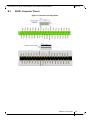
Figure 8:
Connector Orientation (Example) . . . . . . . . . . . . . . . . . . . . . . . . . . . . . . . . . . . . . . . . . . 27
Figure 9:
Support Download Assistant . . . . . . . . . . . . . . . . . . . . . . . . . . . . . . . . . . . . . . . . . . . . . . 38
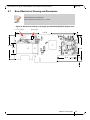
Figure 10: Mechanical Drawing of the Single-port MCX353A-[QFT]CBT Adapter Card . . . . . . . 45
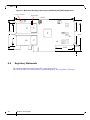
Figure 11: Mechanical Drawing of the Dual-port MCX354A-[QFT]CBT Adapter Card . . . . . . . . 46
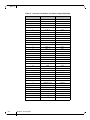
Figure 12: Compatible Connector Plug and Pinout . . . . . . . . . . . . . . . . . . . . . . . . . . . . . . . . . . . . . 47
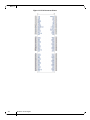
Figure 13: PCIe Connector Pinout . . . . . . . . . . . . . . . . . . . . . . . . . . . . . . . . . . . . . . . . . . . . . . . . . . 48
Figure 14: Connector and Cage Views . . . . . . . . . . . . . . . . . . . . . . . . . . . . . . . . . . . . . . . . . . . . . . . 49
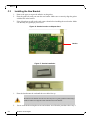
Figure 15: Bracket Screws . . . . . . . . . . . . . . . . . . . . . . . . . . . . . . . . . . . . . . . . . . . . . . . . . . . . . . . . 51
Figure 16: Gasket Location on Adapter Card . . . . . . . . . . . . . . . . . . . . . . . . . . . . . . . . . . . . . . . . . . 52
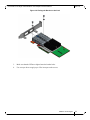
Figure 17: Gasket Installation . . . . . . . . . . . . . . . . . . . . . . . . . . . . . . . . . . . . . . . . . . . . . . . . . . . . . . 52
Figure 18: Placing the Bracket on the Card . . . . . . . . . . . . . . . . . . . . . . . . . . . . . . . . . . . . . . . . . . . 53
6
Mellanox Technologies