1
Nikon D810 Experience
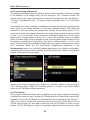
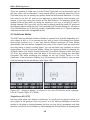
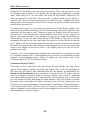
a3: Focus tracking with lock-on
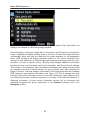
This setting determines how the autofocus system reacts to sudden, dramatic changes
in the distance of the subject when you are working in AF-C autofocus mode. The
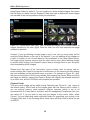
camera can be set to wait a brief period of time before refocusing at the new distance 1 (Short), a long period of time - 5 (Long), or steps in-between, from 1 to 5 (see Figure
71 - left).
For example, you may be tracking a football player across the field when another player
much closer to you comes between you and your intended subject. This setting will
determine if and how quickly the camera then focuses on this nearer player, or if it
continues to focus at the original distance as the closer player passes through your field
of view. If you do not wish for the camera to suddenly change focus to the nearer
player, set to a longer period such as 4 or 5. If you wish to switch focus to a sudden
closer or farther object, such as perhaps a flock of moving birds where focusing on any
bird and not a specific bird is the priority, then set for a shorter period, 1 or 2, or even
set for Off and focus will immediately change. Keep this option in mind with the various
AF-C Autofocus Mode and AF Area Mode configurations (discussed in the
Autofocusing chapter), as it will likely change depending on your subject and situation.
Sometimes you may not want the camera to quickly refocus on a closer or more distant
subject, while other times you might.
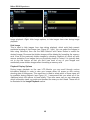
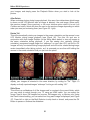
Figure 71 - Left: Focus Tracking With Lock-On setting to determine how long the
camera waits before refocusing on a subject at a different distance, when working in
AF-C Autofocus Mode. Right: AF Activation options, to choose if the Shutter Button
and/or the AF-ON Button initiates autofocus.
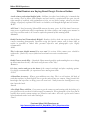
a4: AF activation
This is used to determine which button or buttons can be used to initiate autofocusing.
By default the camera is set to Shutter/AF-ON and either the Shutter Button can be halfpressed or the rear AF-ON Button can be pressed to start autofocusing (see Figure 71 right). If you wish to disable the autofocusing function from the Shutter Button, set for
AF-ON only and then you will need to press the rear AF-ON Button to focus on your
subject. This AF-ON option is used for a technique called back-button focusing, which
82