1
36
CHAPTER 4: SYSTEM POWER UP
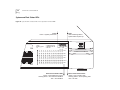
System and Port Status LEDs
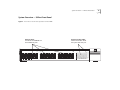
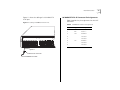
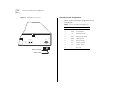
Figure 14 System and Port Status LEDs on the SuperStack II Switch 3900
Fault
Solid or Blinking Yellow =
System failed at power up
Power
Green = System powered on
Status
30x
green
flashing green
off
= enabled, link OK
= disabled, link OK
= link fail
Power Fault
1
2
3
4
5
6
7
8
9 10 11 12 Pckt
1
2
3
4
5
6
7
8
9 10 11 12 Stat
13 14 15 16 17 18 19 20 21 22 23 24 Pckt
13 14 15 16 17 18 19 20 21 22 23 24 Stat
25 26 27 28 29 30 31 32 33 34 35 36 Pckt
25 26 27 28 29 30 31 32 33 34 35 36 Stat
36x
Super Stack II Switch 3900
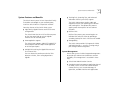
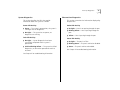
Ethernet Port Status LEDs
Green = Associated port is active
Flashing Green = Port active but disabled
OFF = Port disabled
Ethernet Port Packet LEDs
Yellow = Port is passing data
Flashing Yellow = Port is passing data
OFF = No data