1
8 Additional
information
3
Replace the fuse.
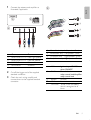
A1 A2 A3 A4 A5 A6 A7 A8
B1 B2 B3 B4 B5 B6 B7 B8
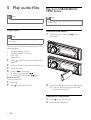
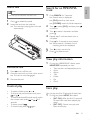
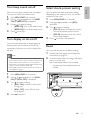
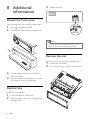
Detach the front panel
You can detach the front panel to deter theft.
1
2
Press
to release the panel.
Press the left side of the panel rightward.
FUSE 15A
Note
• If the new fuse gets damaged again, there may be an
internal malfunction. Consult your Philips dealer.
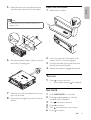
Remove the unit
You can remove the unit from the dashboard.
1
2
3
Pull the panel towards you to detach it
from the chassis.
4
Store the panel in the supplied carry case
to protect it from dirt or damage.
Replace fuse
If the fuse is damaged,
1
2
20
Check the electric connection.
Buy a fuse that matches the voltage of the
damaged fuse.
EN
Detach the front panel.
Pull out the unit by using the removal keys.