1
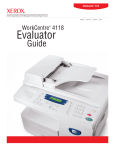
WorkCentre® 4118
copy
WorkCentre 4118
®
Evaluator
Guide
print
scan
fax
ABOUT THIS GUIDE
This guide will introduce you to the WorkCentre® 4118 digital multifunction system and aid you in your evaluation process.
CONTENTS
WorkCentre 4118 Digital Multifunction System Overview
Product Overview . . . . . . . . . . . . . . . . . . . . . . . . . . . . . . . . . . . . . . . . . . . . 1
Configurations and Options . . . . . . . . . . . . . . . . . . . . . . . . . . . . . . . . . . . . . 2
Section 2 – Evaluating Multifunction Systems
Suggests specific areas to evaluate in a product of this class, how to evaluate
these areas and how the WorkCentre 4118 multifunction system measures up.
Productivity to support your small office/workgroup . . . . . . . . . . . . . . . . . . 3
Easy to install, manage and use . . . . . . . . . . . . . . . . . . . . . . . . . . . . . . . . . 6
Space saving design that can grow with your needs. . . . . . . . . . . . . . . . . . 8
Section 3 – Configurations, Competitive Comparisons, Service & Support,
Additional Information Sources
Configuration Summary . . . . . . . . . . . . . . . . . . . . . . . . . . . . . . . . . . . . . . . . 9
Service and Support . . . . . . . . . . . . . . . . . . . . . . . . . . . . . . . . . . . . . . . . . 10
Additional Information Sources . . . . . . . . . . . . . . . . . . . . . . . . . . . . . . . . . 10
Contents
WORKCENTRE 4118 EVALUATOR GUIDE
SECTION 1
Product Overview
The WorkCentre® 4118 multifunction system is a copier-based black and white multifunction
system that helps busy small offices and workgroups save space by consolidating multiple
devices into a single, small package – without losing functionality. This entry-level
multifunction system delivers a strong range of features and capabilities at an affordable price.
The WorkCentre 4118 multifunction system delivers the right level of functionality for your
small office or workgroup. It features rich copying and printing capabilities, as well as fax
and colour scanning.
The WorkCentre 4118 delivers the following benefits to customers:
Designed for Small Offices
• Affordable, desktop device easily fits into space-constrained environments
• Easy to learn and use copy/print/fax/scan features
• Grows with your needs – add paper trays and a cabinet stand to regain desktop space
• Easy to install and manage, even without IT resources.
Robust Copier-Based Design
• 17 ppm copying and printing speed, up to 600 x 600 dpi resolution (up to 1200 dpi for
print jobs)
• 20,000-sheet monthly duty cycle to support busy small workgroups
• 40-sheet automatic document feeder (ADF) reduces time spent on long copy and scan jobs
• Powerful copy features more commonly found on high-end systems include Auto-Fit, Edge
Erase, Margin Shift, Book Copy, Insert Covers, Transparency Mode, Create Booklet Mode,
N-up Copying and more.
Big Office Features
• 650-sheet standard paper capacity (1,200-sheet maximum), up to 8,000-image toner
capacity to minimise user interventions
• Printing features include Two-Sided Printing,
N-up Printing, Booklet Printing, Insert Covers,
Collation, Poster Printing, Watermarks, Toner Save
and optional network printing to support multiple
users
• 3 second fax transmitting via 33.6 kbps
connection, 200 speed dial and group dial
numbers, JBIG/MH/MR/MMH compression
options, JPEG compression for sending colour
faxes and up to 406 x 392 superfine dpi resolution
• Up to 4800 dpi resolution colour scanning
(interpolated), with bundled software, enables easy
and efficient management, distribution and editing
of scanned files.
WorkCentre 4118
WORKCENTRE 4118 EVALUATOR GUIDE
1
Configurations and Options
copy
print
scan
fax
WORKCENTRE® 4118 STANDARD FEATURES
WorkCentre® 4118 Optional
Accessories
Optional accessories for the
WorkCentre 4118 include:
• Additional 550-sheet paper tray
• Up to 17 ppm printing and copying
• First page out time as fast as
10 seconds
• Warm up time as fast as 25 seconds
• Automatic two-sided printing
• Connectivity:
• Parallel port and USB connectivity
• Optional 10/100 Base-T Ethernet
with Networking Kit
• Print Features:
• Cabinet Stand
• Resolution up to 1200 x 1200 dpi
• PCL® 6 emulation, PCL 5e, Adobe® Postscript® 3TM
(optional with Network Kit)
• Networking Kit
• Foreign Device Interface
• Microsoft® Windows® and Apple® Macintosh®
compatibility
• Optional Networking Kit enables shared/ work
group printing
• Booklet Printing Mode, N-Up Printing and more
• Fax Features:
• 650-sheet paper input capacity:
• 3 second transmission speeds at 33.6 Kbps
• 100-sheet bypass tray
• 200 speed dial entries
• 550-sheet paper tray
• Compression methods - MH, MR, MMR, JBIG, JPEG
• 1,200-sheet maximum paper input capacity
with optional 2nd 550-sheet paper tray
• Transmission resolution up to 406 x 392 dpi
• Media Handling:
• Standard 40-sheet ADF
• Media Support:
• Sizes – custom sizes up to 216 x 356 mm
• Weights – 60 to 90 gsm. via all trays,
60 to 163 gsm. via bypass tray
• Copy Features:
• Resolution up to 600 x 600 dpi
• Up to 999 copy quantity
Additional 550-sheet Paper Tray
• 8 MB standard fax memory
• Supports custom page sizes up to A4
• Support for Batch Files, Polling, Timers,
Confidential Fax Receiving, Colour Fax Sending,
Battery Backup
• Scan Features:
• USB 2.0 or Parallel connectivity
• Resolution up to 4800 (interpolated)
• TWAIN and WIA Compatible Drivers
• Nuance® PaperPort® SE 10.0
• Nuance® OmniPage® SE 4.0
• Book Copy, Margin Shift, ID Card Copy,
N-Up Copying and more
Cabinet Stand
2
WORKCENTRE 4118 EVALUATOR GUIDE
Section 2
Evaluating Multifunction Systems
As the company that invented laser printing, Ethernet networking and the first digital multifunction
system, Xerox has invested years of research and development into designing the most productive office
systems in the industry. This experience has positioned Xerox as the recognised leader in office
multifunction system design and performance.
Based on our in-depth understanding of customer needs in the office, Xerox recommends the following
criteria be considered in the evaluation process of a desktop copier-based multifunction system:
• Productivity to support your small office/workgroup
• Easy to use and manage
• Space saving design that can grow with your needs.
This section of the Evaluator Guide will look at each of these areas, suggest ways you can evaluate a
multifunction system's performance and capabilities in these areas and explain how the WorkCentre®
4118 multifunction system exceeds the expectations of desktop copier-based multifunction system
customers on all counts.
EVALUATE PRODUCTIVITY
When evaluating for productivity, evaluate the range of features and performance delivered by
the multifunction system and the needs of you and/or your workgroup. Will the print speed keep
up with your workload? Match that with first page out time and you’ll get a sense of real
throughput – an indication of how the system will handle the average print jobs (which tend to
be 3 to 5 pages in length) of a busy small office or workgroup. Does the printer deliver print
features that will help increase your efficiency? Are the copy speeds and features appropriate
to suit your copying needs? Are faxing and scanning a critical part of your office workflow?
Does the system offer the media flexibility to support the variety of jobs you’ll ask it to perform?
HOW THE WORKCENTRE® 4118 MULTIFUNCTION SYSTEM EXCEEDS THE PRODUCTIVITY REQUIREMENT:
PRINT FEATURES
With up to 17 ppm black and white print speed and under 10 second first-page-out time, the WorkCentre
4118 multifunction system boasts the printing performance to handle the workload of your small office
or workgroup. The average three page office print job will only require approximately
20 seconds from start to finish – helping you stay productive and get to your next task.
The WorkCentre 4118 delivers maximum 1200 x 1200 dpi print resolution, delivering sharp and
professional looking printed documents. Standard two-sided printing is a convenient feature that
maximises efficiency and reduces costs by decreasing the amount of paper used on a daily basis.
Warm up time of just 25 seconds means you won’t have to wait long for the WorkCentre 4118 to wake
up from low-power mode.
WORKCENTRE 4118 EVALUATOR GUIDE
3
HOW THE WORKCENTRE® 4118 MULTIFUNCTION SYSTEM EXCEEDS THE PRODUCTIVITY
REQUIREMENT (Continued):
COPY FEATURES
The WorkCentre 4118 features copy speeds of up to 17 ppm black and white, helping you complete most
print jobs in seconds and even your longest copy jobs in minutes. With its standard 40-sheet ADF, the
WorkCentre 4118 is an ideal choice for busy small offices and workgroups. Automatic two-sided printing
helps save paper on longer copy jobs and up to 600 x 600 dpi resolution delivers crisp clear copies.
A range of advanced features, including book copy, insert covers, edge erase, image repeat,
margin shift, ID card copy, N-Up copy and more make this a full-featured copier for the desktop.
FAX FEATURES
The WorkCentre 4118 comes with fax functionality
as standard. 33.6 Kbps transmission speeds,
compression methods including MH, MR, MMR,
JBIG and JPEG and 8 MB of dedicated fax
memory create a high-performance fax solution.
Up to 13 redial attempts can be set to occur in
1 to 15 minute intervals to help your faxes reach
their destination without manually resending. 200
speed dial settings also help ease the process of
sending faxes and advanced features include the
ability to send colour faxes, the ability to receive
confidential faxes, 72-hour battery backup, timers
for delayed transmitting and sending batch files.
The WorkCentre 4118 also enables setting up
The WorkCentre 4118 brings full-featured copying, with
password protected mailboxes for storing
faxing and scanning capabilities, to your office environment.
frequently used documents, fax forwarding,
fax polling and more.
SCAN FEATURES
The WorkCentre 4118 also brings convenient colour scanning capabilities via direct USB and parallel
connections into your environment. The ADF makes scanning longer documents fast and efficient and
colour scanning is useful for scanning photographs and colour office documents like charts and graphs.
Resolutions up to 4800 x 600 dpi deliver sharp, clear images. Powerful scanning software is bundled
with the WorkCentre 4118, including: Nuance® PaperPort® SE 10.0, an application for scanning, editing,
routing and storing scanned images; and Nuance® OmniPage® SE 4.0, an optical character recognition
application that enables the editing of scanned documents.
4
WORKCENTRE 4118 EVALUATOR GUIDE
HOW THE WORKCENTRE® 4118 MULTIFUNCTION SYSTEM EXCEEDS THE PRODUCTIVITY REQUIREMENT
(Continued):
PAPER HANDLING
The paper handling capabilities of the WorkCentre 4118 are a
critical part of overall productivity of the system. Paper capacity
can be tailored for your environment, with 650 sheets standard
(100-sheet bypass tray, 550-sheet paper tray) and 1,200 sheets
maximum (with optional second 550-sheet paper tray).
Additionally, the 40-sheet ADF speeds longer copy and scan jobs
by automating the scanning of multiple pages – eliminating the
need to place pages one-at-a-time.
The WorkCentre 4118 offers paper
capacity of up to 1,200 sheets - helping
you maximise productivity.
With the optional second paper tray, received faxes can have a
dedicated tray and, for example, be printed on coloured paper for
easy identification and retrieval. Further, auto tray switching
automatically pulls sheets from the next tray if one becomes
empty and the correct media is loaded in the other.
MEDIA FLEXIBILITY
The WorkCentre 4118 supports a range of paper sizes and
weights to support the range of your employees’ tasks.
Custom paper sizes up to 216 x 356 mm allow for printing
a variety of document types – with two-sided printing
support for the same range of sizes. Paper weights from
60 - 90 gsm are supported through all trays, with heavier
papers up to 163 gsm supported through the bypass tray.
In addition to plain paper, the WorkCentre 4118 supports
various specific media types including envelopes, labels,
transparencies and more.
WORKCENTRE 4118 EVALUATOR GUIDE
5
EVALUATE EASE OF USE AND MANAGEMENT
In small offices and workgroups, ease of use is a critical attribute of the systems you deploy in
your environment – the multifunction system must be easy for your employees to learn and
use and easy for your staff to setup, administer and maintain. A simple user interface will
help users quickly learn how to use the multifunction system and get the most out of its
capabilities. Easy to use print drivers will help employees set up their print jobs and get them
right the first time. Easy to access and use advanced features give employees more tools to
efficiently conduct business. Also of importance is how the multifunction system will integrate into
your infrastructure and the tools available for managing the multifunction system.
HOW THE WORKCENTRE® 4118 MULTIFUNCTION SYSTEM EXCEEDS THE EASE OF USE REQUIREMENT:
CONSISTENT USER INTERFACE
Whether executing a simple copy or print job or preparing a fax for delivery to multiple locations –
a simple, intuitive and consistent user interface is an important attribute for your office multifunction
system. The WorkCentre 4118 multifunction system’s local user interface is organised to make the most
commonly used features easily accessible, while keeping advanced functions easy to program –
minimising the training required to get your users up and running. The WorkCentre 4118 user interface
is consistent with other Xerox multifunction systems, enabling you to deploy a mix of Xerox products
that will be familiar and easy to use for your employees.
EASY TO USE PRINT DRIVERS
The WorkCentre 4118 includes print drivers with a clear, graphical user interface that provides an
easy, intuitive way to interact with the system. Similar to the local user interface, the print drivers give
quick, easy access to the most commonly used features like two-sided printing, paper tray selection
and collation.
ACCESSIBLE ADVANCED FEATURES
With advanced features like book copy, booklet printing and copying, cover inserts, edge erase, image
repeat, margin shift, transparency interleaving and more – its important that these features are easy for
employees to find in the user interface and put to use. Whether standing at the WorkCentre 4118 front
panel, or accessing features through the print driver, your employees will be able to quickly and easily
tap into the full range of the system’s features.
The control panel is simple and intuitive.
LCD panel shows job
and machine status.
Frequently used copier features such as
collate, reduce/enlarge and lighten/darken
are one-touch operations.
6
WORKCENTRE 4118 EVALUATOR GUIDE
Easy-to-use fax features are accessed
by the touch of a single button.
Alpha-numeric keypad supports
all fax operations.
Device status display shows whether
system is ready or needs attention.
HOW THE WORKCENTRE® 4118 MULTIFUNCTION SYSTEM EXCEEDS THE EASE OF MANAGEMENT
REQUIREMENT:
SYSTEM DEPLOYMENT
For small offices who have little or no
IT support, new multifunction system
systems must be easy to setup and deploy.
The WorkCentre 4118 is simple to connect
directly to a PC or Mac via USB or
parallel and installing the drivers and
management software is easy with the
included installation and setup CD.
WorkCentre 4118 multifunction systems
with the network kit easily integrate into your
network and are also easily installed to client
PCs with the included driver installation CD.
Xerox CentreWare Web is web based software that installs, configures, manages,
monitors and reports on the networked printers and multifunction devices
throughout the enterprise – regardless of the manufacturer.
DEVICE MANAGEMENT
Xerox CentreWare® Web management
software is a powerful enterprise-level
management solution. CentreWare Web is
optional, free software that eases the chore
of installing, configuring, managing,
monitoring and pulling reports from the
networked printers and multifunction
systems through the enterprise – regardless
of vendor.
The WorkCentre 4118 also includes
CentreWare Internet Services is a web server embedded in every WorkCentre
CentreWare® Internet Services, an embedded
product. You can submit and monitor print jobs and machine status from
web server that enables device management
anywhere – from your intranet to the World Wide Web.
capabilities including detailed status checks
and modification of settings without any
special software tools. Support for Novell
NPDS and HP OpenView helps network
enabled versions of the WorkCentre 4118
integrate into your existing network infrastructure.
For non-networked models, Xerox ControlCentre 5.0 manages fax setting and enables firmware upgrades.
WORKCENTRE 4118 EVALUATOR GUIDE
7
EVALUATE SPACE EFFICIENCY AND EXPANDABILITY
For small offices and workgroups, space is often limited and office equipment that is
purchased must have a small footprint. Consider the size and flexibility of the multifunction
systems you are evaluating and how they can integrate into your environment. Can the system
be expanded to grow if your needs change over time?
HOW THE WORKCENTRE® 4118 MULTIFUNCTION SYSTEM EXCEEDS THE SPACE EFFICIENCY REQUIREMENT:
At just 455 mm tall, 560 mm wide and 430 mm deep, the WorkCentre 4118 multifunction system can
easily fit into office environments. A desktop, direct-connect system in its base configuration – the
WorkCentre 4118 is a great fit as a desktop device in a single employee office or for an executive
assistant who needs a single device for printing, copying, faxing and scanning. With optional network
connectivity, the WorkCentre 4118 can act as a shared printer – making it appropriate on a tabletop
location convenient for multiple employees. The WorkCentre 4118 also has an optional cabinet stand,
allowing the system to stand on its own and free up valuable desktop and tabletop space.
HOW THE WORKCENTRE® 4118 MULTIFUNCTION SYSTEM EXCEEDS THE EXPANDABILITY REQUIREMENT:
MEDIA CAPACITY
The WorkCentre 4118 multifunction system comes standard with a 550-sheet paper tray – a convenient
size in that it allows you to load an entire ream of 500-sheets while there are still some sheets remaining
from the prior ream. If you add employees, find your print volumes increasing, or have a regular need
for a second media size or type, you can add a second 550-sheet paper tray.
NETWORK CONNECTIVITY
The optional network kit enables you to share the WorkCentre 4118 as a network printer for the
employees on your network. This can be added to the system at any time after your purchase – meaning
the WorkCentre 4118 can be expanded to support multiple users if this becomes a requirement six
months after you buy the system.
AUTOMATIC DOCUMENT FEEDER
The WorkCentre 4118 features a 40-sheet ADF, making longer copy jobs much more efficient and automated.
FOOTPRINT
In its base configuration, the WorkCentre 4118 is a desktop or tabletop copier-based multifunction
system. As your business grows, or your workgroup becomes busier, you may need to reclaim space on
your desks and tables. The optional cabinet stand can free this space up by making the WorkCentre 4118
a free-standing system.
8
WORKCENTRE 4118 EVALUATOR GUIDE
SECTION 3
WorkCentre 4118
Configurations/Consumables/Options
copy
print
scan
fax
CONFIGURATIONS
Speed
WorkCentre 4118x
First-Page-Out Time
As fast as 10 seconds
Up to 17 ppm (A4)
Paper Handling
Paper Input
Standard
Automatic Document Feeder: 40 sheets
Bypass Tray: 100 sheets, Size: Custom sizes to 216 x 356 mm
Tray 1: 550 sheets, Size: Custom sizes to 216 x 356 mm, Auto Tray Switching Capable
Optional
Tray 2: 550 sheets, Size: Custom sizes to 216 x 356 mm
Copy
Copy Resolution
600 x 600 dpi
Copy Features
Auto Fit, Auto Suppress, Book Copy, Booklet Mode, Clone, Collation, Covers, Create Booklet, Edge Erase, ID Card Copy, Margin Shift, N-Up, Transparency
Print
Print Resolution
1200 x 1200 dpi
Print Features
Automatic Two-sided, Poster, Booklet Printing, Fit to Page, Reduce/Enlarge, Pages Per Side (up to 16), Cover Pages, Collate, Watermark
Fax
Walk-Up Fax (33.6 Kbps with JBIG Compression)
Fax Features
Secure Fax: Receive Mode, Secure Mailbox
Toll Save, Priority Transmission, Polling, Forwarding, Send Colour Fax
Scan
Scan to Desktop, bundled OCR software (Nuance
PaperPort® SE 10.0, Nuance OmniPage® SE 4.0), Colour Scan Capable
Duty Cycle
Up to 20,000 pages / month
Other Options
Network Kit, Foreign Device Interface Kit, Cabinet Stand
Warranty
One year on-site
DETAILED SPECIFICATIONS
Operating Environment
Temperature:
Maximum Range:
Recommended Range:
Humidity:
Maximum Range:
Recommended Range:
10° – 32°C
16° – 30°C
20 – 80 RH
30 – 70 RH
Electrical Requirement
Power:
Power consumption:
Normal Operation:
Ready Mode:
Sound power levels:
Physical Dimensions
220 - 240 V, 3.5 A
340 watts,
84 watts, Power Saver Mode: 16 watts
Run: 7.1 (B) Lwa,
Standby: 5.1 (B) Lwa
(WxDxH): 560 x 430 x 455 mm
Weight: 26.8 kg
WORKCENTRE 4118 EVALUATOR GUIDE
9
SERVICE AND SUPPORT
Unrivaled service and support
Behind every Xerox product is a large network of customer support that’s unrivaled in the industry and
available when you need it. Xerox service professionals use leading-edge technologies to keep you up and
running. They’re even linked to the engineers who designed your product, so you can be confident when you
choose Xerox. And genuine Xerox supplies are always easily available.
ADDITIONAL INFORMATION SOURCES
The Front Panel
The Front Panel offers tools and information pages to help with machine set-up, feature selections, solve
operational problems, media feed and supply issues.
The Customer Documentation contains:
• Read Me First
• Quick Reference Guide
• User Manual
• Print Driver (PCL)
• Scan Drivers
• Scan Software by Nuance®
• ControlCentre Management Software
With Optional Network Kit:
• System Administrators CD
• CentreWare Network Services
10
WORKCENTRE 4118 EVALUATOR GUIDE
ON THE WEB
Visit www.xerox.com/office for:
• Product, supplies and support information
• Downloading drivers
• Finding your local reseller
• On-line documentation
Visit www.xerox.com/office/support for:
• Support and service information including the
same troubleshooting knowledge base used by
Xerox Customer Support staff to provide the
latest technical information on:
• Application issues
• Errors
• Print-quality issues
• Troubleshooting
WORKCENTRE 4118 EVALUATOR GUIDE
11
WorkCentre® 4118
©2009 XEROX CORPORATION. All rights reserved. Contents of this publication may not be reproduced in any form without permission of Xerox Corporation. Xerox®, CentreWare® and WorkCentre® are registered trademarks of Xerox Corporation. Total Satisfaction ServicesSM is a service mark of
Xerox Corporation. Adobe® and PostScript® 3TM are trademarks of Adobe Systems Incorporated, or its subsidiaries, which may be registered in certain jurisdictions. Apple®, Mac® and Macintosh® are registered trademarks of Apple Computer Incorporated. PCL® is a registered trademark of
Hewlett-Packard Corporation. Microsoft® and Windows® are registered trademarks of Microsoft Corporation in the United States and/or other countries. Ltd. Nuance®, OmniPage®, PaperPort® and ScanSoft® are registered trademarks of Nuance, Inc.
10/09
W41EG-01EB