1
9
Test mode
9.5
Data select operation
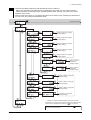
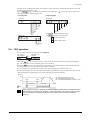
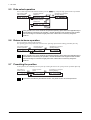
Select a desired operation data number and then press the
Top screen of data
select operation
Operation data No.
selection 0
key, and positioning operation will be performed.
Operation is in progress
(blinking display)
Operation data No.
selection 63
Note
9.6
During operation, the motor rotates at the specified operating speed while each applicable key is
pressed. Before commencing the operation, consider the status of the equipment and condition
of its surroundings to confirm thoroughly that motor rotation will not cause any dangerous
situations.
Return-to-home operation
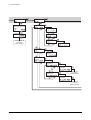
You can perform a return-to-home operation.
The operating speed corresponds to the value set in the “operating speed of home-seeking” parameter [ID: 353].
Top screen of returnto-home operation
Note
9.7
Perform return-tohome operation
Operation is in progress
(blinking display)
During operation, the motor rotates at the specified operating speed while each applicable key is
pressed. Before commencing the operation, consider the status of the equipment and condition
of its surroundings to confirm thoroughly that motor rotation will not cause any dangerous
situations.
Presetting the position
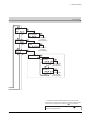
In this operation, the command position is preset by rewriting the value in the “preset position” parameter [ID: 454].
Top screen of
position preset
Note
−36−
Perform position
preset
Processing is in progress
(blinking display)
If operations are limited by the edit lock function, the preset function cannot be performed.