1
User guide
Xperia™ T3
D5102/D5103/D5106
Contents
Getting started...............................................................................6
About this User guide........................................................................6
Overview............................................................................................6
Assembly...........................................................................................7
Starting your device for the first time.................................................9
Why do I need a Google™ account?...............................................10
Charging your device.......................................................................10
Learning the basics......................................................................12
Using the touchscreen.....................................................................12
Locking and unlocking the screen...................................................14
Home screen....................................................................................14
Application screen...........................................................................16
Navigating applications....................................................................17
Small apps.......................................................................................17
Widgets............................................................................................18
Shortcuts and folders......................................................................19
Background and themes..................................................................20
Taking a screenshot.........................................................................21
Status and notifications...................................................................21
Icons in the status bar.....................................................................22
Application overview........................................................................24
Downloading applications............................................................26
Downloading applications from Google Play™...............................26
Downloading applications from other sources................................26
Internet and networks..................................................................27
Browsing the web............................................................................27
Internet and MMS settings ..............................................................27
Wi-Fi®..............................................................................................28
Sharing your mobile data connection..............................................30
Controlling data usage.....................................................................31
Selecting mobile networks...............................................................32
Virtual private networks (VPNs)........................................................32
Synchronising data on your device..............................................34
Synchronising with online accounts................................................34
Synchronising with Microsoft® Exchange ActiveSync®.................34
Synchronising with Outlook using a computer................................35
Basic settings...............................................................................37
Accessing settings...........................................................................37
Sound, ringtone and volume............................................................37
2
This is an Internet version of this publication. © Print only for private use.
SIM card protection.........................................................................38
Screen settings................................................................................38
Screen lock......................................................................................39
Language settings............................................................................40
Date and time...................................................................................40
Enhancing the sound output............................................................41
Typing text...................................................................................42
On-screen keyboard........................................................................42
Entering text using voice input........................................................43
Editing text.......................................................................................43
Personalising the Xperia keyboard..................................................44
Calling..........................................................................................45
Making calls.....................................................................................45
Receiving calls.................................................................................46
Smart call handling..........................................................................47
Ongoing calls...................................................................................48
Using the call log.............................................................................48
Forwarding calls...............................................................................49
Restricting calls................................................................................49
Multiple calls....................................................................................49
Conference calls..............................................................................50
Voicemail..........................................................................................50
Emergency calls...............................................................................51
Contacts.......................................................................................52
Transferring contacts.......................................................................52
Searching and viewing contacts......................................................53
Adding and editing contacts............................................................54
Adding medical and emergency contact information......................55
Favourites and groups.....................................................................56
Sending contact information............................................................57
Avoiding duplicate entries in the Contacts application...................57
Backing up contacts........................................................................57
Messaging and chat.....................................................................59
Reading and sending messages......................................................59
Organising your messages..............................................................60
Calling from a message...................................................................61
Messaging settings..........................................................................61
Instant messaging and video chat...................................................61
Email.............................................................................................63
Setting up email...............................................................................63
Sending and receiving email messages..........................................63
Email preview pane..........................................................................65
3
This is an Internet version of this publication. © Print only for private use.
Organising your email messages.....................................................65
Email account settings.....................................................................66
Gmail™............................................................................................66
Music............................................................................................68
Transferring music to your device...................................................68
Listening to music............................................................................68
“WALKMAN” home screen menu....................................................69
Playlists............................................................................................71
Sharing music..................................................................................71
Enhancing the sound.......................................................................72
Visualiser .........................................................................................72
Recognising music with TrackID™..................................................72
Music Unlimited online service........................................................74
FM radio.......................................................................................75
Listening to the radio.......................................................................75
Favourite radio channels..................................................................76
Sound settings.................................................................................76
Camera.........................................................................................77
Taking photos and recording videos...............................................77
Face detection.................................................................................78
Using Smile Shutter™ to capture smiling faces..............................78
Adding the geographical position to your photos...........................79
General camera settings..................................................................79
Still camera settings.........................................................................81
Video camera settings.....................................................................85
Photos and videos in Album........................................................88
Viewing photos and videos..............................................................88
Sharing and managing photos and videos......................................89
Editing photos with the Photo editor application.............................90
Album home screen menu...............................................................91
Viewing your photos on a map........................................................92
Videos..........................................................................................94
Watching videos in the Movies application.....................................94
Transferring video content to your device.......................................95
Managing video content..................................................................95
Video Unlimited service...................................................................96
Connectivity.................................................................................97
Mirroring the screen of your device wirelessly on a TV...................97
Sharing content with DLNA Certified™ devices..............................97
Playing games on a TV using a DUALSHOCK™3 wireless
controller........................................................................................100
NFC................................................................................................100
4
This is an Internet version of this publication. © Print only for private use.
Bluetooth® wireless technology....................................................102
Smart apps and features that save you time.............................105
Controlling accessories and settings with Smart Connect............105
Using your device as a fitness hub with ANT+™...........................106
Using your device as a wallet........................................................107
Travel and maps.........................................................................108
Using location services..................................................................108
Google Maps™ and navigation.....................................................109
Using data traffic when travelling..................................................110
Airplane mode................................................................................110
Calendar and alarm clock..........................................................111
Calendar.........................................................................................111
Alarm and clock.............................................................................112
Support and maintenance..........................................................114
Support for your device.................................................................114
Computer tools..............................................................................114
Updating your device.....................................................................115
Finding a lost device .....................................................................116
IMEI number...................................................................................117
Battery and power management...................................................117
Memory and storage......................................................................119
Managing files using a computer...................................................120
Backing up and restoring content.................................................121
Restarting and resetting.................................................................123
Recycling your device....................................................................124
Limitations to services and features..............................................124
Legal information...........................................................................124
5
This is an Internet version of this publication. © Print only for private use.
Getting started
About this User guide
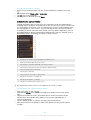
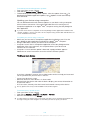
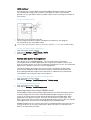
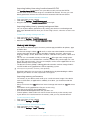
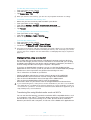
This is the Xperia™ T3 User guide for the Android™ 4.4 software version. If you're
not sure which software version your device is running, you can check it via the
Settings menu. For more information about software updates, see Updating your
device on page 115.
1
2
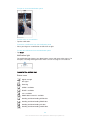
To check the current software version of your device
From your Home screen, tap .
Find and tap Settings > About phone > Android version.
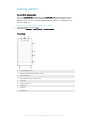
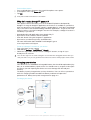
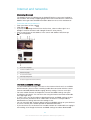
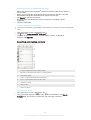
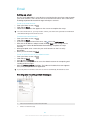
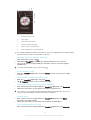
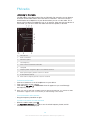
Overview
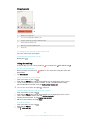
1
Proximity/Light sensor
2
Charging light/Notification light/Ear speaker
3
Front camera lens
4
Micro SIM and memory card slot cover
5
Power key
6
Volume/Zoom key
7
Camera key
8
Strap hole
9
Microphone
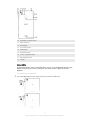
6
This is an Internet version of this publication. © Print only for private use.
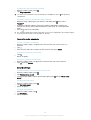
10
Wi-Fi/Bluetooth antenna area
11
Main camera lens
12
Camera light
13
Second microphone
14
Headset jack
15
GPS antenna area
16
Port for charger/USB cable
17
NFC™ detection area
18
Speaker
Assembly
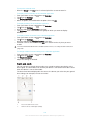
A protective plastic sheet is attached to the screen. You should peel off this sheet
before using the touchscreen. Otherwise, the touchscreen might not function
properly.
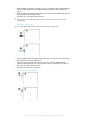
To insert the micro SIM card
Use a fine-tipped pen or other similar tool to insert the micro SIM card.
7
This is an Internet version of this publication. © Print only for private use.
1
2
3
With the back of the device facing you, insert a fingernail into the gap between
the micro SIM card slot cover and the back of the device, then detach the
cover.
With the gold-coloured contacts facing you, insert the micro SIM card into the
slot until you hear a locking sound.
Re-attach the micro SIM card slot cover.
If you insert a micro SIM card while the device is powered on, the device restarts
automatically.
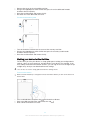
To insert a memory card
Use a fine-tipped pen or other similar tool to insert the memory card.
1
2
3
Insert a fingernail into the gap between the memory card cover and the device,
then detach the memory card cover.
Place the memory card in the memory card slot, with the gold-coloured
contacts facing towards you, then push the memory card all the way into the
slot until you hear a locking sound.
Re-attach the memory card cover.
To remove the micro SIM card
8
This is an Internet version of this publication. © Print only for private use.
1
2
3
4
Remove the cover of the micro SIM card slot.
Using a fine-tipped pen or other similar tool, press the micro SIM card inwards
and then release it quickly.
Draw the card outwards and remove it fully.
Re-attach the micro SIM card slot cover.
To remove the memory card
1
2
3
Turn off the device and remove the cover of the memory card slot.
Using a fine-tipped pen or other similar tool, press the memory card inwards
and then release it quickly.
Draw the card outwards and remove it fully.
Starting your device for the first time
The first time you start your device, a setup guide opens to help you configure basic
settings, sign in to some accounts, and personalise your device. For example, if you
have a Sony Entertainment Network account, you can sign in to it here and get set up
straight away. And you can download Internet settings.
You can also access the setup guide later from the Settings menu.
To turn on the device
Make sure that the battery is charged for at least 30 minutes before you turn on the device for
the first time.
1
2
3
Press and hold down the power key until the device vibrates.
Enter your SIM card PIN when requested, then tap
.
Wait a while for the device to start.
9
This is an Internet version of this publication. © Print only for private use.
1
2
3
To turn off the device
Press and hold down the power key
In the options menu, tap Power off.
Tap OK.
until the options menu opens.
It may take a while for the device to shut down.
Why do I need a Google™ account?
Your Xperia™ device from Sony runs on the Android™ platform developed by
Google™. A range of Google™ applications and services is available on your device
when you purchase it, for example, Gmail™, Google Maps™, YouTube™ and Google
Play™, the online store for downloading Android™ applications. To get the most out
of these services, you need a Google™ account. For example, a Google™ account is
mandatory if you want to:
•
•
•
•
Download and install applications from Google Play™.
Synchronise email, contacts and the calendar.
Chat with friends using the Hangouts™ application.
Synchronise your browsing history and bookmarks.
For more information about Android™ and Google™, go to
www.sonymobile.com/support.
1
2
3
To set up a Google™ account on your device
From your Home screen, tap .
Find and tap Settings > Add account > Google.
Follow the registration wizard to create a Google™ account, or sign in if you
already have an account.
You can also sign in to or create a Google™ account from the setup guide the first time you
start your device. Or you can go online and create an account at www.google.com/accounts.
Charging your device
Your device has an embedded, rechargeable battery that should be replaced only by
Sony or an authorised Sony repair centre. You should never try to open or take apart
this device yourself. Opening the device can cause damage that will void your
warranty.
The battery is partly charged when you buy the device. You can still use your device
while it is charging. Read more about the battery and how to improve the
performance in Battery and power management on page 117.
To charge your device
10
This is an Internet version of this publication. © Print only for private use.
1
2
3
4
Plug the charger into a power outlet.
Plug one end of the USB cable into the charger (or into the USB port of a
computer).
Plug the other end of the cable into the micro USB port on your device, with
the USB symbol facing up. The notification light illuminates when charging
begins.
When the device is fully charged, disconnect the cable from your device by
pulling it straight outwards. Make sure not to bend the connector.
If the battery is completely discharged, it may take a few minutes before the notification light
illuminates and the charging icon
appears.
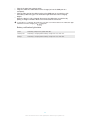
Battery notification light status
Green
The battery charge level is greater than 90%
Flashing red
The battery is charging and the battery charge level is less than 15%
Orange
The battery is charging and the battery charge level is less than 90%
11
This is an Internet version of this publication. © Print only for private use.
Learning the basics
Using the touchscreen
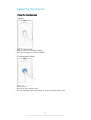
Tapping
•
•
•
Open or select an item.
Mark or unmark a checkbox or option.
Enter text using the on-screen keyboard.
Touching and holding
•
•
•
Move an item.
Activate an item-specific menu.
Activate selection mode, for example, to select several items from a list.
12
This is an Internet version of this publication. © Print only for private use.
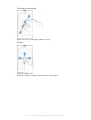
Pinching and spreading
•
Zoom in or out on a web page, a photo or a map.
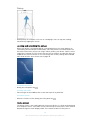
Swiping
•
•
Scroll up or down a list.
Scroll left or right, for example, between Home screen panes.
13
This is an Internet version of this publication. © Print only for private use.
Flicking
•
Scroll quickly, for example, in a list or on a web page. You can stop the scrolling
movement by tapping the screen.
Locking and unlocking the screen
When your device is on and left idle for a set period of time, the screen darkens to
save battery power and locks automatically. This lock prevents unwanted actions on
the touchscreen when you are not using it. When you buy your device, a basic screen
swipe lock is already set. This means that you have to swipe in any direction from the
middle of the screen to unlock it. You can change the security settings later and add
other kinds of locks. See Screen lock on page 39.
•
To activate the screen
Briefly press the power key
•
To unlock the screen
Place a finger on the middle of the screen and swipe in any direction.
•
To lock the screen
When the screen is active, briefly press the power key
.
.
Home screen
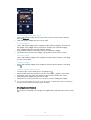
The Home screen is the starting point for using your device. It's similar to the desktop
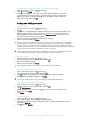
on a computer screen. Your Home screen can have up to seven panes, which extend
beyond the regular screen display width. The number of Home screen panes is
14
This is an Internet version of this publication. © Print only for private use.
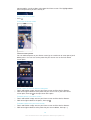
represented by a series of dots at the top of the Home screen. The highlighted dot
shows the pane that you are currently in.
•
To go to the Home screen
Press .
To browse the Home screen
Home screen panes
You can add new panes to your Home screen (up to a maximum of seven panes) and
delete panes. You can also set the pane that you want to use as the main Home
screen pane.
1
2
To set a pane as the main Home screen pane
Touch and hold an empty area on your Home screen until the device vibrates.
Flick left or right to browse to the pane that you want to set as your main Home
screen pane, then tap at the top corner of the pane.
1
2
To add a pane to your Home screen
Touch and hold an empty area on your Home screen until the device vibrates.
Flick left or right to browse the panes, then tap .
1
2
To delete a pane from your Home screen
Touch and hold an empty area on your Home screen until the device vibrates.
Flick left or right to browse to the pane that you want to delete, then tap .
15
This is an Internet version of this publication. © Print only for private use.
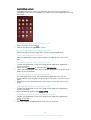
Application screen
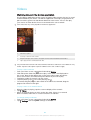
The Application screen, which you open from the Home screen, contains the
applications that come pre-installed on your device as well as applications that you
download.
1
2
To view all applications on the Application screen
From your Home screen, tap .
Flick left or right on the Application screen.
•
To open an application from the Application screen
Flick left or right to find the application, and then tap the application.
•
1
2
3
1
2
1
2
1
2
3
To open the Application screen menu
When the Application screen is open, drag the left edge of the screen to the
right.
To move an application on the Application screen
To open the Application screen menu, drag the left edge of the Application
screen to the right.
Make sure that Own order is selected under SHOW APPS.
Touch and hold the application until it magnifies and the device vibrates, then
drag it to the new location.
To add an application shortcut to the Home screen
From the Application screen, touch and hold an application icon until the
screen vibrates, then drag the icon to the top of the screen. The Home screen
opens.
Drag the icon to the desired location on the Home screen, then release your
finger.
To arrange applications on the Application screen
To open the Application screen menu, drag the left edge of the Application
screen to the right.
Select the desired option under SHOW APPS.
To search for an application from the Application screen
To open the Application screen menu, drag the left edge of the Application
screen to the right.
Tap Search apps.
Enter the name of the application that you want to search for.
16
This is an Internet version of this publication. © Print only for private use.
1
2
3
To uninstall an application from the Application screen
To open the Application screen menu, drag the left edge of the Application
screen to the right.
Tap Uninstall. All uninstallable applications are indicated by .
Tap the application that you want to uninstall, then tap Uninstall.
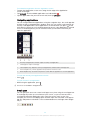
Navigating applications
You can navigate between applications using the navigation keys, the small apps bar
and the recently used applications window, which lets you switch easily between all
to exit
recently used applications. Some applications are closed when you press
while others continue to run in the background or pause. If the application is paused
or runs in the background, you can continue where you left off the next time you
open the application.
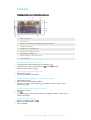
1
Recently used applications window – Open a recently used application
2
Small apps bar – Open a small app
3
Task navigation key – Open the recently used applications window and the small apps bar
4
Home navigation key – Exit an application and go back to the Home screen
5
Back navigation key – Go back to the previous screen within an application or close the application
•
To open the recently used applications window
Press .
•
To open a menu in an application
While using the application, press .
A menu is not available in all applications.
Small apps
You can get quick access to several small apps at any time using the small apps bar.
A small app only takes up a small area of your screen, so you can interact with a
small app and another application at the same time on the same screen. For
example, you can have a webpage open and then open the Calculator small app on
top of it and perform calculations. You can download more small apps from Google
Play™.
17
This is an Internet version of this publication. © Print only for private use.
1
2
To open a small app
To make the small apps bar appear, press
Tap the small app that you want to open.
.
You can open several small apps at the same time.
•
To close a small app
Tap on the small app window.
1
2
To download a small app
From the small apps bar, tap
, then tap and tap .
Search for the small app that you want to download, then follow the
instructions to download it and complete the installation.
•
To move a small app
When the small app is open, touch and hold the top left corner of the small
app, then move it to the desired location.
•
To minimise a small app
When the small app is open, touch and hold the top left corner of the small
app, then drag it to the right edge or to the bottom edge of the screen.
•
To rearrange the small apps in the small apps bar
Touch and hold a small app and drag it to the desired position.
•
To remove a small app from the small apps bar
Touch and hold a small app, then drag it to .
1
2
1
2
3
4
To restore a previously removed small app
Open the small apps bar, then tap
.
Touch and hold the small app that you want to restore, then drag it into the
small apps bar.
To add a widget as a small app
To make the small apps bar appear, press .
> > .
Tap
Select a widget.
Enter a name for the widget, if desired, then tap OK.
Widgets
Widgets are small applications that you can use directly on your Home screen. They
also function as shortcuts. For example, the Weather widget allows you to see basic
weather information directly on your Home screen. But when you tap the widget, the
full Weather application opens. You can download additional widgets from Google
Play™.
18
This is an Internet version of this publication. © Print only for private use.
1
2
1
2
3
To add a widget to the Home screen
Touch and hold an empty area on your Home screen until the device vibrates,
then tap Widgets.
Find and tap the widget that you want to add.
To resize a widget
Touch and hold a widget until it magnifies and the device vibrates, then release
the widget. If the widget can be resized, for example, the Calendar widget,
then a highlighted frame and resizing dots appear.
Drag the dots inward or outward to shrink or expand the widget.
To confirm the new size of the widget, tap anywhere on the Home screen.
•
To move a widget
Touch and hold the widget until it magnifies and the device vibrates, then drag
it to the new location.
•
To delete a widget
Touch and hold the widget until it magnifies and the device vibrates, then drag
it to .
To add a widget to the lock screen
1
2
3
4
5
To activate the screen, briefly press the power key .
Swipe inwards from the top left area of the screen until appears, then tap it.
If required, enter your PIN code, pattern or password to unlock the screen.
Find and tap the widget that you want to add.
Follow the on-screen instructions, if necessary, to finish adding the widget.
You cannot add a widget to the lock screen by default. To enable this feature, tap Settings >
Security and then mark the Enable widgets checkbox.
Shortcuts and folders
Use shortcuts and folders to manage your applications and keep your Home screen
tidy.
19
This is an Internet version of this publication. © Print only for private use.
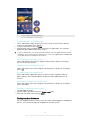
1
2
3
1
Access a folder containing applications
2
Access an application using a shortcut
To add a shortcut to your Home screen
Touch and hold an empty area on your Home screen until the device vibrates
and the customisation menu appears.
In the customisation menu, tap Apps.
Scroll through the list of applications and select an application. The selected
application gets added to the Home screen.
In step 3, alternatively, you can tap Shortcuts and then select an application from the list
available. If you use this method to add shortcuts, some of the applications available allow
you to add specific functionality to the shortcut.
•
To move an item on the Home screen
Touch and hold the item until it magnifies and the device vibrates, then drag
the item to the new location.
•
To delete an item from the Home screen
Touch and hold an item until it magnifies and the device vibrates, then drag the
item to .
•
To create a folder on the Home screen
Touch and hold an application icon or a shortcut until it magnifies and the
device vibrates, then drag and drop it on top of another application icon or
shortcut.
•
To add items to a folder on the Home screen
Touch and hold an item until it magnifies and the device vibrates, then drag the
item to the folder.
1
2
3
To rename a folder on the Home screen
Tap the folder to open it.
Tap the folder's title bar to show the Folder name field.
Enter the new folder name and tap Done.
Background and themes
You can adapt the Home screen to your own style using wallpapers and different
themes. You can also change the wallpaper on the lock screen.
20
This is an Internet version of this publication. © Print only for private use.
1
2
To change your Home screen wallpaper
Touch and hold an empty area on your Home screen until the device vibrates.
Tap Wallpapers and select an option.
1
2
To set a theme
Touch and hold an empty area on your Home screen until the device vibrates.
Tap Themes, then select a theme.
When you change a theme, the background also changes in some applications.
1
2
3
To change the wallpaper for the lock screen
From your Home screen, tap .
Find and tap Settings > Personalization> Lock screen.
Select an option, then follow the instructions to change your wallpaper.
Taking a screenshot
You can capture still images of any screen on your device as a screenshot.
Screenshots you take are automatically saved in Album.
1
2
To take a screenshot
Press and hold down the power key and the volume down key simultaneously
until you hear a clicking sound.
To view the screenshot, drag the status bar fully downwards.
Status and notifications
The icons in the status bar inform you of events such as new messages and calendar
notifications, activities in progress such as file downloads, and status information
such as battery level and signal strength. You can drag down the status bar to open
the Notification panel and handle your notifications.
21
This is an Internet version of this publication. © Print only for private use.
To open or close the Notification panel
•
To take action on a notification
Tap the notification.
•
To dismiss a notification from the Notification panel
Place your finger on a notification and flick left or right.
•
To clear all notifications from the Notification panel
Tap Clear.
Notification light
The notification light informs you about battery status and some other events. For
example, a flashing white light means there is a new message or a missed call.
Icons in the status bar
Status icons
Signal strength
No signal
Roaming
GPRS is available
EDGE is available
3G is available
Mobile data network is available
Sending and downloading GPRS data
Sending and downloading EDGE data
Sending and downloading 3G data
Sending and downloading mobile data
22
This is an Internet version of this publication. © Print only for private use.
Battery status
The battery is charging
STAMINA mode is activated
Airplane mode is activated
The Bluetooth® function is activated
The SIM card is not inserted
The microphone is muted
The speakerphone is on
Silent mode
Vibrate mode
An alarm is set
GPS is activated
Synchronisation is ongoing
Problem with sign-in or synchronisation
Your device is ready to connect to other ANT+™ capable devices
Notification icons
The following notification icons may appear on your screen:
New email message
New text message or multimedia message
New voicemail
Upcoming calendar event
A song is playing
The device is connected to a computer via a USB cable
Warning message
Error message
Missed call
Call ongoing
Call on hold
Call forwarding is turned on
A Wi-Fi® connection is enabled and wireless networks are available
Software updates are available
Downloading data
Uploading data
More (undisplayed) notifications
23
This is an Internet version of this publication. © Print only for private use.
Application overview
Use the Alarm and clock application to set various kinds of alarms.
Use your web browser to navigate and view web pages, manage bookmarks,
and manage text and images.
Use the Calculator application to perform basic calculations.
Use the Calendar application to keep track of your events and manage your
appointments.
Use the camera to take photos and record video clips.
Use the Contacts application to manage phone numbers, email address and
other information related to your contacts.
Access your downloaded applications.
Use the Email application to send and receive emails through both private
and corporate accounts.
Use the Facebook™ application to engage in social networking with friends,
family members and colleagues around the world.
Browse and listen to FM radio stations.
Use the Album application to view and to work with your photos and videos.
Use the Gmail™ application to read, write and organise email messages.
Search for information in your device and on the web.
View your current location, find other locations, and calculate routes using
Google Maps™.
Go to Google Play™ to download free and paid applications for your device.
Use the Messaging application to send and receive text and multimedia
messages.
Use the Movies application to play videos in your device and share content
with your friends.
Use the "WALKMAN" application to organise and play music, audio books
and podcasts.
View news stories and weather forecasts.
Make phone calls by dialling the number manually or by using the smart dial
function.
Use the Video Unlimited application to rent and purchase videos.
Optimise settings to suit your own requirements.
Use the Hangouts™ application to chat with friends online.
Identify music tracks that you hear playing in your surroundings, and get
artist, album and other info.
Use YouTube™ to share and view videos from around the world.
Use the Support application to access user support in the device. For
example, you can access a User guide, troubleshooting information, plus tips
and tricks.
24
This is an Internet version of this publication. © Print only for private use.
Download and install new applications and updates.
Some applications are not supported by all networks and/or service providers in all areas.
25
This is an Internet version of this publication. © Print only for private use.
Downloading applications
Downloading applications from Google Play™
Google Play™ is the official online Google store for downloading applications,
games, music, movies and books. It includes both free and paid applications. Before
you start downloading from Google Play™, make sure that you have a working
Internet connection, preferably over Wi-Fi® to limit data traffic charges.
To use Google Play™, you need to have a Google™ account. Google Play™ may not be
available in all countries or regions.
1
2
3
4
To download an application from Google Play™
From the Home screen, tap .
Find and tap Play Store.
Find an item you wish to download by browsing categories, or by using the
search function.
Tap the item to view its details, and follow the instructions to complete the
installation.
Some applications may need to access data, settings and various functions on your device in
order to work properly. Only install and give permissions to applications that you trust.
You can view the permissions granted to a downloaded application by tapping the application
under Settings > Apps.
Downloading applications from other sources
When your device is set to allow downloads from sources other than Google Play™,
you can download applications directly from other websites by following the relevant
download instructions.
Installing applications of unknown or unreliable origin can damage your device. Only download
applications from reliable sources. Contact the application provider if you have any questions
or concerns.
To allow the download of applications from other sources
1
2
3
4
From your Home screen, tap .
Find and tap Settings > Security.
Mark the Unknown sources checkbox.
Tap OK.
Some applications may need to access data, settings and various functions on your device in
order to work properly. Only install and give permissions to applications you trust.
You can view the permissions granted to a downloaded application by tapping the application
under Settings > Apps.
26
This is an Internet version of this publication. © Print only for private use.
Internet and networks
Browsing the web
The Google Chrome™ web browser for Android™ devices comes pre-installed in
most markets. Go to http://support.google.com/chrome and click the "Chrome for
Mobile" link to get more detailed information about how to use this web browser.
1
2
3
4
To browse with Google Chrome™
From your Home screen, tap .
Find and tap .
If you are using Google Chrome™ for the first time, select to either sign in to a
Google™ account or browse with Google Chrome™ anonymously.
Enter a search term or web address in the search and address field, then tap
Go on the keyboard.
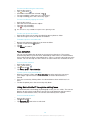
1
Go to the homepage
2
Search and address field
3
Refresh the page
4
Access browser tabs
5
View help and options
6
Go back a page in the browser history
Internet and MMS settings
To send multimedia messages, or to access the Internet when there is no available
Wi-Fi® network, you must have a working mobile data connection with the correct
Internet and MMS (Multimedia Messaging Service) settings. Here are some tips:
•
•
•
•
For most mobile networks and operators, Internet and MMS settings come preinstalled on your device. You can then start using the Internet and send multimedia
messages right away.
In some cases, you get the option to download Internet and MMS settings the first
time you turn on your device when a SIM card is inserted. It is also possible to
download these settings later from the Settings menu.
You can manually add, change or delete Internet and MMS settings on your device at
any time. Contact your network operator for detailed information.
If you cannot access the Internet over a mobile network or if multimedia messaging is
not working, even though the Internet and MMS settings have been downloaded
27
This is an Internet version of this publication. © Print only for private use.
successfully to your device, refer to the troubleshooting tips for your device at
www.sonymobile.com/support/ for network coverage, mobile data, and MMS issues.
1
2
3
To download Internet and MMS settings
From your Home screen, tap .
Find and tap Settings > More… > Internet settings.
Tap Accept. Once the settings have been downloaded successfully,
in the status bar and mobile data is turned on automatically.
appears
If the settings cannot be downloaded to your device, check the signal strength of your mobile
network. Move to an open location free from obstructions or get close to a window and then
try again.
1
2
3
To check whether mobile data is turned on or off
From your Home screen, tap .
Find and tap Settings > More… > Mobile networks.
Check whether the Mobile data traffic checkbox is marked or not.
7
To add Internet and MMS settings manually
From your Home screen, tap .
Find and tap Settings > More… > Mobile networks.
Tap Access Point Names > .
Tap Name and enter a name as desired.
Tap APN and enter the access point name.
Enter all other information as required. If you don’t know what information is
required, contact your network operator for more details.
When you're done, tap , then tap Save.
1
2
3
4
To view the downloaded Internet and MMS settings
From your Home screen, tap .
Find and tap Settings > More… > Mobile networks.
Tap Access Point Names.
To view more details, tap any of the available items.
1
2
3
4
5
6
If you have several available connections, the active network connection is indicated by a
marked button .
1
2
3
4
To delete all Internet and MMS settings
From your Home screen, tap .
Find and tap Settings > More… > Mobile networks.
Tap Access Point Names, then tap .
Tap Reset to default. All Internet and MMS settings are deleted.
Wi-Fi®
Use Wi-Fi® connections to surf the Internet, download applications, or send and
receive emails. Once you have connected to a Wi-Fi® network, your device
remembers the network and automatically connects to it the next time you come
within range.
Some Wi-Fi® networks require you to log in to a web page before you can get
access. Contact the relevant Wi-Fi® network administrator for more information.
Available Wi-Fi® networks may be open or secured:
•
•
Open networks are indicated by next to the Wi-Fi® network name.
Secured networks are indicated by next to the Wi-Fi® network name.
Some Wi-Fi® networks do not show up in the list of available networks because they do not
broadcast their network name (SSID). If you know the network name, you can add it manually
to your list of available Wi-Fi® networks.
28
This is an Internet version of this publication. © Print only for private use.
1
2
3
To turn on Wi-Fi®
From your Home screen, tap .
Find and tap Settings.
Drag the slider beside Wi-Fi to the right to turn on the Wi-Fi® function.
It may take a few seconds before Wi-Fi® is enabled.
1
2
3
4
To connect to a Wi-Fi® network automatically
From your Home screen, tap .
Find and tap Settings.
Tap Wi-Fi. All available Wi-Fi® networks are displayed.
Tap a Wi-Fi® network to connect to it. For secured networks, enter the
relevant password. is displayed in the status bar once you are connected.
To search for new available networks, tap , and then tap Scan.
1
2
3
4
5
6
7
8
To add a Wi-Fi® network manually
From your Home screen, tap .
Find and tap Settings > Wi-Fi.
Tap .
Enter the Network SSID information.
To select a security type, tap the Security field.
If required, enter a password.
To edit some advanced options such as proxy and IP settings, mark the Show
advanced options checkbox and then edit as desired.
Tap Save.
Contact your Wi-Fi® network administrator to get the network SSID and password.
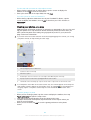
Increasing Wi-Fi® signal strength
There are a number of things you can do to increase the strength of a Wi-Fi® signal:
•
•
•
Move your device closer to the Wi-Fi® access point.
Move the Wi-Fi® access point away from any potential obstructions or interference.
Don’t cover the Wi-Fi® antenna area of your device (the highlighted area in the
illustration).
FCC Caution: Operation in the 5.15 GHz to 5.25 GHz frequency band is only permitted for
indoor use. For indoor and outdoor operation, connect your device to an FCC approved 5 GHz
WLAN access point.
29
This is an Internet version of this publication. © Print only for private use.
Wi-Fi® settings
When you are connected to a Wi-Fi® network or when there are Wi-Fi® networks
available in your vicinity, it is possible to view the status of these networks. You can
also enable your device to notify you whenever an open Wi-Fi® network is detected.
If you are not connected to a Wi-Fi® network, your device uses a mobile data
connection to access the Internet (if you have set up and enabled a mobile data
connection on your device). By adding a Wi-Fi® sleep policy, you can specify when
to switch from Wi-Fi® to mobile data.
1
2
3
4
5
6
1
2
3
1
2
3
4
5
6
To enable Wi-Fi® network notifications
Turn on Wi-Fi®, if it is not already on.
From your Home screen, tap .
Find and tap Settings > Wi-Fi.
Press .
Tap Advanced.
Mark the Network notification checkbox.
To view detailed information about a connected Wi-Fi® network
From the Home screen, tap .
Find and tap Settings > Wi-Fi.
Tap the Wi-Fi® network that you are currently connected to. Detailed network
information is displayed.
To add a Wi-Fi® sleep policy
From the Home screen, tap .
Find and tap Settings > Wi-Fi.
Press .
Tap Advanced.
Tap Keep Wi-Fi on during sleep.
Select an option.
Sharing your mobile data connection
You can share your device's mobile data connection with a single computer using a
USB cable. This process is called USB tethering. You can also share your device's
data connection with up to eight other devices at once by turning your device into a
portable Wi-Fi® hotspot. When your device's mobile data connection is successfully
shared, the sharing devices can use your device's data connection, for example, to
surf the Internet, download applications, or send and receive emails.
You may need to prepare your computer to establish a network connection via USB cable. Go
to www.android.com/tether to get the most current information.
1
2
3
4
5
6
To share your data connection using a USB cable
Deactivate all USB cable connections to your device.
Using the USB cable that came with your device, connect your device to a
computer.
From your Home screen, tap .
Find and tap Settings > More… > Tethering & portable hotspot.
Mark the USB tethering checkbox, then tap OK if prompted. is displayed in
the status bar once you are connected.
To stop sharing your data connection, unmark the USB tethering checkbox or
disconnect the USB cable.
You cannot share your device's data connection and SD card over a USB cable at the same
time.
30
This is an Internet version of this publication. © Print only for private use.
1
2
3
4
5
6
7
8
9
1
2
3
4
5
6
7
To use your device as a portable Wi-Fi® hotspot
From your Home screen, tap .
Find and tap Settings > More… > Tethering & portable hotspot.
Tap Portable Wi-Fi hotspot settings > Configure Wi-Fi hotspot.
Enter the Network SSID information.
To select a security type, tap the Security field. If required, enter a password.
Tap Save.
and mark the Portable Wi-Fi hotspot checkbox.
Tap
If prompted, tap OK to confirm. appears in the status bar once the portable
Wi-Fi® hotspot is active.
To stop sharing your data connection via Wi-Fi®, unmark the Portable Wi-Fi
hotspot checkbox.
To rename or secure your portable hotspot
From the Home screen, tap .
Find and tap Settings > More… > Tethering & portable hotspot.
Tap Portable Wi-Fi hotspot settings > Configure Wi-Fi hotspot.
Enter the Network SSID for the network.
To select a security type, tap the Security field.
If required, enter a password.
Tap Save.
Controlling data usage
You can keep track of the amount of data transferred to and from your device over
your mobile data or Wi-Fi® connection during a given period. For example, you can
view the amount of data used by individual applications. For data transferred over
your mobile data connection, you can also set data usage warnings and limits to
avoid additional charges.
Adjusting data usage settings can help you keep greater control over data usage but cannot
guarantee the prevention of additional charges.
1
2
3
To turn mobile data traffic on or off
From your Home screen, tap .
Find and tap Settings > Data usage.
Drag the slider beside Mobile data accordingly to turn mobile data traffic on or
off.
When mobile data traffic is turned off, your device can still establish Wi-Fi® and Bluetooth®
connections.
1
2
3
4
To set a data usage warning
Make sure that mobile data traffic is turned on.
From your Home screen, tap .
Find and tap Settings > Data usage.
To set the warning level, drag the warning line to the desired value. You receive
a warning notification when the amount of data traffic approaches the level you
set.
1
2
3
4
5
To set a mobile data usage limit
Make sure that mobile data traffic is turned on.
From your Home screen, tap .
Find and tap Settings > Data usage.
Mark the Set mobile data limit checkbox if it is not marked, then tap OK.
To set the mobile data usage limit, drag the corresponding line to the desired
value.
Once your mobile data usage reaches the set limit, mobile data traffic on your device gets
turned off automatically.
31
This is an Internet version of this publication. © Print only for private use.
1
2
3
4
5
To control the mobile data usage of individual applications
From your Home screen, tap .
Find and tap Settings > Data usage.
Find and tap the desired application.
Mark the Restrict background data checkbox.
To access more specific settings for the application (if available), tap View app
settings and make the desired changes.
The performance of individual applications may be affected if you change the related data
usage settings.
1
2
3
4
To view data transferred via Wi-Fi®
From your Home screen, tap .
Find and tap Settings > Data usage.
Tap , then mark the Show Wi-Fi usage checkbox if it is not marked.
Tap the Wi-Fi tab.
Selecting mobile networks
Your device automatically switches between mobile networks depending on which
mobile networks are available where you are. You can also manually set your device
to use a particular mobile network mode, for example, WCDMA or GSM.
1
2
3
4
To select a network mode
From your Home screen, tap .
Find and tap Settings > More… > Mobile networks.
Tap Network Mode.
Select a network mode.
1
2
3
4
To select another network manually
From your Home screen, tap .
Find and tap Settings > More… > Mobile networks > Service providers.
Tap Search mode > Manual.
Select a network.
If you select a network manually, your device will not search for other networks, even if you
move out of range of the manually selected network.
1
2
3
To activate automatic network selection
From your Home screen, tap .
Find and tap Settings > More… > Mobile networks > Service providers.
Tap Search mode > Automatic.
Virtual private networks (VPNs)
Use your device to connect to virtual private networks (VPNs), which allow you to
access resources inside a secured local network from a public network. For example,
VPN connections are commonly used by corporations and educational institutions for
users who need to access intranets and other internal services when they are outside
of the internal network, for example, when they are travelling.
VPN connections can be set up in many ways, depending on the network. Some
networks may require you to transfer and install a security certificate on your device.
For detailed information on how to set up a connection to your virtual private
network, please contact the network administrator of your company or organisation.
32
This is an Internet version of this publication. © Print only for private use.
1
2
3
4
5
6
To add a virtual private network
From your Home screen, tap .
Find and tap Settings > More… > VPN.
Tap .
Select the type of VPN to add.
Enter your VPN settings.
Tap Save.
1
2
3
4
5
To connect to a virtual private network
From your Home screen, tap .
Find and tap Settings > More… > VPN.
In the list of available networks, tap the VPN that you want to connect to.
Enter the required information.
Tap Connect.
1
2
To disconnect from a virtual private network
Drag the status bar downwards.
Tap the notification for the VPN connection to turn it off.
33
This is an Internet version of this publication. © Print only for private use.
Synchronising data on your device
Synchronising with online accounts
Synchronise your device with contacts, email, calendar events and other information
from online accounts, for example, email accounts such as Gmail™ and Exchange
ActiveSync, Facebook™, Flickr™ and Twitter™. You can synchronise data
automatically for all accounts by activating the auto-sync function. Or you can
synchronise each account manually.
1
2
3
1
2
1
2
3
4
1
2
3
4
To set up an online account for synchronisation
From your Home screen, tap .
Tap Settings > Add account, then select the account that you want to add.
Follow the instructions to create an account, or sign in if you already have an
account.
To activate the auto-sync function
From your Home screen, tap > Settings.
Drag the slider beside Auto-sync to the right.
To synchronise manually with an online account
From your Home screen, tap > Settings.
Under Accounts, select the account type, then tap the name of the account
that you want to synchronise with. A list of items that can be synchronised with
the account appears .
Mark the items that you want to synchronise.
Tap , then tap Sync now.
To remove an online account
From your Home screen, tap > Settings.
Under Accounts, select the account type, then tap the name of the account
that you want to remove.
Tap , then tap Remove account.
Tap Remove account again to confirm.
Synchronising with Microsoft® Exchange ActiveSync®
Using a Microsoft Exchange ActiveSync account, you can access your corporate
email messages, calendar appointments and contacts directly on your device. After
setup, you can find your information in the Email, Calendar and Contacts
applications.
34
This is an Internet version of this publication. © Print only for private use.
1
2
3
4
5
6
7
8
9
To set up an EAS account for synchronisation
Make sure that you have your domain and server details, provided by your
corporate network administrator, available.
From your Home screen, tap .
Tap Settings > Add account > Exchange ActiveSync.
Enter your corporate email address and password.
Tap Next. Your device begins to retrieve your account information. If a failure
occurs, enter the domain and server details for your account manually and
then tap Next.
Tap OK to allow your corporate server to control your device.
Select what data you want to sync with your device, such as contacts and
calendar entries.
If desired, activate the device administrator to allow your corporate server to
control certain security features on your device. For example, you can allow
your corporate server to set password rules and set storage encryption.
When the setup is done, enter a name for the corporate account.
When you change the login password for an EAS account on your computer, you have to log
in again to the EAS account on your device.
1
2
3
1
2
3
4
1
2
3
4
To change the settings of an EAS account
From your Home screen, tap .
Tap Email, then tap .
Tap Settings and select an EAS account, then change the settings of the EAS
account as desired.
To set a synchronisation interval for an EAS account
From your Home screen, tap .
Tap Email, then tap .
Tap Settings and select an EAS account.
Tap Account check frequency > Check frequency and select an interval option.
To remove an EAS account
From your Home screen, tap > Settings.
Under Accounts, tap Exchange ActiveSync, then select the EAS account that
you want to remove.
Tap , then tap Remove account.
Tap Remove account again to confirm.
Synchronising with Outlook using a computer
You can use the Calendar and Contacts applications within the PC Companion and
the Sony Bridge for Mac computer programs to synchronise your device with the
calendar and contacts from your Outlook account.
For more information on how to install the PC Companion on a PC or the Sony Bridge for Mac
application on an Apple® Mac® computer, see Computer tools on page 114.
1
2
3
To synchronise with your Outlook contacts using a computer
Make sure that the PC Companion application is installed on the PC or the
Sony Bridge for Mac application is installed on the Apple® Mac® computer.
Computer: Open the PC Companion application or the Sony Bridge for Mac
application.
Click Start to start the Contacts and Contacts Sync applications and follow the
on-screen instructions to synchronise your device with your Outlook contacts.
35
This is an Internet version of this publication. © Print only for private use.
1
2
3
To synchronise with your Outlook calendar using a computer
Make sure that the PC Companion application is installed on the PC or the
Sony Bridge for Mac application is installed on the Apple® Mac® computer.
Computer: Open the PC Companion application or the Sony Bridge for Mac
application.
Click Start to start the Calendar and Calendar Sync applications and follow the
on-screen instructions to synchronise your device with your Outlook calendar.
36
This is an Internet version of this publication. © Print only for private use.
Basic settings
Accessing settings
View and change settings for your device from the Settings menu. The Settings menu
is accessible from both the Application screen and the Quick settings panel.
1
2
To open the device settings menu from the Application screen
From your Home screen, tap .
Tap Settings.
•
To open the Quick settings panel
Using two fingers, drag the status bar downwards.
1
2
To select which settings to display on the Quick settings panel
Using two fingers, drag the status bar downwards, then tap Edit.
Select the quick settings that you want to display.
1
2
To rearrange the Quick settings panel
Using two fingers, drag the status bar downwards, then tap Edit.
beside a quick setting, then move it to the desired position.
Touch and hold
Sound, ringtone and volume
You can adjust the ringtone volume for incoming calls and notifications as well as for
music and video playback. You can also set your device to silent mode so that it
doesn't ring when you're in a meeting.
•
To adjust the ringtone volume with the volume key
Press the volume key up or down.
•
To adjust the media playing volume with the volume key
When playing music or watching video, press the volume key up or down.
•
To set your device to vibrate mode
Press the volume key down until appears in the status bar.
2
To set your device to silent mode
Press the volume key down until the device vibrates and appears in the
status bar.
Press the volume key down again. appears in the status bar.
1
2
3
To set your device to vibrate and ring mode
From your Home screen, tap .
Find and tap Settings > Sound.
Mark the Vibrate when ringing checkbox.
1
2
3
4
To set a ringtone
From your Home screen, tap .
Find and tap Settings > Sound > Phone ringtone.
Select a ringtone.
Tap Done.
1
2
3
4
To select the notification sound
From your Home screen, tap .
Find and tap Settings > Sound > Notification sound.
Select the sound to be played when notifications arrive.
Tap Done.
1
37
This is an Internet version of this publication. © Print only for private use.
1
2
3
To enable touch tones
From your Home screen, tap .
Find and tap Settings > Sound.
Mark the Dial pad touch tones and Touch sounds checkboxes.
SIM card protection
You can lock and unlock each SIM card that you use in your device with a PIN
(Personal Identity Number). When a SIM card is locked, the subscription linked to the
card is protected against misuse, meaning that you have to enter a PIN every time
you start your device.
If you enter the PIN incorrectly more times than the maximum number of attempts
allowed, your SIM card will become blocked. You then need to enter your PUK
(Personal Unblocking Key) and a new PIN. Your PIN and PUK are supplied by your
network operator.
1
2
3
4
To lock or unlock a SIM card
From the Home screen, tap .
Find and tap Settings > Security > Set up SIM card lock.
Mark or unmark the Lock SIM card checkbox.
Enter the SIM card PIN and tap OK.
1
2
3
4
5
6
To change the SIM card PIN
From the Home screen, tap .
Find and tap Settings > Security > Set up SIM card lock.
Tap Change SIM PIN.
Enter the old SIM card PIN and tap OK.
Enter the new SIM card PIN and tap OK.
Re-type the new SIM card PIN and tap OK.
1
2
3
To unlock a blocked SIM card using the PUK code
.
Enter the PUK code and tap
Enter a new PIN code and tap
.
Re-enter the new PIN code and tap
.
If you enter an incorrect PUK code too many times, you need to contact your network operator
to get a new SIM card.
Screen settings
1
2
3
4
To adjust the screen brightness
From your Home screen, tap .
Find and tap Settings > Display > Brightness.
Unmark the Adapt to lighting conditions checkbox if it is marked.
Drag the slider to adjust the brightness.
Lowering the brightness level increases battery performance.
1
2
3
To set the screen to vibrate on touch
From your Home screen, tap .
Find and tap Settings> Sound.
Mark the Vibrate on touch checkbox. The screen now vibrates when you tap
soft keys and certain applications.
38
This is an Internet version of this publication. © Print only for private use.
1
2
3
To adjust the idle time before the screen turns off
From your Home screen, tap .
Find and tap Settings > Display > Sleep.
Select an option.
To turn off the screen quickly, briefly press the power key
.
Smart backlight control
The smart backlight control keeps the screen on as long as the device is held in your
hand. Once you put down the device, the screen turns off according to your sleep
setting.
1
2
3
To turn on the Smart backlight control function
From your Home screen, tap .
Find and tap Settings > Display > Smart backlight control.
Drag the slider beside Smart backlight control to the right.
Screen lock
There are several ways to lock the screen. The security level of each lock type is
listed below in order of weakest to strongest:
•
•
•
•
•
Swipe – no protection, but you have quick access to the Home screen
Face Unlock – unlocks your device when you look at it
Unlock pattern – draw a simple pattern with your finger to unlock your device
Unlock PIN – enter a numeric PIN of at least four digits to unlock your device
Unlock password – enter an alpha-numeric password to unlock your device
It is very important that you remember your screen unlock pattern, PIN or password. If you
forget this information, it may not be possible to restore important data such as contacts and
messages.
1
2
3
4
To set up the Face Unlock feature
From your Home screen, tap > Settings > Security > Screen lock.
Tap Face Unlock, then follow the instructions in your device to capture a photo
of your face.
After your face is successfully captured, tap Continue.
Select a backup unlock method and follow the instructions in the device to
complete the setup.
For best results, capture your face in an indoor area that is well lit but not too bright, and hold
the device at eye level.
1
2
To unlock the screen using the Face Unlock feature
Activate the screen.
Look at your device from the same angle you used to capture your Face
Unlock photo.
If the Face Unlock feature fails to recognise your face, you must use the backup unlock
method to unlock the screen.
1
2
3
To create a screen lock pattern
From your Home screen, tap .
Find and tap Settings > Security > Screen lock > Pattern.
Follow the instructions in your device.
If your lock pattern is rejected five times in a row when you try to unlock your device, you must
wait 30 seconds and then try again.
39
This is an Internet version of this publication. © Print only for private use.
1
2
3
4
To change the screen lock pattern
From your Home screen, tap .
Find and tap Settings> Security > Screen lock.
Draw your screen unlock pattern.
Tap Pattern and follow the instructions in your device.
1
2
3
4
5
6
7
To create a screen unlock PIN
From your Home screen, tap > Settings > Security > Screen lock > PIN.
Enter a numeric PIN.
If necessary, tap to minimise the keyboard.
Tap Continue.
Re-enter and confirm your PIN.
If necessary, tap to minimise the keyboard.
Tap OK.
2
3
4
5
6
7
To create a screen lock password
From your Home screen, tap > Settings > Security > Screen lock >
Password.
Enter a password.
If necessary, tap to minimise the keyboard.
Tap Continue.
Re-enter and confirm your password.
If necessary, tap to minimise the keyboard.
Tap OK.
1
2
3
To change screen lock type
From your Home screen, tap .
Find and tap Settings > Security > Screen lock.
Follow the instructions in your device and select another screen lock type.
1
Language settings
You can select a default language for your device and change it again at a later time.
You can also change the writing language for text input. See Personalising the Xperia
keyboard on page 44.
1
2
3
4
To change the language
From the Home screen, tap .
Find and tap Settings > Language & input > Language.
Select an option.
Tap OK.
If you select the wrong language and cannot read the menu texts, find and tap . Then select
the text beside
and select the first entry in the menu that opens. You can then select the
language you want.
Date and time
You can change the date and time on your device.
1
2
3
4
5
6
To set the date manually
From the Home screen, tap .
Find and tap Settings > Date & time.
Unmark the Automatic date & time checkbox, if it is marked.
Tap Set date.
Adjust the date by scrolling up and down.
Tap Set.
40
This is an Internet version of this publication. © Print only for private use.
1
2
3
4
5
6
7
To set the time manually
From your Home screen, tap .
Find and tap Settings > Date & time.
Unmark the Automatic date & time checkbox if it is marked.
Tap Set time.
Scroll up or down to adjust the hour and minute.
If applicable, scroll up to change AM to PM, or vice versa.
Tap Set.
1
2
3
4
5
To set the time zone
From your Home screen, tap .
Find and tap Settings > Date & time.
Unmark the Automatic time zone checkbox, if it is marked.
Tap Select time zone.
Select an option.
Enhancing the sound output
You can enhance the sound output that comes from the speakers in your device
using features such as Clear Phase™ and xLOUD™ technology.
Using Clear Phase™ technology
Use Clear Phase™ technology from Sony to automatically adjust the sound quality
coming from your device's internal speakers and get a cleaner, more natural sound.
1
2
3
To enhance the speaker sound quality using Clear Phase™
From your Home screen, tap .
Find and tap Settings > Sound.
Mark the Clear Phase™ checkbox.
The activation of the Clear Phase™ feature has no effect on voice communication
applications. For example, there is no change in the voice call sound quality.
Using xLOUD™ technology
Use xLOUD™ audio filter technology from Sony to enhance the speaker volume
without sacrificing quality. Get a more dynamic sound as you listen to your favourite
songs.
1
2
3
To enhance the speaker volume using xLOUD™
From your Home screen, tap .
Find and tap Settings > Sound.
Mark the xLOUD™ checkbox.
The activation of the xLOUD™ feature has no effect on voice communication applications. For
example, there is no change in the voice call sound quality.
41
This is an Internet version of this publication. © Print only for private use.
Typing text
On-screen keyboard
You can enter text with the on-screen QWERTY keyboard by tapping each letter
individually, or you can use the Gesture input feature and slide your finger from letter
to letter to form words.
You can select up to three languages for text input. The keyboard detects the
language that you are using and predicts the words for that language as you type.
Some applications open the on-screen keyboard automatically, for example, email
and text messaging applications.
1 Delete a character before the cursor.
2 Enter a carriage return or confirm text input.
3 Enter a space.
4 Personalise your keyboard. This key disappears after the keyboard is personalised.
5 Display numbers and symbols. For even more symbols, tap
6 Switch between lower-case , upper-case
access extra characters in the language.
and caps
.
. For some languages, this key is used to
•
To display the on-screen keyboard to enter text
Tap a text entry field.
•
To use the on-screen keyboard in landscape orientation
When the on-screen keyboard is displayed, turn the device sideways.
You may need to adjust the settings in some applications to enable landscape orientation.
1
2
•
1
2
3
To enter text character by character
To enter a character visible on the keyboard, tap the character.
To enter a character variant, touch and hold a regular keyboard character to
get a list of available options, then select from the list. For example, to enter
"é", touch and hold "e" until other options appear, then, while keeping your
finger pressed on the keyboard, drag to and select "é".
To enter a period
After you enter a word, double-tap the space bar.
To enter text using the Gesture input function
When the on-screen keyboard is displayed, slide your finger from letter to letter
to trace the word that you want to write.
After you finish entering a word, lift up your finger. A word suggestion appears
based on the letters that you have traced.
to see other options and
If the word that you want does not appear, tap
select accordingly. If the desired option does not appear, delete the entire
word and trace it again, or enter the word by tapping each letter individually.
42
This is an Internet version of this publication. © Print only for private use.
1
2
3
To change the Gesture input settings
When the on-screen keyboard is displayed, tap .
Tap , then tap Keyboard settings > Text input settings.
To activate or deactivate the Gesture input function, mark or unmark the
Gesture input checkbox.
1
2
3
To use the one-handed keyboard
Open the on-screen keyboard in portrait mode, then tap .
Tap , then tap One-handed keyboard.
To move the one-handed keyboard to the left side or right side of the screen,
or accordingly.
tap
To return to using the full on-screen keyboard, tap
.
Entering text using voice input
When you enter text, you can use the voice input function instead of typing the
words. Just speak the words that you want to enter. Voice input is an experimental
technology from Google™, and is available for a number of languages and regions.
1
2
3
4
1
2
3
4
To enable voice input
When you enter text using the on-screen keyboard, tap .
Tap , then tap Keyboard settings.
Mark the Google voice typing key checkbox.
Tap
to save your settings. A microphone icon appears on your on-screen
keyboard.
To enter text using voice input
Open the on-screen keyboard.
Tap . When appears, speak to enter text.
When you're finished, tap again. The suggested text appears.
Edit the text manually if necessary.
To make the keyboard appear and enter text manually, tap
.
Editing text
You can select, cut, copy and paste text as you write. You can access the editing
tools by double-tapping the entered The editing tools then become available via an
application bar.
Application bar
1
Close the application bar
2
Select all text
3
Cut text
4
Copy text
5
Paste text
only appears when you have text saved on the clipboard.
43
This is an Internet version of this publication. © Print only for private use.
1
2
1
2
To select text
Enter some text, then double-tap the text. The word you tap gets highlighted
by tabs on both sides.
Drag the tabs left or right to select more text.
To edit text
Enter some text, then double-tap the entered text to make the application bar
appear.
Select the text that you want to edit, then use the tools in the application bar to
make your desired changes.
Personalising the Xperia keyboard
When entering text using the on-screen keyboard, you can access keyboard and
other text input settings that help you, for example, to set options for writing
languages, text prediction and correction, automatic spacing, and quick full stops.
The keyboard can use data from messaging and other applications to learn your
writing style. There is also a Personalisation guide that runs you through the most
basic settings, to get you started quickly.
1
2
3
4
1
2
To access the on-screen keyboard settings
When you enter text using the on-screen keyboard, tap .
Tap , then tap Keyboard settings and change the settings as desired.
To add a writing language for text input, tap Writing languages and mark the
relevant checkboxes.
Tap OK to confirm.
To change the text input settings
When you enter text using the on-screen keyboard, tap .
Tap , then tap Keyboard settings > Text input settings and select the relevant
settings.
1
2
3
To display the Smiley key
When you enter text using the on-screen keyboard, tap .
Tap , then tap Keyboard settings > Symbols and smileys.
Mark the Smiley key checkbox.
1
2
To use your writing style
When you enter text using the on-screen keyboard, tap .
Tap , then tap Keyboard settings > Use my writing style and select a source.
To select a keyboard layout variant
Layout variants are only available for the on-screen keyboard when you select two or three
writing languages and may not be available in all writing languages.
1
2
3
4
5
When you enter text using the on-screen keyboard, tap
Tap , then tap Keyboard settings.
Tap Writing languages, then tap
.
Select a keyboard layout variant.
Tap OK to confirm.
.
44
This is an Internet version of this publication. © Print only for private use.
Calling
Making calls
You can make a call by manually dialling a phone number, by tapping a number
saved in your contacts list, or by tapping the phone number in your call log view. You
can also use the smart dial feature to quickly find numbers from your contacts list
and call logs. To make a video call, you can use the Hangouts™ instant messaging
and video chat application on your device. See Instant messaging and video chat on
page 61.
1
2
3
1
2
3
4
1
Open your contacts list
2
View your call log entries
3
View your favourite contacts
4
View all contact groups saved to your device
5
Delete number
6
Dialpad
7
View more options
8
Call button
9
Hide or show the dialer
To make a call by dialling
From your Home screen, tap .
Find and tap Phone.
Enter the number of the recipient and tap
.
To make a call using smart dial
From your Home screen, tap .
Find and tap Phone.
Use the dialpad to enter letters or numbers that correspond to the contact you
want to call. As you enter each letter or number, a list of possible matches
appears.
Tap the contact you want to call.
45
This is an Internet version of this publication. © Print only for private use.
1
2
3
4
1
2
3
4
To make an international call
From your Home screen, tap .
Find and tap Phone.
Touch and hold 0 until a “+” sign appears.
Enter the country code, area code (without the initial zeros) and phone number,
then tap .
To add a direct dial number to your Home screen
Touch and hold an empty area on your Home screen until the device vibrates
and the customisation menu appears.
In the customisation menu, tap Apps > Shortcuts.
Scroll through the list of applications and select Direct dial.
Select the contact and the number that you want to use as the direct dial
number.
Showing or hiding your phone number
You can select to show or hide your phone number on call recipients' devices when
you call them.
1
2
To show or hide your phone number
From the Home screen, tap .
Find and tap Settings > Call settings > Additional settings > Caller ID.
Receiving calls
To answer a call
To decline a call
•
To mute the ringtone for an incoming call
When you receive the call, press the volume key.
Using the answering machine
You can use the answering machine application in your device to answer calls when
you are busy or miss a call. You can enable the automatic answering function and
determine how many seconds to wait before the calls get answered automatically.
You can also manually route calls to the answering machine when you are too busy
to answer them. And you can access messages left on your answering machine
directly from your device.
Before using the answering machine, you must record a greeting message.
•
1
2
3
To reject a call with the answering machine
When an incoming call arrives, drag Reject call options upwards, then select
Reject with Answering Machine.
To record a greeting message for the answering machine
From your Home screen, tap .
Find and tap Settings > Call settings > Answering Machine > Greetings.
Tap Record new greeting and follow the on-screen instructions.
46
This is an Internet version of this publication. © Print only for private use.
1
2
3
To enable automatic answering
From your Home screen, tap .
Find and tap Settings > Call settings > Answering Machine.
Mark the Answering Machine checkbox.
If you don't set a time delay for the automatic answering of calls, the default value is used.
1
2
3
4
5
To set a time delay for automatic answering
From your Home screen, tap .
Find and tap Settings > Call settings > Answering Machine.
Tap Pick up after.
Adjust the time by scrolling up and down.
Tap Done.
1
2
3
To listen to messages on the answering machine
From your Home screen, tap .
Find and tap Settings > Call settings > Answering Machine > Messages.
Select the voice message that you want to listen to.
You can also listen to answering machine messages directly from the call log by tapping
.
Rejecting a call with a text message
You can reject a call with a text message. When you reject a call with such a
message, the message is automatically sent to the caller and stored in the Messaging
conversation with the contact.
You can select from a number of predefined messages available on your device, or
you can create a new message. You can also create you own personalised messages
by editing the predefined ones.
1
2
To reject a call with a text message
When an incoming call arrives, drag Reject call options upwards, then tap
Reject with message.
Select a predefined message or tap and write a new message.
2
To reject a second call with a text message
When you hear repeated beeps during a call, drag Reject call options upwards,
then tap Reject with message.
Select a predefined message or tap and write a new message.
1
2
3
4
To edit the text message used to reject a call
From your Home screen, tap .
Find and tap Settings > Call settings > Reject call with message.
Tap the message that you want to edit, then make the necessary changes.
Tap OK.
1
Smart call handling
You can handle incoming calls without touching the screen by turning on the Smart
call handling function. Once activated, you can handle calls in the following way:
•
•
•
Answer: bring the device to your ear.
Reject: shake the device.
Ringer off: place the device face down.
1
2
3
4
To turn on Smart call handling
From your Home screen, tap .
Find and tap Settings > Personalization > Motion.
Tap Smart call handling.
Drag the slider beside Smart call handling to the right.
47
This is an Internet version of this publication. © Print only for private use.
Ongoing calls
1
Open your contacts list
2
Turn on the loudspeaker during a call
3
Put the current call on hold or retrieve the call
4
Enter numbers during a call
5
Mute the microphone during a call
6
End a call
•
To change the ear speaker volume during a call
Press the volume key up or down.
•
To activate the screen during a call
Briefly press .
Using the call log
In the call log, you can view missed calls
1
2
1
2
3
To view your missed calls
When you have missed a call,
downwards.
Tap Missed call.
, received calls
and dialled calls .
appears in the status bar. Drag the status bar
To call a number from your call log
From your Home screen, tap .
Find and tap Phone.The call log view appears on the upper part of the screen.
To call a number directly, tap the number. To edit a number before calling,
touch and hold the number, then tap Edit number before call.
You can also call a number by tapping
> Call back.
1
2
3
4
5
To add a number from the call log to your contacts
From your Home screen, tap .
Find and tap Phone.The call log view appears on the upper part of the screen.
Touch and hold the number, then tap Add to Contacts.
Tap the desired contact, or tap Create new contact.
Edit the contact details and tap Done.
1
2
3
To hide the call log
From your Home screen, tap
Find and tap Phone.
Tap > Hide call log.
.
48
This is an Internet version of this publication. © Print only for private use.
Forwarding calls
You can forward calls, for example, to another phone number, or to an answering
service.
1
2
3
4
To forward calls
From your Home screen, tap .
Find and tap Settings > Call settings.
Tap Call Forwarding and select an option.
Enter the number to which you want to forward calls, then tap Enable.
1
2
3
To turn off call forwarding
From your Home screen, tap .
Find and tap Settings > Call settings > Call Forwarding.
Select an option, then tap Disable.
Restricting calls
You can block all or certain categories of incoming and outgoing calls. If you have
received a PIN2 code from your service provider, you can also use a list of Fixed
Dialling Numbers (FDNs) to restrict outgoing calls. If you want to block a certain
number, visit and download applications from Google Play™ which support this
function.
1
2
3
4
To block incoming or outgoing calls
From your Home screen, tap .
Find and tap Settings > Call settings.
Tap Call blocking, and select an option.
Enter the password and tap Enable.
When you set up call blocking for the first time, you need to enter a password to activate the
call blocking function. You must use this same password later if you want to edit call blocking
settings.
1
2
3
4
1
2
1
2
3
4
5
6
To enable or disable fixed dialling
From your Home screen, tap .
Find and tap Settings > Call settings > Fixed dialing numbers.
Tap Activate fixed dialing or Deactivate fixed dialing.
Enter your PIN2 and tap OK.
To access the list of accepted call recipients
From your Home screen, tap .
Find and tap Settings > Call settings > Fixed dialing numbers > Fixed dialing
numbers.
To change the SIM card PIN2
From the Home screen, tap .
Find and tap Settings > Call settings.
Tap Fixed dialing numbers > Change PIN2.
Enter the old SIM card PIN2 and tap OK.
Enter the new SIM card PIN2 and tap OK.
Confirm the new PIN2 and tap OK.
Multiple calls
If you have activated call waiting, you can handle multiple calls at the same time.
When it is activated, you will be notified by a beep if you receive another call.
49
This is an Internet version of this publication. © Print only for private use.
1
2
3
To activate or deactivate call waiting
From your Home screen, tap .
Find and tap Settings > Call settings > Additional settings.
To activate or deactivate call waiting, tap Call waiting.
•
To answer a second call and put the ongoing call on hold
When you hear repeated beeps during a call, drag to the right.
•
To reject a second call
When you hear repeated beeps during a call, drag
1
2
To make a second call
During an ongoing call, tap .
Enter the number of the recipient and tap
•
to the left.
. The first call is put on hold.
To switch between multiple calls
To switch to another call and put the current call on hold, tap Switch to this
call.
Conference calls
With a conference or multiparty call, you can have a joint conversation with two or
more persons.
For details about the number of participants that you can add to a conference call, contact
your network operator.
1
2
3
4
1
2
3
To make a conference call
During an ongoing call, tap .
Dial the number of the second participant and tap . The first participant is put
on hold.
Tap
to add the second participant to the conference call.
Repeat steps 1 to 3 to add more call participants.
To have a private conversation with a conference call participant
During an ongoing conference call, tap {0} participants.
Tap the telephone number of the participant with whom you want to talk
privately.
To end the private conversation and return to the conference call, tap .
2
To release a participant from a conference call
During an ongoing conference call, tap the button showing the number of
participants. For example, tap 3 participants if there are three participants.
next to the participant you want to release.
Tap
•
To end a conference call
During the conference call, tap End conference call.
1
Voicemail
If your subscription includes a voicemail service, callers can leave voice messages for
you when you can't answer calls. Your voicemail service number is normally saved on
your SIM card. If not, you can get the number from your service provider and enter it
manually.
50
This is an Internet version of this publication. © Print only for private use.
3
4
To enter your voicemail number
From the Home screen, tap .
Find and tap Settings > Call settings > Voicemail >Voicemail settings >
Voicemail number.
Enter your voicemail number.
Tap OK.
1
2
3
To call your voicemail service
From your Home screen, tap .
Find and tap Phone.
Touch and hold 1.
1
2
Emergency calls
Your device supports international emergency numbers, for example, 112 or 911.
You can normally use these numbers to make emergency calls in any country, with or
without a SIM card inserted if you are within range of a network.
1
2
3
To make an emergency call
From your Home screen, tap .
Find and Tap Phone.
Enter the emergency number and tap
. To delete a number, tap
.
You can make emergency calls when no SIM card is inserted or when outgoing calls are
barred.
1
2
To make an emergency call while the SIM card is locked
From the lock screen, tap Emergency call.
Enter the emergency number and tap .
51
This is an Internet version of this publication. © Print only for private use.
Contacts
Transferring contacts
There are several ways to transfer contacts to your new device. Find out more about
choosing a transfer method at www.sonymobile.com/support.
Transferring contacts using a computer
Xperia™ Transfer and Contacts Setup are applications within the PC Companion and
the Sony Bridge for Mac computer programs that help you to collect contacts from
your old device and transfer them to your new device. These applications support
several device brands, including iPhone, Samsung, HTC, BlackBerry, LG, Motorola
and Nokia.
You need:
•
•
•
•
•
1
2
An Internet-connected computer.
A USB cable for your old device.
A USB cable for your new Android™ device.
Your old device.
Your new Android™ device.
To transfer contacts to your new device using a computer
Make sure that PC Companion is installed on the PC or that Sony Bridge for
Mac is installed on the Apple® Mac® computer.
Open the PC Companion application or the Sony Bridge for Mac application,
then click Xperia™ Transfer or Contacts Setup and follow the instructions to
transfer your contacts.
Transferring contacts using an online account
If you sync the contacts in your old device or your computer with an online account,
for example, Google Sync™, Facebook™ or Microsoft® Exchange ActiveSync®, you
can transfer your contacts to your new device using that account.
1
2
3
To synchronise contacts to your new device using a synchronisation account
From your Home screen, tap , then tap .
Tap , then tap Settings > Accounts & sync.
Select the account that you want to sync your contacts with, then tap > Sync
now.
You need to be signed in to the relevant sync account before you can sync your contacts with
it.
Other methods for transferring contacts
There are several other ways to transfer contacts from your old device to your new
device. For example, you can copy contacts to a memory card, use Bluetooth®
technology, or save contacts to a SIM card. For more specific information about
transferring the contacts from your old device, refer to the relevant User guide.
1
2
3
To import contacts from a memory card
From your Home screen, tap , then tap .
Press , then tap Import contacts > SD card.
Select the file that you want to import.
52
This is an Internet version of this publication. © Print only for private use.
To import contacts using Bluetooth® technology
1
2
3
4
5
Make sure you have the Bluetooth® function turned on and that your device is
set to visible.
When you are notified of an incoming file to your device, drag the status bar
downwards and tap the notification to accept the file transfer.
Tap Accept to start the file transfer.
Drag the status bar downwards. When the transfer is complete, tap the
notification.
Tap the received file.
To import contacts from a SIM card
You may lose information or get multiple contact entries if you transfer contacts using a SIM
card.
1
2
3
From your Home screen, tap , then tap .
Tap , then tap Import contacts > SIM card.
To import an individual contact, find and tap the contact. To import all
contacts, tap Import all.
Searching and viewing contacts
1
2
1
Contacts, Calling, Favourites and Groups tabs
2
Edit and view medical and emergency contact information
3
View contact details
4
Jump to contacts starting with the selected letter
5
Access communication options for the contact
6
Search for contacts
7
Add a contact
8
View more options
To search for a contact
From your Home screen, tap , then tap .
Tap and enter a phone number, name or other information in the Search
contacts field. The result list is filtered as you enter each character.
53
This is an Internet version of this publication. © Print only for private use.
1
2
3
4
To select which contacts to display in the Contacts application
From your Home screen, tap , then tap .
Press , then tap Filter.
In the list that appears, mark and unmark the desired options. If you have
synchronised your contacts with a synchronisation account, that account
appears in the list. To further expand the list of options, tap the account.
When you are finished, tap OK.
Adding and editing contacts
1
2
3
4
5
To add a contact
From your Home screen, tap , then tap .
Tap .
If you have synchronised your contacts with one or more accounts and you are
adding a contact for the first time, you must select the account to which you
want to add this contact. Alternatively, tap Phone contact if you only want to
use and save this contact on your device.
Enter or select the desired information for the contact.
When you are finished, tap Done.
After you select a synchronisation account in step 3, that account will show as the default
account offered the next time you add a contact. When you save a contact to a particular
account, that account will show as the default account to save to the next time you add a
contact. If you have saved a contact to a particular account and want to change it, you need to
create a new contact and select a different account to save it to.
If you add a plus sign and the country code before a contact's phone number, you do not
have to edit the number again when you make calls from other countries.
1
2
3
4
To edit a contact
From your Home screen, tap , then tap .
Tap the contact that you want to edit, then tap
Edit the desired information.
When you are finished, tap Done.
.
Some synchronisation services do not allow you to edit contact details.
1
2
3
4
To associate a picture with a contact
From your Home screen, tap , then tap .
Tap the contact you want to edit, then tap .
Tap
and select the desired method for adding the contact picture.
When you have added the picture, tap Done.
You can also add a picture to a contact directly from the Album application.
1
2
3
4
5
1
2
3
4
To personalise the ringtone for a contact
From your Home screen, tap , then tap .
Tap the contact that you want to edit, then tap .
Tap > Set ringtone.
Select an option from the list or tap to select a music file saved to your
device, then tap Done.
Tap Done.
To delete contacts
From your Home screen, tap , then tap .
Touch and hold the contact that you want to delete.
To delete all contacts, tap the downwards arrow to open the drop down menu,
then select Mark all.
Tap , then tap Delete.
54
This is an Internet version of this publication. © Print only for private use.
1
2
3
4
To edit contact information about yourself
From your Home screen, tap , then tap .
Tap Myself, then tap .
Enter the new information or make the changes you want.
When you are done, tap Done.
1
2
3
4
To create a new contact from a text message
From your Home screen, tap , then find and tap .
Tap > Save.
Select an existing contact, or tap Create new contact.
Edit the contact information and tap Done.
Adding medical and emergency contact information
You can add and edit ICE (In Case of Emergency) information in the Contacts
application. You can enter medical details, such as allergies and medications that you
are using, plus information about relatives and friends who can be contacted in case
of emergency. After setup, your ICE information can be accessed from the security
lock screen. This means that even if the screen is locked, for example, by a PIN,
pattern or password, emergency personnel can still retrieve your ICE information.
1
2
3
4
5
1
Go back to the main Contacts screen
2
Get more information about ICE
3
Show your medical and personal information as part of the ICE information
4
Medical information
5
ICE contact list
6
Create new ICE contacts
7
Use existing contacts as ICE contacts
To enter your medical information
From your Home screen, tap , then tap
Tap ICE – In Case of Emergency.
Tap , then tap Edit medical info.
Edit the desired information.
When you are finished, tap Done.
.
55
This is an Internet version of this publication. © Print only for private use.
1
2
3
4
5
To add a new ICE contact
From your Home screen, tap , then tap .
Tap ICE – In Case of Emergency, then tap .
If you have synchronised your contacts with one or more accounts and you are
adding a contact for the first time, you must select the account to which you
want to add this contact. Alternatively, tap Phone contact if you only want to
use and save this contact on your device.
Enter or select the desired information for the contact.
When you are finished, tap Done.
The ICE contact must have at least a phone number to which emergency personnel can make
a call. If your device is locked by a security screen lock, emergency personnel can only see the
phone number of the ICE contact, even if there is other information entered in the Contacts
application about the contact.
1
2
3
4
To use existing contacts as ICE contacts
From your Home screen, tap , then tap .
Tap ICE – In Case of Emergency, then tap .
Mark the contacts that you want to use as ICE contacts.
When you are finished, tap Done.
The ICE contacts that you select must have at least a phone number to which emergency
personnel can make a call. If your device is locked by a security screen lock, emergency
personnel can only see the phone number of the ICE contacts, even if there is other
information entered in the Contacts application about the contacts.
1
2
3
To show your medical and personal information as part of the ICE information
From your Home screen, tap , then tap .
Tap ICE – In Case of Emergency.
Tap , then mark the Show personal information checkbox.
1
2
3
4
To make your ICE information visible from the security lock screen
From your Home screen, tap , then tap .
Tap ICE – In Case of Emergency.
Tap , then tap Settings.
Mark the ICE in lock screen checkbox.
Your ICE information is visible from the security lock screen by default.
1
2
3
4
To enable calls to ICE contacts from the security lock screen
From your Home screen, tap , then tap .
Tap ICE – In Case of Emergency.
Tap , then tap Settings.
Mark the Enable call in ICE checkbox.
Some network operators may not support ICE calls.
Favourites and groups
You can mark contacts as favourites so that you can get quick access to them from
the Contacts application. You can also assign contacts to groups, to get quicker
access to a group of contacts from within the Contacts application.
1
2
3
To mark or unmark a contact as a favourite
From the Home screen, tap , then tap .
Tap the contact you want to add to or remove from your favourites.
Tap .
1
2
To view your favourite contacts
From your Home screen, tap , then tap
Tap .
.
56
This is an Internet version of this publication. © Print only for private use.
1
2
3
4
To assign a contact to a group
In the Contacts application, tap the contact that you want to assign to a group.
Tap , then tap the bar directly under Groups.
Mark the checkboxes for the groups to which you want to add the contact.
Tap Done.
Sending contact information
1
2
3
4
To send your business card
From your Home screen, tap , then tap .
Tap Myself.
Press , then tap Send contact > OK.
Select an available transfer method and follow the on-screen instructions.
1
2
3
4
To send a contact
From your Home screen, tap , then tap .
Tap the contact whose details you want to send.
Press , then tap Send contact > OK.
Select an available transfer method and follow the on-screen instructions.
1
2
3
4
To send several contacts at once
From your Home screen, tap , then tap .
Press , then tap Mark several.
Mark the contacts you want to send, or select all if you want to send all
contacts.
Tap , then select an available transfer method and follow the on-screen
instructions.
Avoiding duplicate entries in the Contacts application
If you synchronise your contacts with a new account or import contact information in
other ways, you could end up with duplicate entries in the Contacts application. If this
happens, you can join such duplicates to create a single entry. And if you join entries
by mistake, you can separate them again later.
1
2
3
4
1
2
3
To link contacts
From your Home screen, tap , then tap .
Tap the contact that you want to link with another contact.
Press , then tap Link contact.
Tap the contact whose information you want to join with the first contact, then
tap OK to confirm. The information from the first contact is merged with the
second contact, and the linked contacts are displayed as one contact in the
Contacts list.
To separate linked contacts
From your Home screen, tap , then tap .
Tap the linked contact that you want to edit, then tap
Tap Unlink contact > Unlink.
.
Backing up contacts
You can use a memory card or a SIM card to back up contacts.
1
2
3
To export all contacts to a memory card
From your Home screen, tap , then tap .
Press , then tap Export contacts > SD card.
Tap OK.
57
This is an Internet version of this publication. © Print only for private use.
To export contacts to a SIM card
When you export contacts to a SIM card, not all information may get exported. This is due to
memory limitations on SIM cards.
1
2
3
4
5
From your Home screen, tap , then tap .
Press , then tap Export contacts > SIM card.
Mark the contacts you want to export, or tap Mark all if you want to export all
your contacts.
Tap Export.
Select Add contacts if you want to add the contacts to existing contacts on
your SIM card, or select Replace all contacts if you want to replace the existing
contacts on your SIM card.
58
This is an Internet version of this publication. © Print only for private use.
Messaging and chat
Reading and sending messages
The Messaging application shows your messages as conversations, which means
that all messages to and from a particular person are grouped together. To send
multimedia messages, you need the correct MMS settings on your device. See
Internet and MMS settings on page 27.
The number of characters that you can send in a single message varies depending on the
operator and the language you use. The maximum size of a multimedia message, which
includes the size of added media files, is also operator dependent. Contact your network
operator for more information.
1
2
3
4
5
6
1
Go back to the list of conversations
2
View options
3
Sent and received messages
4
Send button
5
Add attachments
6
Attach a location
7
Attach a handwritten note or image
8
Take a photo and attach it
9
Attach a photo saved on your device
10
Text field
To create and send a message
From your Home screen, tap , then find and tap .
Tap .
Enter the recipient’s name or phone number, or other contact information that
you have saved about the recipient, then select from the list that appears. If the
recipient is not listed as a contact, enter the recipient's number manually.
Tap Write message and enter your message text.
If you want to add an attachment, tap and select an option.
To send the message, tap Send.
If you exit a message before sending, it gets saved as a draft. The conversation gets tagged
with the word Draft:.
59
This is an Internet version of this publication. © Print only for private use.
1
2
3
To read a received message
From your Home screen, tap , then find and tap .
Tap the desired conversation.
If the message is not yet downloaded, tap and hold the message, then tap
Download message.
All received messages are saved by default to the device memory.
1
2
3
1
2
3
4
5
1
2
3
4
To reply to a message
From your Home screen, tap , then find and tap
Tap the conversation containing the message.
Enter your reply and tap Send.
.
To forward a message
From your Home screen, tap , then find and tap .
Tap the conversation containing the message that you want to forward.
Touch and hold the message that you want to forward, then tap Forward
message.
Enter the recipient’s name or phone number, or other contact information that
you have saved about the recipient, then select from the list that appears. If the
recipient is not listed as a contact, enter the recipient's number manually.
Edit the message, if necessary, then tap Send.
To save a file contained in a message you receive
From your Home screen, tap , then find and tap .
Tap the conversation you want to open.
If the message has not been downloaded yet, tap and hold the message, then
tap Download message.
Touch and hold the file you want to save, then select the desired option.
Organising your messages
1
2
3
To delete a message
From your Home screen, tap , then find and tap .
Tap the conversation containing the message you want to delete.
Touch and hold the message you want to delete, then tap Delete message >
Delete.
1
2
3
To delete conversations
From your Home screen, tap , then find and tap .
Tap , then tap Delete conversations.
Mark the checkboxes for the conversations that you want to delete, then tap
> Delete.
1
2
3
4
To star a message
From your Home screen, tap , then find and tap
Tap the conversation you want to open.
In the message you want to star, tap .
To unstar a message, tap .
1
2
3
To view starred messages
From your Home screen, tap , then find and tap
Tap , then tap Starred messages.
All starred messages appear in a list.
1
2
3
To search for messages
From your Home screen, tap , then find and tap .
Tap , then tap Search.
Enter your search keywords. The search results appear in a list.
.
.
60
This is an Internet version of this publication. © Print only for private use.
Calling from a message
1
2
3
4
1
2
3
4
To call a message sender
From your Home screen, tap , then find and tap .
Tap a conversation.
Tap the recipient name or number at the top of the screen, then select the
number that you want to call from the list that appears.
If the recipient is saved in your contacts, tap the phone number that you want
to call. If you have not saved the recipient in your contacts, tap .
To save a sender's number as a contact
From your Home screen, tap , then find and tap .
Tap > Save.
Select an existing contact, or tap Create new contact.
Edit the contact information and tap Done.
Messaging settings
1
2
3
4
To change your message notification settings
From your Home screen, tap , then find and tap .
Tap , then tap Settings.
To set a notification sound, tap Notification tone and select an option.
For other notification settings, check or uncheck the relevant checkboxes.
1
2
3
To turn the delivery report function on or off for outgoing messages
From your Home screen, tap , then find and tap .
Tap , then tap Settings.
Mark or unmark the Delivery report checkbox as desired.
After the delivery report function is turned on, a check mark is displayed in messages that have
been successfully delivered.
Instant messaging and video chat
You can use the Google Hangouts™ instant messaging and video chat application on
your device to chat with friends who also use the application on computers,
Android™ devices and other devices. You can turn any conversation into a video call
with several friends, and you can send messages to friends even when they are
offline. You can also view and share photos easily.
Before you start using Hangouts™, make sure that you have a working Internet
connection and a Google™ account. Go to http://support.google.com/hangouts and
click the "Hangouts on your Android" link to get more detailed information about how
to use this application.
The video call function only works on devices with a front camera.
61
This is an Internet version of this publication. © Print only for private use.
1
2
3
4
5
1
2
•
1
Start a new chat or video call
2
Options
3
List of contacts
To start an instant message or a video call
From your Home screen, tap .
Find and tap Hangouts.
Tap , then enter a contact name, email address, phone number or circle
name and select the relevant entry from the suggested list.
To start an instant messaging session, tap
.
.
To start a video call, tap
To reply to a chat message or join a video call
When someone contacts you on Hangouts, or appears in the status bar.
Drag the status bar downwards, then tap the message or video call and begin
to chat.
To learn more about Hangouts™
When the Hangouts™ application is open, tap , then tap Help.
62
This is an Internet version of this publication. © Print only for private use.
Email
Setting up email
Use the email application in your device to send and receive email messages through
your email accounts. You can have one or several email accounts at the same time,
including corporate Microsoft Exchange ActiveSync accounts.
1
2
3
To set up an email account
From your Home screen, tap .
Find and tap Email.
Follow the instructions that appear on the screen to complete the setup.
For some email services, you may need to contact your email service provider for information
on detailed settings for the email account.
1
2
3
4
5
6
1
2
3
4
5
To add an extra email account
From your Home screen, tap .
Find and tap Email.
If you are using several email accounts, tap , then tap Add account.
Enter the email address and password, then tap Next. If the settings for the
email account cannot be downloaded automatically, complete the setup
manually.
When prompted, enter a name for your email account so that it is easily
identifiable.
When you are finished, tap Next.
To set an email account as your default account
From your Home screen, tap .
Find and tap Email.
Press , then tap Settings.
Select the account you want to use as the default account for composing and
sending email messages.
Mark the Default account checkbox. The inbox of the default account appears
every time you open the email application.
If you only have one email account, this account is automatically the default account.
Sending and receiving email messages
1
View a list of all email accounts and recent folders
2
Write a new email message
63
This is an Internet version of this publication. © Print only for private use.
1
2
3
4
3
Search for email messages
4
Access settings and options
5
List of email messages
To download new email messages
From your Home screen, tap .
Find and tap Email.
If you are using several email accounts, tap
and select the account that you
want to check, then tap Inbox in the drop down menu.
To download new messages, tap , then tap Refresh.
When the inbox is open, swipe downwards on the screen to refresh the message list.
1
2
3
4
1
2
3
4
1
2
1
2
3
To read your email messages
From your Home screen, tap .
Find and tap Email.
and select the account that you
If you are using several email accounts, tap
want to check, then tap Inbox in the drop down menu. If you want to check all
your email accounts at once, tap , then tap Combined inbox in the drop
down menu.
In the email inbox, scroll up or down and tap the email message that you want
to read.
To create and send an email message
From your Home screen, tap , then find and tap Email.
If you are using several email accounts, tap
and select the account from
which you want to send the email, then tap Inbox in the drop down menu.
and select
Tap , then type the recipient's name or email address, or tap
one or more recipients from your Contacts list.
Enter the email subject and message text, then tap .
To reply to an email message
In your email inbox, find and tap the message that you want to reply to, then
tap Reply or Reply all.
Enter your reply, then tap .
To forward an email message
In your email inbox, find and tap the message that you want to forward, then
tap Forward.
Enter the recipient's email address manually, or tap
and select a recipient
from your Contacts list.
Enter your message text, then tap .
2
3
To view an email message attachment
Find and tap the email message containing the attachment that you want to
view. Email messages with attachments are indicated by .
After the email message opens, tap Load. The attachment starts to download.
After the attachment finishes downloading, tap View.
1
2
3
4
To save a sender's email address to your contacts
Find and tap a message in your email inbox.
Tap the name of the sender, then tap OK.
Select an existing contact, or tap Create new contact.
Edit the contact information, if desired, then tap Done.
1
64
This is an Internet version of this publication. © Print only for private use.
Email preview pane
A preview pane is available for viewing and reading your email messages in
landscape orientation. Once activated, you can use it to view both the email message
list and one selected email message at the same time.
1
2
3
4
1
2
3
4
5
To activate the preview pane
From your Home screen, tap , then find and tap Email.
Tap , then tap Settings.
Tap General > Split view.
Select an option, or a combination of options, then tap OK.
To read email messages using the preview pane
Make sure the preview pane is activated.
Open your email inbox.
Scroll up or down and tap the email message that you want to read.
To view the email message in fullscreen format, tap the split bar (located
between the email list and the email body).
To return to the regular inbox view, tap the split bar again.
Organising your email messages
1
2
3
4
5
1
2
3
4
5
1
2
3
To sort your emails
From your Home screen, tap .
Find and tap Email.
If you are using several email accounts, tap
and select the account that you
want to sort, then tap Inbox in the drop down menu. If you want to sort all your
email accounts at once, tap , then tap Combined inbox.
Tap , then tap Sort.
Select a sorting option.
To search for emails
From your Home screen, tap , then find and tap Email.
If you are using several email accounts, tap
and select the name of the
account that you want to check, then tap Inbox in the drop down menu. If you
want to search all your email accounts at once, tap , then tap Combined
view.
Tap .
Enter your search text, then tap on the keyboard.
The search result appears in a list sorted by date. Tap the email message that
you want to open.
To view all folders for one email account
From your Home screen, tap , then find and tap Email.
If you are using several email accounts, tap , and select the account you
want to check.
Under the account that you want to check, select Show all folders.
65
This is an Internet version of this publication. © Print only for private use.
1
2
To delete an email message
In your email inbox, mark the checkbox for the message that you want to
delete, then tap .
Tap Delete.
In the email inbox view, you can also flick a message to the right to delete it.
Email account settings
1
2
3
4
5
To remove an email account from your device
From your Home screen, tap .
Find and tap Email.
Press , then tap Settings.
Select the account you want to remove.
Tap Delete account > OK.
1
2
3
4
5
To change the inbox check frequency
From your Home screen, tap .
Find and tap Email.
Tap , then tap Settings.
Select the account for which you want to change the inbox check frequency.
Tap Inbox check frequency > Check frequency and select an option.
1
2
3
4
5
6
7
8
To set an Out of Office auto-reply in an Exchange Active Sync account
From your Home screen, tap , then find and tap Email.
Press , then tap Settings.
Select the EAS (Exchange Active Sync) account for which you want to set an
Out of Office auto-reply.
Tap Out of office.
Drag the slider beside Out of office to the right to turn on the function.
If needed, mark the Set time range checkbox and set the time range for the
auto reply.
Enter your Out of Office message in the body text field.
Tap OK to confirm.
Gmail™
If you have a Google™ account, you can use the Gmail™ application to read and
write email messages.
1
View a list of all Gmail accounts and recent folders
2
Write a new email message
3
Search for email messages
66
This is an Internet version of this publication. © Print only for private use.
•
4
Access settings and options
5
List of email messages
To learn more about Gmail™
When the Gmail application is open, tap , then tap Help.
67
This is an Internet version of this publication. © Print only for private use.
Music
Transferring music to your device
There are different ways to get music from a computer onto your device:
•
•
•
Connect the device and computer using a USB cable and drag and drop music files
directly into the file manager application on the computer. See Managing files using a
computer on page 120.
If the computer is a PC, you can use the Media Go™ application from Sony and
organise your music files, create playlists, subscribe to podcasts, and more. To learn
more and download the Media Go™ application, go to http://mediago.sony.com/enu/
features.
If the computer is an Apple® Mac®, you can use the Sony Bridge for Mac application
to transfer your media files from iTunes to your device. To learn more and download
Sony Bridge for Mac, go to www.sonymobile.com/global-en/tools/bridge-for-mac/.
The "WALKMAN" application may not support all music file formats. For more information
about supported file formats and the use of multimedia (audio, image and video) files,
download the White Paper for your device at www.sonymobile.com/support.
Listening to music
Use the "WALKMAN" application to listen to your favourite music and audio books.
1
Go to the “WALKMAN” home screen
2
Search songs on Music Unlimited and all songs saved to your device
3
View the current play queue
4
Album art (if available)
5
Tap to go to the previous song in the play queue
Touch and hold to rewind within the current song
6
Play or pause a song
7
Tap to go to the next song in the play queue
Touch and hold to fast forward within the current song
8
Shuffle songs in the current play queue
9
Repeat all songs in the current play queue
10
Progress indicator – Drag the indicator or tap along the line to fast forward or rewind
11
Total time length of current song
12
Elapsed time of current song
68
This is an Internet version of this publication. © Print only for private use.
“WALKMAN” home screen
1
2
3
4
1
Drag the left edge of the screen to the right to open the “WALKMAN” home screen menu
2
Scroll up or down to view content
3
Play a song using the “WALKMAN” application
4
Return to the "WALKMAN" music player screen
To play a song using the “WALKMAN” application
From your Home screen, tap , then find and tap .
If the “WALKMAN” home screen is not displayed, tap , then drag the left
edge of the “WALKMAN” home screen to the right. If the “WALKMAN” home
screen is displayed, drag the left edge of the “WALKMAN” home screen to the
right.
Select a music category, for example, under Artists, Albums or Songs, then
browse to the song that you want to open.
Tap a song to play it.
You might not be able to play copyright-protected items. Please verify that you have
necessary rights in material that you intend to share.
•
To find song-related information online
While a song is playing in the "WALKMAN" application, tap the album art to
display the infinite button
, then tap
.
The infinite button
gives you access to several sources of information including videos on
YouTube™, lyrics, and artist info on Wikipedia.
•
To adjust the audio volume
Press the volume key.
•
To minimise the "WALKMAN" application
When a song is playing, tap
to go to the Home screen. The "WALKMAN"
application stays playing in the background.
1
To open the "WALKMAN" application when it is playing in the background
While a song is playing in the background, tap the
to open the recently used
applications window.
Tap the "WALKMAN" application.
2
“WALKMAN” home screen menu
The “WALKMAN” home screen menu gives you an overview of all the songs on your
device as well as of the songs available on Music Unlimited. From here you can
manage your albums and playlists, create shortcuts, and organise your music by
mood and tempo using SensMe™ channels.
69
This is an Internet version of this publication. © Print only for private use.
1
Return to the “WALKMAN” home screen
2
Browse your music by artist
3
Browse your music by album
4
Browse your music by song
5
Browse all playlists
6
New releases (provided by Music Unlimited)
7
Charts (provided by Music Unlimited)
8
Featured playlists (provided by Music Unlimited)
9
Collect links to music and related content that you and friends have shared using online services
10
Manage and edit your music using Music Unlimited channels
Sony Entertainment Network with Video Unlimited and Music Unlimited is not available in every
market. Separate subscription required. Additional terms and conditions apply.
1
2
To open the “WALKMAN” home screen menu
From your Home screen, tap , then find and tap .
If the “WALKMAN” home screen is not displayed, tap , then drag the left
edge of the “WALKMAN” home screen to the right. If the “WALKMAN” home
screen is displayed, drag the left edge of the “WALKMAN” home screen to the
right.
•
•
To return to the “WALKMAN” home screen
When the “WALKMAN” home screen menu is open, tap Home.
When the “WALKMAN” home screen menu is open, tap on the screen to the
right of the menu.
1
2
To update your music with the latest information
From the “WALKMAN” home screen, tap .
Tap Download music info > Start. Your device searches online and downloads
the latest available album art and song information for your music.
The SensMe™ channels application is activated when you download music information.
•
To enable the SensMe™ channels application
From the “WALKMAN” home screen, tap , then tap Download music info >
Start.
This application requires a mobile or Wi-Fi® network connection.
70
This is an Internet version of this publication. © Print only for private use.
1
2
3
To delete a song
From the “WALKMAN” home screen, browse to the song that you want to
delete.
Touch and hold the song title, then tap Delete from the list that appears.
Tap Delete again to confirm.
You can also delete albums this way.
Playlists
On the “WALKMAN” home screen, you can create your own playlists from the music
that is saved on your device.
1
2
3
To create your own playlists
From the “WALKMAN” home screen, touch and hold the name of the album or
song that you want to add to a playlist.
In the menu that opens, tap Add to > Create new playlist.
Enter a name for the playlist and tap OK.
You can also tap the album art and then tap
1
2
3
1
2
3
to create a new playlist.
To play your own playlists
Open the “WALKMAN” home screen menu, then tap Playlists.
Under Playlists, select the playlist that you want to open.
If you want to play only one song in the playlist, tap the name of the song. If
you want to play all songs, tap Shuffle all.
To add songs to a playlist
From the “WALKMAN” home screen, browse to the song or album that you
want to add to a playlist.
Touch and hold the song or the album title, then tap Add to.
Tap the name of the playlist to which you want to add the album or song. The
album or song is added to the playlist.
1
2
To remove a song from a playlist
In a playlist, touch and hold the title of the song you want to delete.
Tap Delete from playlist from the list that appears.
1
2
3
4
To delete a playlist
Open the “WALKMAN” home screen menu, then tap Playlists.
Touch and hold the playlist that you want to delete.
Tap Delete.
Tap Delete again to confirm.
You cannot delete default playlists.
Sharing music
1
2
3
To share a song
From the “WALKMAN” home screen, browse to the song or album that you
want to share.
Touch and hold the song title, then tap Share.
Select an application from the list, then follow the on-screen instructions.
You can also share albums and playlists in the same way.
Sharing music on Facebook™
The Friends’ music function collects links to music and music-related content that
you and your friends have shared using Facebook™.
71
This is an Internet version of this publication. © Print only for private use.
1
2
3
1
2
3
1
2
To share and "Like" a song on Facebook™
While the song is playing in the "WALKMAN" application, tap the album art.
Tap to show that you "Like" the song on Facebook™. If desired, add a
comment in the comments field.
Tap Share to send the song to Facebook™. If the song is received
successfully, you will get a confirmation message from Facebook™.
To manage music from your friends on Facebook™
Open the “WALKMAN” home screen menu, then tap Friends' music > Recent.
Tap an item that you want to work on.
Manage the item as desired. For example, to "Like" the song, tap . To
comment on the song, add a comment in the comments field.
To view music that you shared on Facebook™
Open the “WALKMAN” home screen menu, then tap Friends' music > My
shares.
Scroll to an item that you want to open, then tap it. All comments that you
posted on Facebook™ about the item, if any, are displayed.
Enhancing the sound
1
2
3
1
2
3
To improve the sound quality using the equaliser
When the "WALKMAN" application is open, tap .
Tap Settings > Sound enhancements.
To adjust the sound manually, drag the frequency band buttons up or down.
To adjust the sound automatically, tap
and select a style.
To turn on the surround sound
When the "WALKMAN" application is open, tap .
Tap Settings > Sound enhancements > Settings > Surround sound (VPT).
Select a setting, then tap OK to confirm.
Visualiser
The Visualiser adds visual effects to your songs as you play them. The effects for
each song are based on the characteristics of the music. They change, for example,
in response to changes in the music’s loudness, rhythm and frequency level. You can
also change the background theme.
1
2
To turn on the Visualiser
In the "WALKMAN" application, tap .
Tap Visualizer.
Tap the screen to switch to full screen view.
1
2
3
To change the background theme
In the "WALKMAN" application, tap .
Tap Visualizer.
Tap > Theme and select a theme.
Recognising music with TrackID™
Use the TrackID™ music recognition service to identify a music track you hear
playing in your surroundings. Just record a short sample of the song and you’ll get
artist, title and album info within seconds. You can purchase tracks identified by
TrackID™ and you can view TrackID™ charts to see what TrackID™ users around
the globe are searching for. For best results, use TrackID™ technology in a quiet
area.
72
This is an Internet version of this publication. © Print only for private use.
1
Search for music online
2
View options
3
View current music charts
4
View the search result history
5
Main screen for recording music
6
Find out what music you are listening to
The TrackID™ application and the TrackID™ service are not supported in all countries/regions,
or by all networks and/or service providers in all areas.
1
2
3
To identify music using TrackID™ technology
From your Home screen, tap
Find and tap TrackID™, then hold your device towards the music source.
Tap . If the track is recognised by the TrackID™ service, the results appear
on the screen.
To return to the TrackID™ start screen, press
•
.
To view TrackID™ charts
Open the TrackID™ application, then tap Charts. A chart from your own region
is shown.
1
2
To view TrackID™ charts from another region
Open the TrackID™ application, then tap Charts.
Tap > Regions and then select a country or region.
1
2
To buy a track recognised by the TrackID™ application
After a track has been recognised by the TrackID™ application, tap Download.
Follow the instructions in your device to complete your purchase.
You can also select a track to buy by opening the History and Charts tabs. Or you can
purchase tracks identified by an online text search in TrackID™.
2
To share a track
After a track has been recognised by the TrackID™ application, tap Share,
then select a sharing method.
Follow the instructions on your device to complete the procedure.
•
To view artist information for a track
After a track has been recognised by the TrackID™ application, tap Artist info.
1
73
This is an Internet version of this publication. © Print only for private use.
1
2
3
To delete a track from the track history
Open the TrackID™ application, then tap History.
Tap a track title, then tap Delete.
Tap Yes to confirm.
Music Unlimited online service
Music Unlimited is a subscription-based service that offers access to millions of
songs over a mobile network or Wi-Fi® connection. You can manage and edit your
personal music library in the cloud from a variety of devices, or sync your playlists
and music using a PC that runs the Windows® operating system. Go to
www.sonyentertainmentnetwork.com for more information.
Sony Entertainment Network with Video Unlimited and Music Unlimited is not available in every
market. Separate subscription required. Additional terms and conditions apply.
1
2
To get started with Music Unlimited
From the “WALKMAN” home screen, tap > Settings.
Drag the slider beside Music Unlimited to the right so that the Music Unlimited
function gets turned on, then follow the on-screen instructions.
74
This is an Internet version of this publication. © Print only for private use.
FM radio
Listening to the radio
The FM radio in your device works like any FM radio. For example, you can browse
and listen to FM radio stations and save them as favourites. You must connect a
wired headset or headphones to your device before you can use the radio. This is
because the headset or headphones act as an antenna. After one of these devices is
connected, you can then switch the radio sound to the speaker, if desired.
1
2
3
1
Favourites list
2
Radio on/off button
3
View menu options
4
Tuned frequency
5
Save or remove a channel as a favourite
6
Tuning dial
7
Frequency band – drag left or right to move between channels
8
Move up the frequency band to search for a channel
9
A saved favourite channel
10
Move down the frequency band to search for a channel
To listen to the FM radio
Connect a headset or a set of headphones to your device.
From your Home screen, tap .
Find and tap FM radio . The available channels appear as you scroll through
the frequency band.
When you start the FM radio, available channels appear automatically. If a channel has RDS
information, it appears a few seconds after you start listening to the channel.
•
1
2
To move between radio channels
Drag the frequency band left or right.
To start a new search for radio channels
When the radio is open, press .
Tap Search for channels. The radio scans the whole frequency band, and all
available channels are displayed.
75
This is an Internet version of this publication. © Print only for private use.
1
2
To switch the radio sound to the speaker
When the radio is open, press .
Tap Play in speaker.
To switch the sound back to the wired headset or headphones, press and tap Play in
headphones.
1
2
3
To identify a song on the FM radio using TrackID™
While the song is playing on your device's FM radio, press , then select
TrackID™.
A progress indicator appears while the TrackID™ application samples the
song. If successful, you are presented with a track result, or a list of possible
tracks.
to return the FM Radio.
Press
The TrackID™ application and the TrackID™ service are not supported in all countries/regions,
or by all networks and/or service providers in all areas.
Favourite radio channels
2
3
To save a channel as a favourite
When the radio is open, navigate to the channel that you want to save as a
favourite.
Tap .
Enter a name and select a colour for the channel, then press Save.
1
2
To listen to a favourite radio channel
Tap .
Select an option.
1
2
To remove a channel as a favourite
When the radio is open, navigate to the channel that you want to remove.
Tap , then tap Delete.
1
Sound settings
1
2
3
To switch between mono and stereo sound mode
When the radio is open, press .
Tap Enable stereo sound.
To listen to the radio in mono sound mode again, press and tap Force mono
sound.
1
2
3
To select the radio region
When the radio is open, press .
Tap Set radio region.
Select an option.
1
2
3
To adjust the Visualiser
When the radio is open, tap .
Tap Visualizer.
Select an option.
76
This is an Internet version of this publication. © Print only for private use.
Camera
Taking photos and recording videos
1
Main camera screen
2
Zoom in or out
3
Camera key – Activate the camera/Take photos/Record videos
4
View photos and videos
5
Take photos or record video clips
6
Go back a step or exit the camera
7
Capturing mode settings icon
8
Camera settings icon and shortcut icons
9
Front camera lens
To take a photo from the lock screen
1
2
3
To activate the screen, briefly press the power key .
To activate the camera, touch and hold and drag upwards.
After the camera opens, tap .
1
2
To take a photo using the camera key
Activate the camera.
Press the camera key fully down.
1
2
3
To take a photo by tapping the on-screen camera button
Activate the camera.
Point the camera towards the subject.
Tap the on-screen camera button . The photo is taken as soon as you
release your finger.
1
2
3
To take a self-portrait using the front camera
Activate the camera.
.
Tap
To take the photo, press the camera key. The photo is taken as soon as you
release your finger.
1
2
3
To use the still camera flash
When the camera is open, tap .
Select your desired flash setting.
Take the photo.
77
This is an Internet version of this publication. © Print only for private use.
1
2
3
4
5
To record a video using the camera key
Activate the camera.
Tap , and select .
If the video camera is not selected, tap .
To start recording a video, press the camera key.
To stop recording, press the camera key again.
1
2
3
4
To record a video by tapping the screen
Activate the camera.
Point the camera towards the subject.
Tap to start recording.
Tap to stop recording.
This function is only available in Superior auto capturing mode.
1
2
To view your photos and videos
Activate the camera, then tap a thumbnail to open a photo or video.
Flick left or right to view your photos and videos.
1
2
3
4
To delete a photo or recorded video
Browse to the photo or video that you want to delete.
Tap the screen to make appear.
Tap .
Tap Delete to confirm.
Face detection
You can use face detection to bring an off-centre face into focus. The camera
automatically detects up to five faces, indicated by white frames. A coloured frame
shows which face has been selected for focus. Focus is set to the face closest to the
camera. You can also tap one of the frames to select which face should be in focus.
1
2
3
4
1
2
3
To turn on face detection
Activate the camera.
Tap , then select .
Tap , then tap .
Tap Focus mode > Face detection.
To take a photo using face detection
When the camera is open and Face detection turned on, point the camera at
your subject. Up to five faces can be detected, and each detected face is
framed.
Press the camera key halfway down. A coloured frame shows which face is in
focus.
To take the photo, press the camera key fully down.
Using Smile Shutter™ to capture smiling faces
Use Smile Shutter™ technology to photograph a face just as it smiles. The camera
detects up to five faces and selects one face for smile detection and auto focus.
When the selected face smiles, the camera automatically takes a photo.
1
2
3
To turn on Smile Shutter™
Activate the camera.
Tap , then tap
Tap Smile Shutter and select a smile level.
78
This is an Internet version of this publication. © Print only for private use.
1
2
3
To take a photo using Smile Shutter™
When the camera is open and Smile Shutter™ is turned on, point the camera
at your subject. The camera selects which face to focus on.
The face selected appears inside a coloured frame and the photo is taken
automatically.
If no smile is detected, press the camera key to take the photo manually.
Adding the geographical position to your photos
Turn on geotagging to add the approximate geographical location (a geotag) to
photos when you take them. The geographical location is determined either by
wireless networks (mobile or Wi-Fi® networks) or GPS technology.
When appears on the camera screen, geotagging is turned on but the
geographical position has not been found. When appears, geotagging is turned on
and the geographical location is available, so your photo can get geotagged. When
neither of these two symbols appears, geotagging is turned off.
1
2
3
4
5
6
7
To turn on geotagging
From your Home screen, tap .
Tap Settings > Location.
Drag the slider beside Location to the right.
Activate the camera.
Tap , then tap .
Drag the slider beside Geotagging to the right.
Tap OK.
General camera settings
Capturing mode settings overview
Superior auto
Optimise your settings to suit any scene.
Manual
Adjust camera settings manually.
AR effect
Take photos with virtual scenes and characters.
Creative effect
Apply effects to photos or videos.
Timeshift burst
Find the best photo from a burst of images.
Social live
Broadcast live video to Facebook™.
Sweep Panorama
Use this setting to take wide-angle, panoramic photos. Just press the camera key and move the
camera steadily from one side to the other.
Portrait retouch
Take photos with real-time portrait styles.
Superior auto
Superior auto mode detects the conditions in which you are shooting and
automatically adjusts the settings to ensure that you take the best photo possible.
Manual mode
Use Manual mode when you want to manually adjust your camera settings for taking
photos and videos.
79
This is an Internet version of this publication. © Print only for private use.
AR effect
You can apply AR (augmented reality) effects to your photos and make them more
fun. This setting lets you integrate 3D scenes into your photos as you take them. Just
select the scene you want and adjust its position in the viewfinder.
Creative effect
You can apply different effects on your photos or videos. For example, you can add a
Nostalgic effect to make photos look older or a Sketch effect for a more fun image.
Timeshift burst
The camera takes a burst of 31 photos in a window of two seconds – one second
before and after you press the camera key. So you can go back and find the perfect
image.
1
2
3
4
To use Timeshift burst
Activate the camera.
Tap , then select .
To take photos, press the camera key fully down and then release it. The
photos taken appear in thumbnail view.
Scroll through the thumbnails and select the photo that you want to save, then
tap .
Social live
Social live is a camera shooting mode that lets you stream video live to your
Facebook™ page. You just need to have an active internet connection and be logged
into Facebook™. Videos can be up to 10 minutes long.
1
2
3
4
5
6
To broadcast live video using Social live
Activate the camera.
Tap , then select .
Log in to your Facebook™ account.
Tap to start broadcasting.
To take a photo during the broadcast, tap
To stop broadcasting, tap .
.
Portrait retouch
Use this feature to apply touch-up effects to portrait photos as you take them so that
you ensure the best results.
1
2
3
4
5
6
To use the Portrait retouch feature
Activate the camera.
Tap , then tap .
Tap and select the portrait style that you want to apply to the photo.
To delete the applied portrait style, tap the subject's face on the camera
screen.
To compare the applied portrait style with the original portrait, touch and hold
the camera screen.
To take a photo, press the camera key fully down and then release it.
Quick launch
Use Quick launch settings to launch the camera when the screen is locked.
Launch only
When this setting is activated, you can launch the camera when the screen is locked by pressing and
holding down the camera key.
Launch and capture
When this setting is activated, you can launch the camera and capture a photo automatically when the
screen is locked by pressing and holding down the camera key.
80
This is an Internet version of this publication. © Print only for private use.
Launch and record video
When this setting is activated, you can launch the camera and start capturing video when the screen is
locked by pressing and holding down the camera key.
Off
Geotagging
Tag photos with details of where you took them.
Touch capture
Identify a focus area, and then touch the camera screen with your finger. The photo is
taken as soon as you release your finger.
Shutter sound
Choose to turn on or turn off the shutter sound.
Data storage
You can choose to save your data either to a removable SD card or to your device's
internal storage.
Internal storage
Photos or videos are saved on the device memory.
SD card
Photos or videos are saved on the SD card.
White balance
This function adjusts the colour balance according to the lighting conditions. The
white balance setting icon is available on the camera screen.
Auto
Adjusts the colour balance automatically to suit the lighting conditions.
Incandescent
Adjusts the colour balance for warm lighting conditions, such as under light bulbs.
Fluorescent
Adjusts the colour balance for fluorescent lighting.
Daylight
Adjusts the colour balance for sunny outdoor conditions.
Cloudy
Adjusts the colour balance for a cloudy sky.
This setting is only available in Manual capturing mode.
Still camera settings
1
2
3
To adjust the still camera settings
Activate the camera.
To display all settings, tap .
Select the setting that you want to adjust, then edit as desired.
Still camera settings overview
Resolution
Choose between several resolutions and aspect ratios before taking a photo. A photo
with a higher resolution requires more memory.
81
This is an Internet version of this publication. © Print only for private use.
8MP
3264×2448(4:3)
8 megapixel resolution with 4:3 aspect ratio. Suitable for photos you want to view on non-widescreen
displays or print in high resolution.
5MP
3104×1746(16:9)
5 megapixel picture size with 16:9 aspect ratio. Suitable for photos that you want to view on nonwidescreen displays or print in high resolution.
2MP
1920×1080(16:9)
2 megapixel resolution with 16:9 aspect ratio. Suitable for photos you want to view on widescreen
displays.
2MP
1632×1224(4:3)
2 megapixel resolution with 4:3 aspect ratio. Suitable for photos you want to view on non-widescreen
displays or print in high resolution.
This setting is only available in Manual capturing mode.
Self-timer
With the self-timer you can take a photo without holding the device. Use this function
to take self-portraits, or group photos where everyone can be in the photo. You can
also use the self-timer to avoid shaking the camera when taking photos.
On (10 sec.)
Set a 10-second delay from when you tap the camera screen until the photo is taken.
On (2 sec.)
Set a 2-second delay from when you tap the camera screen until the photo is taken.
Off
The photo is taken as soon as you tap the camera screen.
Smile Shutter™
Use the Smile Shutter™ function to determine what kind of smile the camera reacts
to before taking a photo.
Focus mode
The focus function controls which part of a photo should be sharp. When continuous
autofocus is on, the camera keeps adjusting focus so that the area within the
coloured focus frame stays sharp.
Single autofocus
The camera automatically focuses on the selected subject. Continuous autofocus is on. Touch and hold
the camera screen until the yellow focus frame turns blue, indicating that the focus is set. The photo is
taken when you release your finger.
Face detection
The camera automatically detects up to five human faces, indicated by frames on the screen. The
camera automatically focuses on the nearest face. You can also select which face to focus on by tapping
it on the screen. When you tap the camera screen, a blue frame shows which face is selected and in
focus. Face detection cannot be used for all scene types. Continuous autofocus is on.
Touch focus
Touch a specific area on the camera screen to set the area of focus. Continuous autofocus is off. Touch
and hold the camera screen until the yellow focus frame turns blue, indicating that the focus is set. The
photo is taken when you release your finger.
Object tracking
When you select an object by touching it in the viewfinder, the camera tracks it for you.
This setting is only available in Manual capturing mode.
82
This is an Internet version of this publication. © Print only for private use.
HDR
Use the HDR (High Dynamic Range) setting to take a photo against strong back light
or in conditions where the contrast is sharp. HDR compensates for the loss of detail
and produces a picture that is representative of both dark and bright areas.
This setting is only available in Manual capturing mode.
ISO
You can reduce image blurring caused by dark conditions or moving subjects by
increasing the ISO sensitivity.
Auto
Sets the ISO sensitivity automatically.
100
Sets the ISO sensitivity to 100.
200
Sets the ISO sensitivity to 200.
400
Sets the ISO sensitivity to 400.
800
Sets the ISO sensitivity to 800.
1600
Sets the ISO sensitivity to 1600.
This setting is only available in Manual capturing mode.
Metering
This function automatically determines a well-balanced exposure by measuring the
amount of light striking the image you want to capture.
Center
Adjusts the exposure to the centre of the image.
Average
Calculates the exposure based on the amount of light striking the whole image.
Spot
Adjusts the exposure in a very small part of the image that you want to capture.
This setting is only available in Manual capturing mode.
Image stabiliser
When taking a photo, it can be difficult to hold the device steady. The stabiliser helps
you by compensating for small movements of the hand.
This setting is only available in Manual capturing mode.
Preview
You can choose to preview photos or videos just after you shoot them.
Unlimited
The preview of the photo or video appears after you shoot it.
5 seconds
The preview of the photo or video apears for 5 seconds after you shoot it.
3 seconds
The preview of the photo or video appears for 3 seconds after you shoot it.
Edit
83
This is an Internet version of this publication. © Print only for private use.
The photo or video opens for editing after you shoot it.
Off
The photo or video is saved after you shoot it, and no preview appears.
Face registration
You can register faces with the Camera application so that the viewfinder
automatically focuses on these faces when they appear in the viewfinder.
Flash
Use the flash to take photos when lighting conditions are poor or when there is a
backlight. The following options are available when you tap the flash icon in the
camera screen:
Auto
The camera automatically determines if the lighting conditions require the use of a flash.
Fill flash
Use this setting when the background is brighter than the subject. This removes unwanted dark
shadows.
Red-eye reduction
Reduces the red colour of eyes when taking a photo.
Off
The flash is turned off. Sometimes photo quality can be better without the flash, even if lighting
conditions are poor. Taking a good photo without using the flash requires a steady hand. Use the
self-timer to avoid blurred photos.
Flashlight
A torch or camera light is turned on when you take photos.
Scene selection
Use the Scene selection feature to quickly set up the camera for common situations
using pre-programmed scenes. The camera determines a number of settings for you
to fit the selected scene, ensuring the best possible photo.
Off
The Scene selection feature is off and you can take photos manually.
Soft skin
Take photos of faces using an enhanced beauty effect.
Soft snap
Use for shooting photos against a soft background.
Anti motion blur
Use for minimising camera shake when shooting a slightly dark scene.
Landscape
Use for landscape photos. The camera focuses on distant objects.
Backlight correction HDR
Use to improve details in high contrast shots. The built-in backlight correction analyses the image
and automatically adjusts it to give you a perfectly lit shot.
Night portrait
Use for portrait photos taken at night or in poorly lit environments. Due to long exposure time, the
camera must be held still or placed on a stable surface.
Night scene
Use when taking photos at night or in poorly lit environments. Due to long exposure time, the
camera must be held still or placed on a stable surface.
Hand-held twilight
Use for taking hand-held low-light photos with reduced noise and blur.
High sensitivity
Use for taking photos without a flash under low light conditions. Reduces blur.
Gourmet
Use for shooting food arrangements in bright colour.
84
This is an Internet version of this publication. © Print only for private use.
Pet
Use for taking photos of your pet. Reduces blur and red eyes.
Beach
Use for taking photos of seaside or lakeside scenes.
Snow
Use in bright environments to avoid overexposed photos.
Party
Use for indoor photos in poorly lit environments. This scene picks up indoor background lighting
or candlelight. Due to long exposure time, the camera must be held still or placed on a stable
surface.
Sports
Use for photos of fast-moving objects. Short exposure time minimises motion blurring.
Document
Use for photos of text or drawings. Gives the photo increased, sharper contrast.
Fireworks
Use for taking photos of fireworks in all their splendour.
This setting is only available in Manual capturing mode.
Video camera settings
1
2
3
4
To adjust the video camera settings
Activate the camera.
Tap one of the settings icons on the screen.
To display all settings, tap .
Select the setting that you want to adjust, then make your changes.
Video camera settings overview
Video resolution
Adjust the video resolution for different formats.
Full HD
1920×1080(16:9)
Full HD (Full High Definition) format with 16:9 aspect ratio. 1980×1080 pixels.
HD
1280×720(16:9)
HD (High Definition) format with 16:9 aspect ratio. 1280×720 pixels.
VGA
640×480(4:3)
VGA format with 4:3 aspect ratio.
MMS
Record videos suitable for sending in multimedia messages. The recording time of this video format is
limited so that video files can fit in a multimedia message.
This setting is only available in Manual capturing mode.
Self-timer
With the self-timer you can record a video without holding the device. Use it to record
group videos where everyone can be in the video. You can also use the self-timer to
avoid shaking the camera when recording videos.
On (10 sec.)
Set a 10-second delay from when you tap the camera screen until the video begins to record.
On (2 sec.)
Set a 2-second delay from when you tap the camera screen until the video begins to record.
Off
85
This is an Internet version of this publication. © Print only for private use.
The video begins to record as soon as you tap the camera screen.
Smile Shutter™(video)
Use the Smile Shutter™ function to determine what kind of smile the camera reacts
to before recording a video.
Focus mode
The focus setting controls which part of a video should be sharp. When continuous
autofocus is on, the camera keeps adjusting focus so that the area within the white
focus frame stays sharp.
Single autofocus
The camera automatically focuses on the selected subject. Continuous autofocus is on.
Face detection
The camera automatically detects up to five human faces, indicated by frames on the screen. The
camera automatically focuses on the nearest face. You can also select which face to focus on by tapping
it on the screen. When you tap the camera screen, a yellow frame shows which face is selected and in
focus. Face detection cannot be used for all scene types. Continuous autofocus is on.
Object tracking
When you select an object by touching it in the viewfinder, the camera tracks it for you.
This setting is only available in Manual capturing mode.
HDR video
Use the video HDR (High-Dynamic Range) setting to record a video against strong
back light or in conditions where the contrast is sharp. Video HDR compensates for
the loss of detail and produces a picture that is representative of both dark and bright
areas.
This setting is only available in Manual capturing mode.
Metering
This function automatically determines a well-balanced exposure by measuring the
amount of light striking the image you want to capture.
Center
Adjusts the exposure to the centre of the image.
Average
Calculates the exposure based on the amount of light striking the whole image.
Spot
Adjusts the exposure in a very small part of the image that you want to capture.
This setting is only available in Manual capturing mode.
SteadyShot™
When recording a video, it can be difficult to hold the device steady. The stabiliser
helps you by compensating for small movements of the hand.
Microphone
Select whether to pick up the surrounding sound when recording videos.
Preview
You can choose to preview videos just after you shoot them.
On
The preview of the video appears after you shoot it.
86
This is an Internet version of this publication. © Print only for private use.
Edit
The video opens for editing after you shoot it.
Off
The video is saved after you shoot it, and no preview appears.
Flash
Use the flash light to record videos when lighting conditions are poor or when there is
a backlight. The video flash icon
is only available on the video camera screen.
Note that the video quality can sometimes be better without a light even if lighting
conditions are poor.
On
Off
Scene selection
The Scene selection feature helps you to quickly set up the camera for common
situations using pre-programmed video scenes. The camera determines a number of
settings for you to fit the selected scene, ensuring the best possible video.
Off
The Scene selection feature is off and you can shoot videos manually.
Soft snap
Use for shooting videos against soft backgrounds.
Landscape
Use for videos of landscapes. The camera focuses on distant objects.
Night
When turned on, light sensitivity is increased. Use in poorly lit environments. Videos of fastmoving objects may get blurred. Hold your hand steady, or use a support. Turn off night mode
when lighting conditions are good, to improve the video quality.
Beach
Use for videos of seaside or lakeside scenes.
Snow
Use in bright environments to avoid overexposed videos.
Sports
Use for videos of fast-moving objects. Short exposure time minimises motion blurring.
Party
Use for indoor videos in poorly lit environments. This scene picks up indoor background lighting
or candlelight. Videos of fast-moving objects may get blurred. Hold your hand steady, or use a
support.
This setting is only available in Manual capturing mode.
87
This is an Internet version of this publication. © Print only for private use.
Photos and videos in Album
Viewing photos and videos
Use the Album application to view photos and play videos that you’ve taken with your
camera, or to view similar content that you've saved to your device. All photos and
videos are displayed in a chronologically ordered grid.
1
2
3
4
1
View menu options
2
Scroll up or down to view content
3
Drag the left edge of the screen to the right to open the Album home screen menu
4
The date of items in the group
5
Tap a photo or video to view it
To view photos and videos
From your Home screen, tap .
Find and tap Album.
Tap a photo or video to view it.
Flick left to view the next photo or video. Flick right to view the previous photo
or video.
If the screen orientation does not change automatically when you turn your device sideways,
mark the Auto-rotate screen checkbox under Settings > Display.
•
To change the size of the thumbnails
When viewing thumbnails of photos and videos in Album, spread two fingers
apart to zoom in, or pinch two fingers together to zoom out.
•
To zoom a photo
When you are viewing a photo, spread two fingers apart to zoom in, or pinch two
fingers together to zoom out.
1
To watch a slideshow of your photos
When you are viewing a photo, tap the screen to display the toolbars, then tap
> Slideshow to start playing all the photos in an album.
Tap a photo to end the slideshow.
2
88
This is an Internet version of this publication. © Print only for private use.
1
2
3
1
2
3
To watch a slideshow of your photos with music
When you are viewing a photo, tap the screen to display the toolbars, then tap
> SensMe™ slideshow.
Select the music and theme that you want to use for the slideshow, then tap
. The Album application analyses your photos and uses SensMe™ music
data to play a slideshow.
To pause playing, tap the screen to display the controls, then tap .
To play a video
In Album, find and tap the video that you want to play.
Tap Movies > Just once.
If the playback controls are not displayed, tap the screen to display them. To
hide the controls, tap the screen again.
1
2
To pause a video
When a video is playing, tap the screen to display the controls.
Tap .
1
2
To fast forward and rewind a video
When a video is playing, tap the screen to display the controls.
Drag the progress bar marker left to rewind, or right to fast forward.
•
To adjust the volume of a video
Press the volume key.
Sharing and managing photos and videos
You can share photos and videos that you’ve stored on your device. You can also
manage them in different ways. For example, you can work with photos in batches,
delete photos and link them to contacts.
You might not be able to copy, send or transfer copyright-protected items. Also, some items
may not send if the file size is too large.
1
2
3
To share a photo or video
In Album, find and tap the photo or video that you want to share.
Tap the screen to display the toolbars, then tap .
Tap the application that you want to use to share the photo, then follow the
steps to send it.
1
To use a photo as a contact picture
When you are viewing a photo, tap the screen to display the toolbars, then tap
> Use as > Contact picture.
If asked, select Contacts > Just once, then select a contact.
2
1
2
1
2
1
2
To use a photo as wallpaper
When you are viewing a photo, tap the screen to display the toolbars, then tap
> Use as > Wallpaper.
Follow the instructions on the screen.
To rotate a photo
When you are viewing a photo, tap the screen to display the toolbars, then tap
.
Select Rotate. The photo is saved in the new orientation.
To delete a photo or video
When you are viewing a photo, tap the screen to display the toolbars, then tap
.
Tap Delete.
89
This is an Internet version of this publication. © Print only for private use.
1
2
3
To work with batches of photos or videos in Album
When viewing thumbnails of photos and videos in Album, tap , then tap Select
items.
Tap the items that you want to work with. Selected items are indicated by a
blue frame.
Use the tools in the toolbars to work with your selected items.
To activate selection mode, you can also touch and hold an item until its frame turns blue.
Then you can tap other items to select them.
Analysing photos with faces in Album
You can analyse any photos on your device that feature people's faces. Once
activated, the photo analysis feature stays on, and new photos get analysed as they
are added. After running an analysis, you can then group all photos of the same
person in one folder.
1
2
3
1
2
3
1
2
3
4
To turn on the photo analysis feature
From your Home screen, tap .
Find and tap Album.
Drag the left edge of the Album home screen to the right, then tap Faces. All
photos on your device get analysed and grouped in the Unnamed faces folder.
To name a face
In the Faces tile, tap the Unnamed faces folder, then browse to the Other faces
folder and choose the face that you want to name.
Tap Add name.
Type a name, then tap Done > Add as new person.
To edit a face name
When you are viewing a face in full screen view, tap the screen to display the
toolbars, then tap > Edit name tags.
Tap OK.
Tap the name of the face that you want to edit.
Edit the name, then tap Done >Add as new person.
Editing photos with the Photo editor application
You can edit and apply effects to original photos that you’ve taken with your camera.
For example, you can change the light effects. After you save the edited photo, the
original unchanged version of the photo remains on your device.
•
1
2
3
4
5
6
7
8
9
To edit a photo
When you are viewing a photo, tap the screen to display the toolbars, then tap
.
To crop a photo
When you are viewing a photo, tap the screen to display the toolbars, then tap
.
If prompted, select Photo editor > Just once.
Tap > Crop.
Select an option.
To adjust the crop frame, touch and hold the edge of the crop frame. When the
squares at the edges disappear, drag inward or outward to resize the frame.
To resize all sides of the crop frame at the same time, touch and hold one of
the four corners to make the squares at the edges disappear, then drag the
corner accordingly.
To move the crop frame to another area of the photo, touch and hold inside the
frame, then drag it to the desired position.
Tap Apply.
To save a copy of the photo as you cropped it, tap Save.
90
This is an Internet version of this publication. © Print only for private use.
1
2
3
4
To apply special effects to a photo
When you are viewing a photo, tap the screen to display the toolbars, then tap
.
If prompted, select Photo editor > Just once.
Tap , then select an option.
Edit the photo as desired, then tap Save.
Album home screen menu
Through the Album home screen menu you can browse to all your photo albums,
including albums of photos and videos taken with the camera as well as content that
you share online via services such as PlayMemories, Picasa™ and Facebook. Once
you are logged in to such services, you can manage content, comment on photos
and videos, and view comments from friends. From the Album application, you can
also add geotags to photos, perform basic editing tasks, and use methods such as
Bluetooth® wireless technology and email to share content.
1
View photos and videos using the PlayMemories Online service
2
Return to the Album application home screen
3
View all photos and videos taken with your device’s camera
4
View all photos and videos saved to your device in different folders
5
View your favorite photos and videos
6
View all photos with faces
7
View your photos on a map or in globe mode
8
View photos and videos on Facebook™
9
View photos and videos on Picasa™
10
View photos using the Flickr™ online service
The PlayMemories Online service is not available in all countries or regions.
1
2
3
4
5
To view photos from online services in Album
From your Home screen, tap .
Find and tap Album, then drag the left edge of the Album home screen to the
right.
Tap the desired online service, then follow the on-screen instructions to get
started with it. All available online albums that you have uploaded to the
service are displayed.
Tap any album to view its content, then tap a photo in the album.
Flick left to view the next photo or video. Flick right to view the previous photo
or video.
91
This is an Internet version of this publication. © Print only for private use.
1
2
•
To view and add comments to online album content
When viewing a photo from an online album, tap the screen to display the
toolbars, then tap
to view the comments.
Enter your comments in the input field, then tap Post.
To "Like" a photo or video on Facebook™
While viewing a photo or video from one of your Facebook™ albums, tap the
screen to display the toolbars, then tap to show that you "Like" the item on
Facebook™.
Viewing your photos on a map
Adding location information to photos is referred to as geotagging. You can view and
tag your photos on a map and show friends and family where you were when you
took a particular photo. See Adding the geographical position to your photos on
page 79 for more information.
If you have turned on location detection and activated geotagging in the camera, you can tag
your photos directly for map viewing at a later stage.
1
View geotagged photos in Globe view
2
Search a location on the map
3
View menu options
4
Double tap to zoom in. Pinch to zoom out. Drag to view different parts of the map
5
A group of photos and/or videos geotagged with the same location
6
Thumbnails of the selected group of photos and/or videos. Tap an item to view it in full screen
If several photos were taken at the same location, only one of them appears on the map. The
total number of photos appears in the top right corner, for example, . To view all photos in
the group, tap the cover photo and then tap one of the thumbnails at the bottom of the
screen.
1
2
3
4
To add a geotag to a photo
When you are viewing a photo, tap the screen to display the toolbars, then tap
Tap to set location to open the map screen.
Find and tap the desired location to put the photo on the map.
To adjust the location of the photo, tap the location on the map to where you
want to move the photo.
When you are finished, tap OK to save the geotag and return to the photo
viewer.
92
This is an Internet version of this publication. © Print only for private use.
1
2
3
4
To view geotagged photos on a map
From your Home screen, tap .
Find and tap Album.
Drag the left edge of the Album home screen to the right, then tap Places.
Tap the photo that you want to view on a map.
1
2
3
4
To view geotagged photos on a globe
From your Home screen, tap .
Find and tap Album.
Drag the left edge of the Album home screen to the right, then tap Places >
Tap the photo that you want to view on a globe.
.
2
To change the geotag of a photo
When viewing a photo on the map in Album, touch and hold the photo until its
frame turns blue, then tap the desired location on the map.
Tap OK.
•
To change the map view
When viewing the map in Album, tap , then select Classic view or Satellite view.
1
93
This is an Internet version of this publication. © Print only for private use.
Videos
Watching videos in the Movies application
Use the Movies application to play movies and other video content that you’ve saved
or downloaded to your device. The Movies application also helps you get poster art,
plot summaries, genre info and director details for each movie. You can also play
your movies on other devices that are connected to the same network.
Some video files may not be playable in the Movies application.
1
View menu options
2
Scroll up or down to view content
3
Drag the left edge of the screen to the right to browse all downloaded and saved videos
4
Tap to play saved or downloaded video files
Sony Entertainment Network with Video Unlimited and Music Unlimited is not available in every
market. Separate subscription required. Additional terms and conditions apply.
1
2
3
4
5
To play a video in Movies
From your Home screen, tap , then find and tap Movies.
Find and tap the video that you want to play. If the video is not displayed on
the screen, drag the left edge of the screen to the right to open the Movies
home screen menu, then find and tap the video that you want to play.
To display or hide the controls, tap the screen.
To pause playing, tap . To resume playing, tap .
To rewind, drag the progress bar marker to the left. To fast forward, drag the
progress bar marker to the right.
To play a video on an external device
1
2
3
1
2
When the video is playing, tap the screen to display all the controls.
Tap > Throw.
Select an external device on which to play the video. If there is no external
device available, follow the on-screen instructions to add one.
To change settings in Movies
From your Home screen, tap , then find and tap Movies.
Tap > Settings, then change the settings as desired.
94
This is an Internet version of this publication. © Print only for private use.
1
2
3
4
1
2
To change the sound settings while a video is playing
While a video is playing, tap the screen to display the controls.
Tap , then tap Sound settings.
Mark the checkboxes for the sound settings that you want to activate.
When you're finished, tap OK.
To share a video
When a video is playing, tap , then tap Share.
In the menu that opens, tap the application that you want to use to share the
selected video, then follow the relevant steps to send it.
Transferring video content to your device
Before you start using the Movies application, it’s a good idea to transfer movies, TV
shows and other video content to your device from other devices, such as a
computer. There are several ways to transfer your content:
•
•
•
Connect your device to a computer using a USB cable and drag and drop the video
files directly using the file manager application on the computer. See Managing files
using a computer on page 120.
If you have a PC, use the Media Go™ application from Sony to organise content and
transfer video files to your device via the PC. To learn more and download the Media
Go™ application, go to http://mediago.sony.com/enu/features.
If your computer is an Apple® Mac®, you can use Sony Bridge for Mac to transfer
video files from iTunes to your device. To learn more and download Sony Bridge for
Mac, go to www.sonymobile.com/global-en/tools/bridge-for-mac/.
Managing video content
1
2
3
4
5
6
To get movie information manually
Make sure that your device has an active data connection.
From your Home screen, tap , then find and tap Movies.
Drag the left edge of the screen to the right to open the Movies home screen
menu, then browse through the different categories and to the video file that
you want to get information.
Touch and hold the thumbnail for the video, then tap Search for info.
In the search field, enter keywords for the video, then tap the confirm key on
the keyboard. All matches are displayed in a list.
Select a search result, then tap Done. The download of the information begins.
You can get information about newly added videos automatically every time the Movies
application opens if you mark the Get video details checkbox under Settings.
If the downloaded information is not correct, search again using different keywords.
1
2
3
1
2
3
4
To clear information about a video
From your Home screen, tap , then find and tap Movies.
Drag the left edge of the screen to the right to open the Movies home screen
menu, then browse through the different categories and to the video file that
you want to edit.
Touch and hold the video thumbnail, then tap Clear info.
To delete a video
From your Home screen, tap , then find and tap Movies.
Drag the left edge of the screen to the right to open the Movies home screen
menu, then browse through the different categories and to the video file that
you want to delete.
Touch and hold the video thumbnail, then tap Delete from the list that appears.
Tap Delete again to confirm.
95
This is an Internet version of this publication. © Print only for private use.
Video Unlimited service
Use the Video Unlimited service to rent and buy movies or TV shows that you can
view not only on your Android™ device, but also on a PC, PlayStation® Portable
(PSP®), PlayStation® 3 or PlayStation® Vita. Select your pick from the latest
Hollywood releases, action movies, comedies, classics, and a range of other
categories.
You need to create a Video Unlimited account if you want to buy or rent movies
through the Video Unlimited service. If you already have a PlayStation® network
account or a Sony Entertainment Network account, then you can use that account
instead.
Sony Entertainment Network with Video Unlimited and Music Unlimited is not available in every
market. Separate subscription required. Additional terms and conditions apply.
1
2
3
4
To get started with Video Unlimited
From your Home screen, tap .
Find and tap .
If you are starting Video Unlimited for the first time, tap Continue in the
Welcome screen and enter your birth date if required, then tap Continue again
to go to the main screen of Video Unlimited.
Tap > Sign In, then follow the on-screen instructions to sign in to your
account, or create a new account, to buy or rent movies.
96
This is an Internet version of this publication. © Print only for private use.
Connectivity
Mirroring the screen of your device wirelessly on a TV
You can use Screen mirroring feature to show the screen of your device on a TV or
other large display without using a cable connection. Wi-Fi Direct™ technology
creates a wireless connection between the two devices, so you can sit back and
enjoy your favourite photos from the comfort of your couch. You can also use this
feature to listen to music from your device via the TV's speakers.
Your TV must support screen mirroring based on Wi-Fi CERTIFIED Miracast™ for the
functionality described above to work. If your TV does not support screen mirroring, you may
need to purchase a wireless display adapter separately.
When using screen mirroring, the image quality may sometimes be negatively impacted if there
is interference from other Wi-Fi® networks.
1
2
3
4
To mirror the screen of your device on a TV screen
TV: Follow the instructions in the User guide for your TV to turn on the screen
mirroring function.
Your device: From your Home screen, tap .
Find and tap Settings > Xperia™ Connectivity > Screen mirroring.
Tap Turn on Screen mirroring and select the device to which you want to mirror
content.
When using screen mirroring, do not cover the Wi-Fi antenna area of your device.
Your TV must support screen mirroring based on Wi-Fi CERTIFIED Miracast™ for the
functionality described above to work.
Sharing content with DLNA Certified™ devices
You can view or play media content saved to your device on other devices such as,
for example, a TV, or a computer. Such devices must be DLNA Certified™ by the
Digital Living Network Alliance and all devices must be connected to the same WiFi® network in order for content to be shared. You can also view or play content from
other DLNA Certified™ devices on your device.
After you set up the sharing of content between devices, you can, for example, listen
to music files stored on your home computer from your device, or view photos taken
with your device's camera on a large-screen TV.
Playing files from DLNA Certified™ devices on your device
When you play files from another DLNA Certified™ device on your device, this other
device acts as a server. In other words, it shares content over a network. The server
device must have its content sharing function enabled and give access permission to
your device. It also must be connected to the same Wi-Fi® network as your device.
1
2
3
4
To play a shared track on your device
Make sure the devices that you want to share files with are connected to the
same Wi-Fi® network as your device.
From your Home screen, tap , then find and tap WALKMAN.
Select a device from the list of connected devices.
Browse the folders of the connected device and select the track that you want
to play. The track starts playing automatically.
97
This is an Internet version of this publication. © Print only for private use.
1
2
3
4
1
2
3
4
5
To play a shared video on your device
Make sure the devices that you want to share files with are connected to the
same Wi-Fi® network as your device.
From your Home screen, tap , then find and tap Movies.
Select a device from the list of connected devices.
Browse the folders of the connected device and select the video that you want
to play.
To view a shared photo on your device
Make sure the devices that you want to share files with are connected to the
same Wi-Fi® network as your device.
From your Home screen, tap .
Find and tap Album. All your available online albums and connected devices
are displayed.
Select a device from the list of connected devices.
Browse the folders of the connected device and select a photo to view it.
Playing files from your device on DLNA Certified™ devices
Before you can view or play media files from your device on other DLNA Certified™
devices, you must set up file sharing on your device. The devices that you share
content with are called client devices. For example, a TV, computer or tablet can act
as client devices. Your device works as a media server when it makes content
available to client devices. When you set up file sharing on your device, you must
also give access permission to client devices. After you do so, such devices appear
as registered devices. Devices that are waiting for access permission are listed as
pending devices.
1
2
3
4
5
6
To set up file sharing with other DLNA Certified™ devices
Connect your device to a Wi-Fi® network.
From your Home screen, tap , then find and tap .
Tap , then tap Media server.
To turn on the Share media function, drag the slider. appears in the status
bar. Your device can now work as a media server.
Connect your computer or other devices to the same Wi-Fi® network as your
device.
A notification appears in the status bar of your device. Open the notification
and set the relevant access permissions for other devices.
The instructions described above may differ depending on the client devices used. Refer to
your client device User guide for more information. If the device cannot connect, check that
your Wi-Fi®network is working.
You can also access the Media server menu under Settings > Xperia™ Connectivity > Media
server settings. If you close the Media server view, the file sharing function stays running in
the background.
1
2
3
To stop sharing files with other DLNA Certified™ devices
From your Home screen, tap .
Find and tap Settings > Xperia™ Connectivity > Media server settings.
Drag the slider beside Share media to the left.
1
2
3
4
To set access permissions for a pending device
From your Home screen, tap .
Find and tap Settings > Xperia™ Connectivity > Media server settings.
Select a device from the Pending devices list.
Select an access permission level.
98
This is an Internet version of this publication. © Print only for private use.
1
2
3
4
To change the name of a registered device
From your Home screen, tap .
Find and tap Settings > Xperia™ Connectivity > Media server settings.
Select a device from the Registered devices list, then select Change name.
Enter a new name for the device.
1
2
3
4
To change the access level of a registered device
From your Home screen, tap .
Find and tap Settings > Xperia™ Connectivity > Media server settings.
Select a device from the Registered devices list.
Tap Change access level and select an option.
1
2
3
To get help about sharing content with other DLNA Certified™ devices
From your Home screen, tap .
Find and tap Settings > Xperia™ Connectivity > Media server settings.
Tap .
Playing files on a Digital Media Renderer device
Using DLNA™ technology, you can push media content saved on your device to
another device connected to the same Wi-Fi® network. The other device must be
able to function as a Digital Media Renderer (DMR) device, which means that it can
render, or play, content received from your device. A DMR device can be, for
example, a TV with DLNA function, or a PC running Windows® 7 or higher.
The settings for enabling the Digital Media Renderer may vary depending on the device used.
Refer to the user guide for the respective device for more detailed information.
Content with Digital Rights Management (DRM) cannot be played on a Digital Media Renderer
device using DLNA™ technology.
1
2
3
4
5
6
To view photos or videos from your device on a DMR device
Make sure that you have correctly set up the DMR device and that it is
connected to the same Wi-Fi® network as your device.
From your Home screen, tap .
Find and tap Album.
Browse to and open the file that you want to view.
Tap the screen to display the toolbars, then tap and select a DMR device to
share your content with. The selected files start playing in chronological order
on the device that you select.
To disconnect from the DMR device, tap and select your device. The file
stops playing on the DMR device but continues playing on your device.
You can also share a video from the Movies application on your device by tapping the video
and then tapping .
1
2
3
4
5
To play a music track from your device on a DMR device
Make sure that you have correctly set up the DMR device and that it is
connected to the same Wi-Fi® network as your device.
From your Home screen, tap , then find and tap WALKMAN.
Select a music category and browse to the track that you want to share, then
tap the track.
Tap and select a DMR device to share your content with. The track plays
automatically on the device that you select.
To disconnect from the DMR device, tap and select your device. The track
stops playing on the DMR device but continues playing on your device.
99
This is an Internet version of this publication. © Print only for private use.
Playing games on a TV using a DUALSHOCK™3 wireless
controller
You can play PlayStation® Mobile games stored on your device on a TV and control
the games using a DUALSHOCK™3 wireless controller. First you need to establish a
wireless connection between the DUALSHOCK™3 wireless controller and your
device, then you can connect your device with the TV using a cable.
To set up a connection between a DUALSHOCK™3 wireless controller and your device, a
USB On-The-Go adapter is required.
1
2
3
4
5
To set up a connection with a DUALSHOCK™3 wireless controller
Make sure the Bluetooth® function on your device is turned on.
Connect a USB On-The-Go (OTG) adaptor to your device.
Connect the DUALSHOCK™3 wireless controller to the OTG adaptor using a
USB cable
When Controller connected(wired) appears in the status bar at the top of your
device screen, unplug the USB cable.
When Controller connected(wireless) appears in the status bar, a wireless
connection is established.
NFC
Use Near Field Communications (NFC) to share data with other devices, such as a
video, photo, web page address, music file or contact. You can also use NFC to scan
tags that give you more information about a product or service as well as tags that
activate certain functions on your device.
NFC is a wireless technology with a maximum range of one centimetre, so the
devices sharing data must be held close to each other. Before you can use NFC, you
must first turn on the NFC function, and the screen of your device must be active.
NFC may not be available in all countries and/or regions.
1
2
3
To turn on the NFC function
From your Home screen, tap .
Find and tap Settings > More….
Mark the NFC checkbox.
100
This is an Internet version of this publication. © Print only for private use.
1
2
3
4
5
6
1
2
3
4
5
6
7
1
2
3
4
5
6
1
2
3
4
5
6
7
To share a contact with another device using NFC
Make sure that both devices have the NFC function turned on, and that both
screens are active.
To view contacts, go to your Home screen, tap , then tap .
Tap the contact that you want to share.
Hold your device and the receiving device back to back so that the NFC
detection areas of each device touch each other. When the devices connect, a
thumbnail of the contact appears.
Tap the thumbnail to start the transfer.
When the transfer is done, the contact information is displayed on the screen
of the receiving device and is also saved on the receiving device.
To share a music file with another device using NFC
Make sure that both your device and the receiving device have the NFC
function turned on, and that both screens are active.
To open the "WALKMAN" application, tap , then find and tap .
Select a music category and browse to the track you want to share.
Tap the track to play it. You can then tap to pause the track. The transfer
works whether the track is playing or paused.
Hold your device and the receiving device back to back so that the NFC
detection areas of each device touch each other. When the devices connect, a
thumbnail of the track appears.
Tap the thumbnail to start the transfer.
When the transfer is done, the music file plays immediately on the receiving
device. At the same time, the file is saved on the receiving device.
To share a photo or video with another device using NFC
Make sure that both devices have the NFC function turned on, and that both
screens are active.
To view photos and videos in your device, go to your Home screen, tap ,
then find and tap Album.
Tap the photo or video that you want to share.
Hold your device and the receiving device back to back so that the NFC
detection areas of each device touch each other. When the devices connect, a
thumbnail of the track appears.
Tap the thumbnail to start the transfer.
When the transfer is done, the photo or video is displayed on the screen of the
receiving device. At the same time, the item is saved on the receiving device.
To share a web address with another device using NFC
Make sure that both devices have the NFC function turned on, and that both
screens are active.
From your Home screen, tap .
To open the web browser, find and tap .
Load the web page that you want to share.
Hold your device and the receiving device back to back so that the NFC
detection areas of each device touch each other. When the devices connect, a
thumbnail of the track appears.
Tap the thumbnail to start the transfer.
When the transfer is done, the web page is displayed on the screen of the
receiving device.
Scanning NFC tags
Your device can scan various kinds of NFC tags. For example, it can scan embedded
tags on a poster, on a billboard advertisement, or beside a product in a retail store.
You can receive additional information, such as a web address.
101
This is an Internet version of this publication. © Print only for private use.
1
2
To scan an NFC tag
Make sure that your device has the NFC function turned on and that the screen
is active.
Place your device over the tag so that the NFC detection area touches it. Your
device scans the tag and displays the content collected. Tap the content of the
tag to open it.
Connecting to an NFC compatible device
You can connect your device to other NFC compatible devices produced by Sony,
such as a speaker or a headphone. When establishing this kind of connection, refer
to the User guide of the compatible device for more information.
You may need to have Wi-Fi® or Bluetooth® activated on both devices for the connection to
work.
Bluetooth® wireless technology
Use the Bluetooth® function to send files to other Bluetooth® compatible devices, or
to connect to handsfree accessories.Bluetooth® connections work better within 10
metres (33 feet), with no solid objects in between. In some cases you have to
manually pair your device with other Bluetooth® devices.
Interoperability and compatibility among Bluetooth® devices can vary.
4
5
To turn on the Bluetooth® function and make your device visible
From your Home screen, tap .
Find and tap Settings.
Tap the on-off switch beside Bluetooth so that the Bluetooth® function is
turned on.
Tap Bluetooth. Your device and a list of available Bluetooth® devices appear.
Tap your device name to make your device visible to other Bluetooth® devices.
1
2
3
4
To adjust your device's visibility time to other Bluetooth® devices
From your Home screen, tap .
Find and tap Settings > Bluetooth.
Press and select Visibility timeout.
Select an option.
1
2
3
Naming your device
You can give your device a name. This name is shown to other devices after you
have turned on the Bluetooth® function and your device is set to visible.
To give your device a name
1
2
3
4
5
6
Make sure that the Bluetooth® function is turned on.
From your Home screen, tap .
Find and tap Settings > Bluetooth.
Tap and select Rename phone.
Enter a name for your device.
Tap Rename.
Pairing with another Bluetooth® device
When you pair your device with another device, you can, for example, connect your
device to a Bluetooth® headset or a Bluetooth® car kit and use these other devices to
share music.
Once you pair your device with another Bluetooth® device, your device remembers
this pairing. When pairing your device with a Bluetooth® device, you may need to
102
This is an Internet version of this publication. © Print only for private use.
enter a passcode. Your device will automatically try the generic passcode 0000. If
this does not work, refer to the user guide for your Bluetooth® device to get the
device passcode. You do not need to re-enter the passcode the next time you
connect to a previously paired Bluetooth® device.
Some Bluetooth® devices, for example, most Bluetooth® headsets, require you to both pair
and connect with the other device.
You can pair your device with several Bluetooth® devices, but you can only connect to one
Bluetooth® profile at the same time.
To pair your device with another Bluetooth® device
1
2
3
4
5
1
2
3
1
2
3
4
Make sure that the device you want to pair with has the Bluetooth® function
activated and is visible to other Bluetooth® devices.
From your device’s Home screen, tap .
Find and tap Settings > Bluetooth. All available Bluetooth® devices appear in a
list.
Tap the Bluetooth® device that you want to pair with.
Enter a passcode, if required, or confirm the same passcode on both devices.
Your device and the other device are now paired.
To connect your device to another Bluetooth® device
From your Home screen, tap .
Find and tap Settings > Bluetooth.
Tap the Bluetooth® device to which you want to connect.
To unpair a Bluetooth® device
From your Home screen, tap .
Find and tap Settings > Bluetooth.
Under Paired devices, tap beside the name of the device that you want to
unpair.
Tap Unpair.
Sending and receiving items using Bluetooth® technology
Share items with other Bluetooth® compatible devices such as phones or computers.
You can send and receive several kinds of items using the Bluetooth® function, such
as:
•
•
•
•
Photos and videos
Music and other audio files
Contacts
Web pages
To send items using Bluetooth®
1
2
3
4
5
6
7
8
9
Receiving device: Make sure the Bluetooth® function is turned on and that the
device is visible to other Bluetooth® devices.
Sending device: Open the application which contains the item that you want to
send, and scroll to the item.
Depending on the application and on the item that you want to send, you may
need to, for example, touch and hold the item, open the item, and press .
Other ways to send an item may exist.
Select Bluetooth.
Turn on Bluetooth® if you are asked to do so.
Tap the name of the receiving device.
Receiving device: If asked, accept the connection.
Sending device: If asked, confirm the transfer to the receiving device.
Receiving device: Accept the incoming item.
103
This is an Internet version of this publication. © Print only for private use.
To receive items using Bluetooth®
1
2
3
4
5
6
7
1
2
3
Make sure that the Bluetooth® function is on and is visible to other Bluetooth®
devices.
The sending device now starts sending data to your device.
If prompted, enter the same passcode on both devices, or confirm the
suggested passcode.
When you are notified of an incoming file to your device, drag the status bar
downwards and tap the notification to accept the file transfer.
Tap Accept to start the file transfer.
To view the progress of the transfer, drag the status bar downwards.
To open a received item, drag the status bar downwards and tap the relevant
notification.
To view files you have received using Bluetooth®
From your Home screen, tap .
Find and tap Settings > Bluetooth.
Press and select Show received files.
104
This is an Internet version of this publication. © Print only for private use.
Smart apps and features that save you
time
Controlling accessories and settings with Smart Connect
Use the Smart Connect application to set what happens in your device when you
connect or disconnect an accessory. For example, you can decide to always start the
FM radio application when you connect a headset.
You can also use Smart Connect to set a specific action or a group of actions to
launch on your device at certain times of the day. For example, when you connect
your headset between 7am and 9am, you can decide that:
•
•
•
The "WALKMAN" application starts.
The web browser opens the morning paper.
The ring volume is set to vibrate.
With Smart Connect, you can also manage your accessories such as SmartTags and
SmartWatch. Refer to the User guide of the specific accessory for more information.
1
Tap to display all added devices
2
Add a device or an event
3
View menu options
4
Tap to display all added events
5
Tap to activate an event
6
Tap to view details of an event
105
This is an Internet version of this publication. © Print only for private use.
1
2
3
4
5
6
7
8
9
To create a Smart Connect event
From your Home screen, tap , then find and tap .
If you are opening Smart Connect for the first time, tap OK to close the
introduction screen.
On the Events tab, tap .
If you are creating an event for the first time, tap OK again to close the
introduction screen.
Add conditions under which you want to trigger the event. A condition could be
the connection with an accessory, or a specific time interval, or both.
to continue.
Tap
Add what you want to happen when you connect an accessory, and set other
settings as desired.
to continue.
Tap
Set an event name, then tap Finish.
To add a Bluetooth® accessory, you have to first pair it with your device.
1
2
3
4
1
2
3
To edit a Smart Connect event
Start the Smart Connection application.
On the Events tab, tap an event.
If the event is switched off, drag the slider to the right to turn it on.
Tap Edit, then adjust the settings as desired.
To delete an event
Start the Smart Connection application.
On the Events tab, touch and hold the event that you want to delete, then tap
Delete event.
Tap Delete to confirm.
You can also open the event that you want to delete, then tap > Delete event > Delete.
Managing devices
Use the Smart Connect application to manage a range of smart accessories that you
can connect to your device, including SmartTags, SmartWatch and Smart Wireless
Headset pro from Sony. Smart Connect downloads any necessary applications and
also finds third-party applications, when available. Previously connected devices
show in a list that allows you to get more information about the features of each
device.
2
3
4
To pair and connect an accessory
Start the Smart Connection application. If you are opening Smart Connect for
the first time, tap OK to close the introduction screen.
Tap Devices, then tap .
Tap OK to start searching for devices.
In the search result list, tap the name of the device that you want to add.
1
2
3
4
To adjust the settings for a connected accessory
Pair and connect the accessory with your device.
Start the Smart Connection application.
Tap Devices, then tap the name of the connected accessory.
Adjust the desired settings.
1
Using your device as a fitness hub with ANT+™
You can use your device with health and fitness products that also support ANT+™
technology. For example, if you go running with an ANT+™ compatible heart rate
monitor and a foot pod (to measure pace and distance), you can collect all the data
from the run on your device. You can then analyse your performance and see how
you can improve.
106
This is an Internet version of this publication. © Print only for private use.
You can download a range of applications from Google Play™ that support ANT+™
sport, fitness and health devices. For information about ANT+™ compatible
products, go to www.thisisant.com/directory.
Using your device as a wallet
You can use wallet applications and services that let you store credit card, debit card
and other information on your device so that you can pay for goods without reaching
for your real wallet. You can also keep information about special offers on your
device.
To be able to pay for goods using your mobile device, you need to first sign up with a
wallet payment service. They can be offered, for example, by Google or by your
network operator. For more information about such wallet services, refer to your
service provider. You can read more about Google Wallet™ at http://
support.google.com/wallet/.
Mobile payment services may not yet be available in all regions.
107
This is an Internet version of this publication. © Print only for private use.
Travel and maps
Using location services
Location services allow applications such as Maps and the camera to use information
from mobile and Wi-Fi® networks as well as Global Positioning System (GPS)
information to determine your approximate location. If you're not within a clear line of
sight to GPS satellites, your device can determine your location using the Wi-Fi®
function. And if you're not within range of a Wi-Fi® network, your device can
determine your location using your mobile network.
In order to use your device to find out where you are, you need to enable location
services.
1
2
3
4
To enable location services
From your Home screen, tap .
Find and tap Settings > Location.
Drag the slider beside Location to the right.
Tap Agree twice to confirm.
When you enable location services, both GPS satellites and Google's location service get
enabled by default. You can disable either option manually.
1
2
3
4
To allow Google apps to access your location
From your Home screen, tap .
Find and tap Settings > Google > Location.
Drag the slider beside Location to the right.
Tap Agree twice to confirm.
When you enable location services, both GPS satellites and Google's location service get
enabled by default. You can disable either option manually.
Improving GPS accuracy
The first time you use the GPS function in your device, it can take 5 to 10 minutes for
your location to be found. To help the search, make sure you have a clear view of the
sky. Stand still and don't cover the GPS antenna (the highlighted area in the image).
GPS signals can pass through clouds and plastic, but not through most solid objects
such as buildings and mountains. If your location isn't found after a few minutes,
move to another location.
108
This is an Internet version of this publication. © Print only for private use.
Google Maps™ and navigation
Use Google Maps™ to track your current location, view real-time traffic situations
and receive detailed directions to your destination.
When you view a map, you use data traffic to get an Internet connection, and data is
transferred to your device. So it's a good idea to save a map and make it available
offline before you take a trip. This way, you can avoid high roaming costs.
The Google Maps™ application requires the use of an Internet connection when used online.
You may incur data connection charges when you connect to the Internet from your device.
Contact your network operator for more information. The Google Maps™ application may not
be available in every market, country or region.
1
2
1
2
3
4
1
2
3
1
Enter an address or name to search for a location, for example, a restaurant’s name or address.
2
Select a transportation mode and get directions to your destination.
3
View your account profile.
4
Location mark – shows a searched location on the map.
5
Show your current location.
6
View help and options.
To show your location on the map
From your Home screen, tap .
Find and tap Maps, then tap .
To search for a location
From your Home screen, tap .
Find and tap Maps.
In the search field, enter the name of the location you want to find.
Tap the Enter key on the keyboard to start the search, or select a suggested
location from the list. If the search is successful, the location is indicated by
on the map.
To get directions
While viewing a map, tap .
Select a transportation mode, then enter your starting point and your
destination. The recommended routes appear in a list.
Tap an option from the list of recommended routes to view the directions on a
map.
109
This is an Internet version of this publication. © Print only for private use.
1
2
•
To make a map available offline
While viewing a map, tap the search field.
Scroll to the bottom and tap Make this map area available offline. The area
shown on the map gets saved to your device.
To learn more about Google Maps™
When you use Google Maps™, tap , then tap Help.
Using data traffic when travelling
When you travel outside of your home mobile network, you might need to access the
Internet using mobile data traffic. In this case, you need to activate data roaming on
your device. It is recommended to check the relevant data transmission charges in
advance.
1
2
3
To activate or deactivate data roaming
From your Home screen, tap .
Find and tap Settings > More… > Mobile networks.
Mark or unmark the Data roaming checkbox.
You can’t activate data roaming when mobile data is turned off.
Airplane mode
In Airplane mode, the network and radio transceivers are turned off to prevent
disturbance to sensitive equipment. However, you can still play games, listen to
music, watch videos and other content, as long as all this content is saved on your
memory card or internal storage. You can also be notified by alarms, if alarms are
activated.
Turning on Airplane mode reduces battery consumption.
1
2
3
To turn on Airplane mode
From your Home screen, tap .
Find and tap Settings > More….
Mark the Airplane mode checkbox.
You can also press and hold down the power key
menu that opens.
and then select Airplane mode in the
110
This is an Internet version of this publication. © Print only for private use.
Calendar and alarm clock
Calendar
Use the Calendar application to manage your time schedule. If you have signed into
and sychronised your device with one or several online accounts that include
calendars, for example, your Google™ account or Xperia™ with Facebook account,
then calendar events from these accounts will also appear in the Calendar
application. You can select which calendars you want to integrate into the combined
Calendar view.
When an appointment time approaches, your device plays a notification sound to
appears in the status bar.
remind you. Also,
You can also synchronise your Outlook calendar with your device using PC Companion. If you
do so, all appointments from your Outlook calendar will appear in the calendar view of your
device.
1
Select a view type and the calendars that you want to view
2
Add a calendar event
3
Return to the current date
4
Access settings and other options
5
Flick left or right to browse more quickly
6
Agenda for the selected day
4
5
To create a calendar event
From your Home screen, tap , then tap Calendar.
Tap .
If you have synchronised your calendar with one or more accounts, select the
account to which you want to add this event. If you only want to add this event
on your device, tap Device calendar.
Enter or select the desired information and add attendees to the event.
To save the event and send out invitations, tap Done.
1
2
To view a calendar event
From your Home screen, tap , then tap Calendar.
Tap the event that you want to view.
1
2
To view multiple calendars
From your Home screen, tap , then find and tap Calendar.
Tap , then mark the checkboxes for the calendars that you want to view.
1
2
3
111
This is an Internet version of this publication. © Print only for private use.
•
To zoom the calendar view
When the Week or the Day view is selected, pinch the screen to zoom in.
1
2
3
4
To display national holidays in the Calendar application
From your Home screen, tap , then tap Calendar.
Tap , then tap Settings.
Tap National holidays.
Select an option, or a combination of options, then tap OK.
1
2
3
4
To display birthdays in the Calendar application
From your Home screen, tap , then tap Calendar.
Tap , then tap Settings.
Drag the slider beside Birthdays to the right.
Tap Birthdays, then select the contact group for which you want to display
birthdays.
1
2
3
4
To display weather forecasts in the Calendar application
From your Home screen, tap , then tap Calendar.
Tap , then tap Settings.
Drag the slider beside Weather forecast to the right.
If location services are disabled, tap Add, then search for the city that you want
to add.
For more information about how to enable location services, see Using location services on
page 108.
1
2
3
4
To change weather forecast settings in the Calendar application
From your Home screen, tap , then tap Calendar.
Tap , then tap Settings.
Tap Weather forecast.
Adjust the settings as desired.
Alarm and clock
You can set one or several alarms and use any sound saved on your device as the
alarm signal. The alarm does not sound if your device is turned off. But it does sound
when the device is set to silent mode.
The alarm time format displayed is the same as the format you select for your general
time settings, for example, 12-hour or 24-hour.
1
Access the alarm home screen
2
View a world clock and adjust settings
112
This is an Internet version of this publication. © Print only for private use.
3
Access the stopwatch function
4
Access the timer function
5
Open date and time settings for the clock
6
Turn an alarm on or off
7
View options
8
Add a new alarm
1
2
3
4
5
6
7
To set a new alarm
From your Home screen, tap .
Find and tap Alarm & clock.
Tap .
Tap Time and adjust the time by scrolling up and down.
Tap Set.
If desired, edit other alarm settings.
Tap Done.
•
To snooze an alarm when it sounds
Tap Snooze.
•
To turn off an alarm when it sounds
Slide to the right.
1
2
3
To edit an existing alarm
Open the Alarm & clock application, then tap the alarm that you want to edit.
Make the desired changes.
Tap Done.
•
To turn on or off an alarm
Open the Alarm & clock application, then drag the slider next to the alarm to
the on or off position.
1
2
To delete an alarm
Open the Alarm & clock application, then touch and hold the alarm that you
want to delete.
Tap Delete alarm, then tap Yes.
1
2
3
To set the sound for an alarm
Open the Alarm & clock application, then tap the alarm that you want to edit.
Tap Alarm sound and select an option, or tap to select from your music files.
Tap Done twice.
1
2
3
4
To set a recurring alarm
Open the Alarm & clock application, then tap the alarm that you want to edit.
Tap Repeat.
Mark the checkboxes for the desired days, then tap OK.
Tap Done.
1
2
3
To activate the vibrate function for an alarm
Open the Alarm & clock application, then tap the alarm that you want to edit.
Mark the Vibrate checkbox.
Tap Done.
1
2
To set alarms to sound when the device is in silent mode
Open the Alarm & clock application, then tap the alarm that you want to edit.
Mark the Alarm in silent mode checkbox, then tap Done.
113
This is an Internet version of this publication. © Print only for private use.
Support and maintenance
Support for your device
Use the Support application in your device to search a User guide, read
troubleshooting guides, and find information about software updates and other
product-related information.
1
2
To access the Support application
From your Home screen, tap .
Find and tap , then select the required support item.
Make sure that you have a working Internet connection, preferably over Wi-Fi®, to limit data
traffic charges when using the Support application.
Help in menus and applications
Some applications and settings have help available in the options menu, which is
normally indicated by in the specific applications.
Help us improve our software
You can enable the sending of usage info from your device so that Sony Mobile can
receive anonymous bug reports and statistics that help improve our software. None
of the information gathered includes personal data.
1
2
3
4
To allow the sending of usage info
From your Home screen, tap .
Find and tap Settings > About phone > Usage info settings.
Mark the Send usage info checkbox if it is not already marked.
Tap Agree.
Computer tools
There are a number of tools available to help you connect your device to a computer
and manage content such as contacts, movies, music and photos.
PC Companion for Microsoft® Windows®
PC Companion is a computer application that gives you access to additional features
and services which help you to:
•
•
•
•
Transfer contacts, music, video and pictures to and from your old device.
Update your device software.
Back up content on your computer.
Sync calendars between a computer and your device.
To use the PC Companion application, you need an Internet-connected computer
running one of the following operating systems:
•
•
•
•
Microsoft® Windows® 7
Microsoft® Windows® 8
Microsoft® Windows Vista®
Microsoft® Windows® XP (Service Pack 3 or higher)
You can download PC Companion at
www.sonymobile.com/global-en/tools/pc-companion.
Media Go™ for Microsoft® Windows®
The Media Go™ application for Windows® computers helps you to transfer photos,
videos, and music between your device and a computer and to manage your content
on either device. You can install and access Media Go™ from within the PC
114
This is an Internet version of this publication. © Print only for private use.
Companion application. To read more about how to use the Media Go™ application,
go to http://mediago.sony.com/enu/features.
To use the Media Go™ application, you need one of these operating systems:
•
•
•
•
Microsoft® Windows® 7
Microsoft® Windows® 8
Microsoft® Windows Vista®
Microsoft® Windows® XP (Service Pack 3 or higher)
Sony Bridge for Mac
Sony Bridge for Mac is a computer application that gives you access to additional
features and services which help you to:
•
•
•
•
Transfer contacts, music, video and pictures to and from your old device.
Update your device software.
Transfer media files between your device and an Apple® Mac® computer.
Back up content on an Apple® Mac® computer.
To use the Sony Bridge for Mac application, you must have an Internet-connected
Apple® Mac® computer that runs Mac OS version 10.6 or later. You can download
Sony Bridge for Mac from www.sonymobile.com/global-en/tools/bridge-for-mac/.
Updating your device
You should update the software on your device to get the latest functionality,
enhancements and bug fixes in order to ensure optimal performance. When a
software update is available, appears in the status bar. You can also check for new
updates manually.
The easiest way to install a software update is to do it wirelessly from your device.
However, some updates are not available for wireless download. You then need to
use the PC Companion application on a PC or the Sony Bridge for Mac application
on an Apple® Mac® computer to update your device.
For more information about software updates, go to www.sonymobile.com/global-en/
software.
1
2
3
To check for new software
From your Home screen, tap .
Find and tap Update Center.
To check that you have the latest system software installed, tap System. To
check for updates to applications installed on your device, tap Updates.
Updating your device wirelessly
Use the Update Center application to update your device wirelessly. It handles both
application updates and system updates and can also facilitate the download of new
applications developed for your device. The updates that you can download over a
mobile network depend on your operator. It is recommended to use a Wi-Fi®
network instead of a mobile network to download new software so that you can avoid
data traffic costs.
1
2
3
4
To download and install a system update
From your Home screen, tap .
Find and tap Update Center > System.
Select the desired system update, then tap .
When the download is finished, tap and follow the on-screen instructions to
complete the installation.
115
This is an Internet version of this publication. © Print only for private use.
1
2
3
To download and install application updates
From your Home screen, tap .
Find and tap Update Center > System.
To download a particular application update, select the update, then tap . To
download all available application updates, tap . Updates install automatically
after download.
Updating your device using a computer
You can download and install software updates on your device using a computer
with an Internet connection. You need a USB cable and a PC running the PC
Companion application or an Apple® Mac® computer running the Sony Bridge for
Mac application.
If you don’t have the PC Companion or the Sony Bridge for Mac application installed on the
relevant computer, connect your device to the computer using a USB cable and follow the onscreen installation instructions.
1
2
3
4
To update your device using a computer
Make sure you have the PC Companion application installed on your PC or the
Sony Bridge for Mac application installed on the Apple® Mac® computer.
Using a USB cable, connect your device to the computer.
Computer: Launch the PC Companion application or the Sony Bridge for Mac
application. After a few moments, the computer detects your device and
searches for new software.
Computer: If a new software update is detected, a popup window appears.
Follow the on-screen instructions to run the relevant software updates.
Finding a lost device
If you have a Google™ account, the my Xperia web service can help you locate and
secure your device if you ever lose it. You can:
•
•
•
•
Locate your device on a map.
Sound an alert even if the device is in silent mode.
Remotely lock the device and make the device display your contact information to
anyone who finds it.
As a last resort, remotely clear the internal and external memory of the device.
The my Xperia service may not be available in all countries/regions.
1
2
3
To activate the my Xperia service
From your Home screen, tap .
Find and tap Settings > Security > my Xperia > Activate.
Mark the checkbox, then tap Accept.
To verify that the my Xperia service can locate your device, go to myxperia.sonymobile.com
and sign in using the same Google™ account that you have set up on your device.
116
This is an Internet version of this publication. © Print only for private use.
IMEI number
Every device has a unique IMEI (International Mobile Equipment Identity) number.
You should keep a copy of this number. If your device is stolen, your network
provider can use your IMEI number to stop the device from accessing the network in
your country.
To view your IMEI number
1
2
Detach the cover of the SD card slot.
Place a fingernail under the right or left edge of the label tray, then drag the
tray outwards to view your IMEI number.
You can also open the phone dialer on your device and enter *#06# to view the IMEI number.
1
2
3
To view your IMEI number in the device
From your Home screen, tap .
Find and tap Settings > About phone > Status.
Scroll to IMEI to view the IMEI number.
Battery and power management
Your device has an embedded battery. You can keep track of your battery
consumption and see which applications are using the most power. You can also
view an estimate of how much time is left before your battery runs out. The estimated
battery time is based on your most recent usage pattern.
To make the battery last longer you can use one or more battery saving modes,
which include STAMINA mode, Low battery mode, Location-based Wi-Fi®, and
Queue background data mode. Each mode works in a different way and controls
several power consuming functions on your device.
1
2
To view which applications use the most battery power
From your Home screen, tap .
Find and tap Settings > Power management > Battery usage.
1
2
To view the estimated battery time
From your Home screen, tap .
Find and tap Settings > Power management.
Improving battery time using STAMINA mode
Use STAMINA mode to automatically improve battery time when the battery reaches
a certain charge level. A function called Extended standby recognises when your
screen is not active and can automatically disable Wi-Fi® and mobile data. Most
applications then become inactive. Once the screen becomes active again, your
device starts to function normally and all disabled functions resume. You can exclude
some applications and services from being paused in STAMINA mode.
STAMINA mode also has a feature that restricts hardware performance while you are
using your device, to save even more power. When this feature is activated, your
device can still function normally.
117
This is an Internet version of this publication. © Print only for private use.
1
2
3
To activate STAMINA mode
From your Home screen, tap .
Find and tap Settings > Power management.
Drag the slider beside STAMINA mode to the right, then tap Activate, if
prompted. appears in the status bar once the battery reaches a set level.
If you are activating STAMINA mode for the first time, the Extended standby checkbox is
marked by default.
1
2
3
4
To choose when to activate STAMINA mode
From your Home screen, tap .
Find and tap Settings > Power management > STAMINA mode > Activation.
Drag the slider to adjust the battery level at which you want to activate
STAMINA mode.
Tap OK.
appears in the status bar when the battery reaches the level that you set.
1
2
3
To activate the Extended standby function
From your Home screen, tap .
Find and tap Settings > Power management, then tap STAMINA mode.
Mark the Extended standby checkbox if it is not already marked, then tap
Activate, if prompted.
4
5
To select which applications to run in STAMINA mode
From your Home screen, tap .
Find and tap Settings > Power management, then tap STAMINA mode.
Make sure that the Extended standby checkbox is marked, then tap Apps
active in standby > Add applications.
Scroll left or right to add or remove applications and services as desired.
When you're finished, tap Done.
1
2
3
To restrict the hardware performance
From your Home screen, tap .
Find and tap Settings > Power management, then tap STAMINA mode.
Mark the Extended usage checkbox, then tap Activate, if prompted.
1
2
3
If you notice a sharp reduction in performance when this function is activated, unmark the
Extended usage checkbox to deactivate it.
Improving battery time using Low battery mode
Use the Low battery mode feature to automatically start saving power when the
battery reaches a certain charge level. You can set and readjust this charge level as
desired. You can also decide which functions to keep active, for example, mobile
data traffic, Wi-Fi® or auto-sync.
1
2
3
4
1
2
3
4
To activate Low battery mode
From your Home screen, tap .
Find and tap Settings > Power management.
Drag the slider beside Low battery mode to the right.
If prompted, tap Activate.
appears in the status bar when the battery
reaches the charge level that you set.
To change the settings for Low battery mode
From your Home screen, tap .
Find and tap Settings > Power management.
Make sure that Low battery mode is activated, then tap Low battery mode.
Change the settings, for example, readjust the battery level.
118
This is an Internet version of this publication. © Print only for private use.
Improving battery time using Location-based Wi-Fi®
The Location-based Wi-Fi feature sets your device to only activate the Wi-Fi®
function when it comes within range of a saved Wi-Fi® network. This way you save
battery power but still have the convenience of automatic Wi-Fi® connections.
1
2
3
To activate the Location-based Wi-Fi® feature
From your Home screen, tap .
Find and tap Settings > Power management.
Drag the slider beside Location-based Wi-Fi to the right.
Improving battery time by queuing background data
You can improve battery performance by setting your device to send background
data at pre-defined intervals when you are not using it, that is, when the screen is not
active.
1
2
3
To allow the queuing of background data
From your Home screen, tap .
Find and tap Settings > Power management.
Mark the checkbox beside Queue background data.
Memory and storage
Your device has different types of memory and storage possibilities for photos, apps
and other files:
•
•
•
The internal storage is about 4.9 GB and is used to store downloaded or transferred
content along with personal settings and data. Examples are alarm, volume and
language settings, emails, bookmarks, contacts, calendar events, photos, videos and
music.
You can use a removable memory card of up to 32 GB to get more storage space.
Most applications can read data from a memory card but only certain apps can save
files to this type of memory. You can, for example, set the camera application to save
photos directly to the memory card.
The dynamic memory (RAM) is about 1 GB and cannot be used for storage. RAM is
used to handle running applications and the operating system.
You may have to purchase a memory card separately.
Read more about the use of memory in Android devices by downloading the White
paper for your device at www.sonymobile.com/support.
Improving memory performance
The memory in your device tends to fill up as a result of normal usage. If the device
starts to slow down, or applications suddenly shut down, you should consider the
following:
•
•
•
•
•
•
Always have more than 100 MB of free internal storage and more than 100 MB of free
RAM.
Close down running applications that you are not using.
Clear the cache memory for all applications.
Uninstall downloaded applications that you don't use.
Transfer photos, videos and music from the internal memory to the memory card.
If your device can't read content on the memory card, you may need to format it.
1
2
To view the memory status
From your Home screen, tap .
Find and tap Settings > Storage.
1
2
To view the amount of free and used RAM
From your Home screen, tap .
Find and tap Settings > Apps > Running.
119
This is an Internet version of this publication. © Print only for private use.
1
2
3
To clear the cache memory for all applications
From your Home screen, tap .
Find and tap Settings > Storage.
Tap Cached data > OK.
When you clear the cache memory, you don't lose any important information or settings.
1
2
3
4
5
To transfer media files to the memory card
Make sure you have a memory card inserted in your device.
From your Home screen, tap .
Find and tap Settings > Storage > Transfer data to SD card.
Mark the file types that you want to transfer to the memory card.
Tap Transfer.
1
2
3
To stop applications and services from running
From your Home screen, tap .
Find and tap Settings > Apps > Running.
Select an application or service, then tap Stop.
1
2
3
To format the memory card
From your Home screen, tap .
Find and tap Settings > Storage > Erase SD card.
To confirm, tap Erase SD card > Erase everything
All content on the memory card gets erased when you format it. Make sure you make backups
of all data that you want to save before formatting the memory card. To back up your content,
you can copy it to a computer. For more information, see Managing files using a computer on
page 120.
Managing files using a computer
Use a USB cable connection between a Windows® computer and your device to
transfer and manage your files. Once the two devices are connected, you can drag
and drop content between your device and the computer, or between your device's
internal storage and SD card, using the computer's file explorer.
If you have an Apple® Mac® computer, you can use the Sony Bridge for Mac
application to access the file system of your device. You can download Sony Bridge
for Mac from www.sonymobile.com/global-en/tools/bridge-for-mac/.
This is where files are stored on your device:
•
•
•
•
•
Photos and videos taken by the camera: Internal storage or SD card\DCIM.
Downloaded files from the Internet: Internal storage or SD card\Downloads.
Files received via Bluetooth®: Internal storage or SD card\bluetooth.
Files received via Android Beam (NFC): Internal storage\beam.
Screenshots taken on your device: Internal storage\DCIM\Pictures\Screenshots.
If you're transferring music, video, pictures or other media files to your device, use the Media
Go™ application on your Windows® computer. Media Go™ converts media files so that you
can use them on your device. To learn more and download the Media Go™ application, go to
http://mediago.sony.com/enu/features.
Transferring files using Media transfer mode via Wi-Fi®
You can transfer files between your device and other MTP compatible devices, such
as a computer, using a Wi-Fi® connection. Before connecting, you first need to pair
the two devices. If you're transferring music, video, pictures or other media files
between your device and a computer, it's best to use the Media Go™ application on
120
This is an Internet version of this publication. © Print only for private use.
the computer. Media Go™ converts media files so that you can use them on your
device.
In order to use this feature, you need a Wi-Fi® enabled device that supports Media transfer,
for example, a computer running Microsoft® Windows Vista® or Windows® 7.
1
2
3
4
1
2
3
4
5
6
To prepare to use your device wirelessly with a computer
Make sure Media transfer mode is enabled on your device. It is normally
enabled by default.
Connect your device to the computer using a USB cable.
Computer: Once the name of your device appears on the screen, click
Configure device for network access and follow the instructions to pair the
computer and your device.
When you are finished pairing, disconnect the USB cable from both devices.
To connect wirelessly to a paired device
Make sure Media transfer mode is enabled on your device. It is normally
enabled by default.
Make sure the Wi-Fi® function is turned on.
From your Home screen, tap .
Find and tap Settings > Xperia™ Connectivity > USB Connectivity.
Under Wireless Media Transfer, select the paired device that you want to
connect.
Tap Connect.
4
To disconnect from a paired device
From your Home screen, tap .
Find and tap Settings > Xperia™ Connectivity > USB Connectivity.
Under Wireless Media Transfer, select the paired device that you want to
disconnect.
Tap Disconnect.
1
2
3
4
To remove a pairing with another device
From your Home screen, tap .
Find and tap Settings > Xperia™ Connectivity > USB Connectivity.
Select the paired device that you want to remove.
Tap Forget.
1
2
3
Backing up and restoring content
Generally, you should not save photos, videos and other personal content solely on
the internal memory of your device. If something should happen with the hardware, or
if your device is lost or stolen, the data stored on its internal memory is gone forever.
It is recommended to use the PC Companion or the Sony Bridge for Mac applications
to make backups which save your data safely to a computer, that is, an external
device. This method is especially recommended if you are updating your device
software from one version to another.
Once your data is safely backed up to a computer, you can also make a quick
backup of basic settings and data to the SD card in your device or to an external
USB storage device by using the Backup and restore application. This backup
method is useful, for example, if you are doing a factory data reset and are not
updating the software version.
Backing up data to a computer
Use the PC Companion application or the Sony Bridge for Mac application to back
up data from your device to a PC or an Apple® Mac® computer. These backup
applications let you back up the following types of data:
•
•
Contacts and call logs
Text messages
121
This is an Internet version of this publication. © Print only for private use.
•
•
1
2
3
4
1
2
3
Settings
Media files
To back up your data using a computer
Make sure that the PC Companion application is installed on a PC or the Sony
Bridge for Mac application is installed on an Apple® Mac® computer.
Connect your device to the computer using a USB cable.
Computer: Open the PC Companion application or the Sony Bridge for Mac
application. After a few moments, the computer detects your device.
Computer: Click Back up & restore, then follow the on-screen instructions to
back up data from your device.
To restore your data using a computer
Connect your device to the computer using a USB cable.
Computer: Open the PC Companion application or the Sony Bridge for Mac
application. After a few moments, the computer detects your device.
Computer: Click Back up & restore and select a backup file from the backup
records, then follow the on-screen instructions to back up data from your
device.
Backing up with the Backup and restore application
You can only use this method to back up and restore content between the same Android
software version. You cannot use it to restore content after a system upgrade.
The Backup and restore application is recommended for backing up content before
you do a factory data reset. With this application you can back up the following types
of data to an SD card or to an external USB storage device that you have connected
by cable to your device:
•
•
•
•
•
•
•
Bookmarks
Call logs
Contacts
Applications downloaded from Google Play™
Multimedia messages
System settings (such as alarms, ringer volume, and language settings)
Text messages
You may incur additional data transmission charges when you restore applications from
Google Play™.
1
2
3
4
5
6
To back up content using the Backup and restore application
If you are backing up content to a USB storage device, make sure the storage
device is connected to your device using the appropriate cable. If you are
backing up to an SD card, make sure the SD card is properly inserted in your
device.
From your Home screen, tap .
Find and tap Back up & restore.
Tap Back up, then select a backup destination and the data types that you
want to back up.
Tap Back up now.
Enter a password for the backup, then tap OK.
122
This is an Internet version of this publication. © Print only for private use.
1
2
3
4
5
6
To restore content using the Backup and restore application
If you are restoring content from a USB storage device, make sure the storage
device is connected to your device using the appropriate cable. If you are
restoring content from an SD card, make sure the SD card is properly inserted
in your device.
From your Home screen, tap .
Find and tap Back up & restore.
Tap Restore.
Select the record that you want to restore from, then tap Restore now.
Enter the password for the backup record, then tap OK.
Remember that any changes you make to your data and settings after you create a backup will
get deleted during a restore procedure.
Restarting and resetting
You can force your device to shut down in situations where it stops responding or
won't restart normally. No settings or personal data get deleted. You can also reset
your device to its original factory settings, with or without deleting all of your personal
data. This action is sometimes necessary if your device stops functioning properly.
Your device may fail to restart if the battery level is low. Connect your device to a charger and
try restarting again.
To force the device to shut down
1
2
Detach the cover of the micro SIM card slot.
Using the tip of a pen or a similar object, press and hold down the OFF button
until the device shuts down.
Do not use overly sharp objects that could damage the OFF button.
To perform a factory data reset
To avoid permanent damage to your device, do not restart your device while a reset procedure
is underway.
1
2
3
4
5
6
7
Before you start, make sure to back up any important data that is saved on the
internal memory of your device to a memory card or other non-internal
memory.
From your Home screen, tap .
Find and tap Settings > Backup & reset > Factory data reset.
To delete information, such as pictures and music, from your internal storage,
mark the Erase internal storage checkbox.
Tap Reset phone.
If required, draw your screen unlock pattern, or enter your screen unlock
password or PIN to continue.
To confirm, tap Erase everything.
If you forget your screen unlock password, PIN or pattern in step 6, you can use the device
repair feature in the PC Companion or Sony Bridge for Mac applications to erase this security
123
This is an Internet version of this publication. © Print only for private use.
layer. By running the repair feature, you are reinstalling software for your device and you may
lose some personal data in the process.
Recycling your device
Got an old device lying around the house? Why not recycle it? By doing so, you will
help us reuse its materials and components, and you’ll protect the environment, too!
Find out more about the recycling options in your region at
www.sonymobile.com/recycle.
Limitations to services and features
Some of the services and features described in this User guide are not supported in
all countries/regions or by all networks and/or service providers in all areas. Without
limitation, this applies to the GSM International Emergency Number, 112. Please
contact your network operator or service provider to determine availability of any
specific service or feature and whether additional access or usage fees apply.
Use of certain features and applications described in this guide may require access
to the Internet. You may incur data connection charges when you connect to the
Internet from your device. Contact your wireless service provider for more
information.
Legal information
Sony D5102/D5103/D5106
This User guide is published by Sony Mobile Communications AB or its local affiliated company, without any
warranty. Improvements and changes to this User guide necessitated by typographical errors, inaccuracies of
current information, or improvements to programs and/or equipment, may be made by Sony Mobile
Communications AB at any time and without notice. Such changes will, however, be incorporated into new
editions of this User guide. All illustrations are for illustration purposes only and may not accurately depict the
actual device.
All product and company names mentioned herein are the trademarks or registered trademarks of their
respective owners. All other trademarks are property of their respective owners. Any rights not expressly
granted herein are reserved. Visit www.sonymobile.com/us/legal/ for more information.
This User guide may reference services or applications provided by third parties. Use of such programming or
services may require separate registration with the third party provider and may be subject to additional terms
of use. For applications accessed on or through a third-party website, please review such websites’ terms of
use and applicable privacy policy in advance. Sony does not warrant or guarantee the availability or
performance of any third-party websites or offered services.
Your mobile device has the capability to download, store and forward additional content, for example,
ringtones. The use of such content may be restricted or prohibited by rights of third parties, including but not
limited to restriction under applicable copyright laws. You, and not Sony, are entirely responsible for additional
content that you download to or forward from your mobile device. Prior to your use of any additional content,
please verify that your intended use is properly licensed or is otherwise authorized. Sony does not guarantee
the accuracy, integrity or quality of any additional content or any other third party content. Under no
circumstances will Sony be liable in any way for your improper use of additional content or other third party
content.
Visit www.sonymobile.com for more information.
This product is protected by certain intellectual property rights of Microsoft. Use or distribution of such
technology outside of this product is prohibited without a licence from Microsoft.
Content owners use Windows Media digital rights management technology (WMDRM) to protect their
intellectual property, including copyrights. This device uses WMDRM software to access WMDRM-protected
content. If the WMDRM software fails to protect the content, content owners may ask Microsoft to revoke the
software's ability to use WMDRM to play or copy protected content. Revocation does not affect unprotected
content. When you download licences for protected content, you agree that Microsoft may include a
revocation list with the licences. Content owners may require you to upgrade WMDRM to access their content.
If you decline an upgrade, you will not be able to access content that requires the upgrade.
This product is licensed under the MPEG-4 visual and AVC patent portfolio licences for the personal and noncommercial use of a consumer for (i) encoding video in compliance with the MPEG-4 visual standard
("MPEG-4 video") or the AVC standard ("AVC video") and/or (ii) decoding MPEG- 4 or AVC video that was
encoded by a consumer engaged in a personal and non-commercial activity and/or was obtained from a video
provider licenced by MPEG LA to provide MPEG-4 and/or AVC video. No licence is granted or shall be implied
for any other use. Additional information including that relating to promotional, internal and commercial uses
and licensing may be obtained from MPEG LA, L.L.C. See www.mpegla.com. MPEG Layer-3 audio decoding
technology licenced from Fraunhofer IIS and Thomson.
SONY MOBILE WILL NOT BE LIABLE FOR ANY LOSS, ERASE AND/OR DATA-OVERWRITING OF PERSONAL
DATA OR FILES STORED ON YOUR PHONE (INCLUDING BUT NOT LIMITED TO CONTACTS, MUSIC
TRACKS AND PICTURES) ARISING OUT OF ANY UPDATE OF YOUR DEVICE BY ANY OF THE METHODS
DESCRIBED IN THIS USER GUIDE OR DOCUMENTATION. IN NO EVENT SHALL SONY MOBILE’S OR ITS
SUPPLIERS’ TOTAL LIABILITY TO YOU FOR ANY AND ALL DAMAGES, LOSSES AND CAUSES OF ACTION
(WHETHER IN CONTRACT OR TORT, INCLUDING, BUT NOT LIMITED TO NEGLIGENCE OR OTHERWISE)
EXCEED THE AMOUNT ACTUALLY PAID BY YOU FOR YOUR DEVICE.
© Sony Mobile Communications AB, 2014.
All rights reserved
124
This is an Internet version of this publication. © Print only for private use.