1
MAKING A CALL
Last number re-dial : Press Multi-Function button shortly.
Voice dial : Press Multi-Function button for 2 seconds.
Once your mobile phone is in voice dialing mode, please follow the step as
your mobile phone instructs. You can de-activate voice dial mode by
pushing Multi-Function button for 2 seconds in voice dialing mode.
[Note] Please check if your mobile phone supports voice dialing function.
Please record voice tag first before you use this function.
ANSWERING A CALL
Press the Multi-function button briefly to receive a call.
[TIP] Call waiting mode by pushing “Send” button on your mobile phone.
REJECT AN INCOMING CALL
Press and hold Multi-Function button for 2 seconds.
RESET OF THE HEADSET
Press and hold Multi-Function button & Volume Down button for 4 seconds.
Then all device information and call list of your headset will be reset.
(Please make sure that the headset is not connected)
ENDING A CALL
Press Multi-Function button shortly while you are on the line.
You can also end a call from your mobile by pushing “END” button.
STATUS INDICATION
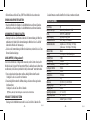
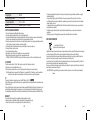
1. LED Indication
TRANSFERRING A CALL
Headset to mobile phone: Press and hold Multi-Function button for 2 seconds.
Mobile phone to headset: Press and hold Multi-Function button for 2 seconds.
MIC MUTE
Press and hold volume down button for 2 seconds. Then the MIC mute will be activated.
You can hear the status indication beep every 5 seconds in MIC mute mode.
-3-
You can de-activate the MIC mute mode by pushing volume down button for 2 seconds.
CALL WAITING [3way calling]
Before you use 3way calling function, please make sure that your mobile phone supports
“Handsfree profile”. And please check with your network operator if they support Call
hold & Multiparty call service.
1. Connect to incoming call & disconnect your current call.
: Press and hold volume down button for 4 seconds.
2. Put your current call in waiting mode and receive incoming call.
: Press and hold volume up button for 4 seconds.
English
Status
Power On
Power Off
Pairing Mode
Connectable Mode
Connected Mode
LED Indication
Blue LED blinks 3 times
Red LED turns on for 2 seconds
Blue & Red LED blink repeatedly
Blue LED blinks 1 time every 5 seconds
Blue LED blinks 2 times every 5 seconds
-4-
English