1
Serial 7-Segment Display
2010.05.17
Special Commands
There are eight special commands that can be sent to
the Serial 7-Segment Display. Each special command
consists of sending a command character followed by
a data byte. After sending a special command, the
characters previously on the display will be restored.
brightness value is written into the processor’s nonvolatile memory, so it will retain the same brightness
level upon power cycling.
Example: to set the display to its dimmest level, send
the special character, 0x7A, followed by 254. So
send: (0x7A)(0xFE)
Decimal Point Command
Baud rate control
To turn on or off any of the decimal points, colons, or
apostrophes on the Serial 7-Segment Display, first
send the special command character 0x77, followed
by a data byte. Each of the six least significant bits in
the data byte represent one decimal point (or two in
the case of the colon); a 1 will turn the decimal point
on, a 0 will turn it off. The most significant bits in the
data byte has no effect on the display. The two colon
LEDs are connected internally and cannot be
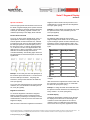
controlled individually. The following figure shows the
bit representation for each decimal point; 0 is the least
significant bit.
By default the UART baud rate of the Serial 7Segment Display will be 9600. This can be adjusted
by first sending the special command character 0x7F,
followed by a binary number between 0 and 6. The
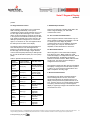
table below shows corresponding baud rates to data
bytes:
Example: To turn solely the colon and apostrophe on,
first send the special character 0x77. The 4th and 5th
bits in the data byte should be 1, everything else
should be 0, the byte would look like: 00110000. So,
send: (0x77)(0x30).
To turn the colon and apostrophe off, send the special
character, 0x77, and set all bits in the data byte to 0.
So, send: (0x77)(0x00).
Brightness Command
To control the brightness of the Serial 7-Segment
Display, first send the special command character
0x7A, followed by a data byte. The data byte can be a
number between 0 and 254; the lower the number the
brighter the display.
After the screen receives the brightness command the
Baud Rate
Data Byte Value
2400
0
4800
1
9600
2
14400
3
19200
4
38400
5
57600
6
If the data byte is not between 0 and 6 nothing will be
changed.
After the baud rate is adjusted the value is written into
the processors non-volatile memory, so it will retain
the same rate upon power cycling.
Example: to change the baud rate to 4800 first enter
the special command character 0x79, followed by the
binary number 1. So, send: (0x7F)(0x01)
3.4 Reset Display
Sending the reset display command, 0x76, will clear
the display and set the cursor to the first digit. This
command is useful if the position of the cursor is
unknown. There is no data byte for this command,
and it can be sent at any time, regardless of cursor
© 2010 SparkFun Electronics, Inc. All Rights Reserved. Product features, specifications, system requirements and availability are subject to change without notice. Serial
7-Segment Display (COM-09230) is a trademark of SparkFun Electronics, Inc. All other trademarks contained herein are the property of their respective owners.
Serial7SegmentDisplay_DS_092705
2