1
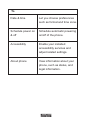
On some screens, the orientation of the screen rotates with the phone as you turn it from upright to its slide and back again. You can turn this feature on and off. Key tips Power/Lock key When powering off status, press and hold to turn on the phone; When powering on status, press and hold to enter phone options (Power off, Reboot, Airplane mode, and so on); To save your battery, prevent accidental touches or when you want to wipe smudges off your touch screen, put the touch screen to sleep by pressing Power/Lock key; To wake up the touch screen, just press Power/Lock key again, and then slide the screen to unlock according to the clue on the screen. Menu key Opens a menu with items related to the current screen/ application. Home key Touch Home key to close any menu or app and return to the Home screen. If you are viewing the left or right Extended Home screen, open the central Home screen. 8