1
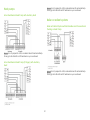
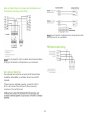
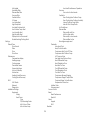
On Thermostat: 1. Select Main Menu > Settings > Installation Settings > Equipment > Dehumidifier. 2. Configure the settings as required. You must configure the Equipment settings (page 24) before setting the thresholds. Only the applicable threshold settings will be displayed (i.e. if no air conditioner is configured, you will not see the options related to air conditioners). Ventilator Auto Heat/Cool This menu lets you configure a ventilator accessory. Enabling this option allows the user to select auto change-over as a system mode. Free Cooling Max Outdoor Temp: Prevents the free-cooling feature from running when the outdoor temperature is above the configured value. Free Cooling Max Outdoor Humidity: Prevents the freecooling feature from running when the outdoor humidity is above the configured value. By default, this option is disabled. The Auto value determines the maximum humidity based on the temperature. Indoor/Outdoor Temp Delta: The temperature difference between the indoor and outdoor temperatures at which the ventilator will run. Max Set Point Temp Delta: The maximum allowed difference between the current temperature and set point for free cooling to function. By default, this option is disabled. On Thermostat: 1. Select Main Menu > Settings > Installation Settings > Thresholds > Auto Heat/Cool. 2. Configure the settings as required. Heat/Cool Min Delta The minimum difference between the heat mode set temperature and the cool mode set temperature when the system mode is in auto change-over. The delta is adjustable from 2 to 10 °F (1.1 to 5.5 °C). The default value is 5 °F (2.8 °C). On Thermostat: 1. Select Main Menu > Settings > Installation Settings > Thresholds > Heat/Cool Min delta. 2. Configure the settings as required. On Thermostat: 1. Select Main Menu > Settings > Installation Settings > Equipment > Ventilator. 2. Configure the settings as required. Compressor Min Cycle Off Time This enforces a minimum time that the compressor must be off between cycles. This ensures the compressor does not short cycle (which could negatively affect the operating life of the system). This time is adjustable from 240–900 seconds. Reconfiguring Equipment Select Main Menu > Reconfigure equipment to run the initial setup process again. On Thermostat: 1. Select Main Menu > Settings > Installation Settings > Thresholds > Compress Min Cycle Off Time. 2. Configure the settings as required. Note: Reconfiguring the equipment will delete any existing configuration. Thresholds This menu lets you configure the temperature and time thresholds associated with the heating and cooling equipment. Compressor Min Outdoor Temp Enforces a minimum outside air temperature at which the compressor will be disabled. It prevents the compressor from 26