1
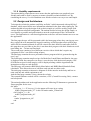
The IF statement goes to the database and checks if the age entered by the user is less than
or equal to 25, if it is it then a fitness program, specific for users 25 or under is generated for
the user and displayed on the programme page of the website, all the processing of the IF
statement is done in the background and the user will only see their fitness program. If the
age is between 26 and 40 the fitness program specific for users between 26 and 40 is
generated for the user and displayed on the programme page of the website. Finally, if the
age doesn’t meet either of these categories an over 40’s program is displayed.
3.3 Implementation
The main function in the users controller code was user authentication (Sign up, in and sign
out). It was important to ensure that the user’s password was encrypted in the database to
protect the user’s personal information and in case my database was hacked by an outsider
also needed separate authentication method for normal users and admin users, as admin
users have administrative privileges which allow them to edit, update, create and delete
users. This was achieved by putting a before filter at the top of my controller so the system
could identify what privileges the user logging in has. In the user model validations methods
were used to ensure users entered the correct information, each validation method had
different conditions e.g. password must be between 6 and 40. I used an Active record callback and passing it to a before save filter, to save and encrypt the users password in my
database.
Another important part of the website was the fitness programmes, which were
automatically generated, based on the age the user entered when signing up. An IF
Statement was used to achieve this. The IF Statement used the age column from the users
table in the database to determine the age of the user and then it appended the correct
programme based on age.
3.4 Testing
Test specifications attached on the CD in the spec folder. A Framework called RSpec was
used for testing purposes using Test Driven Development (TDD) which means writing the
test before the application code. RSpec is a domain specific language for describing the
behaviour of code. It is used together with a programme called Rspec
In TDD, you have the write a failing test first (e.g. there should be an about page). After this
we get the test to pass by adding the about action and the corresponding view. The reason
we do it this way is to make sure the feature we are adding is actually tested.
A cycle Known as “Red, Green, and Refactor” was used during testing. The first step is Red,
this refers to writing a failing test, and our test tools will indicate with the colour red. The
next step refers to Green, this refers to passing a test, and the test tool will indicate this with
the colour green. Once we have passed our tests we can refactor our code, i.e. eliminating
duplication without actually changing the functionality.