1
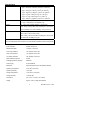
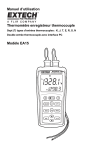
Meter Description
1
1.
RS-232 and thermocouple input jacks
2.
LCD display
3.
Power, Data Hold, and Backlight buttons
4.
Max/Min, display select, and units buttons
5.
MEM, input TYPE, and READ buttons
6.
SET button
7.
Battery compartment (rear)
4
8.
Up/Down scroll button
5
9.
Enter Button
2
T1
C
F
K
T2
INTERVAL
T1
min:sec
hour:min
TYPE
KJTERSN
T2
MX - MN AVG
3
6
7
Operation
8
9
Connecting thermocouples
1. This meter accepts two thermocouples with spade plugs (sub-miniature type with one
spade wider than the other).
2. Plug the thermocouple(s) into the meter's T1 and/or T2 thermocouple input jack(s).
3. Always check LCD display for the proper thermocouple type selection..
Turn Power ON
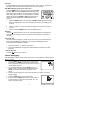
Press the
button to turn power on. The meter will perform a short self-test. If a
thermocouple is not plugged into the selected input or if the thermocouple is "open", the
display will show "- - - - -". The default thermocouple type, units and display is determined
from the parameters selected when the meter was last used.
Selecting thermocouple type
Press the TYPE button to select the type of thermocouple being used.
Selecting °C, °F or °K units of measure
Press the C/F/K button to select the unit of measure.
Selecting T1, T2, and T1-T2 Displays
Press the T1 T2 T1-T2 button to step through and select from the following displays:
a. T1 (thermocouple 1) primary display and T2 (thermocouple 2) lower display.
b. T2 primary display and T1 lower display
c. (T1-T2) (difference between T1 and T2) primary display and T1 lower display
d. (T1-T2)primary display and T2 lower display
Notes:
• To avoid electrical shock or personal injury, do not apply more than 20Vrms, between
the thermocouples, or between any thermocouple and earth ground.
• If voltage on the measurement surface results in potentials of more than 1V,
measurement errors may occur.
• If a potential exists between the thermocouples, use electrically insulated
thermocouples.
3
Model EA15 Version 1.5 9/03