1
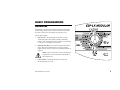
ESP-LX Modular Controller
Installation, Programming,
& Operation Guide
SAFETY INFORMATION
WARNING: A CIRCUIT BREAKER OR CUTOFF SWITCH IS
TO BE PROVIDED IN THE FIXED WIRING TO ISOLATE THE
CONTROLLER.
ATTENTION: UN DISJONCTEUR OU UN INTERRUPTEUR
DOIT ETRE INSTALLE SUR LE PRIMAIRE POUR ISOLER LE
PROGRAMMATEUR.
MEMORY IS RETAINED BY A BATTERY, WHICH IS TO BE
DISPOSED OF IN ACCORDANCE WITH LOCAL
REGULATIONS.
LA MEMOIRE EST MAINTENUE GRACE A UNE BATTERIE
RECHARGEABLE A DISPOSER SELON LA
REGLEMENTATION LOCALE.
The lightning flash with arrowhead symbol, within an
equilateral triangle, is intended to alert the user to the
presence of uninsulated “dangerous voltage” within
the product’s enclosure that may be of sufficient
magnitude to constitute a risk of electronic shock to
persons.
L’éclair avec le symbole de la flèche, placé dans les
limites d’un triangle èquilatéral est prévu pour avertir
l’utilisateur de la présence de “tension dangereuse”
non isolé dans l’enceinte du produit qui pourrait ëtre
d’une importance suffisante pour présenter un risque
d’èlectrocution aux personnes.
The exclamation point within an equilateral triangle is
intended to alert the user to the presence of important
operating and maintenance (servicing) instructions in
the literature accompanying the product.
Le point d’exclamation dans un triangle èquilatéral est
prévu pour avertir l’utilisateur de la présence
d’instructions importantes pour les opérations et
l’entretien (service) dans les manuels fournis avec
l’appareil.
CONTENTS
Introduction ..............................................................................3
Welcome to Rain Bird........................................................... 3
ESP-LX Modular Controller ................................................. 3
Valves ........................................................................... 4
Basic Operation............................................................. 5
Controls, Switches, and Indicators ........................................ 6
Basic Programming ...................................................................7
Definitions............................................................................. 7
Programming Under Battery Power ...................................... 8
Programming Checklist......................................................... 9
Fill Out Programming Chart ............................................... 10
Sample Programming Chart ........................................ 11
Clear Programs.................................................................... 12
Individual Program...................................................... 12
All Programs ............................................................... 13
Restore Defaults .......................................................... 14
Set Date............................................................................... 15
Set Time .............................................................................. 16
Select Program .................................................................... 17
Set Watering Start Times .................................................... 18
Select Days to Water........................................................... 19
Custom Cycle .............................................................. 20
Odd/Odd31/Even Cycle .............................................. 21
Cyclical ....................................................................... 22
Set Valve Run Times .......................................................... 24
Advanced Programming...........................................................25
Seasonal Adjust % .............................................................. 25
Individual Program...................................................... 26
ESP-LX Modular Controller
By Month.....................................................................27
Delay Watering....................................................................30
Rain Delay ...................................................................30
Calendar Day Off.........................................................31
Valve Settings......................................................................33
Valve Delay .................................................................33
Cycle+Soak™..............................................................35
MV or Pump ................................................................37
Sensor Override ...........................................................38
Special Features...................................................................40
Set Language ...............................................................40
Backup Programs — Contractor Default™ .................41
Optional Smart Modules™ ..................................................45
Communications..................................................................45
Set Sensor Bypass Switch....................................................45
Operating the Controller ......................................................... 48
Operate Controller Automatically........................................48
Manual Watering .................................................................50
Start Valve ...................................................................50
Start Program ...............................................................52
Test All Valves/Check System ............................................54
Confirm Programs .......................................................54
Test All Valves ............................................................60
Rapid Station Test Routine — RASTER™ .........................63
Reset Controller...................................................................65
Alarm Light .........................................................................66
Electrical Faults ...........................................................66
Active Sensor...............................................................66
1
Installing the Controller ..........................................................67
Installation Checklist ...........................................................67
Check Box Contents ............................................................67
Choose Location ..................................................................68
Gather Installation Tools .....................................................69
Mount Controller .................................................................70
Install Module(s)..................................................................72
Connect Field Wiring ..........................................................73
Connect Sensor Wiring........................................................74
Connect Source Power.........................................................75
Complete Installation...........................................................78
Troubleshooting Chart.............................................................79
Index .......................................................................................82
2
ESP-LX Modular Controller
INTRODUCTION
Welcome to Rain Bird
Thank you for purchasing your new state-of-the-art Rain Bird ESPLX Modular controller. For more than six decades, Rain Bird has
led the irrigation industry in meeting all of your water management
needs by providing the highest quality products and services
available. Your new Rain Bird controller is designed to give you a
lifetime of on-site watering control.
ESP-LX Modular Controller
The ESP-LX Modular controller is an irrigation timing system
designed for commercial and residential use. The controller’s
modular design can accommodate from 8 to 32 valves.
The ESP-LX Modular controller is available in an indoor-only
version, as well as an indoor/outdoor version. The controller
includes many advanced features to help you manage water
efficiently. These include:
Programmable valve delay
Cycle+Soak™
Sensor connection with bypass switch
Built-in diagnostic and validation software
Compatibility with all Rain Bird remote systems, including
one-button and multi-function systems
ESP-LX Modular Controller
3
Valves
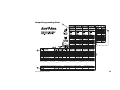
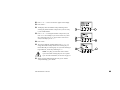
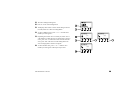
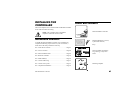
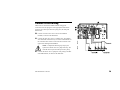
The ESP-LX Modular controls when your sprinkler system turns
on, and how long the sprinklers run. The controller has several
valves connected to it, as shown in the illustration on the following
page.
Each valve opens when it receives power from the controller, and
the sprinklers connected to that valve turn on. When these
sprinklers have run for their programmed time, the controller shuts
off the valve and opens the next valve in sequence.
For example, the illustration on page 5 shows that valve 1 is
currently watering. When valve 1 is finished, the controller will
shut it off and start valve 2. In the same way, valve 3 will begin
watering when valve 2 is finished.
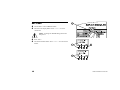
NOTES: The ESP-LX Modular controller lets you
set a delay between valves. (See page 33.) For
example, if you set a one-minute delay, valve 1 will
run until finished, followed by a one-minute delay.
Then valve 2 will operate, followed by a one-minute
delay.
In addition, the Cycle+Soak™ feature may delay
valve operation. See page 35.
4
ESP-LX Modular Controller
Basic Operation
ESP-LX Modular Controller
5
Controls, Switches, and
Indicators
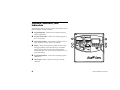
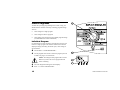
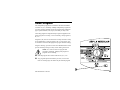
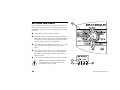
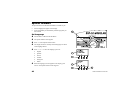
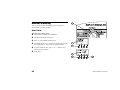
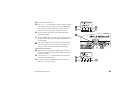
This illustration shows the controls, switches, and indicators on the
ESP-LX Modular controller, including:
Programming Dial—used to turn the controller off and on,
and for programming.
Program Select Switch—used to select watering program A,
B, C, or D (D-drip).
Sensor Bypass Switch—used to tell the controller to obey or
ignore input from a sensor. (Sensors are optional.)
Display—during normal operation, displays the time of day;
during programming, shows the result of your commands;
during watering, shows the valve that is running and the
minutes remaining in its run time (when program dial is set to
the AUTO position).
Programming Buttons—used to enter and change program
information.
Alarm Light—flashes to indicate various types of alarm
conditions.
6
ESP-LX Modular Controller
BASIC PROGRAMMING
Definitions
Programming is the process of telling the controller exactly when
and how long you want to water. The controller opens and closes
the remote control valves according to the program you set.
Each program contains:
Days to water—the specific days of the week on which
watering takes place (for example, Monday, Wednesday,
Friday), or the watering interval (for example, every third day,
or only on even or odd days of the month).
Watering start time(s)—the time(s) of day that the program
begins; this is the time that the first valve in the program
begins watering; all other valves in the program then follow in
sequence.
NOTE: The term “start time” refers to the time that a
program starts, not to the time that each individual
valve begins to run.
Valve run time—the number of minutes (or hours and
minutes) that each valve runs.
ESP-LX Modular Controller
7
Programming Under Battery
Power
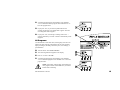
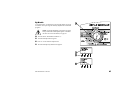
You can remove the front face panel of the controller and install a
9-Volt battery. You can then program the unit under battery power.
This feature can be useful if the controller is installed in an area that
is not readily accessible. This feature also lets you enter program
information before installing the controller at the job site.
Although you can program the controller under battery power, you
cannot operate it on battery power alone. Connect the controller to
an AC power source as soon as possible.
NOTE: All program information is stored in nonvolatile memory so it will be preserved indefinitely in
the event of a power outage.
8
ESP-LX Modular Controller
Programming Checklist
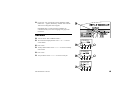
To program the ESP-LX Modular controller for the first time, we
recommend that you complete the following steps in order. For
your convenience, a check-off box ( ) is provided for each step.
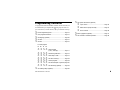
Fill out Programming Chart ........................................ Page 10
Clear program information ......................................... Page 12
Set language (optional).............................................. Page 40
Set special valve features (optional)
Cycle+Soak™...................................................Page 35
Master valve or pump start relay.........................Page 37
Sensor override .................................................Page 38
Back up programs (optional). .....................................Page 41
Set controller to automatic operation...........................Page 48
Set date. ................................................................... Page 15
Set time . .................................................................. Page 16
For each program:
A
B
C
D
Select program
(A, B, C, or D-drip). ................... Page 17
Set watering start times. ............ Page 18
Select days to water .................. Page 19
Set valve run time(s).................. Page 24
Confirm program ....................... Page 54
Set seasonal adjust % (optional). Page 25
Set valve delay (optional) ........... Page 33
Set watering delays (optional).................................... Page 30
ESP-LX Modular Controller
9
Fill Out Programming Chart
Before you begin programming, fill out the Programming Chart and
attach it to the inside of the controller door. A sample Programming
Chart is shown on page 11. Follow these instructions to complete
the chart.
NOTE: Start times apply to the program, not to the
individual valves assigned to the program. In this example,
Program A begins watering at 8:00 a.m. on Mondays,
Wednesdays, and Fridays. Valve 1 runs for ten minutes,
followed by valve 2 for 20 minutes, valve 3 for 20 minutes,
and valve 4 for 5 minutes. The entire program takes about an
hour.
Describe the sprinklers or plant zones covered by each valve on the
controller.
Enter the watering run time (in hours and minutes) for each valve
assigned to Program A.
Indicate which valves drive a master valve or booster pump relay by
checking “ON” in the MV / Pump Relay column. (See page 37 for
more information).
Enter the seasonal adjust by month percentages if you are using them.
Also check “on” in the Monthly Seasonal Adjust box for each program
that will use the monthly percentages.
Indicate which valves are set for sensor override by checking “ON” in
the Sensor Override column. (See page 38 for more information).
Enter the seasonal adjust by program percentage if you are using it.
The seasonal adjust for sample Program A is set to 80%, and the
Monthly Seasonal Adjust box is left unchecked.
Indicate which valves are set for Cycle+Soak™ by entering the cycle
time and soak time in the Cycle+Soak™ column. (See page 35 for
more information).
In the Program “A” column, for Custom cycle, circle the specific days
of the week; for Cyclical schedule, write the cycle period (e.g., “3-day
cycle” means every third day); for ODD/EVEN-day watering, check
ODD, EVEN, or ODD 31. Also check any days that have been set
permanently OFF. (See pages 20 to 22 for more information.)
Enter the start time(s) for Program A. You may enter up to eight start
times for each program, but only one is needed to run the program.
Enter the valve delay. A valve delay is the time between the end of one
valve’s operation and the beginning of the next. Use a valve delay to
let a water well recover or to allow slow-closing valves to turn off
completely. If neither of these situations applies to your site, leave the
valve delay set to 0. A valve delay setting applies to all programs.
In the sample chart, Program A has a one-minute delay between
valves. When valve 1 ends, the controller waits one minute before
starting valve 2. There will also be a one-minute delay between valve
2 and valve 3, etc.
Make any special notes in the space provided.
Repeat steps 5 through 10 for Programs B, C, and D.
10
ESP-LX Modular Controller
Sample Programming Chart
ESP-LX Modular Controller
11
Clear Programs
To make sure you begin programming with a “clean” setup, you
should clear the controller’s memory of existing program settings.
You can:
Clear settings for a single program
Clear settings for all four programs
Clear memory and restore the factory default program settings
(recommended for first-time installations)
Individual Program
Use this function to erase start times, watering days, and valve run
times for a single program. This function will not erase seasonal
adjust percentages, rain delay, advanced cycles, valve settings, or
special features.
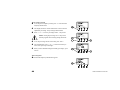
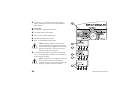
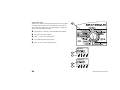
Turn the dial to “CLEAR PROGRAMS.”
Use the program select switch to select the program you want
to delete. See page 17 for instructions.
NOTE: All settings for this program will be erased.
Make sure you have the correct program selected
before continuing.
The Clear Programs menu appears in the display.
Press “1” to select “Individual PGM.”
12
ESP-LX Modular Controller
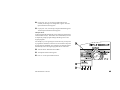
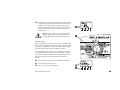
A warning message appears in the display. Press and hold
“Yes” to delete the selected program. Press and hold “No” to
leave the program intact.
If you press “No” (or you don’t respond within several
seconds), the message “No change made” appears. Then the
Clear Programs menu reappears.
If you press “Yes,” the message “Clearing. Please wait…”
appears, followed by “Cleared.” Then the Clear Memory menu
reappears.
All Programs
Use this function to erase start times, watering days, and valve run
times for all four programs. This function will not erase seasonal
adjust percentages, rain delay, advanced cycles, valve settings, or
special features.
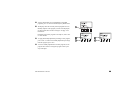
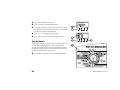
Turn the dial to “CLEAR PROGRAMS.”
The Clear Programs menu appears in the display.
Press “2” to select “All PGM.”
A warning message appears in the display. Press and hold
“Yes” to delete all programs. Press and hold “No” to leave the
programs intact.
NOTE: Start times, watering days, and run times for
ALL programs will be erased. Make sure you want to
do this before continuing.
ESP-LX Modular Controller
13
If you press “No” (or you don’t respond within several
seconds), the message “No change made” appears. Then the
Clear Programs menu reappears.
If you press “Yes,” the message “Clearing All Programs A - D.
Please wait…” appears, followed by “Cleared.” Then the Clear
Programs menu reappears.
Restore Defaults
Use this function to erase ALL programming information for all
programs, including start times, watering days, valve run times,
seasonal adjust percentages, rain delay, advanced cycles, valve
settings, and special features (except for the backup programs).
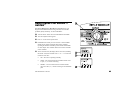
Turn the dial to “CLEAR PROGRAMS.”
The Clear Programs menu appears in the display.
Press “3” to select “Restore Defaults.”
A warning message appears in the display. Press and hold
“Yes” to delete all programs and load the factory default
settings. Press and hold “No” to leave the programs intact.
NOTE: ALL programming information for ALL
programs will be erased. Make sure you want to do
this before continuing.
If you press “No” (or you don’t respond within several
seconds), the message “No change made” appears. Then the
Clear Programs menu reappears.
14
ESP-LX Modular Controller
If you press “Yes,” the message “Factory Defaults Loading.
Please wait…” appears, followed by “Loaded” and “Cleared.”
Then the Clear Programs menu reappears.
Immediately after you restore the factory defaults, the
controller will ask you to select a language. See page 40 for
instructions.
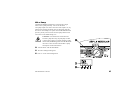
Set Date
Turn the dial to “SET CURRENT DATE.”
The month in the display flashes. Press “+” or “–“ to set the
current month.
Press “Next.”
The day number flashes. Press “+” or “–“ to set the current day
of the month.
Press “Next.”
The year flashes. Press “+” or “–“ to set the current year.
ESP-LX Modular Controller
15
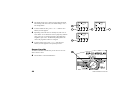
Set Time
Turn the dial to “SET CURRENT TIME.”
The hour in the display flashes. Press “+” or “–“ to set the
current hour.
NOTE: To change the AM/PM setting, advance the
hour past 12.
Press “Next.”
The minutes number flashes. Press “+” or “–“ to set the current
minute.
16
ESP-LX Modular Controller
Select Program
Four independent programs are available in the ESP-LX Modular
controller: A, B, C, and D-drip. Multiple independent programs let
you enter watering schedules to meet the requirements of different
types of plant materials, soils, slopes, and shady or sunny areas.
The D-drip program is designed for drip irrigation equipment. The
D-drip program can overlap, or run concurrently, with programs A,
B, or C.
Programs A, B, and C are not allowed to overlap each other. If they
are programmed to overlap, programs A, B, or C will “stack” (run
in consecutive order after the program in progress finishes running).
Program “stacking” prevents excessive flow demand and low water
pressure caused by having too many valves running at one time.
NOTE: It is easier to select one program and
program it completely. Jumping from program to
program can be confusing.
Slide the program select switch under the A, B, C, or D.
Any program-specific information you enter , such as start
times or watering days, will affect only the selected program.
ESP-LX Modular Controller
17
Set Watering Start Times
You may assign up to eight start times to a program per day.
Multiple start times allow you to run a program more than once on
each watering day.
For example, if you are growing new lawn seed, you may want to
water several times a day to keep the seedbed or top dressing damp.
NOTE: Start times apply to the entire program, not
to an individual valve.
Turn the dial to “SET WATERING START TIMES.”
The display shows the program, the number of the start time,
and the start time itself (or “OFF”). The start time flashes. If
the program you want is not displayed, use the program select
switch to change it. See page 17 for instructions.
Press “+” or “–” to set the start time. To turn off a start time,
press “+” or “–” until the display shows the “OFF” setting
between 11:59 p.m. and 12:00 a.m.
If you want to set additional start times, press “Next.” Then
repeat steps 2 through 4.
18
ESP-LX Modular Controller
Select Days to Water
Each program can operate in one of three watering day cycles:
1.
CUSTOM waters on the days of the week you select. See the
instructions on page 20.
NOTE: Any days you turn OFF via the Custom
Cycle will override watering days set via advanced
cycles, such as ODD/ODD31/ EVEN or CYCLICAL.
For example, assume you want a program to water on
even days of the month, but you do not want to water
on Wednesdays, when landscape service is scheduled.
You can set the program to an EVEN cycle and use
the CUSTOM cycle to turn Wednesdays off . The
controller will then water on all even days of the
month except Wednesdays.
2.
ODD/ODD31/EVEN waters only on odd-numbered days, oddnumbered days except for the 31st and February 29th, or evennumbered days of the month. See page 21.
3.
CYCLICAL waters on a selected daily interval (for example,
every other day, or every third day). See page 22.
ESP-LX Modular Controller
19
Custom Cycle
To set a custom cycle:
Turn the dial to “MON.”
The display shows the currently selected program and day of
the week, along with a flashing “On” or “Off.” If the program
you want is not displayed, use the program select switch to
change it. See page 17 for instructions.
Press “On” to turn the selected day on. Press “Off” to turn the
selected day off.
20
ESP-LX Modular Controller
Turn the dial to the next day of the week. Repeat steps 2
through 4 until you have set each day of the week on or off.
Odd/Odd31/Even Cycle
To set an Odd, Odd31, or Even cycle:
Turn the dial to “ADVANCED CYCLES.”
The display shows the currently selected program and its
current watering day cycle If the program you want is not
displayed, use the program select switch to change it. See page
17 for instructions.
ESP-LX Modular Controller
21
Press “+” or “–” to change the cycle to:
ODD: The program waters only on odd-numbered days
of the month, including the 31st.
ODD31: The program waters only on odd-numbered
days of the month, except the 31st and February 29th. Use
this setting if local regulations prohibit watering on two
consecutive days of the month.
EVEN: The program waters only on even-numbered days
of the month.
NOTE: Any days you turn OFF via the Custom
cycle will override watering days set via Odd, Odd31,
or Even cycles. For more information, see the note on
page 19.
Cyclical
Turn the dial to “ADVANCED CYCLES.”
The display shows the currently selected program and its
current watering day cycle. If the program you want is not
displayed, use the program select switch to change it. See page
17 for instructions.
22
ESP-LX Modular Controller
Press “+” or “–” until “CYCLICAL” appears in the display.
Press “More.”
The display shows the number of days remaining until a
watering day and the number of days in the cycle. The “Day
Cycle” number flashes.
Press “+” or “–” to change the number of days in the cycle,
from 1 to 31. For example, if you want to water every other
day, set the Day Cycle to “2.” If you want to water once a
week, set the Day Cycle to “7.”
Press “Next.”
The “Days remaining” number flashes. Press “+” or “–” to
change the number of days until the next watering day. “0”
means that today is a watering day. So if you want watering to
begin tomorrow, set the days remaining to “1.”
NOTE: Any days you turn OFF via the Custom
cycle will override watering days set via a Cyclical
cycle. For more information, see the note on page 19.
When you have finished setting the “Day Cycle” and the
“Days Remaining,” press “Back.”
ESP-LX Modular Controller
23
Set Valve Run Times
You can set any valve to run from 0 to 12 hours. For the first two
hours, you can set the watering time in one-minute increments. For
the remaining 10 hours, you can set the watering time in 10-minute
increments.
Turn the dial to “SET VALVE RUN TIMES.”
The display shows the currently selected program and Valve 1,
along with its current run time. The run time numbers flash. If
the program you want is not displayed, use the program select
switch to change it. See page 17 for instructions.
To set the run time for a different valve, press “+” or “–” under
“Valve” until the valve number you want appears in the
display.
To set the valve run time, press “+” or “–” under “Hrs Min.”
The run time will change in one-minute increments until the
time reaches two hours. Then the run time will change in 10minute increments.
To set run times for additional valves, repeat steps 3 through 5.
NOTE: If you have finished setting all programs,
you should confirm your program settings. See
“Confirm Programs” on page 54.
24
ESP-LX Modular Controller
ADVANCED PROGRAMMING
Seasonal adjustments you make by program and by month will be
multiplied together to calculate a run time for the valve.
Seasonal Adjust %
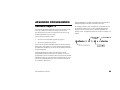
For example, assume a valve on Program A is programmed to run
for 10 minutes (100%). Then you set a seasonal adjustment for
Program A of 80%. Finally, you set a monthly adjustment for
January of 50%. The adjusted run time for the valve in January is as
follows:
The seasonal adjustment feature lets you scale the run times of all
valves up or down by a selected percentage. You can set the
percentage from 0% to 300%, in increments of one percent. The
normal programmed run time is 100%.
You can set the percentage to affect:
All valves on an individual program (see page 26)
All valves by month (see page 27)
You can use the seasonal adjustment feature to cut back watering
during cool winter months, or to increase watering during periods
of unusual heat. In addition, you can use the 0% setting to shut off a
program temporarily.
Seasonal adjustment percentages are applied to the normal
programmed run times for each valve. For example, if a valve is
programmed to run for 10 minutes (100%), and you set the seasonal
adjustment to 80%, the valve will run for 8 minutes (80% of 10). If
you set the seasonal adjustment to 120%, that same valve will run
for 12 minutes (120% of 10).
ESP-LX Modular Controller
25
Individual Program
Turn the dial to “SEASONAL ADJUST %.”
The Seasonal Adjust menu appears.
Press “1” on the Seasonal Adjust menu.
The display shows the currently selected program and its
current seasonal adjustment percentage. The percentage
numbers flash. If the program you want is not displayed, use
the program select switch to change it. See page 17 for
instructions.
Press “+” or “–” to set the percentage from 0 – 300 percent.
NOTE: Setting the percentage to “0” will prevent the
program from watering.
To set the percentage for another program, use the program
select switch to change the program. Then repeat steps 2
through 6.
26
ESP-LX Modular Controller
By Month
To use this feature, you must first set the seasonal adjust percent for
each month. Then you assign the monthly adjustments to individual
programs.
NOTE: Seasonal adjustments you make by program
and by month will be multiplied together to calculate
run times. For more information, see page 25.
Turn the dial to “SEASONAL ADJUST %.”
The Seasonal Adjust menu appears.
Press “2” on the Seasonal Adjust menu.
The Seasonal Adjust by Month menu appears.
ESP-LX Modular Controller
27
Set % Adjust by Month
To set the percent adjust by month, press “1” on the Seasonal
Adjust by Month menu.
The display shows the current month and its current seasonal
adjustment percentage. The percentage numbers flash.
Press “+” or “–” to set the percentage from 0 – 300 percent.
NOTE: Setting the percentage to “0” will prevent
selected programs from watering during this month.
To set the percentage for the next month, press “Next.”
The month flashes. Press “+” or “–” to select the month you
want. Then repeat steps 2 through 5.
When you have finished setting the monthly percentages, press
“Back.”
Select Programs
The Seasonal Adjust by Month menu appears.
28
ESP-LX Modular Controller
To apply the monthly percent adjustments to individual
programs, press “2” on the Seasonal Adjust by Month menu.
The display shows the currently selected program and “Use
Monthly Adjust?” If the program you want is not displayed,
use the program select switch to change it. See page 17 for
instructions.
Depending on how this program is currently set, either “NO”
or “YES” flashes.
To apply the monthly adjustment percentage to this program,
press “YES.” To remove the monthly adjustment percentage
from this program, press “NO.”
To set the monthly adjustment for another program, use the
program select switch to change the program. Then repeat
steps 3 through 5.
ESP-LX Modular Controller
29
Delay Watering
The ESP-LX Modular controller lets you turn off watering during
rainy periods or on specific calendar days.
Rain Delay
The rain delay feature lets you suspend watering for up to 14 days.
For example, if rainy weather lasts for two or three days, you can
set a rain delay of five or six days to let the landscape dry out
before resuming normal watering schedules.
NOTE: The Rain Delay feature lets you set a delay
period manually. If you have a sensor attached to your
system, see the instructions on page 45.
The rain delay setting applies to all programs. During a rain delay,
you can run programs manually.
Turn the dial to “DELAY WATERING.”
The Delay Watering menu appears.
Press “1” on the Delay Watering menu.
The display shows the days remaining until normal watering
cycles resume. The number of days flashes.
Press “+” or “–” to set the number of days to suspend
watering. This setting applies to all programs. To cancel a rain
delay, set the delay to “0.”
30
ESP-LX Modular Controller
Calendar Day Off
The Calendar Day Off feature lets you temporarily suspend
watering on a specific day of the month (selected up to 30 days in
advance).
For example, if you are planning an outdoor event on July 4th, you
can set that day OFF, so no watering will occur. After July 4th
passes, the fourth of each month will be automatically reset to ON.
A Calendar Day Off setting applies to all programs.
Turn the dial to “DELAY WATERING.”
The Delay Watering menu appears.
Press “2” on the Delay Watering menu.
The display shows the current date, along with “On” or “Off.”
The day number flashes.
Press “+” or “–” to change the date. You can select any date
within 30 days of the current date.
ESP-LX Modular Controller
31
To turn watering off on the selected date, press “Off.” All
watering will be suspended on this date. The next time the date
occurs, normal watering schedules will resume.
To set another day off, press “Back.” Then repeat steps 2
through 7.
32
ESP-LX Modular Controller
Valve Settings
The ESP-LX Modular controller lets you assign special settings to
valves. These include:
Valve Delay— Program a pause between the end of one
valve’s operation and the beginning of the next valve’s
operation.
Cycle+Soak™—Break up a valve run time to prevent runoff
and puddling.
MV or Pump—Assign a master valve or pump start relay to
operate any time a valve opens.
Sensor Override—Set a valve to operate when a sensor is
active.
Valve Delay
The valve delay feature lets you program a pause between the end
of one valve’s operation and the beginning of the next valve’s
operation. You may set a delay from one second to nine hours.
You can use valve delays to allow a water well to recover or slowclosing valves to turn off completely. If neither of these situations
applies to your site, leave the valve delay set to 0.
You can set a different valve delay for each program. A valve delay
applies to all valves in a given program.
Turn the dial to “VALVE SETTINGS.”
ESP-LX Modular Controller
33
The Valve Settings menu appears.
Press “1” on the Valve Settings menu.
The display shows the selected program, along with the delay
that is currently set between valves. The numbers flash. If the
program you want is not displayed, use the program select
switch to change it. See page 17 for instructions.
Press “+” or “–” to set the delay time between valves. The
delay can be up to 9 hours long. This delay time will affect all
valves in the selected program.
To set a valve delay for another program, use the program
select switch to change the program. Then repeat steps 4
through 6.
34
ESP-LX Modular Controller
Cycle+Soak™
The Cycle+Soak™ feature is designed to conserve water that might
puddle in tight soils such as clay, or end up as runoff on slopes.
Cycle+Soak™ lets you break up the total run time of a valve into
shorter cycles. You set a maximum watering (cycle) time and a
minimum soak time.
For example, if you want a valve to run for a total of 20 minutes,
but runoff begins after five minutes, you can set the valve for fiveminute maximum cycles, with a minimum soak time of 25 minutes
between cycles.
When the controller operates this valve, the sprinklers will run for
five minutes (cycle) and then shut off for at least 25 minutes (soak).
While the valve is in soak mode, the controller operates the other
valves in the program.
The controller will automatically return to the first valve when the
soak time has elapsed. The valve will operate for another five
minutes and then shut off for another soak time. This process
repeats until the valve has run for its total run time of 20 minutes.
NOTE: Cycle+Soak™ times affect the valve in all
programs to which it is assigned.
Turn the dial to “VALVE SETTINGS.”
ESP-LX Modular Controller
35
The Valve Settings menu appears.
Press “2” on the Valve Settings menu.
The display shows a valve number and its current settings for
Cycle+Soak™. The valve number flashes.
NOTE: Cycle+Soak™ settings of “:00” indicate
normal operation. The valve will operate for its
programmed run time with no delays for soak time.
To select a different valve, press “+” or “–” until the valve
number you want appears.
Press “Next.”
The Cycle numbers flash. Press “+” or “–” to set the maximum
number of minutes (up to 60) for a watering cycle.
Press “Next.”
The Soak numbers flash. Press “+” or “–” to set the minimum
number of minutes (up to 60) for soaking between cycles.
To set Cycle+Soak™ for another valve, press “Next.” Then
repeat steps 4 through 10.
36
ESP-LX Modular Controller
MV or Pump
The ESP-LX Modular controller has a connection for a single
master valve or pump start relay. You can set the master
valve/pump output on or off for each valve. If the output is on, any
time the valve operates, the master valve or pump start relay will
also turn on. For example, if a specific valve needs additional water
pressure, you may want to activate a booster pump whenever that
valve turns on. The default setting is on.
CAUTION: If an unused valve is turned on and
activates a pump start relay, the pump may overheat
or cause a pipe to burst. To prevent operating a pump
with no flow (deadheading), make sure that all unused
valves have a zero run time or that the MV or pump
start output is off for unused valves.
Turn the dial to “VALVE SETTINGS.”
The Valve Settings menu appears.
Press “3” on the Valve Settings menu.
ESP-LX Modular Controller
37
The display shows Valve 1 and its current setting for Master
Valve/Pump, either On or Off. (The default setting is “On.”)
The setting flashes.
To select a different valve, press “+” or “–” until the valve
number you want appears.
Depending on how this valve is currently set, either “On” or
“Off” flashes. To use the master valve or pump relay with this
valve, press “On.” To remove the master valve/pump relay
assignment, press “Off.” The MV/Pump setting affects the
valve in all programs to which it is assigned.
To select another valve, press “+” or “–” until the valve
number you want appears. Then repeat steps 6 and 7.
Sensor Override
The ESP-LX Modular controller lets you set valves to run even
when a sensor is active.
Turn the dial to “VALVE SETTINGS.”
38
ESP-LX Modular Controller
The Valve Settings menu appears.
Press “4” on the Valve Settings menu.
The display shows Valve 1 and its current setting for Sensor
Override, either On or Off. The setting flashes.
To select a different valve, press “+” or “–” until the valve
number you want appears.
Depending on how this valve is currently set, either “On” or
“Off” flashes. To allow this valve to operate when a sensor is
active, press “On.” To remove the sensor override from this
valve, press “Off.” The sensor override setting affects the
valve in all programs to which it is assigned.
To select another valve, press “+” or “–” until the valve
number you want appears. Then repeat steps 6 and 7.
ESP-LX Modular Controller
39
Special Features
The Special Features of the ESP-LX Modular controller let you:
Set the language that appears in the display
Store and manually or automatically recall the programs you
have entered
Set Language
Turn the dial to “SPECIAL FEATURES.”
The Special Features menu appears.
Press “1” on the Special Features menu.
The display shows the currently selected language. The name
of the language flashes.
Press “+” or “–” to select the language you want:
English
Spanish
French
German
Portuguese
Italian
When the language you want appears in the display, press
“Back.” The Special Features menu reappears.
40
ESP-LX Modular Controller
Backup Programs — Contractor Default™
All program information you enter is stored in non-volatile memory
so it will be retained if power to the controller is interrupted. The
backup feature lets you store backup copies of programs A through
D so you can easily recall them if necessary. You can recall
programs manually or automatically, on a time delay.
This feature can be useful if program settings are unintentionally
changed and you want to go back to the original program settings
you entered.
Store Programs
Turn the dial to “SPECIAL FEATURES.”
The Special Features menu appears.
Press “2” on the Special Features menu.
The Backup Programs menu appears.
Press “1” on the Backup Programs menu.
A warning message appears in the display. Press and hold
“Yes” to store all program information. Press and hold “No” to
skip storing the programs.
If you press “No” (or you don’t respond within several
seconds), the message “No change made” appears. Then the
Special Features menu reappears.
ESP-LX Modular Controller
41
If you press “Yes,” the message “Please wait. Storing …”
appears, followed by “Stored.” Then the Special Features
menu reappears.
Recall Programs
Turn the dial to “SPECIAL FEATURES.”
The Special Features menu appears.
Press “2” on the Special Features menu.
The Backup Programs menu appears.
Press “2” on the Backup Programs menu.
NOTE: Recalling programs will overwrite any
program information you might have entered since
you last backed up the programs. Before continuing,
make sure you do want to overwrite your current
programs with the stored programs.
A warning message appears in the display. Press and hold
“Yes” to recall all program information. Press and hold “No”
to skip storing the programs.
NOTE: This feature will work properly only if you
have previously backed up your programs, as
described on page 41. If you have not backed up the
programs, you will receive an error message.
42
ESP-LX Modular Controller
If you press “No” (or you don’t respond within several
seconds), the message “No change made” appears. Then the
Special Features menu reappears.
If you press “Yes,” the message “Programs Recalled” appears.
Then the Special Features menu reappears.
Delayed Recall
A delayed recall will automatically restore backup programs after a
selected number of days. This feature can be useful when you want
to temporarily change program settings and then go back to the
original programs.
For example, if you are growing new turf from seed, you may want
to program the controller to water the area several times a day until
the turf becomes established. You could then set a delayed recall to
automatically restore the original programs after several weeks.
Turn the dial to “SPECIAL FEATURES.”
The Special Features menu appears.
Press “2” on the Special Features menu.
ESP-LX Modular Controller
43
The Backup Programs menu appears.
Press “3” on the Backup Programs menu.
NOTE: Recalling programs will overwrite any
program information you might have entered since
you last backed up the programs. Before continuing,
make sure you do want to overwrite your current
programs with the stored programs.
The display shows the days remaining until the stored
programs are recalled and loaded into the controller’s memory.
If no delay has been set, the display shows “None.”
Press “+” or “–” to set the number of days until the recall,
from 0 to 90 . Then press “Store.”
A warning message appears in the display. Press and hold
“Yes” to store the delayed recall. Press and hold “No” to skip
the delayed recall.
NOTES: This feature will work properly only if you
have previously backed up your programs, as
described on page 41. If you have not backed up the
programs, you will receive an error message.
To cancel a delayed recall once you have stored it,
repeat steps 1 through 7. Set the number of days to
“None.”
44
ESP-LX Modular Controller
Optional Smart Modules™
Instructions for programming the optional Smart Modules™ are
packaged with the modules. Please refer to those instructions for
more information.
Communications
Instructions for programming the optional Communications module
are packaged with the module. Please refer to those instructions for
more information.
Set Sensor Bypass Switch
The ESP-LX Modular controller lets you connect various types of
sensors that interrupt watering when a specific condition is
detected. For example, if you have a Rain Bird RSD Series Rain
Sensor or a WRS Wireless Rain Sensor connected to the controller,
watering will be suspended when rainfall activates the sensor.
NOTE: For this feature to operate properly, the
sensor must be connected to the controller’s sensor
inputs according to the instructions that come with the
sensor equipment.
ESP-LX Modular Controller
45
To activate the sensor, set the sensor bypass switch to
“ACTIVE.”
NOTE: If no sensor is attached to the controller,
make sure the supplied jumper connects the two
SENSOR terminals on the controller’s base module.
If you set the sensor bypass switch to “ACTIVE”
without a sensor or jumper connected to these
terminals, the valves will not operate, and no watering
will occur.
The display shows the active status of the sensor. The
controller will operate normally until an activating condition is
detected by the sensor. When the sensor detects an activating
condition, power to the valves will be interrupted, and no
watering will occur (including manual program or valve
operation) EXCEPT for valves that have the sensor override
set to ON. See page 38 for more information about sensor
override.
To deactivate the sensor, set the sensor bypass switch to
“BYPASSED.” Use this setting for troubleshooting or manual
watering while a sensor condition is in effect.
46
ESP-LX Modular Controller
The display shows that the sensor is bypassed and that all
watering is allowed.
ESP-LX Modular Controller
47
OPERATING THE
CONTROLLER
After you have programmed the controller, you will normally set it
to operate automatically. You can manually run one or more
programs, and you can manually operate a single valve or several
valves.
The ESP-LX Modular controller also provides several testing and
diagnostic functions.
Operate Controller
Automatically
To operate the controller automatically, turn the dial to
“AUTO.” The controller runs the sprinklers according to the
programs you have set. When no program is running, the
display shows “Auto,” along with the day and time. When a
program starts, the display shows the valve currently running
and its remaining run time.
NOTE: If you forget to turn the dial to “AUTO,” the
controller will eventually set itself to automatic
operation. The only setting that prevents automatic
operation is “OFF” (see step 6).
48
ESP-LX Modular Controller
While a program is running and the dial is set to “AUTO,” the
display shows the program and valve currently watering and
the time left to water.
You can press“+” or “–” to add or subtract run time from the
valve that is currently running.
To advance to the next valve in the program sequence, press
“Adv Valve.” Go to step 2.
To cancel a program that is currently running, turn the dial to
“OFF” for three seconds. Then turn the dial back to “AUTO.”
To turn the controller off and prevent all watering, turn the dial
to “OFF.” Any valve that is currently operating will stop
running. The display shows “All Watering Off,” along with the
current time.
You can use the “OFF” setting to suspend watering during
seasonal shutdown or system maintenance.
ESP-LX Modular Controller
49
Manual Watering
You can use the controller to manually operate a single valve,
several valves, or an entire program.
Start Valve
Selecting One or More Valves
Turn the dial to “MANUAL WATERING.”
The Manual Watering menu appears.
Press “1” on the Manual Watering menu.
The display shows Valve 1 and the run time set in the currently
selected program (or “0:00”). The valve number flashes.
To select a different valve, press “+” or “–” until the valve
number you want appears.
Press “Next.”
50
ESP-LX Modular Controller
The hours and minutes flash.
Press “+” or “–” to set the amount of time you want to run this
valve (from 0 minutes to 12 hours). The run time will change
in one-minute increments until the time reaches two hours.
Then the run time will change in 10-minute increments.
To begin watering, press “Run.” The message “Watering”
appears in the display.
To operate additional valves, press “Next” and repeat steps 5
through 10. Each valve you operate will run when the previous
valve has ended.
After selecting all the valves you want to run, turn the dial to
“AUTO.” The valves you have selected will operate for the
times you entered. They will then shut off automatically.
While Valves Are Running
While the valve(s) are running manually and the dial is set to
“AUTO,” the display shows the valve currently watering and
the time left to water.
You can press“+” or “–” to add or subtract run time from the
valve that is currently running.
To advance to the next manually started valve in sequence,
press “Adv. Valve.” Go to step 1.
ESP-LX Modular Controller
51
To cancel the manual operation of all selected valves, turn the
dial to “OFF” for three seconds. Then turn the dial back to
“AUTO.”
Start Program
Selecting the Program
Turn the dial to “MANUAL WATERING.”
The Manual Watering menu appears.
Press “2” on the Manual Watering menu.
52
ESP-LX Modular Controller
The display shows the currently selected program and “Manual
Watering/Start Program.” If the program you want is not
displayed, use the program select switch to change it. See page
17 for instructions.
Press “Run” to manually start the program. “Watering”
appears in the display.
While the Program Is Running
While the program is running manually and the dial is set to
“AUTO,” the display shows the program and valve currently
watering and the time left to water.
You can press“+” or “–” to add or subtract run time from the
valve that is currently running.
To advance to the next valve in the program sequence, press
“Adv Valve.” Go to step 1.
To cancel the manual operation of the program, turn the dial to
“OFF” for three seconds. Then turn the dial back to “AUTO.”
ESP-LX Modular Controller
53
Test All Valves/Check System
The ESP-LX Modular Controller provides built-in diagnostic
functions that let you:
Confirm all information entered for each program
Calculate the total run time of each program
Calculate the total daily watering times of each valve in each
program
Run a test program that operates all system valves in sequence
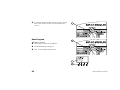
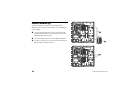
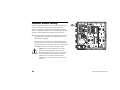
NOTE: The controller also provides a “hot post” test
terminal on the inside panel. Use this terminal to test
a single valve. See the top illustration on the right.
Confirm Programs
Review Program
Turn the dial to “TEST ALL VALVES/CHECK SYSTEM.”
54
ESP-LX Modular Controller
The Check System menu appears.
Press “1” on the Check System menu.
The Confirm Programs menu appears.
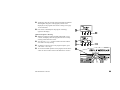
Press “1” from the Confirm Programs menu. The Review
Program function will display all information that affects
program operation.
The display shows the currently selected program and its
watering start times. If the program you want is not displayed,
use the program select switch to change it. See page 17 for
instructions. Press “Next.”
ESP-LX Modular Controller
55
The display shows the following screens of standard program
information.
Program’s watering day cycle (display will vary
depending on the how the program is set)
Program’s watering days
Run times of each valve assigned to the program
Seasonal adjust percentages (by program and/or by
month)
Rain delay
56
ESP-LX Modular Controller
(continued)
Calendar Day Off
Valve delays
Cycle+Soak settings entered for each valve
Master valve or pump relay settings that are turned OFF
Sensor overrides that are turned ON
On some screens, you can press“+” or “–” to scroll through
more information. When you are finished viewing a screen,
press “Next” to display the next screen.
The Confirm Programs menu reappears.
ESP-LX Modular Controller
57
Program Run Time
This function calculates and displays the total run time of a program
from the time the first valve turns on until the last valve turns off.
The total run time includes any valve delay settings, as well as the
effects of seasonal adjust percentages.
Turn the dial to “TEST ALL VALVES/CHECK SYSTEM.”
The Check System menu appears.
Press “1” on the Check System menu.
The Confirm Programs menu appears.
Press “2” on the Confirm Programs menu.
58
ESP-LX Modular Controller
The display shows the currently selected program and the total
run time of the program from the time the first valves turns on
until the last valve turns off. If the program you want is not
displayed, use the program select switch to change it. See page
17 for instructions. Press “Back” to return to the Confirm
Programs menu.
NOTE: If Cycle+Soak™ is set for this program, a
message appears telling you that the actual run time
for the program will be longer than the time shown.
Valve Run Time
This function displays each valve in the system, along with the total
amount of actual watering that will occur in each program each day
the program is scheduled to run. This calculation includes multiple
start times and the effects of seasonal adjust percentages.
For example, assume that Valve 1 runs for 10 minutes in program
A, and program A has two start times per watering day. The total
valve run time would be 20 minutes. If a seasonal adjust percent of
80% were also in effect, the calculated run time would be 16
minutes.
Turn the dial to “TEST ALL VALVES/CHECK SYSTEM.”
The Check System menu appears.
Press “1” on the Check System menu.
ESP-LX Modular Controller
59
The Confirm Programs menu appears.
Press “3” from the Confirm Programs menu.
The display shows the first valve in the system, along with the
total amount of actual watering that will occur in each program
each day the program is scheduled to run.
Press “+” or “–“ to change the valve number.
Press “Back” to return to the Confirm Programs menu.
Test All Valves
The controller’s built-in test program will run each valve that has a
non-zero watering time assigned to it. When you run the test
program, the controller operates each valve in numerical sequence,
from lowest to highest. You can use this program to check out the
operation of all the sprinklers in the system.
Turn the dial to “TEST ALL VALVES/CHECK SYSTEM.”
60
ESP-LX Modular Controller
The Check System menu appears.
Press “2” on the Check System menu.
The display shows the default test time of two minutes. The
time digits flash.
Press “+” or “–“ to change the test time. This is the time that
each valve will run during the test.
Press “Run.” The message “Watering” appears.
Turn the dial to “AUTO.”
ESP-LX Modular Controller
61
While the valves are running and the dial is set to “AUTO,”
the display shows the valve currently watering and the time
left to water.
You can press“+” or “–” to add or subtract run time from the
valve that is currently running. To advance to the next valve in
sequence, press “Adv. Valve.” Go to step 1.
To cancel the valve test, turn the dial to “OFF” for three
seconds. Then turn the dial back to “AUTO.”
62
ESP-LX Modular Controller
Rapid Station Test Routine —
RASTER™
Rain Bird’s RApid Station TEst Routine (RASTER™) lets you
diagnose and troubleshoot field wiring, solenoid, and controller
problems quickly and easily. To run a RASTER™:
Turn the dial to “TEST ALL VALVES/CHECK SYSTEM.”
The Check System menu appears.
Press “3” on the Check System menu.
RASTER™ first warns you not to remove or insert modules
during the test. It then checks the status of the controller,
reporting the number of modules present and the total number
of valve outputs. The controller then tests each valve terminal
on the controller.
At the end of the test, the display shows each valve (including
the master valve) and its status. Press “+” or “–” to see the test
results for each valve:
OK—The valve is operating normally.
OPEN—The circuit between the controller and the valve
is open; i.e., no current is flowing.
SHORT— The circuit between the controller and the
valve has a short; i.e., current is flowing on an unintended
path.
ESP-LX Modular Controller
63
When you are finished reviewing test results, press “EXIT.”
The display shows “WIRING TEST DONE.”
If RASTER™ reports a fault on any valve, you will need to
troubleshoot, diagnose, and repair the fault.
Open circuits are usually caused by:
Malfunctioning valve solenoid
Field wires that have been cut or pulled loose
Loose wire connections on the controller terminal or at
the valve solenoid
Short circuits are usually caused by:
Shorted valve solenoid
Nicked or “skinned” field wires
Loose or corroded wire connections on the controller
terminal or at the valve solenoid
After you have repaired the fault, run RASTER™ again to
verify that the problem has been corrected.
64
ESP-LX Modular Controller
Reset Controller
If the display of the ESP-LX Modular controller “freezes” and the
controller stops responding to commands, you may be able to reset
the internal circuitry. Resetting the controller will cancel any
watering that my be occurring at the time, but the controller will
retain the date, time, and all programming information.
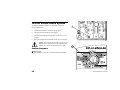
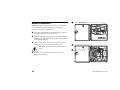
Unlock and open the controller cabinet.
Use the crescent-shaped cutout to grasp the face panel and
open it on its hinges.
Locate the recessed compartment labeled “RESET” on the
back of the face panel.
Insert the tip of a pencil into the RESET compartment.
Momentarily press the small button with the pencil tip.
The Rain Bird logo appears briefly in the display. The display
then shows “Auto” and the time of day.
ESP-LX Modular Controller
65
Alarm Light
The alarm light on the face panel of the ESP-LX Modular will
illuminate and an appropriate text message will display when
programming errors and other conditions (for example electrical
faults or an active sensor) prevent watering.
Electrical Faults
If the controller detects an electrical fault on one of the valve
circuits, the controller automatically shuts off the faulty circuit and
advances to the next working valve in the program. The Alarm light
on the face panel of the controller will light, and the display will
describe the fault condition.
After the program finishes, you should isolate and repair the fault in
the circuit. Faults occur most frequently in the valve solenoid or in
the wire connectors on the valve leads.
After you find and repair the fault, operate the valve manually to
make sure it works properly. See page 50 for instructions.
Active Sensor
A sensor connected to the ESP-LX Modular controller may suspend
watering when certain conditions are met, such as rainfall. In this
case, the alarm light will illuminate, and the display will show that
watering has been suspended by the sensor.
If the sensor is working properly, no further action is required.
When the sensor condition no longer exists, normal watering will
resume, and the alarm light will go out.
If you suspect the sensor may be faulty, you can bypass it, as
described on page 45. Troubleshoot and repair the faulty sensor,
and then set the sensor switch back to “ACTIVE.”
66
ESP-LX Modular Controller
INSTALLING THE
CONTROLLER
Check Box Contents
This section explains how to mount the ESP-LX Modular controller
on the wall and connect the wiring.
NOTE: This controller must be installed in
compliance with local electrical codes..
Installation Checklist
To install the ESP-LX Modular controller, we recommend you
complete the following steps in order. For your convenience, a
check-off box has been provided for each step.
ESP-LX Modular Controller
Mounting Hardware (5 screws,
5 plastic wall anchors)
Keys
Check the box contents. ..............................................Page 67
Choose a location. .......................................................Page 68
Gather installation tools. .............................................Page 69
ESP-LX Modular Installation,
Programming, & Operation
Guide
Mount the controller. ...................................................Page 70
Install module(s). ........................................................Page 72
Connect field wiring. ...................................................Page 73
Connect source power. ................................................Page 75
Mounting Template
Complete the installation. ............................................Page 78
ESP-LX Modular Controller
67
Choose Location
Choose a location that:
Is easily accessible
Allows for comfortable viewing
Has a flat wall surface
Is near a 120 V or 230/240 V AC power source, depending on
model
Is safe from potential vandalism
Is outside the range of operating sprinklers
NOTE: This controller must be installed in
compliance with local electrical codes.
68
ESP-LX Modular Controller
Gather Installation Tools
Wire strippers
Phillips head screwdriver
Slotted thin-blade screwdriver
Marking pencil
Metal drill bit(s)
Electric drill (or hammer drill if
installing in masonry or
concrete)
Hammer
ESP-LX Modular Controller
69
Mount Controller
OPTIONAL: Before you mount the controller, we recommend
you remove the front panel. Although this is not absolutely
necessary, it will make installation easier.
If necessary, unlock the door with the supplied key. Open the
door of the cabinet and swing it to the left.
Open the front panel by grasping the crescent-shaped finger
hold on the top right side of the cabinet. Open the front panel
approximately 90 degrees.
Disconnect the ribbon cable from the front panel by gently
pulling the connector out and away from the socket.
CAUTION: Be careful NOT to bend the pins in the
socket.
Shift the front panel up and remove the lower hinge pin.
Remove the front panel.
70
ESP-LX Modular Controller
Attach the mounting template to the mounting surface at eye
level. Make sure that at least one of the mounting holes lines
up with a wall stud or other solid surface. Make sure the
template is level.
Drill or tap a pilot hole on each mark for the mounting holes.
Remove the mounting template from the surface. If necessary,
install wall anchors. Drive a #8 screw into the top center pilot
hole.
Slide the controller over the top center screw. Line up the
controller cabinet with the remaining four pilot holes. Drive
the appropriate fastener(s) through the mounting holes into the
mounting surface. Verify that the cabinet is secure.
ESP-LX Modular Controller
71
Install Module(s)
The ESP-LX Modular controller lets you add modules for
additional valve connections. The controller can accommodate up
to four modules.
To install a module, align the connector on the back of the
module with the module slot on the back panel. Press firmly
until the module snaps into place.
Use the remaining connectors to install additional modules.
To remove a module, press in on the two release buttons and
pull the module from the back panel.
72
ESP-LX Modular Controller
Connect Field Wiring
Field wires are connected to module terminals using quick
connectors. Press the spring arm of the appropriate terminal and
insert the wire. When you release the spring arm, the clamp will
hold the wire.
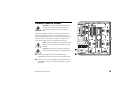
Connect one of the valve wires to one of the numbered
terminals, as shown in the illustration.
Connect the other valve wire to a common wire. All common
wires should be connected to any one of the COM terminals on
the controller. Wires used to connect the valves must be codeapproved for underground installation.
NOTE: Complete the following step only if your
system uses a master valve or a pump start relay. The
controller does not provide main power for a pump.
Connect the master valve or pump start relay wiring to the MV
and COM terminals, as shown in the illustration.
ESP-LX Modular Controller
73
Connect Sensor Wiring
The ESP-LX Modular controller lets you connect various types of
sensors that interrupt watering when a specific condition is
detected. For example, if you have a Rain Bird RSD Series Rain
Sensor or a WRS Wireless Rain Sensor connected to the controller,
watering will be suspended when rainfall activates the sensor.
The sensor must be connected to the controller’s sensor inputs
on the base module according to the instructions that come
with the sensor equipment.
Most sensors have two wires or two terminals designed to be
connected to the valve common wire. Instead of connecting to
the valve common wire, connect these wires or terminals to the
“SENSOR” terminals on the ESP-LX Modular controller.
NOTE: If no sensor is attached to the controller,
make sure the supplied jumper connects the two
SENSOR terminals on the controller’s base module.
If you set the sensor bypass switch to “ACTIVE”
without a sensor or jumper connected to these
terminals, valves will not operate, and no watering
will occur.
74
ESP-LX Modular Controller
Connect Source Power
WARNING: To prevent electrical shock, make sure
all supply power is OFF before connecting these
wires. Electrical shock can cause severe injury or
death.
The ESP-LX Modular controller has an internal transformer that
reduces supply voltage (120 VAC in U.S. models; 230 VAC in
international models; 240 VAC in Australian models) to 24 VAC to
operate the valves connected to the controller. You will need to
connect power supply wires to the transformer's three wires.
NOTE: Indoor units and 240 VAC (Australian) units
do not require a conduit because the cable is already
installed.
CAUTION: All electrical connections and wiring
runs must be made according to local building codes.
With the front panel removed, locate the high-voltage
compartment in the lower left corner of the controller cabinet.
Remove the screw on the right edge of the compartment cover.
Then pull the cover open to expose the transformer's primary
input wires.
ESP-LX Modular Controller
75
Remove the knockout at the bottom of the cabinet. Attach a ½"
(1,3 cm) conduit fitting to the bottom entrance of the highvoltage compartment. Then attach conduit to the fitting.
Bring three supply wires from the power source through the
conduit into the high-voltage compartment. Strip the insulation
from the incoming wires to expose about ½" (1,3 cm) of bare
wire.
Using wire nuts, connect the wires as follows:
On 120 VAC models (U.S.), connect the black supply
wire (“hot”) to the black transformer wire.
On 230 VAC models (international), connect the black
supply wire (“hot”) to the black transformer wire.
On 120 VAC models (U.S.), connect the white supply wire
(“neutral”) to the white transformer wire.
On 230 VAC models (international), connect the blue supply
wire (“neutral”) to the blue transformer wire.
76
ESP-LX Modular Controller
On 120 VAC models (U.S.), connect the green supply wire
(“ground”) to the green transformer wire.
On 230 VAC models (international), connect the green-withyellow-stripe supply wire (“ground”) to the green-with-yellowstripe transformer wire.
NOTE: The ground wires MUST be connected to
provide electrical surge protection.
Verify that all connections are secure. Then close the cover of
the high-voltage compartment and secure it with the screw.
ESP-LX Modular Controller
77
Complete Installation
WARNING: To prevent electrical shock, make sure
all supply power is OFF before completing
installation. Electrical shock can cause severe injury
or death.
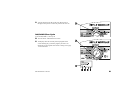
If you removed the front panel, reinstall it now by inserting the
top corner pin into the top pin hole. Push up and rock the lower
corner into the lower pin hole.
Reconnect the ribbon cable to the front panel by gently
pushing the connector into the socket.
CAUTION: Be careful NOT to bend the pins in the
socket.
Turn on the power source.
NOTE: The first time you power up the controller,
the display will prompt you to select the language you
wish to use. See page 40 for instructions.
OPTIONAL: Install a 9-Volt battery into the battery
compartment on the inside of the front panel. This battery will
allow you to program the controller with the front panel
disconnected from the cabinet. To irrigate, you will need to reconnect the front panel to the cabinet and connect the
controller to source power.
78
ESP-LX Modular Controller
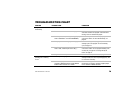
TROUBLESHOOTING CHART
SYMPTOM
POSSIBLE CAUSE
CORRECTION
Program does not come on
automatically.
1.
Dial is set to OFF position.
Set the dial to AUTO.
2.
Start time has not been entered for the program.
Use “Confirm Programs” (see page 54) to check the
start times entered for the program. If the start time is
missing, enter it as described on page18.
3.
Rain Delay feature is preventing watering. (Display
shows “RAIN DELAY” and “DAYS REMAINING.”)
If the Rain Delay feature has been set properly, no
correction is needed. To cancel the Rain Delay, see
page 30.
4.
Today may not be a watering day for the program.
Use “Confirm Programs” (see page 54) to check the
watering cycle for the program. To set the watering
cycle, see page 19.
5.
Day Off feature is preventing watering. (Display
shows “NON,” followed by the time of day.)
If the Day Off feature has been set properly, no
correction is needed. To run a program manually (even
on a Day Off), see page 52. To change the Day Off
feature, see page 31.
Display shows a valve
operating, but no watering
occurs.
ESP-LX Modular Controller
6.
Program’s Seasonal Adjust is set to 0%.
Set the Seasonal Adjust above 0%. See page 25.
7.
Sensor is preventing irrigation.
Turn the sensor bypass switch to BYPASSED. If
watering resumes, the sensor is operating properly, and
no correction is necessary.
8.
No sensor or jumper is connected to the
controller’s SENSOR terminals, and the SENSOR
BYPASS switch has been set to ACTIVE.
Turn the sensor bypass switch to BYPASSED. To
prevent future occurrences, install the supplied jumper
on the controller’s SENSOR terminals.
79
SYMPTOM
POSSIBLE CAUSE
CORRECTION
Display shows a valve
operating, but no watering
occurs. (cont’d)
9.
Use “Confirm Programs” (see page 54) to check the run
time set for the valve. If no valve is connected, set the
run time to “0:00.” See page 24.
Valve does not come on.
10. No run time has been set for the valve.
Use “Confirm Programs” (see page 54) to check the run
time set for the valve. To add a run time, see page 24.
11. Water pressure to the valve has been interrupted.
Make sure the valve has water pressure.
Run the RASTER test (see page 63) to see if the valve
fails open or short. Identify and repair the fault in the
circuit. Then start the valve manually. See page 50 for
instructions.
No valve is connected to the terminal on the
controller.
12. A short or open circuit in the solenoid or valve
wiring has disabled the valve. (The ALARM light is
lit.)
Display shows “NO Power.”
80
13. Sensor is preventing irrigation.
14. Watering start time has not been entered for the
program to which the valve is assigned.
See correction for Cause #7.
See correction for Cause #2.
15. Seasonal Adjust for the valve’s program is set to
0%.
See correction for Cause #6.
16. No power is being supplied to the controller.
Verify that the controller is plugged into a working outlet.
Check the main power supply to the controller.
17. PTC fuse is open.
Disconnect the controller from its power source. Identify
and repair the circuit fault that caused the fuse to blow.
Reconnect power to the controller.
ESP-LX Modular Controller
SYMPTOM
POSSIBLE CAUSE
Display is partially or
completely blank.
18. An electrical surge or lightning strike has damaged
the controller’s electronics.
Reset the controller as described on page 65.
Turn off the controller and disconnect the 9-Volt
battery. Let the controller rest for two or three
minutes. Then reconnect the battery and restore
power to the controller. If the electrical surge did no
permanent damage, the controller will accept
programming commands and function normally.
19. No power is being supplied to the controller, or the
battery is low.
Verify that the controller is plugged into a working outlet.
Check the main power supply to the controller. Replace
the battery if you intend to program the controller using
battery power.
20. A program has been started manually.
To cancel a program that has been manually started, set
the dial to OFF for three seconds. Then set the dial back
to AUTO.
21. An unwanted watering start time may have been
entered.
Use “Confirm Programs” (see page 54) to see if any
programs have an unwanted start time. See page 18 for
instructions on setting and eliminating start times.
22. The programs may be stacked.
Programs A, B, and C will stack behind each other if
they are scheduled to start while another program (other
than D) is running. Use “Confirm Programs” (see page
54) to make sure Programs A, B, and C are not
scheduled to start when any program other than D is
scheduled.
Watering starts when it
should not.
ESP-LX Modular Controller
CORRECTION
81
INDEX
Active sensor alarm, 66
Advanced cycles, 21
Advanced programming, 25
Alarm light, 6, 66
AM/PM time, 16
Automatic operation, 48
Backup programs, 41
Basic operation, 5
Basic programming, 7
Battery power, for programming, 8
Box contents, 67
Calendar day off, 31
Checklist
installation, 67
programming, 9
Choose location, 68
Clear programs, 12
all programs, 13
factory defaults, 14
individual program, 12
Communications, 45
Confirm programs, 54
Controls, 6
Custom cycle, 19, 20
Cycle
custom, 19, 20
cyclical, 19, 22
82
odd/odd31/even, 19, 21
Cycle+Soak™, 35
Cyclical cycle, 19, 22
Date, setting, 15
Days remaining, 23
Days to water, 7, 19
Deadheading, 37
Delay
between valves, 4
watering, 30
Delayed program recall, 43
Diagnosing, 63
Display, 6
Drip program, 17
Electrical fault alarm, 66
Factory defaults, 14
Fault alarm, 66
Field wiring, 73
Flow demand, 17
Hardware, mounting, 67
Hot post test terminal, 54
Indicators, 6
Installation, 67
checklist, 67
completing, 78
module, 72
tools, 69
Language, setting, 40
Location, for installing, 68
Manual watering, 50
program, 52
valve, 50
Master valve, 37
Modular design, 3
Module
installing, 72
programming, 45
Mount controller, 70
Mounting hardware, 67
MV or pump start relay, 37
Odd/odd31/even cycle, 19, 21
OFF setting, 49
Open circuit, 63
Operate controller, 48
automatically, 48
OFF, 49
Override sensor, 38
Program
backup, 41
clear, 12
confirm, 54
delayed recall, 43
drip, 17
manual operation, 52
ESP-LX Modular Controller
recall, 42
review, 54
run time, 58
selecting, 17
stacking, 17
start times, 18
storing, 41
Program select switch, 6, 17
Programming
advanced, 25
basic, 7
buttons, 6
chart, 10
checklist, 9
definition, 7
dial, 6
under battery power, 8
Pump start relay, 37
Rain delay, 30
Rapid Station Test Routine —
RASTER™, 63
Recall programs, 42
Remote capability, 3
Reset controller, 65
Review program, 54
Run time, 24
program, 58
ESP-LX Modular Controller
valve, 59
Seasonal adjust %, 25
by month, 27
individual program, 26
Select
days to water, 19
program, 17
Sensor
active alarm, 66
bypass switch, 6, 45
connecting, 74
jumper, 46
jumpers, 74
override, 38
Set
date, 15
language, 40
sensor bypass switch, 45
time, 16
valve run times, 24
watering start times, 18
Short circuit, 63
Smart Modules™. See Module
Source power, 75
Special features, 40
Stacking programs, 17
Start time, 7, 18
Store programs, 41
Switches, 6
System check, 54
Test all valves, 54, 60
Test terminal, 54
Time, setting, 16
Tools, for installing, 69
Troubleshooting, 63, 79
Valve, 4
delay, 4, 33
manual operation, 50
master, 37
run time, 24, 59
settings, 33
test, 60
test terminal, 54
Watering
cycle, 19
days, 19
manual, 50
start times, 7, 18
Wiring
from valves, 73
sensor, 74
source power, 75
83
84
ESP-LX Modular Controller
NOTES
This equipment has been tested and found to comply with the limits for a
Class B digital device, pursuant to Part 15 of the FCC Rules. These limits
are designed to provide reasonable protection against harmful interference in
a residential installation.
This equipment generates, uses, and can radiate radio frequency energy and,
if not installed and used in accordance with the instructions, may cause
harmful interference to radio communications. However, there is no
guarantee that interference will not occur in a particular installation.
If the equipment does cause harmful interference to radio or television
reception, which can be determined by turning the equipment off and on, the
user is encouraged to try to correct the interference by the following
measures:
•
Reorient or relocate the receiving antenna.
•
Increase the separation between the equipment and receiver.
•
Connect the equipment into an outlet on a circuit different from that to
which the receiver is connected.
•
Consult the dealer or an experienced radio/TV technician for help.
Changes or modifications not expressly approved by Rain Bird Sales, Inc.,
could void the user’s authority to operate the equipment.
This product was FCC certified under test conditions that included the use
of shielded I/O cables and connectors between system components. To be in
compliance with FCC regulations, the user must use shielded cables and
connectors and install them properly.
RAIN BIRD CORPORATION
6991 E. Southpoint Road, Bldg. 1 • Tucson, AZ 85706
Rain Bird Europe, S.A.R.L. • 900, rue Ampere • BP 72000 • 13792 Aix en Provence Cedex 3 • France
© 2006 Rain Bird Corporation
® Registered trademark of Rain Bird Corporation. • ® Marca registrada de Rain Bird Corporation.
www.rainbird.com
636281-010 Rev A