1
VibroMeter
Auto Center
Signal Level Control
Time Interval Control
Vibration Graph
Freeze or Unfreeze the
measurement
Recording
Panel
Over-limit Setting
Recorded
Data
Over-limit Data
Data Logging
Control Panel
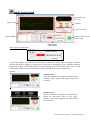
Time Interval Control
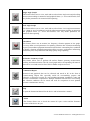
To adjust the time interval (Horizontal Scale) for the vibration graph.
Scale 0: 10 seconds (default)
Scale 5: 5 seconds
Signal Level Control
To amplify the measured magnitude of vibration.
Scale 1: Original measured vibration value
Scale 2: Double the measured vibration value
Auto Center
To auto adjust the vertical scale of the graph and set the zero relative gravity at the center of the graph.
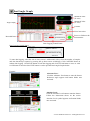
Data Logging Control Panel:
To start data logging, select the unit of time (second / millisecond). Next, select the number of samples
and time duration per capture by pressing the up down arrow accordingly. Click CAPTURE button to
initiate data logging. Click STOP button to halt data logging and click CLEAR button to erase or click
SAVE button to store the data. EXIT button is used to quit the VibroMeter window.
© 2013 DIGIPAS USA LLC. All Rights Reserved.