1
User manual: RS-800G
page5 of 9
ILDA mode
When an IDLA compatible interface is connected to the laser, the laser is
automatically switched to ILDA mode. Output is then controlled from a PC running
software.
The laser uses pins 4 and 17 of the IDLA signal to detect the presence of an ILDA
interface.
Further information can be found in the software manual.
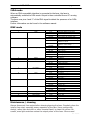
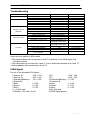
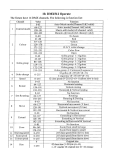
DMX mode
1
Mode
2
Colour
DMX512 value
0~63
64~127
128~191
192~255
0~63
64~127
128~192
3
Pattern group
4
5
6
Pattern
Speed
Rotation
7
Dot rotation
8
Move
9
Extend
10
Zoom
11
12
13
14
Drawing speed
Scan speed
Colour speed
Size
193~255
0~42
43~85
86~128
129~171
172~214
215~255
0~255
0~255
0~63
64~127
128~191
192~255
0~63
64~127
192~255
0~63
64~127
128~191
192~255
0~63
64~127
128~191
192~255
0~85
86~169
170~255
0~255
0~255
0~255
0
1~255
Function
Auto-Music Mode (Ch 1&2 valid)
Auto-mode (Ch 1&2 valid)
Music-edit mode (All channels valid)
Manual mode (All channels valid)
No Beam
Single colour laser: Strobe
Multicolour: colours
Single colour: Fluxion blanking
Multicolor: Colour change
On
Pattern group 1
Pattern group 2
Pattern group 3
Pattern group 4
Pattern group 5
Group 6 cartoons
32 patterns
slow to fast
No function
Rotate horizontally
Rotate vertically
Rotate h. & v.
No function
Rotating
Rotating & Dotting
No function
Move horizontally
Move vertically
Move h. & v.
No function
Extend horizontally
Extend vertically
Extend h. & v.
No function
Small to large
Large to small
slow to fast
slow to fast
slow to fast
Original size
Small to large (120 = original)
Maintenance / cleaning
Always disconnect from mains before cleaning/opening the laser. Regularly clean the
interior from dust, especially ensure operation of the fans. Use a sponge with
alcohol, rather than wet cloth or other chemical liquid, to clean the mirrors. Be
careful, even light scratches reduce the output power of the laser. Mirrors need
Rev: 11/2008