1
STM32 ST-LINK Utility user interface
UM0892
2
STM32 ST-LINK Utility user interface
2.1
Main window
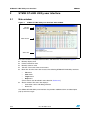
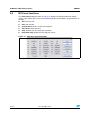
Figure 1.
STM32 ST-LINK Utility user interface main window
Title bar
Menu bar
Main window
Status bar
The main window is composed of three zones and three bars as illustrated in Figure 1:
●
Memory display zone
●
Device information zone
●
Memory contents zone
●
Title bar: The name of the current menu
●
Menu bar: Use the menu bar to access the following STM32 ST-LINK Utility functions:
–
File menu
–
View menu
–
Target menu
–
Help menu
(These menus are described in more detail in Section 2.2)
●
Status window: The status bar displays:
–
Connection status and debug interface
–
Device ID
The STM32 ST-LINK Utility user interface also provides additional forms and descriptive
pop-up error messages.
4/23
Doc ID 16987 Rev 6