1
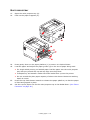
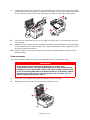
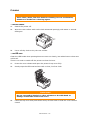
through the drum cavity area. Then allow the pressure release lever to rise
again.
d
NOTE
If the sheet is well advanced into the fuser (only a short length is still visible),
do not attempt to pull it back.
(d)
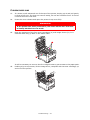
To remove a sheet in the fuser, push the two retaining levers (e) towards the
rear of the printer to release the fuser. Withdraw the fuser unit using the handle
(f).
f
e
e
(e)
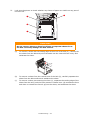
Press release lever (g) and pull the trapped paper from the fuser.
g
(f)
Replace fuser unit into the machine and move locking levers (e) toward the rear
of the machine.
e
Troubleshooting > 79