1
VIZIO
USER MANUAL
Models E65-C3 and E70-C3
Safety & Certification
THANK YOU FOR CHOOSING VIZIO
IMPORTANT SAFETY INSTRUCTIONS
And congratulations on your new VIZIO HDTV.
Your TV is designed and manufactured to operate within defined
design limits. Misuse may result in electric shock or fire. To prevent
your TV from being damaged, the following instructions should
be observed for the installation, use, and maintenance of your
TV. Read the following safety instructions before operating your
TV. Keep these instructions in a safe place for future reference.
To get the most out of your new VIZIO product, read these
instructions before using your product and retain them for future
reference. Be sure to inspect the package contents to ensure
there are no missing or damaged parts.
PRODUCT REGISTRATION
To purchase or inquire about accessories and installation services
for your VIZIO product, visit our website at www.VIZIO.com or call
toll free at (877) 698-4946.
• To reduce the risk of electric shock or component
damage, switch off the power before connecting other
components to your TV.
• Read these instructions.
• Keep these instructions.
We recommend that you register your VIZIO product at
www.VIZIO.com
• Heed all warnings.
Extended Warranties
• Do not use this apparatus near water.
For peace of mind, and to protect your investment beyond the
standard warranty, VIZIO offers on-site extended warranty service
plans. These plans provide additional coverage during the
standard warranty period. To purchase an extended warranty
service plan, visit www.VIZIO.com.
WHEN READING THIS MANUAL
When you see this symbol, please read the
accompanying important warning or notice. It is
intended to alert you to the presence of important
operating instructions.
When you see this symbol, please read the
accompanying helpful tip.
• Follow all instructions.
• Clean only with dry cloth.
• Do not block any ventilation openings. Install in
accordance with the manufacturer’s instructions.
• Do not install near any heat sources such as radiators,
heat registers, stoves, or other apparatus (including
amplifiers) that produce heat.
• Do not defeat the safety purpose of the polarized or
grounding-type plug. A polarized plug has two blades
with one wider than the other. A grounding type plug
has two blades and a third grounding prong. The wide
blade or the third prong are provided for your safety. If
the provided plug does not fit into your outlet, consult an
electrician for replacement of the obsolete outlet.
• Protect the power cord from being walked on or pinched
particularly at plugs, convenience receptacles, and the
point where they exit from the apparatus.
• Only use attachments/accessories specified by the
manufacturer.
• Use only with the cart, stand, tripod, bracket,
or table specified by the manufacturer, or sold
with the apparatus. When a cart is used, use
caution when moving the cart/apparatus
combination to avoid injury from tip-over.
• Unplug this apparatus during lightning storms or when
unused for long periods of time.
• Refer all servicing to qualified service personnel. Servicing
is required when the apparatus has been damaged
in any way, such as the power-supply cord or plug is
damaged, liquid has been spilled or objects have fallen
into the apparatus, the apparatus has been exposed to
rain or moisture, does not operate normally or has been
dropped.
• Unplug the power cord before cleaning your TV.
• When moving your TV from an area of low temperature
to an area of high temperature, condensation may form
in the housing. Wait before turning on your TV to avoid
causing fire, electric shock, or component damage.
• A distance of at least three feet should be maintained
between your TV and any heat source, such as a radiator,
heater, oven, amplifier etc. Do not install your TV close to
smoke. Operating your TV close to smoke or moisture may
cause fire or electric shock.
• Slots and openings in the back and bottom of the
cabinet are provided for ventilation. To ensure reliable
operation of your TV and to protect it from overheating,
be sure these openings are not blocked or covered. Do
not place your TV in a bookcase or cabinet unless proper
ventilation is provided.
• Never push any object into the slots and openings on
your TV cabinet. Do not place any objects on the top of
your TV. Doing so could short circuit parts causing a fire
or electric shock. Never spill liquids on your TV.
• Your TV should be operated only from the type of power
source indicated on the label. If you are not sure of the
type of power supplied to your home, consult your dealer
or local power company.
ii
• Do not apply pressure or throw objects at your TV.
This may compromise the integrity of the display. The
manufacturer’s warranty does not cover user abuse or
improper installations.
• Do not use your TV if any abnormality occurs. If any
smoke or odor becomes apparent, unplug the power
cord and contact your dealer immediately. Do not try to
repair your TV yourself.
• The power cord must be replaced when using different
voltage than the voltage specified. For more information,
contact your dealer.
• Avoid using dropped or damaged appliances. If your
TV is dropped and the housing is damaged, the internal
components may function abnormally. Unplug the power
cord immediately and contact your dealer for repair.
Continued use of your TV may cause fire or electric
shock.
• When connected to a power outlet, power is always
flowing into your TV. To totally disconnect power, unplug
the power cord.
• The lightning flash with arrowhead symbol within an
equilateral triangle is intended to alert the user to the
presence of un-isolated, dangerous voltage within the
inside of your TV that may be of sufficient magnitude to
constitute a risk of electric shock to persons.
• Do not overload power strips and extension cords.
Overloading can result in fire or electric shock.
• The wall socket should be installed near your TV and
easily accessible.
• Only power of the marked voltage can be used for your
TV. Any other voltage than the specified voltage may
cause fire or electric shock.
• Do not touch the power cord during lightning. To avoid
electric shock, avoid handling the power cord during
electrical storms.
• Unplug your TV during a lightning storm or when it will not
be used for long period of time. This will protect your TV
from damage due to power surges.
• Do not attempt to repair or service your TV yourself.
Opening or removing the back cover may expose you to
high voltages, electric shock, and other hazards. If repair
is required, contact your dealer and refer all servicing to
qualified service personnel.
• WARNING: Keep your TV away from moisture. Do not expose
your TV to rain or moisture. If water penetrates into your TV,
unplug the power cord and contact your dealer. Continuous
use in this case may result in fire or electric shock.
• Do not install your TV in an area with heavy dust or high
humidity. Operating your TV in environments with heavy
dust or high humidity may cause fire or electric shock.
• The mains plug or appliance coupler is used as the
disconnect device, the disconnect device shall remain
readily operable.
• CAUTION - These servicing instructions are for use by
qualified service personnel only. To reduce the risk of
electric shock, do not perform any servicing other than
that contained in the operating instructions unless you
are qualified to do so.
h
• The lightning flash with arrowhead symbol within an
equilateral triangle is intended to alert the user to the
presence of uninsulated DANGEROUS VOLTAGE within the
product’s enclosure that may be of sufficient magnitude
to constitute a risk of electrical shock to persons.
• Follow instructions for moving your TV. Ensure that the
power cord and any other cables are unplugged before
moving your TV.
• When unplugging your TV, hold the AC/DC power
adapter, not the cord. Pulling on the power cord may
damage the wires inside the cord and cause fire or
electric shock. When your TV will not be used for an
extended period of time, unplug the power cord.
• To reduce risk of electric shock, do not touch the
connector with wet hands.
• Insert batteries in accordance with instructions. Incorrect
polarities may cause the batteries to leak which can
damage the remote control or injure the operator. Do not
expose batteries to excessive heat such as sunshine, fire
or the like.
• If any of the following occurs, contact the dealer:
- The power cord fails or frays.
- Liquid sprays or any object drops into your TV.
- Your TV is exposed to rain or other moisture.
- Your TV is dropped or damaged in any way.
- The performance of your TV changes substantially.
• This apparatus shall not be exposed to dripping or
splashing and no objects filled with liquids, such as vases,
shall be placed on the apparatus.
iii
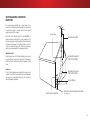
TELEVISION ANTENNA CONNECTION
PROTECTION
If an outside antenna/satellite dish or cable system is to be
connected to the TV, make sure that the antenna or cable system
is electrically grounded to provide some protection against
voltage surges and static charges.
Article 810 of the National Electrical Code, ANSI/NFPSA 70,
provides information with regard to proper grounding of the
mast and supporting structure, grounding of the lead-in wire to
an antenna discharge unit, size of the grounding conductors,
location of antenna discharge unit, connection to grounding
electrodes, and requirements of the grounding electrode.
Ground Clamp
Lightning Protection
Antenna Lead In Wire
Antenna Discharge Unit
(NEC Section 810-20)
For added protection of the TV during a lightning storm or when
it is left unattended or unused for long periods of time, unplug
the TV from the wall outlet and disconnect the antenna or cable
system.
Power Lines
Grounding Conductors
(NEC Section 810-21)
Do not locate the antenna near overhead light or power circuits,
or where it could fall into such power lines or circuits. Remember,
the screen of the coaxial cable is intended to be connected to
earth in the building installation.
Ground Clamps
Electric Service Equipment
Power Service Grounding Electrode System
(NEC ART 250, part H)
iv
This product qualifies for ENERGY STAR in the “factory
default” setting and this is the setting in which power
savings will be achieved. Changing the factory default
picture settings or enabling other features will increase
power consumption that could exceed the limits
necessary to qualify for ENERGY STAR rating.
Manufactured under license from Dolby Laboratories.
Dolby and the double-D symbol are trademarks of
Dolby Laboratories.
For DTS patents, see http://patents.dts.com.
HDMI, the HDMI logo and High-Definition Multimedia
Interface are trademarks or registered trademarks of
HDMI Licensing LLC.
Manufactured under license from DTS Licensing
Limited. DTS, the Symbol, & DTS and the Symbol together
are registered trademarks, and DTS Studio Sound is a
trademark of DTS, Inc. © DTS, Inc. All Rights Reserved.
v
Table of Contents
Getting to Know Your TV............................................... 7
Resetting a Preset Picture Mode.................................................... 27
Blocking and Unblocking Content by Rating................................ 44
Inspecting the Package Contents...................................................... 7
Adjusting the Color Calibration Settings....................................... 28
Changing the Parental Control PIN............................................... 44
Installing the TV................................................................................... 8
Adjusting the Color Tuner Settings................................................. 28
Resetting the Content Locks.......................................................... 44
Installing the TV Stand...................................................................... 8
Adjusting the Audio Settings............................................................. 31
Changing the View Mode Settings................................................ 45
Installing the TV on a Wall................................................................ 9
Changing the Equalizer Settings................................................... 31
Adjusting the Wide Mode (Aspect Ratio)...................................... 45
Front Panel......................................................................................... 10
Deleting the Custom Audio Mode................................................. 32
Changing your TV Name............................................................... 45
Rear Panel......................................................................................... 11
Setting Timers.................................................................................... 33
Controlling Other Devices with CEC.............................................. 46
Remote Control................................................................................. 12
Setting the Sleep Timer................................................................... 33
Turning the Power Indicator On or Off........................................... 46
Replacing the Batteries.................................................................. 12
Setting the Auto Power Off Feature................................................ 33
Using the Reset & Admin Menu........................................................ 47
Enabling the Screen Saver............................................................. 33
Restoring the TV to Factory Default Settings.................................. 47
Blank Screen Feature..................................................................... 33
Enabling and Disabling Smart Interactivity................................... 47
Using the Network Connection Menu............................................... 34
Using the Guided Setup Menu...................................................... 48
Connecting to a Wireless Network................................................. 34
Using Guided Setup....................................................................... 48
Changing the Manual Setup Settings........................................... 34
Using the Info Window....................................................................... 48
Connecting Your Devices........................................... 13
Connecting A Device........................................................................ 13
Connecting A Device - Audio & Video Cable Types......................... 14
Connecting an Audio Device........................................................... 15
Connecting An Audio Device - Audio Cable Types.......................... 16
Connecting an Audio Device - Arc................................................... 17
Without HDMI ARC.......................................................................... 17
With HDMI ARC............................................................................... 17
Connecting to Your Network............................................................. 18
Connecting to a Wired Network (Best).......................................... 18
Connecting to a Wireless Network................................................. 18
Completing The First-Time Setup................................ 19
Using the On-Screen Menu........................................ 22
Navigating the On-Screen Menu...................................................... 22
Changing the Input Source.............................................................. 22
Changing the Screen Aspect Ratio.................................................. 23
Viewing Video with the Menu Open................................................. 23
Adjusting the Picture Settings........................................................... 24
Adjusting the More Picture Settings............................................... 25
Adjusting the Color Temperature................................................... 25
Adjusting the Picture Mode Edit Settings....................................... 26
Saving a Custom Picture Mode..................................................... 26
Locking and Unlocking Custom Picture Modes............................. 26
Deleting a Custom Picture Mode................................................... 27
Finding MAC Addresses for Network Setup.................................... 34
Connecting to a Hidden Network.................................................. 35
Setting Up the Tuner.......................................................................... 36
Selecting a Channel Source.......................................................... 36
Finding Channels........................................................................... 36
Adding New Channels................................................................... 37
Using the USB Media Player....................................... 49
Using the USB Media Player.............................................................. 49
Preparing Your USB Drive to Play USB Media.................................. 49
Playing USB Media.......................................................................... 49
Removing the USB Drive from the TV.............................................. 49
Skipping Channels......................................................................... 37
Using VIZIO Internet Apps Plus® (V.I.A. Plus)............... 53
Listening to Alternate Audio.............................................................. 38
Using the fullscreen V.I.A. Apps Window............................................ 54
Changing the Analog Audio Language........................................ 38
Fullscreen V.I.A. Plus Apps Window Overview.................................... 55
Changing the Digital Audio Language......................................... 38
Customizing the V.I.A. Plus Apps Window.......................................... 56
Setting Up Closed Captioning.......................................................... 39
Adding an App to the My Apps Tab.............................................. 56
Changing the Appearance of Digital Closed Captions............... 39
Deleting an App from the My Apps Tab......................................... 56
Renaming Devices on the Input Menu............................................. 41
Moving an App in My Apps........................................................... 56
Changing the TV Settings................................................................. 42
Troubleshooting & Technical Support........................ 58
Viewing System Information........................................................... 42
Changing the On-Screen Menu Language.................................. 42
Specifications............................................................. 62
Setting the Time and Local Settings............................................... 43
Warranty..................................................................... 64
Using the Parental Controls............................................................ 43
Accessing the Parental Controls Menu......................................... 43
Legal & Compliance.................................................. 65
Enabling or Disabling Program Ratings......................................... 43
Locking and Unlocking Channels.................................................. 43
vi
Getting to Know Your TV
1
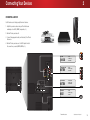
INSPECTING THE PACKAGE CONTENTS
Before installing your new TV, take a moment to inspect the package contents. Use the images below to ensure that nothing is missing or damaged.
VIZIO LED UHDTV with Stand
Quick Start Guide
English
TV Stands
(two identical stands)
Quick Start Guide
Spanish and French
Power Cord
(E65-C3)
4 x 14 mm M5
Phillips Screws
Remote Control
(E70-C3)
4 x 18 mm M5
Phillips Screws
PACKAGE CONTENTS
7
1
INSTALLING THE TV
To install the base:
After removing the TV from the box and inspecting the package
contents you can begin installing the TV. Your TV can be installed
in two ways:
• On a flat surface, using the included stand
• On a wall, using a VESA-standard wall mount (not
included)
Installing the TV Stand
Your TV includes a stand designed to support the weight of the
TV and keep it from falling over. However, the TV can still fall over if:
• It is placed on an uneven, unstable, or non-level surface
• It is pushed, pulled, or otherwise improperly moved
• If an earthquake occurs and the TV is not properly
secured
It is recommended that two people take part in the
base installation.
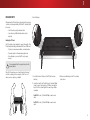
Place the TV screen-down on a clean, flat surface. To prevent
scratches or damage to the screen, place the TV on a soft
surface, such as carpet, rug, or blanket.
1. Insert the stands into the base of the TV. (The stands are
identical.)
3. When you are finished, place the TV on a stable,
level surface.
2. Secure the stands to the TV with the four (4) included Phillips
screws. For each stand, insert two (2) Phillips screws into the
back of the TV as shown. Tighten the screws using a Phillips
screwdriver.
For E65-C3: Use two (2) 14 mm M5 Phillips screws for each
stand.
For E70-C3: Use two (2) 18 mm M5 Phillips screws for each
stand.
8
1
Installing the TV on a Wall
To mount your TV on a wall, you will need a wall mount. Consult
the information below to find the appropriate mount for your TV
model:
Installing a TV on a wall requires lifting. To prevent
injury or damage to the TV, ask someone to help you.
Screw Size:
Hole Pattern:
E65-C3
E70-C3
M6
400 mm (V) x
400 mm (H)
M6
400 mm (V) x
400 mm (H)
50.71 lbs
55.69 lbs
Weight w/o Stand:
Be sure the mount you choose is capable of supporting the
weight of the TV. After you have determined that you have the
correct mount for your TV, you can begin the installation.
To install your TV on a wall:
1. Disconnect any cables connected to your TV.
2. Place the TV face-down on a clean, flat, stable surface.
Be sure the surface is clear of debris that can scratch or
damage the TV.
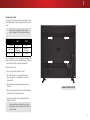
3. Remove the base and neck by loosening and removing
the screws.
WALL-MOUNT SCREW LOCATIONS
4. Attach your TV and wall mount to the wall, carefully following
the instructions that came with your mount.
Use only with a UL-listed wall mount bracket rated for the
weight/load of this TV.
For some wall mounts, you may want to use cables
with right-angle connectors. This allows the TV to rest
closer to the wall.
9
1
FRONT PANEL
REMOTE SENSOR & POWER INDICATOR
When using the remote, aim it directly at this sensor.
The power indicator flashes on when the TV turns on, then goes out after several seconds.
To keep the power indicator on as long as the TV is on, see Turning the Power Indicator On or Off on page 46.
10
1
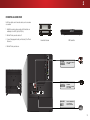
REAR PANEL
USB - Connect USB thumb drive to play photo, music, or video.
Component/Composite - Connect component or composite device.
HDMI - Connect HDMI device.
Stereo Audio Out - Connect RCA audio device, such as sound bar.
Optical Audio Out - Connect optical/SPDIF audio device, such as
home audio receiver.
HDMI - Connect HDMI device.
Coaxial - Connect coaxial cable from cable, satellite, or antenna.
Ethernet - Connect Ethernet cable from home network.
Power/Input - Press once to turn on
the TV. Press once to access the input
menu. Press and hold to turn off the TV.
11
1
REMOTE CONTROL
Replacing the Batteries
APP LAUNCHER
Quickly launch the pictured App.
(Also turns on the TV if it is off.)
INPUT
Change the currently displayed input.
POWER
Turn TV on or off.
A/V CONTROLS
Control USB media player and
video streaming playback.
CLOSED CAPTIONS
Turn closed captions on and off.
EXIT
Close the on-screen menu.
OK
Select the highlighted option.
BACK
Go to the previous on-screen menu.
VOLUME UP/DOWN
Increase or decrease loudness
of the audio.
MUTE
Turn the audio off or on.
WIDE
Change the display mode.
NUMBER PAD
Manually enter a channel.
ENTER
Confirm channel or passcode
entered using the Number Pad.
MENU
Display the on-screen menu.
INFO
Display the info window.
ARROW
Navigate the on-screen menu.
GUIDE
Display the info window.
CHANNEL UP/DOWN
Change the channel.
V BUTTON
Open the VIZIO Internet Apps Plus® (V.I.A. Plus)
dock.
LAST
Return to the channel last viewed.
PIC
Opens the Picture Mode menu.
DASH
Use with number pad to manually
enter a digital sub-channel.
(For example, 18-4 or 18-5.)
1. To remove the battery cover, press on the logo and slide the
cover out.
2. Insert two batteries into the remote control. Make sure that
the (+) and (-) symbols on the batteries match the (+) and
(-) symbols inside the battery compartment.
3. Replace the battery cover.
12
Connecting Your Devices
2
CONNECTING A DEVICE
Your TV can be used to display output from most devices.
1. Verify that your device has a video port that matches an
available port on the TV (HDMI, Component, etc.).
2. Turn the TV and your device off.
3. Connect the appropriate cable (not included) to the TV and
the device.
4. Turn the TV and your device on. Set the TV’s input to match
the connection you used (HDMI-1, HDMI-2, etc.).
AV CABLE
• ANALOG
GOOD
• SD VIDEO (480i)1
COMPONENT CABLE
• ANALOG
BETTER
• STEREO AUDIO
COAXIAL CABLE
• ANALOG/DIGITAL
BETTER
• STEREO/HD AUDIO
HDMI CABLE
• DIGITAL
BEST
1
• STEREO AUDIO
Maximum Resolution
• HD VIDEO (1080p)1
• HD VIDEO (1080i)1
• HD VIDEO (1080p)1
• HD AUDIO
Cables are not included.
13
2
CONNECTING A DEVICE - AUDIO & VIDEO CABLE TYPES
AV CABLE
COAXIAL CABLE
COMPONENT CABLE
HDMI CABLE
AV cables (or Composite cables) are the
traditional way of connecting your devices
to your TV. Video signals are sent over the
yellow connector while audio is sent over
the red and white connectors.
Coaxial cables are the traditional way of
connecting antennas and cable television
signals to your TV. Coaxial cables carry both
audio and video signals through a single
connector.
Component cables are designed to carry high
definition video signals along with additional
audio connections. Colors are delivered with
color information split up three different ways
over three connectors for video (separated into
Red, Blue and Green signals) and the left and
right audio connectors (Red and White).
HDMI is the intelligent, all-digital interface
that delivers both dazzling quality and
unmatched ease of use. HDMI technology
transmits crystal-clear digital video along with
multi-channel surround audio. HDMI-connected
devices have the ability to automatically adjust
themselves for optimal viewing.
• Video Resolutions up to 480i
• HD Video Resolutions up to 1080i
• HD Video Resolutions up to 1080p
• HD Video Resolutions up to 1080p
• Analog Connection
• Analog Connection
• Analog Connection
• HD Audio
• Audio and Video Signals
• Audio and Video Signals
• Audio and Video Signals
• Digital Connection
COMPONENT VIDEO
Y/V
R
Cable/Antenna
COMPONENT VIDEO
COAXIAL CABLE
L
GOOD
BETTER
Y/V
Pb/Cb
Pr/Cr
L
BETTER
• Audio and Video Signals
R
HDMI
BEST
14
2
CONNECTING AN AUDIO DEVICE
Your TV can output sound to an audio device, such as a receiver
or sound bar.
1. Verify that your device has an audio port that matches an
available port on the TV (Optical, RCA, etc).
2. Turn the TV and your audio device off.
3. Connect the appropriate cable (not included) to the TV and
the device.
Home Audio Receiver
VIZIO Sound Bar
4. Turn the TV and your device on.
RCA CABLE
GOOD
• ANALOG STEREO CONNECTION
• 2.0 CHANNEL
OPTICAL/SPDIF CABLE
BETTER
• PCM STREAM
• DOLBY DIGITAL 5.1 CHANNEL
• DTS 5.1 CHANNEL
HDMI CABLE
• ARC 2-WAY COMMUNICATION
• 2.0-5.1 DIGITAL AUDIO
• PCM, DTS, DOLBY DIGITAL
BEST
15
2
CONNECTING AN AUDIO DEVICE - AUDIO CABLE TYPES
RCA CABLE
OPTICAL/SPDIF CABLE
HDMI CABLE
RCA cables (or Composite cables) are the
traditional way of connecting your devices to
your audio device. Audio signals are sent over
the red and white connectors.
Optical/SPDIF cables transmit audio signals as
pulses of light through a cable made of plastic
fibers. Audio signals are digitally transmitted
between devices.
HDMI technology transmits crystal-clear digital
multi-channel surround audio through a single
HDMI cable. Audio Return Channel-enabled
(ARC) TVs allow audio to be sent over an already
connected HDMI cable, eliminating the need
for a separate audio cable. See Connecting an
Audio Device - Arc on page 17.
• Quality Stereo Connection
• PCM Stream (Lossless)
• 2.0 Channel
• Dolby Digital 5.1 Channel
• Analog Connection
• DTS 5.1 Channel
• Audio Signal Only
• Digital Connection
COMPONENT VIDEO
• Audio Signal Only
L
R
GOOD
Optical/SPDIF
• ARC 2-way Communication
(Auto setup)
• PCM, DTS, Dolby Digital
• 2.0 - 5.1 Scaleable Lossless
Digital Audio Connection
• Audio and Video Signals
HDMI
DIGITAL OPTICAL AUDIO
HDMI
BETTER
BEST
16
2
CONNECTING AN AUDIO DEVICE - ARC
WITHOUT HDMI ARC
WITH HDMI ARC
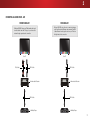
Without an HDMI ARC setup, your TV will transmit audio signal
from the built-in tuner and VIA apps to your home audio
receiver through a separate audio connection.
Your TV
RCA (Audio)
With an HDMI ARC setup, the audio connection between
your TV and Home Audio Receiver can be removed. The HDMI
cable will transmit audio signal to and from your TV with an
all-digital audio/video connection.
Your TV
HDMI Cable
HDMI Cable
Your Home Audio Receiver
Your Home Audio Receiver
HDMI Cable
HDMI Cable
Your Blu-Ray Player
Your Blu-Ray Player
17
2
CONNECTING TO YOUR NETWORK
Your TV is Internet-ready. It can be connected to your home
network with a Wired or Wireless connection.
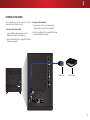
Connecting to a Wired Network (Best)
1. Connect an Ethernet cable to your router and to the
Ethernet port on the back of the TV. See below.
Connecting to a Wireless Network
1. Ensure you have a router or modem broadcasting as
high-speed wireless signal (802.11n recommended).
2. Use the Guided Network Setup to configure the TV. See Using
the Guided Setup Menu on page 48.
2. Use the Guided Network Setup to configure the TV. See Using
Guided Setup on page 48.
Ethernet Cable
Router / Modem
18
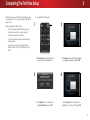
Completing The First-Time Setup
The first time you turn on the TV, the Setup App will guide
you through each of the steps necessary to get your TV
ready for use.
Before you begin the first-time setup:
3
To complete the first-time setup:
1
3
• Your TV should be installed and the power cord
should be connected to an electrical outlet.
• Your devices should be connected.
• If you have a wireless network, have the network
password ready.
• If you are connecting to your network with an
Ethernet cable, connect it to the Ethernet port on
the TV.
Use the Arrow buttons on the remote to highlight
your language of preference and press OK.
Press the Power button on the remote. The TV
powers on and the Setup App starts.
2
Choose your mode.
Select Store Demo for in-store display.
Select Home Use for in-home use.
4
Seleccione "Home Use" por Modo de Casa o "Store Demo" por Demostración de Tienda.
Choisissez "Home Use" pour Mode Domicile ou "Store Demo" pour Démonstration en Magasin.
Store Demo
Home Use
Use the Arrow buttons on the remote to
highlight Home Use and press OK.
Use the Arrow buttons on the remote to
highlight your country, and then press OK.
19
3
5
6
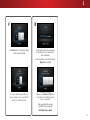
Select your time zone and press OK.
7
Use the Arrow and OK buttons on the remote to
review the Terms Of Service and Privacy Policy.
Select the name of your wireless network from
the list of available networks and press OK.
When you are finished, highlight I Accept
and press OK.
8
Enter the network password using the on-screen
keyboard, and then highlight Connect and press OK.
Enter your E-mail Address, First
Name, Last Name, and Zip Code
using the on-screen keyboard.
Highlight Next and press OK.
20
3
10
9
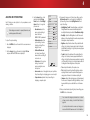
Use the Arrow buttons on the remote to highlight
your TV source and press OK.
If the TV Signal channel scan screen appears,
the TV will need to scan for channels, which
takes several minutes.
Use the arrow buttons on the remote to highlight
Begin Scan and press OK.
Note: Number of ports may differ by TV.
If you have cable TV, select whether you
have a cable box or if you connect the TV
directly to a cable from the wall.
Otherwise, use the Arrow and OK buttons
on the remote to select the input your TV
source is connected to.
When you are finished, the message
“Your VIZIO TV is set up.” will appear.
The First-Time Setup is complete.
21
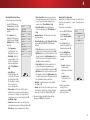
Using the On-Screen Menu
Your TV features an easy-to-use on-screen menu.
To open the on-screen menu, press the MENU button on the
remote. You can also open the on-screen menu by pressing the
VIA button and selecting HDTV Settings from the VIA Dock, then
pressing OK.
From this menu, you can:
• Adjust the Picture settings
Picture
External devices such as DVD players, Blu-ray Players, and video
game consoles can be connected to your TV. To use one of these
devices with your TV, you must first change the input source using
the Input menu.
Use the Arrow buttons to highlight
a menu option, and press the OK
button to select that option.
Wide
Zoom
Normal
Panoramic
Timers
Network
• Adjust the Tuner settings
• Access the Guided Setup
To open the on-screen menu, press
the MENU button on the remote.
Audio
• Adjust the Network settings
• Adjust TV settings
CHANGING THE INPUT SOURCE
TV SETTINGS
• Setting the Sleep Timers
• Name Inputs
NAVIGATING THE ON-SCREEN MENU
VIZIO
• Adjust the Audio settings
• Set up Closed Captioning
4
Channels
CC
Exit
2D
3D
Closed Captions
Devices
ABC
System
Guided Setup
Input
Wide
CC
Sleep
Timer
Picture
Audio
To change the input source:
1. Press the INPUT button on
the remote. The Input menu is
displayed.
2. Use the Up/Down Arrow buttons
or the INPUT button on the
remote to highlight the input
you wish to view and press OK.
The selected input is displayed.
Network
While navigating the on-screen menu, you can
press Help
the BACK button at any time to return to the
Settings
previous menu screen. The EXIT button will close the
on-screen menu.
COMP
HDMI-1
HDMI-2
User Manual
• Access the User Manual
TV
Input Name
HDMI-3
HDMI-4
Note: Inputs may vary by TV.
You change the input names that appear on the
Input menu to make your devices easy to recognize.
See Renaming Devices on the Input Menu on page
41 for more information.
22
4
VIZIO
CHANGING THE SCREEN ASPECT RATIO
VIEWING VIDEO WITH THE MENU OPEN
Wide
The TV can display images in five different modes: Normal,
Stretch, Panoramic, Wide, and Zoom. Each mode displays the
picture differently. See Adjusting the Wide Mode (Aspect Ratio)
on page 45 for an alternate way of adjusting the screen aspect
ratio.
To change the screen aspect ratio:
1. Press the
button on the remote.
2. Use the Arrow buttons to
highlight the aspect ratio you
wish to view and press OK.
• Normal preserves the content’s
original aspect ratio. Since the
4:3 aspect ratio is not large
enough to fill the TV’s screen,
black bars are added to the left
and right of the display image.
Normal
Normal
Panoramic
Stretch
Wide
Wide
Zoom
Zoom
Note: Aspect ratio settings may
vary by Input source.
• Stretch expands the display image to fill the screen. Images
may appear wider than intended. If you are watching
widescreen (1.85:1 or 2.35:1) content, black bars will still
appear on the top and bottom of the display image. This
option is only available when the TV is displaying a
720p/1080i/1080p source.
• Panoramic expands the display image to fill the screen.
Images may appear wider than intended. If you are
watching widescreen (1.85:1 or 2.35:1) content, black
bars will still appear on the top and bottom of the display
image. This option is only available when the TV is
displaying a 480i/480p source.
• Wide stretches a 4:3 aspect ratio picture to the edges of
the screen. Since the picture is being stretched, the display
image may appear distorted. If the program is already
formatted for widescreen viewing (1.85:1 or 2.35:1), then
black bars will appear on the top and bottom of the
display image.
• Zoom expands images with black bars to fit the screen.
Panoramic
VIZIO
When the on-screen menu opens, it covers the left-hand portion
of the picture. The picture can be displayed in three different
ways:
Exit
2D
• Centered Overlay - The picture is full-sized and centered
in the area next to the menu, so that the right and left
edges are cut off.
Sleep
Picture
Brightness
Contrast
Color
Tint
Sharpness
2. Press OK to cycle through the
three display methods.
3. Press the Up Arrow button on
the remote to the menu.
4. See Changing the View Mode
Settings on page 45 for an
alternate method of adjusting
the video.
Picture Mode
+ 85
Auto Brightness Control
Backlight
Brightness
Contrast
Color
Tint
Sharpness
More Picture
-
Standard
ABC
+
9
85
+
50
+
50
+
59
+
0
+
9
Input
Wide
CC
Sleep
Timer
Picture
Audio
Network
Settings
Help
Picture Mode Management
CC
Viewport
Audio
VIZIO
Help
Wide
Zoom
Normal
Exit
2D
3D
Panoramic
PICTURE
Picture Mode
Wide
Medium
+
3D
ABC
+ 59
+ 0
Standard
Off
Brightness
Contrast
ZoomColor
Normal
Tint
Sharpness
Backlight
Settings
2D
+ 50
+ 50
Auto Brightness Control
Network
Exit
Panoramic
Advanced Picture
VIZIO
PICTURE
Normal
Off
-
Backlight
To change the position of the picture while the on-screen menu
is displayed:
1. Use the Arrow buttons on the
remote to highlight
Resize
Video.
Zoom
Standard
Auto Brightness Control
3D
• Overlay - The picture stays in its normal position and the
menu covers the left-hand portion of the picture. (The
Input
Wide
picture is full-sized.)
Wide
PICTURE
Picture Mode
• Viewport - The entire picture is resized to fit into the space
to the right of the menu.
Timer
Zoom
Normal
+ 85
+ 50
+ 50
ABC
Panoramic
+ 59
+ 0
+
9
Input
Wide
CC
Sleep
Timer
Picture
Audio
Network
Settings
Help
Advanced Picture
Picture Mode Management
Exit
2D
3D
Overlay
ABC
Input
VIZIO
Wide
CC
Picture Mode Edit
Wide
Zoom
Normal
Exit
2D
3D
Input
Wide
CC
Sleep
Timer
Picture
Audio
Network
Settings
Help
Panoramic
PICTURE
Color Calibration
Picture Mode
Standard
Auto Brightness Control
Backlight
Sleep
Timer
Brightness
Contrast
Picture
Color
Tint
Sharpness
Audio
-
Off
+ 85
+ 50
+ 50
+ 59
+ 0
+
ABC
9
Advanced Picture
Picture Mode Management
Network
Settings
Help
Centered Overlay
23
4
ADJUSTING THE PICTURE SETTINGS
Your TV display can be adjusted to suit your preferences and
viewing conditions.
When changes are made to a preset picture mode, an
asterisk appears after its name(*).
To adjust the picture settings:
1. Press the MENU button on the remote. The on-screen menu is
displayed.
2. Use the Arrow buttons on the remote to highlight Picture
and press OK. The PICTURE menu is displayed.
3. Use the Arrow buttons on the
remote to highlight Picture
Mode, then use the Left/Right
Arrow buttons to change the
picture mode:
• Standard mode sets the
various picture settings to
values that meet
ENERGY STAR® requirements.
• Calibrated mode sets the
picture settings to values
ideal for watching TV in a
brightly-lit room.
VIZIO
PICTURE
Picture Mode
Standard
Auto Brightness Control
Backlight
Brightness
Contrast
Color
Tint
Sharpness
-
Medium
+
85
+
50
+
50
+
59
+
0
+
9
More Picture
Picture Mode Edit
Color Calibration
• Calibrated Dark mode
sets the picture settings to
values ideal for watching TV
in a dark room.
• Vivid mode sets the picture
settings to values that
produce a brighter, more
vivid picture.
• Game mode reduces throughput delays and optimizes
the picture settings for displaying game console output.
• Computer mode optimizes the picture settings for
displaying computer output.
4. To manually change each of the picture settings, use the
Up/Down Arrow buttons on the remote to highlight that
Wide
Zoom
Normal
picture
setting,
thenPanoramic
use the Left/Right Arrow buttons to
adjust the setting:
• Auto Brightness Control - The auto brightness control detects
the light levels in the room and automatically adjusts the
Exit
2D
3D
backlight for the best picture. Select Off, Low, Medium, or High.
• Backlight - Adjusts the LED brightness to affect the overall
ABC
brilliance of the picture. Backlight cannot be adjusted when
starting from some picture modes.
Input
Wide
CC
Picture
Audio
• Brightness - Adjusts the black level of the picture. When this
setting is too low, the picture may be too dark to distinguish
details. When this setting is too high, the picture may appear
Sleepfaded or washed out.
Timer
• Contrast - Adjusts the white level of the picture. When this
setting is too low, the picture may appear dark. When this
setting is too high, the picture may appear faded or washed
out. If the setting
is too high or too low, detail may be difficult
Network Settings
Help
to distinguish in dark or bright areas of the picture.
• Color - Adjusts the intensity of the picture colors.
• Tint - Adjusts the hue of the picture. This setting is useful in
adjusting the flesh tones in the picture. If flesh appears too
orange, reduce the level of color before adjusting tint.
• Sharpness - Adjusts the edge sharpness of picture elements.
It can be used to sharpen non-HD (high definition) content;
however, it will not produce detail that does not otherwise
exist.
5. When you have finished adjusting the picture settings, press
the EXIT button on the remote.
You can save the changes you’ve made as a custom
picture mode. See Saving a Custom Picture Mode on
page 26.
(A custom picture mode also saves any changes you
made on the More Picture menu or in Color Calibration.)
24
4
Adjusting the More Picture Settings
• Reduce Signal Noise - Reduces background picture
noise when viewing analog sources. The function helps
to correct “speckle” noise with a slight reduction in
sharpness. Select Off, Low, Medium, or High.
To adjust the advanced picture settings:
1. From the PICTURE menu, use
the Arrow buttons to highlight
More Picture Edit, and then
press OK.
2. Use the Arrow buttons to
highlight the setting you wish
to adjust, then press the Left/
Right Arrow buttons to change
the setting:
• Color Temperature See Adjusting the Color
Temperature on page 25.
VIZIO
MORE PICTURE
Color Temperature
Black Detail
Cool
Medium
Active LED Zones
Reduce Judder
On
Medium
Clear Action
Off
Reduce Noise
Game Low Latency
Off
Picture Size & Position
Film Mode
Gamma
Auto
2.1
• Black Detail - Adjusts the
average brightness of the
picture to compensate for
large areas of brightness.
Select Off, Low, Medium, or
High.
• Active LED Zones Dynamically improves the
contrast ratio of the picture
by adjusting the backlight.
The adjustment is controlled
by the content on the
screen. Select On or Off.
• Reduce Judder - Activates Smooth Motion motion
estimation/motion compensation, which suppresses
motion judder, or “stuttering” of the image when the
camera moves across a scene horizontally. Select Off,
Low, Medium, or High.
• Reduce Block Noise - Reduces pixelation and
distortion for mpeg files. Select Off, Low, Medium, or
Wide
Zoom
High. Normal Panoramic
• Game Low Latency - Select On to reduce video delay
(lag) when gaming.
• Picture
Size
2D
3D & Position - Highlight Picture Size & Position
and press OK. The PICTURE SIZE & POSITION menu is
displayed.
Exit
ABC
• Picture Size: Increase or decrease the vertical and
horizontal
size of the displayed picture. Use the Left/
Input
Wide
CC
Right Arrow buttons to adjust the horizontal size of the
displayed picture. Use the Up/Down Arrow buttons to
adjust the vertical size of the displayed picture. Press
the
OK Audio
button when you are finished.
Sleep
Picture
Timer
• Picture Position: Adjust the vertical and horizontal
positions of the picture to ensure the image is
centered and completely fills the screen. Use the Left/
Right Arrow
buttons to adjust the horizontal position of
Network Settings
Help
the displayed picture. Use the Up/Down Arrow buttons
to adjust the vertical position of the displayed picture.
Press the OK button when you are finished.
• Film Mode - Optimizes the picture for watching film.
Select Auto or Off.
• Gamma - Set the shape of the Gamma curve. Use lower
Gamma values for bright room conditions, and higher
values when it’s dark. Select 1.8, 2.0, 2.1, 2.2, or 2.4.
Adjusting the Color Temperature
Adjusting the color temperature changes the white balance of
the picture (the “warmness” or “coolness” of the white areas of
the picture).
To adjust the color temperature:
1. From the MORE PICTURE menu,
use the Arrow buttons to
highlight Color Temperature,
then press OK.
2. Use the Arrow buttons on
the remote to highlight Color
Temperature, then press OK.
3. Use the Left/Right Arrow
buttons to highlight a color
temperature preset and then
press OK:
• Normal is optimized for
television viewing.
VIZIO
COLOR TEMPERATURE
Normal
Wide
Zoo
Cool
Computer
Exit
2D
Input
W
Sleep
Timer
Pic
Network
Set
• Cool produces a blue-hued
picture.
• Computer optimizes
the picture for use as a
PC monitor.
4. When you have finished
adjusting the color
temperature, press the EXIT
button on the remote.
3. When you have finished adjusting the Advanced Picture
Settings, press the EXIT button on the remote.
• Clear Action - Reduces blur in scenes with fast action.
Some sensitive viewers may notice flicker. Select On or Off.
• Reduce Noise - Opens a sub-menu with two settings:
25
4
Adjusting the Picture Mode Edit Settings
Saving a Custom Picture Mode
Locking and Unlocking Custom Picture Modes
Picture Mode Edit allows you to create picture modes to save
groups of picture settings.
Custom picture modes allow you to save a group of custom
settings for various viewing conditions and video sources.
• When changes are made to a preset picture mode, an
asterisk appears after its name(*).
Custom picture modes can be locked/unlocked with a unique
PIN to prevent accidental changes to their settings.
To adjust the Picture Mode Edit settings:
1. From the PICTURE menu, use the
Arrow buttons to highlight Picture
Mode Edit, and then press OK.
The PICTURE MODE EDIT menu is
displayed.
2. Use the Arrow buttons to
highlight the setting you wish
to adjust, then press OK to
change the setting:
• Save Picture Mode - Save
the picture mode settings
as a new custom picture
mode.
VIZIO
PICTURE MODE EDIT - Calibrated*
Save Picture Mode
Lock Picture Mode
Reset Picture Mode - Calibrated*
• Lock Picture Mode - Prevent
changes to custom picture
modes.
To save a custom picture mode:
Zoom
Normal
Panoramic
1. From the PICTURE MODE EDIT
menu, use the Arrow buttons
to highlight Save Picture
Mode, 2D
and then
Exit
3D press OK. The
SAVE PICTURE MODE menu is
displayed.
ABC
†
VIZIO
PICTURE MODE EDIT - My Settings
Save Picture Mode
Unlock Picture Mode
Delete Picture Mode - My Settings
• Unlock Picture Mode - Allow
changes to custom picture
modes.
• Reset Picture Mode† - Reset the picture mode settings to
factory default values.
• Delete Picture Mode - Delete a custom picture mode.
Inputs assigned to that custom picture mode will be set
to Calibrated picture mode.
1. From the PICTURE MODE EDIT
menu, use the Arrow buttons
to highlight Lock Picture
Mode, and then press OK. The
LOCK PICTURE MODE menu is
displayed.
• The custom picture mode is not automatically saved.
Wide
2. Use either the on-screen
Input
Wideto type
CC a name for
keyboard
your custom picture mode.
Wide
Zoom
Normal
Panoramic
3. Highlight Save and press OK.
Sleep
Timer
Picture
Network
Settings
ABC
Help
Input
Wide
CC
Audio
4. Press the EXIT button to exit the
menu screens.
Exit
2D
3D
To lock all custom picture modes:
VIZIO
SAVE PICTURE MODE
Wide
Custom1_
a b
j k
s t
1 2
.@#
Save
c d
l m
u v
3 4
.com
äêí
e
n
w
5
f g
o p
x y
6 7
Space
h
q
z
8
i
r
0
9
Zoom
Normal
VIZIO
LOCK PICTURE MODE
Wide
Panoramic
2. Use the Number Pad on your
remote to enter a unique
4-digit PIN.
Exit
2D
Input
W
Sleep
Timer
Pic
Network
Set
Save
2D
3. Exit
Highlight
Save3Dand press OK.
4. Press the EXIT button to exit the
ABC
menu screens.
Create a 4 digit passcode using the number keys on the remote.
Input
Wide
CC picture modes:
To unlock
all custom
1. From the PICTURE MODE EDIT
menu, use the Arrow buttons
to highlight
Unlock
Picture
Sleep
Picture
Audio
Timer
Mode, and then press OK. The
UNLOCK PICTURE MODE menu
is displayed.
Settings
Help Pad on your remote to enter your 4-digit PIN.
2.Network
Use the
Number
3. Make any desired changes to the picture modes.
Sleep
Timer
Picture
Audio
Network
Settings
Help
4. Relock the picture modes, if desired. You must create a new
4-digit PIN.
5. Press the EXIT button to exit the menu screens.
†
Only available on when the current picture mode is
a pre-set mode that has been customized.
Zoo
Create a picture control PIN to prevent
changes to all custom picture modes.
26
4
Deleting a Custom Picture Mode
Resetting a Preset Picture Mode
Custom picture modes that are no longer needed can be
deleted.
Reset the picture mode settings (for a preset picture mode) to
the factory default values.
Inputs assigned to a deleted custom picture mode
become assigned to the Calibrated picture mode.
To delete a custom picture mode:
1. From the PICTURE MODE EDIT
menu, use the Arrow buttons
to highlight Delete Picture
Mode, and then press OK. The
DELETE PICTURE MODE window
is displayed.
To delete the user created Custom 1 picture mode,
select the Delete button.
Delete
Cancel
To reset a customized preset picture mode:
1. From the PICTURE MODE EDIT
menu, use the Arrow buttons
to highlight Reset Picture
Mode, and then press OK. The
RESET PICTURE MODE window is
displayed.
Select Reset to restore Standard
picture mode to factory defaults.
Reset
Cancel
2. Use the Up/Down Arrow buttons to select the customized
preset picture mode that you want to reset and then press
OK.
2. Use the Up/Down Arrow buttons to select the custom picture
mode that you want to delete and then press OK.
3. Use the Left/Right Arrow buttons to highlight Reset and press
OK.
3. Use the Left/Right Arrow buttons to highlight Delete and
press OK.
4. Press the EXIT button to exit the menu screens.
4. Press the EXIT button to exit the menu screens.
27
4
Adjusting the Color Calibration Settings
Color Calibration Settings allow you to make precise adjustments
to the picture and to create picture modes to save groups of
picture settings.
• Reset Color Tuner - Resets the color tuner settings for the
current color temperature mode.
• If the current picture mode is a pre-set, the color
temperature is reset for all pre-set picture modes using
the current color temperature mode. It does not affect
saved custom picture modes.
The Color Tuner, 11 Point White Balance, and test
patterns allow technicians to manually calibrate
the TV. Calibration requires specialized training, an
input with precisely set colors, and a specialized light
meter.
• If the current picture mode is a saved custom picture
mode, the color temperature only reset for that custom
picture modes. It does not affect pre-set picture modes
or other custom picture modes.
For example, suppose that:
To adjust the color calibration picture settings:
1. From the PICTURE menu,
use the Arrow buttons to
highlight Color Calibration
and press the OK button. The
COLOR CALIBRATION menu is
displayed.
• You have created two custom picture modes: “My
Picture Settings” and “Oliver.” They both use the Normal
color temperature, but you have adjusted it for each
of the modes.
VIZIO
COLOR CALIBRATION
Picture Mode*
Wide
Color Temperature*
Color Tuner
Reset Color Temperature
2. Use the Arrow buttons to
highlight the setting you wish
to adjust, then press the OK
button to change the setting:
• Picture Mode - Displays
the current picture mode.
(Cannot be selected) If the
picture mode is a pre-set
that has been modified, an
asterisk appears after its
name (*).
• Color Temperature - Displays the current color
temperature mode. (Cannot be selected) If the color
temperature has been modified, an asterisk appears
after its name (*).
• Color Tuner - Adjust the HSB color, RGB offsets, and
11-point white balance, and display calibration test
patterns.
Zoom
Normal
Panoramic
• You have changed the Color Tuner settings for the
Normal color temperature while in the Calibrated
picture mode.
Exit
2D
3D “My Picture Settings” with a modified Normal
So, you
have
color temperature, “Oliver” with different changes to the
Normal color
temperature, and a third set of changes
ABC
to the Normal color temperature that apply to all of the
pre-set picture modes.
Input
Wide
CC
The Calibrated and Calilbrated Dark picture modes
both use the Normal color temperature. If Calibrated
is the current picture mode when the Normal color
Sleeptemperature is reset, the change affects both of these
Picture
Audio
Timer
picture modes, but does not undo the changes to the
color temperature for the “My Picture Settings” or “Oliver”
custom picture modes.
If “My
Picture
Settings
HelpSettings is the current picture mode when
the Normal color temperature is reset, the change only
affects “My Picture Settings” picture mode. The color
temperature changes to the “Oliver,” Calibrated, and
Calibrated Dark picture modes stay as they are.
Adjusting the Color Tuner Settings
The Color Tuner settings allow you to adjust the HSB color and
11 point white balance, turn color channels off for testing, and
display color bar, flat, and ramp test patterns.
To adjust the HSB color settings:
1. From the PICTURE menu, use the Arrow buttons to highlight
Color Calibration and press the OK button. The COLOR
CALIBRATION menu is displayed.
2. Use the Arrow buttons to highlight Color Tuner, and press the
OK button. The Color Tuner menu is displayed.
Color Tuner
Red
Green
Blue
Cyan
Magenta
Yellow
0
0
0
0
25
-14
Saturation
-1
5
-4
0
-2
0
Brightness
-24
0
-22
0
0
0
Hue
Offset
0
0
0
Gain
0
0
0
3. To adjust the color, use the Arrow buttons on the remote to
highlight the Hue, Saturation, or Brightness of the color you
wish to adjust. Press the OK button.
—or—
To adjust the color temperature, use the Arrow buttons on
the remote to highlight the Offset or Gain of the color you
wish to adjust. Press the OK button.
4. Use the Left/Right Arrow buttons to adjust the value. When
you are finished, press the OK button to save the setting.
5. When you are finished adjusting the color tuner settings,
press the EXIT button.
Network
28
4
To turn color channels off and on:
To adjust the 11 Point White Balance settings:
To show or hide the SMPTE Test Pattern or Color Bar Test Pattern:
1. From the PICTURE menu, use the Arrow buttons to highlight
Color Calibration and press the OK button. The COLOR
CALIBRATION menu is displayed.
1. From the Color Tuner menu, use the Arrow buttons to
highlight Color Tuner, and then press the Left/Right Arrow
buttons until the 11 Point White Balance menu is displayed.
1. Ensure that you are on an input that is displaying active
content.
2. Use the Arrow buttons to highlight Color Tuner, and then
press the OK button. The Color Tuner menu is displayed.
11 Point White Balance
Gain
Red
Green
Blue
5%
0
0
0
2. From the Color Tuner menu, use the Arrow buttons to
highlight Color Tuner, and then press the Left/Right Arrow
buttons until the SMPTE Test Pattern or Color Bar Test Pattern
menu is displayed.
Color Tuner
Red
Green
Blue
Cyan
Magenta
Yellow
Hue
0
0
0
0
25
-14
Saturation
-1
5
-4
0
-2
0
Brightness
-24
0
-22
0
0
0
Offset
0
0
0
Gain
0
0
0
3. Use the Arrow buttons on the remote to highlight Red,
Green, or Blue.
4. Press the OK button to turn the color channel off or on. An X
appears over a color channel that has been turned off.
5. Use the Arrow buttons to highlight another color channel to
turn off or on. Only two color channels can be turned off at
the same time.
SMPTE Test Pattern
Off
2. Use the Arrow buttons on the remote to highlight the Gain
and Color values you wish to adjust. Press the OK button
and use the Left/Right Arrow buttons to adjust the value
When you are finished press the OK button to save the
setting.
3. When you are finished, press the EXIT button.
All changes here are saved to Color Temperature.
3. Use the Arrow buttons on the remote to highlight Off. Use the
Left/Right Arrow buttons to highlight On to show the SMPTE
Pattern or Color Bar Test Pattern.
—or—
To hide the SMPTE Test Pattern or Color Bar Test Pattern, use
the Left/Right Arrow buttons to highlight Off.
4. When you are finished, press the EXIT button.
6. When you are finished with the color channels, press the
EXIT button.
29
4
To show or hide the Flat Test Pattern:
To show or hide the Ramp Test Pattern:
1. Ensure that you are on an input that is displaying active
content.
1. Ensure that you are on an input that is displaying active
content.
2. From the Color Tuner menu, use the Arrow buttons to
highlight Color Tuner, and then press the Left/Right Arrow
buttons until the Flat Test Pattern menu is displayed.
2. From the Color Tuner menu, use the Arrow buttons to
highlight Color Tuner, and then press the Left/Right Arrow
buttons until the Ramp Test Pattern menu is displayed.
Ramp Test Pattern
Flat Test Pattern
Off
Off
3. Use the Arrow buttons on the remote to highlight Off. Use
the Left/Right Arrow buttons to select the percentage
brightness for the flat test pattern. Selecting a percentage
immediately shows the flat pattern at that brightness.
3. Use the Arrow buttons on the remote to highlight Off. Use
the Left/Right Arrow buttons to select the color for the ramp
test pattern. Selecting a color immediately shows that color
ramp.
—or—
To disable the Flat Test Pattern, use the Left/Right Arrow
buttons to highlight Off.
4. When you are finished, press the EXIT button.
—or—
To hide the Ramp Test Pattern, use the Left/Right Arrow
buttons to highlight Off.
4. When you are finished, press the EXIT button.
30
4
ADJUSTING THE AUDIO SETTINGS
• Lip Sync - Adjusts the synchronization between the display
image and the accompanying audio track.
To adjust the audio settings:
1. Press the MENU button on the
remote. The on-screen menu
is displayed.
2. Use the Arrow buttons on the
remote to highlight Audio and
press OK. The AUDIO menu
is displayed.
3. Use the Arrow buttons to
highlight the setting you wish
to adjust, then press Left/
Right Arrow buttons to change
the setting:
• Digital Audio Out - Changes the type of processing for
digital audio out and HDMI ARC output when connected
to a home theater audio system. Select PCM or Bitstream.
VIZIO
AUDIO
TV Speakers
On
Surround Sound
On
Volume Leveling
On
Balance
Lip Sync
-
+
0
+
0
Digital Audio Out
PCM
Analog Audio Out
Fixed
Equalizer
Delete Audio Mode
• TV Speakers - Turns the
built-in speakers on or off.
Wide
Zoom
Normal
Panoramic
You must select Bitstream for audio with more than
two channels (3.0, 5.0, or 5.1, for example).
2D
3D
• Analog
Audio
Out - Sets the volume control properties for
the RCA connector when connected to a home theater
audio system.
Select Variable if you are controlling the
ABC
volume with the TV’s volume controls, or select Fixed if
an external audio device (sound bar or AV receiver) will
Input
Wide
CC
control the volume.
Exit
• Equalizer - Adjusts the boost or attenuation of different
frequencies using either preset or custom settings. See
SleepChanging the Equalizer Settings on page 31.
Picture
Audio
Changing the Equalizer Settings
The graphic equalizer has several pre-set modes and allows you
to create one custom mode.
To select a pre-set audio mode:
1. Press the MENU button on the remote. The on-screen menu is
displayed.
2. Use the Arrow buttons on the remote to highlight Audio and
press OK. The AUDIO menu is displayed.
3. Use the Arrow buttons to highlight Equalizer and press OK.
The Audio Mode and equalizer settings screen appears.
4. Use the Left and Right Arrow buttons to select an audio
mode. The equalizer bars change to reflect the mode.
5. Press the EXIT button on the remote.
Timer
When the TV speakers are set to On, DTS signals
cannot be passed through digital audio outputs.
• Surround Sound - Surround sound uses DTS TruSurround™
to deliver an immersive surround sound experience from
the TV’s internal speakers. TruSurround completes the
entertainment experience by providing deep, rich bass
and by delivering crisp details and clear, intelligible dialog.
Select On or Off.
• Delete Audio Mode - Deletes a custom audio mode
created using the Equalizer Settings. See Deleting the
Custom Audio Mode on page 32.
Help
4.Network
WhenSettings
you have
finished adjusting the audio settings, press
the EXIT button on the remote.
• Volume Leveling - Volume leveling uses DTS TruVolume™
to maintain consistent volume levels during transitions
between program content, AV formats, and input sources.
Select On or Off. In a few cases, volume leveling may
artificially suppress volume increases, making it difficult to
hear dialog or flattening sudden noises. If this occurs, turn
volume leveling off.
• Balance - Adjusts the loudness of the audio output from
the left and right speakers.
31
4
To create, modify, or replace the single custom equalizer setting:
Deleting the Custom Audio Mode
1. Press the MENU button on the remote. The on-screen menu is
displayed.
To delete the custom audio mode that has been created:
2. Use the Arrow buttons on the remote to highlight Audio and
press OK. The AUDIO menu is displayed.
3. Use the Arrow buttons to highlight Equalizer and press OK.
The Audio Mode and equalizer settings screen appears.
1. Press the MENU button on the remote. The on-screen menu is
displayed.
2. Use the Arrow buttons on the remote to highlight Audio and
press OK. The AUDIO menu is displayed.
4. Use the Left and Right Arrow buttons to select any audio
mode as a starting point.
3. Use the Arrow buttons to highlight Delete Audio Mode and
press OK. The TV displays, “To delete the user created custom
audio mode, select the Delete button.”
5. Use the Arrow buttons to highlight a frequency and then
press OK.
4. Highlight Delete and press OK.
6. Use the Up and Down Arrow buttons to adjust the boost
(up) and attenuation (down) for the frequency.
5. Press the EXIT button on the remote.
7. Use the Left and Right Arrow buttons to select another
frequency, if desired, and adjust it.
8. Press the EXIT button on the remote.
32
4
SETTING TIMERS
Setting the Auto Power Off Feature
Blank Screen Feature
This TV has timers that save energy, can turn off the TV when you
To help save energy, your TV is set by default to turn off after 10
minutes without a video or audio signal. This feature can be
deactivated.
You can blank the screen while there is audio streaming. This
feature helps save energy and the life of the screen.
go to sleep, and blank the screen when you stream music.
To set the Auto Power Off feature:
Setting the Sleep Timer
When activated, the TV’s sleep timer will turn the TV off after a set
period of time.
1. From the TIMERS menu, use the Up/Down Arrow buttons on
the remote to highlight Auto Power Off.
1. Press the MENU button on the
remote. The on-screen menu is
displayed.
2. Use the Left/Right Arrow buttons on the remote to change
whether the TV will turn off. If you don’t want the TV to turn off
when there is no signal, change the setting to Off. Otherwise,
Wide
Normal
Panoramic
selectZoom
10 minutes.
2. Use the Arrow buttons on the
remote to highlight Timers and
press OK. The TIMERS menu is
displayed.
3. Use the Left/Right Arrow
buttons on the remote to
highlight the period of time
after which you want the TV to
go to sleep: 30, 60, 90, 120, or
180 minutes. If you don’t want
the sleep timer to activate,
change the setting to Off.
4. When you have finished setting
the sleep timer, press the EXIT
button on the remote.
VIZIO
TIMERS
Sleep Timer
Auto Power Off
Screen Saver
Blank Screen
Off
10 minutes
Off
To blank the screen:
• From the TIMERS menu, use the Up/Down Arrow buttons
on the remote to highlight Blank Screen and press OK.
Exiting the Blank Screen
Press any button on the remote other than the
Volume and Mute buttons to exit the blank screen.
3. When you have finished setting the auto power off time,
press the EXIT button on the remote.
Exit
2D
3D
Enabling the Screen Saver
If there is no on-screen
content or static content when audio is
ABC
streaming, the backlight is turned off, saving energy. You can set
theInput
time before
the
screen saver begins.
Wide
CC
To set the Screen Saver:
1. From the TIMERS menu, use the Up/Down Arrow buttons on
Sleep
the remote
highlight Screen Saver.
Picture toAudio
Timer
2. Use the Left/Right Arrow buttons on the remote to change
the time before the screen saver begins. If you don’t want
the screen saver to be active, change the setting to Off.
Network Settings
Help
Otherwise, select 2, 10, or 20 minutes.
3. When you have finished setting the screen saver time, press
the EXIT button on the remote.
Exiting the Screen Saver
Press any button on the remote other than the
Volume and Mute buttons to exit the screen saver.
33
4
USING THE NETWORK CONNECTION MENU
Your TV is Internet-ready, featuring both an Ethernet port and
built-in high-speed Wireless-N.
Connecting to a Wireless Network
To connect to a wireless network whose network name (SSID) is
being broadcast:
If your TV is connected to a network with an
Ethernet cable, you will not see the wireless network
connection menu. You must disconnect the Ethernet
cable to set up a wireless network connection.
1. Press the MENU button on the
remote. The on-screen menu is
displayed.
2. Use the Arrow buttons on the
remote to highlight Network
and press OK. The NETWORK
menu is displayed.
3. If you do not see your wireless
network displayed, highlight
More Access Points and press
OK. The WIRELESS ACCESS
POINTS menu, which is a list of
available wireless networks, is
displayed.
4. Highlight the name of your
wireless network (this is the
network’s SSID) and press OK.
5. Using the on-screen keyboard,
enter your network’s password,
then highlight Connect and
press OK.
VIZIO
NETWORK
Wired Connection
Disconnected
Wireless Access Points
Changing the Manual Setup Settings
Finding MAC Addresses for Network Setup
Advanced users can fine-tune the network settings using the
Manual Setup feature.
The security settings on your router may require you to enter the
TV's MAC address in the router's settings.
To change advanced network settings:
To find the TV's MAC address:
1. From the NETWORK menu,
highlight Manual Setup and
press OK. The MANUAL SETUP
menu is displayed.
2. To change the settings
manually, use the Arrow
buttons on the remote to
highlight DHCP and then use
the Left/Right Arrow buttons to
change the setting to Off.
3. Use the Arrow and OK buttons
to adjust each setting:
Wide
Zoom
Normal
Panoramic
• IP Address - The IP address
assigned to the TV.
1. From the NETWORK menu, highlight Manual Setup and press
OK. The MANUAL SETUP menu is displayed.
VIZIO
MANUAL SETUP
DHCP
Off
IP Address
____.____.____.____
Subnet Mask
____.____.____.____
Default
Gateway
____.____.____.____
Pref. DNS
Server
____.____.____.____
Alt. DNS
Server
____.____.____.____
MAC
0:0:0:0:0:0
WPS
Manual Setup
Hidden Network
Test Connection
• RJ45 MAC - The Ethernet or RJ45 MAC address may
be needed to set up your network when you have
Exit connected
2D
3Dthe TV to your network with an Ethernet (Cat
5) cable.
ABC - The Wireless (WiFi) MAC address may be
• Wireless MAC
needed to connect your TV to your network with WiFi.
Input
Wide
CC
Sleep
Timer
Picture
Audio
Network
Settings
Help
Save
Cancel
• Subnet Mask - The subnet
Exit mask.
2D
3D
More Access Points
2. Wide
Find the
address
for the TV at the bottom of the list. The
ZoomMAC
Normal
Panoramic
MAC addresses for the connections in use are displayed:
• Default Gateway - Your
ABC
network’s default
gateway
address.
CC
• Pref.Wide
DNS Server
- Your
preferred domain name
server address.
Input
• Alt. DNS Server - Your alternate domain name server
Picture
Audio
address.
Sleep
Timer
4. Use the Arrow buttons on the remote to highlight Save and
press OK.
Network
Settings
Help
5. Press the EXIT button on the remote.
6. Press the EXIT button on the remote.
34
4
Connecting to a Hidden Network
Testing Your Network Connection
To connect to a wireless network whose network name (SSID) is
not being broadcast:
To test your network connection:
1. From the NETWORK menu,
highlight Hidden Network
and press OK. The ENTER
ACCESS POINT NAME screen is
displayed.
2. Using the on-screen keyboard,
enter your network’s name
(SSID), then highlight Connect
and press OK.
3. Using the on-screen keyboard,
enter your network’s password,
then highlight Connect and
press OK.
4. Press the EXIT button on the
remote.
VIZIO
ENTER ACCESS POINT NAME
Enter your access point name. This
is used to connect to an access
point with a hidden SSID.
1. From the NETWORK menu, highlight Test Connection and
press OK.
2. The TEST CONNECTION screen displays the connection
Wide
Zoom
Normal
Panoramic
method,
network
name,
signal strength, and download
speed of your network connection.
3. Press the EXIT button on the remote.
Exit
a b
j k
s t
1 2
.@#
Connect
c d
l m
u v
3 4
.com
äêí
e
n
w
5
f g
o p
x y
6 7
Space
h
q
z
8
i
r
0
9
2D
3D
ABC
Input
Wide
CC
Sleep
Timer
Picture
Audio
Network
Settings
Help
35
4
SETTING UP THE TUNER
Selecting a Channel Source
You can use the TV’s Tuner menu to:
Select the source of your television signal:
Antenna (Over-the-air) or Cable (Out-of-the-wall).
• Select a channel source
• Find channels
CHANNELS
Channel Source
• Manually add channels
Find Channels
• Select channels to skip
Partial Channel Search
• Select the language for
the audio from analog and
digital channels.
Cable
Add Analog Channel
Skip Channel
Analog Audio
Digital Language
either
1. On the remote control, press INPUT and use the Arrow
buttons to highlight TV (antenna icon), then press OK.
VIZIO
• Perform a partial channel scan
Finding Channels
Stereo
Normal
Panoramic
2. Wide
Press Zoom
the MENU
button,
select Channels and press OK. The
CHANNELS menu is displayed.
3. On the CHANNELS menu, highlight Channel Source and
using the
Arrow buttons to select either Antenna
Exit
2D Left/Right
3D
or Cable.
English
ABC
Input
Sleep
Timer
Network
Wide
Picture
Settings
CC
Audio
Help
The TV may need to scan for channels before it can display
programs and their associated information. A channel scan is
required for free over-the-air channels (using an antenna) and
cable channels from an out-of-the-wall connection (without a
cable box). Moving the TV to an area with different channels
requires the TV to scan for channels again.
To perform an Auto Channel Scan:
1. From the CHANNELS menu,
highlight Find Channels, and
press OK. The channel scan
begins.
2. Wait until the channel scan is
100% complete. Highlight Done
and press OK.
VIZIO
FIND CHANNELS
Channels Found
Wide
Zoo
Digital: 0
Analog: 0
13% Complete
Cancel
Exit
2D
Input
W
Sleep
Timer
Pic
Network
Set
3. Press the EXIT button on the
remote.
If the channel scan is cancelled,
the channels that were already
discovered are retained. A new
channel scan will clear all channels.
Cancel the channel scan.
36
4
Adding New Channels
To add a single new analog channel:
Occasionally, you may need to add a new range of channels or
add a new analog channel. You can do this by using the Partial
Channel Search and Add Analog Channel options. This is quicker
than scanning all possible channels.
1. From the TUNER menu, highlight
Add Analog Channel and
press OK. The ADD ANALOG
CHANNEL menu is displayed.
To add a range of new channels:
2. Highlight Enter Channel # and
use the Number Pad on the
remote to enter the number of
the channel you are adding.
1. From the CHANNELS menu, highlight Partial Channel
Search, and press OK. The PARTIAL CHANNEL SEARCH menu
is displayed.
2. Highlight Scan Mode and select the type of channel you
are adding: Analog, Digital, or Analog/Digital.
3. Highlight From Channel and enter the channel where
you want to begin the scan. (Use the Left Arrow button to
backspace. Use the Number Pad on the remote to enter the
channel.)
4. Highlight To Channel and enter the channel where you want
to end the scan. (Use the Left Arrow button to backspace.
Use the Number Pad on the remote to enter the channel.)
5. Highlight Start and press OK. The partial channel search
begins.
6. Wait until the partial channel search is 100% complete.
Highlight Done and press OK.
7. Press the EXIT button on the remote.
Do You Need to Search for Analog Channels?
Very few stations in the United States transmit analog
channels over the air (through an antenna). Those
that do are low-powered stations, mostly in rural
areas.
3. Highlight Add Channel and
press OK. The TV scans for the
channel.
4. When the TV is done scanning
for the channel, press the EXIT
button on the remote.
Skipping Channels
VIZIO
ADD ANALOG CHANNEL
Enter Channel
After a channel scan is completed, you may find that some
channels are too weak to watch comfortably. There may also be
some channels you do not want to view. You can remove these
Wide
Zoom
Normal
channels
from the
TV’sPanoramic
memory with the Skip Channel feature.
Add Channel
Exit
Input
Channels that have been removed with the Skip
Channel feature can still be viewed if the channel
3D using the Number Pad. If you wish to
is2Dentered
completely block a channel from being viewed, use
the parental
controls. See Locking and Unlocking
ABC
Channels on page 43.
Wide
CC
To remove a channel:
1. From the TUNER menu, highlight
Skip Channel,
and press OK.
Sleep
Picture
Audio
Timer
The SKIP CHANNEL menu is
displayed.
2. For each channel you wish
Network
Settingsuse
Help
to remove,
the Up/Down
Arrow buttons on the remote
to highlight the channel and
press OK. A P appears to the
right of each channel you
select.
3. When you have selected all
of the channels you wish to
remove, press the EXIT button
on the remote.
VIZIO
SKIP CHANNEL
Wide
1
Test 0
1
Test 1
P
1-2
Test 2
P
2
Test 3
2-2
Test 4
2-3
Test 5
P
Zoo
Exit
2D
Input
W
Sleep
Timer
Pic
Network
Set
Many cable systems that provide Out-of-the-wall
connections use analog signals.
37
4
LISTENING TO ALTERNATE AUDIO
Changing the Digital Audio Language
Changing the Analog Audio Language
Some digital over-the-air (free), cable, and satellite channels
broadcast programs in more than one language. Your TV’s Digital
Audio feature allows you to listen to audio in alternate languages.
Some analog over-the-air (free) and cable channels broadcast
programs in more than one language. Your TV’s Analog Audio
feature allows you to listen to audio in an alternate language
using Secondary Audio Programming (SAP).
Not all programs are broadcast in SAP. The Analog
Audio Language feature only works when the
program being viewed is being broadcast with
Secondary Audio Programming.
To use the Analog Audio feature:
1. From the TUNER menu, highlight
Analog Audio and press OK.
The ANALOG AUDIO menu is
displayed.
2. Select Stereo, SAP (secondary
audio programming), or Mono.
Press OK.
VIZIO
ANALOG AUDIO
Stereo
SAP
Not all programs are broadcast in alternate
languages. The Digital Audio Language feature only
works when the program being viewed is being
broadcast in the language you select.
1. From the TUNER menu, highlight
Digital Language and press
OK. The DIGITAL LANGUAGE
menu is displayed.
2. Select your preferred language:
English, Español, or Français .
Press OK.
VIZIO
DIGITAL LANGUAGE
English
Wide
Zoom
Normal
Exit
2D
3D
Panoramic
Español
Français
Normal
Panoramic
3.Wide
Press Zoom
the EXIT
button
on the
remote.
ABC
Mono
Exit
2D
3. Press the EXIT button on the
remote.
ABC
Input
Wide
Input
Wide
CC
Sleep
Timer
Picture
Audio
Network
Settings
Help
3D
CC
Sleep
Timer
Picture
Audio
Network
Settings
Help
38
4
SETTING UP CLOSED CAPTIONING
Changing the Appearance of Digital Closed Captions
Your TV can display closed captions for programs that include
them. Closed captions display a transcription of a program’s
dialogue.
If the program you are viewing is not being
broadcast with closed captions, the TV will not
display them.
2. Use the Left/Right Arrow
buttons on the remote to select
Custom. The DIGITAL STYLE
menu appears as shown.
To activate or deactivate closed captions:
2. Use the Arrow buttons on the
remote to highlight Closed
Captions and press OK. The
CLOSED CAPTIONS menu is
displayed.
3. Use the Arrow buttons on the
remote to highlight Closed
Captions and then use the
Left/Right Arrow buttons to
select On or Off.
4. Use the Arrow buttons on
the remote to highlight either
Analog or Digital Closed
Captions.
5. Use the Left/Right Arrow
buttons on the remote to select
the caption channel you wish
to display, then press EXIT.
VIZIO
CLOSED CAPTIONS
Closed Captions
Off
Analog Closed Captions
CC1
Digital Closed Captions
CS1
Digital Style
3. Use the Up/Down Arrow
buttons on the remote to
highlight the setting you wish
Wide
Zoom
Normal
Panoramic
to change,
then
use
the Left/
Right Arrow buttons to change
the setting:
• Window Opacity - Change the opacity of the closed
captioning box.
VIZIO
DIGITAL STYLE
Caption Style
Text Style
Custom
As Broadcast
Green
Text Color
Text Opacity
As Broadcast
Text Edges
As Broadcast
Text Edges Color
As Broadcast
Exit
2D
3D
ABC
Black
Background Color
As Broadcast
Input
Wide
CC
Sleep
Timer
Picture
Audio
Network
Settings
Help
Red
Window Color
Window Opacity
Normal
Panoramic
4. Wide
WhenZoom
you are
satisfied
with the appearance of the closed
captions, press the EXIT button on the remote.
Large
Text Size
Background Opacity
• Background Opacity - Change the transparency of the
background directly behind the text.
• Window Color - Change the color of the closed
captioning box.
To change the appearance of digital closed captions:
1. From the CLOSED CAPTIONS
menu, use the Arrow buttons
to highlight Digital Style and
press OK.
The Closed Captions menu does not appear when
an HDMI input is selected.
1. Press the MENU button on the
remote. The on-screen menu is
displayed.
Digital closed captions can be displayed according to your
preference. See the diagram on the next page for an explanation
of the parts of the closed caption area.
• Background Color - Change the color of the
background directly behind the text.
As Broadcast
• Caption Style - Choose
Exit
2D
3D
As Broadcast to keep
default settings or Custom
ABC
to manually
change each
setting.
• TextWide
Style -CC
Change the
font used for the closed
captioning text.
Input
• Text Size - Make the text larger or smaller.
Sleep
Timer
Picture
Audio
• Text Color - Change the color of the text.
• Text Opacity - Change the transparency of the text.
• Text Edges - Change the effects at the edges of the text,
Settings
Help
such
as raising
the edges or adding drop shadows.
Network
• Text Edges Color - Change the color of the text edge
effects.
39
4
Typical choices include:
• Opaque background, transparent window—Only a strip
of background appears behind the text, expanding as
the text appears. This is the typical "As Broadcast" mode.
Text
Background
• Opaque background and window in the same color—
When text appears, the entire line fills with color at once.
In the example below, the closed caption text is green, the
background is black, and the window is red.
CLOSED CAPTION TEXT SAMPLE
Window
CLOSED CAPTIONS SCREEN LAYOUT
40
4
RENAMING DEVICES ON THE INPUT MENU
You can rename the inputs to make them easier to recognize on
the Input menu. For example, if you have a DVD player connected
to the Component input, you can rename that input to display
“DVD Player.” See Changing the Input Source on page 22.
1. Press the MENU button on the remote. The on-screen menu is
displayed.
2. Use the Arrow buttons on the remote to highlight Devices
and press OK. The DEVICES menu is displayed.
VIZIO
DEVICES
HDMI-1
b. Highlight the input name you want to use and press OK.
—or—
VIZIO
NAME INPUT
a. Type your custom label using the on-screen keyboard.
HDMI-1
b. Highlight OK and press the OK button on the remote.
DVD_
c. The Input Name changes to show the custom name that
you created.
5. When you have finished naming your input, press the EXIT
button on the remote.
Wide
Zoom
Normal
HDMI-2
Panoramic
Wide
Zoom
Input
Name
DVD
Panoramic
Custom Name
Exit
a b
j k
s t
1 2
.@#
Normal
c d
l m
u v
3 4
.com
äêí
e
n
w
5
f g
o p
x y
6 7
Space
h
q
z
8
i
r
0
9
2D
3D
ABC
Input
Wide
CC
Sleep
Timer
Picture
Audio
Network
Settings
Help
OK
HDMI-3
Cancel
HDMI-4
COMP
Input Port
a. Highlight the Input Port row and press OK.
To enter a custom name:
To change the name of an input:
3. Highlight the input device that
you want to rename and press
OK.
4. To use a preset input name:
Exit
2D
3D
ABC
Input
Wide
CC
Sleep
Timer
Picture
Audio
Network
Settings
Help
Select the input name from a list
of common device names (Blu-ray,
Cable Box, DVD, etc).
41
4
CHANGING THE TV SETTINGS
Using the System menu, you can:
• View system information
VIZIO
SYSTEM
• Change the on-screen
menu language
System Information
• Set time zone and local
settings
Time & Local Settings
Menu Language
• Set up parental controls
• Resize the video size
Wide
• Change your TV Name
TV Name
English
Power Indicator
• Adjust the CEC settings
Reset & Admin
To view a summary of the TV settings:
Your TV can display the on-screen menu in different languages.
1. Press the MENU button on the remote. The on-screen menu is
displayed.
To change the on-screen menu language:
Zoom
Normal
Panoramic
2. Use the Arrow buttons on the remote to highlight System
and press OK. The SYSTEM menu is displayed.
3. Highlight System Information and press OK.
Overlay
VIZIOTV
CEC
• Adjust wide mode
Changing the On-Screen Menu Language
Wide
Parental Controls
View Mode
Viewing System Information
Off
• Adjust when the power
indicator is illuminated
Exit
3D
4. Use the Up/Down Arrow buttons to scroll through the system
information.
ABC
5. When you are finished reviewing the system information,
press the
button on the remote.
Input
WideEXIT CC
Sleep
Timer
• Reset the TV settings & set
up administrative controls
2D
Picture
Audio
View status information for the TV,
current input and your network.
Network
Settings
Help
1. Press the MENU button on the
remote. The on-screen menu is
displayed.
2. Use the Arrow buttons on the
remote to highlight System and
press OK. The SYSTEM menu is
displayed.
3. Use the Arrow buttons on the
remote to highlight Menu
Language and press OK. The
MENU LANGUAGE menu is
displayed.
4. Highlight your preferred
language (English, Español, or
Français) and press OK.
VIZIO
MENU LANGUAGE
English
Wide
Zoo
Español
Français
Exit
2D
Input
W
Sleep
Timer
Pic
Network
Set
5. Press the EXIT button on the
remote.
42
4
Setting the Time and Local Settings
Using the Parental Controls
Enabling or Disabling Program Ratings
To ensure the correct time is displayed when you press the INFO
button, set the TV’s time zone:
The TV’s parental controls allow you to prevent the TV from
displaying certain channels or programs without a password.
To manage program content according to its rating, you must
enable the Program Rating feature.
1. Press the MENU button on the
remote. The on-screen menu is
displayed.
The Parental Controls menu only appears when:
To enable or disable the Program Rating feature:
2. Use the Arrow buttons on the
remote to highlight System and
press OK. The SYSTEM menu is
displayed.
VIZIO
Nov 06, 2014 12:44 PM
Time Zone
Pacific (-8)
Daylight Saving Time
Auto
Zip Code
CountryUSA
3. Use the Arrow buttons on the
remote to highlight Time &
Local Settings and press OK.
The menu headed by the local
date and time is displayed.
4. Highlight Time Zone and press
OK. The TIME ZONE menu is
displayed.
5. Highlight your time zone and press OK.
6. Highlight Daylight Saving Time and press OK. The DAYLIGHT
SAVING TIME menu is displayed. Choose On if your locale
observes daylight savings time, Off if it does not, or Auto
to have the system automatically detect Daylight Savings
Settings.
7. If you are in the United States, highlight Zip Code. Enter your
Zip code using the keypad on the remote, then press OK. Zip
codes are often used by V.I.A. Plus Apps to give you the most
accurate location-based information, such as weather or
news.
• You are using the tuner to receive your TV signals, such as
Zoom you
Normal
Panoramic
when
are using
an antenna for Over-the-Air signals
or when connected to cable TV directly from the wall (no
cable box).
Wide
• You have a device connected using a composite video
2D
3D
cable or a coaxial cable, such as a VCR, satellite or
cable box, or DVR.
Exit
ABC
Accessing the Parental Controls Menu
Input
Wide
CC
To access
the Parental
Controls menu:
1. Press the MENU button on the remote. The on-screen menu is
displayed.
Sleep
Picture
Audio
1. From the PARENTAL CONTROLS menu, highlight Locks and
press OK. The LOCKS menu is displayed.
2. Select On or Off and press OK.
Locking and Unlocking Channels
When a channel is locked, it will be inaccessible. Locking
a channel is a good way to prevent children from viewing
inappropriate material.
To lock or unlock a channel:
1. From the PARENTAL CONTROLS menu, highlight Channel
Locks and press OK. The CHANNEL LOCKS menu is displayed.
2. Timer
Use the Arrow buttons on the remote to highlight System
and press OK. The SYSTEM menu is displayed.
2. Highlight the channel you want to lock or unlock and press
OK.
3. Use the Arrow buttons on the remote to highlight Parental
Controls
and Help
press OK.
Network
Settings
3. When a channel is locked, the Lock icon appears locked.
The channel is not accessible unless the parental PIN is
entered.
4. Enter your parental PIN. If you have not set a PIN, enter the
default, 0000. The PARENTAL CONTROLS menu is displayed.
To set a custom parental passcode, see Changing
the Parental Control PIN on page 44.
4. When a channel is unlocked, the Lock icon appears
unlocked. The channel is accessible.
8. Highlight Country and press OK. The COUNTRY menu is
displayed.
9. Highlight your country and press OK.
10.Press the EXIT button on the remote.
43
4
Blocking and Unblocking Content by Rating
A channel may sometimes broadcast programs that are meant
for children, and at other times broadcast programs that are
meant for mature audiences. You may not want to block the
channel completely using a channel lock, but you may wish to
block certain programs from being viewed.
When this is the case, you can use the TV’s Rating Block feature
to block content based on its rating.
For a list of content ratings and their definitions, visit
www.tvguidelines.org.
To block or unblock content by its rating:
1. From the PARENTAL CONTROLS menu, highlight the content
type you want to adjust and press OK:
USA TV - USA television program broadcasts.
USA Movie - USA movie broadcasts.
Canadian English - Canadian English television program
broadcasts.
Canadian French - Canadian French television program
broadcasts.
Changing the Parental Control PIN
Resetting the Content Locks
If you use the parental controls, you should change the PIN to
prevent children from accessing inappropriate material.
To reset the content locks to the factory-default settings:
To change the parental control PIN:
1. From the PARENTAL CONTROLS menu, highlight Change PIN
and press OK. The CHANGE PIN menu is displayed.
1. From the PARENTAL CONTROLS menu, highlight Reset Locks
and press OK. The TV displays, “Select Reset to restore
Parental Controls to factory defaults.”
2. Highlight Reset and press OK.
2. In the NEW PIN field, use the Number Pad on the remote to
enter your new 4-digit parental control PIN.
3. In the CONFIRM PIN field, use the Number Pad on the
remote to re-enter your new 4-digit parental control PIN.
4. Write down your new parental control PIN and save it in a
secure location.
5. Press the EXIT button on the remote.
2. For each rating type you want to block or unblock, use the
Up/Down and Left/Right Arrow buttons on the remote to
highlight the rating type and press OK.
3. When the rating type is blocked, the Lock icon appears
locked. Content with this rating and all higher ratings
cannot be viewed.
4. When the rating type is unblocked, the Lock icon appears
unlocked. Content with this rating and all lower ratings can
be viewed.
If you want to block all unrated content, highlight Block
Unrated Shows and use the Arrow buttons on the remote to
select On.
5. When you are finished adjusting the rating level blocks, press
the EXIT button on the remote.
44
4
Changing the View Mode Settings
Adjusting the Wide Mode (Aspect Ratio)
Changing your TV Name
You how the video content is displayed while the menu is open.
The TV can display images in five different modes: Normal,
Stretch, Panoramic, Wide, and Zoom. Each mode displays the
picture differently. See Changing the Screen Aspect Ratio on
page 23 for an alternate way of adjusting the Wide Mode.
DLNA allows your TV to display content from DLNA-certified
computers, cameras, tablets, and smartphones.
To change the screen aspect ratio from the SYSTEM menu:
1. Press the MENU button on the
remote. The on-screen menu is
displayed.
To change the view mode settings:
1. Press the MENU button on the
remote. The on-screen menu is
displayed.
2. Use the Arrow buttons on the
remote to highlight System and
press OK. The SYSTEM menu is
displayed.
VIZIO
VIEW MODE
Viewport
Overlay
Centered Overlay
3. Use the Arrow buttons on the
remote to highlight View Mode
and press OK. The VIEW MODE
menu is displayed.
4. Highlight Viewport, Overlay, or
Centered Overlay and press
OK. See Viewing Video with the
Menu Open on page 23 for
illustrations of the three view
modes.
• Viewport - The entire picture
is visible in the space to the
right of the menu.
• Overlay - The left-hand
portion of the picture
covered by the menu.
• Centered Overlay - The picture is full-sized and centered
in the area next to the menu, so that the right and left
edges are cut off.
5. Press the EXIT button on the remote.
Zoom
Normal
Panoramic
1. Wide
Press the
MENU
button
on the remote. The on-screen menu is
displayed.
2. Use the Arrow buttons on the remote to highlight System
and press
OK.3DThe SYSTEM menu is displayed.
Exit
2D
3. Highlight Wide and press
Normal
Normal
ABC
OK. Use the Arrow
buttons to
highlight the aspect ratio you
Panoramic
Stretch
wish to Wide
view and
Input
CC press OK.
• Normal preserves the content’s
Wide
Wide
original aspect ratio. Since the
4:3 aspect ratio is not large
Zoom
Zoom
Sleepenough to fill the TV’s screen,
Picture
Audio
Timer
black bars are added to the left
Note: Aspect ratio settings may
vary by Input source.
and right of the display image.
• Stretch expands the display image to fill the screen. Images
may appear wider than intended. If you are watching
Network Settings
Help
widescreen (1.85:1 or 2.35:1) content, black bars will still
appear on the top and bottom of the display image. This
option is only available when the TV is displaying a
720p/1080i/1080p source.
• Panoramic expands the display image to fill the screen.
Images may appear wider than intended. If you are
watching widescreen (1.85:1 or 2.35:1) content, black
bars will still appear on the top and bottom of the display
image. This option is only available when the TV is
displaying a 480i/480p source.
• Wide stretches a 4:3 aspect ratio picture to the edges of
the screen. Since the picture is being stretched, the display
image may appear distorted. If the program is already
formatted for widescreen viewing (1.85:1 or 2.35:1), then
black bars will appear on the top and bottom of the
display image.
• Zoom expands images with black bars to fit the screen.
To create a custom name for your TV:
2. Use the Arrow buttons on the
remote to highlight System and
press OK. The SYSTEM menu is
displayed.
3. Use the Arrow buttons on the
remote to highlight TV Name
and press OK. The TV NAME
menu is displayed.
4. Use either the on-screen
keyboard to enter a name for
your TV (the name can be up
to 10 characters long).
When you are finished,
highlight OK and press the OK
button on the remote.
VIZIO
TV NAME
Wide
Zoo
VIZIOTV_
a b
j k
s t
1 2
.@#
OK
c d
l m
u v
3 4
.com
äêí
e
n
w
5
f g
o p
x y
6 7
Space
h
q
z
8
i
r
0
9
Exit
2D
Input
W
Sleep
Timer
Pic
Network
Set
Cancel
5. Press the EXIT button on the remote.
45
4
Controlling Other Devices with CEC
The CEC function on your TV enables you to control devices
connected to the HDMI (ARC) input with the included remote,
without any programming. Using CEC, your VIZIO TV remote can
control:
• Power on/off
• Volume
• Mute
Not all HDMI devices support CEC. See your device’s
user manual for details.
To enable, disable, or adjust CEC settings:
1. Press the MENU button on the remote. The on-screen menu is
displayed.
To begin device discovery:
• From the CEC menu, highlight Device Discovery and
press OK.
Your TV begins looking for CEC devices connected to all of its
HDMI inputs. When discovery is complete:
• The CEC-compatible devices are listed below Device
Discovery.
• The names of these devices now appear on the Input
menu.
• If an audio device was discovered, the TV’s speakers
are turned off.
• The VIZIO TV remote controls an attached VIZIO sound
bar or other audio system.
Turning the Power Indicator On or Off
The Power Indicator on the front of your TV normally does not
glow when the TV is on. You can change this setting if you prefer
the light to be on.
To turn the Power Indicator Light on or off:
1. Press the MENU button on the remote. The on-screen menu is
displayed.
2. Use the Arrow buttons on the remote to highlight System
and press OK. The SYSTEM menu is displayed.
3. Highlight Power Indicator and press OK.
4. Use the Up/Down Arrow buttons to select On or Off, then
press OK.
2. Use the Arrow buttons on the remote to highlight System
and press OK. The SYSTEM menu is displayed.
3. Use the Arrow buttons on the remote to highlight CEC and
press OK. The CEC menu is displayed.
4. Highlight CEC and press OK. Select a setting and then press
OK.
• Enable - All CEC-compatible devices connected to HDMI
inputs can be discovered.
• ARC only - VIZIO sound bars and other CEC-compatible
audio systems connected to the HDMI (ARC) input are
automatically discovered, controlled by the remote, and
have audio played through them.
• Disable - Devices are not discovered and the remote
does not control CEC devices.
46
4
USING THE RESET & ADMIN MENU
5. If you have changed the default parental control PIN, enter it
now.
You can use the TV’s Reset & Admin menu to restore the TV to its
factory default settings.
Restoring the TV to Factory Default Settings
All of the on-screen menu settings can be reset to the factory
defaults.
The TV displays, “Select Reset to restore all TV settings to
factory defaults and clear all account information.”
6. Highlight Reset and press OK.
7. Wait for the TV to turn off. The TV will turn back on shortly
afterward and the Setup App will begin.
If you restore the TV to the factory default settings, all
changes you have made to the settings will be lost!
Enabling and Disabling Smart Interactivity
Your TV can display program-related information as part of a
broadcast. To enable or disable Smart Interactivity:
1. Press the MENU button. The on-screen menu is displayed.
2. Use the Arrow buttons on the remote to highlight System
and press OK. The SYSTEM menu is displayed.
3. Highlight Reset & Admin and press OK. The RESET & ADMIN
menu is displayed.
4. Highlight Smart Interactivity and press OK.
This includes any V.I.A. Plus Apps that you have
added and any changes you have made to the
settings for those Apps.
5. Select On or Off and press OK.
6. Press the EXIT button on the remote.
To restore the TV to its factory default settings:
1. Press the MENU button on the
remote. The on-screen menu is
displayed.
2. Use the Arrow buttons on the
remote to highlight System and
press OK. The SYSTEM menu is
displayed.
VIZIO
RESET & ADMIN
Reset TV to Factory Defaults
Wide
Zoom
Normal
Exit
2D
3D
VIZIO Privacy Policy
Smart Interactivity
On
Store Demo
3. Highlight Reset & Admin and
press OK. The RESET & ADMIN
menu is displayed.
4. Highlight Reset TV to Factory
Defaults and press OK.
Panoramic
ABC
Input
Wide
CC
Sleep
Timer
Picture
Audio
Network
Settings
Help
47
4
USING THE GUIDED SETUP MENU
USING THE INFO WINDOW
Using Guided Setup
The Info Window can be displayed by pressing the INFO or GUIDE
button on the remote:
The TV’s Setup App can be used to easily set up the TV tuner or
to connect the TV with your network.
To use guided setup:
1. Press the MENU button on the
remote. The on-screen menu is
displayed.
2. Highlight Guided Setup and
press OK.
3. Highlight the guided setup you
want to use and press OK:
VIZIO
GUIDED SETUP
Tuner Setup
• Press the INFO or GUIDE button one time to display
channel, input, and display information.
• Press the INFO or GUIDE button two times to display the
program title, program rating, audio information, and the
start and end times of the program.
Wide
Zoom
Normal
Exit
2D
3D
Network Setup
• Tuner Setup - Set up the TV
tuner.
• Network Setup - Connect
the TV to the Internet using
your network.
4. Follow the on-screen
instructions. When finished,
press the EXIT button on the
remote.
Panoramic
ABC
Input
Wide
CC
28-1
KCET-HD
1080p Oliver’s Holiday Surprise
Sleep
Timer
Picture
Audio
Network
Settings
Help
Network/Display Information
Channel/Input Information
TV-PG-V
6:15pm
Normal
Dolby D Stereo
11:00AM - 12:00PM
Oliver wakes up one morning only to discover that his pals are missing. In this
hour-long holiday special, Oliver goes on a journey in search of his pals. Who
knows what he’ll encounter on the way?
Program Title/Rating Information
Program Description
DIGITAL EPISODE GUIDE & INFO WINDOW
48
Using the USB Media Player
USING THE USB MEDIA PLAYER
The USB Media Player allows you to connect a USB thumb drive to
your TV and play music, video, or photos.
5
Preparing Your USB Drive to Play USB Media
To play USB media, you must first save your files onto a USB thumb
drive:
• The USB thumb drive must be formatted as FAT32.
• Files on the USB thumb drive must end in a supported file
extension (.mp3, .jpg, etc.).
• The player is not designed to play media from external
hard drives, MP3 players, cameras, or smartphones
Playing USB Media
Removing the USB Drive from the TV
Do not remove the USB thumb drive while the TV is
on. Doing so may damage the drive.
To safely remove your USB drive from the TV:
1. Turn off the TV.
2. Disconnect your USB thumb drive from the USB port on the
side of the TV.
To play your USB media:
1. Connect your USB thumb drive to the USB port on the side of
the TV.
2. Press the V button on the remote.
3. Use the Arrow buttons to highlight the Multimedia app in
the V.I.A. Plus Dock and press OK. (The highlighted App is in
the center of the dock.)
4. Use the Arrow buttons to highlight the USB drive from the list
and press OK.
5. Use the Arrow buttons to highlight the type of media to
display (Music, Video, or Photo) and press OK.
6. Use the Arrow buttons to highlight the file you want to
display. Press OK. Music or video files play, photos display.
You can display your photos in fullscreen. Select the
photo, press OK, then highlight Fullscreen and press
OK.
49
5
Back Button
Highlight this button
and press OK to return
to the previous screen.
Connected
Sources
Displays
connected USB
devices.
VIZIO
Now Playing Information
Displays song title, album title, and artist name.
Progress Bar
Displays the duration of the currently-playing song. The blue bar will
lengthen as the song progresses.
Fab Apple Dream
Music
On January Mix Comp
By Oliver
USB1: MyFlashDrive
5:50
8:46
MyFlashDrive\Audio\root\My Music
#
2
Track
Starry Summer
Downspin
3
Mango Dream
1
Current Folder
My Music
4
Playback Controls
Use to control audio
playback. Highlight Play/
Pause, Previous, or Next
and press OK.
Toggle Music/Photos
Sort by Album/Artist/
Track
Album Art
If included on the
USB thumb drive and
associated with your music,
the album art will display
here.
5
Crystal Waters
Smooth Waves
Album
Summer Mix
Summer Mix
Beach Mix
Beach Mix
Breezy Mix
Artist
JCheesy
JCheesy
Oliver
The Dash
Rio Steve
Browse Photos
Sort:
Artist A-Z
View:
All
Page 1 of 1
Toggle between
viewing all content
and only viewing
folders.
Page Information
If your USB thumb drive has more
files than can be displayed on a
single screen, the page information
is displayed here.
Duration
2:42
6:20
8:46
4:21
7:58
Folder Contents/
Playlist
This area displays
the contents of the
currently selected
folder. You can browse
files and folders
using the Arrow and
OK buttons on the
remote.
MUSIC PLAYER
50
5
Back Button
Highlight this button
and press OK to return
to the previous screen.
Connected
Sources
Displays
connected USB
devices.
VIZIO
Video
USB1: MyFlashDrive
MyFlashDrive\Video\root\My Videos
Current Folder
My Videos
Sort by Date
or File Name
Sort:
Date New-Old
View:
Folders
#
File
Date
Duration
1
Family Vacation - California
-
00:23:43
2
26th Birthday Party
-
00:38:18
3
Summer 2012
-
00:41:08
4
Greatest Trip Ever
-
00:05:32
Page 1 of 1
View All or
View Folders
Page Information
If your USB thumb drive has more
files than can be displayed on a
single screen, the page information
is displayed here.
Folder Contents/
Playlist
This area displays
the contents of the
currently selected
folder. You can
browse among files
using the Arrow and
OK buttons on the
remote.
VIDEO PLAYER
51
5
Back Button
Highlight this button
and press OK to return
to the previous screen.
Connected
Sources
Displays
connected USB
devices.
VIZIO
Photo
Current Folder
Displays the folder path.
VIZIO_2GB\Photo\root
USB1:
Current Folder
root
Start Fullscreen
Slideshow
Sort by Date
or File Name
View Thumbnails/Folders
A.jpg
B.jpg
C.jpg
D.jpg
E.jpg
F.jpg
G.jpg
H.jpg
I.jpg
Start Slideshow
Adjust Slideshow Settings
View Music Files
Back Button
Highlight and press OK to return to left column.
Folder Contents
This area displays the
contents of the currently
selected folder. You can
browse files and folders
using the Arrow and OK
buttons on the remote.
Sort:
Name A-Z
View:
Thumbnails
Settings
Browse Music
File Name: D 1920x1080
Resolution: 1920x1080
Size:
1607270KB
Page 1 of 1
Photo Information
Displays the name,
resolution, and file
size of the selected
photo.
Page Information
If your USB thumb drive has more
files than can be displayed on a
single screen, the page information
is displayed here.
PHOTO VIEWER
52
Using VIZIO Internet Apps Plus® (V.I.A. Plus)
6
VIZIO Internet Apps Plus® (V.I.A. Plus) delivers popular online
content to your TV. V.I.A. Plus features a selection of Apps that
allow you to watch movies and TV shows, listen to music, get
weather and news information, and more–all on demand.
A high-speed Internet connection is required to receive
product updates and to access online content.
See Using the Network Connection Menu on page 34 if your TV
is not yet connected to your home network.
USING THE V.I.A. PLUS APP DOCK
The V.I.A. Plus App Dock is where all of your V.I.A. Apps are accessed.
To launch an App from the Dock:
1. Press the V Button on the remote.
V Button
2. Highlight a V.I.A. Plus App by
scrolling left and right using the
Left/Right Arrow buttons on the
remote. (The highlighted App is
in the center of the dock.)
3. Press the OK button on the
remote to launch the App.
Note: App location, appearance, and availability subject to change without notice.
53
6
USING THE FULLSCREEN V.I.A. APPS WINDOW
The Fullscreen V.I.A. Plus Apps window allows you to add and
store Apps. The Apps on the first page are displayed in the Dock
and Apps on additional pages can be moved to the Dock.
To open the Fullscreen V.I.A. Plus Apps Window:
1. Press the V Button on the remote twice.
2. Highlight an App by using the Arrow buttons on the remote.
3. Press the OK button on the remote to launch the App.
4. To exit from an open App or to close the App Dock, press the
Exit button on the remote.
My Apps Tab
Displays the apps
installed on your TV.
App Store Tabs
Browse through
Apps on these tabs
to run them and
add them to your
My Apps tab.
Installed Apps
The Apps displayed
here are also
available in the V.I.A.
Plus App Dock.
Note: App location, appearance, and availability subject to change without notice.
54
6
FULLSCREEN V.I.A. PLUS APPS WINDOW OVERVIEW
The Fullscreen V.I.A. Plus Apps Window allows you to add, delete
and organize your Apps. The My Apps tab displays Apps that
are already installed on your TV. The Apps on the first page are
displayed in the V.I.A. Plus App Dock.
Apps with a small lock icon in the right-hand corner
cannot be deleted.
The following tabs are located at the top of your Fullscreen V.I.A.
Plus Apps Window:
• My Apps: Displays apps that are installed on your TV.
• Featured: Displays apps that are recommended by Yahoo!
• Latest: Displays apps that were most recently added to
the library of apps.
• All Apps: Displays every app that is available for download.
• Categories: Displays apps sorted into categories:
Spotlight, Yahoo!, Weather, News and Finance, Movies
and TV, Photos and Video, Sports, Music, Social,
Information, Fun and Games, Shopping, and Local TV.
• Settings (
): Displays App software information and
development settings.
You can also preview Apps without installing them.
Simply highlight the App you wish to preview and
press OK to open it.
Note: App location, appearance, and availability subject to change without notice.
55
6
CUSTOMIZING THE V.I.A. PLUS APPS WINDOW
You can add, delete, and move apps around on your My Apps
tab for a custom look and feel.
Adding an App to the My Apps Tab
To add an app to your TV:
1. Use the Arrow buttons on the remote to highlight one of the
App Store tabs (Featured, Latest, All Apps, or Categories).
Deleting an App from the My Apps Tab
Moving an App in My Apps
To delete an app from your TV:
You can organize your Apps on your My Apps tab by moving
them where you want.
1. Use the Arrow buttons on the remote to highlight the App
you wish to delete.
2. Press and hold the OK button. The following options appear:
Note: App location, appearance, and availability subject to change without notice.
1. Use the Arrow buttons to highlight the app you wish to add.
To move the Apps on your My Apps tab:
1. Use the Arrow buttons on the remote to highlight the app
you wish to move.
2. Press and hold the OK button. The following options appear:
Note: App location, appearance, and availability subject to change without notice.
2. Press and hold the OK button until [App Name] has been
added to your My Apps list appears.
Once the app has been installed, a star appears in the top
right-hand corner of the app icon as shown below.
Star
3. Press OK to delete the app. The following dialog box appears:
Only the Apps on the first page appear in the Dock.
4. Use the Left/Right Arrow buttons to select Delete and press OK.
The App is removed from your My Apps tab.
Note: App location, appearance, and availability subject to change without notice.
56
6
3. Use the Arrow buttons to move the app to the desired
location and press OK to place the app.When you can
move the app, it appears as shown below.
Note: App location, appearance, and availability subject to change without notice.
Cursor showing the location that
the app will move to
57
Troubleshooting & Technical Support
A
Do You Have Questions? Find Answers At
SUPPORT.VIZIO.COM
Find help with:
• New Product Setup
• Connecting Your Devices
• Technical Problems
• Product Updates
• And More
Live Chat
Support Available
You can also contact our
award-winning support team at:
Phone:
Email:
(877) 698-4946 (TOLL-FREE)
[email protected]
Hours Of Operation: Monday - Friday: 7 am to 11 pm (CST)
Saturday - Sunday: 9 am to 6 pm (CST)
58
A
Take A Moment To Register Your Product At
VIZIO.COM/PRODUCT-REGISTRATION
Why Register?
Customized Support
Get assistance quickly with your information on-hand.
News & Offers
Take advantage of the latest news and special offers from VIZIO.
Safety & Satisfaction
Stay up to date with important product updates and notifications.
REGISTER YOUR VIZIO PRODUCT NOW
59
A
The remote is not responding.
• Make sure the batteries are properly inserted matching
the - and + symbols.
• Replace the batteries with fresh ones.
The TV displays “No Signal.”
• Press the INPUT button on the remote control to select a
different input source.
• If you are using cable TV or antenna connected directly
to the TV, scan for channels. See Finding Channels on
page 36.
There is no power.
• Ensure the TV is plugged into a working electrical outlet.
• Ensure the power cable is securely attached to the TV.
• Press the Power button on the remote or on the back of
the TV to turn the TV on.
The power is on, but there is no image on the screen.
• Ensure all cables are securely attached to the TV.
• Ensure all devices are connected correctly. Devices
differ; see your device’s user manual for details.
• Adjust the Brightness, Contrast, or Backlight. See
Adjusting the Picture Settings on page 24.
• Press the INPUT button on the remote to select a
different input source.
There is no sound.
• Press Volume Up on the remote control.
• Press the MUTE button on the remote to ensure mute is off.
• Check the audio settings. See Adjusting the Audio
Settings on page 31.
• Check the audio connections of external devices
(Blu-ray player, game console, cable/satellite box) that
are connected to the TV.
• If you are using an antenna, the signal strength of the
channel may be low. Ensure your antenna is connected
securely to the TV and move the antenna around the
room or close to a window for the best signal.
The sound is flat or dialog is not audible.
• Turn off Volume Leveling. See Adjusting the Audio
Settings on page 31.
The colors on the TV don’t look right.
• Adjust the Color and Tint settings in the Picture menu.
See Adjusting the Picture Settings on page 24.
• Select a pre-set picture mode. See Adjusting the Picture
Settings on page 24. VIZIO recommends selecting
Calibrated.
• Check all cables to ensure they are securely attached.
The buttons on the remote aren’t working.
• Ensure you are only pressing one button at a time.
The image quality is not good.
• For the best image quality, view high-definition
programs using digital sources. Connect your devices
with HDMI cables.
• If you are using an antenna, the signal strength of the
channel may be low. Ensure your antenna is connected
securely to the TV and move the antenna around the
room or close to a window for the best signal.
The picture is distorted.
• Move the TV away from electrical appliances, cars, and
fluorescent lights.
• Ensure all cables are securely attached.
The display image does not cover the entire screen.
• Some programs add black bars to the top or sides of
the screen to keep the original shape of the picture.
• If you are using TV, AV, or Component with 480i input,
press the
button on the remote to change the
screen mode.
The TV has pixels (dots) that are always dark.
• Your UHD TV is precision-manufactured using an
extremely high level of technology. However, sometimes
pixels may not display correctly. These types of
occurrences are inherent to this type of product and do
not constitute a defective product.
• Point the remote directly at the TV when pressing a button.
• Replace the remote batteries with new ones. See
Replacing the Batteries on page 12.
60
A
I see “noise” or static on the screen.
• When your TV’s digital capabilities exceed a
digital broadcast signal, the signal is up-converted
(improved) to match your TV’s display capabilities. This
up-converting can sometimes cause irregularities in the
image.
• If you are using an antenna, the signal strength of the
channel may be low. Ensure your antenna is connected
securely to the TV and move the antenna around the
room or close to a window for the best signal.
When I change input source, the display image changes size.
• The TV remembers the viewing mode on each input
source. If the viewing mode on the new input source
differs from the one on the input source you switch from,
the difference may be noticeable.
• See Changing the Screen Aspect Ratio on page 23..
61
Specifications
B
E65-C3
Screen Size:
Viewable Area:
Dimensions w/ Stand:
w/o Stand:
65"
64.5"
57.29" x 37.76" x 11.81"
57.29" x 33.20" x 2.95"
Weight w/ Stand:
w/o Stand:
51.59 lbs
50.71 lbs
LCD Backlight:
Direct LED
Active LED Zones:
16 Zones
Refresh Rate:
240 Hz Effective Refresh Rate
Clear Action:
480
Maximum Resolution:
Dynamic Contrast Ratio:
Pixel Pitch:
Viewing Angle:
Remote Control Model:
Certifications:
Voltage Range:
XRT112
cUL, FCC Class B, BETS-7 Issue 2, FCC ID, IC,
HDMI 1.4b (CEC, ARC), Dolby Digital Plus
120V @ 60 Hz
Power Consumption:
90.1 W
Standby Power:
< 0.5 W
Zero Bright Pixel Guarantee:
Yes
1920 x 1080 (1080p)
5,000,000:1
0.744 mm (H) x 0.744 mm (V)
176° (H) / 176° (V)
HDMI Inputs:
4
Component Video Inputs:
1
Composite Inputs:
1 (Shared with Component)
RF Antenna Input:
1
USB Port:
1
Ethernet:
1
Audio Outputs:
HDMI, Optical Digital (SPDIF/PCM), RCA Analog Stereo
OSD Language:
English, French, Spanish
Ambient Light Sensor:
E65-C3
Yes
62
B
E70-C3
Screen Size:
Viewable Area:
Dimensions w/ Stand:
w/o Stand:
70"
69.5"
61.70" x 38.64" x 11.02"
61.70" x 35.85" x 2.68"
Weight w/ Stand:
w/o Stand:
56.88 lbs
55.69 lbs
LCD Backlight:
Direct LED
Active LED Zones:
16 Zones
Refresh Rate:
240 Hz Effective Refresh Rate
Clear Action:
480
Maximum Resolution:
Dynamic Contrast Ratio:
Pixel Pitch:
Viewing Angle:
Remote Control Model:
Certifications:
Voltage Range:
XRT112
cUL, FCC Class B, BETS-7 Issue 2, FCC ID, IC,
HDMI 1.4b (CEC, ARC), Dolby Digital Plus
120V @ 60 Hz
Power Consumption:
101.9 W
Standby Power:
< 0.5 W
Zero Bright Pixel Guarantee:
Yes
1920 x 1080 (1080p)
5,000,000:1
0.8015 mm (H) x 0.8015 mm (V)
176° (H) / 176° (V)
HDMI Inputs:
4
Component Video Inputs:
1
Composite Inputs:
1 (Shared with Component)
RF Antenna Input:
1
USB Port:
1
Ethernet:
1
Audio Outputs:
HDMI, Optical Digital (SPDIF/PCM), RCA Analog Stereo
OSD Language:
English, French, Spanish
Ambient Light Sensor:
E70-C3
Yes
63
Warranty
ON PARTS AND LABOR
Covers units purchased as new in United States and
Puerto Rico Only. VIZIO provides a warranty to the original
purchaser of a new Product against defects in materials and
workmanship for a period of one (1) year of non-commercial
usage and ninety (90) days of commercial use. If a Product
covered by this warranty is determined to be defective
within the warranty period, VIZIO will either repair or replace
the Product at its sole option and discretion.
To obtain warranty service, contact VIZIO Technical Support
via e-mail: [email protected] or via phone at 877
MY VIZIO (877.698.4946) from 5:00AM to 9:00PM Monday
through Friday and 8:00AM to 4:00PM Saturday and Sunday,
Pacific Time, or visit www.VIZIO.com. PRE-AUTHORIZATION
MUST BE OBTAINED BEFORE SENDING ANY PRODUCT TO A
VIZIO SERVICE CENTER. Proof of purchase in the form of a
purchase receipt or copy thereof is required to show that a
Product is within the warranty period.
Parts and Labor
There will be no charge for parts or labor during the
warranty period. Replacement parts and Products may
be new or recertified at VIZIO’s option and sole discretion.
Replacement parts and Products are warranted for the
remaining portion of the original warranty or for ninety (90)
days from warranty service or replacement, whichever is
greater.
Type of Service
Defective Products must be sent to a VIZIO service center
to obtain warranty service. VIZIO is not responsible for
transportation costs to the service center, but VIZIO will
cover return shipping to the customer. PRE-AUTHORIZATION
IS REQUIRED BEFORE SENDING ANY PRODUCT TO A VIZIO
SERVICE CENTER FOR WARRANTY SERVICE.
Product returns to VIZIO’s service centers must utilize either
C
the original carton box and shipping material or packaging
that affords an equal degree of protection. VIZIO Technical
Support will provide instructions for packing and shipping
the covered Product to the VIZIO service center.
RIGHTS, AND YOU MAY ALSO HAVE OTHER RIGHTS, WHICH
VARY FROM STATE TO STATE. THIS WARRANTY IS SUBJECT TO
CHANGE WITHOUT NOTICE.
Limitations and Exclusions
VIZIO’s one-year limited warranty only covers defects in
materials and workmanship. This warranty does not cover,
for example: cosmetic damage, normal wear and tear,
improper operation, improper voltage supply or power
surges, signal issues, damages from shipping, acts of God,
any type of customer misuse, modifications or adjustments,
as well as installation and set-up issues or any repairs
attempted by anyone other than by a VIZIO authorized
service center. Products with unreadable or removed serial
numbers, or requiring routine maintenance are not covered.
This one year limited warranty does not cover Products
sold “AS IS”, “FACTORY RECERTIFIED”, or by a non-authorized
reseller.
Personal Data
If your VIZIO product is capable of storing personal data
and other information, ALL CONTENTS AND INFORMATION
WILL BE DELETED IN THE COURSE OF SOME IN-HOME AND ALL
SHIP-IN WARRANTY SERVICE. If this occurs, your product will
be restored to you configured as originally purchased. You
will be responsible for restoring all applicable data and
passwords. Recovery and reinstallation of user data is not
covered under this Limited Warranty. In order to protect your
personal information, VIZIO recommends that you always
clear all personal information from the unit before it is
serviced, regardless of the servicer.
THERE ARE NO EXPRESS WARRANTIES OTHER THAN THOSE
LISTED OR DESCRIBED ABOVE. ANY IMPLIED WARRANTIES,
INCLUDING ANY IMPLIED WARRANTY OF MERCHANTABILITY
AND FITNESS FOR A PARTICULAR PURPOSE, SHALL BE LIMITED IN
DURATION TO THE PERIOD OF TIME SET FORTH ABOVE. VIZIO’S
TOTAL LIABILITY FOR ANY AND ALL LOSSES AND DAMAGES
RESULTING FROM ANY CAUSE WHATSOEVER INCLUDING
VIZIO’S NEGLIGENCE, ALLEGED DAMAGE, OR DEFECTIVE
GOODS, WHETHER SUCH DEFECTS ARE DISCOVERABLE OR
LATENT, SHALL IN NO EVENT EXCEED THE PURCHASE PRICE OF
THE PRODUCT. VIZIO SHALL NOT BE RESPONSIBLE FOR LOSS OF
USE, LOSS OF INFORMATION OR DATA, COMMERCIAL LOSS,
LOST REVENUE OR LOST PROFITS, OR OTHER INCIDENTAL OR
CONSEQUENTIAL DAMAGES. SOME STATES DO NOT ALLOW
LIMITATIONS ON HOW LONG AN IMPLIED WARRANTY LASTS
OR THE EXCLUSION OF INCIDENTAL OR CONSEQUENTIAL
DAMAGES, SO THE ABOVE LIMITATIONS OR EXCLUSIONS MAY
NOT APPLY TO YOU.THIS WARRANTY GIVES YOU SPECIFIC LEGAL
CHECK WWW.VIZIO.COM FOR THE MOST CURRENT VERSION.
Zero Bright Pixel Defect Guarantee
This policy covers “zero bright pixel” defects for the duration
of the limited “ONE YEAR WARRANTY” on select new product
purchases. To determine if this guarantee applies to your
product, refer to the “DETAILS” tab of the model’s product
information page (www.VIZIO.com) or look for the “zero
bright pixel” guarantee on the box.
64
Legal & Compliance
FCC Class B Radio Interference Statement
NOTE: This equipment has been tested and found to comply with the limits
for a Class B digital device, pursuant to Part 15 of the FCC Rules. These
limits are designed to provide reasonable protection against harmful
interference in a residential installation. This equipment generates, uses
and can radiate radio frequency energy, and if not installed and used in
accordance with the instructions, may cause harmful interference to radio
communications. However, there is no guarantee that interference will not
occur in a particular installation. If this equipment does cause harmful
interference to radio or television reception, which can be determined by
turning the equipment off and on, the user is encouraged to try to correct
the interference by one or more of the following measures:
1. Reorient or relocate the receiving antenna.
2. Increase the separation between the equipment and receiver.
3. Connect the equipment into an outlet on a circuit different from
that to which the receiver is connected.
4. Consult the dealer or an experienced radio/TV technician for
help.
This device complies with Part 15 of the FCC Rules. Operation is subject
to the following two conditions: (1) this device may not cause harmful
interference, and (2) this device must accept any interference received,
including interference that may cause undesired operation.
Notice
1. The changes or modifications not expressly approved by the party
responsible for compliance could void the user’s authority to
operate the equipment.
2. Shielded interface cables and AC power cord, if any, must be used
in order to comply with the emission limits.
3. The manufacturer is not responsible for any radio or TV
interference caused by unauthorized modification to this
equipment. It is the responsibilities of the user to correct such
interference.
FCC warning
Changes or modifications not expressly approved by the party responsible
for compliance with the FCC Rules could void the user’s authority to operate
this equipment.
D
Caution
Always use an AC/DC power adapter that is properly grounded. Use the AC
cords listed below for each area.
USA: UL
Canada: CSA
Germany: VDE
UK: BASE/BS
Japan: Electric Appliance Control Act
Open Source Software Notice
VIZIO Internet Applications Disclaimer
VIZIO Internet Applications (“VIA”) affords the opportunity to access third
party Internet product offerings or services (“VIA Services”) on certain VIZIO
TVs. The VIA Services accessible herein are provided as per our agreement
with these third parties. These agreements are subject to change,
interruption, suspension (including termination) at any time and for various
reasons. VIZIO makes no warranties or representations that any particular
VIA Service will be accessible, available, function in any particular manner
or function at all.
Your VIA device may contain GPL executables and LGPL libraries that are
subject to the PL2.0/LGPL2.1 License Agreements. VIZIO offers to provide
source code to you on CD-ROM for a processing fee covering the cost
of performing such distribution, such as the cost of media, shipping and
handling upon request made to VIZIO at www.VIZIO.com.
To use these VIA Services, you must obtain access to the Internet, either
directly or through devices that access the Internet and pay any service fees
associated with such access. In addition, you must provide all equipment
necessary to make such connection to the Internet including a modem or
other Internet access device.
This offer is valid for a period of three (3) years from the date of the
distribution of this VIA device by VIZIO.
VIZIO or said third parties providing VIA Services reserve the right to delete
data from their servers, or prevent access to their servers or to change data
categories, product offerings or service levels for any reason that VIZIO or
said third parties deem sufficient in their sole discretion at any time, without
notice. Some or all of the data or functionality of VIA Services may require
additional payment by you. However, in no event will you be charged
for any VIA Services unless those charges are made available to you in
advance. VIZIO makes no warranties or representations of any kind as to the
accuracy, currency, or completeness of any information contained on the
data servers of such third party providers of any VIA Services. Furthermore,
we do not review, control, or endorse the content, products or services of
VIA Services or their data servers.
You can obtain a copy of the GPL, LGPL licenses from:
http://www.gnu.org/licenses/old-licenses/gpl-2.0.html
and
http://www.gnu.org/licenses/oldlicenses/lgpl-2.1.html
You can also obtain a copy of gSOAP public license from:
http://www.cs.fsu.edu/~engelen/license.html
Please visit www.VIZIO.com for attribution of copyrights to any open source
software on your VIZIO VIA device.
Permission is hereby granted, free of charge, to any person obtaining a
copy of any such software and associated documentation files (the “Open
Source Software”), to deal in the Open Source Software without restriction,
including without limitation the rights to use, copy, modify, merge, publish,
distribute, sublicense, and/or sell copies of the Open Source Software, and
to permit persons to whom the Open Source Software is furnished to do so,
subject to the following conditions:
THE SOFTWARE IS PROVIDED “AS IS”, WITHOUT WARRANTY OF ANY KIND,
EXPRESS OR IMPLIED, INCLUDING BUT NOT LIMITED TO THE WARRANTIES OF
MERCHANTABILITY, FITNESS FOR A PARTICULAR PURPOSE AND NONINFRINGEMENT. IN NO EVENT SHALL THE AUTHORS OR COPYRIGHT HOLDERS BE LIABLE
FOR ANY CLAIM, DAMAGES OR OTHER LIABILITY, WHETHER IN AN ACTION OF
CONTRACT, TORT OR OTHERWISE, ARISING FROM, OUT OF OR IN CONNECTION
WITH THE SOFTWARE OR THE USE OR OTHER DEALINGS IN THE SOFTWARE.
Your rights to use the widget links to access VIA Services is governed by
the VIZIO Internet Applications Software License Agreement (“VIA Software
License Agreement”), the terms of which are available in your Product
Guide, all of which are incorporated herein by this reference. In the event
of a conflict between this VIZIO Internet Applications Disclaimer and the
VIA Software License Agreement, the VIA Software License Agreement shall
control.
VIZIO INTERNET APPLICATIONS SOFTWARE LICENSE AGREEMENT
THE FOLLOWING AGREEMENT EXPLAINS HOW YOU MAY USE THE VIZIO INTERNET
APPLICATIONS (“VIA”) TO ACCESS THIRD PARTY INTERNET PRODUCT OFFERINGS
AND SERVICES (“VIA SERVICES”) AND THE VIZIO SOFTWARE INSTALLED ON
YOUR VIZIO HD TV. BY USING THE VIZIO INTERNET APPLICATIONS, YOU CONSENT
AND AGREE TO BE BOUND BY ALL OF THE TERMS AND CONDITIONS BELOW
AND YOU MAY, SUBJECT TO THOSE TERMS AND CONDITIONS, USE THE VIZIO
SOFTWARE AND ACCESS THE VIA SERVICES.
65
D
VIZIO SOFTWARE LICENSE AGREEMENT
The following terms and conditions govern the use of any software on your
VIZIO HD TV:
1. General. The software, documentation and any fonts accompanying
this License Agreement whether on disk, in read only memory, on any
other media or in any other form (collectively the “VIZIO Software”) are
licensed, not sold, to you by VIZIO, Inc. (“VIZIO”) for use only under the
terms of this License Agreement, and VIZIO reserves all rights not expressly
granted to you. The rights granted herein are limited to VIZIO’s and its third
party licensors’ intellectual property rights in the VIZIO Software and do
not include any other patents or intellectual property rights. You own the
media on which the VIZIO Software is recorded or resides but VIZIO and/or
its licensor(s) retain ownership of the VIZIO Software itself. The terms of this
License Agreement will govern any software upgrades provided or made
available by or through VIZIO that replace and/or supplement the original
VIZIO Software, unless such upgrade is accompanied by a separate license
in which case the terms of that license will govern.
2. Permitted Uses and Restrictions. This License Agreement allows you to
use the VIZIO Software and, through functions solely found within the VIZIO
HD TV, this Agreement also allows you to install upgrades thereto. The VIZIO
Software may be used to access VIA Services and view materials so long
as such use is limited to materials in which you are authorized or legally
permitted to view. You may not make the VIZIO Software or VIA Services
available over a network or where it could be used by multiple televisions
at the same time. Except as and only to the extent expressly permitted in
this License Agreement or by applicable law, you may not copy, decompile,
reverse engineer, disassemble, modify, or create derivative works of the
VIZIO Software or any part thereof. THE VIZIO SOFTWARE AND VIA SERVICES
ARE NOT INTENDED FOR USE IN ANY EQUIPMENT OR ENVIRONMENT IN WHICH
THE FAILURE OF THE VIZIO SOFTWARE OR VIA SERVICES COULD LEAD TO DEATH,
PERSONAL INJURY, OR SEVERE PHYSICAL OR ENVIRONMENTAL DAMAGE.
3. Transfer. You may not rent, lease, lend, redistribute or sublicense the VIZIO
Software or access to the VIA Services. You may, however, make a one-time
permanent transfer of all of your license rights to the VIZIO Software to
another party, provided that: (a) the transfer must include the VIZIO HD TV,
including all its component parts, original media, printed materials and this
License Agreement; (b) you do not retain any copies of the VIZIO Software,
full or partial, including copies stored on a computer or other storage device;
and (c) the party receiving the VIZIO HD TV and VIZIO Software reads and
agrees to accept the terms and conditions of this License Agreement.
4. Consent to Use of Collected Data. You agree that VIZIO and its third party
providers of VIA Services may collect and use technical, non-technical and
related information, including but not limited to information about your
use of the VIZIO Software, the VIA Services, content viewed and attached
peripherals, products or services purchased, that is gathered periodically
to facilitate the provision of software updates, product support and other
services to you, including additional or different VIA Services related to
the VIZIO Software and to verify compliance with the terms of this License
Agreement. VIZIO and its third party providers of VIA Services and/or other
providers may use this information, as long as it is in a form that does not
personally identify you, to improve our products or to provide services or
technologies to you.
5. VIA Services and other Services. The VIZIO software affords the opportunity
to access third party Internet product offerings or services (“VIA Services”).
The VIA Services accessible herein are provided as per our agreement with
certain third parties. These agreements are subject to change, interruption,
suspension, removal (including termination) at any time and for various
reasons. Moreover, VIZIO or its third party providers of VIA Services reserve the
right to delete data from their servers, or prevent access to their servers or to
change data categories, product offerings or service levels for any reason
that VIZIO or said third parties deem sufficient in their sole discretion at any
time, without notice. VIZIO may also impose additional or different limits on
the use of or access to certain VIA Services, in any case and without notice
or liability. VIZIO makes no warranties or representations that any particular
VIA Service will be accessible, available, function in any particular manner
or function at all.
Use of the VIA Services may require you to accept additional terms of
service or end user license agreements which will be presented to you
before you can use such Services. Some or all of the data, functionality of
VIA Services may require additional payment by you. However, in no event
will you be charged for any VIA Services unless those charges are made
available to you in advance.
6. Disclaimer as to Content on VIA Services. Certain VIA Services may include
materials from third parties or links to certain third party data servers. You
acknowledge and agree that VIZIO is not responsible for examining or
evaluating the content or accuracy of any VIA Services, their data servers
or related third-party materials. VIZIO does not warrant or endorse and does
not assume and will not have any liability or responsibility for any third-party
materials or websites, or for any other materials, products, or services of
third parties. Links to VIA Services and any associated links to other data
servers are provided solely as a convenience to you. To the extent provided,
content types or descriptions of VIA Services provided for convenience,
and you acknowledge and agree that VIZIO does not guarantee their
accuracy. You understand that by using any of the VIA Services, you may
encounter content that may be deemed offensive,
indecent, or objectionable, which content may or may not be identified as
having explicit language. Nevertheless, you agree to use the VIA Services
at your sole risk and that VIZIO shall have no liability to you for content that
may be found to be offensive, indecent, or objectionable.
You agree that you will not use any third-party materials in a manner that
would infringe or violate the rights of any other party, and that VIZIO is not
in any way responsible for any such use by you.
7. Internet Access Required. To use these VIA Services, you must obtain
access to the Internet, either directly or through devices that access the
Internet and pay any service fees associated with such access. In addition,
you must provide all equipment necessary to make such connection to the
Internet including a modem or other Internet access device.
8. Upgrades, Support. VIZIO or its third party providers may elect, but shall be
under no obligation, to provide you with customer support and/or software
upgrades, enhancements, or modifications to the VIZIO Software or VIA
Services (collectively, “Support”), in its sole discretion, and may terminate
such Support at any time without notice to you. VIZIO and its third party
providers reserve the right to charge you for any Support it provides but will
make a schedule of those charges available to you prior to your incurring
any costs.
9. Termination. This License is effective until terminated. Your rights under this
License will terminate automatically without notice from VIZIO if you fail to
comply with any term(s) of this License Agreement. Upon the termination
of this License Agreement, you shall cease all use of the VIZIO Software and
VIA Services.
10. Limited Warranty on VIZIO Media. VIZIO warrants the media on which the
VIZIO Software is recorded and delivered by VIZIO to be free from defects
in materials and workmanship under normal use for a period of ninety
(90) days from the date of original retail purchase. Your exclusive remedy
under this Section shall be, at VIZIO’s option, a refund of the purchase price
of the product containing the VIZIO Software or replacement of the VIZIO
Software which is returned to VIZIO or a VIZIO authorized representative with
a copy of the receipt. THIS LIMITED WARRANTY AND ANY IMPLIED WARRANTIES
ON THE MEDIA INCLUDING, BUT NOT LIMITED TO, THE IMPLIED WARRANTIES
OF MERCHANTABILITY, OF SATISFACTORY QUALITY, AND OF FITNESS FOR A
PARTICULAR PURPOSE, ARE LIMITED IN DURATION TO NINETY (90) DAYS FROM
THE DATE OF ORIGINAL RETAIL PURCHASE. SOME JURISDICTIONS DO NOT
ALLOW LIMITATIONS ON HOW LONG AN IMPLIED WARRANTY LASTS, SO THE
ABOVE LIMITATION MAY NOT APPLY TO YOU. THE LIMITED WARRANTY SET FORTH
HEREIN IS THE ONLY WARRANTY MADE TO YOU AND IS PROVIDED IN LIEU OF
ANY OTHER WARRANTIES (IF ANY) CREATED BY ANY DOCUMENTATION OR
PACKAGING. THIS LIMITED WARRANTY GIVES YOU SPECIFIC LEGAL RIGHTS,
66
D
AND YOU MAY ALSO HAVE OTHER RIGHTS WHICH VARY BY JURISDICTION.
11. Disclaimer of Warranties. YOU EXPRESSLY ACKNOWLEDGE AND AGREE
THAT USE OF THE VIZIO SOFTWARE AND VIA SERVICES (AS DEFINED ABOVE) IS
AT YOUR SOLE RISK AND THAT THE ENTIRE RISK AS TO SATISFACTORY QUALITY,
PERFORMANCE, ACCURACY AND EFFORT IS WITH YOU. EXCEPT FOR THE LIMITED
WARRANTY ON MEDIA SET FORTH ABOVE AND TO THE MAXIMUM EXTENT
PERMITTED BY APPLICABLE LAW, THE VIZIO SOFTWARE AND VIA SERVICES
ARE PROVIDED “AS IS”, WITH ALL FAULTS AND WITHOUT WARRANTY OF ANY
KIND, AND VIZIO AND VIZIO’S THIRD PARTY PROVIDERS OF VIA SERVICES AND
THIRD PARTY LICENSORS (COLLECTIVELY REFERRED TO AS “VIZIO” FOR THE
PURPOSES OF SECTIONS 10 AND 11) HEREBY DISCLAIM ALL WARRANTIES AND
CONDITIONS WITH RESPECT TO THE VIZIO SOFTWARE AND SERVICES, EITHER
EXPRESS, IMPLIED OR STATUTORY, INCLUDING, BUT NOT LIMITED TO, THE IMPLIED
WARRANTIES AND/OR CONDITIONS OF MERCHANTABILITY, OF SATISFACTORY
QUALITY, OF FITNESS FOR A PARTICULAR PURPOSE, OF ACCURACY, OF QUIET
ENJOYMENT, AND NON-INFRINGEMENT OF THIRD PARTY RIGHTS. VIZIO DOES
NOT WARRANT AGAINST INTERFERENCE WITH YOUR ENJOYMENT OF THE
VIZIO SOFTWARE OR VIA SERVICES, THAT THE FUNCTIONS CONTAINED IN THE
VIZIO SOFTWARE OR VIA SERVICES WILL MEET YOUR REQUIREMENTS, THAT THE
OPERATION OF THE VIZIO SOFTWARE OR VIA SERVICES WILL BE UNINTERRUPTED
OR ERROR-FREE, OR THAT DEFECTS IN THE VIZIO SOFTWARE OR VIA SERVICES
WILL BE CORRECTED. NO ORAL OR WRITTEN INFORMATION OR ADVICE
GIVEN BY VIZIO OR A VIZIO AUTHORIZED REPRESENTATIVE SHALL CREATE A
WARRANTY. SHOULD THE VIA SOFTWARE OR VIA SERVICES PROVE DEFECTIVE,
YOU ASSUME THE ENTIRE COST OF ALL NECESSARY SERVICING, REPAIR OR
CORRECTION. SOME JURISDICTIONS DO NOT ALLOW THE EXCLUSION OF
IMPLIED WARRANTIES OR LIMITATIONS ON APPLICABLE STATUTORY RIGHTS OF
A CONSUMER, SO THE ABOVE EXCLUSION AND LIMITATIONS MAY NOT APPLY
TO YOU.
12. Limitation of Liability. TO THE EXTENT NOT PROHIBITED BY LAW, IN NO EVENT
SHALL VIZIO BE LIABLE FOR PERSONAL INJURY, OR ANY INCIDENTAL, SPECIAL,
INDIRECT OR CONSEQUENTIAL DAMAGES WHATSOEVER, INCLUDING, WITHOUT
LIMITATION, DAMAGES FOR LOSS OF PROFITS, LOSS OF DATA, BUSINESS
INTERRUPTION OR ANY OTHER COMMERCIAL DAMAGES OR LOSSES, ARISING
OUT OF OR RELATED TO YOUR USE OR INABILITY TO USE THE VIZIO SOFTWARE OR
VIA SERVICES, HOWEVER CAUSED, REGARDLESS OF THE THEORY OF LIABILITY
(CONTRACT, TORT OR OTHERWISE) AND EVEN IF VIZIO HAS BEEN ADVISED OF
THE POSSIBILITY OF SUCH DAMAGES. SOME JURISDICTIONS DO NOT ALLOW
THE LIMITATION OF LIABILITY FOR PERSONAL INJURY, OR OF INCIDENTAL OR
CONSEQUENTIAL DAMAGES, SO THIS LIMITATION MAY NOT APPLY TO YOU.
In no event shall VIZIO’s total liability to you for all damages (other than
as may be required by applicable law in cases involving personal injury)
exceed the amount of twenty five dollars ($25.00). The foregoing limitations
will apply even if the above stated remedy fails of its essential purpose.
13. Export Control. You may not use or otherwise export or re-export the
VIZIO Software except as authorized by United States law and the laws of
the jurisdiction in which the VIZIO Software was obtained. In particular, but
without limitation, the VIZIO Software may not be exported or re-exported
(a) into any U.S. embargoed countries or (b) to anyone on the U.S. Treasury
Department’s list of Specially Designated Nationals or the U.S. Department
of Commerce Denied Person’s List or Entity List. By using the VIZIO Software,
you represent and warrant that you are not located in any such country
or on any such list. You also agree that you will not use these products for
any purposes prohibited by United States law, including, without limitation,
the development, design, manufacture or production of missiles, or nuclear,
chemical or biological weapons.
14. Controlling Law and Severability. This License Agreement will be
governed by and construed in accordance with the laws of the State of
California, as applied to agreements entered into and to be performed
entirely within California between California residents. This License
Agreement shall not be governed by the United Nations Convention on
Contracts for the International Sale of Goods, the application of which is
expressly excluded. If for any reason a court of competent jurisdiction finds
any provision, or portion thereof, to be unenforceable, the remainder of this
License Agreement shall continue in full force and effect.
15. Complete Agreement; Governing Language. This License Agreement
constitutes the entire agreement between the parties with respect to the
use of the VIZIO Software licensed hereunder and supersedes all prior or
contemporaneous understandings regarding such subject matter, with
the exception of any additional terms and conditions you are required to
accept if you choose to access VIA Services which will govern your use
of such VIA Services. No amendment to or modification of this License
Agreement will be binding unless in writing and signed by VIZIO. Any
translation of this License Agreement is done for local requirements and in
the event of a dispute between the English and any non-English versions,
the English version of this License Agreement shall govern.
Other
Image(s) used under license from Shutterstock.com
67
© 2015 VIZIO INC. ALL RIGHTS RESERVED.
141218EM-US-NC